Workflow Engine in Machine Learning
A workflow engine is the runtime brain behind every non-trivial ML pipeline. It takes a directed acyclic graph (DAG) of tasks -- data ingestion, feature computation, model training, evaluation, deployment -- resolves their dependencies, schedules them across workers, and drives each task to completion with built-in retry, timeout, and failure-handling semantics.
Why does this matter? Because real ML systems are not single scripts. They are webs of interconnected jobs: some can run in parallel, some must wait for others, some require human approval before proceeding, and all of them can fail at any point. Without a workflow engine, you are left writing bespoke orchestration code riddled with race conditions, partial failures, and invisible state.
From Netflix running hundreds of Temporal workflows to power their content delivery infrastructure, to Flipkart orchestrating product catalog pipelines with Azkaban, to Razorpay coordinating fraud-detection model retraining -- workflow engines sit at the operational heart of production ML. They are the difference between a notebook prototype and a system that runs reliably at 3 AM on a Saturday without anyone watching.
This guide covers everything you need to know: the formal DAG execution model, core architectural patterns (fan-out/fan-in, conditional branching, human-in-the-loop approvals), implementation with leading tools (Temporal, Argo Workflows, AWS Step Functions, Prefect, Dagster), failure modes, cost analysis, and the interview questions that separate senior engineers from the rest.
Concept Snapshot
- What It Is
- A runtime system that executes complex, multi-step ML workflows by resolving task dependencies (typically modeled as a DAG), scheduling tasks across distributed workers, and ensuring reliable completion through retries, checkpointing, and failure handling.
- Category
- Orchestration
- Complexity
- Advanced
- Inputs / Outputs
- Inputs: workflow definition (DAG of tasks with dependencies, parameters, and resource requirements). Outputs: completed workflow execution with task-level status, artifacts, logs, and lineage metadata.
- System Placement
- Sits at the center of the ML platform, orchestrating upstream data ingestion and feature engineering stages and triggering downstream model training, evaluation, and deployment stages.
- Also Known As
- workflow orchestrator, pipeline execution engine, DAG executor, task orchestration engine, durable execution engine, pipeline runtime
- Typical Users
- ML Engineers, MLOps Engineers, Data Engineers, Platform Engineers, SREs
- Prerequisites
- Directed Acyclic Graphs (DAGs), Distributed systems fundamentals, Container orchestration (Kubernetes basics), Idempotency concepts, Basic queueing theory
- Key Terms
- DAGtopological sortfan-out/fan-inconditional branchingidempotencydurable executionworkflow versioningcheckpointingdead-letter queuesaga pattern
Why This Concept Exists
The Problem: ML Pipelines Are Not Scripts
Let's be honest about what a production ML pipeline looks like. It is not python train.py. It is a network of 10-50 interdependent tasks: fetch data from three sources, validate schema, compute features in parallel, train five candidate models, evaluate each against a holdout set, run a bias audit, wait for a human to approve the champion model, deploy it to a canary, monitor for 30 minutes, then promote to production. Each task can fail. Each task has different resource requirements. Some tasks take seconds, others take hours.
Without a workflow engine, teams end up building this coordination logic themselves -- cron jobs chained together with shell scripts, status flags in a database, ad-hoc retry loops. This approach is fragile, opaque, and impossible to debug when something goes wrong at 2 AM. And something will go wrong at 2 AM.
Two Forces That Made Workflow Engines Essential
Force 1: The shift from batch to continuous ML. Early ML systems retrained models monthly or quarterly. A single cron job was enough. Modern systems retrain daily or even continuously -- triggered by data drift, new labels, or business events. This requires robust scheduling, dependency resolution, and failure recovery that ad-hoc scripts cannot provide.
Force 2: The rise of MLOps as a discipline. As ML moved from research experiments to business-critical production systems, the need for reproducibility, auditability, and operational reliability grew. Workflow engines provide the execution backbone that makes MLOps practices -- versioned pipelines, automated rollbacks, approval gates -- actually possible.
A Brief History
The lineage of modern ML workflow engines traces through several generations:
- 2011-2012: Luigi (Spotify) and Azkaban (LinkedIn) introduced DAG-based batch pipeline orchestration for Hadoop-era data engineering.
- 2014-2015: Apache Airflow (Airbnb) brought Python-native DAG definitions and a rich UI, becoming the de facto standard for data pipeline orchestration.
- 2016-2019: Uber's Cadence and later Temporal introduced durable execution -- a paradigm where workflow state is automatically persisted and recovered, enabling long-running, fault-tolerant workflows without explicit checkpointing.
- 2018-present: Argo Workflows brought Kubernetes-native, container-per-task execution. Prefect and Dagster offered modern alternatives to Airflow with better developer experience and asset-centric paradigms.
- 2020-present: Cloud-managed services (AWS Step Functions, Azure Durable Functions, GCP Workflows) abstracted away the infrastructure entirely.
Key Takeaway: Workflow engines exist because the gap between "my model works in a notebook" and "my model runs reliably in production" is almost entirely an orchestration problem. The engine fills that gap.
Core Intuition & Mental Model
The Assembly Line Analogy
Think of a workflow engine as the foreman of a factory assembly line. The foreman doesn't build the product -- individual workers on the line do. But the foreman ensures that each station has the parts it needs before work begins, that parallel stations operate simultaneously without conflicts, that a defective part gets sent back for rework (retry) rather than halting the entire line, and that the final product passes quality inspection (approval gate) before shipping.
Replace "stations" with "tasks," "parts" with "data artifacts," and "foreman" with "workflow engine," and you have the exact operational model.
The Core Contract
A workflow engine makes one fundamental promise: given a valid DAG of tasks and their dependencies, it will execute every task exactly once (or at-least-once with idempotency guarantees), in the correct dependency order, handling transient failures transparently, and reporting terminal failures clearly.
This promise sounds simple, but implementing it correctly in a distributed system is remarkably hard. You need consensus on task ownership (so two workers don't execute the same task), durable state (so a scheduler crash doesn't lose progress), and bounded retries (so a permanently broken task doesn't retry forever).
What a Workflow Engine Does NOT Do
This is important to internalize: a workflow engine orchestrates tasks but does not execute them in-process. The engine delegates work to external systems -- a Spark cluster for data processing, a GPU node for training, an API endpoint for deployment. The engine owns the control plane (what runs, when, in what order); the data plane (the actual computation) lives elsewhere.
Confusing these two planes is a common mistake. If your workflow engine is doing heavy computation, you have an architecture problem.
Mental Model: The workflow engine is a conductor, not a musician. It doesn't play any instrument -- it ensures every musician plays the right note at the right time.
Technical Foundations
DAG Execution Model
Formally, a workflow is defined as a directed acyclic graph where:
- is the set of tasks (nodes)
- is the set of dependency edges, where means task depends on task (i.e., must complete before can start)
The acyclicity constraint ensures a valid topological ordering exists such that for every edge , we have . This ordering determines the execution schedule.
Task Execution Semantics
Each task has a state machine with states: . The transition function is:
Parallelism and Critical Path
The maximum achievable parallelism is bounded by the width of the DAG -- the size of the largest antichain (set of mutually independent tasks). The minimum execution time is determined by the critical path -- the longest weighted path from any source to any sink:
where is the execution time of task . Optimizing a workflow often means shortening the critical path -- either by parallelizing sequential tasks or by reducing the execution time of bottleneck tasks.
Fan-Out / Fan-In
Fan-out occurs when a single task has multiple successors that can execute in parallel:
Fan-in occurs when multiple tasks converge on a single successor:
A classic ML example: fan-out from data preparation to five parallel model training tasks, then fan-in at an evaluation task that compares all five models.
Idempotency Requirement
For safe retries, tasks should be idempotent: executing a task multiple times with the same input produces the same output and side effects. Formally:
This is critical because the workflow engine may retry a task after a timeout even if the original execution actually succeeded (the "at-least-once" delivery problem). Without idempotency, retries can corrupt state -- imagine a payment task that charges the customer twice.
Internal Architecture
A production workflow engine consists of five core subsystems: a workflow definition layer that accepts DAG definitions, a scheduler that resolves dependencies and determines task readiness, a dispatcher that assigns ready tasks to workers, a state store that persists workflow and task state durably, and a worker pool that executes the actual task logic. Let us walk through how these components interact.
The scheduler continuously evaluates the DAG, identifying tasks whose dependencies are all satisfied. These tasks are handed to the dispatcher, which places them on a task queue. Workers pull tasks from the queue, execute them, and report results back to the state store. The scheduler then re-evaluates the DAG to unlock the next round of tasks. This loop continues until all tasks are complete or a terminal failure occurs.
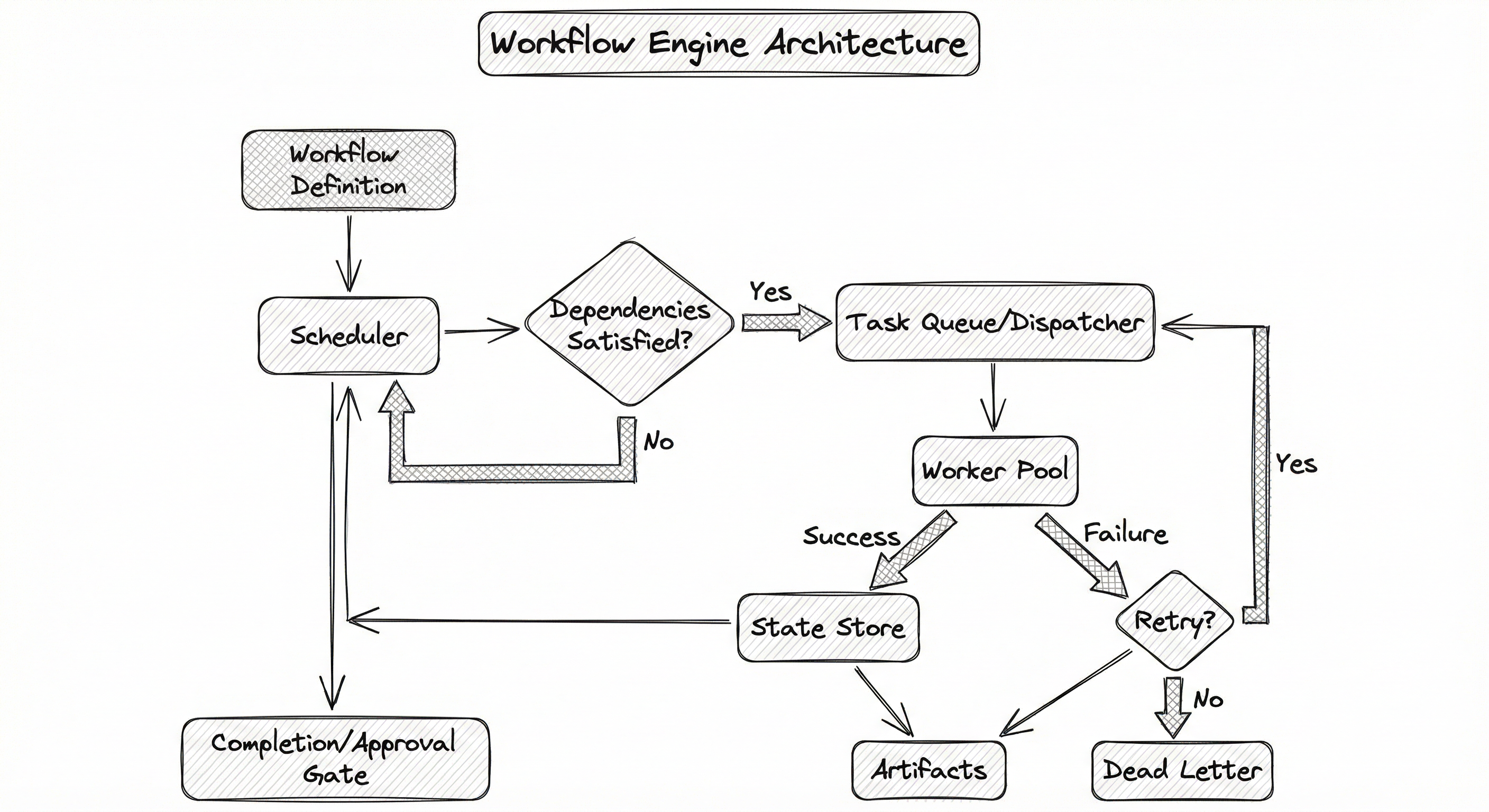
In durable execution engines like Temporal and Cadence, the architecture differs slightly: the workflow logic itself runs as a deterministic replay against an event history stored in the state store. Activities (side-effecting operations) are dispatched to workers, and their results are recorded in the event history. If the workflow worker crashes, the engine replays the event history to reconstruct the workflow state without re-executing activities. This is the key innovation that makes long-running workflows (hours, days, even months) practical.
Key Components
Workflow Definition Layer
Accepts workflow specifications -- either as code (Python/Go/Java functions in Temporal, Python DAGs in Airflow/Prefect) or as declarative YAML/JSON templates (Argo Workflows, Step Functions). Validates the DAG for cycles, resolves parameters and templates, and registers the workflow with the scheduler.
Scheduler / Orchestrator
The brain of the engine. Maintains a state machine for each workflow execution. Evaluates task readiness by checking dependency completion, evaluates conditional branches, manages timeouts and retry policies, and determines the next set of tasks to dispatch. In cron-triggered systems (Airflow), the scheduler also handles periodic workflow instantiation.
Task Queue / Dispatcher
Decouples the scheduler from workers. Ready tasks are placed on queues (often partitioned by task type or resource requirements). Supports priority ordering, rate limiting, and backpressure. In Temporal, task queues are first-class constructs that enable sticky routing (sending tasks to the same worker that holds cached state).
Worker Pool
Executes the actual task logic. Workers can be heterogeneous: CPU workers for data processing, GPU workers for model training, lightweight workers for API calls. Workers pull tasks from queues, execute them in isolated environments (containers in Argo, processes in Temporal), report success/failure, and upload artifacts.
State Store
Durably persists the state of every workflow execution and task. Implementations vary: Temporal uses Cassandra or PostgreSQL for event sourcing, Airflow uses PostgreSQL/MySQL for task instance state, Argo uses Kubernetes etcd. The state store enables recovery after crashes and provides the foundation for workflow observability.
Conditional & Approval Engine
Evaluates conditional branches (if-else, switch) based on task outputs or external signals. Manages human-in-the-loop approval gates where the workflow pauses, sends a notification, and waits for explicit human approval before proceeding. Essential for production ML deployments where a human must sign off on model quality before promoting to production.
Observability Layer
Provides workflow-level and task-level metrics (duration, success rate, retry count, queue wait time), logs, and visual DAG rendering. Integrates with Prometheus, Grafana, and alerting systems. Surfaces the workflow execution history for debugging failed runs.
Data Flow
A user or CI/CD system submits a workflow definition with input parameters. The definition layer validates the DAG, resolves templates, and creates a workflow execution record in the state store. The scheduler picks up the new execution and begins evaluating task readiness.
For each task: (1) the scheduler marks it as SCHEDULED when all upstream dependencies are satisfied, (2) the dispatcher places it on the appropriate task queue, (3) a worker dequeues it and begins execution, (4) on completion, the worker writes the result (success + output artifacts, or failure + error details) to the state store, (5) the scheduler re-evaluates the DAG and advances to the next wave of ready tasks.
When a task fails: the scheduler checks the retry policy (max retries, backoff strategy). If retries remain, the task is re-dispatched. If retries are exhausted, the task is marked FAILED, downstream tasks are marked SKIPPED (or a failure branch is triggered), and an alert fires. In durable execution engines, the workflow itself can catch the failure and execute compensating logic (the saga pattern).
At an approval gate, the workflow pauses and emits a signal (Slack notification, email, dashboard alert). The state store records the pending approval. When a human approves (via API, UI, or Slack reaction), the signal is delivered to the workflow, which resumes execution. Temporal supports this natively via signals and queries; Airflow uses external task sensors.
A directed flow starting from 'Workflow Definition (DAG + Parameters)' feeding into the 'Scheduler', which checks dependency satisfaction. Satisfied tasks flow to the 'Task Queue / Dispatcher', then to the 'Worker Pool'. Workers report results to the 'State Store', which feeds back to the Scheduler for the next evaluation cycle. Failed tasks are checked for retry eligibility -- retries go back to the dispatcher, terminal failures go to a dead-letter queue and alerting. The scheduler also routes to 'Completion / Approval Gate' for human-in-the-loop steps.
How to Implement
Choosing an Implementation Approach
Workflow engine implementations fall into three broad categories, each with distinct tradeoffs:
Category 1: Durable Execution Engines (Temporal, Cadence). You write workflow logic as regular code in your language of choice (Go, Java, Python, TypeScript). The engine automatically persists execution state and replays on failure. Best for: long-running workflows, microservice orchestration, complex branching logic, and human-in-the-loop patterns. Temporal Cloud pricing starts at $50 per million actions (~INR 4,200 per million actions), or you can self-host the open-source version.
Category 2: DAG-based Schedulers (Airflow, Prefect, Dagster). You define workflows as Python DAGs with explicit task dependencies. The scheduler triggers tasks based on schedules (cron) or data events. Best for: batch data pipelines, scheduled retraining, ETL workflows. Managed Airflow on AWS (MWAA) costs approximately 350/month (~INR 29,400/month).
Category 3: Kubernetes-Native Engines (Argo Workflows). You define workflows as YAML templates; each task runs in its own container on Kubernetes. Best for: containerized ML workloads, GPU training jobs, CI/CD pipelines. Argo itself is free (CNCF project); you pay only for the underlying Kubernetes compute.
Category 4: Cloud-Managed Services (AWS Step Functions, Azure Durable Functions, GCP Workflows). Fully serverless -- no infrastructure to manage. You define state machines in JSON/YAML. Best for: teams without dedicated platform engineers, serverless architectures. Step Functions costs $0.025 per 1,000 state transitions (~INR 2.1 per 1,000 transitions).
Cost Note for Indian Teams: A mid-size ML platform running 500 workflow executions/day with ~20 tasks each on Temporal Cloud would cost roughly 200-400/month (~INR 16,800-33,600/month) including Cassandra storage. Airflow on MWAA starts at ~50/month (~INR 4,200/month).
import asyncio
from datetime import timedelta
from temporalio import workflow, activity
from temporalio.client import Client
from temporalio.worker import Worker
from dataclasses import dataclass
from typing import List


@dataclass
class TrainingConfig:
    dataset_path: str
    model_variants: List[str]
    approval_timeout_hours: int = 24


@dataclass
class ModelMetrics:
    variant: str
    accuracy: float
    latency_p99_ms: float
    model_artifact_path: str


# --- Activities (side-effecting operations) ---

@activity.defn
async def validate_dataset(dataset_path: str) -> dict:
    """Validate dataset schema, check for drift, compute statistics."""
    # In production: run Great Expectations or similar
    import pandas as pd
    df = pd.read_parquet(dataset_path)
    stats = {
        "row_count": len(df),
        "null_fraction": df.isnull().mean().mean(),
        "schema_valid": True,
    }
    if stats["null_fraction"] > 0.1:
        raise ValueError(f"Null fraction {stats['null_fraction']:.2%} exceeds 10% threshold")
    return stats


@activity.defn
async def train_model(variant: str, dataset_path: str) -> ModelMetrics:
    """Train a single model variant. Idempotent: same inputs produce same outputs."""
    # In production: launch SageMaker/Vertex training job
    import hashlib
    run_id = hashlib.sha256(f"{variant}:{dataset_path}".encode()).hexdigest()[:12]
    artifact_path = f"s3://models/{variant}/{run_id}/model.pt"
    # Simulate training
    return ModelMetrics(
        variant=variant,
        accuracy=0.92 + hash(variant) % 5 / 100,
        latency_p99_ms=45.0 + hash(variant) % 20,
        model_artifact_path=artifact_path,
    )


@activity.defn
async def deploy_model(model_path: str, stage: str) -> str:
    """Deploy model to specified stage (canary, production)."""
    # In production: call deployment API
    return f"Deployed {model_path} to {stage}"


@activity.defn
async def notify_for_approval(variant: str, metrics: dict) -> None:
    """Send Slack/email notification requesting human approval."""
    # In production: call Slack webhook
    print(f"Approval requested for {variant}: {metrics}")


# --- Workflow (deterministic orchestration logic) ---

@workflow.defn
class MLTrainingPipeline:
    def __init__(self):
        self._approved = False

    @workflow.signal
    async def approve_deployment(self):
        """Signal handler: human approves the champion model."""
        self._approved = True

    @workflow.run
    async def run(self, config: TrainingConfig) -> str:
        # Step 1: Validate dataset
        stats = await workflow.execute_activity(
            validate_dataset,
            config.dataset_path,
            start_to_close_timeout=timedelta(minutes=10),
            retry_policy=workflow.RetryPolicy(maximum_attempts=3),
        )
        workflow.logger.info(f"Dataset validated: {stats['row_count']} rows")

        # Step 2: Fan-out — train all model variants in parallel
        training_tasks = [
            workflow.execute_activity(
                train_model,
                args=[variant, config.dataset_path],
                start_to_close_timeout=timedelta(hours=4),
                retry_policy=workflow.RetryPolicy(maximum_attempts=2),
                heartbeat_timeout=timedelta(minutes=10),
            )
            for variant in config.model_variants
        ]

        # Step 3: Fan-in — collect all results
        results: List[ModelMetrics] = await asyncio.gather(*training_tasks)

        # Step 4: Select champion model
        champion = max(results, key=lambda m: m.accuracy)
        workflow.logger.info(
            f"Champion: {champion.variant} (accuracy={champion.accuracy:.4f})"
        )

        # Step 5: Human approval gate
        await workflow.execute_activity(
            notify_for_approval,
            args=[champion.variant, {"accuracy": champion.accuracy}],
            start_to_close_timeout=timedelta(minutes=5),
        )

        # Wait for human approval signal (with timeout)
        try:
            await workflow.wait_condition(
                lambda: self._approved,
                timeout=timedelta(hours=config.approval_timeout_hours),
            )
        except asyncio.TimeoutError:
            return f"Workflow timed out waiting for approval of {champion.variant}"

        # Step 6: Deploy approved model
        result = await workflow.execute_activity(
            deploy_model,
            args=[champion.model_artifact_path, "production"],
            start_to_close_timeout=timedelta(minutes=30),
            retry_policy=workflow.RetryPolicy(maximum_attempts=3),
        )

        return f"Pipeline complete: {result}"


# --- Worker bootstrap ---

async def main():
    client = await Client.connect("localhost:7233")
    worker = Worker(
        client,
        task_queue="ml-training-pipeline",
        workflows=[MLTrainingPipeline],
        activities=[validate_dataset, train_model, deploy_model, notify_for_approval],
    )
    await worker.run()


if __name__ == "__main__":
    asyncio.run(main())
This Temporal workflow demonstrates the key patterns a workflow engine provides:
- Sequential dependency: dataset validation must complete before training begins.
- Fan-out/fan-in: multiple model variants train in parallel (
asyncio.gather), and results are collected before the next step. - Human-in-the-loop approval: the workflow pauses after selecting a champion model, sends a notification, and waits for a
approve_deploymentsignal from a human reviewer. The workflow survives server restarts during this waiting period thanks to Temporal's durable execution. - Retry policies: each activity has configurable retry behavior with backoff.
- Idempotency: the
train_modelactivity uses a deterministicrun_idderived from inputs, ensuring retries don't produce duplicate artifacts.
The workflow is just Python code -- no YAML, no JSON state machines. Temporal handles persistence, replay, and failure recovery automatically.
apiVersion: argoproj.io/v1alpha1
kind: Workflow
metadata:
  generateName: ml-training-dag-
  labels:
    team: ml-platform
spec:
  entrypoint: training-pipeline
  arguments:
    parameters:
      - name: dataset-path
        value: "s3://data/training/2026-02-07"
      - name: model-registry
        value: "registry.internal/ml-models"

  templates:
    - name: training-pipeline
      dag:
        tasks:
          # Step 1: Data validation
          - name: validate-data
            template: validate
            arguments:
              parameters:
                - name: dataset
                  value: "{{workflow.parameters.dataset-path}}"

          # Step 2: Feature engineering (depends on validation)
          - name: compute-features
            template: feature-eng
            dependencies: [validate-data]
            arguments:
              parameters:
                - name: dataset
                  value: "{{workflow.parameters.dataset-path}}"

          # Step 3: Fan-out — train three model variants in parallel
          - name: train-xgboost
            template: train
            dependencies: [compute-features]
            arguments:
              parameters:
                - name: model-type
                  value: "xgboost"

          - name: train-lightgbm
            template: train
            dependencies: [compute-features]
            arguments:
              parameters:
                - name: model-type
                  value: "lightgbm"

          - name: train-nn
            template: train-gpu
            dependencies: [compute-features]
            arguments:
              parameters:
                - name: model-type
                  value: "neural-net"

          # Step 4: Fan-in — evaluate all models
          - name: evaluate
            template: evaluate-models
            dependencies: [train-xgboost, train-lightgbm, train-nn]

          # Step 5: Conditional deployment
          - name: deploy
            template: deploy-model
            dependencies: [evaluate]
            when: "{{tasks.evaluate.outputs.parameters.champion-accuracy}} > 0.90"

    - name: validate
      container:
        image: ml-platform/data-validator:v2.3
        command: [python, validate.py]
        args: ["--dataset", "{{inputs.parameters.dataset}}"]
        resources:
          requests:
            memory: "2Gi"
            cpu: "1"
      inputs:
        parameters:
          - name: dataset
      retryStrategy:
        limit: 3
        retryPolicy: Always
        backoff:
          duration: "30s"
          factor: 2

    - name: feature-eng
      container:
        image: ml-platform/feature-engine:v1.8
        command: [python, compute_features.py]
        args: ["--input", "{{inputs.parameters.dataset}}"]
        resources:
          requests:
            memory: "8Gi"
            cpu: "4"
      inputs:
        parameters:
          - name: dataset

    - name: train
      container:
        image: ml-platform/trainer:v3.1
        command: [python, train.py]
        args: ["--model-type", "{{inputs.parameters.model-type}}"]
        resources:
          requests:
            memory: "16Gi"
            cpu: "8"
      inputs:
        parameters:
          - name: model-type
      retryStrategy:
        limit: 2

    - name: train-gpu
      container:
        image: ml-platform/trainer-gpu:v3.1
        command: [python, train.py]
        args: ["--model-type", "{{inputs.parameters.model-type}}"]
        resources:
          requests:
            memory: "32Gi"
            cpu: "8"
            nvidia.com/gpu: "1"
      inputs:
        parameters:
          - name: model-type
      retryStrategy:
        limit: 2
      nodeSelector:
        gpu-type: a100

    - name: evaluate-models
      container:
        image: ml-platform/evaluator:v2.0
        command: [python, evaluate.py]
        resources:
          requests:
            memory: "4Gi"
            cpu: "2"
      outputs:
        parameters:
          - name: champion-accuracy
            valueFrom:
              path: /tmp/champion_accuracy.txt

    - name: deploy-model
      container:
        image: ml-platform/deployer:v1.5
        command: [python, deploy.py]
        args: ["--registry", "{{workflow.parameters.model-registry}}"]
        resources:
          requests:
            memory: "2Gi"
            cpu: "1"
This Argo Workflows example demonstrates Kubernetes-native workflow execution:
- DAG dependencies: explicit
dependenciesfields define the execution order. Argo automatically parallelizes tasks with no mutual dependencies. - Fan-out/fan-in: three training tasks (
train-xgboost,train-lightgbm,train-nn) run in parallel aftercompute-features, and all three must complete beforeevaluatestarts. - Heterogeneous resources: the neural network training task (
train-gpu) requests a GPU vianvidia.com/gpu: 1and targets A100 nodes, while XGBoost and LightGBM tasks use CPU-only containers. - Conditional deployment: the
deploytask only executes if the champion model accuracy exceeds 0.90 (via thewhenclause). - Retry strategies: each task has independent retry configuration with exponential backoff.
- Container isolation: every task runs in its own container with declared resource limits, preventing noisy-neighbor problems.
from prefect import flow, task
from prefect.tasks import task_input_hash
from datetime import timedelta
from typing import List, Dict
import hashlib


@task(
    retries=3,
    retry_delay_seconds=[30, 60, 120],  # Exponential backoff
    cache_key_fn=task_input_hash,
    cache_expiration=timedelta(hours=6),
    log_prints=True,
)
def fetch_and_validate_data(source: str) -> Dict:
    """Fetch data from source and validate schema."""
    print(f"Fetching data from {source}")
    # In production: actual data fetching and validation
    return {"source": source, "row_count": 1_000_000, "valid": True}


@task(
    retries=2,
    cache_key_fn=task_input_hash,
    cache_expiration=timedelta(hours=12),
)
def train_variant(variant: str, data: Dict) -> Dict:
    """Train a single model variant. Task-level caching ensures idempotency."""
    run_id = hashlib.sha256(f"{variant}:{data['source']}".encode()).hexdigest()[:8]
    print(f"Training {variant} (run_id={run_id})")
    # In production: launch training job
    return {
        "variant": variant,
        "run_id": run_id,
        "accuracy": 0.91 + hash(variant) % 8 / 100,
        "artifact": f"s3://models/{variant}/{run_id}/model.pt",
    }


@task
def select_champion(results: List[Dict]) -> Dict:
    """Select the best model based on accuracy."""
    champion = max(results, key=lambda r: r["accuracy"])
    print(f"Champion: {champion['variant']} (accuracy={champion['accuracy']:.4f})")
    return champion


@task(retries=2)
def deploy_to_staging(model: Dict) -> str:
    """Deploy champion model to staging environment."""
    print(f"Deploying {model['variant']} to staging")
    return f"staging-endpoint-{model['run_id']}"


@flow(
    name="ml-retraining-pipeline",
    description="Weekly model retraining with dynamic fan-out",
    retries=1,
    timeout_seconds=14400,  # 4 hours
)
def ml_retraining_pipeline(
    data_sources: List[str],
    model_variants: List[str],
):
    """End-to-end ML retraining pipeline with fan-out/fan-in."""

    # Fan-out: fetch and validate data from multiple sources in parallel
    data_futures = fetch_and_validate_data.map(data_sources)

    # Fan-in: merge validated data
    validated_data = {
        "sources": [d.result() for d in data_futures],
        "source": ",".join(data_sources),
    }

    # Dynamic fan-out: train all model variants in parallel
    training_futures = train_variant.map(
        variant=model_variants,
        data=[validated_data] * len(model_variants),
    )
    training_results = [f.result() for f in training_futures]

    # Fan-in: select champion
    champion = select_champion(training_results)

    # Conditional: only deploy if accuracy meets threshold
    if champion["accuracy"] >= 0.90:
        endpoint = deploy_to_staging(champion)
        return {"status": "deployed", "endpoint": endpoint, "champion": champion}
    else:
        return {"status": "below_threshold", "champion": champion}


if __name__ == "__main__":
    result = ml_retraining_pipeline(
        data_sources=["s3://data/clickstream", "s3://data/transactions"],
        model_variants=["xgboost-v2", "lightgbm-v3", "catboost-v1", "nn-small"],
    )
This Prefect example showcases a more Pythonic approach to workflow orchestration:
- Decorator-based definition:
@flowand@taskdecorators turn regular Python functions into orchestrated units. No YAML, no separate configuration -- just Python. - Dynamic fan-out:
task.map()dynamically fans out over a list of inputs, creating parallel task runs at runtime. This is particularly useful when the number of model variants or data sources is not known at definition time. - Built-in caching:
cache_key_fn=task_input_hashwithcache_expirationprovides automatic idempotency -- if a task with the same inputs has already succeeded within the cache window, it returns the cached result instead of re-executing. - Exponential backoff retries:
retry_delay_seconds=[30, 60, 120]provides increasing delays between retry attempts. - Conditional branching: standard Python
if/elsecontrols deployment logic -- no special DSL needed.
# Temporal Workflow Configuration (conceptual YAML)
workflow:
  name: ml-training-pipeline
  task_queue: ml-training
  execution_timeout: 6h
  run_timeout: 8h
  retry_policy:
    initial_interval: 30s
    backoff_coefficient: 2.0
    maximum_interval: 10m
    maximum_attempts: 3

activities:
  validate_dataset:
    start_to_close_timeout: 10m
    retry_policy:
      maximum_attempts: 3
  train_model:
    start_to_close_timeout: 4h
    heartbeat_timeout: 10m
    retry_policy:
      maximum_attempts: 2
  deploy_model:
    start_to_close_timeout: 30m
    retry_policy:
      maximum_attempts: 3
      non_retryable_errors:
        - PermissionDeniedError
        - InvalidModelError

# Argo Workflows — Resource Quotas
resource_quotas:
  max_concurrent_workflows: 20
  max_concurrent_tasks_per_workflow: 50
  default_cpu_request: "1"
  default_memory_request: "2Gi"
  gpu_node_selector:
    gpu-type: a100
    region: ap-south-1  # Mumbai

# Alerting
alerting:
  on_failure:
    slack_channel: "#ml-pipeline-alerts"
    pagerduty_severity: warning
  on_timeout:
    slack_channel: "#ml-pipeline-alerts"
    pagerduty_severity: critical
  sla:
    training_pipeline_max_duration: 4h
    deployment_pipeline_max_duration: 1h
Common Implementation Mistakes
- ●
Non-idempotent tasks without deduplication: Writing tasks that create side effects (database inserts, API calls, charges) without idempotency keys. When the workflow engine retries after a timeout, the task executes again, causing duplicate records or double-charges. Always use idempotency keys derived from workflow run ID + task ID.
- ●
Monolithic DAGs with 100+ tasks: Cramming the entire ML pipeline -- from raw data ingestion to model serving -- into a single massive workflow. This creates a fragile monolith where a failure in any task blocks everything downstream. Break workflows into composable sub-workflows (data prep, training, deployment) connected by events or triggers.
- ●
Ignoring the critical path: Adding more parallel branches without profiling which tasks actually determine total execution time. The critical path sets the lower bound on workflow duration -- optimizing tasks not on the critical path has zero impact on total time. Profile first, optimize the bottleneck.
- ●
Coupling workflow logic with business logic: Embedding data transformations, model training code, or API calls directly in the workflow definition instead of delegating to activities/tasks. This makes the orchestration layer slow, hard to test, and impossible to scale independently. The workflow engine should be the conductor, not the musician.
- ●
Missing heartbeats on long-running tasks: Not configuring heartbeat timeouts for tasks that run for hours (e.g., model training). Without heartbeats, the engine cannot distinguish between a task that is still running and one that has silently failed. Temporal, Argo, and Airflow all support heartbeat mechanisms -- use them.
- ●
Hardcoded retry counts without circuit breakers: Setting
max_retries=10on every task without considering that some failures are permanent (bad data, permission errors). Retrying a permanently failing task wastes resources and delays failure notification. Implement retry policies that distinguish transient failures (network timeouts) from permanent ones (schema validation errors). - ●
Workflow versioning neglect: Deploying new workflow definitions while old executions are still running. In Temporal, this causes non-determinism errors. In Airflow, this can alter the behavior of in-flight DAG runs. Always version your workflows and ensure running executions complete under the version they started with.
When Should You Use This?
Use When
Your ML pipeline has more than 3-5 interdependent tasks that must execute in a specific order with parallelism opportunities
You need reliable failure recovery -- if a training job fails at step 7 of 10, you want to resume from step 7, not restart from step 1
Your workflows include human-in-the-loop steps (model approval, data quality sign-off, compliance review) where the pipeline must pause and resume
You require auditability and reproducibility -- knowing exactly which version of each task ran, with what inputs, and what outputs, for regulatory or debugging purposes
Your pipeline duration exceeds minutes and failures are costly -- restarting a 4-hour training job from scratch because of a deployment-step failure is unacceptable
You have heterogeneous resource requirements -- some tasks need GPUs, some need high memory, some are lightweight API calls -- and you need to route tasks to appropriate workers
Multiple teams contribute tasks to shared pipelines and you need clear ownership boundaries, versioning, and access control
Avoid When
Your pipeline is a single script that runs in under 10 minutes -- the overhead of a workflow engine is not justified. Just use a try/except block.
All tasks are independent with no dependencies -- a simple task queue (Celery, SQS) is sufficient without DAG-level orchestration
You need sub-second latency for request-response workflows -- workflow engines add 10-100ms of scheduling overhead per task, which is unacceptable for hot-path serving
Your team lacks the operational capacity to run distributed infrastructure (unless using a fully managed service like Step Functions or Temporal Cloud)
The workflow is purely event-driven with no dependency ordering -- an event bus (Kafka, SNS) with consumer groups is simpler and more appropriate
You are orchestrating a single long-running computation (e.g., one big training job) -- a workflow engine adds complexity without benefit. Just submit the job directly to your compute platform.
Key Tradeoffs
The Core Tradeoff: Reliability vs. Complexity
A workflow engine adds a significant piece of infrastructure to your stack. You gain reliable execution, observability, and operational tooling. You pay with operational complexity, latency overhead, and learning curve. For a two-person startup running one model, this tradeoff is not worth it. For a team running 50 models with daily retraining, it is essential.
Code-First vs. Config-First
| Aspect | Code-First (Temporal, Prefect) | Config-First (Argo, Step Functions) |
|---|---|---|
| Flexibility | Full programming language | Limited to template constructs |
| Testing | Standard unit tests | Harder to test declarative configs |
| Learning curve | Lower for developers | Lower for ops/DevOps teams |
| Portability | Tied to language SDK | Platform-agnostic YAML/JSON |
| Debugging | Step through code | Parse execution logs |
Self-Hosted vs. Managed
Self-hosted (Temporal OSS, Airflow, Argo) gives you full control, avoids vendor lock-in, and can be cheaper at scale. But you own the uptime, upgrades, and scaling. Managed services (Temporal Cloud, AWS MWAA, Step Functions) eliminate ops burden but introduce vendor dependency and potentially higher costs at scale.
Rule of Thumb for Indian Startups: Start with Prefect or Dagster on a single VM (~$30/month, ~INR 2,500/month). Graduate to Temporal or Argo when you exceed 10 daily pipeline runs or need human-in-the-loop patterns. Consider managed services only when your team cannot justify a dedicated platform engineer.
Alternatives & Comparisons
A pipeline scheduler focuses on time-based triggering and basic DAG execution, while a workflow engine provides richer primitives: durable execution, human approval gates, conditional branching, long-running workflows, and saga-based compensation. If your pipelines are batch-oriented and time-triggered, a scheduler like Airflow may suffice. If you need complex control flow, long-lived workflows, or human-in-the-loop patterns, choose a full workflow engine like Temporal.
Event triggers (Kafka consumers, SNS/SQS, webhooks) react to individual events without maintaining workflow state. A workflow engine coordinates sequences of actions with dependency ordering and state management. Use event triggers for simple, stateless reactions (e.g., 'when new data arrives, start processing'). Use a workflow engine when you need to coordinate multiple steps with conditional logic and failure recovery.
CI/CD pipelines are optimized for build-test-deploy cycles with tight Git integration. Workflow engines are optimized for arbitrary business and ML processes with richer failure handling, human approval, and long-running execution. Some teams use CI/CD for simple ML pipelines, but outgrow it when they need dynamic fan-out, conditional model selection, or approval gates that persist for days.
Feature stores manage the computation and serving of ML features, sometimes with built-in scheduling. They overlap with workflow engines for the specific case of feature pipelines. However, a feature store handles only the feature computation stage, while a workflow engine orchestrates the entire lifecycle: data validation, feature computation, training, evaluation, and deployment.
Pros, Cons & Tradeoffs
Advantages
Automatic dependency resolution eliminates manual coordination between pipeline stages. Define the DAG once, and the engine handles execution ordering, parallelism, and synchronization -- reducing what would be hundreds of lines of bespoke coordination code to a declarative specification.
Durable execution and crash recovery mean that if a worker, scheduler, or even the entire cluster crashes mid-workflow, execution resumes from the last checkpointed state rather than restarting from scratch. Netflix reports reducing transient deployment failures from 4% to 0.0001% after adopting Temporal.
Built-in observability provides task-level metrics (duration, retry count, queue wait time), visual DAG rendering, and execution history. This turns opaque 'cron job failed' alerts into actionable 'step 7 of 12 failed after 2 retries with error X' diagnostics.
Human-in-the-loop support enables approval gates where the workflow pauses, notifies a human, and resumes on approval. This is essential for responsible ML deployment -- a model should not go to production without a human reviewing bias metrics and performance regressions.
Fan-out/fan-in parallelism enables patterns like training five model variants simultaneously and comparing results. This reduces total pipeline duration from the sum of individual task times to the maximum of parallel task times -- often a 3-5x speedup.
Workflow versioning allows running old and new workflow definitions side by side. In-flight executions complete under their original version while new executions use the updated definition. This prevents the catastrophic scenario of mid-execution schema changes breaking running pipelines.
Disadvantages
Operational overhead of running a distributed workflow engine (scheduler, state store, worker fleet) is non-trivial. Self-hosted Temporal requires Cassandra/PostgreSQL, a frontend service, history service, matching service, and worker processes. Budget 0.5-1 FTE for operations at scale.
Scheduling latency adds 10-100ms per task dispatch, which compounds across deep DAGs. A 20-task sequential pipeline with 50ms per dispatch adds 1 second of pure overhead. For latency-sensitive serving paths, this is unacceptable.
Learning curve and adoption friction: each engine has its own abstractions (Temporal's activities vs. Airflow's operators vs. Argo's templates). Teams must invest weeks to months learning the paradigm, debugging framework-specific issues, and adapting existing code.
Vendor lock-in risk: workflow definitions are tightly coupled to the engine's SDK and runtime. Migrating from Airflow to Temporal or from Step Functions to Argo requires rewriting every workflow definition. Choose carefully upfront.
Over-engineering risk for simple pipelines: introducing a workflow engine for a 3-step batch script that runs once daily is like using a crane to hang a picture frame. The operational cost exceeds the benefit for truly simple use cases.
State store scaling: the state store (Cassandra, PostgreSQL, etcd) must handle the write amplification of recording every task state transition. At high throughput (10,000+ concurrent workflow executions), the state store becomes the primary scaling bottleneck.
Failure Modes & Debugging
Zombie workflows (stuck in RUNNING forever)
Cause
A worker crashes after acknowledging a task but before reporting completion. The engine waits for a heartbeat that never arrives. If heartbeat timeouts are not configured or are set too high, the workflow hangs indefinitely.
Symptoms
Workflows show as RUNNING for hours or days beyond their expected duration. Downstream tasks never trigger. Dashboard shows tasks 'in progress' with no recent heartbeat. Alert fatigue leads operators to ignore them.
Mitigation
Configure heartbeat timeouts on all long-running tasks (e.g., heartbeat_timeout=10m for training tasks). The engine will mark a task as failed and trigger a retry if no heartbeat is received within the timeout. Also implement workflow-level execution timeouts as a safety net.
Non-determinism replay failures (Temporal/Cadence specific)
Cause
Workflow code is modified while executions are in-flight. Temporal replays the event history against the new code, but the execution path diverges because the code now makes different decisions for the same inputs.
Symptoms
Temporal throws NonDeterministicError or NonDeterminismException. Affected workflow executions are stuck and cannot make progress. Logs show 'workflow task failed' with replay mismatch details.
Mitigation
Always version your workflows. In Temporal, use the workflow.patched() API or versioned task queues to run old and new workflow code side by side. Never deploy breaking workflow logic changes while executions are in-flight. Use a deployment strategy that drains old executions before rolling forward.
Fan-out explosion (resource exhaustion)
Cause
A dynamic fan-out creates thousands of parallel tasks (e.g., one task per user in a million-user dataset) without rate limiting. The worker pool, task queue, and state store are overwhelmed simultaneously.
Symptoms
Task queue depth spikes to hundreds of thousands. Worker pods OOM or hit CPU limits. State store write latency increases by orders of magnitude. The scheduler itself may become unresponsive due to the volume of state transitions.
Mitigation
Always bound fan-out with concurrency limits. Use Temporal's workflow.execute_activity with max_concurrent, Argo's parallelism field, or Airflow's max_active_tasks. For truly large fan-outs, use a batch-processing pattern: split into chunks of 100-500 items, process each chunk as a single task, and fan-out over chunks rather than individual items.
Cascading retry storms
Cause
An upstream dependency (database, API, S3 bucket) experiences a transient outage. All tasks that depend on it fail simultaneously and enter retry loops. With exponential backoff, they all retry at roughly the same time, creating thundering-herd spikes that prolong the outage.
Symptoms
Periodic spikes in task queue depth and worker CPU. The upstream dependency recovers but is immediately overwhelmed by retry traffic. Circuit breaker metrics (if present) show repeated open-close cycling.
Mitigation
Add jitter to retry backoff (e.g., backoff * (1 + random(0, 0.3))). Implement circuit breakers at the activity level that fail fast when an upstream is known to be down. Set maximum retry counts that are proportional to the expected outage duration, not arbitrarily high.
State store corruption or data loss
Cause
The underlying database (Cassandra, PostgreSQL, etcd) experiences data loss due to disk failure, misconfigured replication, or botched migration. Workflow execution history is partially or fully lost.
Symptoms
Workflows show inconsistent state (tasks marked as RUNNING that already completed). Scheduler makes incorrect decisions (re-executing completed tasks or skipping pending ones). In severe cases, the engine cannot recover any in-flight workflows.
Mitigation
Run the state store with replication factor >= 3 in production. Enable point-in-time recovery (PITR) for PostgreSQL or incremental backups for Cassandra. Test backup restoration regularly -- an untested backup is not a backup. For critical workflows, consider writing execution checkpoints to an independent store as a secondary record.
Approval gate timeout causing silent pipeline failures
Cause
A human approval step times out because the reviewer was on vacation, the notification was lost, or the approval UI was broken. The workflow engine marks the workflow as timed out, but no one notices because alerting is not configured for approval timeouts.
Symptoms
Model retraining pipelines silently stop producing new models. Production models become stale. Downstream metrics (prediction quality, business KPIs) degrade gradually.
Mitigation
Configure escalation policies for approval gates: if the primary reviewer does not act within N hours, escalate to a secondary reviewer or the team lead. Set up alerts for approval timeouts. Consider auto-approval with guardrails for low-risk changes (e.g., if the new model's metrics are within 1% of the previous version, auto-approve).
Placement in an ML System
The Workflow Engine as the Nervous System
In a production ML platform, the workflow engine occupies the center of the architecture -- it is the nervous system that connects every other component. Upstream, it receives triggers from schedulers (cron-based retraining schedules), event systems (data arrival notifications, drift alerts), and CI/CD pipelines (model code changes). Downstream, it drives data validation, feature computation, model training, evaluation, registry updates, deployment, and monitoring setup.
For example, in a typical Flipkart-style recommendation system retraining pipeline: (1) the event trigger fires when new clickstream data arrives in S3, (2) the workflow engine orchestrates data validation, feature engineering, training of multiple candidate models, A/B evaluation, human approval, canary deployment, and monitoring setup -- a 12-step DAG spanning 3 teams and 4 different compute environments.
The workflow engine does not own any of these components -- it delegates to them. But it owns the execution contract: the guarantee that these steps will execute in the right order, with the right inputs, with proper failure handling, and with a complete audit trail. Without the workflow engine, each team would build their own coordination logic, leading to inconsistent error handling, invisible dependencies, and operational chaos.
Pipeline Stage
Orchestration / Platform Layer
Upstream
- event-trigger
- pipeline-scheduler
- ci-cd-pipeline
- feature-store
Downstream
- model-training
- model-evaluation
- model-registry
- model-serving
- monitoring
Scaling Bottlenecks
The primary bottleneck is the state store. Every task state transition (PENDING -> SCHEDULED -> RUNNING -> SUCCESS) is a write to the state store. A workflow with 20 tasks generates 80+ state transitions per execution. At 1,000 concurrent executions, that is 80,000 writes. At 10,000 concurrent executions, the state store must handle 800,000 writes -- which is where Cassandra shines and PostgreSQL struggles without read replicas.
The second bottleneck is task queue throughput. Temporal's matching service and Airflow's scheduler both have finite dispatch rates. Temporal benchmarks show ~10,000 task dispatches/second per namespace on a well-tuned cluster. Airflow's scheduler processes ~500-1,000 task instances per heartbeat interval (default 5 seconds), limiting it to ~100-200 tasks/second.
The third bottleneck is worker pool sizing. If you have 50 concurrent training tasks each requesting 8 CPUs and 32GB RAM, you need 400 CPUs and 1.6TB RAM in your worker fleet. On AWS Mumbai (ap-south-1), that is roughly 25 c5.4xlarge instances at 17/hr (~INR 1,430/hr) or ~$12,000/month (~INR 10 lakh/month) for continuous operation. GPU workers are significantly more expensive.
Production Case Studies
Netflix adopted Temporal to orchestrate critical cloud operations including content delivery (Open Connect CDN), live reliability, media processing (Plato platform), and Flink deployments. They migrated from a legacy orchestration system by building a CloudOperationRunner interface in Orca that dynamically routes executions between the legacy path and Temporal, using Netflix's Fast Properties configuration system for gradual rollout.
Reduced transient deployment failures from 4% to effectively zero (0.0001%). Temporal adoption has been doubling year-over-year since initial introduction in 2021, now powering hundreds of use cases across the organization.
Uber built and open-sourced Cadence (the predecessor to Temporal) to orchestrate complex microservice workflows across its platform. Cadence handles over 12 billion executions and 270 billion actions per month at Uber, powering 1,000+ services from T0 (most critical) to T5 tier. Use cases include trip lifecycle management, payment processing, driver onboarding, and fraud detection workflows.
Cadence processes 12 billion workflow executions and 270 billion actions monthly. Achieved CNCF Sandbox status. Cadence 1.0 was released after six years of production hardening at Uber-scale.
DoorDash adopted Cadence as a fallback mechanism for their Drive delivery creation flow. Rather than a wholesale migration, they used Cadence as a reliability layer -- when the primary event-driven processing path fails, Cadence ensures the delivery is still created through its durable execution guarantees. They also redesigned their tag annotation pipeline using Cadence with Kafka consumers and CockroachDB as the source of truth.
Achieved consistent throughput and latency across varying load conditions for the delivery creation flow. The Cadence-backed annotation pipeline maintains reliability during traffic spikes without manual intervention.
Spotify originally built Luigi, one of the first open-source DAG-based workflow engines (2012), to orchestrate Hadoop batch jobs. They ran 20,000+ daily workflows across 1,000+ repositories owned by 300+ teams. However, as scale grew, they migrated to Flyte for its better Kubernetes integration, stronger typing, and improved caching capabilities. This case study illustrates the evolution from first-generation to modern workflow engines.
Luigi became one of the most widely adopted open-source workflow engines, used by Spotify, Stripe, Squarespace, Skyscanner, and others. Spotify's migration to Flyte demonstrates how workflow engine requirements evolve with organizational scale.
Razorpay uses workflow orchestration to coordinate their fraud detection model retraining pipeline and payment routing decisions. ML features are served in under 200ms, requiring tight orchestration between data ingestion, feature computation, model inference, and real-time decisioning. Their platform engineering team manages workflows that span multiple microservices processing millions of transactions daily across the Indian payment ecosystem.
Real-time ML feature serving in under 200 milliseconds for fraud detection, with automated model retraining workflows that maintain model freshness as transaction patterns evolve across UPI, cards, and net banking channels.
Tooling & Ecosystem
Durable execution platform for building reliable distributed applications. Write workflows as code (Go, Java, Python, TypeScript, .NET). Automatic state persistence and replay on failure. Supports signals, queries, human-in-the-loop, and long-running workflows (hours to months). Cloud and self-hosted options.
Kubernetes-native workflow engine for orchestrating parallel jobs. Each task runs in its own container with declared resource limits. DAG and step-based execution, conditional logic, artifact passing, and GPU scheduling. Part of the CNCF ecosystem alongside Argo CD and Argo Events.
The most widely adopted open-source workflow orchestrator. Python-native DAG definitions with a rich library of operators (Spark, Kubernetes, AWS, GCP, etc.). Strong scheduling, backfill, and catchup capabilities. Managed offerings include AWS MWAA, Google Cloud Composer, and Astronomer.
Modern Python-native workflow orchestrator with minimal ceremony -- add a @flow decorator and you are running. Dynamic task mapping, built-in caching, result persistence, and a polished dashboard. Prefect Cloud offers a managed control plane while workers run in your infrastructure.
Asset-centric orchestration platform where workflows are defined around the data assets they produce rather than the tasks they execute. Strong data lineage, type checking, and testing support. Dagster Cloud provides a managed offering. Best when data quality and lineage are primary concerns.
Fully managed serverless workflow service from AWS. Define state machines in JSON (Amazon States Language) with built-in integration to 200+ AWS services. Express Workflows for high-volume, short-duration tasks; Standard Workflows for long-running processes with human approval.
Open-source workflow orchestration engine created by Uber. The predecessor to Temporal, handling 12 billion executions/month at Uber. Supports Go and Java SDKs. Now a CNCF Sandbox project with active community development.
Python module created by Spotify for building complex batch pipelines. Handles dependency resolution, workflow management, and visualization. Atomic file system operations prevent partial data states. Now community-maintained as Spotify migrated to Flyte.
Kubernetes-native workflow automation platform built for ML and data engineering. Strong typing, versioning, caching, and multi-tenant support. Adopted by Spotify, Lyft, and others. Managed offering via Union.ai.
Research & References
Ferreira da Silva, Badia, Balis, et al. (2025)arXiv preprint (Workflows Community Summit, Amsterdam 2025)
Comprehensive community perspective on workflow systems covering runtime optimization, scalability, fault tolerance, and standardization challenges. Identifies key barriers to workflow adoption including long-term sustainability and gaps in interoperability standards.
Zhang, Shang, Chen, et al. (2025)ICLR 2025
Introduces automated workflow optimization using Monte Carlo Tree Search over code-represented workflows. Demonstrates that automatically generated workflows can outperform manually designed pipelines, with implications for ML pipeline auto-tuning.
Burckhardt, Chand, Faleiro, et al. (2024)arXiv preprint 2024
Formalizes idempotency and exactly-once execution guarantees in workflow systems like Temporal and Azure Durable Functions. Proposes speculative execution techniques that reduce latency while maintaining correctness guarantees for durable workflows.
Wilkinson, Olsen, Mitchell (2021)arXiv preprint
Analyzes priority-based scheduling strategies for DAG workflows, demonstrating how topological-sort-based scheduling with greedy task selection achieves near-optimal parallelism in practice. Directly applicable to ML pipeline scheduling.
Sun, Zhang, Li, et al. (2025)arXiv preprint 2025
Presents the AutoDW framework with state-aware stepwise planning and adaptive rollback mechanisms for workflow orchestration. Introduces compensation-based recovery patterns applicable to ML pipeline failure handling.
Interview & Evaluation Perspective
Common Interview Questions
- ●
How would you design a workflow engine to orchestrate a daily model retraining pipeline with data validation, training, evaluation, approval, and deployment?
- ●
What is the difference between Temporal's durable execution model and Airflow's DAG scheduling? When would you choose each?
- ●
How do you ensure idempotency in a workflow that includes API calls, database writes, and model artifact uploads?
- ●
Explain the fan-out/fan-in pattern and give an example of how you would use it in an ML pipeline.
- ●
How would you handle workflow versioning when deploying new pipeline logic while existing executions are still running?
- ●
What happens when a human approval step times out in your workflow? Walk me through the failure handling.
- ●
How would you design a workflow engine to handle 10,000 concurrent ML pipeline executions?
Key Points to Mention
- ●
The workflow engine owns the control plane (scheduling, dependency resolution, state management) but delegates the data plane (actual computation) to external systems. Never put heavy computation in the workflow engine itself.
- ●
Idempotency is a first-class design requirement, not an afterthought. Every activity/task must be safe to retry, typically achieved via idempotency keys derived from workflow ID + task ID + input hash.
- ●
Fan-out should always be bounded with concurrency limits. Unbounded dynamic fan-out is the #1 cause of production incidents in workflow engines.
- ●
Workflow versioning is essential for zero-downtime deployments. Temporal uses patching APIs; Airflow uses DAG versioning with catchup semantics.
- ●
The critical path through the DAG determines minimum execution time. Optimizing tasks not on the critical path has zero impact on total workflow duration.
- ●
Human-in-the-loop patterns require durable state persistence -- the workflow must survive server restarts during the approval wait period, which can last hours or days.
Pitfalls to Avoid
- ●
Conflating a workflow engine with a task queue (Celery, SQS). A task queue dispatches independent tasks; a workflow engine coordinates dependent tasks with ordering, branching, and state management. They solve fundamentally different problems.
- ●
Designing workflows without considering the failure of the workflow engine itself. What happens if the scheduler crashes? The state store loses data? Senior candidates should discuss redundancy, replication, and graceful degradation.
- ●
Ignoring the operational cost of running a workflow engine. Mentioning Temporal without discussing whether you would self-host (and the associated Cassandra/PostgreSQL operational burden) or use Temporal Cloud (and the per-action pricing) shows a gap in production experience.
- ●
Treating all failures as retryable. Some failures are permanent (invalid input, permission denied) and should fail fast. Others are transient (network timeout, rate limit) and should retry with backoff. The retry policy should distinguish between these.
Senior-Level Expectation
A senior/staff-level candidate should be able to design a complete workflow engine architecture from scratch: DAG representation (adjacency list vs. matrix, topological sort for scheduling), state machine design (per-task states, transition rules), distributed task dispatch (worker polling vs. push, sticky routing, task queue partitioning), state persistence (event sourcing vs. state snapshots, choice of backing store), and failure handling (retry policies with jitter, circuit breakers, saga-based compensation, dead-letter queues). They should also discuss workflow observability (what metrics to track, how to build a workflow debugger), workflow versioning strategies (Temporal's patching, blue-green workflow deployments), and cost modeling (state store IOPS, worker fleet sizing, managed vs. self-hosted TCO). The ability to reason about tradeoffs at Indian startup scale (INR budget constraints, small teams, managed services vs. self-hosted) versus hyperscaler scale (Uber's 12B executions/month, Netflix's zero-tolerance for deployment failures) demonstrates true architectural depth.
Summary
A workflow engine is the operational backbone of any serious ML platform. It takes a directed acyclic graph of tasks -- data validation, feature engineering, model training, evaluation, human approval, deployment -- and executes them reliably at scale, handling dependency resolution, parallel execution (fan-out/fan-in), conditional branching, failure recovery, and human-in-the-loop approval gates.
The design space spans four categories: durable execution engines (Temporal, Cadence) that automatically persist workflow state and survive infrastructure failures; DAG-based schedulers (Airflow, Prefect, Dagster) optimized for batch data pipelines with Python-native definitions; Kubernetes-native engines (Argo Workflows, Flyte) where each task runs in its own container with declared resource limits; and cloud-managed services (AWS Step Functions, Azure Durable Functions) that abstract away all infrastructure. The choice depends on your workload characteristics, team capabilities, and budget -- from INR 2,500/month for a self-hosted Prefect instance to INR 10 lakh/month for a full Temporal cluster running thousands of concurrent GPU training workflows.
The critical engineering principles are: idempotency (every task must be safe to retry), bounded fan-out (always limit concurrency to prevent resource exhaustion), workflow versioning (never break in-flight executions when deploying new logic), and separation of control and data planes (the engine orchestrates but does not execute heavy computation). Organizations like Netflix (Temporal, 0.0001% failure rate), Uber (Cadence, 12B executions/month), and Spotify (Luigi to Flyte evolution) demonstrate that workflow engines are not optional infrastructure -- they are the difference between ML models that work in notebooks and ML systems that run reliably in production.