Event Trigger in Machine Learning
An event trigger is the mechanism that causes an ML pipeline -- training, evaluation, deployment, or inference -- to execute in response to something that just happened, rather than on a fixed schedule. It is the connective tissue between real-world occurrences and automated ML workflows.
Why does this matter? Because the most expensive mistake in production ML is not a bad model -- it is a stale model silently serving outdated predictions while the world has moved on. Event triggers solve this by making pipelines reactive: new data lands, a drift monitor fires, a feature store updates, or an upstream model publishes a new artifact, and the relevant downstream pipeline kicks off automatically.
In modern MLOps, event triggers sit at the intersection of distributed systems engineering and ML lifecycle management. They draw on well-established patterns from event-driven architecture (EDA) -- publish-subscribe messaging, event sourcing, dead letter queues -- and adapt them to the unique challenges of ML: long-running training jobs, expensive GPU compute, data-dependent correctness, and model versioning.
From Flipkart's fraud detection pipeline that retrains when transaction patterns shift, to Swiggy's demand forecasting models that re-execute when new restaurant onboarding events arrive, event triggers are the backbone of responsive ML systems at Indian and global scale alike. If your ML pipeline only runs on a cron job, you are leaving both freshness and cost efficiency on the table.
Concept Snapshot
- What It Is
- A mechanism that detects a predefined occurrence (data arrival, drift alert, model registration, API webhook) and automatically initiates one or more ML pipeline stages in response.
- Category
- Orchestration
- Complexity
- Intermediate
- Inputs / Outputs
- Inputs: events (data upload notifications, drift signals, webhook payloads, schedule ticks, message queue messages). Outputs: pipeline execution requests with event context passed as parameters.
- System Placement
- Sits between event sources (data stores, monitoring systems, external services) and pipeline orchestrators (Airflow, Kubeflow, Vertex AI Pipelines, Argo Workflows). It is the first block in the execution chain.
- Also Known As
- event-driven trigger, pipeline trigger, event listener, sensor (Dagster/Airflow), automation trigger, reactive trigger
- Typical Users
- ML Engineers, MLOps Engineers, Platform Engineers, Data Engineers, SREs managing ML infrastructure
- Prerequisites
- Message queues and pub/sub basics (Kafka, SQS, Pub/Sub), ML pipeline orchestration concepts, Cloud services (Lambda, Cloud Functions, EventBridge), Basic understanding of event-driven architecture
- Key Terms
- event sourceevent buspub/subdead letter queueCloudEventswebhooksensoridempotencyat-least-once deliveryevent schemabackpressure
Why This Concept Exists
The Cron Job Ceiling
The simplest way to run an ML pipeline is on a schedule: "retrain every night at 2 AM." This works surprisingly well for a while, but it has three fundamental problems:
- Staleness: If critical data arrives at 3 AM, the model won't see it until the next night. For a fraud detection system at Razorpay processing thousands of transactions per second, 24 hours of staleness could mean lakhs of rupees in undetected fraud.
- Waste: If no meaningful new data has arrived, the scheduled run burns GPU hours retraining an identical model. At 60-120/month (~INR 5,000-10,000/month) per pipeline.
- Coupling: Scheduled pipelines force upstream and downstream systems to coordinate by wall-clock time rather than data readiness, creating brittle time-based dependencies that break when any stage runs late.
The Event-Driven Alternative
Event triggers invert the control flow. Instead of "run at time T," the contract becomes "run when condition C is true." This is a fundamental architectural shift from polling to pushing, and it aligns ML pipelines with the same event-driven patterns that have scaled transactional systems for decades.
The idea is not new. Event-driven architecture (EDA) has been a cornerstone of distributed systems since the 1990s, with message brokers like IBM MQ, RabbitMQ, and later Apache Kafka enabling loose coupling between services. What is new is applying these patterns to ML-specific concerns: training triggers on data arrival, retraining triggers on drift detection, deployment triggers on validation success, and rollback triggers on serving degradation.
Two Trends That Made This Essential
Trend 1: ML pipelines became complex DAGs. Modern ML systems are not a single script -- they are multi-stage pipelines with feature engineering, training, evaluation, registration, deployment, and monitoring. Each stage may depend on events from different sources: a feature store update, a labeling job completion, or an A/B test conclusion. Schedule-based orchestration cannot express these dependencies cleanly.
Trend 2: Serverless and managed event services matured. AWS EventBridge, Google Eventarc, Azure Event Grid, and open-source tools like Argo Events made it practical to wire event sources to pipeline actions without managing message broker infrastructure. The barrier to entry dropped from "deploy and operate a Kafka cluster" to "write a JSON rule."
Key Takeaway: Event triggers exist because real-world data does not arrive on a schedule, and running ML pipelines on a clock wastes compute when nothing has changed while missing critical updates between ticks. Event-driven triggers align pipeline execution with data reality.
Core Intuition & Mental Model
The Smoke Detector Analogy
Think of an event trigger as a smoke detector for your ML system. A smoke detector does not check for fire on a schedule ("inspect kitchen at 2 PM"). Instead, it continuously monitors for a specific signal -- smoke particles -- and activates an alarm the moment the threshold is crossed. Similarly, an event trigger monitors for a specific occurrence (new data, drift signal, webhook call) and fires a pipeline the moment that occurrence is confirmed.
The beauty of this model is proportional response. No smoke? No alarm. No new data? No retraining. Lots of smoke? Sound every alarm in the building. Massive data drift? Trigger retraining and alert the on-call engineer and pause the serving endpoint.
The Three-Part Contract
Every event trigger, regardless of implementation, follows a three-part contract:
- Event Source: Where does the event come from? (S3 bucket, Kafka topic, HTTP webhook, monitoring alert, cron clock)
- Filter / Condition: Should this specific event trigger the pipeline? (Only CSV files over 1 MB, only drift scores above 0.15, only from the production environment)
- Action: What happens when the trigger fires? (Start training pipeline, send Slack notification, create a Kubernetes Job, invoke a Lambda function)
This source-filter-action pattern is universal. AWS EventBridge calls them "rules," Argo Events calls them "sensors," Dagster calls them "sensors" too, and Prefect calls them "automations." The terminology changes, but the mental model is identical.
Why "At Least Once" Changes Everything
Here is the subtlety that trips up most teams: event delivery in distributed systems is almost always at-least-once, not exactly-once. This means your pipeline might be triggered twice for the same event. If retraining is not idempotent -- producing the same result regardless of how many times it runs on the same input -- you will get duplicate model artifacts, wasted compute, or worse, inconsistent model versions in production.
Expert Note: Design every event-triggered pipeline as if it will be invoked twice. Use deterministic run IDs derived from the event payload, check for existing artifacts before creating new ones, and never assume a trigger fires exactly once.
Technical Foundations
Formal Model
An event trigger system can be modeled as a tuple where:
- is a set of event sources (data stores, message topics, HTTP endpoints, monitoring systems)
- is the event space -- the set of all possible events, where each event carries a payload and metadata
- is a filter function that determines whether an event should trigger execution
- is the action set -- the pipeline stages or workflows to invoke when
Event Processing Semantics
The trigger system processes events under one of three delivery guarantees:
- At-most-once: The event may be lost; the pipeline may never run. Acceptable for non-critical analytics.
- At-least-once: The event is guaranteed to be delivered, but may be delivered multiple times. The standard for production ML triggers. Requires idempotent pipelines.
- Exactly-once: The event is delivered exactly once. Extremely hard to achieve in distributed systems and typically approximated via idempotent consumers with deduplication.
Formally, for at-least-once delivery, the system guarantees:
Trigger Latency
The trigger latency is the time between event occurrence and pipeline invocation:
where is event detection time (push-based: ~milliseconds; poll-based: up to the polling interval), is filter evaluation time (typically microseconds for simple rules, milliseconds for complex CEP), and is the time to invoke the downstream pipeline.
For push-based triggers (EventBridge, Pub/Sub), is typically 100-500ms. For poll-based sensors (Airflow, Dagster), can be 10-60 seconds depending on the polling interval.
Event Throughput
The maximum sustainable event rate is bounded by:
where is the throughput capacity of the underlying event bus. For Kafka, can exceed events/second per partition. For EventBridge, the default is 2,400 events/second (soft limit, can be increased).
Dead Letter Queue Formalization
Events that fail processing after retry attempts are routed to a dead letter queue (DLQ):
The DLQ preserves failed events with their metadata for debugging and manual replay, preventing poison-pill events from blocking the main processing pipeline.
Internal Architecture
A production event trigger system consists of four layers: event ingestion (collecting events from diverse sources), an event bus (routing and buffering), trigger evaluation (filtering and condition matching), and action dispatch (invoking pipelines). Here is the architecture:
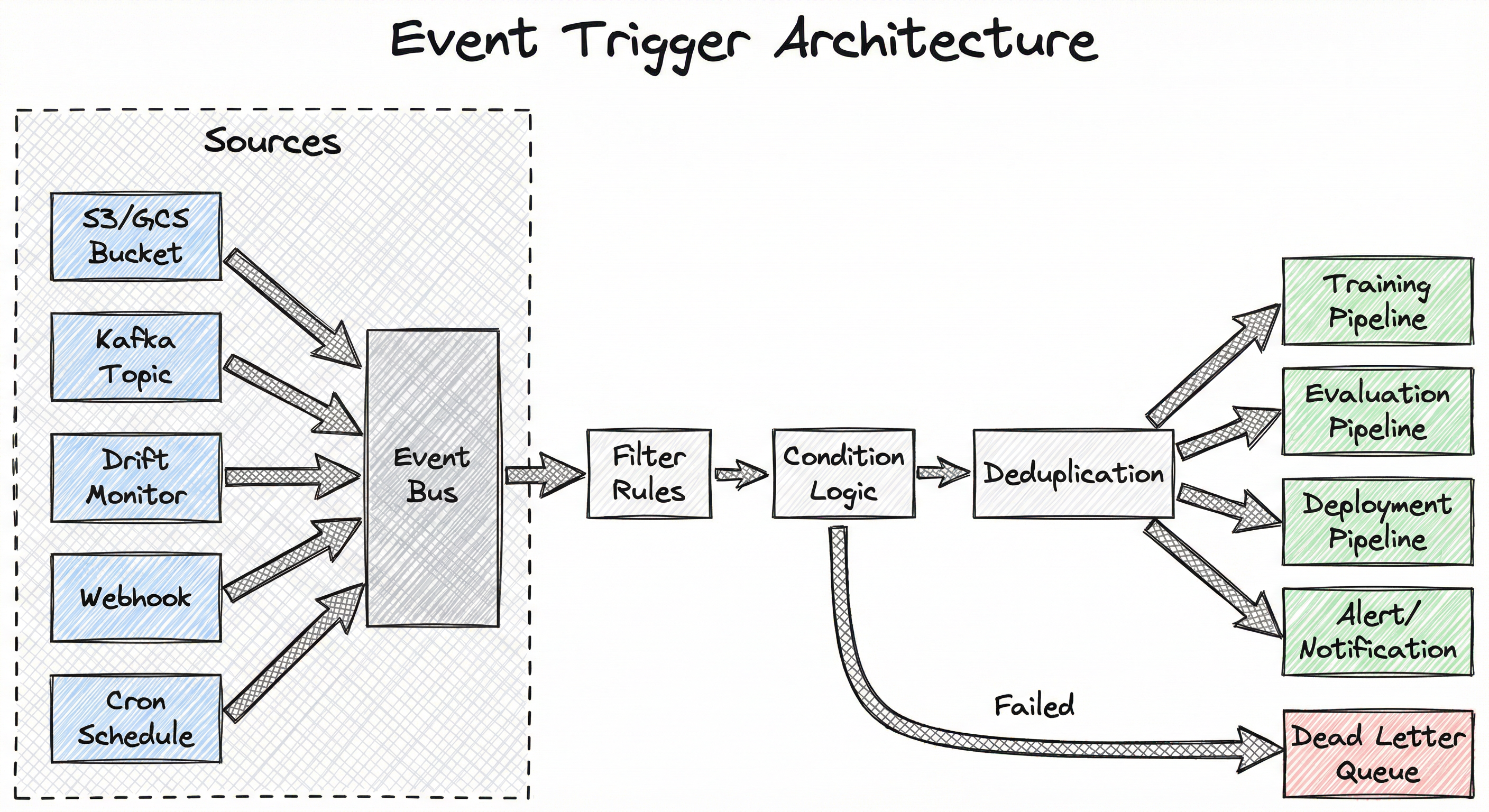
The event bus is the central nervous system. It decouples event producers from consumers, enabling independent scaling and evolution of each side. In cloud-native deployments, AWS EventBridge or Google Eventarc serves as the managed bus. In Kubernetes-native setups, Argo Events provides an equivalent abstraction using NATS or Kafka as the transport layer.
The filter and condition layer is where ML-specific logic lives. Simple rules ("trigger on any .parquet file upload to s3://training-data/") are evaluated inline. Complex conditions ("trigger when both the feature store AND the label store have been updated for the same date partition") require stateful event correlation, often implemented as a lightweight CEP (Complex Event Processing) engine.
Key Components
Event Source Adapters
Normalize events from heterogeneous sources (cloud storage notifications, message queues, HTTP webhooks, monitoring alerts, cron ticks) into a common event format. Most production systems adopt the CloudEvents specification (CNCF graduated project) as the canonical envelope, ensuring interoperability across sources.
Event Bus / Message Broker
Receives, buffers, and routes events to registered consumers. Provides durability (events survive consumer failures), ordering guarantees (per-partition in Kafka), and fan-out (one event can trigger multiple pipelines). AWS EventBridge, Google Pub/Sub, Apache Kafka, and NATS are common choices.
Trigger Evaluator / Sensor
Evaluates filter rules and conditions against incoming events. Supports simple pattern matching (event type, source prefix, payload fields) and complex multi-event correlation ("fire only when events A AND B have both arrived within a 30-minute window"). Argo Events sensors and Dagster sensors implement this layer.
Action Dispatcher
Translates a trigger decision into a concrete pipeline invocation: submitting an Argo Workflow, creating a SageMaker Pipeline execution, calling the Vertex AI Pipelines API, or invoking a Lambda function. Passes event context (payload, timestamp, source) as pipeline parameters so the pipeline knows why it was triggered.
Dead Letter Queue (DLQ)
Captures events that failed processing after exhausting retry attempts. Preserves the original event payload plus error metadata (stack trace, retry count, last attempt timestamp) for debugging and manual replay. Essential for preventing poison-pill events from blocking the entire trigger pipeline.
Event Schema Registry
Stores and enforces versioned schemas for event payloads (using Avro, JSON Schema, or Protobuf). Ensures producers and consumers agree on event structure and prevents schema drift from breaking downstream trigger logic. Confluent Schema Registry and AWS Glue Schema Registry are common implementations.
Data Flow
An event originates at a source (e.g., a new Parquet file lands in S3). The source adapter converts this into a CloudEvents-formatted message and publishes it to the event bus. The bus persists the event (for durability) and routes it to all registered trigger evaluators.
The trigger evaluator receives the event, applies filter rules ("is this from the training-data bucket? Is the file extension .parquet? Is the file size above the minimum threshold?"), checks conditions ("has the corresponding label file also arrived?"), deduplicates ("have we already triggered for this exact file?"), and if all checks pass, emits a trigger action.
The action dispatcher receives the trigger action, resolves the target pipeline (from configuration), injects event context as pipeline parameters (data path, event timestamp, trigger ID), and submits the pipeline execution. It records the submission result and retries on transient failures.
If the action fails after all retries (e.g., the pipeline API is down), the event plus failure metadata is routed to the DLQ. An alert fires to the on-call engineer. The DLQ supports manual inspection and replay once the root cause is resolved.
A flow diagram showing five event sources (S3/GCS Bucket, Kafka Topic, Drift Monitor, Webhook, Cron Schedule) feeding into a central Event Bus, which routes to a filter/condition/deduplication evaluation chain, which then dispatches to four possible actions (Training Pipeline, Evaluation Pipeline, Deployment Pipeline, Alert/Notification) or routes failures to a Dead Letter Queue.
How to Implement
Implementation Approaches
Event trigger implementations fall into three tiers of sophistication:
Tier 1: Cloud-native managed triggers -- AWS EventBridge rules, Google Eventarc triggers, Azure Event Grid subscriptions. Zero infrastructure to manage, pay-per-event pricing, and native integration with cloud ML services (SageMaker, Vertex AI, Azure ML). Best for teams on a single cloud who want the fastest path to production.
Tier 2: Orchestrator-native sensors -- Airflow sensors, Dagster sensors, Prefect automations. Run inside your existing orchestration platform. Good for teams already using these tools who want event-driven behavior without introducing a separate event bus. The tradeoff is polling-based latency (10-60 seconds) rather than push-based (sub-second).
Tier 3: Kubernetes-native event frameworks -- Argo Events, Knative Eventing. Full event-driven architecture on Kubernetes with support for 20+ event source types, complex trigger conditions, and native Argo Workflow integration. Best for platform teams building ML infrastructure on Kubernetes.
For cost context: AWS EventBridge charges 0.01/month -- essentially free. The real cost is in the pipeline compute that triggers fire, not the triggers themselves. Google Pub/Sub charges $40/TB of message data (~INR 3,360/TB), and the first 10 GB/month is free.
Cost Note: AWS Lambda pricing for event-triggered functions is 0.0000166667/GB-second of compute. A Lambda function that triggers a SageMaker Pipeline (128 MB, 500ms execution) costs roughly 0.09/month (~INR 7.5/month). The pipeline compute itself will be 1000x more expensive than the trigger.
import boto3
import json

# Create EventBridge rule to trigger on S3 object creation
eventbridge = boto3.client('events')
s3 = boto3.client('s3')
sagemaker = boto3.client('sagemaker')

# Step 1: Enable S3 Event Notifications to EventBridge
s3.put_bucket_notification_configuration(
    Bucket='ml-training-data',
    NotificationConfiguration={
        'EventBridgeConfiguration': {}  # Enables all S3 events to EventBridge
    }
)

# Step 2: Create EventBridge rule with filtering
rule_name = 'ml-data-arrival-trigger'
eventbridge.put_rule(
    Name=rule_name,
    EventPattern=json.dumps({
        'source': ['aws.s3'],
        'detail-type': ['Object Created'],
        'detail': {
            'bucket': {'name': ['ml-training-data']},
            'object': {
                'key': [{'prefix': 'training/daily/'}],
                'size': [{'numeric': ['>', 1048576]}]  # Only files > 1MB
            }
        }
    }),
    State='ENABLED',
    Description='Trigger ML training pipeline when new training data arrives'
)

# Step 3: Add SageMaker Pipeline as target
eventbridge.put_targets(
    Rule=rule_name,
    Targets=[{
        'Id': 'sagemaker-training-pipeline',
        'Arn': 'arn:aws:sagemaker:ap-south-1:123456789:pipeline/fraud-detection-training',
        'RoleArn': 'arn:aws:iam::123456789:role/EventBridgeSageMakerRole',
        'SageMakerPipelineParameters': {
            'PipelineParameterList': [
                {'Name': 'InputDataPath', 'Value': '$.detail.object.key'},
                {'Name': 'TriggerTimestamp', 'Value': '$.time'},
                {'Name': 'TriggerSource', 'Value': 'eventbridge-s3-arrival'}
            ]
        }
    }]
)

print(f'Rule {rule_name} created. Pipeline will trigger on data arrival.')
This example sets up a complete event-driven trigger chain on AWS. S3 bucket notifications are routed to EventBridge, where a rule filters for specific file patterns and minimum sizes. When a matching file arrives, EventBridge automatically starts a SageMaker Pipeline execution, passing the file path and trigger metadata as pipeline parameters. The ap-south-1 region (Mumbai) is used for an India-based deployment, minimizing latency for Indian data sources.
# event-source.yaml — Listen for new data in MinIO/S3
apiVersion: argoproj.io/v1alpha1
kind: EventSource
metadata:
  name: training-data-source
spec:
  minio:
    training-data:
      bucket:
        name: ml-training-data
      endpoint: minio-service.default:9000
      events:
        - s3:ObjectCreated:Put
      filter:
        prefix: "training/daily/"
        suffix: ".parquet"
      accessKey:
        name: minio-credentials
        key: accesskey
      secretKey:
        name: minio-credentials
        key: secretkey
---
# sensor.yaml — Evaluate conditions and trigger workflow
apiVersion: argoproj.io/v1alpha1
kind: Sensor
metadata:
  name: training-trigger-sensor
spec:
  dependencies:
    - name: training-data-dep
      eventSourceName: training-data-source
      eventName: training-data
      filters:
        data:
          - path: "notification.0.s3.object.size"
            type: float
            comparator: ">"
            value:
              - "1048576"  # 1 MB minimum
  triggers:
    - template:
        name: trigger-training-workflow
        argoWorkflow:
          operation: submit
          source:
            resource:
              apiVersion: argoproj.io/v1alpha1
              kind: Workflow
              metadata:
                generateName: fraud-model-training-
              spec:
                entrypoint: train
                arguments:
                  parameters:
                    - name: data-path
                    - name: trigger-time
                templates:
                  - name: train
                    container:
                      image: ml-team/fraud-trainer:v2.3
                      command: [python, train.py]
                      args:
                        - "--data-path={{workflow.parameters.data-path}}"
                        - "--trigger-time={{workflow.parameters.trigger-time}}"
                      resources:
                        requests:
                          nvidia.com/gpu: 1
                          memory: 16Gi
          parameters:
            - src:
                dependencyName: training-data-dep
                dataKey: notification.0.s3.object.key
              dest: spec.arguments.parameters.0.value
            - src:
                dependencyName: training-data-dep
                dataKey: notification.0.eventTime
              dest: spec.arguments.parameters.1.value
      retryStrategy:
        steps: 3
        duration: 60s
        factor: 2
This Argo Events configuration demonstrates a Kubernetes-native event trigger for ML training. The EventSource watches a MinIO bucket for new Parquet files. The Sensor applies a size filter and, when conditions are met, submits an Argo Workflow that runs GPU-accelerated model training. The retry strategy provides resilience: 3 attempts with exponential backoff. This pattern is common in self-hosted Kubernetes ML platforms used by Indian tech companies running on-premise or hybrid cloud infrastructure.
import dagster
from dagster import (
    sensor, RunRequest, SkipReason, SensorEvaluationContext,
    job, op, In, Out, DynamicPartitionsDefinition
)
import boto3
from datetime import datetime, timedelta
import hashlib

# Define the training job
@op
def fetch_training_data(context, data_path: str):
    """Download training data from S3."""
    context.log.info(f"Fetching data from {data_path}")
    # ... fetch logic
    return data_path

@op
def train_model(context, data_path: str):
    """Train the fraud detection model."""
    context.log.info(f"Training model on {data_path}")
    # ... training logic
    return {"model_path": "s3://models/fraud/latest", "metrics": {"auc": 0.94}}

@op
def evaluate_and_register(context, train_result: dict):
    """Evaluate model and register if performance meets threshold."""
    if train_result["metrics"]["auc"] >= 0.90:
        context.log.info("Model passed evaluation. Registering.")
        return True
    context.log.warning("Model below threshold. Skipping registration.")
    return False

@job
def fraud_training_pipeline():
    data = fetch_training_data()
    result = train_model(data)
    evaluate_and_register(result)

# Event trigger sensor
@sensor(
    job=fraud_training_pipeline,
    minimum_interval_seconds=30,
    default_status=dagster.DefaultSensorStatus.RUNNING
)
def new_training_data_sensor(context: SensorEvaluationContext):
    """Sensor that triggers training when new data arrives in S3."""
    s3 = boto3.client('s3')
    bucket = 'ml-training-data'
    prefix = 'training/daily/'

    # Get cursor (last processed timestamp)
    last_processed = context.cursor or '1970-01-01T00:00:00'
    last_dt = datetime.fromisoformat(last_processed)

    # List new objects since last check
    response = s3.list_objects_v2(Bucket=bucket, Prefix=prefix)
    new_files = []
    latest_timestamp = last_dt

    for obj in response.get('Contents', []):
        if obj['LastModified'].replace(tzinfo=None) > last_dt:
            if obj['Key'].endswith('.parquet') and obj['Size'] > 1_048_576:
                new_files.append(obj)
                if obj['LastModified'].replace(tzinfo=None) > latest_timestamp:
                    latest_timestamp = obj['LastModified'].replace(tzinfo=None)

    if not new_files:
        yield SkipReason("No new training data found.")
        return

    # Deduplicate using deterministic run ID from file paths
    file_keys = sorted([f['Key'] for f in new_files])
    run_key = hashlib.sha256('|'.join(file_keys).encode()).hexdigest()[:16]

    yield RunRequest(
        run_key=run_key,  # Prevents duplicate runs for same files
        run_config={
            "ops": {
                "fetch_training_data": {
                    "inputs": {
                        "data_path": f"s3://{bucket}/{file_keys[0]}"
                    }
                }
            }
        },
        tags={
            "trigger": "data-arrival-sensor",
            "file_count": str(len(new_files)),
            "trigger_time": datetime.utcnow().isoformat()
        }
    )

    # Update cursor to latest processed timestamp
    context.update_cursor(latest_timestamp.isoformat())
This Dagster example shows a poll-based sensor -- the most common pattern for teams already using Dagster or Airflow. The sensor runs every 30 seconds, checks S3 for new Parquet files, and emits a RunRequest with a deterministic run_key derived from the file paths. The run_key ensures idempotency: if the sensor fires twice for the same set of files, Dagster deduplicates the second invocation. The cursor mechanism tracks the last processed timestamp, ensuring no files are missed across sensor evaluations.
import boto3
import json

# This Lambda function is triggered by a CloudWatch alarm
# when data drift exceeds the configured threshold.
# It starts a SageMaker Pipeline for model retraining.

def lambda_handler(event, context):
    """
    Lambda triggered by EventBridge when drift alarm fires.
    Event flow: CloudWatch Alarm -> EventBridge Rule -> This Lambda -> SageMaker Pipeline
    """
    sagemaker = boto3.client('sagemaker')

    # Extract drift details from the alarm event
    alarm_name = event['detail']['alarmName']
    drift_metric = event['detail']['configuration']['metrics'][0]['metricStat']
    current_value = event['detail']['state']['value']
    timestamp = event['time']

    # Determine which model needs retraining based on alarm name
    # Convention: alarm name format is "drift-alert-{model-name}"
    model_name = alarm_name.replace('drift-alert-', '')

    # Check if a training job is already running (prevent duplicate triggers)
    running_jobs = sagemaker.list_pipeline_executions(
        PipelineName=f'{model_name}-retraining',
        SortBy='CreationTime',
        SortOrder='Descending',
        MaxResults=1
    )
    if running_jobs['PipelineExecutionSummaries']:
        latest = running_jobs['PipelineExecutionSummaries'][0]
        if latest['PipelineExecutionStatus'] in ['Executing', 'Stopping']:
            print(f'Pipeline already running: {latest["PipelineExecutionArn"]}')
            return {
                'statusCode': 200,
                'body': 'Skipped: pipeline already running'
            }

    # Start retraining pipeline with drift context
    response = sagemaker.start_pipeline_execution(
        PipelineName=f'{model_name}-retraining',
        PipelineParameters=[
            {'Name': 'TriggerType', 'Value': 'drift-detection'},
            {'Name': 'DriftScore', 'Value': str(current_value)},
            {'Name': 'TriggerTimestamp', 'Value': timestamp},
            {'Name': 'AlarmName', 'Value': alarm_name},
            {'Name': 'UseLatestData', 'Value': 'true'}
        ],
        PipelineExecutionDescription=f'Drift-triggered retraining. Drift score: {current_value}'
    )

    execution_arn = response['PipelineExecutionArn']
    print(f'Started retraining: {execution_arn}')

    # Publish event for downstream consumers (audit trail)
    eventbridge = boto3.client('events')
    eventbridge.put_events(
        Entries=[{
            'Source': 'ml.triggers.drift',
            'DetailType': 'RetrainingStarted',
            'Detail': json.dumps({
                'modelName': model_name,
                'pipelineExecutionArn': execution_arn,
                'driftScore': current_value,
                'triggerTimestamp': timestamp
            }),
            'EventBusName': 'ml-events'
        }]
    )

    return {
        'statusCode': 200,
        'body': json.dumps({
            'executionArn': execution_arn,
            'model': model_name,
            'driftScore': current_value
        })
    }
This Lambda function implements the drift-triggered retraining pattern. When a CloudWatch alarm detects data drift above a threshold, it fires an EventBridge event that invokes this Lambda. The function checks for already-running pipelines (preventing duplicate retraining), starts a SageMaker Pipeline with drift context, and publishes a RetrainingStarted event for audit and downstream consumers. This event-chaining pattern -- where one trigger produces events consumed by other triggers -- is fundamental to composable event-driven ML systems.
# Prefect automation trigger configuration (YAML equivalent)
automation:
  name: training-data-arrival-trigger
  description: Trigger fraud model retraining on new data arrival
  enabled: true
  trigger:
    type: event
    match:
      prefect.resource.id: "s3.bucket.ml-training-data"
    match_related:
      prefect.resource.role: "object"
    expect:
      - "s3.object.created"
    threshold: 1
    within: 300  # 5-minute debounce window
  actions:
    - type: run-deployment
      deployment_id: "fraud-training-pipeline/production"
      parameters:
        trigger_source: "event-automation"
        data_bucket: "ml-training-data"
  # Dead letter handling
  on_failure:
    - type: send-notification
      channel: "slack"
      webhook_url: "https://hooks.slack.com/services/XXX"
      message: "Training trigger failed: {{ event.id }}"
Common Implementation Mistakes
- ●
Missing idempotency guards: Event-driven systems deliver at-least-once. Without deduplication (run keys, existence checks, idempotent pipeline design), the same data arrival event can trigger two identical training runs, wasting GPU hours and creating confusing model registry entries.
- ●
No dead letter queue: When a triggered pipeline fails (API timeout, insufficient quota, bad data), the triggering event is lost. Without a DLQ, you have no record of what happened and no ability to replay. Always configure a DLQ for every event trigger rule.
- ●
Overly broad event filters: A trigger on "any file created in the bucket" will fire on temporary files, checkpoint files, and metadata uploads -- not just the training data you intended. Always use prefix, suffix, and size filters to narrow the event scope.
- ●
Ignoring event ordering: In Kafka-based triggers, events within a partition are ordered, but across partitions they are not. If your pipeline requires processing data files in order (e.g., incremental training on daily batches), you must ensure ordering guarantees or handle out-of-order events gracefully.
- ●
Triggering expensive pipelines on every micro-event: A feature store that updates 10,000 features per minute should not trigger a full retraining pipeline per update. Use event batching, debouncing, or aggregation windows to coalesce rapid-fire events into a single pipeline invocation.
- ●
Hardcoded event schemas: When the upstream event schema changes (e.g., S3 notification format evolves), triggers break silently. Use a schema registry and validate event payloads before processing.
When Should You Use This?
Use When
Your ML pipeline should react to data arrival -- new training data, labels, or features appear at unpredictable intervals and the model must incorporate them promptly
A drift detection monitor signals that the production data distribution has shifted and the current model is degrading, requiring automated retraining
Upstream pipeline completion should trigger downstream stages -- e.g., feature engineering finishing should trigger training, training finishing should trigger evaluation
You need webhook-driven pipelines -- an external system (labeling service, data vendor, partner API) notifies you when new data is ready via HTTP callback
Cost optimization is a priority -- running pipelines only when needed (event-driven) instead of on a fixed schedule reduces wasted compute, especially for GPU-intensive training jobs
Your system requires audit trails -- event-driven architectures naturally produce a log of what triggered each pipeline run, when, and why
Multiple teams or services need to react to the same event -- pub/sub fan-out lets the training team, monitoring team, and data quality team all subscribe to the same data arrival event independently
Avoid When
Your data arrives on a perfectly predictable schedule (e.g., daily ETL at midnight) and a cron-based trigger is simpler to reason about and debug
The pipeline is infrequently run (weekly or monthly) and the operational overhead of setting up event infrastructure outweighs the benefits of reactivity
You need strict ordering guarantees across multiple event sources that your event bus cannot provide without significant complexity
The triggering condition requires complex multi-source joins (e.g., "fire when data from source A AND labels from source B AND config from source C all arrive for the same date") -- this is doable but requires stateful event correlation that adds operational burden
Your organization lacks observability infrastructure to monitor event flows, DLQ depths, and trigger latencies -- event-driven systems fail silently without proper monitoring
The pipeline is a one-off experiment -- event infrastructure is overhead for throwaway work. Use a manual trigger or notebook instead
Key Tradeoffs
Reactivity vs. Complexity
Event triggers make pipelines more responsive but introduce distributed systems complexity. A cron job is a single line of configuration; an event trigger involves an event source, a bus, filter rules, action dispatch, DLQ, monitoring, and schema management. For a solo ML engineer at an early-stage startup, a cron job is often the right starting point. For a platform serving 50 models at a company like PhonePe or Zerodha, event triggers are essential.
Push vs. Poll
| Aspect | Push-based (EventBridge, Pub/Sub) | Poll-based (Dagster/Airflow sensors) |
|---|---|---|
| Latency | 100-500ms | 10-60s (polling interval) |
| Infrastructure | Separate event bus required | Runs inside orchestrator |
| Cost | Per-event pricing ($1/M events) | Sensor process consumes orchestrator resources |
| Complexity | Higher (event bus + rules) | Lower (Python function) |
| Ordering | Depends on bus implementation | Natural ordering within sensor |
| Best for | High-frequency events, multi-consumer | Low-frequency events, simple conditions |
Cost Analysis: Event-Driven vs. Scheduled
Consider a training pipeline that costs $5 (~INR 420) per run in GPU compute:
- Scheduled (daily): 30 runs/month = $150/month (~INR 12,600/month), regardless of data changes
- Event-driven (on data arrival): If data arrives 12 times/month, 12 runs/month = 0.01 in event infrastructure
The event-driven approach saves 1,800/month (~INR 1.5 lakh/month) in avoided waste.
Alternatives & Comparisons
A pipeline scheduler runs pipelines at fixed time intervals (hourly, daily, weekly) regardless of whether conditions have changed. Choose a scheduler when data arrives predictably and simplicity is paramount. Choose event triggers when data arrival is unpredictable, when you need sub-minute response times, or when you want to avoid wasting compute on no-op runs. Many production systems use both: a scheduled baseline with event-driven overrides for urgent triggers like drift alerts.
A webhook is a specific type of event trigger -- one that uses an HTTP POST as the event delivery mechanism. Webhooks are simpler to set up (no message broker needed) but lack the durability, retry semantics, and fan-out capabilities of a full event bus. Use raw webhooks for simple integrations (e.g., a labeling service notifying you when annotations are complete). Use a proper event trigger system when you need reliable delivery, multiple consumers, or complex filtering.
A streaming data source (Kafka, Kinesis) provides the continuous data flow that event triggers listen to. The streaming source is the producer of events; the event trigger is the consumer that decides when to act. They are complementary, not alternatives. However, some teams build trigger logic directly into their stream processing jobs (e.g., a Flink job that detects drift and calls a retraining API), bypassing a separate trigger layer entirely.
Drift detection is an event source, not a trigger mechanism itself. When a drift monitor detects distribution shift, it publishes an event (metric alert, webhook, message). The event trigger system consumes that event and decides whether and how to act (retrain, alert, roll back). They form a producer-consumer pair: drift detection generates the signal, event triggers act on it.
A workflow engine executes pipelines; an event trigger initiates them. Most workflow engines include basic trigger capabilities (Airflow sensors, Argo Events), but these are bolted-on features rather than first-class event processing. For simple trigger needs, the built-in capabilities suffice. For complex event processing (multi-source correlation, sophisticated filtering, schema validation), a dedicated event trigger layer is more maintainable.
Pros, Cons & Tradeoffs
Advantages
Eliminates wasted compute by running pipelines only when meaningful events occur, reducing GPU costs by 40-70% compared to scheduled approaches for pipelines with irregular data arrival patterns
Reduces model staleness from hours or days (next scheduled run) to minutes (event detection + pipeline startup), critical for latency-sensitive applications like fraud detection at Razorpay or surge pricing at Ola
Natural audit trail -- every pipeline execution is tied to a specific event with a timestamp, source, and payload, making it trivial to answer "why did this model get retrained at 3 AM?"
Loose coupling via pub/sub allows multiple teams to independently subscribe to the same events without coordinating deployments. The data engineering team can add a new consumer without touching the ML team's trigger configuration
Composable event chains enable reactive architectures: data arrival triggers training, training completion triggers evaluation, evaluation success triggers deployment -- each stage independently triggered by the previous stage's completion event
Scales horizontally -- event buses like Kafka and EventBridge handle millions of events per second, and adding new trigger rules does not degrade existing ones
Disadvantages
Distributed systems complexity -- debugging "why didn't my pipeline run?" requires tracing events through the bus, checking filter rules, inspecting DLQs, and verifying action dispatch, which is harder than checking a cron log
At-least-once delivery means pipelines must be idempotent, which adds engineering effort to training and deployment code that was not designed for repeated invocations
Event storms can trigger cascade failures: a bulk data upload creating 10,000 events can spawn 10,000 pipeline runs simultaneously, exhausting GPU quotas and crashing the orchestrator. Debouncing and rate limiting are essential but add configuration complexity
Monitoring overhead -- you need dashboards for event throughput, trigger latency, DLQ depth, filter match rates, and action success rates. Without this observability, event-driven systems fail silently, which is worse than a failed cron job that sends an email
Schema evolution risk -- when upstream event formats change (new fields, renamed keys, different serialization), triggers can break silently. Schema registries mitigate this but require additional infrastructure
Cold start latency for serverless triggers (Lambda, Cloud Functions) adds 100ms-10s depending on runtime and package size, which can be problematic for latency-sensitive trigger chains
Failure Modes & Debugging
Event storm cascade
Cause
A bulk data upload, backfill operation, or replay of historical events generates thousands of events in rapid succession, each triggering an independent pipeline run.
Symptoms
GPU quota exhaustion, orchestrator overload, hundreds of pending/failed pipeline runs, cloud cost spike (a single event storm can burn $500-1000 / INR 42,000-84,000 in unexpected compute). On-call engineer gets paged at 3 AM.
Mitigation
Implement debouncing (aggregate events within a time window before triggering), rate limiting (cap pipeline invocations per minute), and concurrency guards (check if a pipeline is already running before starting another). AWS EventBridge supports input transformers and Lambda concurrency limits. Argo Events sensors support trigger conditions with time-based aggregation.
Silent trigger failure (DLQ neglect)
Cause
An event trigger fails to invoke the pipeline (API timeout, insufficient IAM permissions, misconfigured target ARN) and the event is routed to the DLQ. But nobody monitors the DLQ.
Symptoms
The pipeline stops running without any visible error in the pipeline orchestrator's UI. Model freshness degrades. The team does not notice until downstream metrics drop -- potentially days or weeks later.
Mitigation
Set up DLQ depth alerts (CloudWatch alarm when DLQ message count > 0). Implement a DLQ dashboard showing event age, failure reason, and replay status. Run a weekly DLQ audit script. Never deploy an event trigger without a corresponding DLQ and alert.
Duplicate pipeline execution
Cause
At-least-once delivery semantics cause the same event to be delivered twice (network retry, consumer acknowledgment failure, EventBridge retry on transient target error).
Symptoms
Two identical training runs for the same data batch. Duplicate model versions in the registry. Wasted compute. Potential race conditions if both runs try to deploy simultaneously.
Mitigation
Use idempotent run keys derived from event content (e.g., SHA-256 of the triggering file paths). Implement check-before-act patterns (query the pipeline API for existing executions before starting a new one). Dagster's run_key mechanism and Argo Workflows' synchronization feature both provide built-in deduplication.
Event schema drift
Cause
The upstream system changes its event payload format (adds fields, renames keys, changes types) without updating the trigger's filter rules or action parameter mappings.
Symptoms
Trigger filters stop matching (no pipelines run) or match incorrectly (wrong pipelines run). Action dispatch passes garbled parameters to the pipeline, causing failures deep in the training code that are hard to trace back to an event schema change.
Mitigation
Use a schema registry (Confluent, AWS Glue, or in-house) to version event schemas. Require backward-compatible schema evolution. Add schema validation at the trigger evaluator layer -- reject events that don't conform to the expected schema and route them to the DLQ with a clear error message.
Trigger-pipeline version mismatch
Cause
The event trigger is configured to invoke a pipeline version that no longer exists (renamed, deleted, or moved to a different endpoint) after an infrastructure change or migration.
Symptoms
All trigger invocations fail with 404 or ResourceNotFound errors. Events accumulate in the DLQ. If the DLQ is not monitored, the failure is completely invisible.
Mitigation
Use infrastructure-as-code (Terraform, Pulumi) to manage trigger-pipeline bindings in the same deployment unit. Run integration tests that verify the trigger can successfully invoke the pipeline in a staging environment. Implement health checks that periodically fire a test event and verify end-to-end execution.
Backpressure collapse
Cause
The pipeline execution system (Kubernetes cluster, SageMaker capacity, GPU quota) cannot keep up with the rate of triggered executions. New triggers keep firing while previous runs are still queued.
Symptoms
Exponentially growing queue of pending pipeline runs. Resource starvation. Potentially cascading failures as the orchestrator itself becomes overloaded managing the queue.
Mitigation
Implement backpressure signaling: the trigger evaluator checks downstream capacity before dispatching. Use queue-based dispatch with bounded concurrency (SQS + Lambda with reserved concurrency, or Kubernetes Job parallelism limits). Configure circuit breakers that pause trigger evaluation when the pipeline queue exceeds a threshold.
Placement in an ML System
Where Does It Sit in the ML System?
The event trigger sits at the control plane of the ML system, not the data plane. It does not process data or run models -- it decides when to invoke the systems that do.
Upstream, it receives signals from event sources: data stores emitting arrival notifications, drift monitors publishing alert events, feature stores signaling freshness updates, and external systems sending webhooks. Downstream, it invokes pipeline orchestrators: Airflow DAGs, Kubeflow Pipelines, SageMaker Pipelines, Argo Workflows, or direct serverless functions.
In a well-designed ML platform, the event trigger layer is the single point of control for pipeline execution policy. This centralization makes it possible to answer critical operational questions: "How many times was this pipeline triggered last week?", "What was the average latency between data arrival and training start?", "Which drift events were not acted upon?" Without a dedicated trigger layer, these questions require forensic log analysis across multiple systems.
Architectural Pattern: The most robust production setups use event triggers as an orchestration facade: all pipeline executions -- whether triggered by events, schedules, manual requests, or CI/CD -- flow through the same trigger evaluation and dispatch layer. This unifies logging, access control, rate limiting, and audit trails.
Pipeline Stage
Orchestration / Pipeline Control
Upstream
- drift-detection
- streaming-data-source
- feature-store
- data-ingestion
- model-monitoring
Downstream
- pipeline-scheduler
- workflow-engine
- training-pipeline
- evaluation-pipeline
- deployment-pipeline
Scaling Bottlenecks
The event trigger layer itself is rarely the bottleneck -- managed event buses handle millions of events per second. The bottleneck is almost always downstream pipeline capacity: GPU availability, orchestrator queue depth, and cloud API rate limits.
Specific numbers: AWS EventBridge supports 2,400 put-events/second (soft limit, raisable to 10,000+). Google Pub/Sub supports 1 GB/s per topic. Kafka supports millions of messages/second per cluster. Meanwhile, a typical SageMaker Pipeline start takes 30-60 seconds, and Argo Workflow submission takes 2-5 seconds on a healthy cluster.
The implication is clear: the trigger can fire faster than the pipeline can start. At scale (>100 triggers/minute), you need a dispatch queue between the trigger layer and the pipeline layer, with backpressure to prevent overwhelming the orchestrator. Without this, a high-frequency event source (like a Kafka topic with 10,000 messages/second) will try to start 10,000 pipeline runs per second, which no ML orchestrator can handle.
Production Case Studies
Netflix built Maestro, a horizontally scalable workflow orchestrator that manages millions of ML pipeline executions daily. Maestro's flow engine is fully event-driven: it reacts to events immediately upon receipt, eliminating polling interval delays. ML pipelines are triggered by upstream completion events using Metaflow's @trigger_on_finish decorator, creating composable event chains across teams. Maestro handles hundreds of thousands of jobs in massive workflows.
Event-driven orchestration via Maestro reduced pipeline scheduling overhead and enabled Netflix to run millions of ML workflow executions daily with sub-second trigger latency, supporting personalization models for 260M+ subscribers.
LinkedIn processes 4 trillion events daily through 3,000+ Apache Beam pipelines. Their ML feature generation system uses event-driven architecture: when members take actions on the platform, events flow to Kafka, streaming Beam pipelines generate real-time ML features, and feature freshness triggers downstream model inference. The event-driven feature computation system serves all major ML models on the platform.
Event-driven feature computation reduced feature staleness from hours to seconds, improving ML model quality across feed ranking, job recommendations, and notification relevance for 1B+ members.
Flipkart uses Kafka-based event pipelines for fraud detection and product catalog ML models. During Big Billion Days sales events, transaction event volumes spike 10-50x. Event-driven triggers automatically scale fraud detection model inference based on event volume, and catalog quality models are triggered when new product listings are ingested. The event-driven architecture handles the extreme burstiness of sale events without manual intervention.
Event-driven fraud detection during sale events reduced fraudulent transaction processing time from minutes to sub-second, protecting GMV during peak traffic periods handling 10M+ concurrent users.
Spotify's Event Delivery Infrastructure (EDI) ingests up to 8 million events per second (500 billion events/day) from user interactions. These events feed into ML pipelines for personalization. Spotify uses Kubeflow Pipelines with event-triggered retraining: when new interaction data accumulates above a threshold, pipelines retrain recommendation models. The infrastructure combines TFX for pipeline definition with Kubeflow for orchestration.
Event-driven ML infrastructure reduced the time from ML project idea to production deployment from four months to one week, enabling Spotify to iterate rapidly on personalization models.
Tooling & Ecosystem
Fully managed serverless event bus that connects applications using events. Native integration with SageMaker Pipelines, Lambda, Step Functions, and 200+ AWS services as event sources. Supports content-based filtering, input transformation, and cross-account event routing. Pay-per-event at $1/million events. Supports event payloads up to 1 MB (increased from 256 KB in 2025).
Google Cloud's event routing and delivery platform. Eventarc uses CloudEvents format and integrates with Vertex AI Pipelines, Cloud Run, and Cloud Functions. Pub/Sub provides the underlying messaging with at-least-once delivery. Native triggers for GCS bucket events, BigQuery, and Firestore changes. Vertex AI Pipelines can be triggered directly from Pub/Sub messages.
Azure's event routing service with native Azure Machine Learning integration. Supports events for training run completion, model registration, model deployment, and data drift detection. When a drift monitor detects distribution shift, Event Grid can trigger Logic Apps, Azure Functions, or Azure Data Factory pipelines for automated retraining. First 100,000 operations/month are free.
Kubernetes-native event-driven automation framework. Supports 20+ event sources (webhooks, S3/MinIO, Kafka, AMQP, NATS, cron, GitHub, Slack, and more). Sensors evaluate conditions and trigger Argo Workflows, Kubernetes resources, or HTTP endpoints. Uses NATS or Kafka as the internal event bus. Ideal for teams running ML workloads on Kubernetes.
Dagster's built-in sensor framework provides poll-based event triggers within the Dagster orchestrator. Sensors run on configurable intervals (default 30s), evaluate Python functions against external state, and emit RunRequests with deduplication via run keys. Best for teams already using Dagster who want event-driven behavior without a separate event bus.
Prefect's Automations and Webhooks system enables event-driven workflow execution. Supports internal events (flow/task state changes) and external events (webhooks, cloud storage). Automations configure actions (run deployment, send notification, pause deployment) in response to event patterns with debouncing windows. Push-based event delivery with the Prefect Cloud event bus.
The de facto standard distributed event streaming platform. Provides the backbone for event-driven ML systems at scale. High throughput (millions of events/second), durable storage, exactly-once semantics (with transactions), and a rich connector ecosystem. Often used as the event bus layer that cloud-native trigger services sit on top of. Kafka Connect integrates with ML tools like MLflow and Kubeflow.
CNCF graduated specification for describing events in a common format. SDKs available for Python, Go, Java, JavaScript, Ruby, Rust, and more. Adopted by Google Eventarc, Argo Events, and Knative Eventing as the canonical event envelope. Using CloudEvents ensures interoperability across event sources and trigger systems.
Research & References
Various authors (2025)arXiv preprint
Introduces AI-Enhanced Event Orchestration (AIEO), employing ML-driven predictive scaling and reinforcement learning for dynamic resource allocation in event-driven architectures. Directly relevant to scaling event triggers for ML pipelines.
Mak et al. (2023)arXiv preprint
Presents Modyn, a data-centric ML platform where users declaratively describe triggering policies for continuously training models on growing datasets. The trigger abstraction allows users to specify when retraining should occur based on data volume, time, or custom conditions.
Various authors (2024)arXiv preprint
Addresses the stability problem in event-triggered model retraining: when new data batches trigger retraining, model behavior can change unpredictably. Proposes a framework for finding stable retraining sequences, directly relevant to drift-triggered retraining design.
Various authors (2021)arXiv preprint
Proposes autonomic orchestration concepts for ML pipelines, including event-driven trigger mechanisms that automatically detect when pipeline re-execution is needed based on network conditions and data changes.
Diethe et al. (2019)arXiv preprint
Describes a reference architecture for Auto-Adaptive Machine Learning systems that continuously retrain in response to data changes. The data flow diagrams and trigger mechanisms described are foundational to modern event-driven ML pipeline design.
Interview & Evaluation Perspective
Common Interview Questions
- ●
How would you design an event-driven retraining system for a fraud detection model that needs to respond to changing transaction patterns within hours?
- ●
What are the tradeoffs between scheduled pipeline execution and event-driven triggers? When would you use each?
- ●
How do you handle duplicate events in an at-least-once delivery system to prevent duplicate training runs?
- ●
Describe how you would implement a drift-triggered retraining pipeline end-to-end, from drift detection to model deployment.
- ●
How would you prevent event storms from overwhelming your ML pipeline infrastructure?
- ●
What role do dead letter queues play in event-driven ML systems? How would you monitor and manage them?
Key Points to Mention
- ●
Event triggers follow a source-filter-action pattern. Always structure your answer around these three components and explain what each does for the specific use case.
- ●
Idempotency is non-negotiable in event-driven ML. Use deterministic run keys, check-before-act patterns, and design pipelines to produce identical outputs on repeated invocations.
- ●
Distinguish between push-based triggers (EventBridge, Pub/Sub -- sub-second latency) and poll-based sensors (Airflow, Dagster -- seconds to minutes). Choose based on latency requirements and existing infrastructure.
- ●
Always mention dead letter queues and monitoring. The hallmark of production-grade event triggers is not the happy path but the failure handling.
- ●
For drift-triggered retraining, discuss the threshold tuning problem: trigger too aggressively and you waste compute; trigger too conservatively and the model serves stale predictions. This is an ongoing optimization, not a one-time decision.
- ●
Quantify cost tradeoffs: event-driven saves 40-70% GPU compute vs. daily scheduled runs when data arrives irregularly.
Pitfalls to Avoid
- ●
Assuming exactly-once event delivery exists in practice -- it is almost always at-least-once, and your design must account for duplicates.
- ●
Describing only the happy path without addressing failure modes (DLQ, retries, circuit breakers, event storms).
- ●
Conflating the event trigger with the pipeline orchestrator -- the trigger decides when to run; the orchestrator decides how to run.
- ●
Ignoring the cost of monitoring and observability for event-driven systems -- without dashboards and alerts, event-driven architectures fail silently.
Senior-Level Expectation
A senior or staff-level candidate should be able to design an end-to-end event-driven ML system covering: event source selection and schema design, event bus architecture (managed vs. self-hosted, single-region vs. multi-region), filter and condition specification (including multi-event correlation), idempotent pipeline design with deduplication, DLQ management and automated replay strategies, backpressure and rate limiting to prevent cascade failures, observability (event throughput, trigger latency, DLQ depth dashboards), cost modeling (event infrastructure + triggered compute), and graceful degradation to scheduled fallback when the event bus is unavailable. The ability to reason about failure modes and design for them proactively -- not just describe the happy path -- separates senior engineers from mid-level ones. Bonus points for discussing event sourcing as an audit mechanism and CQRS patterns for separating trigger evaluation from pipeline execution.
Summary
An event trigger is the mechanism that makes ML pipelines reactive instead of passive. Rather than running on fixed schedules and hoping the timing aligns with data reality, event triggers detect meaningful occurrences -- data arrival, drift alerts, upstream pipeline completions, external webhooks -- and initiate the appropriate pipeline stage automatically. The core architecture follows a source-filter-action pattern: events flow from diverse sources through a central event bus, are evaluated against filter rules and conditions, and dispatched as pipeline invocations with the event context passed as parameters.
The critical engineering challenges are idempotency (at-least-once delivery means your pipeline must handle duplicate triggers gracefully), event storms (bulk operations can generate thousands of triggers that overwhelm GPU quotas), and silent failures (without dead letter queues and monitoring, failed triggers are invisible). Production-grade implementations require DLQs for every trigger rule, deterministic run keys for deduplication, debouncing for high-frequency event sources, and comprehensive observability for event throughput, trigger latency, and DLQ depth.
The tooling landscape spans managed cloud services (AWS EventBridge at $1/million events, Google Eventarc, Azure Event Grid) for zero-ops simplicity, orchestrator-native sensors (Dagster, Prefect, Airflow) for teams already invested in those platforms, and Kubernetes-native frameworks (Argo Events) for full control on self-managed infrastructure. Cost savings of 40-70% over scheduled approaches are typical for pipelines with irregular data arrival. For Indian companies operating ML at scale -- from Flipkart's fraud detection to PhonePe's transaction scoring -- event triggers are the bridge between real-time data and responsive models, delivering freshness without waste.