Model Serving in Machine Learning
Model serving is the discipline of taking a trained machine learning model and making it available to applications at production scale -- reliably, with low latency, and at a cost that doesn't bankrupt your organization.
It sounds deceptively simple. You have a model, you wrap it in an API, done. But the moment real traffic hits, everything changes. You need to think about batching, GPU memory management, model versioning, auto-scaling, canary rollouts, and the cold reality that a 200ms P99 latency target with a 7B-parameter model on a single GPU is an engineering problem, not a deployment checklist.
Model serving sits at the very end of the ML pipeline, but it's where all the upstream work -- data collection, feature engineering, training, evaluation -- either delivers value or doesn't. A model that can't serve predictions fast enough, or that costs too much to run, might as well not exist. From Flipkart's real-time product recommendations to Swiggy's order-assignment optimization running 5,000+ predictions per second, every user-facing ML application depends on a well-engineered serving layer.
This guide covers the full landscape: from classical serving frameworks like TensorFlow Serving and TorchServe, through GPU-optimized engines like NVIDIA Triton and vLLM, to managed platforms like AWS SageMaker and Google Vertex AI. We'll dive into model optimization techniques (quantization, distillation, pruning), auto-scaling strategies, batch vs. real-time trade-offs, and the failure modes that will bite you at 3 AM.
Concept Snapshot
- What It Is
- The infrastructure and systems layer responsible for loading trained ML models into memory, accepting inference requests, executing predictions, and returning results at production-grade latency, throughput, and reliability.
- Category
- Deployment
- Complexity
- Advanced
- Inputs / Outputs
- Inputs: trained model artifacts (weights, configs, tokenizers) + inference requests (features, text, images). Outputs: predictions (scores, classifications, generated text) with latency guarantees.
- System Placement
- Sits after model training and model registry (upstream) and before metrics collection, logging, and downstream application logic (downstream) in the ML pipeline.
- Also Known As
- inference serving, prediction serving, model deployment, inference server, model endpoint, serving infrastructure
- Typical Users
- ML Engineers, MLOps Engineers, Platform Engineers, SREs, Backend Engineers
- Prerequisites
- Model training basics, REST/gRPC APIs, Docker and containerization, Basic GPU concepts, Load balancing fundamentals
- Key Terms
- inference latencythroughput (QPS)batch inferencedynamic batchingmodel warm-upKV cachequantizationPagedAttentioncontinuous batchingmodel artifact
Why This Concept Exists
The Gap Between Training and Value
Here's a stat that should make every data scientist uncomfortable: according to Gartner, over 85% of ML projects fail to reach production. The single biggest reason? The serving layer. Teams invest months training a model that achieves 0.92 AUC on an evaluation set, then discover that putting it behind an API that handles 10,000 requests per second with sub-100ms latency is an entirely different engineering discipline.
Training is a batch, offline process. You can afford to wait hours. Serving is an online, latency-sensitive process where every millisecond matters to user experience and revenue. A recommendation model at Flipkart that takes 500ms to respond might as well not exist -- the user has already scrolled past.
Why Can't We Just Use Flask?
This is genuinely one of the most common questions from teams deploying their first model. And the answer is: you can, for a prototype. But Flask (or FastAPI, or any generic web framework) doesn't give you:
- Dynamic batching: Accumulating individual requests into batches that exploit GPU parallelism. A batch of 32 inferences on a GPU is only marginally slower than a batch of 1, but you've served 32x the requests.
- Model versioning and hot-swapping: Loading a new model version without downtime while the old version is still serving traffic.
- GPU memory management: Efficiently sharing GPU memory across concurrent requests, especially for LLMs where the KV cache can consume gigabytes per request.
- Health checking and graceful degradation: Automatically routing traffic away from unhealthy replicas.
- Multi-model serving: Running dozens of models on the same GPU, each with different resource requirements.
Dedicated serving frameworks solve all of these problems. That's why they exist.
The LLM Inflection Point
The explosion of large language models in 2023-2025 fundamentally changed model serving. Traditional serving assumed models were relatively small (a few hundred MB), inference was fast (single-digit milliseconds), and CPU was often sufficient. LLMs shattered all three assumptions:
- A 7B-parameter model in FP16 needs ~14 GB of GPU memory just for weights.
- Autoregressive generation is inherently sequential -- each token depends on the previous one.
- The KV cache grows linearly with sequence length, creating dynamic memory pressure that traditional serving frameworks were never designed to handle.
This is why purpose-built LLM serving engines like vLLM (with PagedAttention) and NVIDIA Triton (with TensorRT-LLM backend) emerged. They solve memory management problems that generic serving frameworks simply don't address.
Key Takeaway: Model serving exists because the gap between "model works in a notebook" and "model serves millions of users reliably" requires specialized infrastructure that generic web frameworks can't provide. The LLM era has only widened this gap.
Core Intuition & Mental Model
The Restaurant Kitchen Analogy
Think of model serving like running a high-volume restaurant kitchen. The trained model is your recipe. The serving infrastructure is everything else: the kitchen equipment, the line cooks, the expeditor who coordinates orders, and the system that decides how to batch similar orders together.
A single customer walks in and orders a pizza? Easy -- one cook, one oven, no coordination needed. That's your Flask prototype. But when 500 customers order simultaneously, you need an expeditor (the serving framework) who batches similar orders (dynamic batching), assigns them to available ovens (GPU scheduling), monitors cook health (health checks), and ensures no customer waits too long (latency SLOs).
The model itself is just the recipe. The serving layer is what makes the restaurant actually work.
The Two Fundamental Modes
Every serving system ultimately operates in one of two modes, and understanding this distinction is crucial:
Real-time (online) serving: The application sends a request and blocks until the response arrives. Latency matters enormously -- typically P99 < 100ms for traditional ML models, P99 < 2-5 seconds for LLM generation. This is what powers recommendation widgets, fraud detection, and chatbots.
Batch (offline) serving: Predictions are computed in bulk over a dataset, results stored for later consumption. Latency doesn't matter much -- you optimize for throughput and cost. This powers daily email recommendations, pre-computed search rankings, and periodic risk scoring.
Many production systems use both. Flipkart might pre-compute category-level recommendations in batch (cheap, done overnight) and then personalize them with a real-time model at request time (expensive, but only for the top candidates).
The Cost-Latency-Quality Triangle
Every serving decision involves three competing objectives:
- Lower latency requires more (or better) hardware, which costs more.
- Lower cost means fewer GPUs, which forces you to optimize models (quantization, distillation) at some quality loss.
- Higher quality means larger models, which need more memory and compute, increasing both latency and cost.
You cannot optimize all three simultaneously. The art of model serving is finding the point on this triangle that matches your business requirements. A Zerodha fraud detection model might sacrifice some quality for ultra-low latency. A PhonePe recommendation model might accept higher latency for better quality. An IRCTC batch scoring job might sacrifice latency entirely for minimal cost.
Technical Foundations
Formalizing Serving Performance
Let's put some math behind the intuition. A model serving system takes inference requests and produces predictions subject to performance constraints.
Latency: For a single request, the end-to-end latency is:
where typically dominates for GPU models. For autoregressive LLMs, inference latency for generating tokens is:
where is the time to process the input prompt of length (compute-bound, parallelizable) and is the per-token generation time (memory-bandwidth-bound, sequential).
Throughput: The maximum sustainable queries per second (QPS) for a serving instance with batch size is:
Note that grows sub-linearly with on GPUs (due to parallelism), so larger batches improve throughput -- up to the point where GPU memory is exhausted.
Dynamic Batching Efficiency: Given incoming requests with arrival rate and a batching window , the expected batch size is:
The batching window introduces additional latency but improves GPU utilization. The trade-off is:
GPU Memory Budget: For a model with parameters at precision bits, the minimum memory required is:
For LLMs, the KV cache adds:
where the factor 2 accounts for both keys and values, and is the number of concurrent sequences. This is often the dominant memory consumer -- a Llama 2 70B model with batch size 32 and 2K sequence length requires ~40 GB just for KV cache.
Quantization Compression Ratio: Quantizing from precision to yields:
For example, FP16 (16 bits) to INT4 (4 bits) gives a 4x compression. The quality degradation depends on the quantization method (PTQ vs. QAT) and can be measured as:
Typically, well-calibrated INT8 quantization achieves (less than 1% degradation), while INT4 may see depending on the model and task.
Practical Note: In interviews and design discussions, being able to quickly estimate GPU memory requirements and throughput bounds using these formulas demonstrates a strong command of the serving space. For example: "A 7B model in FP16 needs 14 GB for weights, plus ~8 GB KV cache for batch size 16 at 2K context, so it fits on a single A100-80GB with room to spare."
Internal Architecture
A production model serving system consists of multiple layers, each handling a distinct concern. At the outermost layer, a load balancer distributes incoming requests across serving replicas. Each replica runs an inference server (Triton, vLLM, TorchServe, etc.) that manages model loading, request batching, GPU scheduling, and response formatting. Underneath, a model store (often backed by a model registry like MLflow or S3) provides versioned model artifacts. An auto-scaler monitors metrics like GPU utilization, queue depth, and latency P99 to dynamically adjust the number of replicas.
For LLM serving specifically, the inference server includes additional components: a KV cache manager that handles memory allocation for autoregressive generation, a continuous batching scheduler that dynamically adds and removes sequences from the running batch, and optionally a speculative decoding module that uses a smaller draft model to accelerate generation.
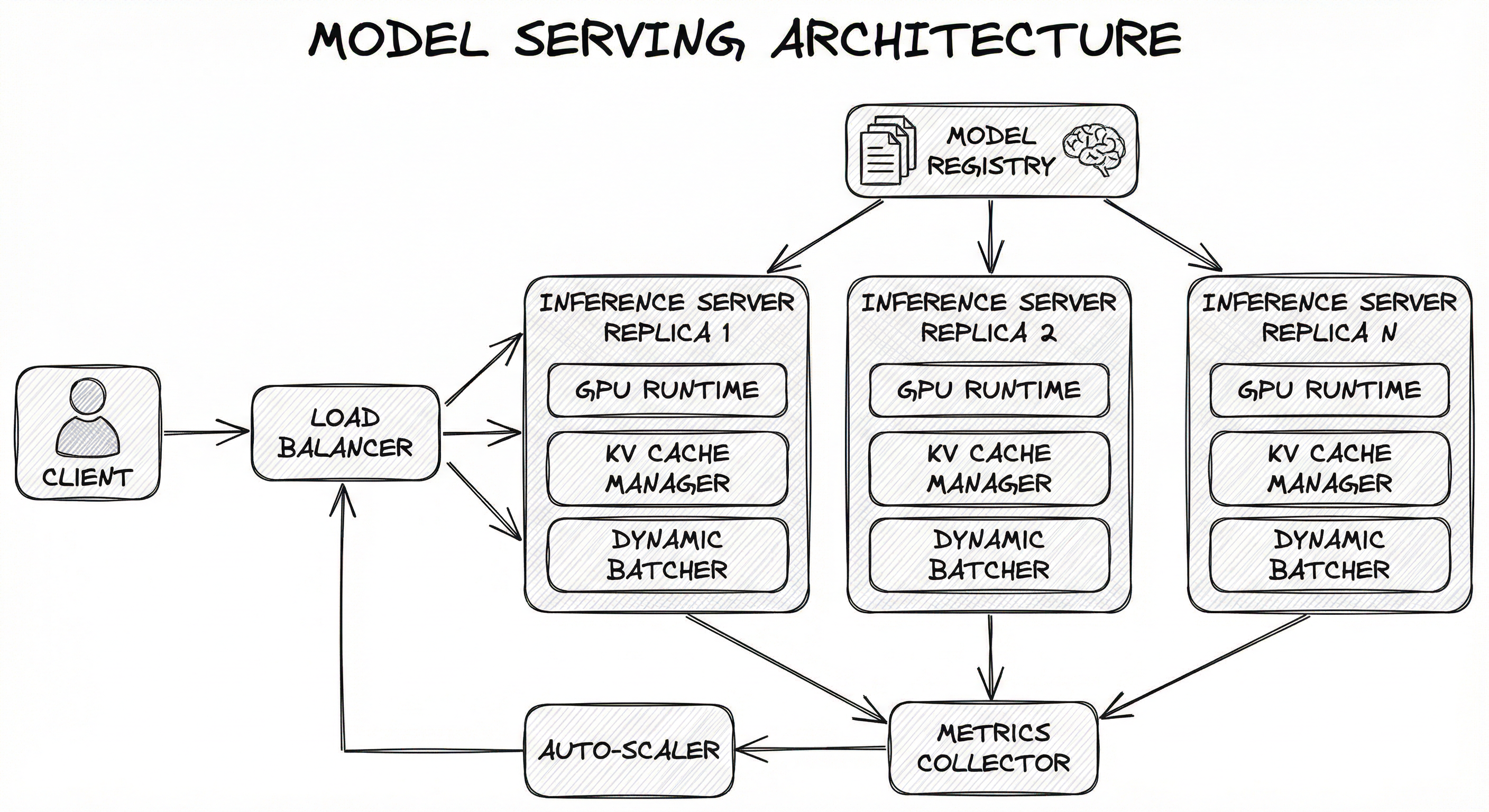
The data flow for a real-time request looks like this: the client sends a request to the load balancer, which routes it to an available replica. The replica's dynamic batcher accumulates the request with others (waiting up to a configurable window, typically 5-50ms). Once a batch is formed, it's sent to the GPU runtime for inference. For LLMs, the KV cache manager allocates memory for the new sequence and the continuous batcher interleaves prefill and decode operations. The result is returned to the client, and metrics (latency, GPU utilization, queue depth) are emitted to the metrics collector, which feeds the auto-scaler.
Key Components
Load Balancer
Distributes incoming inference requests across serving replicas. Can be a simple round-robin (NGINX, Envoy) or an intelligent router that considers GPU utilization, queue depth, or even KV cache locality (vLLM Router). For LLM workloads, prefix-aware routing can yield 3-10x latency improvements by directing requests to replicas that already have relevant KV cache entries.
Inference Server
The core process that loads model artifacts, accepts requests, executes inference on hardware accelerators, and returns predictions. Examples: NVIDIA Triton, vLLM, TorchServe, TensorFlow Serving, BentoML. Handles model warm-up, health checks, and graceful shutdown.
Dynamic Batcher
Accumulates individual requests into batches to exploit GPU parallelism. Configurable parameters include maximum batch size, maximum wait time (batching window), and preferred batch sizes. For LLMs, continuous batching (iteration-level scheduling from the Orca paper) replaces traditional static batching -- sequences are added and removed at the granularity of each decode step rather than waiting for the entire batch to finish.
GPU Runtime / Backend
Executes the actual model computation on GPU (or CPU/TPU). May use optimized runtimes like TensorRT, ONNX Runtime, or custom CUDA kernels. Manages GPU memory allocation, kernel launch, and multi-GPU distribution (tensor parallelism, pipeline parallelism).
KV Cache Manager
Specific to LLM serving. Manages the key-value cache that stores intermediate attention states during autoregressive generation. vLLM's PagedAttention allocates KV cache in non-contiguous blocks (like OS virtual memory pages), reducing fragmentation from ~60% to near-zero and enabling 2-4x higher throughput.
Model Store / Registry
Provides versioned model artifacts (weights, configs, tokenizers) to inference servers. Typically backed by S3, GCS, Azure Blob Storage, or a model registry like MLflow. Supports model versioning, A/B testing, and rollback.
Auto-Scaler
Monitors serving metrics and adjusts replica count. Kubernetes HPA (Horizontal Pod Autoscaler) with custom GPU metrics (utilization, queue depth) is the standard approach. For GPU workloads, scale-up should be aggressive (0s stabilization) and scale-down conservative (10min stabilization) to avoid unnecessary pod churn and cold-start overhead.
Metrics Collector
Captures serving telemetry: latency (P50, P95, P99), throughput (QPS), GPU utilization, memory usage, queue depth, error rates, and model-specific metrics (tokens per second for LLMs). Feeds dashboards (Grafana) and alerting systems.
Data Flow
Real-time path: Client -> Load Balancer -> Inference Server -> Dynamic Batcher (accumulates for up to N ms) -> GPU Runtime -> Post-processing -> Response back to client. Total latency budget: typically 50-500ms for traditional ML, 1-10s for LLM generation.
Batch path: Scheduler triggers batch job -> reads input data from storage -> inference server processes large batches (thousands of items) -> writes predictions to output storage (database, S3, feature store). Optimized for throughput, not latency.
Model update path: New model version registered in Model Store -> Inference Server polls for updates (or receives webhook) -> loads new model alongside old version -> health check passes -> traffic gradually shifted (canary) -> old model unloaded.
Scaling path: Metrics Collector reports high GPU utilization / queue depth -> Auto-Scaler increases replica count -> new pods pull model from Model Store -> warm-up inference -> Load Balancer adds new replicas to rotation.
A directed architecture diagram showing: Client Application connects to Load Balancer, which fans out to N Inference Server Replicas. Each replica contains a GPU Runtime, KV Cache Manager, and Dynamic Batcher. A Model Registry feeds model artifacts to all replicas. An Auto-Scaler reads from a Metrics Collector (which receives data from all replicas) and adjusts the Load Balancer configuration.
How to Implement
Choosing Your Serving Stack
The serving landscape in 2025-2026 breaks into three tiers:
Tier 1: Purpose-built LLM engines -- vLLM, TensorRT-LLM (via Triton), and SGLang. These are optimized specifically for autoregressive generation with features like PagedAttention, continuous batching, and speculative decoding. If you're serving an LLM, start here.
Tier 2: General-purpose inference servers -- NVIDIA Triton, TorchServe, TensorFlow Serving, BentoML. These handle any model type (vision, NLP, tabular, ensembles) with framework-agnostic backends, dynamic batching, and model management. Triton is the industry standard for multi-framework GPU serving.
Tier 3: Managed platforms -- AWS SageMaker, Google Vertex AI, Azure ML. These abstract away infrastructure entirely. You upload a model, configure an endpoint, and the platform handles scaling, monitoring, and hardware. Higher cost, lower operational burden.
For a startup in Bengaluru building a chatbot, vLLM on a single GPU might be perfect -- zero infrastructure overhead, excellent throughput, and you can run it for ~INR 70,000/month ($830/month) on a cloud A100. For an enterprise like Flipkart running 60+ ML models across multiple frameworks, Triton behind a Kubernetes cluster with custom auto-scaling is the way to go.
Model Optimization Before Serving
Before you even think about the serving framework, optimize the model itself. The three pillars of model optimization are:
-
Quantization: Reduce numerical precision (FP32 -> FP16 -> INT8 -> INT4). INT8 post-training quantization (PTQ) typically preserves >99% accuracy while halving memory and doubling throughput. For LLMs, GPTQ and AWQ methods enable INT4 quantization with minimal quality loss.
-
Knowledge Distillation: Train a smaller "student" model to mimic a larger "teacher" model. Can achieve 5-50x size reduction while retaining 90-95% of the teacher's performance on the target task. This is becoming the most important technique in production AI -- companies like OpenAI, Anthropic, and Cohere all ship distilled models.
-
Pruning: Remove redundant weights or attention heads. Structured pruning can reduce model size by 2-10x. Most effective when combined with fine-tuning after pruning.
Cost Insight: On an NVIDIA T4 GPU (INR 22,000-28,000/month or ~340/month on cloud), an INT8-quantized BERT model can serve ~3,000 QPS at P99 < 10ms. The same model in FP32 on a T4 serves ~800 QPS. That's a 3.75x throughput improvement for free -- no quality loss, no hardware upgrade.
from vllm import LLM, SamplingParams
from vllm.entrypoints.openai.api_server import app
import uvicorn

# Option 1: Programmatic usage
llm = LLM(
    model="meta-llama/Llama-3.1-8B-Instruct",
    tensor_parallel_size=1,      # number of GPUs
    max_model_len=4096,
    gpu_memory_utilization=0.90, # reserve 10% for overhead
    quantization="awq",          # use AWQ INT4 quantization
    enforce_eager=False,         # enable CUDA graphs for speed
)

sampling_params = SamplingParams(
    temperature=0.7,
    top_p=0.9,
    max_tokens=512,
)

prompts = ["Explain model serving in one paragraph."]
outputs = llm.generate(prompts, sampling_params)

for output in outputs:
    print(output.outputs[0].text)

# Option 2: Launch OpenAI-compatible server (CLI)
# python -m vllm.entrypoints.openai.api_server \
#   --model meta-llama/Llama-3.1-8B-Instruct \
#   --tensor-parallel-size 1 \
#   --max-model-len 4096 \
#   --quantization awq \
#   --port 8000
vLLM is the dominant open-source LLM serving engine, powering inference at Meta, Stripe, IBM, and many others. The LLM class handles model loading, PagedAttention-based KV cache management, and continuous batching automatically. The --quantization awq flag enables INT4 quantization, reducing memory from ~16 GB to ~4 GB for an 8B model, allowing it to fit on a single T4 (16 GB). The OpenAI-compatible API server means you can swap in vLLM behind any application already using the OpenAI SDK.
# model_repository/
# └── bert_classifier/
#     ├── config.pbtxt
#     └── 1/
#         └── model.onnx

# config.pbtxt for the BERT classifier model
"""
name: "bert_classifier"
platform: "onnxruntime_onnx"
max_batch_size: 64

input [
  {
    name: "input_ids"
    data_type: TYPE_INT64
    dims: [512]
  },
  {
    name: "attention_mask"
    data_type: TYPE_INT64
    dims: [512]
  }
]

output [
  {
    name: "logits"
    data_type: TYPE_FP32
    dims: [3]
  }
]

dynamic_batching {
  preferred_batch_size: [8, 16, 32]
  max_queue_delay_microseconds: 50000
}

instance_group [
  {
    count: 2
    kind: KIND_GPU
    gpus: [0]
  }
]
"""

# Client code to query Triton
import tritonclient.grpc as grpcclient
import numpy as np

client = grpcclient.InferenceServerClient(url="localhost:8001")

input_ids = grpcclient.InferInput("input_ids", [1, 512], "INT64")
attention_mask = grpcclient.InferInput("attention_mask", [1, 512], "INT64")

input_ids.set_data_from_numpy(np.ones([1, 512], dtype=np.int64))
attention_mask.set_data_from_numpy(np.ones([1, 512], dtype=np.int64))

result = client.infer(
    model_name="bert_classifier",
    inputs=[input_ids, attention_mask],
)

logits = result.as_numpy("logits")
print(f"Predicted class: {np.argmax(logits)}")
NVIDIA Triton is the Swiss Army knife of model serving -- it supports TensorRT, PyTorch, TensorFlow, ONNX, and Python backends, all managed from a single server process. The config.pbtxt file defines the model's interface and serving behavior. dynamic_batching with max_queue_delay_microseconds: 50000 means Triton will wait up to 50ms to accumulate requests into a batch of up to 64, dramatically improving GPU utilization. The instance_group with count: 2 runs two model instances on GPU 0, enabling concurrent execution. Uber switched their entire Michelangelo platform to Triton for serving deep learning models.
# Step 1: Create a handler (handler.py)
import torch
from ts.torch_handler.base_handler import BaseHandler
import json

class SentimentHandler(BaseHandler):
    def preprocess(self, data):
        """Tokenize incoming text."""
        texts = []
        for row in data:
            input_text = row.get("data") or row.get("body")
            if isinstance(input_text, (bytes, bytearray)):
                input_text = input_text.decode("utf-8")
            texts.append(input_text)

        inputs = self.tokenizer(
            texts,
            padding=True,
            truncation=True,
            max_length=128,
            return_tensors="pt",
        )
        return inputs.to(self.device)

    def inference(self, inputs):
        """Run forward pass."""
        with torch.no_grad():
            outputs = self.model(**inputs)
        return outputs.logits

    def postprocess(self, outputs):
        """Convert logits to predictions."""
        probs = torch.softmax(outputs, dim=-1)
        predictions = []
        for prob in probs:
            pred_class = torch.argmax(prob).item()
            confidence = prob[pred_class].item()
            predictions.append({
                "class": pred_class,
                "confidence": round(confidence, 4)
            })
        return predictions

# Step 2: Package the model
# torch-model-archiver --model-name sentiment \
#   --version 1.0 \
#   --serialized-file model.pt \
#   --handler handler.py \
#   --extra-files "tokenizer/" \
#   --export-path model_store/

# Step 3: Start TorchServe
# torchserve --start --model-store model_store \
#   --models sentiment=sentiment.mar \
#   --ts-config config.properties

# Step 4: Query
# curl -X POST http://localhost:8080/predictions/sentiment \
#   -H "Content-Type: application/json" \
#   -d '{"data": "This product is amazing!"}'
TorchServe is developed jointly by AWS and Meta (PyTorch team). It uses the .mar (Model Archive) format to bundle model weights, handler code, and dependencies into a single deployable artifact. The handler pattern (preprocess -> inference -> postprocess) gives you full control over the serving pipeline. TorchServe supports multi-model serving, request batching, model versioning, and integrates with Kubernetes via KServe. Its main limitation compared to Triton is that it only supports PyTorch models.
import bentoml
import numpy as np
from bentoml.io import JSON, NumpyNdarray

# Save a trained model to BentoML's model store
import sklearn.ensemble
model = sklearn.ensemble.RandomForestClassifier()
# ... train model ...
bentoml.sklearn.save_model("fraud_detector", model)

# Define the serving service
@bentoml.service(
    resources={"cpu": "2", "memory": "4Gi"},
    traffic={"timeout": 30, "max_concurrency": 50},
)
class FraudDetectionService:
    fraud_model = bentoml.models.get("fraud_detector:latest")

    def __init__(self):
        self.model = bentoml.sklearn.load_model(self.fraud_model)

    @bentoml.api
    def predict(self, features: np.ndarray) -> dict:
        """Predict fraud probability for a transaction."""
        probabilities = self.model.predict_proba(features)
        predictions = self.model.predict(features)
        return {
            "prediction": int(predictions[0]),
            "fraud_probability": float(probabilities[0][1]),
            "threshold": 0.5,
        }

    @bentoml.api
    def health(self) -> dict:
        return {"status": "healthy", "model_version": str(self.fraud_model.tag)}

# Build and containerize
# bentoml build
# bentoml containerize fraud_detection_service:latest

# Run locally
# bentoml serve fraud_detection_service:latest
BentoML stands out for its developer experience -- it bridges the gap between a Python script and a production container with minimal boilerplate. The @bentoml.service decorator configures resources and traffic handling. The bentoml build command packages everything into a Bento (a standardized OCI-compatible artifact), and bentoml containerize generates a production Docker image. BentoML supports adaptive batching, multi-model inference graphs, GPU scheduling, and scale-to-zero on its managed platform (BentoCloud). Particularly popular with teams that want the simplicity of Flask with production-grade features.
import boto3
import sagemaker
from sagemaker.huggingface import HuggingFaceModel

sagemaker_session = sagemaker.Session()
role = sagemaker.get_execution_role()

# Deploy a HuggingFace model to a SageMaker endpoint
hf_model = HuggingFaceModel(
    model_data="s3://my-bucket/model/model.tar.gz",
    role=role,
    transformers_version="4.37",
    pytorch_version="2.1",
    py_version="py310",
    env={
        "HF_MODEL_ID": "distilbert-base-uncased-finetuned-sst-2-english",
        "HF_TASK": "text-classification",
    },
)

predictor = hf_model.deploy(
    initial_instance_count=1,
    instance_type="ml.g5.xlarge",  # ~$1.41/hr (~INR 118/hr)
    endpoint_name="sentiment-endpoint",
)

# Configure auto-scaling
client = boto3.client("application-autoscaling")

client.register_scalable_target(
    ServiceNamespace="sagemaker",
    ResourceId=f"endpoint/sentiment-endpoint/variant/AllTraffic",
    ScalableDimension="sagemaker:variant:DesiredInstanceCount",
    MinCapacity=1,
    MaxCapacity=10,
)

client.put_scaling_policy(
    PolicyName="gpu-utilization-scaling",
    ServiceNamespace="sagemaker",
    ResourceId=f"endpoint/sentiment-endpoint/variant/AllTraffic",
    ScalableDimension="sagemaker:variant:DesiredInstanceCount",
    PolicyType="TargetTrackingScaling",
    TargetTrackingScalingPolicyConfiguration={
        "TargetValue": 70.0,
        "CustomizedMetricSpecification": {
            "MetricName": "GPUUtilization",
            "Namespace": "/aws/sagemaker/Endpoints",
            "Statistic": "Average",
        },
        "ScaleInCooldown": 600,
        "ScaleOutCooldown": 60,
    },
)

# Test the endpoint
result = predictor.predict({"inputs": "This product is excellent!"})
print(result)
AWS SageMaker abstracts away the entire serving infrastructure -- no Kubernetes, no Docker builds, no load balancer configuration. You pay per second of endpoint uptime. The auto-scaling policy targets 70% GPU utilization with aggressive scale-out (60s cooldown) and conservative scale-in (600s cooldown). An ml.g5.xlarge instance costs ~1,030/month (~INR 86,500/month) for a single always-on endpoint. SageMaker also offers serverless inference (pay only during inference, scale to zero) and asynchronous inference for long-running predictions.
# Kubernetes deployment for vLLM with HPA auto-scaling
apiVersion: apps/v1
kind: Deployment
metadata:
  name: llm-serving
spec:
  replicas: 2
  template:
    spec:
      containers:
      - name: vllm
        image: vllm/vllm-openai:latest
        args:
          - --model=meta-llama/Llama-3.1-8B-Instruct
          - --tensor-parallel-size=1
          - --max-model-len=4096
          - --gpu-memory-utilization=0.90
          - --quantization=awq
        resources:
          limits:
            nvidia.com/gpu: 1
            memory: 24Gi
        ports:
          - containerPort: 8000
        readinessProbe:
          httpGet:
            path: /health
            port: 8000
          initialDelaySeconds: 120
          periodSeconds: 10
        livenessProbe:
          httpGet:
            path: /health
            port: 8000
          initialDelaySeconds: 180
          periodSeconds: 30
---
apiVersion: autoscaling/v2
kind: HorizontalPodAutoscaler
metadata:
  name: llm-serving-hpa
spec:
  scaleTargetRef:
    apiVersion: apps/v1
    kind: Deployment
    name: llm-serving
  minReplicas: 2
  maxReplicas: 20
  metrics:
  - type: Pods
    pods:
      metric:
        name: vllm_num_requests_waiting
      target:
        type: AverageValue
        averageValue: 5
  behavior:
    scaleUp:
      stabilizationWindowSeconds: 0
      policies:
      - type: Pods
        value: 4
        periodSeconds: 60
    scaleDown:
      stabilizationWindowSeconds: 600
      policies:
      - type: Pods
        value: 1
        periodSeconds: 120
Common Implementation Mistakes
- ●
No model warm-up: Loading a model and immediately serving traffic causes the first N requests to suffer 5-50x higher latency (GPU kernel compilation, memory allocation, JIT compilation). Always run warm-up inferences before accepting production traffic. Triton and TorchServe support this natively via configuration.
- ●
Static batching for LLMs: Using traditional static batching (wait for all sequences in a batch to complete) wastes GPU cycles when sequences have different lengths. A 10-token response and a 500-token response in the same batch means the GPU sits idle for 490 tokens on the short sequence. Use continuous batching (iteration-level scheduling) instead.
- ●
Ignoring the prefill-decode asymmetry: LLM prefill is compute-bound and fast; decode is memory-bandwidth-bound and slow. Treating them identically leads to suboptimal scheduling. Modern systems like Splitwise and Distserv disaggregate prefill and decode onto different hardware configurations.
- ●
Over-provisioning GPU memory: Setting
gpu_memory_utilizationto 1.0 in vLLM leaves no headroom for transient allocations, causing OOM crashes under load. Always reserve 10-15% (use 0.85-0.90). This one will hit you in production at 2 AM. - ●
Skipping quantization: Serving a 7B model in FP32 (28 GB) when INT8 (7 GB) gives essentially the same quality is throwing money away. Always benchmark quantized versions against your evaluation set before deploying the full-precision model.
- ●
Missing health checks and readiness probes: Kubernetes will route traffic to pods that are still loading the model (which can take 30-120 seconds for large models) unless you configure proper readiness probes. This causes a wave of timeouts after every scaling event.
- ●
Single model instance per GPU: Running one model instance on a GPU that's only 30% utilized wastes 70% of your investment. Use Triton's
instance_groupor run multiple vLLM workers to co-locate models on the same GPU when they have complementary resource profiles.
When Should You Use This?
Use When
Your ML model needs to serve predictions in real-time (sub-second latency) to end users -- recommendation engines, chatbots, fraud detection, search ranking
You're deploying LLMs and need efficient GPU memory management with continuous batching and PagedAttention
Multiple models with different frameworks (PyTorch, TensorFlow, ONNX) need to be served from the same infrastructure
You need auto-scaling that responds to GPU-specific metrics (utilization, queue depth, KV cache occupancy) rather than just CPU/memory
Model versioning and A/B testing are requirements -- you need to run multiple model versions simultaneously with traffic splitting
Your serving workload requires dynamic batching to maximize GPU utilization under variable load
You need canary deployments to safely roll out model updates without risking full traffic
Avoid When
Your model runs infrequently (< 100 predictions/day) -- a simple serverless function (Lambda, Cloud Functions) is cheaper and simpler. Don't bring a Triton server to a Lambda fight.
Predictions can be pre-computed in batch and served from a cache or database -- batch inference with a cron job is 10-100x cheaper than maintaining always-on GPU endpoints
Your model is tiny (< 100 MB) and CPU inference meets latency requirements -- a FastAPI service with ONNX Runtime on a $20/month VM is perfectly adequate
You're in the prototyping phase and need to iterate quickly -- the overhead of setting up Triton or KServe will slow you down. Start with BentoML or a simple Flask wrapper.
Your team has no Kubernetes experience and no DevOps support -- managed platforms (SageMaker, Vertex AI) are a better fit despite higher per-unit cost
The model is embedded in a mobile or edge device -- model serving is a server-side pattern; for edge, use TensorFlow Lite, Core ML, or ONNX Runtime Mobile
Key Tradeoffs
Self-hosted vs. Managed: The Central Decision
The biggest architectural decision is whether to self-host (Triton, vLLM on Kubernetes) or use a managed platform (SageMaker, Vertex AI).
| Factor | Self-hosted | Managed (SageMaker/Vertex) |
|---|---|---|
| Cost at scale | 2-5x cheaper | Premium pricing |
| Operational burden | High (SRE needed) | Low (platform handles) |
| Customization | Full control | Limited to platform APIs |
| Cold start | You manage warm pools | Platform manages (variable) |
| GPU efficiency | Can co-locate models | One model per endpoint |
| Setup time | Days to weeks | Hours |
For a Bengaluru startup with 2 ML engineers, SageMaker at ~INR 86,500/month ($1,030/month) per endpoint is probably the right call -- the engineering time saved is worth more than the cost premium. For Flipkart running 60+ models at scale, self-hosted Triton on Kubernetes is 3-5x more cost-effective.
Batch vs. Real-time: Knowing When to Pre-compute
The most cost-effective serving strategy is often a hybrid: pre-compute what you can in batch, personalize in real-time.
- Batch: Daily recommendations, periodic risk scores, embedding pre-computation. Cost: ~$0.02-0.05 per 1000 inferences on spot instances.
- Real-time: Click-time ranking, fraud detection, conversational AI. Cost: ~$0.10-1.00 per 1000 inferences on dedicated GPU endpoints.
That's a 20-50x cost difference. If 80% of your predictions can be pre-computed, you've just cut your serving bill by 80%.
Quantization: The Free Lunch (Almost)
INT8 quantization is the closest thing to a free lunch in ML serving. For most models:
- Memory: 2x reduction (FP16 -> INT8)
- Throughput: 1.5-2x improvement
- Quality: <1% degradation on most benchmarks
INT4 is more aggressive: 4x memory reduction but 2-5% quality loss. Worth it for cost-sensitive deployments, not for quality-critical applications.
Rule of Thumb: Always try INT8 first. If quality is acceptable, deploy it. If not, try FP16. Only use FP32 if you have a specific numerical stability requirement.
Alternatives & Comparisons
Serverless inference scales to zero and charges only per invocation, making it ideal for sporadic, low-volume workloads (< 100 QPS). However, cold starts (5-30 seconds for large models), limited memory (10 GB max on Lambda), and no GPU support make it unsuitable for latency-sensitive or GPU-dependent workloads. Choose serverless for lightweight CPU models with bursty traffic; choose dedicated model serving for anything that needs GPUs or consistent latency.
Batch inference processes large datasets offline with no latency requirement, using frameworks like Spark or simple job schedulers. It's 10-100x cheaper than real-time serving for high-volume, non-interactive workloads. Choose batch inference for pre-computing recommendations, periodic scoring, or data enrichment pipelines. Choose real-time serving when the prediction must be generated at request time using fresh features.
Edge inference runs models directly on user devices (mobile, IoT, browsers), eliminating network latency and server costs entirely. However, models must be aggressively optimized (quantized, pruned) to fit device constraints, and updates require app deployments. Choose edge for privacy-sensitive or ultra-low-latency applications (face detection, keyboard prediction); choose server-side serving when you need large models, centralized updates, or cross-device consistency.
Store pre-computed predictions in a feature store (Redis, DynamoDB) and serve them as simple key-value lookups with sub-1ms latency. This is the cheapest and fastest serving pattern but only works when predictions can be computed ahead of time and the feature space is enumerable. Choose this for user-level recommendations or segment-level scores; choose model serving when predictions depend on real-time context that can't be pre-computed.
Pros, Cons & Tradeoffs
Advantages
GPU utilization optimization: Dynamic batching, continuous batching, and multi-model co-location can push GPU utilization from 10-20% (naive serving) to 70-90%, extracting maximum value from expensive hardware. At $3-4/hour per A100, this is the difference between a viable and a bankrupt serving strategy.
Model-agnostic deployment: Frameworks like Triton and BentoML serve PyTorch, TensorFlow, ONNX, XGBoost, and custom Python models from a single infrastructure, eliminating the need for per-framework deployment pipelines.
Automatic scaling: Integration with Kubernetes HPA or managed platform auto-scaling means your serving layer can handle 10x traffic spikes (Diwali sale on Flipkart, IPL finale on Hotstar) without manual intervention.
Model versioning and canary deployment: Serving frameworks enable A/B testing, shadow mode, and gradual rollout of new model versions, reducing the blast radius of a bad model update from 100% to 1-5% of traffic.
Standardized observability: Built-in Prometheus metrics, OpenTelemetry integration, and health check endpoints provide the monitoring foundation that SRE teams need to maintain reliability SLOs.
LLM-specific optimizations: PagedAttention, speculative decoding, and prefix caching in engines like vLLM deliver 2-4x throughput improvements over naive serving, making LLM deployment economically feasible.
Disadvantages
Infrastructure complexity: Running Triton on Kubernetes with auto-scaling, model versioning, and monitoring requires significant platform engineering expertise. A misconfigured readiness probe can bring down your entire serving cluster.
Cold start latency: Loading a large model into GPU memory takes 30-120 seconds. Scaling from 0 to 1 or from 2 to 3 replicas introduces a window where requests queue or timeout. ReadWriteMany persistent volumes help but add storage complexity.
GPU cost: Always-on GPU endpoints are expensive. A single A100-80GB instance runs ~INR 2.5-3.5 lakh/month (4,200/month). Without careful capacity planning, serving costs can exceed training costs by 10x.
Vendor lock-in with managed platforms: SageMaker endpoints are tightly coupled to the AWS ecosystem. Migrating to GCP or self-hosted requires rewriting deployment pipelines, scaling configs, and monitoring.
Configuration tuning overhead: Optimal batch sizes, batching windows, instance counts, and model parallelism strategies vary by model, hardware, and traffic pattern. There's no one-size-fits-all configuration -- you must benchmark for your specific workload.
Model update coordination: Updating a serving model requires coordinating model registry, serving infrastructure, and monitoring. A model that passes offline evaluation but degrades online metrics (data drift, feature skew) needs rapid rollback capability.
Failure Modes & Debugging
GPU Out-of-Memory (OOM) under load
Cause
Batch size or concurrent request count exceeds GPU memory capacity. For LLMs, this is often caused by the KV cache growing beyond available memory when too many long sequences are processed concurrently. Setting gpu_memory_utilization too high leaves no headroom for transient allocations.
Symptoms
CUDA OOM errors, container restarts (CrashLoopBackOff in Kubernetes), sudden latency spikes followed by complete unavailability. Prometheus metrics show GPU memory at 100% right before the crash.
Mitigation
Set gpu_memory_utilization to 0.85-0.90. Configure max_model_len to limit maximum sequence length. Use vLLM's automatic preemption (swapping long sequences to CPU memory when GPU memory is tight). Implement request-level memory estimation and reject requests that would exceed the budget. Monitor GPU memory as a leading indicator, not just GPU utilization.
Cold start cascade on scale-up
Cause
Auto-scaler adds new replicas during a traffic spike, but model loading takes 60-120 seconds. During this window, existing replicas are overwhelmed, causing timeouts that trigger even more scale-up events. The new replicas are still loading when the next wave of scale-up starts.
Symptoms
Exponentially growing replica count, widespread request timeouts during the loading window, followed by massive over-provisioning once all replicas come online. CloudWatch or Grafana shows a staircase pattern of replica count with a latency spike at each step.
Mitigation
Use ReadWriteMany (RWX) persistent volumes so model weights are pre-cached on shared storage instead of downloaded per pod (cuts loading from 5-10 minutes to 30-60 seconds). Maintain a minimum replica count that handles normal traffic without scaling. Configure initialDelaySeconds on readiness probes to match actual model loading time. Consider warm pools (pre-provisioned but idle replicas) for latency-critical services.
Silent model quality degradation
Cause
The serving model silently receives features in a different format, range, or order than the training model expected. Common causes: feature pipeline change without model retraining, schema drift between feature store and serving code, or numeric precision differences between training (FP32) and serving (INT8).
Symptoms
No errors in logs -- the model returns predictions that look plausible but are systematically wrong. Business metrics (CTR, conversion, revenue) gradually decline. Online A/B tests show the model underperforming the control group.
Mitigation
Implement feature validation at the serving boundary (schema checks, range checks). Deploy shadow mode for new models (run alongside the current model, compare outputs without serving to users). Monitor prediction distribution over time -- if the distribution shifts without a model update, something upstream has changed. Log a sample of request-response pairs for offline analysis.
Batch inference timeout / starvation
Cause
Dynamic batching configured with too-large batch sizes or too-long batching windows. Under low traffic, requests wait for a batch that never fills, adding unnecessary latency. Under high traffic, large batches take too long to process, causing downstream timeouts.
Symptoms
Bimodal latency distribution: some requests complete quickly (full batch), others timeout (incomplete batch waiting). During low-traffic hours, P99 latency spikes because requests wait for the batching window to expire.
Mitigation
Set max_queue_delay_microseconds to a value that respects your latency SLO (e.g., 50ms delay means batch adds 50ms to the worst-case latency). Use preferred_batch_size to hint the batcher toward efficient batch sizes. Implement a minimum batch trigger: if the batching window expires with fewer requests than preferred_batch_size, process whatever is available immediately.
Canary deployment gone wrong
Cause
A new model version is deployed as a canary (1-5% traffic) but the evaluation metrics are too noisy or too slow to detect a regression at low traffic volume. The canary is promoted to full traffic before the regression is detected.
Symptoms
Business metrics (revenue, engagement) drop after full promotion. Rollback is triggered hours or days later, but the damage is already done. Post-mortem reveals the canary had a slightly lower conversion rate, but the sample size was too small for statistical significance.
Mitigation
Calculate minimum canary duration based on expected effect size and traffic volume. For a 1% canary receiving 10,000 requests/day, you need ~7 days to detect a 2% regression with 95% confidence. Use sequential testing (not fixed-duration A/B tests) for faster detection. Gate promotion on both statistical significance and business metric thresholds. Always have a one-click rollback mechanism.
Request queuing death spiral
Cause
Inference throughput drops below arrival rate (due to GPU throttling, memory pressure, or a suddenly-popular model). Requests queue up. Queue processing adds overhead, further reducing throughput. Latency increases, causing clients to retry, further increasing arrival rate.
Symptoms
Exponentially increasing queue depth. Latency goes from P99 = 200ms to P99 = 30s within minutes. Client-side retry storms amplify the problem. The serving cluster appears to be processing requests but nothing completes in time.
Mitigation
Implement load shedding: reject requests with HTTP 429 when queue depth exceeds a threshold (e.g., 2x normal). Configure client-side retry with exponential backoff and jitter (not immediate retries). Set max_queue_size on the inference server. Use a rate limiter upstream of the serving layer. Monitor queue depth as a leading indicator and alert before the spiral starts.
Placement in an ML System
The Final Mile of the ML Pipeline
Model serving is the final and most visible stage of the ML pipeline. Upstream, the model registry provides versioned model artifacts after training and evaluation. The feature store provides real-time features that the model needs at inference time. Together, these form the inputs to the serving layer.
Downstream, the serving layer feeds into metrics collection (latency, throughput, error rates), which in turn drives the monitoring and alerting system. The load balancer sits in front of the serving layer, distributing traffic across replicas. The rate limiter protects the serving layer from abuse or unexpected traffic spikes. Canary deployment mechanisms control how traffic is shifted between model versions.
The serving layer is also the primary cost center in most production ML systems. While training is a one-time (or periodic) expense, serving is continuous. For companies like Uber (10 million predictions per second at peak) or Swiggy (5,000+ predictions per second per model), the serving infrastructure cost can dwarf training costs by 10-100x over the model's lifetime.
Key Insight: Optimizing serving cost (through quantization, batching, auto-scaling, and spot instances for batch workloads) often has a bigger impact on the total cost of ownership than optimizing training efficiency.
Pipeline Stage
Serving / Deployment
Upstream
- model-registry
- model-training
- feature-store
Downstream
- metrics-collector
- load-balancer
- rate-limiter
- canary-deploy
Scaling Bottlenecks
The primary bottleneck is GPU memory, not GPU compute. Modern GPUs (A100, H100) have enormous compute capacity but relatively limited memory (40-80 GB). A 70B-parameter LLM in FP16 needs 140 GB of GPU memory just for weights -- already requiring at least two A100-80GB GPUs before you even account for KV cache and activations.
The second bottleneck is GPU memory bandwidth during LLM decode. Autoregressive generation is memory-bandwidth-bound: each token requires loading the entire model weights from GPU HBM. An A100 has 2 TB/s memory bandwidth, which limits decode throughput to ~100-200 tokens/second for a 70B model regardless of batch size.
The third bottleneck is cold start time. Loading a 14 GB model from S3 to GPU memory takes 30-120 seconds depending on network bandwidth. At scale, this means auto-scaling events have a significant warm-up penalty that must be accounted for in capacity planning.
Some concrete numbers: a single A100-80GB can serve a Llama 3.1 8B model (AWQ INT4) at ~2,500 tokens/second with batch size 32, handling roughly 50-80 concurrent requests. Scaling to 1,000 concurrent users requires approximately 15-20 A100 GPUs, costing ~INR 37-70 lakh/month (85,000/month) on cloud.
Production Case Studies
Uber's Michelangelo platform manages over 5,000 models in production, serving 10 million predictions per second at peak. They migrated from their custom Neuropod serving layer to NVIDIA Triton Inference Server for deep learning models, citing Triton's native support for TensorFlow and PyTorch backends. The platform supports both real-time serving (ETA prediction, surge pricing) and batch inference (driver-rider matching optimization). Over 20,000 model training jobs run monthly.
Triton adoption reduced serving latency by ~30% for deep learning models and simplified the deployment pipeline by eliminating the need for framework-specific serving code. The platform now supports the transition from predictive ML to generative AI workloads.
Swiggy's Data Science Platform (DSP) serves ML predictions for order assignment, delivery time estimation, and search ranking. The order-assignment flow involves multiple ML models that must run in a batch for every (order, delivery executive) pair in a city, with city-level batch jobs triggering at configured intervals. A single API call can fan out to hundreds of prediction calls.
Achieved over 5,000 peak predictions per second for a single model with P99 latency of 71ms (batch size 30), a 2x latency improvement from the previous 144ms P99. This optimization directly improved order-assignment quality by allowing more frequent batch jobs.
Stripe migrated their LLM inference stack to vLLM, processing 50 million daily API calls for fraud detection, document understanding, and merchant support automation. The migration involved replacing their previous HuggingFace-based serving setup with vLLM's PagedAttention and continuous batching.
Achieved a 73% inference cost reduction by running on 1/3 of the previous GPU fleet while maintaining the same throughput and latency targets. This translates to millions of dollars in annual savings at Stripe's scale.
Netflix's ML Platform supports diverse serving patterns across recommendation, content understanding, and experimentation. Their architecture separates heavy computation (model training, batch feature engineering) from low-latency serving through microservices. Each serving environment has tunable "knobs" for model latency, data freshness, caching policies, and execution parallelism. They are currently transitioning from domain-specific serving to a unified, domain-agnostic serving platform.
The unified platform supports both real-time inference and batch processing for 200+ million members, with per-model latency tuning that balances freshness against serving cost.
Flipkart runs 60+ ML models on their data platform, serving real-time predictions for product search ranking, personalized recommendations, fraud detection, and image-based product matching. Their platform ingests 10-50 TB of raw data daily and supports near-real-time decision parameters with under 2 minutes latency. ML models are served through a combination of online endpoints (for real-time personalization) and batch inference (for catalog-level scoring).
ML-powered search ranking and recommendations contribute significantly to Flipkart's GMV, with the serving infrastructure handling peak loads during Big Billion Days sale events (10-50x normal traffic).
Tooling & Ecosystem
High-throughput LLM serving engine with PagedAttention for efficient KV cache management and continuous batching. Supports OpenAI-compatible API, tensor parallelism, quantization (GPTQ, AWQ, FP8), speculative decoding, and prefix caching. The dominant open-source LLM serving engine -- powers inference at Meta, Stripe, IBM, and Cohere. The vLLM Production Stack includes a Rust-based router for Kubernetes deployments with 3-10x latency improvements.
Industry-standard multi-framework inference server supporting TensorRT, PyTorch, TensorFlow, ONNX, and Python backends. Features dynamic batching, model ensembles, concurrent model execution, and GPU/CPU scheduling. Recently rebranded to Dynamo-Triton. Used by Uber, LinkedIn, and American Express for production serving.
Official PyTorch model serving framework, developed by AWS and Meta. Supports model archiving (.mar format), multi-model serving, request batching, model versioning, and metrics. Integrates with KServe for Kubernetes deployments. Best for PyTorch-only shops that want a simple, well-supported serving solution.
High-performance serving system for TensorFlow models using the SavedModel format. Features request batching with configurable latency controls, model versioning with automatic version management, and gRPC/REST APIs. Mature and battle-tested, but limited to TensorFlow models.
Developer-friendly framework for packaging and serving ML models. Packages code, models, and configs into Bentos (OCI-compatible artifacts). Features adaptive batching, multi-model inference graphs, GPU scheduling, and scale-to-zero on BentoCloud. Supports any Python ML framework. Best for teams that want FastAPI simplicity with production-grade features.
Kubernetes-native model serving platform, now a CNCF incubating project (joined September 2025). Provides a standardized serving interface with auto-scaling, canary rollouts, request logging, and explainability. Supports Triton, TorchServe, and custom containers as backends. The Kubernetes-native answer to SageMaker.
Open-source platform for deploying ML models on Kubernetes with advanced inference graphs, A/B testing, canary deployments, and outlier/drift detection. Supports pre-packaged servers for sklearn, XGBoost, TensorFlow, and custom containers. Strong focus on MLOps integration and model monitoring.
Fully managed model serving with real-time endpoints, serverless inference, batch transform, and asynchronous inference. Auto-scaling, model monitoring, and A/B testing built in. Pricing: ml.g5.xlarge at ~$1.41/hour (~INR 118/hour). Best for teams on AWS who want zero operational overhead. SageMaker Savings Plans can reduce costs by up to 64%.
High-performance inference optimizer and runtime for NVIDIA GPUs. Converts models from PyTorch, TensorFlow, and ONNX into optimized engines with layer fusion, kernel auto-tuning, INT8/FP16 quantization, and dynamic tensor memory. Typically used as a backend within Triton, not standalone. Can deliver 2-6x speedup over native framework inference.
Unified library for SOTA model optimization techniques including post-training quantization (PTQ), quantization-aware training (QAT), pruning, knowledge distillation, and speculative decoding. Compresses models for deployment on TensorRT-LLM, TensorRT, and vLLM. Supports FP8, INT8, INT4, and NVFP4 precision formats.
Research & References
Kwon, Li, Zhuang, Sheng, Zheng, Yu, Gonzalez, Zhang & Stoica (2023)SOSP 2023
Introduced PagedAttention, which manages KV cache in non-contiguous memory blocks (like OS virtual memory pages), reducing memory waste from ~60% to near-zero and enabling 2-4x higher throughput. The foundation of vLLM.
Yu, Jeong, Kim, Kim & Chun (2022)OSDI 2022
Proposed iteration-level scheduling (continuous batching) and selective batching for LLM serving, achieving 36.9x throughput improvement over NVIDIA FasterTransformer. These ideas are now standard in every production LLM serving engine.
Crankshaw, Wang, Zhou, Franklin, Gonzalez & Stoica (2017)NSDI 2017
Pioneered the modular, framework-agnostic prediction serving architecture with caching, batching, and adaptive model selection. Introduced the concept of a prediction serving abstraction layer between applications and ML frameworks.
Miao, Oliaro, Zhang, Cheng, Wang, Wong, Chen, Arfeen, Abhyankar & Jia (2024)arXiv preprint
Comprehensive survey covering LLM serving optimizations including speculative decoding, quantization, KV cache management, distributed serving, and scheduling algorithms. An excellent reference for understanding the full optimization landscape.
Bai, Luo, Peng, Li & Zhang (2024)arXiv preprint
Survey of LLM inference serving systems published between January 2023 and June 2024, covering request scheduling, memory management, parallelism strategies, and emerging techniques like disaggregated serving.
Wu, Zhong, Liu, Sun, Liu & Chen (2023)arXiv preprint
Introduced FastServe, a distributed LLM serving system with preemptive scheduling using a skip-join Multi-Level Feedback Queue, enabling request-level preemption to reduce head-of-line blocking and improve tail latency.
Sheng, Cao, Li, Hooper, Lee, Yang, Chou, Zhu, Zheng, Keutzer, Gonzalez & Stoica (2024)arXiv preprint
Proposed the Virtual Token Counter (VTC), the first fair scheduling algorithm for continuous batching in LLM serving, ensuring equitable resource allocation across clients with different request sizes.
Interview & Evaluation Perspective
Common Interview Questions
- ●
How would you design a model serving system that handles 10,000 QPS with P99 latency < 100ms?
- ●
What is continuous batching, and why is it critical for LLM serving?
- ●
How does PagedAttention improve LLM serving throughput compared to static KV cache allocation?
- ●
Walk me through deploying a new model version to production with zero downtime.
- ●
How would you choose between self-hosted (Triton/vLLM) and managed (SageMaker) serving?
- ●
Explain the trade-offs between INT8 and INT4 quantization for production serving.
- ●
How would you auto-scale GPU-based serving endpoints on Kubernetes?
- ●
What failure modes should you monitor for in a production serving system?
Key Points to Mention
- ●
Continuous batching (iteration-level scheduling from Orca) is the single most important optimization for LLM serving -- it eliminates the idle time from static batching where short sequences wait for long ones.
- ●
PagedAttention (vLLM) manages KV cache in non-contiguous blocks, reducing memory fragmentation from ~60% to near-zero and enabling 2-4x throughput improvement.
- ●
Quantization is nearly free: INT8 typically preserves >99% quality while halving memory and doubling throughput. Always benchmark quantized models before dismissing them.
- ●
GPU memory is the bottleneck, not GPU compute. A 7B model in FP16 = 14 GB weights + KV cache. Quick math: bytes for model, plus KV cache that scales with batch size and sequence length.
- ●
Canary deployments with statistical significance testing are essential -- never promote a new model to 100% traffic based on offline metrics alone.
- ●
Batch vs. real-time is often a hybrid decision: pre-compute what you can in batch (10-100x cheaper), personalize in real-time only where necessary.
- ●
Auto-scaling on GPU metrics (utilization, queue depth), not CPU/memory. Scale-up aggressively, scale-down conservatively.
Pitfalls to Avoid
- ●
Saying you'd use Flask or FastAPI for production model serving without discussing batching, GPU management, health checks, or scaling. This signals lack of production experience.
- ●
Ignoring the cold start problem -- claiming you'd scale to zero and back without discussing the 30-120 second model loading time and how it affects user experience.
- ●
Claiming that quantization always degrades quality significantly. Well-calibrated INT8 is nearly lossless for most models. Show you understand the precision-quality spectrum.
- ●
Designing a serving system without discussing monitoring and rollback. Production systems fail, and your design must account for detecting and recovering from failures quickly.
- ●
Conflating training infrastructure with serving infrastructure. Training optimizes for throughput over large datasets; serving optimizes for latency on individual requests. The hardware, software, and cost models are fundamentally different.
Senior-Level Expectation
A senior/staff-level candidate should be able to design the full serving lifecycle: model optimization (quantization strategy with quality benchmarks), infrastructure selection (self-hosted vs. managed with cost analysis), deployment strategy (blue-green, canary with statistical significance), auto-scaling policy (custom GPU metrics, scale-up/down asymmetry), monitoring (P99 latency, throughput, GPU utilization, prediction distribution drift), and capacity planning (GPU memory budget, cost per 1000 inferences, monthly infrastructure cost in both USD and INR). They should discuss trade-offs in concrete terms: "A 70B model on 2x A100 costs ~INR 6 lakh/month but INT4 quantization lets us serve it on a single A100 for half that, with ~3% quality degradation on our eval set." The ability to reason about the cost-latency-quality triangle and make business-justified decisions separates staff-level from senior.
Summary
Model serving is the critical infrastructure layer that transforms trained ML models into production-grade prediction services. It is both the final mile of the ML pipeline and, paradoxically, the stage that most directly determines whether an ML investment generates business value.
The serving landscape has matured rapidly from 2023 to 2026. For LLMs, vLLM with PagedAttention and continuous batching has become the dominant open-source engine, delivering 2-4x throughput improvements over naive serving. For multi-framework deployments, NVIDIA Triton (now Dynamo-Triton) remains the industry standard, used by Uber, LinkedIn, and others to serve thousands of models at scale. Managed platforms like AWS SageMaker and Google Vertex AI trade cost-efficiency for operational simplicity -- the right choice for teams without dedicated platform engineering. The key technical decisions revolve around the cost-latency-quality triangle: quantization (INT8 for nearly-free 2x gains, INT4 for aggressive 4x compression with 2-5% quality trade-off), batching strategy (dynamic for traditional ML, continuous for LLMs), and scaling policy (GPU-metric-driven HPA with asymmetric scale-up/down).
Production serving demands rigorous operational practices: canary deployments with statistical significance testing, GPU memory monitoring as a leading indicator, load shedding to prevent request queuing spirals, and pre-warmed replicas to mitigate cold start cascades. The economics are stark -- a poorly optimized serving system can cost 10x more than a well-tuned one serving the same traffic. For Indian startups, the difference between an FP16 model on an A100 (~INR 70,000/month) and an INT4 quantized model on a T4 (~INR 25,000/month) can determine product viability. Mastering model serving is not optional for any team building production ML systems.