Pipeline Scheduler in Machine Learning
A pipeline scheduler is the clock and conductor of every production ML system. It decides when each pipeline runs, in what order tasks execute, and what happens when things go wrong. Without one, your model training, feature engineering, and batch inference jobs are just scripts sitting on someone's laptop -- they run when someone remembers to run them.
In ML systems, the scheduler sits at the center of the operational layer. It orchestrates directed acyclic graphs (DAGs) of tasks -- data ingestion, feature computation, model training, evaluation, and deployment -- ensuring that upstream dependencies complete before downstream tasks begin. It handles time-based triggers (cron), event-based triggers (new data arrival), retry logic, backfill for historical data, SLA monitoring, and resource allocation.
The importance of this component has grown dramatically with the rise of MLOps. As organizations move from one-off Jupyter notebook experiments to continuous training pipelines that refresh models daily or hourly, the scheduler becomes the backbone that keeps the entire system running reliably. From IRCTC's dynamic pricing models refreshing during peak booking hours to Flipkart's recommendation models retraining before Big Billion Days, every production ML workload depends on a scheduler that simply does not miss a beat.
Today, the ecosystem spans battle-tested tools like Apache Airflow (now at version 3.x with a completely rearchitected execution model), modern alternatives like Prefect and Dagster, Kubernetes-native options like Kubeflow Pipelines and Argo Workflows, and managed cloud services like AWS SageMaker Pipelines and Google Vertex AI Pipelines.
Concept Snapshot
- What It Is
- A system that triggers, sequences, and monitors the execution of ML pipeline tasks according to time-based schedules, event-based triggers, or dependency graphs.
- Category
- Orchestration
- Complexity
- Intermediate
- Inputs / Outputs
- Inputs: DAG definitions, schedule configurations, trigger events, resource constraints. Outputs: executed pipeline runs with status, logs, metrics, and artifacts.
- System Placement
- Sits at the orchestration layer, above individual pipeline components (data ingestion, feature engineering, training, serving) and below the CI/CD system that deploys pipeline definitions.
- Also Known As
- workflow scheduler, pipeline orchestrator, DAG scheduler, job scheduler, workflow engine, task orchestrator
- Typical Users
- ML Engineers, Data Engineers, MLOps Engineers, Platform Engineers, Data Scientists (consumers)
- Prerequisites
- DAG (Directed Acyclic Graph) concepts, Cron expressions, Basic distributed systems concepts, Containerization (Docker/Kubernetes), ML pipeline stages (ingestion, training, serving)
- Key Terms
- DAGcron schedulebackfillretry policySLAtask dependencyexecutortrigger ruleidempotencycatchupsensorXCom
Why This Concept Exists
The Problem: ML Pipelines Are Not One-Shot Scripts
In research, you train a model once, write a paper, and move on. In production, you retrain models on fresh data every day, every hour, or even continuously. A recommendation engine at Swiggy needs to recompute user embeddings as new order data flows in. A fraud detection model at Razorpay must retrain on the latest transaction patterns before they become stale. A demand forecasting model at Zomato needs to refresh before each meal rush.
Manually triggering these pipelines is not an option at scale. A single ML system might involve 50+ interdependent tasks: data extraction from multiple sources, feature computation, data validation, model training, hyperparameter tuning, model evaluation, A/B test analysis, model registration, and deployment. These tasks have complex dependencies -- you cannot start training until features are computed, and you cannot deploy until evaluation passes.
Two Forces That Made Schedulers Essential
Force 1: The shift from batch to continuous ML. Early ML systems ran monthly retraining jobs. Modern systems retrain daily or hourly to capture data drift and maintain model freshness. This increased cadence demands automated, reliable scheduling -- humans cannot be in the loop for every run.
Force 2: The complexity explosion of ML pipelines. A typical production ML pipeline is not a linear sequence. It is a DAG with parallel branches (train multiple model variants simultaneously), conditional paths (deploy only if the new model outperforms the current one), and external dependencies (wait for an upstream data warehouse ETL to complete). Managing this complexity without a scheduler is like running an airport without air traffic control.
The Evolution of Pipeline Scheduling
The history follows a clear trajectory. Cron jobs (1970s-2000s) provided basic time-based scheduling but offered no dependency management, no retry logic, and no visibility into failures. Early workflow managers like Apache Oozie and Luigi (2010s) added DAG-based dependency management but struggled with scalability and developer experience. Apache Airflow (created at Airbnb in 2014, open-sourced in 2015) established the modern paradigm: DAGs-as-code, a rich web UI, pluggable executors, and an extensive operator ecosystem. Today, next-generation tools like Dagster (asset-aware orchestration), Prefect (dynamic, event-driven flows), and Flyte (type-safe, Kubernetes-native) are pushing the boundaries further.
Key Takeaway: Pipeline schedulers exist because production ML systems require automated, dependency-aware, fault-tolerant execution of complex task graphs on recurring schedules. Cron alone was never enough.
Core Intuition & Mental Model
The Air Traffic Control Analogy
Think of a pipeline scheduler as air traffic control for your ML system. Each pipeline run is a flight. Each task within the pipeline is a segment of that flight -- takeoff, cruising, landing. The scheduler's job is to ensure that flights depart on time, follow the correct sequence, don't collide with each other (resource contention), and land safely (complete successfully). When a flight encounters turbulence (a transient failure), the scheduler decides whether to retry, reroute, or abort.
Just as air traffic control doesn't fly the planes -- pilots do -- the scheduler doesn't execute your training code. It orchestrates execution. It tells the right compute resources to run the right tasks at the right time in the right order.
What a Scheduler Actually Manages
At its core, a pipeline scheduler manages three concerns:
- When: Time-based triggers ("run every day at 2 AM IST"), event-based triggers ("run when new data lands in S3"), or dependency-based triggers ("run when the upstream pipeline completes").
- What order: DAG-based dependency resolution ensures that task B does not start until task A completes. This is non-negotiable -- you cannot evaluate a model that hasn't been trained.
- What if: Failure handling through retry policies, timeout enforcement, SLA monitoring, and alerting. In production, failures are not exceptional -- they are expected. The scheduler's job is to handle them gracefully.
The Idempotency Contract
Here is a concept that separates production-grade scheduling from amateur hour: idempotency. A well-designed scheduled pipeline must produce the same result whether it runs once or ten times for the same logical execution date. This means tasks should be deterministic given their inputs, should overwrite rather than append, and should not have side effects that accumulate across reruns. Idempotency is what makes backfill and retry safe. Without it, rerunning a failed pipeline might double-count data, retrain on corrupted features, or deploy a broken model.
Mental Model: A pipeline scheduler is the difference between "I ran the training script and it worked" and "the training script runs reliably every day at 2 AM, recovers from failures, and alerts me before the business notices any issues."
Technical Foundations
Formal Framework
A pipeline schedule can be modeled as a tuple where:
-
is a directed acyclic graph (DAG) where is the set of tasks and represents dependency edges. An edge means task cannot begin until completes successfully.
-
is a trigger specification -- either a cron expression defining periodic execution, an event predicate that fires when a condition is met, or a dataset sensor that monitors for data availability.
-
is a retry policy defined by . The delay between the -th retry follows:
-
is a constraint set specifying resource limits (CPU, GPU, memory), concurrency bounds, pool assignments, and SLA deadlines.
DAG Execution Semantics
For a DAG run at logical date , the scheduler maintains a state machine for each task instance . A task transitions from to only when:
This is the fundamental scheduling invariant -- no task runs until all its upstream dependencies are satisfied.
Scheduling Latency
The makespan of a DAG run is the total wall-clock time from the first task starting to the last task completing:
The critical path determines the minimum possible makespan, even with unlimited parallelism. Optimizing the scheduler means either reducing individual task durations or restructuring the DAG to shorten the critical path.
Backfill Formalization
A backfill operation over a date range creates DAG runs . The scheduler can execute these sequentially or in parallel, subject to concurrency constraints. Correctness requires idempotent task implementations:
where is the task's transformation function.
Why This Matters: Understanding the formal model helps you reason about scheduling edge cases -- what happens when a backfill overlaps with a scheduled run, how retry delays interact with SLA deadlines, and why DAG cycles are prohibited.
Internal Architecture
A production pipeline scheduler consists of five core subsystems: a DAG parser that reads pipeline definitions, a scheduler loop that evaluates triggers and dependencies, an executor that dispatches tasks to compute resources, a metadata store that tracks run state and history, and a UI/API layer that provides observability and control.
The architecture follows a clear separation of concerns. The scheduler loop is the brain -- it runs continuously, checking which tasks are eligible for execution based on their trigger conditions and upstream dependency states. The executor is the muscle -- it takes eligible tasks and runs them on the appropriate infrastructure (local processes, Kubernetes pods, cloud instances). The metadata store is the memory -- it persists every state transition, enabling audit trails, debugging, and backfill operations.
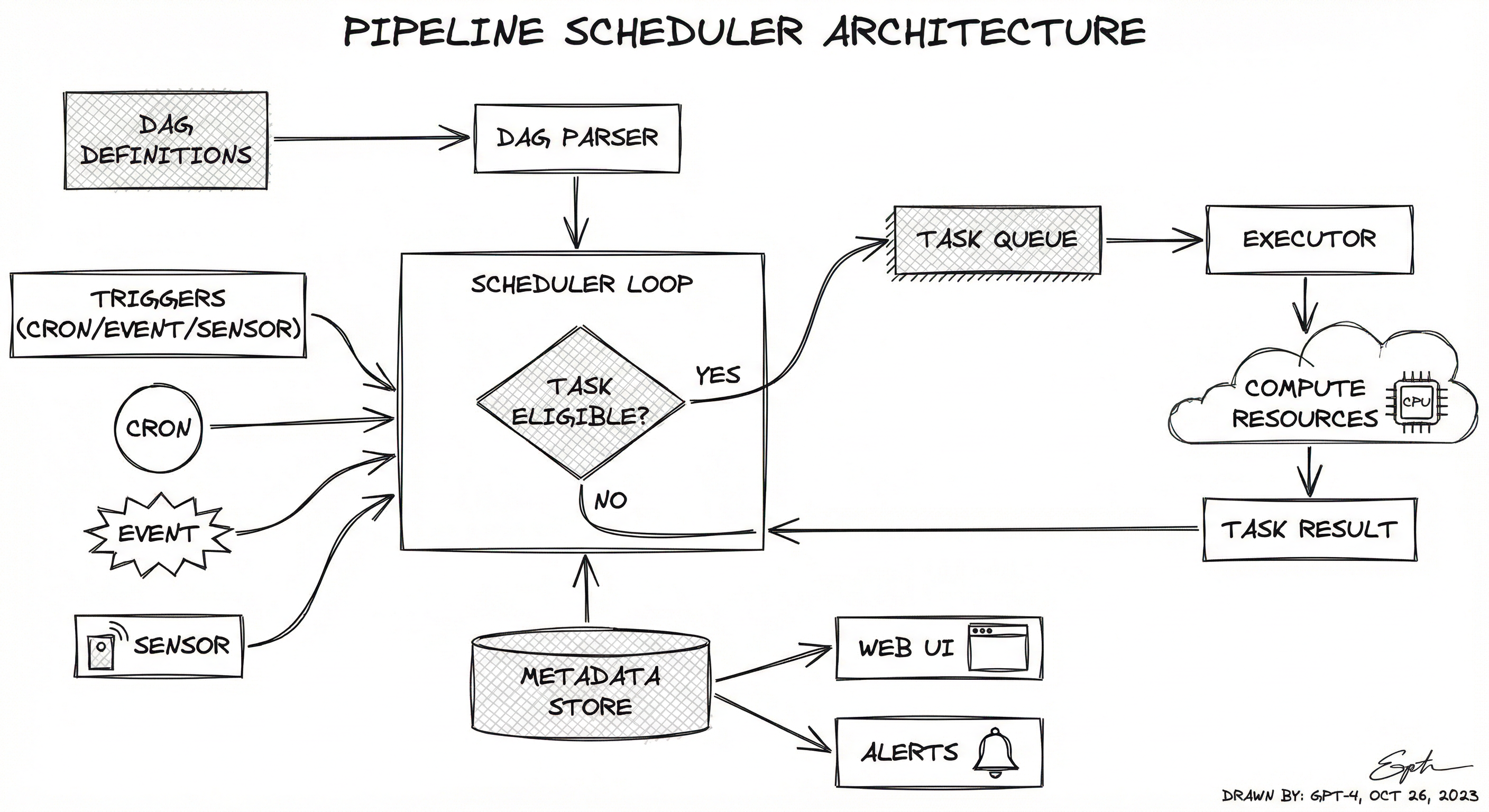
Modern schedulers like Airflow 3.x have evolved toward a service-oriented architecture where the scheduler, web server, triggerer, and executor run as independent services. This enables horizontal scaling -- you can run multiple scheduler replicas for high availability and multiple executor workers for throughput. The Task Execution API in Airflow 3.0 further decouples task execution, enabling tasks to run in remote environments (edge devices, different cloud regions) while reporting state back to the central scheduler.
Key Components
DAG Parser / Definition Layer
Reads pipeline definitions written in Python (Airflow, Prefect, Dagster), YAML (Argo Workflows), or SDK-generated IR (Kubeflow Pipelines). Validates DAG structure -- ensures no cycles, resolves imports, and registers tasks with their dependencies, parameters, and configurations. In Airflow 3.0, this layer also handles DAG versioning, tracking structural changes over time.
Scheduler Loop / Scheduling Engine
The core control loop that runs continuously (typically every few seconds). It evaluates trigger conditions (cron schedules, event sensors, dataset updates), checks upstream dependency states, and transitions eligible task instances from scheduled to queued. Manages concurrency limits, pool assignments, and priority weights. In high-throughput deployments, this is often the bottleneck component.
Executor / Task Dispatch
Receives queued task instances and dispatches them to the appropriate compute backend. Common executor types include: LocalExecutor (runs tasks as subprocesses -- for development), CeleryExecutor (distributes tasks across a Celery worker cluster), KubernetesExecutor (spins up a dedicated Kubernetes pod per task), and EdgeExecutor (Airflow 3.0 -- runs tasks on remote/edge environments). The executor abstracts away the compute infrastructure from the DAG definition.
Metadata Store / State Backend
A relational database (PostgreSQL or MySQL) that persists all scheduler state: DAG definitions, DAG run records, task instance states, XComs (inter-task communication), connection credentials, and audit logs. This is the single source of truth for the entire system. Every state transition is recorded, enabling full reproducibility and debugging. At scale, the metadata store often becomes the performance bottleneck -- query optimization and connection pooling are critical.
Triggerer / Event Handler
A dedicated service (introduced in Airflow 2.2+) that efficiently monitors external events without consuming executor slots. Uses Python's asyncio to poll sensors and event sources with minimal resource usage. Enables event-driven scheduling patterns -- e.g., start the training pipeline when new data lands in the feature store, or trigger deployment when a model passes evaluation.
Web UI / API / Observability Layer
Provides a visual interface for monitoring DAG runs, inspecting task logs, managing connections, triggering manual runs, and initiating backfills. Exposes a REST API for programmatic interaction. In Airflow 3.0, the UI was completely rebuilt with React and FastAPI, adding DAG versioning views and backfill management. Also integrates with alerting systems (Slack, PagerDuty, email) for SLA miss notifications and failure alerts.
SLA Monitor / Deadline Tracker
Monitors whether DAG runs and individual tasks complete within their defined Service Level Agreements. When an SLA is breached (e.g., the daily training pipeline hasn't finished by 6 AM IST), it triggers alerts via configured notification channels. Airflow 3.1 introduced Deadline Alerts as a first-class feature, providing proactive notifications before SLAs are missed.
Data Flow
Scheduling Cycle: The scheduler loop wakes up every heartbeat interval (default 5 seconds in Airflow) and performs the following: (1) Parse DAG files for any structural changes, (2) Create new DAG runs for schedules whose trigger time has passed, (3) For each active DAG run, evaluate task dependencies and transition eligible tasks to queued, (4) The executor picks up queued tasks and dispatches them to compute resources, (5) As tasks complete (success or failure), their state is written to the metadata store, (6) The scheduler loop picks up the state changes on its next heartbeat and re-evaluates downstream dependencies.
Retry Flow: When a task fails, the scheduler checks the retry policy. If retries remain, it schedules the task for re-execution after the configured delay (with optional exponential backoff). If all retries are exhausted, the task is marked failed, and downstream tasks transition to upstream_failed.
Backfill Flow: A user initiates a backfill for a date range via the UI or CLI. The scheduler creates DAG runs for each logical date in the range, respecting the max_active_runs concurrency limit. Tasks execute with the historical logical date as context, enabling idempotent re-processing of historical data.
A directed flow showing DAG definitions feeding into a DAG parser, which connects to the scheduler loop. Triggers (cron, event, sensor) also feed the scheduler loop. The scheduler evaluates task eligibility and sends eligible tasks to a task queue, which the executor picks up and dispatches to compute resources (CPU/GPU pods). Task results flow back to a metadata store (PostgreSQL), which both feeds the scheduler loop (for dependency evaluation) and the Web UI/API (for observability). An alerts and SLA monitor connects to the Web UI.
How to Implement
Implementation Approaches
There are three broad approaches to implementing pipeline scheduling for ML systems:
Approach 1: General-Purpose Workflow Orchestrators -- Tools like Apache Airflow, Prefect, and Dagster were built for data and ML workflows. They provide DAG-based scheduling, rich operator libraries, and extensive ecosystem integrations. Airflow is the industry standard with the largest community. Prefect offers a more Pythonic, dynamic approach. Dagster provides asset-aware orchestration that models data lineage.
Approach 2: Kubernetes-Native ML Orchestrators -- Kubeflow Pipelines, Argo Workflows, and Flyte run natively on Kubernetes and treat each task as a containerized workload. They excel at GPU resource management, experiment tracking, and ML-specific features like hyperparameter tuning integration. Best for teams already running on Kubernetes who need tight infrastructure integration.
Approach 3: Managed Cloud Services -- AWS SageMaker Pipelines, Google Vertex AI Pipelines, and Azure ML Pipelines provide fully managed scheduling with zero infrastructure overhead. The tradeoff is vendor lock-in, limited customization, and potentially higher cost at scale. A SageMaker ml.m5.xlarge instance for pipeline orchestration costs approximately 0.192/hour (~INR 16/hour) but requires operational investment.
Cost Note for Indian Startups: For a team running 50 daily pipeline runs with average 30 tasks each, self-hosted Airflow on a t3.large instance costs roughly 350/month (~INR 29,000/month). Prefect Cloud's free tier supports up to 3 users. Dagster Cloud starts at $100/month (~INR 8,300/month). Choose based on your team's operational maturity and budget.
from datetime import datetime, timedelta
from airflow import DAG
from airflow.operators.python import PythonOperator
from airflow.providers.cncf.kubernetes.operators.pod import KubernetesPodOperator
from airflow.sensors.filesystem import FileSensor
from airflow.utils.trigger_rule import TriggerRule

default_args = {
    "owner": "ml-team",
    "depends_on_past": False,
    "email": ["[email protected]"],
    "email_on_failure": True,
    "retries": 3,
    "retry_delay": timedelta(minutes=5),
    "retry_exponential_backoff": True,
    "max_retry_delay": timedelta(minutes=60),
    "execution_timeout": timedelta(hours=4),
    "sla": timedelta(hours=6),
}

with DAG(
    dag_id="recommendation_model_training",
    default_args=default_args,
    description="Daily retraining of recommendation model",
    schedule="0 2 * * *",  # 2 AM IST daily
    start_date=datetime(2026, 1, 1),
    catchup=False,
    max_active_runs=1,
    tags=["ml", "training", "recommendations"],
) as dag:

    wait_for_data = FileSensor(
        task_id="wait_for_fresh_data",
        filepath="/data/daily/{{ ds }}/events.parquet",
        poke_interval=300,  # Check every 5 minutes
        timeout=3600,       # Give up after 1 hour
        mode="reschedule",  # Free up worker slot while waiting
    )

    def validate_data(**context):
        import great_expectations as gx
        ds = context["ds"]
        suite = gx.get_context().get_expectation_suite("training_data")
        result = suite.validate(f"/data/daily/{ds}/events.parquet")
        if not result.success:
            raise ValueError(f"Data validation failed: {result.statistics}")
        return {"row_count": result.statistics["evaluated_expectations"]}

    validate = PythonOperator(
        task_id="validate_training_data",
        python_callable=validate_data,
    )

    compute_features = KubernetesPodOperator(
        task_id="compute_features",
        name="feature-computation",
        namespace="ml-pipelines",
        image="registry.company.com/feature-engine:v2.3",
        cmds=["python", "compute_features.py"],
        arguments=["--date={{ ds }}", "--output=s3://features/{{ ds }}/"],
        resources={"request_cpu": "4", "request_memory": "16Gi"},
        is_delete_operator_pod=True,
    )

    train_model = KubernetesPodOperator(
        task_id="train_model",
        name="model-training",
        namespace="ml-pipelines",
        image="registry.company.com/trainer:v1.8",
        cmds=["python", "train.py"],
        arguments=["--features=s3://features/{{ ds }}/", "--output=s3://models/{{ ds }}/"],
        resources={"request_cpu": "8", "request_memory": "32Gi", "limit_gpu": "1"},
        is_delete_operator_pod=True,
    )

    def evaluate_model(**context):
        import mlflow
        ds = context["ds"]
        new_metrics = mlflow.get_run(run_id=context["ti"].xcom_pull(task_ids="train_model")).data.metrics
        prod_metrics = mlflow.get_run(run_id="production").data.metrics
        improvement = new_metrics["ndcg@10"] - prod_metrics["ndcg@10"]
        if improvement < -0.01:  # Allow up to 1% regression
            raise ValueError(f"Model regression detected: {improvement:.4f}")
        return {"ndcg_improvement": improvement, "deploy": improvement > 0}

    evaluate = PythonOperator(
        task_id="evaluate_model",
        python_callable=evaluate_model,
    )

    deploy = KubernetesPodOperator(
        task_id="deploy_model",
        name="model-deployment",
        namespace="ml-serving",
        image="registry.company.com/deployer:v1.2",
        cmds=["python", "deploy.py"],
        arguments=["--model=s3://models/{{ ds }}/", "--canary-pct=10"],
        trigger_rule=TriggerRule.ALL_SUCCESS,
        is_delete_operator_pod=True,
    )

    wait_for_data >> validate >> compute_features >> train_model >> evaluate >> deploy
This DAG demonstrates a production ML training pipeline in Airflow. Key patterns include: (1) FileSensor with mode='reschedule' to efficiently wait for upstream data without blocking a worker slot, (2) retry policies with exponential backoff -- the first retry waits 5 minutes, the second 10, the third 20, up to a max of 60 minutes, (3) SLA enforcement -- if the entire pipeline hasn't completed within 6 hours, an alert fires, (4) KubernetesPodOperator for compute-intensive tasks so each task gets its own isolated container with specific resource allocations (including GPU for training), (5) evaluation gating -- the deploy task only runs if the model passes quality checks, preventing regressions from reaching production. The {{ ds }} template provides the logical execution date, enabling idempotent backfill.
from prefect import flow, task, get_run_logger
from prefect.tasks import task_input_hash
from prefect.concurrency.sync import concurrency
from datetime import timedelta
import pandas as pd

@task(
    retries=3,
    retry_delay_seconds=[60, 300, 900],  # Progressive backoff: 1m, 5m, 15m
    cache_key_fn=task_input_hash,
    cache_expiration=timedelta(hours=12),
    log_prints=True,
)
def extract_training_data(date: str, source: str) -> pd.DataFrame:
    """Extract training data from the specified source."""
    logger = get_run_logger()
    logger.info(f"Extracting data for {date} from {source}")
    # Actual extraction logic here
    if source == "clickstream":
        df = pd.read_parquet(f"s3://data/clickstream/{date}.parquet")
    elif source == "transactions":
        df = pd.read_parquet(f"s3://data/transactions/{date}.parquet")
    logger.info(f"Extracted {len(df)} rows")
    return df

@task(retries=2, retry_delay_seconds=120)
def compute_features(raw_data: pd.DataFrame, feature_config: dict) -> pd.DataFrame:
    """Compute ML features from raw data."""
    # Feature engineering logic
    features = raw_data.copy()
    for col, transform in feature_config.items():
        if transform == "log":
            features[f"{col}_log"] = features[col].apply(lambda x: max(0, x)).apply(pd.np.log1p)
        elif transform == "zscore":
            features[f"{col}_z"] = (features[col] - features[col].mean()) / features[col].std()
    return features

@task(retries=1, timeout_seconds=7200)  # 2 hour timeout for training
def train_model(features: pd.DataFrame, hyperparams: dict) -> dict:
    """Train the ML model and return metrics."""
    import mlflow
    with mlflow.start_run():
        # Model training logic
        from sklearn.ensemble import GradientBoostingClassifier
        model = GradientBoostingClassifier(**hyperparams)
        # ... training code ...
        metrics = {"auc": 0.87, "precision": 0.82, "recall": 0.79}
        mlflow.log_metrics(metrics)
        mlflow.sklearn.log_model(model, "model")
    return metrics

@flow(name="ml-training-pipeline", log_prints=True, retries=1)
def training_pipeline(
    date: str,
    sources: list[str] = ["clickstream", "transactions"],
    hyperparams: dict = {"n_estimators": 200, "max_depth": 6, "learning_rate": 0.1},
):
    """End-to-end ML training pipeline with dynamic source mapping."""
    logger = get_run_logger()
    logger.info(f"Starting training pipeline for {date}")

    # Dynamic fan-out: extract from multiple sources in parallel
    raw_datasets = extract_training_data.map(
        date=[date] * len(sources),
        source=sources,
    )

    # Merge and compute features
    merged = pd.concat([ds.result() for ds in raw_datasets], ignore_index=True)

    feature_config = {"amount": "log", "frequency": "zscore", "recency": "log"}
    features = compute_features(merged, feature_config)

    # Train with resource limits
    with concurrency("gpu-training", occupy=1):
        metrics = train_model(features, hyperparams)

    logger.info(f"Pipeline complete. Metrics: {metrics}")
    return metrics

# Deploy with schedule
if __name__ == "__main__":
    from prefect.deployments import Deployment
    from prefect.server.schemas.schedules import CronSchedule

    deployment = Deployment.build_from_flow(
        flow=training_pipeline,
        name="daily-training",
        schedule=CronSchedule(cron="0 2 * * *", timezone="Asia/Kolkata"),
        parameters={"date": "{{ now | format_datetime('%Y-%m-%d') }}"},
        work_queue_name="ml-gpu",
    )
    deployment.apply()
This Prefect example showcases several modern scheduling patterns: (1) Progressive retry delays -- retry_delay_seconds=[60, 300, 900] provides 1-minute, 5-minute, and 15-minute delays between retries, unlike Airflow's uniform delay, (2) Task-level caching with task_input_hash so identical inputs skip re-execution -- critical for efficient backfill, (3) Dynamic fan-out with .map() for parallel data extraction from multiple sources, (4) Concurrency limits via concurrency('gpu-training', occupy=1) to prevent GPU contention across concurrent pipeline runs, (5) CronSchedule with explicit IST timezone for Indian deployments. Prefect's approach is more Pythonic than Airflow -- flows and tasks are just decorated functions, making unit testing straightforward.
import dagster as dg
from dagster import (
    asset,
    define_asset_job,
    ScheduleDefinition,
    AssetSelection,
    FreshnessPolicy,
    AutoMaterializePolicy,
    MetadataValue,
    Output,
)

@asset(
    group_name="training_data",
    freshness_policy=FreshnessPolicy(maximum_lag_minutes=1440),  # Must be <24h old
    metadata={"owner": "data-eng", "tier": "critical"},
)
def raw_events(context: dg.AssetExecutionContext) -> Output[None]:
    """Raw clickstream events from the data warehouse."""
    import pandas as pd
    partition_date = context.partition_key
    df = pd.read_sql(
        f"SELECT * FROM events WHERE date = '{partition_date}'",
        con="postgresql://warehouse:5432/analytics",
    )
    row_count = len(df)
    df.to_parquet(f"s3://data/raw/{partition_date}/events.parquet")
    context.log.info(f"Extracted {row_count} events for {partition_date}")
    return Output(None, metadata={"row_count": MetadataValue.int(row_count)})

@asset(
    group_name="features",
    deps=[raw_events],
    auto_materialize_policy=AutoMaterializePolicy.eager(),
)
def user_features(context: dg.AssetExecutionContext) -> Output[None]:
    """Computed user features for recommendation model."""
    import pandas as pd
    partition_date = context.partition_key
    events = pd.read_parquet(f"s3://data/raw/{partition_date}/events.parquet")
    features = events.groupby("user_id").agg(
        total_clicks=("event_type", "count"),
        avg_session_duration=("duration", "mean"),
        unique_categories=("category", "nunique"),
    ).reset_index()
    features.to_parquet(f"s3://features/{partition_date}/user_features.parquet")
    return Output(None, metadata={"feature_count": MetadataValue.int(len(features))})

@asset(
    group_name="models",
    deps=[user_features],
    freshness_policy=FreshnessPolicy(maximum_lag_minutes=1440),
)
def recommendation_model(context: dg.AssetExecutionContext) -> Output[None]:
    """Trained recommendation model."""
    import pandas as pd
    import mlflow
    partition_date = context.partition_key
    features = pd.read_parquet(f"s3://features/{partition_date}/user_features.parquet")
    with mlflow.start_run():
        # Training logic
        metrics = {"ndcg@10": 0.45, "hit_rate@50": 0.72}
        mlflow.log_metrics(metrics)
    context.log.info(f"Model trained with metrics: {metrics}")
    return Output(None, metadata={
        "ndcg_at_10": MetadataValue.float(metrics["ndcg@10"]),
        "hit_rate_at_50": MetadataValue.float(metrics["hit_rate@50"]),
    })

# Define a job that materializes all ML assets
ml_training_job = define_asset_job(
    name="ml_training_job",
    selection=AssetSelection.groups("training_data", "features", "models"),
)

# Schedule: run daily at 2 AM IST
ml_training_schedule = ScheduleDefinition(
    job=ml_training_job,
    cron_schedule="0 2 * * *",
    execution_timezone="Asia/Kolkata",
)

defs = dg.Definitions(
    assets=[raw_events, user_features, recommendation_model],
    schedules=[ml_training_schedule],
    jobs=[ml_training_job],
)
Dagster's asset-based approach is fundamentally different from Airflow's task-based model. Instead of defining what to do (tasks), you define what to produce (assets). Key features shown: (1) FreshnessPolicy enforces that assets must be no older than 24 hours -- the scheduler materializes them proactively, (2) AutoMaterializePolicy.eager() triggers materialization as soon as upstream assets update, eliminating the need for explicit cron schedules on intermediate assets, (3) Metadata tracking on every asset materialization provides built-in observability (row counts, model metrics) without external tooling, (4) Asset lineage is automatically inferred from deps, providing a data-aware view of the pipeline rather than just a task-execution view. This paradigm is especially powerful for ML because you can reason about 'is my model fresh?' rather than 'did the training DAG run?'
from kfp import dsl, compiler
from kfp.dsl import Input, Output, Dataset, Model, Metrics

@dsl.component(
    base_image="python:3.11",
    packages_to_install=["pandas", "pyarrow", "scikit-learn"],
)
def preprocess_data(
    input_path: str,
    output_dataset: Output[Dataset],
    metrics: Output[Metrics],
):
    import pandas as pd
    df = pd.read_parquet(input_path)
    # Preprocessing logic
    df = df.dropna(subset=["target"])
    df.to_parquet(output_dataset.path)
    metrics.log_metric("rows_after_cleaning", len(df))
    metrics.log_metric("null_ratio", float(df.isnull().sum().sum() / df.size))

@dsl.component(
    base_image="python:3.11",
    packages_to_install=["pandas", "scikit-learn", "mlflow"],
)
def train_model(
    dataset: Input[Dataset],
    model_output: Output[Model],
    metrics: Output[Metrics],
    n_estimators: int = 100,
    max_depth: int = 6,
):
    import pandas as pd
    from sklearn.ensemble import GradientBoostingClassifier
    import joblib
    df = pd.read_parquet(dataset.path)
    X, y = df.drop("target", axis=1), df["target"]
    model = GradientBoostingClassifier(n_estimators=n_estimators, max_depth=max_depth)
    model.fit(X, y)
    joblib.dump(model, model_output.path)
    score = model.score(X, y)
    metrics.log_metric("train_accuracy", float(score))

@dsl.pipeline(
    name="ml-training-pipeline",
    description="Daily ML model training pipeline",
)
def ml_pipeline(input_path: str = "gs://data/daily/latest/", n_estimators: int = 200):
    preprocess_task = preprocess_data(input_path=input_path)
    preprocess_task.set_cpu_limit("4").set_memory_limit("16Gi")
    preprocess_task.set_retry(num_retries=3, policy="Always", backoff_duration="60s")

    train_task = train_model(
        dataset=preprocess_task.outputs["output_dataset"],
        n_estimators=n_estimators,
    )
    train_task.set_cpu_limit("8").set_memory_limit("32Gi").set_gpu_limit(1)
    train_task.set_retry(num_retries=2, policy="Always", backoff_duration="120s")

# Compile and create recurring run
compiler.Compiler().compile(ml_pipeline, "ml_pipeline.yaml")

# Schedule via Kubeflow Pipelines SDK
from kfp.client import Client
client = Client(host="https://kubeflow.company.internal")
client.create_recurring_run(
    experiment_id="recommendation-experiments",
    job_name="daily-training",
    pipeline_package_path="ml_pipeline.yaml",
    cron_expression="0 2 * * *",
    max_concurrency=1,
    enabled=True,
)
Kubeflow Pipelines is purpose-built for ML on Kubernetes. Key differences from Airflow: (1) Typed artifacts -- Input[Dataset], Output[Model], Output[Metrics] provide type-safe data passing between pipeline steps, with automatic artifact tracking and lineage, (2) Per-step resource allocation -- .set_cpu_limit(), .set_gpu_limit() map directly to Kubernetes resource requests, enabling fine-grained GPU scheduling, (3) Component isolation -- each step runs in its own container with explicit dependencies, ensuring reproducibility, (4) Built-in experiment tracking -- metrics logged via Output[Metrics] are automatically captured in the Kubeflow UI for comparison across runs. The tradeoff is that Kubeflow requires a Kubernetes cluster, adding infrastructure complexity compared to Airflow's simpler deployment model.
# Airflow 3.x configuration (airflow.cfg excerpt)
[scheduler]
scheduler_heartbeat_sec = 5
min_file_process_interval = 30
dag_dir_list_interval = 300
max_dagruns_to_create_per_loop = 10
max_tis_per_query = 512
use_job_schedule = True

[core]
executor = KubernetesExecutor
max_active_runs_per_dag = 3
parallelism = 64
max_active_tasks_per_dag = 32
default_task_retries = 2
default_task_retry_delay = 300

[kubernetes_executor]
worker_container_repository = registry.company.com/airflow-worker
worker_container_tag = 3.0.2
namespace = airflow-workers
delete_worker_pods = True
delete_worker_pods_on_failure = False
worker_pods_creation_batch_size = 16

[sla]
check_slas = True
sla_check_interval = 60

[smtp]
smtp_host = smtp.company.com
smtp_port = 587
smtp_mail_from = [email protected]
Common Implementation Mistakes
- ●
Not setting
catchup=False: In Airflow, new DAGs default tocatchup=True, which means the scheduler will create runs for every missed schedule interval sincestart_date. If yourstart_dateis a year ago and you have a daily schedule, you'll suddenly have 365 DAG runs queued. Always setcatchup=Falseunless you explicitly want backfill behavior. - ●
Non-idempotent tasks: Writing tasks that append to a table instead of overwriting (or using upsert) makes retries and backfills dangerous -- you'll get duplicate data. Every task in a scheduled pipeline must produce the same output regardless of how many times it runs for the same logical date.
- ●
Oversized DAG files: Putting complex Python logic (data processing, model training) directly in the DAG definition file instead of importing it from separate modules. The Airflow scheduler parses DAG files every heartbeat -- heavy imports in DAG files slow down the entire scheduler loop.
- ●
Ignoring time zones: Scheduling a pipeline for '2 AM' without specifying a timezone leads to ambiguous execution times, especially during daylight saving transitions. Always use explicit timezones (e.g.,
Asia/Kolkatafor IST) in cron expressions. - ●
Missing SLA and timeout configuration: Deploying pipelines without SLA definitions or task-level timeouts. A hung task with no timeout will block the pipeline indefinitely. A pipeline without SLA monitoring will fail silently while downstream consumers serve stale data.
- ●
Over-scheduling: Running pipelines more frequently than the data refresh rate. If your data warehouse ETL completes at 4 AM but your training pipeline runs at 2 AM, you're always training on yesterday's data. Use sensors or event triggers instead of aggressive cron schedules.
- ●
Single point of failure scheduler: Running only one scheduler instance with no high availability. When it crashes, all pipelines stop. Use Airflow's HA scheduler (multiple replicas), Prefect's server redundancy, or Dagster's daemon with health checks.
When Should You Use This?
Use When
You have ML pipelines that must run on a recurring schedule (daily model retraining, hourly feature computation, weekly batch inference) and manual triggering is not sustainable
Your pipeline has complex task dependencies forming a DAG -- feature computation must complete before training, evaluation must pass before deployment
You need automated retry and failure recovery for transient failures (network timeouts, spot instance preemptions, API rate limits)
Business SLAs require guaranteed pipeline completion times -- e.g., the fraud model must refresh before the morning transaction peak
You need backfill capability to reprocess historical data when upstream data corrections arrive or when pipeline logic changes
Multiple teams share pipeline infrastructure and need isolation (pool-based resource allocation, DAG-level access controls, multi-tenancy)
You require an audit trail of every pipeline run, including who triggered it, what parameters were used, and what the outcome was
Avoid When
You have a single ML script that runs once a week and a cron job with email-on-failure is sufficient -- don't introduce orchestrator complexity for simple workloads
Your pipeline is purely real-time / streaming (continuous inference via Kafka, Flink) -- schedulers are designed for batch and micro-batch, not stream processing
You're in the experimentation phase and pipeline structure changes daily -- the overhead of writing proper DAG definitions is wasted if the pipeline is thrown away next week. Use a notebook scheduler instead
Your workload is a single long-running job with no meaningful subtasks to parallelize or checkpoint -- a simple Kubernetes CronJob or AWS Step Function might be simpler
You lack the operational capacity to maintain the scheduler infrastructure (database, workers, monitoring) -- consider a managed service or simpler alternative before self-hosting Airflow
Key Tradeoffs
Scheduler Complexity vs. Reliability
There's a direct tension between scheduler sophistication and operational overhead. A full Airflow deployment with HA scheduler, Celery workers, PostgreSQL metadata store, Redis broker, and Flower monitoring is extremely capable but requires dedicated platform engineering to maintain. For a 5-person ML team at an Indian startup, this might be overkill -- Prefect with its lightweight server or Dagster Cloud could provide 80% of the capability at 20% of the operational cost.
Scheduling Paradigm: Task-Based vs. Asset-Based
| Aspect | Task-Based (Airflow, Prefect) | Asset-Based (Dagster) |
|---|---|---|
| Mental model | "What tasks should run?" | "What data should be fresh?" |
| Scheduling unit | DAG run triggered by cron/event | Asset materialization triggered by freshness policy |
| Backfill | Re-execute tasks for date range | Re-materialize stale assets |
| Observability | Task success/failure dashboard | Data lineage + freshness dashboard |
| Best for | ETL-heavy pipelines | ML pipelines with complex data dependencies |
The asset-based paradigm is gaining traction for ML because it aligns better with how ML engineers think -- they care about whether the training data is fresh and the model is up to date, not whether task #17 ran at 2:03 AM.
Self-Hosted vs. Managed
Self-hosted (Airflow on your own Kubernetes cluster) gives you full control and avoids vendor lock-in, but demands 0.5-1 FTE of platform engineering time. Managed services (Astronomer, Prefect Cloud, Dagster Cloud) reduce operational burden but add monthly cost. For reference:
- Self-hosted Airflow on a 3-node EKS cluster: ~$200/month (~INR 16,700/month) compute + your team's time
- Astronomer (Managed Airflow): $350-1,500/month (~INR 29,000-1,25,000/month)
- Prefect Cloud: Free tier for small teams, $500+/month (~INR 41,700+/month) for enterprise
- Dagster Cloud: 300+/month (~INR 25,000+/month) for hybrid
Rule of Thumb: If you have fewer than 20 DAGs and a small team, start with Prefect Cloud or Dagster Cloud. If you have 100+ DAGs and need maximum flexibility, invest in Airflow.
Alternatives & Comparisons
A workflow engine (e.g., Temporal, AWS Step Functions) handles arbitrary task orchestration but lacks ML-specific features like experiment tracking integration, model registry hooks, and data lineage. Choose a workflow engine for general microservice orchestration; choose a pipeline scheduler for ML-specific workflows where you need tight integration with feature stores, model registries, and evaluation frameworks.
Event triggers start pipelines reactively (when data arrives, when a model degrades) rather than on a fixed schedule. In practice, most ML systems use both: a scheduler for recurring retraining on a fixed cadence, and event triggers for on-demand runs (e.g., retrain immediately when data drift exceeds a threshold). Prefect and Dagster blur this line by supporting both cron schedules and event-driven sensors natively.
CI/CD pipelines (Jenkins, GitHub Actions, GitLab CI) trigger on code changes and are designed for build/test/deploy workflows. Pipeline schedulers trigger on time or data events and are designed for recurring data/ML workflows. They serve complementary roles: CI/CD deploys the pipeline code, the scheduler runs the pipeline on a schedule. Using Jenkins as your ML scheduler is a common anti-pattern -- it lacks DAG-aware dependency management, backfill, and ML-specific observability.
Kubernetes CronJobs provide basic cron-based scheduling for containerized workloads. They're perfect for simple, single-step jobs but lack DAG dependency management, retry with backoff, backfill, SLA monitoring, and a management UI. For a single model retraining job, a CronJob might suffice. For a 20-step ML pipeline with branching logic, you need a proper scheduler.
Pros, Cons & Tradeoffs
Advantages
Automated, reliable execution eliminates manual pipeline triggers and human-schedule dependencies. Pipelines run at exactly the right time, every time, even at 2 AM on a Saturday when nobody is watching.
DAG-based dependency management ensures correct execution order across complex multi-step ML pipelines. The scheduler will never start model training before feature computation completes, regardless of timing quirks.
Retry and failure recovery with configurable policies (exponential backoff, max attempts, delay intervals) handles transient failures automatically. In production, 5-10% of task executions hit transient issues -- automated retry converts these from incidents into non-events.
Backfill capability enables reprocessing historical data when pipeline logic changes, upstream data is corrected, or a new model needs to be evaluated against historical periods. This is essential for ML experimentation and data quality recovery.
SLA monitoring and alerting provides early warning when pipelines run late, enabling teams to intervene before downstream consumers are affected. Critical for business-facing ML systems where stale predictions directly impact revenue.
Resource management and isolation through pools, concurrency limits, and executor-level resource allocation prevents GPU contention and ensures fair sharing across teams -- especially important in organizations where multiple ML teams share a Kubernetes cluster.
Observability and audit trails through run history, task logs, and metadata tracking provide the reproducibility and compliance documentation that regulated industries (banking, healthcare) require.
Disadvantages
Significant operational overhead for self-hosted deployments. A production Airflow installation requires PostgreSQL, a message broker (Redis/RabbitMQ), worker nodes, and monitoring -- this is a distributed system in its own right that needs care and feeding.
Scheduler-as-bottleneck risk: The scheduler loop is often single-threaded (or limited to a few threads) and can become the throughput ceiling. Netflix's migration from Meson to Maestro was driven by exactly this problem -- their single-leader scheduler couldn't keep up with 500,000 daily jobs.
DAG authoring learning curve: Each tool has its own DSL, operator library, and execution semantics. A new ML engineer needs 2-4 weeks to become productive with Airflow's templating, XCom patterns, and trigger rules. Prefect and Dagster have shorter ramps but smaller ecosystems.
Over-engineering risk: It's tempting to build a 50-task DAG for a pipeline that could be a single script. The scheduler adds latency (task scheduling overhead is typically 5-30 seconds per task), so a 50-task pipeline adds 4-25 minutes of pure scheduling overhead even if tasks themselves are fast.
Metadata store scalability: The relational metadata store accumulates data from every run, task, and log entry. After months of operation with hundreds of DAGs, query performance degrades unless you implement aggressive pruning and archival. Airflow's
airflow db cleancommand is essential but often forgotten.Version skew between scheduler and pipeline code: When pipeline definitions are updated but currently running instances use the old definition, you get unpredictable behavior. Airflow 3.0 introduced DAG versioning to address this, but it remains a source of confusion.
Cold start latency: KubernetesExecutor spins up a new pod per task, adding 30-90 seconds of container startup time. For pipelines with many small tasks, this overhead dominates execution time. The CeleryExecutor avoids this but requires pre-provisioned workers.
Failure Modes & Debugging
Scheduler loop stall / deadlock
Cause
The scheduler process itself becomes unresponsive due to excessive DAG parsing load, metadata database lock contention, or a bug in the scheduling loop. With 500+ DAGs, the parsing phase alone can take minutes, during which no new tasks are scheduled.
Symptoms
No new task instances are created despite pending schedules. The web UI shows DAG runs stuck in running state with no task progress. Worker nodes sit idle. The scheduler's heartbeat metric stops updating.
Mitigation
Enable HA scheduler mode (multiple scheduler replicas). Optimize DAG file parsing by minimizing top-level Python imports and using .airflowignore to exclude non-DAG files. Monitor scheduler heartbeat latency and set alerts when it exceeds 30 seconds. In Airflow 3.x, the service-oriented architecture and the min_file_process_interval config help distribute parsing load.
Metadata store exhaustion
Cause
The PostgreSQL/MySQL metadata database grows unboundedly as run history, task logs, and XCom data accumulate. After months of operation with hundreds of DAGs, query performance degrades exponentially. A 50GB metadata database is not uncommon in large deployments.
Symptoms
Web UI becomes sluggish (page load times exceed 10+ seconds). Scheduler loop latency increases as dependency queries slow down. Database connection pool exhaustion causes random task failures. Storage costs increase unexpectedly.
Mitigation
Run airflow db clean on a weekly schedule to prune old records (keep 30-90 days by default). Configure connection pooling (SQLAlchemy pool_size and max_overflow). Use read replicas for the web UI to isolate read traffic from the scheduler's write-heavy workload. Monitor database size and query latency as first-class metrics.
Backfill stampede
Cause
A user initiates a large backfill (e.g., reprocess 365 days of data) without setting max_active_runs, causing hundreds of DAG runs to be created simultaneously. Each run's tasks compete for executor slots, saturating the worker pool and blocking normally scheduled runs.
Symptoms
Normally scheduled DAG runs are delayed or stuck in queued state. Worker resource utilization spikes to 100%. The task queue grows unboundedly. SLA misses trigger on production pipelines that can't get executor slots.
Mitigation
Always set max_active_runs (e.g., 3-5) on DAGs that might be backfilled. Use dedicated worker pools for backfill workloads, separate from production pools. Implement backfill rate limiting in your CI/CD process. In Airflow 3.0, the new backfill management UI provides better control over concurrent backfill runs.
Zombie tasks / leaked resources
Cause
A task's executor process is killed (OOM, spot instance reclamation, node failure) but the scheduler doesn't detect the failure, leaving the task in running state indefinitely. With KubernetesExecutor, orphaned pods consume cluster resources.
Symptoms
Tasks stuck in running state for far longer than expected. Kubernetes shows orphaned pods that don't belong to any active scheduler run. GPU resources are held by zombie tasks, blocking other pipelines. DAG runs never complete.
Mitigation
Configure Airflow's zombie task detection (scheduler_zombie_task_threshold, default 300 seconds). Set task-level execution_timeout to force-kill hung tasks. With KubernetesExecutor, use is_delete_operator_pod=True and Kubernetes resource quotas. Implement a periodic pod cleanup CronJob that detects orphaned pods older than a threshold.
Cascading upstream failures
Cause
An upstream data source (e.g., the data warehouse ETL) fails, causing the sensor task that waits for it to timeout. This cascades as upstream_failed through all downstream tasks in the DAG, and potentially through multiple dependent DAGs.
Symptoms
Multiple DAGs fail simultaneously with upstream_failed status. The failure originates from a single root cause (the upstream data source) but manifests as dozens of failed task instances. Alert fatigue -- the on-call engineer receives 50+ alerts for what is essentially one issue.
Mitigation
Implement circuit breaker patterns -- if the upstream data source has been unavailable for N consecutive checks, pause dependent DAGs rather than failing them. Use Airflow's ExternalTaskSensor with allowed_states and failed_states to explicitly handle upstream failures. Configure alert deduplication to group related failures into a single incident.
Schedule drift / clock skew
Cause
The scheduler's host clock drifts from the authoritative time source, or timezone configuration is inconsistent between the scheduler, workers, and metadata store. This causes pipelines to run at incorrect times or triggers to be evaluated against the wrong logical date.
Symptoms
Pipelines trigger at unexpected times. Backfill produces incorrect results because the logical date doesn't match the expected data partition. Duplicate DAG runs are created for the same logical date. SLA calculations are inaccurate.
Mitigation
Use NTP (Network Time Protocol) on all scheduler and worker nodes. Always specify explicit timezones in schedule configurations -- never rely on system default. Store all timestamps in UTC internally and convert to local time only for display. Validate clock synchronization in health checks.
Placement in an ML System
The Orchestration Hub
The pipeline scheduler sits at the center of the ML system's operational layer. It is the component that ties together all other components into a functioning, automated system.
Upstream, the scheduler receives pipeline definitions from the CI/CD system (which deploys DAG code from version control), trigger signals from event sources (new data arrival, model drift alerts, manual triggers), and configuration from the feature store and data warehouse about data availability.
Downstream, the scheduler triggers and monitors execution of every batch workload in the ML system: data ingestion, feature computation, model training, batch inference, model evaluation, and conditional deployment. It passes artifacts (data paths, model URIs, metrics) between pipeline stages and records the lineage of every execution.
In many organizations, the pipeline scheduler is the single pane of glass for ML operations. If you want to know whether yesterday's model training completed, whether the features are fresh, or why batch predictions are delayed -- you look at the scheduler's dashboard.
Architecture Note: The scheduler should NOT embed business logic. It should orchestrate, not execute. Training code lives in the training service. Feature logic lives in the feature engineering module. The scheduler just ensures everything runs in the right order at the right time. This separation is what makes the system maintainable at scale.
Pipeline Stage
Orchestration / Operations
Upstream
- ci-cd-pipeline
- event-trigger
- feature-store
- data-warehouse
Downstream
- model-training
- batch-inference
- model-registry
- model-serving
Scaling Bottlenecks
The primary bottleneck is the scheduler loop throughput -- the number of task instances that can be evaluated and queued per second. Airflow's scheduler can typically handle 1,000-5,000 task scheduling decisions per minute on a single instance. Netflix's Meson hit this ceiling at ~500,000 daily jobs, motivating the migration to the horizontally scalable Maestro.
The metadata store is the second bottleneck. Every task state transition generates a database write. With 100,000 daily task instances, that's 300,000+ database writes (scheduling, running, and completion for each). PostgreSQL handles this well on modern hardware, but query latency for the web UI and dependency checks degrades as the table sizes grow.
The executor layer is the third bottleneck. CeleryExecutor throughput is limited by the number of pre-provisioned workers and the message broker's capacity. KubernetesExecutor is limited by the Kubernetes API server's rate limits and pod scheduling throughput (typically 50-200 pods/minute depending on cluster size).
For ML-specific workloads, GPU scheduling is often the true bottleneck. When multiple training pipelines compete for limited GPU resources, the scheduler's pool management and priority weighting become critical for fair and efficient allocation.
Production Case Studies
Netflix migrated from their original Meson orchestrator to Maestro, a horizontally scalable workflow orchestrator designed to handle their growing volume of data and ML workflows. Meson managed approximately 70,000 workflows and 500,000 daily jobs but hit vertical scaling limits -- the single-leader architecture was approaching AWS instance type limits during peak traffic at midnight UTC.
Maestro's distributed architecture eliminated the single-leader bottleneck, achieving 100x faster workflow engine performance. It now orchestrates millions of workflow executions across data pipelines, recommendation model training, A/B test analysis, and content ML models. The system reduced operational overhead during peak hours and eliminated the need for manual monitoring during midnight UTC cron storms.
Spotify ran 20,000 batch data pipelines defined in 1,000+ repositories, owned by 300+ teams. They migrated from their original orchestration stack (Luigi for Python, Flo for Java) to Flyte, selecting it for extensibility, multi-language support, and Kubernetes-native scalability. The legacy orchestrators treated workflow containers as black boxes, limiting platform-level optimization.
The migration to Flyte enabled tighter integration with Spotify's ML infrastructure, including Ray-based distributed training and the ML Platform's annotation pipeline. Flyte's typed task interfaces and Kubernetes-native execution model reduced time-to-production for new ML pipelines and improved resource utilization across their compute cluster.
Lyft created and open-sourced Flyte as their ML workflow orchestrator, running it alongside Apache Airflow for different use cases. ETL workflows using SQL run on Airflow, while computation-heavy tasks (Python processing, Spark jobs, image processing, ML model training) run on Flyte. For their pricing model, Airflow handles training data preparation via Hive/Trino, while Flyte orchestrates the actual model training workflow.
By November 2020, Flyte hosted over 9,000 workflows, 20,000+ tasks, and over 1 million workflow executions per month serving 400+ users. The dual-orchestrator strategy allowed each tool to handle its strength: Airflow for SQL-heavy ETL, Flyte for ML-specific workloads requiring typed interfaces, GPU scheduling, and containerized execution.
Uber's Michelangelo ML platform uses a custom workflow orchestration system built on top of common orchestration engines. The workflow system orchestrates batch data pipelines, training jobs, batch prediction jobs, and model deployment. Michelangelo's Job Controller serves as a centralized interface for workload scheduling, allocating work based on compute affinity, data affinity, and policy constraints.
Michelangelo powers all of Uber's ML use cases -- from dynamic pricing and ETA estimation to fraud detection and driver matching. The orchestration layer enables automated retraining pipelines that keep hundreds of models fresh as ride patterns evolve. Teams use automation scripts to schedule regular model retraining and deployment via Michelangelo's API.
Zomato's ML platform uses orchestrated pipelines for feature computation and model training. Real-time features are computed via Apache Kafka and Apache Flink event streams, while batch features are computed using Apache Spark on a scheduled cadence. Models are standardized via MLflow format and deployed through an automated pipeline that includes model conversion, registry, and serving. The scheduling layer coordinates batch feature computation, model retraining, and deployment.
The platform reduced model deployment time to under 24 hours, down from weeks in the manual era. The decoupled architecture (feature store, model store, serving gateway) orchestrated by scheduled pipelines enables rapid experimentation -- new models can be retrained and deployed without changing the serving infrastructure.
Mercado Libre, Latin America's largest e-commerce platform, built a global time series forecasting pipeline that generates item-level demand and sales forecasts for millions of products across 18 countries. They developed a scheduled batch pipeline using LightGBM and DeepAR models with separate forecasting tracks for demand (what customers want) vs. sales (what was actually sold, including out-of-stock effects) (2021).
The dual-track forecasting pipeline improved inventory planning accuracy by 15-20% across their marketplace. The scheduled pipeline processes millions of time series daily, enabling better stock allocation and reducing both overstock waste and lost sales from stockouts.
Tooling & Ecosystem
The industry-standard workflow orchestrator. Airflow 3.x (released April 2025) introduces a service-oriented architecture, DAG versioning, Task Execution API for remote execution, Edge Executor for distributed/edge environments, and a completely redesigned React+FastAPI UI. The largest open-source community and operator ecosystem for data and ML workflows.
Modern, Pythonic workflow orchestration framework. Prefect 3.x offers dynamic flow construction, event-driven scheduling, task-level caching, progressive retry delays, and hybrid execution (local + cloud). Flows and tasks are just decorated Python functions, making unit testing straightforward. Free Cloud tier for small teams.
Asset-aware orchestration platform that models pipelines as data assets rather than tasks. Unique features include FreshnessPolicy (auto-materialize stale assets), built-in metadata tracking, strong typing, and excellent local development experience. About half of Dagster's users use it for ML pipelines. Dagster Cloud offers serverless deployment from $100/month (~INR 8,300/month).
Kubernetes-native ML pipeline orchestrator with built-in experiment tracking, artifact lineage, and typed component interfaces. Uses Argo Workflows under the hood. Purpose-built for ML with first-class support for GPU scheduling, hyperparameter tuning (Katib), and model serving (KServe). Available standalone or as part of the full Kubeflow platform.
Kubernetes-native workflow orchestrator created at Lyft, now a Linux Foundation project. Features type-safe data passing, multi-language support (Python, Java, Scala), built-in memoization, and seamless integration with distributed training frameworks (Ray, Spark). Handles 1M+ monthly executions at Lyft and Spotify.
Kubernetes-native workflow engine implemented as a CRD. Supports DAG and step-based workflows, CronWorkflows for scheduling, GPU resource scheduling, step-level memoization, and artifact management. Used as the execution backend for Kubeflow Pipelines. Best for teams deeply invested in the Kubernetes ecosystem.
Fully managed ML pipeline orchestration service on AWS. Supports scheduling, experiment tracking, model registry integration, and pay-per-use compute. No infrastructure to manage. Best for AWS-centric teams who want zero operational overhead. Costs are compute-based (e.g., ml.m5.xlarge at ~$0.23/hour or ~INR 19/hour).
Serverless ML pipeline orchestration on Google Cloud. Supports both KFP SDK and TFX pipelines. Integrates with Vertex AI's training, serving, and model monitoring services. Schedules pipelines via Cloud Scheduler. Best for GCP-centric teams and TensorFlow-heavy workloads.
Netflix's open-source horizontally scalable workflow orchestrator, designed to handle millions of workflow executions. Supports flexible scheduling, diverse execution engines (Docker, notebooks, SQL, Python), and enterprise-grade reliability. Built as a successor to Meson to handle Netflix's massive scale.
Research & References
Baylor, Breck, Cheng, Fiedel, Foo, Haque, Haykal, Ispir, Jain, Koc et al. (2017)KDD 2017
Introduced TFX, Google's end-to-end ML platform that standardized pipeline components and orchestration. TFX reduced time-to-production from months to weeks by integrating data validation, transformation, training, evaluation, and serving into a unified, orchestrated pipeline. Now powers thousands of ML models at Alphabet.
Baylor, Haas, Katsiapis, Leong, Liu, Menwald, Miao, Polyzotis, Trott, Zinkevich (2020)arXiv preprint
Chronicles the evolution of TFX from an internal Google tool to an open-source ML engineering framework. Discusses pipeline orchestration patterns, continuous training, and the shift from ad-hoc ML scripts to production-grade scheduled pipelines.
Kreuzberger, Kuhl, Hirschl (2023)IEEE Access, Vol. 11
Comprehensive survey of MLOps practices including pipeline orchestration, automated workflow scheduling, and continuous training architectures. Provides a reference architecture for ML systems with the orchestrator as a central component connecting all pipeline stages.
Fang, Liu, Li, Liu, Chen, Zheng, Zhang, Wang, Song, Wu (2023)arXiv preprint
Surveys the entire ML lifecycle from an operations perspective, including pipeline scheduling strategies, DAG-based workflow management, and the role of orchestrators in enabling reproducible, automated ML workflows.
Jiang, Yang, Shen, Qi, Wu, Wu, Lin, Chen, Miao (2024)arXiv preprint
Reviews resource allocation and workload scheduling strategies for distributed deep learning training and inference. Covers scheduling granularity (job-level, task-level, operator-level), resource types (GPU, CPU, memory), and optimization objectives (throughput, latency, fairness) -- directly relevant to how pipeline schedulers allocate GPU resources for ML training.
Granlund, Stirbu, Mikkonen (2024)arXiv preprint
Systematic mapping study of 43 papers on MLOps architectures from 2020-2024. Identifies the container orchestrator and pipeline scheduler as core infrastructure components, and analyzes patterns for integrating scheduling with experiment tracking, model registries, and deployment services.
Interview & Evaluation Perspective
Common Interview Questions
- ●
How would you design a pipeline scheduler for an ML system that retrains 50 models daily?
- ●
Compare Apache Airflow, Prefect, and Dagster for ML pipeline scheduling. When would you choose each?
- ●
How do you handle backfill when your pipeline logic changes? What about when upstream data is corrected?
- ●
Explain the difference between task-based and asset-based scheduling paradigms.
- ●
How would you implement SLA monitoring for a critical ML pipeline that must complete before market opening at 9:15 AM IST?
- ●
What happens when a scheduled pipeline and a backfill run concurrently? How do you prevent resource contention?
- ●
How would you design a scheduler that handles GPU resource allocation across multiple ML teams?
Key Points to Mention
- ●
Idempotency is non-negotiable: Every task must produce the same output regardless of how many times it runs for the same logical date. This is what makes retry and backfill safe. Without idempotency, your scheduler is a footgun.
- ●
The scheduler doesn't execute, it orchestrates: Business logic belongs in pipeline tasks, not in the scheduling layer. The scheduler manages timing, dependencies, retries, and observability. This separation of concerns is what makes the system maintainable.
- ●
Backfill strategy matters: Discuss max_active_runs limits, dedicated worker pools for backfill, and the importance of idempotent tasks. A senior engineer will also mention blue-green backfill patterns for critical pipelines.
- ●
SLA monitoring is proactive, not reactive: Don't just alert on failure -- alert on lateness. A pipeline that runs but finishes 2 hours late is worse than one that fails fast, because stale data flows to downstream consumers silently.
- ●
Resource isolation: Use executor pools or Kubernetes namespaces to prevent one team's backfill from starving another team's production pipeline. This is especially important for GPU scheduling.
- ●
Asset-based scheduling (Dagster) vs. task-based scheduling (Airflow): Asset-based is better for ML because 'is my model fresh?' is a more natural question than 'did task #17 run at 2:03 AM?'
Pitfalls to Avoid
- ●
Saying you'd use Jenkins or GitHub Actions as your ML pipeline scheduler -- these are CI/CD tools, not workflow orchestrators. They lack DAG dependency management, backfill, and SLA monitoring.
- ●
Ignoring the operational cost of the scheduler itself. A production Airflow deployment is a distributed system that needs its own monitoring, alerting, and capacity planning.
- ●
Describing a scheduler without mentioning failure handling -- retries, timeouts, SLA monitoring, and dead-letter queues are what separate production from prototype.
- ●
Conflating the scheduler with the execution environment. The scheduler decides when and what order; the executor (Kubernetes, Celery) decides where and how.
- ●
Forgetting timezone handling. 'Run at 2 AM' means nothing without specifying IST, UTC, or another timezone. In a globally distributed team, this is a guaranteed source of bugs.
Senior-Level Expectation
A senior/staff-level candidate should discuss the full operational lifecycle of a pipeline scheduler: tool selection criteria (team size, existing infrastructure, managed vs. self-hosted cost analysis), scheduler HA and scaling (multiple scheduler replicas, metadata store optimization, executor autoscaling), multi-team governance (DAG ownership, RBAC, resource quotas, shared vs. dedicated pools), monitoring beyond task success/failure (scheduler loop latency, metadata store query performance, executor queue depth, SLA compliance rates), and migration strategies (how to migrate 200 DAGs from Airflow 2.x to 3.x or from Airflow to Dagster without downtime). For Indian startup context, discuss cost optimization -- using spot instances for training tasks with retry on preemption, right-sizing executor resources, and choosing between self-hosted (~INR 16,700/month for a 3-node cluster) vs. managed (~INR 29,000+/month for Astronomer) based on team operational maturity.
Summary
The pipeline scheduler is the operational backbone of every production ML system. It transforms ad-hoc scripts into reliable, automated workflows by providing time-based and event-based triggering, DAG-based dependency management, retry and failure recovery, backfill for historical reprocessing, SLA monitoring, and resource allocation. Without a scheduler, ML systems cannot maintain model freshness, handle failures gracefully, or scale beyond a single engineer's manual oversight.
The ecosystem has matured significantly. Apache Airflow (3.x) remains the industry standard with the largest community and operator ecosystem, now featuring DAG versioning, a modern React UI, and the Task Execution API for distributed execution. Dagster offers a paradigm shift with asset-based orchestration that naturally fits ML workflows ('is my model fresh?' vs. 'did the DAG run?'). Prefect provides the most Pythonic developer experience with dynamic flows and progressive retry policies. Kubeflow Pipelines and Flyte serve Kubernetes-native ML teams with typed artifacts and GPU scheduling. Managed services (SageMaker Pipelines, Vertex AI Pipelines) eliminate operational overhead for cloud-centric teams. Netflix's open-source Maestro pushes the scalability frontier for organizations orchestrating millions of daily jobs.
When designing a pipeline scheduler for an ML system, the key decisions are: (1) scheduling paradigm -- task-based vs. asset-based, (2) deployment model -- self-hosted vs. managed, (3) execution backend -- Kubernetes, Celery, or local, and (4) resource isolation strategy -- pools, namespaces, or dedicated clusters. The right choice depends on your team's size, operational maturity, existing infrastructure, and budget. For most teams, start simple (Prefect Cloud or Dagster Cloud), invest in idempotent task design, configure proper SLA monitoring, and only move to self-hosted Airflow when you outgrow the managed offering.