Rate Limiter in Machine Learning
Here is the uncomfortable truth about building production LLM applications: the most expensive component in your system is not the GPU cluster, not the vector store, not even the engineering team. It is the API bill that arrives at the end of the month when you forgot to throttle your batch processing job and it burned through 50 million tokens in six hours.
A rate limiter is the traffic cop that sits between your application and an LLM provider's API, controlling how many requests (and tokens) flow through per unit of time. It exists to solve two problems simultaneously: staying within the provider's enforced limits (so you do not get HTTP 429 errors raining down on your users) and staying within your own cost budget (so your CFO does not have a heart attack).
In ML systems, rate limiting is not optional -- it is infrastructure. Every major LLM provider -- OpenAI, Anthropic, Google, Cohere -- enforces rate limits measured in RPM (requests per minute), TPM (tokens per minute), and sometimes RPD (requests per day). If your application exceeds these, requests get rejected. If you do not handle those rejections gracefully, your users see errors. If you handle them poorly, you waste money on retries that themselves get rate-limited.
From a Bengaluru startup calling GPT-4o for customer support automation to a fintech platform like Razorpay using Claude for fraud narrative generation, rate limiting is the difference between a stable, cost-predictable system and one that oscillates between 429 errors and budget overruns. Let us build it right.
Concept Snapshot
- What It Is
- A control mechanism that regulates the rate at which API requests are sent to LLM providers, enforcing limits on requests per minute (RPM), tokens per minute (TPM), and concurrent connections.
- Category
- LLM Operations
- Complexity
- Intermediate
- Inputs / Outputs
- Inputs: outbound API requests with token counts and priority metadata. Outputs: throttled request stream that respects provider limits and budget constraints, with queued or rejected overflow requests.
- System Placement
- Sits between the application layer (or LLM gateway) and the LLM provider API, typically co-located with the model-serving or prompt-template layer in the inference pipeline.
- Also Known As
- throttler, request governor, API throttle, concurrency limiter, traffic shaper, request rate controller
- Typical Users
- ML Engineers, Backend Engineers, Platform Engineers, SRE / DevOps, MLOps Engineers
- Prerequisites
- HTTP APIs and status codes (especially 429), Concurrency and async programming basics, Token counting for LLMs, Basic queueing theory
- Key Terms
- RPMTPMtoken bucketleaky bucketsliding windowexponential backoffjitter429 Too Many Requestsretry-after headercircuit breakerbackpressuresemaphore
Why This Concept Exists
The Provider Limit Problem
Every LLM API provider enforces rate limits, and for good reason -- they are protecting shared GPU infrastructure from being monopolized by a single tenant. OpenAI, for instance, measures limits across five dimensions: RPM (requests per minute), RPD (requests per day), TPM (tokens per minute), TPD (tokens per day), and IPM (images per minute). As of early 2026, a Tier 1 OpenAI account gets roughly 500 RPM and 200,000 TPM for GPT-4o. Anthropic's Claude API uses RPM, ITPM (input tokens per minute), and OTPM (output tokens per minute), with Tier 4 accounts reaching 4,000 RPM and 2,000,000 ITPM for Claude Sonnet.
Here is the catch that trips up most teams: rate limits can be quantized. An RPM of 600 may be enforced as 10 requests per second. So even if you are well under the per-minute cap, a burst of 15 requests in one second will trigger a 429 error. This is where naive "just count requests per minute" implementations fail.
The Cost Problem
Beyond provider limits, there is a financial dimension. GPT-4o costs roughly 10.00 per million output tokens. Claude Opus 4 runs 75 per million output tokens. For an Indian startup processing 100,000 customer queries per day, each averaging 500 input tokens and 300 output tokens, the monthly bill on GPT-4o alone is approximately $24,000 (~INR 20 lakh). Without rate limiting and cost budgeting, a single runaway batch job can double that in hours.
Real Example: A Series A startup in Bengaluru running an AI-powered legal document analyzer accidentally left a retry loop running overnight with no backoff. By morning, they had burned through INR 3.5 lakh ($4,200) in API credits -- more than their entire monthly LLM budget. A simple rate limiter with a daily token cap would have prevented this.
The Reliability Problem
Rate limiting is also a reliability pattern. When your LLM provider experiences degradation and starts responding slowly, an unthrottled client will pile up concurrent requests, each consuming connection pool resources and memory. This creates cascading failures: the LLM gateway times out, the application retries (generating more load), and soon your entire service is down -- not because the LLM API is down, but because your client overwhelmed itself trying to reach it.
This is the same fundamental problem that TCP congestion control solved for network traffic in the 1980s. And indeed, the most sophisticated rate limiting algorithms for LLM APIs borrow directly from those ideas -- AIMD (Additive Increase Multiplicative Decrease), Vegas-style delay-based estimation, and adaptive concurrency limits.
Core Intuition & Mental Model
The Water Tank Analogy
Imagine you have a water tank with a tap at the bottom that drains at a constant rate -- say, 10 liters per minute. This is your LLM provider's rate limit. Now, your application is a hose filling this tank from the top. As long as the hose flows at or below 10 liters per minute, the tank level stays manageable. But if you suddenly blast 50 liters in one burst, the tank overflows. That overflow is the 429 error.
A rate limiter is the valve on the hose. It controls the flow from your application so the tank never overflows. Different algorithms give you different types of valves:
- Token bucket: You get a bucket of tokens (permits) that refills at a steady rate. Each request consumes one or more tokens. If the bucket is empty, the request waits or gets rejected. This allows short bursts (up to the bucket capacity) while maintaining an average rate.
- Leaky bucket: Requests enter a queue that drains at a constant rate, smoothing out bursts entirely. Think of it as a funnel -- no matter how fast you pour water in, it comes out at a fixed drip rate.
- Sliding window: You track requests in a moving time window (say, the last 60 seconds) and reject new ones if the count exceeds the limit. More accurate than fixed windows because it does not have the boundary reset problem.
What Makes LLM Rate Limiting Special
Rate limiting for LLM APIs is harder than standard API throttling for one critical reason: you do not know the cost of a request before it completes. A request to GPT-4o might generate 50 output tokens or 4,000, and output tokens count toward your TPM limit. This means your rate limiter needs to be token-aware, not just request-aware. You must estimate token consumption before sending the request (using the input token count plus max_tokens) and then reconcile with the actual usage reported in the response headers.
OpenAI explicitly recommends this approach: they use the maximum of input tokens and max_tokens to determine TPM consumption. So if you set max_tokens to 4,096 on every request "just to be safe," you are burning through your TPM allocation 10x faster than necessary. This is the single most common rate limiting mistake in LLM applications.
Key Insight: A rate limiter for LLM APIs must be a dual-axis throttle: controlling both the request rate (RPM) and the token rate (TPM) simultaneously. Neither alone is sufficient.
Technical Foundations
Mathematical Foundations
Let us formalize the three core rate limiting algorithms used in production LLM systems.
Token Bucket Algorithm
The token bucket maintains a counter (the bucket) with maximum capacity (burst size). Tokens are added at rate per second. When a request of cost tokens arrives:
The request is admitted if , in which case . Otherwise, it is queued or rejected.
For LLM rate limiting, we run two token buckets in parallel:
- Request bucket: requests/sec, = burst allowance
- Token bucket: tokens/sec, = burst allowance
A request is admitted only if both buckets have sufficient capacity.
Sliding Window Log
Maintain a sorted log of timestamps for all requests in the window where is the window size (e.g., 60 seconds for RPM). For each new request at time :
- Remove all entries where
- If , admit and append to
- Otherwise, reject or queue
Time complexity: per request with a balanced BST, or amortized with a deque.
Exponential Backoff with Jitter
When a request is rejected (HTTP 429), the retry delay follows:
where is the retry attempt number, is typically 1 second, and introduces randomness to prevent the thundering herd problem -- where many clients back off to the same time and all retry simultaneously.
The full jitter variant (recommended by AWS and OpenAI) replaces the additive jitter with:
This distributes retries more uniformly across the backoff window.
Adaptive Concurrency (Netflix AIMD)
Netflix's approach adapts the concurrency limit dynamically using latency signals:
- Additive Increase: If (no queueing detected), increase
- Multiplicative Decrease: If (queueing detected), decrease where
The ratio estimates the queueing factor. A value of 1.0 means no queueing; values below 0.5 indicate severe congestion. This is mathematically equivalent to TCP Vegas congestion control.
Internal Architecture
A production-grade rate limiter for LLM APIs consists of several cooperating subsystems: a request interceptor that captures outbound API calls, a token estimator that predicts the token cost of each request, a multi-dimensional rate engine that enforces RPM/TPM/budget limits, a priority queue for request scheduling, a retry manager that handles 429 responses with backoff, and a metrics exporter for observability.
Here is how these components fit together in a typical deployment:
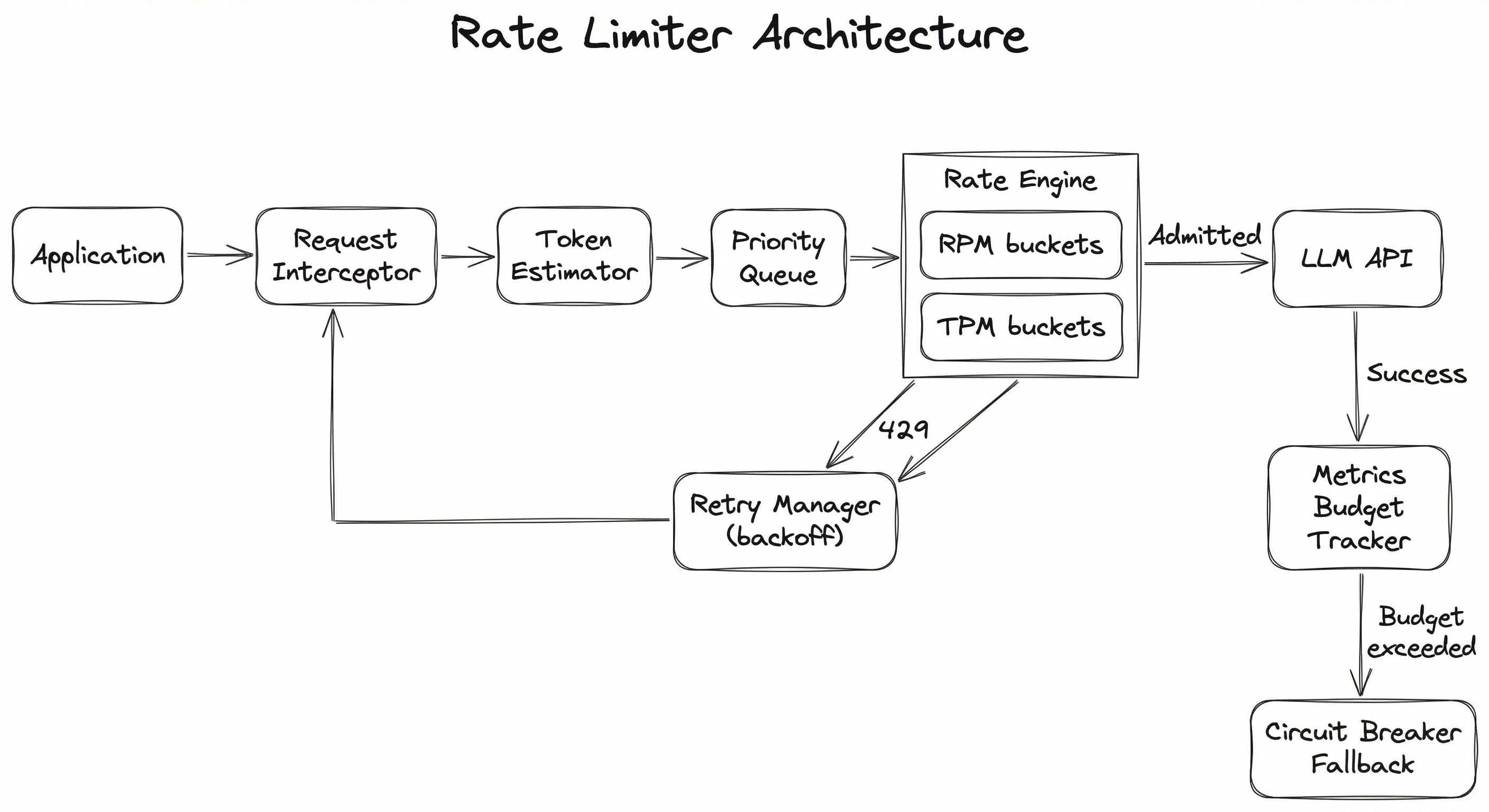
The architecture follows a closed-loop control pattern: the rate engine makes admission decisions based on current state, the response handler feeds back actual token consumption, and the metrics tracker adjusts future estimates. This feedback loop is what makes LLM rate limiting fundamentally different from simple API throttling -- you cannot know the exact cost until the response arrives.
Key Components
Request Interceptor
Captures all outbound LLM API calls before they leave the application. This is typically implemented as middleware, a decorator, or a proxy layer. It extracts the prompt, model name, max_tokens setting, and any priority metadata before passing to the token estimator.
Token Estimator
Estimates the total token cost of a request before it is sent. Uses the tokenizer for the target model (e.g., tiktoken for OpenAI models, Anthropic's tokenizer for Claude) to count input tokens, then adds the max_tokens parameter as a worst-case output estimate. This estimate is used by the rate engine for TPM admission control.
Priority Queue
Orders pending requests by priority class. Real-time user-facing requests get highest priority, background batch jobs get lowest. This ensures that rate limit capacity is allocated to the most latency-sensitive workloads first. Typically implemented as a multi-level feedback queue or a heap with priority keys.
Dual-Axis Rate Engine
The core rate limiting logic. Maintains two parallel token buckets (or sliding windows): one for RPM and one for TPM. A request is admitted only if both buckets have sufficient capacity. Also enforces daily/monthly budget caps. In distributed deployments, bucket state is stored in Redis or a similar shared store.
Retry Manager
Handles HTTP 429 responses from the LLM provider. Implements exponential backoff with full jitter. Respects the Retry-After header when present. Tracks retry counts per request and gives up after a configurable maximum (typically 3-5 retries). Failed requests are routed to the fallback handler.
Metrics & Budget Tracker
Records actual token consumption from API response headers (x-ratelimit-remaining-tokens, x-ratelimit-remaining-requests). Tracks cumulative spend per hour/day/month in both tokens and cost (USD/INR). Triggers alerts and circuit breaker activation when budget thresholds are crossed.
Circuit Breaker
Prevents cascading failures by opening (blocking all requests) when error rates exceed a threshold or budget limits are hit. Uses the half-open state pattern to periodically test if the provider has recovered. Integrates with fallback routing to redirect traffic to alternative models or providers.
Data Flow
Outbound Path: Application generates an LLM API request -> Request Interceptor captures it -> Token Estimator calculates the estimated token cost -> Request enters the Priority Queue -> Rate Engine checks both RPM and TPM buckets -> If admitted, request is sent to the LLM provider -> Response is received and processed.
Feedback Path: Response Handler extracts actual token usage from response headers -> Metrics Tracker updates cumulative consumption counters -> Budget Tracker checks against daily/monthly caps -> If budget threshold crossed, Circuit Breaker engages.
Retry Path: If the provider returns a 429 or 5xx error -> Retry Manager calculates backoff delay with jitter -> Request re-enters the Priority Queue after the delay -> Rate Engine re-evaluates admission.
Fallback Path: If retries are exhausted or circuit breaker is open -> Request is routed to a fallback provider (e.g., switch from GPT-4o to Claude Sonnet) or a cached response is returned if available.
A flow diagram showing requests flowing from the Application Layer through a Request Interceptor, Token Estimator, and Priority Queue into a Dual-Axis Rate Engine (RPM + TPM buckets). Admitted requests go to the LLM Provider API. 429 responses flow to a Retry Manager with exponential backoff, which feeds back into the Priority Queue. Successful responses update a Metrics and Budget Tracker, which can trigger a Circuit Breaker that routes to fallback providers.
How to Implement
Implementation Approaches
There are three broad approaches to implementing rate limiting for LLM APIs, each suited to different scales and team maturity levels:
Option A: Client-side rate limiting -- Embed the rate limiter directly in your application code using libraries like tenacity, aiolimiter, or custom token bucket implementations. This is the simplest approach and works well for single-process applications or small teams. The downside is that it does not coordinate across multiple application instances.
Option B: Gateway/proxy-based rate limiting -- Deploy a dedicated LLM gateway (LiteLLM, Portkey, or a custom proxy) that centralizes rate limiting, retry logic, and provider routing. All application instances route their LLM calls through the gateway. This is the recommended approach for teams with more than one service calling LLM APIs.
Option C: Distributed rate limiting -- Use a shared state store (Redis, Memcached) to coordinate rate limit counters across multiple application instances. Each instance checks and updates the shared counters atomically. This is necessary at scale but introduces latency for the state store round-trip.
For most Indian startups and mid-size companies, Option B (gateway-based) provides the best balance of simplicity and capability. You get centralized observability, multi-provider routing, and per-team budget controls without building everything from scratch.
Cost Note: LiteLLM (open source, MIT license) can be self-hosted on a single VM starting at roughly 49/month (~INR 4,100/month). For comparison, a single unthrottled GPT-4o batch job that burns through your monthly budget costs far more than any gateway setup.
import time
import threading
from dataclasses import dataclass, field
from typing import Optional


@dataclass
class TokenBucket:
    """A token bucket that refills at a constant rate."""
    capacity: float
    refill_rate: float  # tokens per second
    tokens: float = field(init=False)
    last_refill: float = field(init=False)
    lock: threading.Lock = field(default_factory=threading.Lock, init=False)

    def __post_init__(self):
        self.tokens = self.capacity
        self.last_refill = time.monotonic()

    def _refill(self):
        now = time.monotonic()
        elapsed = now - self.last_refill
        self.tokens = min(self.capacity, self.tokens + elapsed * self.refill_rate)
        self.last_refill = now

    def try_acquire(self, cost: float = 1.0) -> bool:
        with self.lock:
            self._refill()
            if self.tokens >= cost:
                self.tokens -= cost
                return True
            return False

    def wait_time(self, cost: float = 1.0) -> float:
        """Returns seconds to wait before cost tokens are available."""
        with self.lock:
            self._refill()
            if self.tokens >= cost:
                return 0.0
            deficit = cost - self.tokens
            return deficit / self.refill_rate


class DualAxisRateLimiter:
    """
    Rate limiter that enforces both RPM and TPM limits simultaneously.
    A request is admitted only when BOTH buckets have capacity.
    """

    def __init__(
        self,
        rpm_limit: int = 500,
        tpm_limit: int = 200_000,
        rpm_burst: Optional[int] = None,
        tpm_burst: Optional[int] = None,
    ):
        rpm_burst = rpm_burst or rpm_limit
        tpm_burst = tpm_burst or tpm_limit

        self.rpm_bucket = TokenBucket(
            capacity=rpm_burst,
            refill_rate=rpm_limit / 60.0,
        )
        self.tpm_bucket = TokenBucket(
            capacity=tpm_burst,
            refill_rate=tpm_limit / 60.0,
        )

    def acquire(self, estimated_tokens: int, timeout: float = 30.0) -> bool:
        """
        Block until the request can be admitted, or return False on timeout.

        Args:
            estimated_tokens: Estimated total tokens (input + max_tokens)
            timeout: Maximum seconds to wait
        """
        deadline = time.monotonic() + timeout

        while time.monotonic() < deadline:
            rpm_wait = self.rpm_bucket.wait_time(1.0)
            tpm_wait = self.tpm_bucket.wait_time(estimated_tokens)
            wait = max(rpm_wait, tpm_wait)

            if wait == 0:
                # Both buckets have capacity -- acquire atomically
                if self.rpm_bucket.try_acquire(1.0) and self.tpm_bucket.try_acquire(estimated_tokens):
                    return True
            else:
                time.sleep(min(wait, deadline - time.monotonic()))

        return False  # Timed out


# --- Usage ---
limiter = DualAxisRateLimiter(rpm_limit=500, tpm_limit=200_000)

def call_llm(prompt: str, max_tokens: int = 512):
    # Estimate tokens: input tokens + max_tokens
    import tiktoken
    enc = tiktoken.encoding_for_model("gpt-4o")
    input_tokens = len(enc.encode(prompt))
    estimated_total = input_tokens + max_tokens

    if limiter.acquire(estimated_total, timeout=30.0):
        # Proceed with API call
        import openai
        response = openai.chat.completions.create(
            model="gpt-4o",
            messages=[{"role": "user", "content": prompt}],
            max_tokens=max_tokens,
        )
        return response
    else:
        raise TimeoutError("Rate limit: could not acquire capacity within 30s")
This implements a dual-axis token bucket -- the core pattern for LLM rate limiting. Two independent buckets enforce RPM and TPM limits simultaneously. The acquire method blocks until both buckets have capacity or times out. The key insight is using tiktoken to estimate input tokens and adding max_tokens for the worst-case output estimate, matching how OpenAI calculates TPM consumption. This is thread-safe and suitable for synchronous Python applications.
import asyncio
import time
import heapq
from enum import IntEnum
from dataclasses import dataclass, field
from typing import Any, Coroutine, Callable


class Priority(IntEnum):
    CRITICAL = 0   # User-facing real-time
    HIGH = 1       # Interactive but tolerant of delay
    NORMAL = 2     # Background processing
    LOW = 3        # Batch jobs, backfill


@dataclass(order=True)
class PrioritizedRequest:
    priority: int
    timestamp: float = field(compare=False)
    estimated_tokens: int = field(compare=False)
    future: asyncio.Future = field(compare=False)
    coroutine_factory: Callable = field(compare=False)


class AsyncLLMRateLimiter:
    """
    Async rate limiter with priority scheduling for LLM APIs.
    Higher-priority requests are dequeued first.
    """

    def __init__(self, rpm_limit: int = 500, tpm_limit: int = 200_000, max_concurrent: int = 20):
        self.rpm_limit = rpm_limit
        self.tpm_limit = tpm_limit
        self.semaphore = asyncio.Semaphore(max_concurrent)

        self._queue: list[PrioritizedRequest] = []
        self._rpm_tokens = rpm_limit
        self._tpm_tokens = tpm_limit
        self._last_refill = time.monotonic()
        self._lock = asyncio.Lock()
        self._running = True
        self._processor_task: asyncio.Task | None = None

    async def start(self):
        """Start the background request processor."""
        self._processor_task = asyncio.create_task(self._process_queue())

    async def stop(self):
        """Gracefully stop the rate limiter."""
        self._running = False
        if self._processor_task:
            self._processor_task.cancel()

    def _refill(self):
        now = time.monotonic()
        elapsed = now - self._last_refill
        self._rpm_tokens = min(self.rpm_limit, self._rpm_tokens + elapsed * (self.rpm_limit / 60.0))
        self._tpm_tokens = min(self.tpm_limit, self._tpm_tokens + elapsed * (self.tpm_limit / 60.0))
        self._last_refill = now

    async def submit(
        self,
        coroutine_factory: Callable[[], Coroutine],
        estimated_tokens: int,
        priority: Priority = Priority.NORMAL,
    ) -> Any:
        """
        Submit a request to be rate-limited and prioritized.
        Returns the result of the coroutine when it completes.
        """
        loop = asyncio.get_event_loop()
        future = loop.create_future()

        request = PrioritizedRequest(
            priority=priority.value,
            timestamp=time.monotonic(),
            estimated_tokens=estimated_tokens,
            future=future,
            coroutine_factory=coroutine_factory,
        )

        heapq.heappush(self._queue, request)
        return await future

    async def _process_queue(self):
        while self._running:
            if not self._queue:
                await asyncio.sleep(0.01)
                continue

            async with self._lock:
                self._refill()
                request = self._queue[0]  # Peek at highest priority

                if self._rpm_tokens >= 1 and self._tpm_tokens >= request.estimated_tokens:
                    heapq.heappop(self._queue)
                    self._rpm_tokens -= 1
                    self._tpm_tokens -= request.estimated_tokens
                else:
                    await asyncio.sleep(0.05)
                    continue

            # Execute with concurrency limit
            asyncio.create_task(self._execute(request))

    async def _execute(self, request: PrioritizedRequest):
        async with self.semaphore:
            try:
                result = await request.coroutine_factory()
                request.future.set_result(result)
            except Exception as e:
                request.future.set_exception(e)


# --- Usage ---
import openai

client = openai.AsyncOpenAI()
limiter = AsyncLLMRateLimiter(rpm_limit=500, tpm_limit=200_000, max_concurrent=20)

async def main():
    await limiter.start()

    # High-priority user-facing request
    result = await limiter.submit(
        coroutine_factory=lambda: client.chat.completions.create(
            model="gpt-4o",
            messages=[{"role": "user", "content": "Explain rate limiting."}],
            max_tokens=256,
        ),
        estimated_tokens=50 + 256,  # input + max_tokens
        priority=Priority.CRITICAL,
    )

    # Low-priority batch request
    batch_result = await limiter.submit(
        coroutine_factory=lambda: client.chat.completions.create(
            model="gpt-4o",
            messages=[{"role": "user", "content": "Summarize this document..."}],
            max_tokens=1024,
        ),
        estimated_tokens=500 + 1024,
        priority=Priority.LOW,
    )

    await limiter.stop()
This async implementation adds priority scheduling on top of rate limiting. User-facing requests (CRITICAL/HIGH priority) are dequeued before batch jobs (LOW priority), ensuring that interactive latency is preserved even when the system is at capacity. The asyncio.Semaphore provides an additional concurrency cap to prevent overwhelming the provider with too many parallel connections. This pattern is essential for production systems that mix real-time and batch LLM workloads -- for example, a customer support chatbot (CRITICAL) running alongside nightly document summarization (LOW).
import openai
from tenacity import (
    retry,
    stop_after_attempt,
    wait_exponential_jitter,
    retry_if_exception_type,
    before_sleep_log,
)
import logging

logger = logging.getLogger(__name__)


@retry(
    retry=retry_if_exception_type(openai.RateLimitError),
    wait=wait_exponential_jitter(
        initial=1,      # Start with 1 second
        max=60,          # Cap at 60 seconds
        jitter=5,        # Add up to 5 seconds of jitter
    ),
    stop=stop_after_attempt(5),
    before_sleep=before_sleep_log(logger, logging.WARNING),
)
def call_openai_with_backoff(prompt: str, max_tokens: int = 512) -> str:
    """
    Call OpenAI API with automatic retry on rate limit errors.
    Uses exponential backoff with jitter to prevent thundering herd.
    """
    client = openai.OpenAI()
    response = client.chat.completions.create(
        model="gpt-4o",
        messages=[{"role": "user", "content": prompt}],
        max_tokens=max_tokens,
    )
    return response.choices[0].message.content


# For async code:
from tenacity import AsyncRetrying

async def call_openai_async(prompt: str) -> str:
    client = openai.AsyncOpenAI()
    async for attempt in AsyncRetrying(
        retry=retry_if_exception_type(openai.RateLimitError),
        wait=wait_exponential_jitter(initial=1, max=60, jitter=5),
        stop=stop_after_attempt(5),
    ):
        with attempt:
            response = await client.chat.completions.create(
                model="gpt-4o",
                messages=[{"role": "user", "content": prompt}],
                max_tokens=512,
            )
            return response.choices[0].message.content
This is the simplest production-ready approach using the tenacity library, which OpenAI themselves recommend. The wait_exponential_jitter strategy combines exponential backoff with random jitter -- the gold standard for retry behavior. The before_sleep_log callback logs each retry attempt, which is essential for debugging rate limit issues in production. Note: this handles retries but does not proactively prevent rate limit hits. For that, combine it with the token bucket limiter from the previous example.
import redis
import time
from typing import Tuple


class RedisRateLimiter:
    """
    Distributed rate limiter using Redis for shared state.
    Implements sliding window log with atomic Lua scripting.
    """

    # Lua script for atomic sliding window check-and-increment
    SLIDING_WINDOW_SCRIPT = """
    local key = KEYS[1]
    local window_ms = tonumber(ARGV[1])
    local limit = tonumber(ARGV[2])
    local cost = tonumber(ARGV[3])
    local now_ms = tonumber(ARGV[4])

    -- Remove expired entries
    redis.call('ZREMRANGEBYSCORE', key, 0, now_ms - window_ms)

    -- Count current entries (weighted by cost)
    local current = 0
    local entries = redis.call('ZRANGEBYSCORE', key, now_ms - window_ms, now_ms, 'WITHSCORES')
    for i = 1, #entries, 2 do
        current = current + tonumber(entries[i])
    end

    if current + cost <= limit then
        -- Admit: add entry with cost as member, timestamp as score
        redis.call('ZADD', key, now_ms, tostring(cost) .. ':' .. tostring(now_ms))
        redis.call('PEXPIRE', key, window_ms)
        return 1  -- Admitted
    else
        return 0  -- Rejected
    end
    """

    def __init__(
        self,
        redis_url: str = "redis://localhost:6379",
        rpm_limit: int = 500,
        tpm_limit: int = 200_000,
        prefix: str = "ratelimit",
    ):
        self.redis = redis.from_url(redis_url)
        self.rpm_limit = rpm_limit
        self.tpm_limit = tpm_limit
        self.prefix = prefix
        self._script = self.redis.register_script(self.SLIDING_WINDOW_SCRIPT)

    def try_acquire(
        self,
        tenant_id: str,
        estimated_tokens: int,
    ) -> Tuple[bool, dict]:
        """
        Attempt to acquire rate limit capacity for a tenant.
        Returns (admitted, metadata) where metadata includes remaining capacity.
        """
        now_ms = int(time.time() * 1000)
        rpm_key = f"{self.prefix}:{tenant_id}:rpm"
        tpm_key = f"{self.prefix}:{tenant_id}:tpm"

        # Check RPM (1-minute window)
        rpm_ok = self._script(
            keys=[rpm_key],
            args=[60_000, self.rpm_limit, 1, now_ms],
        )

        if not rpm_ok:
            return False, {"reason": "rpm_exceeded", "limit": self.rpm_limit}

        # Check TPM (1-minute window)
        tpm_ok = self._script(
            keys=[tpm_key],
            args=[60_000, self.tpm_limit, estimated_tokens, now_ms],
        )

        if not tpm_ok:
            return False, {"reason": "tpm_exceeded", "limit": self.tpm_limit}

        return True, {"rpm_remaining": "check_key", "tpm_remaining": "check_key"}


# --- Usage with multi-tenancy ---
limiter = RedisRateLimiter(
    redis_url="redis://localhost:6379",
    rpm_limit=100,    # Per-tenant limit
    tpm_limit=50_000, # Per-tenant limit
)

# Tenant A: high-priority enterprise customer
admitted, meta = limiter.try_acquire("tenant-flipkart", estimated_tokens=1500)

# Tenant B: free-tier user with lower limits
free_limiter = RedisRateLimiter(rpm_limit=10, tpm_limit=5_000)
admitted, meta = free_limiter.try_acquire("tenant-free-user-123", estimated_tokens=500)
This implements distributed rate limiting using Redis as the shared state store. The Lua script runs atomically on the Redis server, eliminating race conditions between multiple application instances. The sliding window log pattern (using Redis sorted sets with timestamps as scores) avoids the boundary reset problem of fixed windows. The multi-tenant design allows different limits per customer tier -- critical for SaaS platforms where enterprise clients (like a Flipkart or Zerodha) get higher quotas than free-tier users.
# LiteLLM Proxy rate limiting config (YAML)
model_list:
  - model_name: gpt-4o
    litellm_params:
      model: openai/gpt-4o
      api_key: sk-...
      rpm: 500
      tpm: 200000
  - model_name: claude-sonnet
    litellm_params:
      model: anthropic/claude-sonnet-4-20250514
      api_key: sk-ant-...
      rpm: 1000
      tpm: 400000

general_settings:
  master_key: sk-litellm-master-key
  database_url: postgresql://...

litellm_settings:
  max_budget: 500.00           # Monthly budget in USD
  budget_duration: 1mo
  num_retries: 3
  request_timeout: 120
  retry_after: 5
  allowed_fails: 3
  cooldown_time: 60            # Seconds to cool down after failures
  fallbacks:
    - model_name: gpt-4o
      fallback_model: claude-sonnet

# Per-team budgets
team_budgets:
  - team_id: ml-platform
    max_budget: 200.00         # USD per month (~INR 16,800)
    rpm_limit: 200
    tpm_limit: 100000
  - team_id: customer-support
    max_budget: 150.00         # USD per month (~INR 12,600)
    rpm_limit: 100
    tpm_limit: 50000
  - team_id: batch-processing
    max_budget: 100.00
    rpm_limit: 50
    tpm_limit: 80000
Common Implementation Mistakes
- ●
Setting
max_tokenstoo high on every request: OpenAI uses the maximum of input tokens andmax_tokensto calculate TPM consumption. Settingmax_tokens=4096on a request that only needs 200 output tokens wastes 20x your TPM budget. Always setmax_tokensas close as possible to the expected output length. - ●
Rate limiting only by RPM, ignoring TPM: A single request with a 10,000-token prompt consumes 100x more TPM than a 100-token prompt. If you only track RPM, you will hit TPM limits unexpectedly and get 429 errors despite sending fewer requests than your RPM cap.
- ●
Retrying without backoff or jitter: When you get a 429, immediately retrying just adds to the congestion. Worse, if multiple clients retry at the same time (thundering herd), you amplify the problem. Always use exponential backoff with full jitter.
- ●
Using fixed window counters instead of sliding windows: A fixed window that resets every 60 seconds allows a burst of 2x the limit at the boundary (e.g., 500 requests in the last second of minute 1 plus 500 in the first second of minute 2 = 1,000 in 2 seconds). Sliding windows prevent this.
- ●
Not reading response headers: LLM providers return
x-ratelimit-remaining-requests,x-ratelimit-remaining-tokens, andRetry-Afterheaders. Ignoring these means flying blind. Your rate limiter should adapt based on these signals. - ●
Single-process rate limiter in a distributed system: If you have 10 application instances each running their own rate limiter with the full RPM allocation, your actual request rate is 10x the limit. Use a shared state store (Redis) or centralized gateway for distributed deployments.
- ●
No budget cap as a safety net: Rate limiting without a daily/monthly spending cap is like having speed limits but no fuel gauge. A logic bug that generates infinite retry loops will drain your API budget. Always implement a hard budget circuit breaker.
When Should You Use This?
Use When
You are calling any external LLM API (OpenAI, Anthropic, Google, Cohere) in production -- rate limiting is non-negotiable for production deployments
Your application has multiple services or instances that share a single API key, requiring coordinated rate limiting
You need to enforce per-tenant or per-team quotas in a multi-tenant SaaS application (e.g., different API limits for free vs. paid tiers)
Cost predictability is critical -- you need hard budget caps that prevent runaway spending (especially important for bootstrapped Indian startups)
You mix real-time and batch workloads and need priority-based scheduling to protect user-facing latency
Your system processes variable-length inputs where token consumption varies 10-100x between requests
You are building an LLM gateway or proxy that routes to multiple providers and need unified rate limiting across all of them
Avoid When
You are prototyping with a single developer and low request volume (under 10 RPM) -- the overhead is not justified yet, but implement it before going to production
You are using local/self-hosted models (vLLM, Ollama) where you control the serving infrastructure directly -- use concurrency limiting on the serving side instead
Your LLM calls are purely internal batch jobs with no latency requirements and you are already using the provider's Batch API (which has its own queueing -- OpenAI Batch API gives 50% discount)
The provider already handles rate limiting gracefully via their SDK with built-in retries (though you should still add budget caps)
You have a single application instance with simple, predictable request patterns that never approach the rate limit -- but this rarely holds in practice
Key Tradeoffs
The Latency-Throughput Tradeoff
Every rate limiter adds latency. A token bucket check takes microseconds, but the waiting when the bucket is empty can add seconds to request latency. For user-facing applications, this means you need to size your rate limits with headroom -- typically 70-80% of the provider's actual limit -- to avoid queuing delays during normal operation.
| Approach | Avg Latency Overhead | Coordination Cost | Burst Handling | Accuracy |
|---|---|---|---|---|
| In-process token bucket | <1ms | None (single process) | Good (configurable burst) | Per-process only |
| Redis sliding window | 1-3ms (network RTT) | Low (Redis atomic ops) | Excellent | Global (all instances) |
| LLM Gateway (LiteLLM) | 5-15ms (proxy hop) | Medium (gateway deployment) | Good | Global + per-tenant |
| Adaptive concurrency | <1ms | None (local estimation) | Excellent (auto-tuning) | Self-adjusting |
The Accuracy-Cost Tradeoff
More accurate rate limiting (sliding window log) uses more memory than approximate methods (fixed window counter). For a system handling 10,000 RPM, a sliding window log stores 10,000 timestamps per minute (~80KB), while a fixed window counter uses a single integer. At scale with multi-tenancy (10,000 tenants), this becomes 800MB vs. ~40KB. Choose based on your accuracy requirements.
The Control-Flexibility Tradeoff
Strict rate limiting (hard rejection when limits are hit) protects your budget but may cause user-visible errors. Lenient rate limiting (queue and wait) preserves user experience but may allow cost overruns during traffic spikes. The right balance depends on your application:
- Hard limits: Appropriate for batch processing, internal tools, cost-critical deployments
- Soft limits with queuing: Appropriate for user-facing applications where latency matters more than strict cost control
- Hybrid: Hard daily budget cap + soft per-minute limits with queuing (recommended for most production deployments)
Alternatives & Comparisons
A response cache reduces the number of API calls by serving cached results for identical or semantically similar prompts. It complements rate limiting -- caching reduces demand, while rate limiting controls what gets through. Use caching first to reduce load, then rate limiting to manage the residual. For a customer support bot where 30-40% of queries are repeated, caching alone can halve your API bill.
A load balancer distributes requests across multiple API keys or provider endpoints. It increases aggregate throughput but does not control the rate per key. Use a load balancer in front of per-key rate limiters -- the load balancer spreads traffic, and each key's rate limiter ensures its quota is respected. This is the standard pattern for teams with multiple OpenAI organization accounts.
A token counter measures the token cost of a request but does not enforce limits. It is a prerequisite for token-aware rate limiting -- your rate limiter needs token counts to enforce TPM limits. If you only need monitoring (not enforcement), a token counter with alerting may suffice. But for production, pair it with a rate limiter.
Pros, Cons & Tradeoffs
Advantages
Prevents 429 errors from reaching your users by proactively throttling requests before they hit provider limits, resulting in a smoother user experience and fewer retries
Cost predictability and budget control -- hard spending caps prevent runaway API bills, which is critical for startups operating on tight budgets (a single unthrottled batch job can burn INR 5-10 lakh overnight)
Priority scheduling ensures that user-facing requests are served first, even when the system is at capacity, preventing batch workloads from starving interactive applications
Multi-tenant fairness -- per-tenant rate limits prevent one noisy customer from consuming the entire API quota, which is essential for SaaS platforms serving multiple clients
Graceful degradation through queuing and fallback routing means the system bends rather than breaks under load -- requests are delayed rather than dropped, or routed to alternative providers
Observability -- a centralized rate limiter provides a single point to monitor API usage, token consumption, error rates, and spending across all services and tenants
Disadvantages
Added latency -- every request passes through the rate limiter, adding 1-15ms depending on the implementation (in-process vs. distributed). For latency-sensitive applications, this overhead matters
Operational complexity -- distributed rate limiters require shared state (Redis), which introduces another dependency to monitor and maintain. Redis downtime means your rate limiter fails open (allowing unlimited requests) or closed (blocking everything)
Configuration burden -- setting the right limits requires understanding provider quotas, estimating token consumption patterns, and tuning per-tenant allocations. Misconfigured limits either waste capacity or cause unnecessary throttling
Token estimation is imprecise -- you cannot know exact output token count before the request completes, so estimates may over- or under-reserve TPM capacity. Over-reservation wastes throughput; under-reservation risks 429 errors
Cold start problem -- when the application starts (or after a deployment), the rate limiter has no history of recent requests. If multiple instances restart simultaneously, they may all burst at full rate, overwhelming the provider
Complexity scales with tenants -- managing per-tenant limits for 10,000+ tenants requires careful data structure design and can consume significant Redis memory
Failure Modes & Debugging
Thundering herd after backoff
Cause
Multiple clients hit a 429 simultaneously, all back off for the same duration, and retry at the same instant. Without jitter, the retry wave recreates the exact same overload condition.
Symptoms
Periodic spikes in 429 error rates with a pattern matching the backoff interval (e.g., every 2, 4, 8 seconds). API error rate oscillates rather than recovering smoothly. Logs show clusters of retries at identical timestamps.
Mitigation
Always use full jitter in exponential backoff: delay = random(0, min(max_delay, base * 2^attempt)). This distributes retries uniformly across the backoff window. Additionally, read the Retry-After header from the provider and use it as the minimum delay.
Token estimation mismatch
Cause
The rate limiter estimates token consumption using the prompt length plus max_tokens, but the actual output is much shorter (or longer if streaming is truncated). Over-estimation wastes TPM capacity; under-estimation causes unexpected 429 errors.
Symptoms
TPM utilization reported by the rate limiter diverges significantly from actual provider-reported usage. Either the system throttles itself unnecessarily (utilization appears high but provider headers show plenty of headroom) or unexpectedly hits 429 errors (utilization appears low).
Mitigation
Implement a feedback loop: after each response, compare estimated tokens with actual tokens from response headers. Maintain a running correction factor per model and prompt type. For frequently used prompt templates, cache the typical output length and use it instead of max_tokens for estimation.
Redis failure -- rate limiter fails open
Cause
The Redis instance used for distributed rate limiting becomes unavailable (network partition, OOM, maintenance). The rate limiter has no state to check and defaults to allowing all requests.
Symptoms
Sudden spike in API calls well above rate limits. Provider returns flood of 429 errors. API costs spike. Logs show Redis connection errors but application appears to function normally otherwise.
Mitigation
Implement a fail-closed policy with a local fallback: if Redis is unreachable, fall back to an in-process rate limiter with conservative limits (e.g., 50% of the per-instance share of the total limit). Use Redis Sentinel or Cluster for high availability. Set a TTL-based circuit breaker on the Redis connection to avoid repeated connection attempts.
Priority inversion -- batch jobs starve interactive requests
Cause
A large batch job fills the rate limit queue before interactive requests arrive. Even with priority levels, if the batch requests are already being processed (occupying concurrency slots), new high-priority requests must wait.
Symptoms
User-facing latency spikes during batch processing windows. P99 latency for interactive requests correlates with batch job schedules. Users report the chatbot being 'slow' during certain hours.
Mitigation
Reserve a portion of rate limit capacity exclusively for high-priority requests (e.g., 70% for interactive, 30% for batch). Implement preemptive scheduling where batch requests in the queue are deprioritized when interactive requests arrive. Schedule batch jobs during off-peak hours and use the provider's Batch API (OpenAI offers 50% discount for batch).
Budget exhaustion mid-day
Cause
Daily budget cap is hit early in the day due to a traffic spike or misconfigured limits, causing all requests to be rejected for the remainder of the day.
Symptoms
All API requests fail with budget-exceeded errors starting at a specific time. No recovery until the next day. Critical user-facing features go down entirely.
Mitigation
Implement budget pacing: spread the daily budget evenly across time periods (e.g., allocate 1/24th per hour with rollover). Set warning alerts at 50%, 75%, and 90% of daily budget. Maintain a reserve pool (10-15% of budget) that can only be used by CRITICAL priority requests. Consider auto-switching to a cheaper model (e.g., GPT-4o-mini) when budget runs low.
Quantized rate limit enforcement
Cause
The provider enforces rate limits at sub-minute granularity (e.g., OpenAI may enforce 600 RPM as 10 requests per second). The rate limiter tracks only per-minute totals and allows micro-bursts that exceed the per-second quota.
Symptoms
Sporadic 429 errors even though the per-minute request count is well below the RPM limit. Errors appear in bursts and are hard to reproduce. The issue is more pronounced during traffic spikes.
Mitigation
Configure the token bucket refill rate to match the per-second equivalent of the RPM limit (e.g., for 600 RPM, set refill rate to 10/second with a small burst capacity of 15-20). Monitor the x-ratelimit-remaining-requests header to detect when the provider is enforcing at a finer granularity.
Placement in an ML System
Where Does It Sit in the ML Pipeline?
The rate limiter sits in the LLM operations layer, specifically on the outbound path between your application and the LLM provider API. Think of it as the last gate before requests leave your infrastructure.
In a typical architecture, the flow is: Prompt Template (constructs the prompt) -> Token Counter (estimates cost) -> Rate Limiter (enforces limits) -> LLM Provider API -> Response Cache (stores the result for future reuse).
The rate limiter interacts closely with the load balancer upstream (which distributes requests across API keys or providers) and the response cache downstream (which reduces the total number of requests that reach the rate limiter). It also depends on the token counter for accurate TPM estimation.
For systems using an LLM gateway (LiteLLM, Portkey), the rate limiter is built into the gateway and operates transparently. For direct API integrations, it is typically implemented as middleware or a decorator in the application code.
Key Insight: The rate limiter is not just a throttle -- it is a resource allocator. It decides which requests get API capacity and which must wait. This allocation decision (priority queuing, tenant fairness, budget pacing) is where the real system design complexity lives.
Pipeline Stage
LLM Operations / Serving
Upstream
- prompt-template
- token-counter
- load-balancer
Downstream
- model-serving
- response-cache
Scaling Bottlenecks
The primary bottleneck is shared state coordination in distributed deployments. Every rate limit check requires a round-trip to Redis (1-3ms), and at 10,000+ RPM across 50 application instances, this means 10,000+ Redis operations per minute per rate limit dimension (RPM + TPM = 20,000+ ops/min). Redis handles this easily (it can do 100K+ ops/second), but network partitions or Redis failover can cause brief windows of uncoordinated limiting.
The second bottleneck is token estimation latency. Running tiktoken to count tokens in a 10,000-token prompt takes 1-5ms. At high throughput, this adds up. The mitigation is to cache token counts for repeated prompts or use approximate estimation (character count / 4 for English text with OpenAI models).
At extreme scale (100K+ RPM), the rate limiter itself can become a bottleneck if implemented as a single gateway. The solution is to shard rate limiting by tenant or by model, with each shard handling a subset of the traffic.
Production Case Studies
Stripe published a detailed engineering blog post on their approach to API rate limiting at scale. They use a multi-layer strategy with request rate limiters (token bucket), concurrent request limiters (semaphore-based), fleet usage load shedders (for overload protection), and worker utilization load shedders (for per-server protection). Their key insight is that different types of limits serve different purposes and should be composed in layers rather than handled by a single mechanism.
Stripe's layered rate limiting approach enables them to serve millions of API requests per day with consistent sub-200ms latency while protecting against both accidental overload and deliberate abuse. Their approach has become a reference architecture adopted across the industry.
Netflix developed an adaptive concurrency limiter that automatically detects optimal throughput without static configuration. Instead of setting fixed RPM limits, their system measures request latency and uses TCP Vegas-style congestion control (AIMD -- Additive Increase Multiplicative Decrease) to adjust the concurrency limit dynamically. When latency increases (indicating server-side queueing), the limit decreases; when latency is stable, the limit increases. They open-sourced this as the concurrency-limits Java library.
Netflix's adaptive approach eliminated the need for manual limit tuning across their microservices fleet. The system automatically finds the optimal concurrency for each service, reducing both timeout rates and over-provisioning. The open-source library (github.com/Netflix/concurrency-limits) has been adopted by multiple organizations.
Cloudflare built a rate limiting system that scales across their global network serving millions of domains. Their engineering blog details the challenges of distributed counting -- how to accurately count requests across hundreds of edge servers without a central coordinator. They use a combination of sliding window counters with probabilistic data structures, achieving accurate rate limiting with minimal memory overhead. Their key insight is that naive fixed-window counters allow boundary bursts, while sliding windows provide consistent enforcement.
Cloudflare's rate limiting system protects millions of customer domains with configurable per-endpoint limits, processing billions of requests daily. Their sliding window implementation became the basis for their Advanced Rate Limiting product, handling complex rules based on request attributes, headers, and body content.
Portkey built an AI Gateway specifically designed for LLM API rate limiting and reliability. Their platform handles over 10 billion LLM requests per month, implementing automatic fallback routing (e.g., OpenAI -> Azure OpenAI -> Anthropic when rate limits are hit), request caching, and per-team budget controls. Their blog details common rate limiting patterns specific to LLM workloads, including the challenge of token-based limits and the importance of provider-specific header parsing.
Portkey's AI Gateway achieves 99.9999% uptime with sub-10ms gateway latency. Their automatic fallback routing reduces effective error rates by 90%+ for customers who configure multi-provider setups. The platform is used by teams across India and globally for production LLM deployments.
Tooling & Ecosystem
Open-source LLM proxy/gateway that provides unified rate limiting, budget management, and fallback routing across 100+ LLM providers. Supports per-key, per-team, and per-model rate limits with RPM/TPM enforcement. Includes a proxy server mode for centralized deployment.
Blazing-fast AI Gateway with built-in rate limiting, automatic retries, fallback routing, and caching. Supports 200+ LLMs with a unified API. The open-source gateway can be self-hosted, and the managed service handles 10B+ requests/month.
General-purpose Python retrying library, widely used for handling LLM API rate limits. Provides decorators for exponential backoff, jitter, and conditional retry logic. Recommended by OpenAI in their official cookbook.
Open-source LLM observability platform that includes a proxy gateway with built-in rate limiting, caching, cost tracking, and request monitoring. Integration requires changing a single base URL. Supports per-user rate limits and threat detection.
Java library implementing adaptive concurrency limiting based on TCP congestion control algorithms (AIMD, Vegas). Automatically detects optimal throughput without manual configuration. Provides integrations for servlets, gRPC, and executors.
Lightweight fault tolerance library for Java with modules for rate limiting, circuit breaking, bulkhead isolation, and retry logic. Inspired by Netflix Hystrix but designed for functional programming. Spring Boot integration available.
Efficient asyncio rate limiter implementing the leaky bucket algorithm for Python. Provides precise control over request rates in async applications. Lightweight and composable with any async HTTP client.
Purpose-built rate limiter for the OpenAI API that implements the generic cell rate algorithm (GCRA), a variant of the leaky bucket pattern. Automatically tracks both RPM and TPM limits for OpenAI models.
Research & References
Raghavan, B. et al. (2021)arXiv preprint
Analyzes how distributed rate limiters that drop packets probabilistically can emulate the effect of a single aggregate rate limiter. Demonstrates the tradeoffs between local and global rate limiting accuracy in distributed systems.
Mace, J. et al. (2015)NSDI 2015
Proposes a resource management framework for multi-tenant systems that dynamically adapts resource allocation (including rate limits) to enforce fairness and latency guarantees across tenants. Relevant to multi-tenant LLM API management.
Choi, H. et al. (2024)arXiv preprint
Addresses fair scheduling across multiple DNN inference tenants sharing GPU accelerators. Proposes RL-based scheduling that balances throughput and fairness -- directly applicable to multi-tenant LLM serving with per-tenant rate limits.
Corless, M. & Shorten, R. (2004)Automatica, Vol. 40, No. 8
Foundational analysis of Additive Increase Multiplicative Decrease (AIMD) algorithms for congestion control. Proves convergence and fairness properties that underpin Netflix's adaptive concurrency limiter and modern rate limiting systems.
Zheng, L. et al. (2024)arXiv preprint
Proposes learning-based scheduling for LLM inference that predicts output lengths to optimize scheduling decisions. Directly relevant to rate limiting, as accurate output token prediction improves TPM budget estimation.
Interview & Evaluation Perspective
Common Interview Questions
- ●
Design a rate limiter for an LLM API gateway that handles 10,000 RPM across 100 tenants.
- ●
How would you implement rate limiting that respects both RPM and TPM limits simultaneously?
- ●
What happens when your rate limiter's Redis goes down? How do you handle this gracefully?
- ●
Compare token bucket vs. sliding window for LLM API rate limiting. Which would you choose and why?
- ●
How would you prevent a single tenant from consuming all the shared rate limit capacity in a multi-tenant system?
- ●
Design a system that automatically switches to a cheaper LLM model when the daily budget for the primary model is 80% consumed.
- ●
How would you handle rate limiting across multiple LLM providers (OpenAI + Anthropic + Google) with different limit structures?
Key Points to Mention
- ●
LLM rate limiting is dual-axis (RPM + TPM), not single-axis like traditional API rate limiting. Both must be enforced simultaneously because a single high-token request can exhaust TPM while RPM shows headroom.
- ●
Token estimation before the request is the hard problem. Use input token count +
max_tokensas an upper bound, then reconcile with actual usage from response headers. OpenAI explicitly uses this formula for TPM calculation. - ●
For distributed systems, use Redis with atomic Lua scripts for sliding window counters. The Lua script must be atomic to prevent race conditions between check and increment operations.
- ●
Always implement exponential backoff with full jitter for 429 handling -- not just exponential backoff. Without jitter, thundering herd behavior makes rate limit recovery oscillate instead of converging.
- ●
Priority queuing is essential in production: user-facing requests must preempt batch jobs. Reserve a fraction of capacity (e.g., 70%) exclusively for high-priority requests.
- ●
Budget caps are a safety net, not a substitute for rate limiting. Rate limiting controls the flow; budget caps prevent financial damage when the rate limiter has bugs or misconfigurations.
Pitfalls to Avoid
- ●
Saying you would use a fixed window counter without acknowledging the boundary burst problem (2x the limit at window edges).
- ●
Ignoring the TPM dimension and only discussing RPM -- this is the single biggest gap in junior candidates' understanding of LLM rate limiting.
- ●
Proposing a distributed rate limiter without discussing what happens when the coordination layer (Redis) fails. Always discuss fail-open vs. fail-closed policies.
- ●
Using
time.sleep()for backoff without jitter -- this creates synchronized retry waves across clients. - ●
Not mentioning observability: a rate limiter without metrics (429 rate, queue depth, budget utilization, token estimation accuracy) is a black box you cannot debug in production.
Senior-Level Expectation
A senior or staff-level candidate should be able to design the complete rate limiting stack: token estimation (with feedback loops for estimation accuracy), dual-axis token bucket or sliding window (with clear justification for the algorithm choice), distributed coordination via Redis (including Lua scripts for atomicity), priority scheduling across request classes, circuit breaker integration for budget enforcement, multi-provider fallback routing, and comprehensive observability. They should discuss capacity planning: given a provider's TPM limit and an application's traffic pattern, calculate the maximum sustainable throughput and the required buffer for burst absorption. They should also address the cost dimension -- quantifying the monthly API spend under different rate limiting strategies and justifying the configuration choices with specific numbers (e.g., 'At 500 RPM with an average of 800 tokens per request, our monthly GPT-4o cost is approximately Y with a 15% reserve for CRITICAL requests'). Indian startup context is valuable here: discussing how to optimize API costs when engineering budgets are tight, using strategies like batch API discounts (50% off on OpenAI), prompt caching, and model routing (use GPT-4o-mini for simple tasks, GPT-4o for complex ones).
Summary
Let us recap what we have covered in this deep dive into rate limiting for LLM systems.
A rate limiter is the control mechanism that governs how fast your application sends requests to LLM providers. Unlike traditional API rate limiting which only tracks request count, LLM rate limiting is dual-axis -- you must enforce both RPM (requests per minute) and TPM (tokens per minute) simultaneously, because a single high-token request can exhaust your token budget while your request count shows plenty of headroom. The core algorithms -- token bucket for burst tolerance, sliding window for accurate counting, and exponential backoff with full jitter for retry handling -- form the foundation. For distributed systems, Redis-backed counters with atomic Lua scripts provide cross-instance coordination.
The real complexity in production is not the algorithm but the system design around it: priority queuing to protect user-facing latency from batch job interference, multi-tenant fairness to prevent one customer from consuming all capacity, budget pacing to spread daily spending evenly, circuit breakers to prevent cascading failures, and fallback routing to alternative providers when the primary is rate-limited. Tools like LiteLLM and Portkey provide these capabilities out of the box, while libraries like Tenacity and aiolimiter are building blocks for custom implementations.
For any team spending more than INR 50,000/month on LLM APIs, rate limiting infrastructure is not optional -- it is the difference between predictable costs and unpleasant surprises. Start with a simple dual-axis token bucket, add Redis coordination when you scale beyond a single process, and graduate to a full LLM gateway when you need multi-provider routing and per-tenant controls. The rate limiter pays for itself the first time it prevents a runaway batch job from burning through your monthly API budget in a single afternoon.