OCR in Machine Learning
Optical Character Recognition (OCR) is the process of extracting machine-readable text from images, scanned documents, PDFs, photographs, and video frames. It is one of the oldest and most commercially impactful computer vision tasks, tracing its roots back to the 1950s -- yet it remains an active area of deep learning research in 2026.
In modern ML systems, OCR sits at the critical junction between unstructured visual data and structured text pipelines. Whether you are building a KYC onboarding flow that reads Aadhaar and PAN cards, a document intelligence platform that parses invoices, or a multilingual content digitization system for Devanagari manuscripts, OCR is the first step that converts pixels into tokens.
The field has evolved dramatically: from rule-based template matching to CNN+RNN hybrid architectures (CRNN), and now to fully end-to-end transformer models like TrOCR, Donut, and GOT-OCR2.0. Today's OCR systems don't just read text -- they understand document layouts, extract tables, parse handwriting, and handle 100+ languages. But this power comes with real engineering complexity: preprocessing pipelines, detection-recognition two-stage architectures, post-processing heuristics, and a constant battle against noisy real-world inputs.
This guide covers everything you need to design, implement, and scale OCR in production ML systems -- from the math behind text detection to the practical cost of processing a million Aadhaar cards per day.
Concept Snapshot
- What It Is
- A computer vision technique that detects and recognizes text regions within images or documents, converting visual pixel data into machine-readable character sequences.
- Category
- Computer Vision
- Complexity
- Intermediate
- Inputs / Outputs
- Inputs: images, scanned documents, PDFs, camera frames (RGB pixels). Outputs: extracted text strings with bounding box coordinates, confidence scores, and optionally structured fields (tables, key-value pairs).
- System Placement
- Sits after image preprocessing (deskewing, denoising, binarization) and before downstream NLP tasks like text chunking, NER, or document-to-text loading in RAG pipelines.
- Also Known As
- text recognition, text extraction, document digitization, intelligent character recognition (ICR), optical text recognition
- Typical Users
- ML Engineers, Computer Vision Engineers, Data Engineers, Backend Engineers, Document Processing Teams
- Prerequisites
- Image processing basics (resizing, thresholding, color spaces), Convolutional Neural Networks (CNNs), Sequence-to-sequence models (RNNs, Transformers), Bounding box detection concepts
- Key Terms
- text detectiontext recognitionCTC lossCRNNbinarizationdeskewingcharacter error rate (CER)word error rate (WER)layout analysisdocument understanding
Why This Concept Exists
The Paper Problem
The world generates an extraordinary volume of text locked inside images. In India alone, the government processes over 3 billion identity documents annually -- Aadhaar cards, PAN cards, voter IDs, driving licenses -- and the vast majority of legacy records exist only as scanned images or photocopies. Manually transcribing this data is slow, error-prone, and expensive. At a typical data entry cost of INR 0.50-1.00 per field (roughly 0.012), processing a million documents with 10 fields each costs INR 50-100 lakh (120,000). OCR automates this at a fraction of the cost.
From Template Matching to Deep Learning
Early OCR systems (1950s-1990s) relied on template matching -- comparing pixel patterns against stored character templates. These worked reasonably well for clean, typed, monospaced text (think typewriter output or printed checks) but fell apart on anything remotely noisy, skewed, or variable-font.
The next generation (2000s-2015s) brought feature engineering + classical ML: systems like Tesseract used connected component analysis, feature extraction, and adaptive classifiers. Tesseract 3.x could handle multi-font printed text in ~100 languages, which was genuinely impressive. But it struggled with scene text (text on signboards, product labels, photographs), handwriting, and complex layouts.
The Deep Learning Revolution
The breakthrough came with CRNN (Convolutional Recurrent Neural Network) architectures around 2015-2017. The key insight: treat text recognition as a sequence prediction problem. A CNN extracts visual features from the image, an RNN (typically BiLSTM) models the sequential dependencies between characters, and CTC (Connectionist Temporal Classification) loss handles the alignment between input image columns and output character sequences without requiring explicit character-level segmentation.
This was a paradigm shift. Instead of segmenting individual characters and classifying them independently, the model learned to read entire text lines end-to-end. Accuracy jumped dramatically, especially on curved text, variable-length words, and degraded documents.
The Transformer Era (2021-Present)
More recently, transformer-based models like TrOCR (Microsoft, 2021), Donut (Naver/CLOVA, 2022), and GOT-OCR2.0 (2024) have pushed the frontier further. These models treat OCR as a vision-language task: an image encoder produces visual features, and a text decoder generates the output sequence autoregressively. The advantage? They can jointly learn detection, recognition, and even document understanding in a single model.
Key Takeaway: OCR exists because the gap between visual text and machine-readable text is enormous. Deep learning closed much of that gap, but production OCR still requires careful engineering around preprocessing, language support, and post-processing.
Core Intuition & Mental Model
Two Problems, Not One
Here's the mental model that will save you hours of confusion: OCR is actually two separate problems stitched together.
Problem 1: Text Detection -- Where is the text in the image? This is an object detection task. The model outputs bounding boxes (or polygons) around text regions. Think of it like finding where on a photograph the words are, ignoring what they say.
Problem 2: Text Recognition -- What does the text say? Given a cropped image of a text region, produce the character sequence. This is a sequence prediction task, similar to speech recognition but with pixels instead of audio.
Most production OCR systems are two-stage pipelines: a detector finds text regions, crops them, and feeds them to a recognizer. Some newer models (Donut, GOT-OCR2.0) attempt to do both in a single pass, but the two-stage approach remains dominant in production because you can independently optimize and swap each component.
The Restaurant Menu Analogy
Imagine you walk into a restaurant in Jaipur and the menu is a hand-painted board with items in Hindi and English, prices in different fonts, and some text partially obscured by a hanging plant. Your brain does two things almost simultaneously: (1) it locates the text regions on the board, separating them from decorative elements, and (2) it decodes each text region into words and numbers. An OCR system does exactly the same thing, but with CNN feature extractors instead of a visual cortex and sequence decoders instead of linguistic intuition.
The reason this is harder than it sounds is that real-world images contain enormous variation: different fonts, sizes, colors, backgrounds, lighting conditions, perspectives, and even overlapping text. A printed Aadhaar card scanned at 300 DPI is a very different beast from a photo of a signboard taken with a shaky phone camera in low light.
Why Preprocessing Matters More Than You Think
The single biggest practical insight in OCR engineering is this: the quality of your preprocessing pipeline often matters more than the choice of OCR engine. A well-preprocessed image (deskewed, denoised, properly binarized, with adequate resolution) will produce good results even with Tesseract. A poorly preprocessed image will defeat even the best transformer model. The OCR model can only work with the pixels it receives.
Technical Foundations
Mathematical Framework
Let's formalize the two stages of OCR.
Text Detection: Given an input image , a text detector produces a set of bounding regions:
where each is a bounding polygon (typically a quadrilateral defined by 4 corner points) and is a confidence score.
Text Recognition: Given a cropped text region , a recognizer produces a character sequence:
where each belongs to a character vocabulary (e.g., alphanumeric + special characters + language-specific glyphs).
CTC Loss
The dominant training objective for recognition is Connectionist Temporal Classification (CTC). Given a feature sequence of length and target label sequence where , CTC marginalizes over all valid alignments :
The CTC loss is then:
CTC introduces a special blank token () that allows the model to emit "no character" at positions between characters, handling the variable alignment between image columns and output characters.
Attention-Based Recognition
More recent models replace CTC with attention-based decoding. At each decoding step , the model attends to visual features:
where are the encoder hidden states and is the context vector used to predict the next character.
Evaluation Metrics
Character Error Rate (CER): the edit distance between predicted and ground-truth character sequences, normalized by ground-truth length:
where , , are substitutions, deletions, and insertions, and is the total number of ground-truth characters.
Word Error Rate (WER): same computation but at the word level.
Detection metrics: Precision, Recall, and F1-score at a given IoU threshold (typically 0.5) on the bounding boxes.
Practical Note: A CER below 2% is considered excellent for printed text. Handwritten text typically ranges 5-15% CER depending on legibility. Scene text (signboards, product labels) varies widely -- 3-20% CER depending on conditions.
Internal Architecture
A production OCR pipeline consists of several stages working in sequence. The architecture has evolved from monolithic systems to modular pipelines where each component can be independently optimized and scaled.
The standard two-stage architecture separates text detection (finding where text is) from text recognition (reading what the text says). Between these stages sit preprocessing and cropping modules. After recognition, post-processing modules handle spell correction, format validation, and structured output assembly.
Modern architectures increasingly add a layout analysis stage that classifies detected regions into semantic categories (title, paragraph, table, figure caption) before recognition. This is critical for document understanding tasks where spatial relationships between text blocks carry meaning -- think of an invoice where you need to associate line items with their prices.
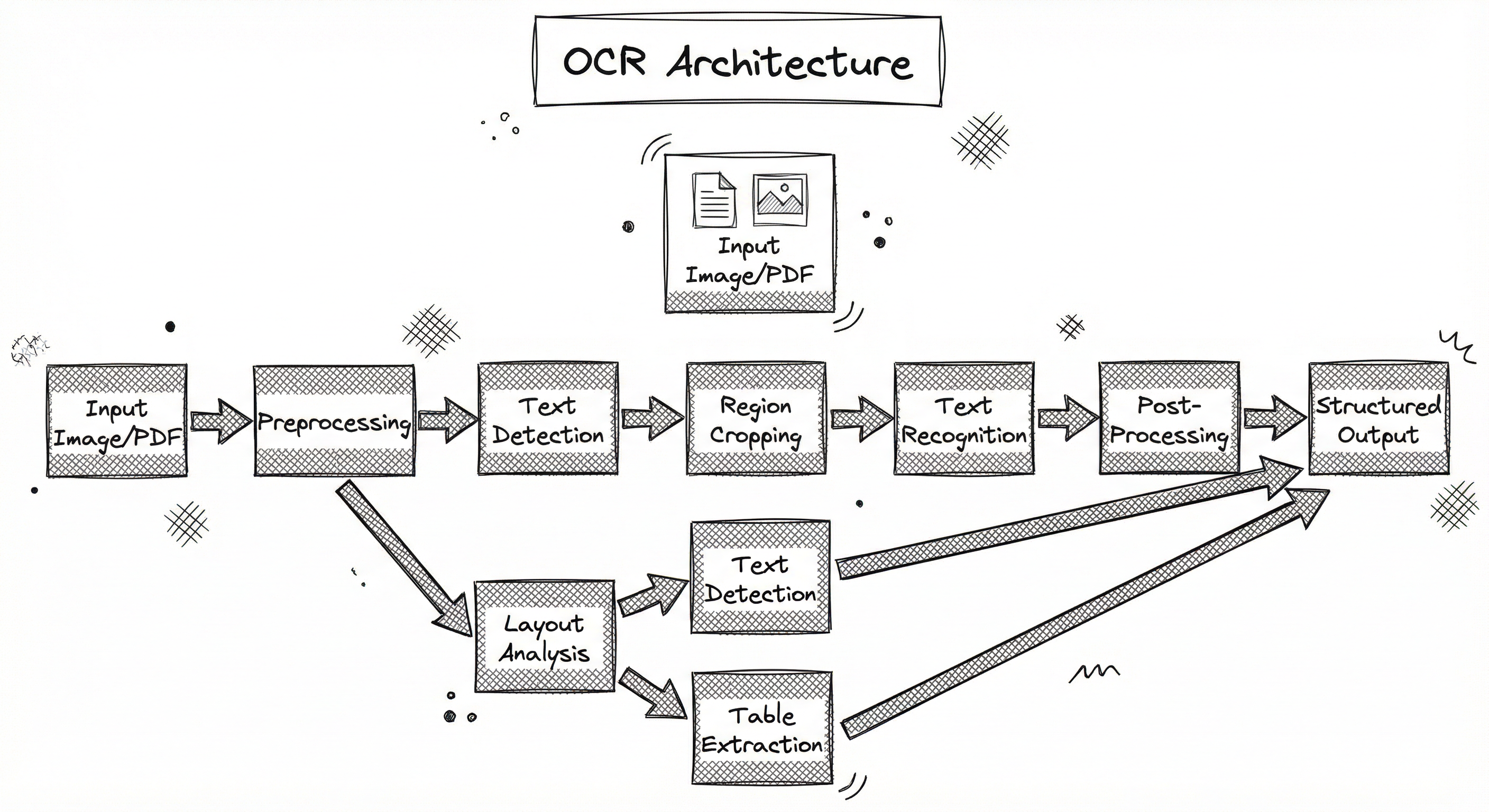
For end-to-end transformer models like Donut and GOT-OCR2.0, the architecture collapses the detection and recognition stages into a single encoder-decoder model that directly maps image pixels to text tokens. While elegant, these models are typically slower at inference and harder to debug when things go wrong in production.
Key Components
Image Preprocessor
Handles deskewing (rotation correction), denoising (Gaussian/median filtering), binarization (Otsu's method, Sauvola adaptive thresholding), resolution normalization, and contrast enhancement. This stage dramatically impacts downstream accuracy -- a well-preprocessed image can improve CER by 30-50% compared to raw input.
Text Detector
Locates text regions in the image and outputs bounding boxes or polygons. Popular architectures include CRAFT (Character Region Awareness for Text Detection), DBNet (Differentiable Binarization), and EAST (Efficient and Accurate Scene Text Detector). DBNet is used by PaddleOCR and achieves real-time performance with its differentiable binarization approach.
Layout Analyzer
Classifies detected regions into semantic categories: paragraph, title, table, figure, header, footer, page number. Essential for document understanding and structured extraction. PaddleOCR's PP-StructureV2 and Microsoft's Layout Parser are popular choices.
Region Cropper
Extracts and normalizes detected text regions from the original image. Applies perspective correction for skewed text, pads regions to standard aspect ratios, and resizes to the recognition model's expected input dimensions (typically 32px height for CRNN-based recognizers).
Text Recognizer
Converts cropped text region images into character sequences. The classic architecture is CRNN + CTC: a CNN backbone (ResNet, MobileNet) extracts features, a BiLSTM models sequential context, and CTC decoding produces the output string. Modern alternatives use attention-based decoders or pure transformer architectures (TrOCR, PARSeq).
Table Extractor
Specialized module for detecting table structures (rows, columns, cells) and extracting cell contents into a structured format (HTML, CSV, JSON). Uses models like TableNet, CascadeTabNet, or PaddleOCR's SLANet for table structure recognition.
Post-Processor
Applies language-model-based spell correction, regex-based format validation (e.g., Aadhaar numbers must be 12 digits, PAN cards follow the pattern ABCDE1234F), confidence thresholding, and output formatting. In KYC pipelines, this stage also handles field-level extraction from recognized text.
Data Flow
Write/Index Path (Document Ingestion): Raw images or PDFs enter the pipeline -> the preprocessor normalizes quality (deskew, denoise, binarize) -> the text detector identifies text regions with bounding polygons -> the layout analyzer classifies region types -> the region cropper extracts and normalizes text line images -> the recognizer converts each region to text -> the post-processor validates and formats output -> structured text + coordinates are stored in the downstream system (database, search index, or RAG pipeline).
Read/Query Path (Real-Time OCR): Identical flow but optimized for latency. Typically uses lighter models (PP-OCRv4 mobile vs. server), skips layout analysis if not needed, and may use batched GPU inference for throughput. For Aadhaar/PAN KYC flows, the pipeline adds a template-matching step that uses the known document layout to directly extract fields without full-page OCR.
Key engineering decision: batch processing vs. real-time. Document digitization workloads (scanning millions of archived files) run as batch jobs with heavy models for maximum accuracy. KYC onboarding and camera-based OCR need sub-500ms latency with lighter models.
A directed pipeline starting from Input Image/PDF, flowing through Preprocessing, Text Detection, Region Cropping, Text Recognition, Post-Processing, and ending at Structured Output. A parallel branch from Preprocessing goes to Layout Analysis, which feeds both Text Detection and a separate Table Extraction module that also outputs to Structured Output.
How to Implement
Choosing Your OCR Stack
The OCR ecosystem in 2026 spans three tiers:
Tier 1: Open-source libraries -- Tesseract, PaddleOCR, EasyOCR, and TrOCR. Free to use, self-hosted, and fully customizable. PaddleOCR has emerged as the dominant open-source choice due to its superior accuracy, speed, and multilingual support (80+ languages including Hindi, Tamil, Bengali, and other Indic scripts).
Tier 2: Cloud APIs -- Google Cloud Vision, AWS Textract, Azure Document Intelligence. Pay-per-page pricing ($1.50 per 1,000 pages for basic OCR, INR 125 per 1,000 pages). Zero infrastructure management, excellent accuracy, but vendor lock-in and data privacy concerns. For Indian government documents, data residency requirements may prohibit sending Aadhaar images to US-hosted cloud services.
Tier 3: Specialized platforms -- Nanonets, ABBYY FineReader, Hyperverge. Pre-built models for specific document types (invoices, IDs, receipts) with built-in field extraction. Higher cost but lower development effort.
For most Indian startups and enterprises, the recommendation is: start with PaddleOCR for development and testing, use Google Vision or AWS Textract if you need quick production deployment and can afford the API costs, and invest in fine-tuning PaddleOCR or TrOCR for long-term cost optimization.
Cost Comparison at Scale: Processing 1 million pages/month:
- Google Cloud Vision: ~$1,500/month (INR ~1.25 lakh/month)
- AWS Textract: ~$1,500/month (INR ~1.25 lakh/month)
- Self-hosted PaddleOCR on 2x A10 GPUs: ~$600/month (INR ~50,000/month) for the compute, plus engineering overhead
- Tesseract on CPU: ~$200/month (INR ~17,000/month) on a decent VM, but lower accuracy on complex documents
from paddleocr import PaddleOCR
import cv2
import json

# Initialize PaddleOCR with PP-OCRv4
# lang='hi' for Hindi/Devanagari, 'en' for English
ocr = PaddleOCR(
    use_angle_cls=True,   # Detect text orientation
    lang='en',
    det_model_dir=None,   # Use default PP-OCRv4 detection
    rec_model_dir=None,   # Use default PP-OCRv4 recognition
    use_gpu=True,
    det_db_thresh=0.3,    # Detection confidence threshold
    det_db_box_thresh=0.5,
    rec_batch_num=16,     # Batch size for recognition
)

def process_document(image_path: str) -> list[dict]:
    """Extract text with bounding boxes from a document image."""
    result = ocr.ocr(image_path, cls=True)

    extracted = []
    for line in result[0]:
        bbox = line[0]          # [[x1,y1], [x2,y2], [x3,y3], [x4,y4]]
        text = line[1][0]       # Recognized text
        confidence = line[1][1] # Recognition confidence

        extracted.append({
            "text": text,
            "confidence": round(confidence, 4),
            "bbox": bbox,
        })

    return extracted

# Process an Aadhaar card image
results = process_document("aadhaar_scan.jpg")
for r in results:
    if r["confidence"] > 0.8:
        print(f"[{r['confidence']:.2f}] {r['text']}")
PaddleOCR provides a high-level API that wraps the full detection-recognition pipeline. The use_angle_cls=True flag enables text orientation classification, which is critical for documents that may be rotated or upside-down (common in mobile KYC flows). The det_db_thresh and det_db_box_thresh parameters control the sensitivity of the DBNet text detector -- lower values detect more text but increase false positives. For Aadhaar/PAN processing, you typically want higher thresholds to avoid detecting background patterns as text.
import pytesseract
import cv2
import numpy as np
from PIL import Image

def preprocess_for_ocr(image_path: str) -> np.ndarray:
    """Apply preprocessing to maximize Tesseract accuracy."""
    img = cv2.imread(image_path)

    # Convert to grayscale
    gray = cv2.cvtColor(img, cv2.COLOR_BGR2GRAY)

    # Deskew: detect text angle and rotate
    coords = np.column_stack(np.where(gray > 0))
    angle = cv2.minAreaRect(coords)[-1]
    if angle < -45:
        angle = -(90 + angle)
    else:
        angle = -angle
    (h, w) = gray.shape[:2]
    M = cv2.getRotationMatrix2D((w // 2, h // 2), angle, 1.0)
    gray = cv2.warpAffine(gray, M, (w, h),
                          flags=cv2.INTER_CUBIC,
                          borderMode=cv2.BORDER_REPLICATE)

    # Adaptive thresholding (Sauvola-style binarization)
    binary = cv2.adaptiveThreshold(
        gray, 255, cv2.ADAPTIVE_THRESH_GAUSSIAN_C,
        cv2.THRESH_BINARY, 31, 10
    )

    # Denoise
    denoised = cv2.fastNlMeansDenoising(binary, h=10)

    return denoised

def extract_text(image_path: str, lang: str = "eng") -> dict:
    """Extract text with confidence using Tesseract."""
    processed = preprocess_for_ocr(image_path)

    # Use LSTM-based engine (OEM 1) with auto page segmentation (PSM 3)
    custom_config = r'--oem 1 --psm 3'

    # Get detailed output with confidence per word
    data = pytesseract.image_to_data(
        processed, lang=lang, config=custom_config,
        output_type=pytesseract.Output.DICT
    )

    words = []
    for i in range(len(data['text'])):
        if int(data['conf'][i]) > 0:
            words.append({
                'text': data['text'][i],
                'confidence': int(data['conf'][i]),
                'x': data['left'][i],
                'y': data['top'][i],
                'w': data['width'][i],
                'h': data['height'][i],
            })

    full_text = pytesseract.image_to_string(processed, lang=lang, config=custom_config)
    return {'full_text': full_text.strip(), 'words': words}

# Usage with Hindi + English
result = extract_text("document.png", lang="hin+eng")
print(result['full_text'])
Tesseract remains widely used because it runs on CPU, requires no GPU, and supports 100+ languages out of the box. The preprocessing pipeline shown here is critical -- without deskewing and binarization, Tesseract accuracy drops dramatically on scanned documents. The --oem 1 flag selects the LSTM-based engine (Tesseract 4+/5.x), which is significantly more accurate than the legacy engine. For bilingual documents common in India (Hindi + English on the same page), pass both language codes separated by +.
import easyocr
import cv2

# Initialize reader with multiple languages
# Downloads models on first use (~100-200 MB per language)
reader = easyocr.Reader(
    ['en', 'hi'],  # English + Hindi
    gpu=True,
    model_storage_directory='./models',
    download_enabled=True,
)

def ocr_with_easyocr(image_path: str, min_confidence: float = 0.5) -> list[dict]:
    """Extract text using EasyOCR with confidence filtering."""
    results = reader.readtext(
        image_path,
        detail=1,           # Return bounding boxes + confidence
        paragraph=False,    # Don't merge into paragraphs
        min_size=10,        # Minimum text region height in pixels
        text_threshold=0.7, # Text confidence threshold
        low_text=0.4,       # Text region lower-bound score
        width_ths=0.5,      # Maximum horizontal distance to merge boxes
    )

    extracted = []
    for (bbox, text, confidence) in results:
        if confidence >= min_confidence:
            extracted.append({
                'text': text,
                'confidence': round(confidence, 4),
                'bbox': bbox,  # [[x1,y1],[x2,y2],[x3,y3],[x4,y4]]
            })

    return extracted

# Process a signboard photo with Hindi and English text
results = ocr_with_easyocr("shop_signboard.jpg", min_confidence=0.6)
for r in results:
    print(f"[{r['confidence']:.2f}] {r['text']}")
EasyOCR uses a CRAFT-based text detector and a CRNN recognizer. It handles multilingual text detection well, which is important for Indian documents that frequently mix Devanagari, English, and regional scripts on the same page. The text_threshold and low_text parameters control the text detection sensitivity -- you may need to lower these for low-contrast images. EasyOCR downloads models lazily on first use, so budget ~200MB per language for storage.
from google.cloud import vision
import io

def google_vision_ocr(image_path: str) -> dict:
    """Extract text using Google Cloud Vision with layout info."""
    client = vision.ImageAnnotatorClient()

    with io.open(image_path, 'rb') as f:
        content = f.read()
    image = vision.Image(content=content)

    # DOCUMENT_TEXT_DETECTION provides better layout understanding
    response = client.document_text_detection(image=image)

    if response.error.message:
        raise Exception(f"Vision API error: {response.error.message}")

    document = response.full_text_annotation

    # Extract structured page -> block -> paragraph -> word hierarchy
    pages = []
    for page in document.pages:
        page_data = {'blocks': []}
        for block in page.blocks:
            block_text = []
            for paragraph in block.paragraphs:
                para_text = []
                for word in paragraph.words:
                    word_text = ''.join([s.text for s in word.symbols])
                    confidence = word.confidence
                    para_text.append({
                        'text': word_text,
                        'confidence': round(confidence, 4),
                    })
                block_text.append(para_text)
            page_data['blocks'].append({
                'type': block.block_type.name,
                'paragraphs': block_text,
            })
        pages.append(page_data)

    return {
        'full_text': document.text,
        'pages': pages,
        'language': document.pages[0].property.detected_languages[0].language_code
            if document.pages and document.pages[0].property.detected_languages
            else 'unknown',
    }

# Process a multi-page PDF or image
result = google_vision_ocr("invoice.png")
print(f"Detected language: {result['language']}")
print(f"Full text:\n{result['full_text'][:500]}")
Google Cloud Vision's DOCUMENT_TEXT_DETECTION provides a hierarchical output (page -> block -> paragraph -> word -> symbol) that is invaluable for structured document processing. The confidence scores are per-word, which helps identify low-quality regions that may need manual review. For Indian language documents, Vision API auto-detects the script (Hindi, Tamil, Bengali, etc.) without requiring language specification. Pricing: first 1,000 pages/month free, then $1.50 per 1,000 pages (INR ~125 per 1,000 pages).
import re
from paddleocr import PaddleOCR
from dataclasses import dataclass

@dataclass
class AadhaarData:
    name: str | None = None
    aadhaar_number: str | None = None
    dob: str | None = None
    gender: str | None = None
    address: str | None = None
    confidence: float = 0.0

def extract_aadhaar_fields(image_path: str) -> AadhaarData:
    """Extract structured fields from an Aadhaar card image."""
    ocr = PaddleOCR(use_angle_cls=True, lang='en', use_gpu=True)
    result = ocr.ocr(image_path, cls=True)

    lines = []
    total_conf = 0.0
    for line in result[0]:
        text = line[1][0].strip()
        conf = line[1][1]
        if text and conf > 0.5:
            lines.append(text)
            total_conf += conf

    full_text = ' '.join(lines)
    avg_conf = total_conf / max(len(lines), 1)

    data = AadhaarData(confidence=round(avg_conf, 4))

    # Extract 12-digit Aadhaar number (XXXX XXXX XXXX pattern)
    aadhaar_pattern = r'\b(\d{4}\s?\d{4}\s?\d{4})\b'
    match = re.search(aadhaar_pattern, full_text)
    if match:
        data.aadhaar_number = re.sub(r'\s', '', match.group(1))

    # Extract date of birth (DD/MM/YYYY or DD-MM-YYYY)
    dob_pattern = r'\b(\d{2}[/-]\d{2}[/-]\d{4})\b'
    match = re.search(dob_pattern, full_text)
    if match:
        data.dob = match.group(1)

    # Extract gender
    gender_pattern = r'\b(Male|Female|MALE|FEMALE|male|female|Transgender)\b'
    match = re.search(gender_pattern, full_text, re.IGNORECASE)
    if match:
        data.gender = match.group(1).capitalize()

    # Validate Aadhaar using Verhoeff checksum (simplified)
    if data.aadhaar_number and len(data.aadhaar_number) != 12:
        data.aadhaar_number = None  # Invalid format

    return data

# Example usage
aadhaar = extract_aadhaar_fields("aadhaar_front.jpg")
print(f"Aadhaar: {aadhaar.aadhaar_number}")
print(f"DOB: {aadhaar.dob}")
print(f"Gender: {aadhaar.gender}")
print(f"Avg Confidence: {aadhaar.confidence}")
This example demonstrates a common India-specific use case: extracting structured fields from Aadhaar cards during KYC onboarding. The approach combines PaddleOCR for text extraction with regex-based post-processing for field extraction. In production, you would add Verhoeff checksum validation for the Aadhaar number, use the known Aadhaar card layout to associate text regions with specific fields based on their spatial positions, and handle both front and back of the card. Companies like IDfy, Hyperverge, and Nanonets have built commercial products around this exact pipeline.
# PaddleOCR production config (YAML)
ocr_engine:
  framework: paddleocr
  version: pp-ocrv4
  use_gpu: true
  gpu_mem: 2000          # MB reserved for GPU
  use_angle_cls: true

detection:
  model: ch_PP-OCRv4_det
  det_algorithm: DB++
  det_db_thresh: 0.3
  det_db_box_thresh: 0.5
  det_db_unclip_ratio: 1.6
  max_side_len: 2048     # Resize long edge

recognition:
  model: ch_PP-OCRv4_rec
  rec_algorithm: SVTR_LCNet
  rec_batch_num: 16
  max_text_length: 80
  character_dict: ppocr_keys_v1.txt

preprocessing:
  deskew: true
  denoise: true
  binarize: adaptive_gaussian
  target_dpi: 300
  max_image_size: 4096

postprocessing:
  min_confidence: 0.75
  spell_correction: true
  format_validation:
    aadhaar: '\d{12}'
    pan: '[A-Z]{5}[0-9]{4}[A-Z]'
    pincode: '\d{6}'
Common Implementation Mistakes
- ●
Skipping preprocessing: Feeding raw camera images directly to the OCR engine without deskewing, denoising, or binarization. This alone accounts for 30-50% of accuracy issues in production. Always preprocess.
- ●
Wrong resolution: OCR engines expect text at specific DPI ranges. Tesseract works best at 300 DPI. Feeding a 72 DPI web screenshot will produce terrible results. Upscale low-resolution images using super-resolution (Real-ESRGAN) or at minimum bicubic interpolation before OCR.
- ●
Ignoring text orientation: Documents may be rotated 90, 180, or 270 degrees. Without angle detection and correction, the recognizer sees gibberish. PaddleOCR's
use_angle_cls=Truehandles this; for Tesseract, use--psm 0to detect orientation first. - ●
Single language assumption: Indian documents frequently contain mixed scripts (Devanagari + Latin + numbers). Using a single-language model will fail on the other script. Use multilingual models or run multiple language-specific recognizers and merge results.
- ●
No confidence thresholding: Blindly trusting all OCR output without filtering by confidence scores leads to garbage data in downstream systems. Always set a minimum confidence threshold (typically 0.7-0.8 for production) and route low-confidence results to manual review.
- ●
Treating OCR as solved: Assuming any off-the-shelf OCR will work perfectly without domain-specific tuning. In reality, fine-tuning the recognition model on your specific document types (fonts, layouts, degradation patterns) can improve accuracy by 10-30%.
When Should You Use This?
Use When
You need to convert scanned documents, PDFs, or photographs into machine-readable text for downstream processing (search, NLP, RAG)
Building a KYC/identity verification pipeline that must extract fields from Aadhaar cards, PAN cards, passports, or driving licenses
Digitizing paper archives -- government records, historical manuscripts, legacy forms -- at scale
Processing invoices, receipts, or purchase orders for automated accounting and expense management
Building a multilingual document search system where source documents exist only as images (common in Indian government and legal systems)
Scene text recognition is required -- reading text from photos of signboards, product labels, or street signs for navigation or accessibility applications
Table extraction from images is needed -- converting photographed or scanned tables into structured data (CSV, JSON)
Handwriting recognition for digitizing handwritten forms, prescriptions, or notes
Avoid When
Your documents are already in digital text format (PDF with embedded text, Word documents, HTML) -- use a document parser or text extractor instead, not OCR
You only need to detect whether text is present in an image (binary classification) -- a simple text detection model is cheaper than full OCR
The text you need is in a structured database or API -- don't photograph a screen to OCR it when you can query the source directly (this happens more often than you'd think)
Real-time video OCR is required at very high frame rates (>30 FPS) on edge devices without GPU -- current OCR models are too slow; consider keyword spotting or simpler detection approaches
The image quality is consistently terrible (heavily blurred, extremely low resolution <50 DPI, severe occlusion) -- no OCR engine will produce usable results; invest in better image capture first
You need semantic understanding of document content rather than raw text extraction -- consider document understanding models like Donut or LayoutLMv3 that go beyond OCR
Key Tradeoffs
The Accuracy-Speed Tradeoff
This is the central tension in OCR system design. Heavier models (TrOCR-large, GOT-OCR2.0) achieve CER below 1% on clean printed text but require GPU and process 5-15 pages/second. Lighter models (PaddleOCR mobile, Tesseract on CPU) process 20-50+ pages/second but may have CER of 3-8% on complex documents.
| Model | CER (printed) | Speed (pages/sec) | GPU Required | Cost per 1M pages |
|---|---|---|---|---|
| Tesseract 5 | 3-8% | 30-50 (CPU) | No | ~INR 17K ($200) |
| PaddleOCR v4 (mobile) | 2-4% | 20-40 (GPU) | Optional | ~INR 30K ($360) |
| PaddleOCR v4 (server) | 1-3% | 10-20 (GPU) | Yes | ~INR 50K ($600) |
| EasyOCR | 2-5% | 8-15 (GPU) | Yes | ~INR 50K ($600) |
| Google Vision API | 1-2% | N/A (API) | N/A | ~INR 1.25L ($1,500) |
| AWS Textract | 1-2% | N/A (API) | N/A | ~INR 1.25L ($1,500) |
The Build vs. Buy Decision
Cloud APIs (Google Vision, AWS Textract, Azure Document Intelligence) offer excellent accuracy with zero infrastructure management, but at 15,000 (INR 12.5 lakh). Self-hosted PaddleOCR on a 2x A10G instance achieves 80-90% of cloud API accuracy at roughly one-third the cost, but requires ML engineering investment.
Rule of Thumb for Indian Startups: Below 100K pages/month, use cloud APIs -- the engineering time to set up self-hosted OCR isn't worth it. Between 100K-1M pages/month, evaluate self-hosting with PaddleOCR. Above 1M pages/month, self-hosting almost always wins on cost.
Alternatives & Comparisons
Document loaders extract text from native digital documents (PDFs with embedded text layers, DOCX, HTML) without computer vision. If your documents have a digital text layer, use a document loader -- it is faster, more accurate, and cheaper than OCR. Use OCR only when the document is a scanned image or photograph with no extractable text layer.
Image preprocessing (deskewing, denoising, binarization) is not an alternative to OCR but a critical upstream dependency. A common mistake is to skip preprocessing and blame the OCR engine for poor results. The image preprocessor prepares the visual input; OCR converts the prepared input to text. You almost always need both.
Face detection finds human faces in images, while OCR finds and reads text. Both are computer vision tasks, and both appear in KYC/identity verification pipelines -- face detection matches the photo on an Aadhaar card against a selfie, while OCR extracts the name, number, and DOB from the same card. They are complementary, not alternatives.
Pros, Cons & Tradeoffs
Advantages
Unlocks unstructured visual data at scale -- converts billions of scanned documents, photos, and PDFs into searchable, indexable text that can feed RAG pipelines, search engines, and databases
Mature open-source ecosystem with production-ready options: PaddleOCR (80+ languages, Apache 2.0), EasyOCR (80+ languages), and Tesseract (100+ languages, Apache 2.0) are all free to use commercially
Multilingual support covers virtually all major scripts including Devanagari (Hindi, Marathi, Sanskrit), Tamil, Bengali, Gujarati, Urdu, Arabic, Chinese, Japanese, and Korean -- critical for India's 22 official languages
Sub-second inference is achievable with optimized models: PaddleOCR v4 mobile processes a full page in 50-100ms on a modern GPU, enabling real-time camera-based OCR for mobile KYC flows
Fine-tunable on domain-specific data: if your documents use specialized fonts, layouts, or vocabulary (medical prescriptions, legal documents, engineering drawings), fine-tuning the recognition model on 5,000-10,000 labeled samples typically improves CER by 30-50%
Composable pipeline architecture allows mixing best-in-class components: you can use CRAFT for detection with TrOCR for recognition, or PaddleOCR for detection with a custom fine-tuned recognizer
Disadvantages
Highly sensitive to input quality -- noise, blur, low resolution, skew, and poor lighting can degrade accuracy from 98% CER to 40%+ CER on the same OCR engine. Preprocessing is not optional; it is mandatory
Handwriting recognition remains challenging -- even state-of-the-art models achieve only 5-15% CER on handwritten text compared to 1-3% on printed text. Doctor's prescriptions and handwritten forms are a notorious failure case
Complex layouts defeat simple pipelines -- multi-column documents, overlapping text, text within images, watermarks, and dense tables require specialized layout analysis that basic OCR engines don't provide
Language mixing is hard -- documents with multiple scripts on the same line (e.g., 'Name: राहुल Kumar') require models that can switch between recognition vocabularies mid-sequence, which most recognizers handle poorly
No semantic understanding -- OCR extracts characters, not meaning. It cannot distinguish between a date and a phone number, or understand that '10,000' in one context is a price and in another is a quantity. Post-processing rules or downstream NLP is always needed
GPU dependency for real-time performance -- while Tesseract runs on CPU, achieving sub-200ms latency on full pages with deep learning models requires GPU inference, adding ~$200-600/month (INR 17K-50K) in infrastructure cost
Failure Modes & Debugging
Resolution-induced character confusion
Cause
Input image resolution too low (below 150 DPI for printed text, below 200 DPI for handwriting). At low DPI, visually similar characters become indistinguishable -- 'rn' looks like 'm', '1' looks like 'l', '0' looks like 'O'.
Symptoms
High CER despite clean, well-lit images. Systematic character substitution errors. Numbers and letters with similar shapes are consistently confused. Aadhaar numbers have digit errors that fail checksum validation.
Mitigation
Enforce a minimum 300 DPI for document scanning. For camera-captured images, ensure the text region occupies at least 20% of the image width. Apply super-resolution preprocessing (Real-ESRGAN or BSRGAN) for legacy low-DPI scans. Add resolution validation at the ingestion gateway to reject images below the threshold.
Skew and rotation mishandling
Cause
Documents scanned at an angle, or photos taken at a perspective. The text detector may still find regions, but the recognizer receives distorted character images that don't match its training distribution.
Symptoms
Partial text extraction -- some lines recognized correctly, others garbled. Words split incorrectly. The recognized text has correct characters but in wrong order. CER varies wildly across different regions of the same page.
Mitigation
Enable angle classification (use_angle_cls=True in PaddleOCR). Apply Hough transform-based deskewing as a preprocessing step. For perspective distortion (photos of documents), use four-point perspective correction with OpenCV getPerspectiveTransform. In mobile KYC flows, guide the user with an overlay rectangle to capture the document straight.
Script misidentification in multilingual documents
Cause
The OCR model attempts to recognize text in the wrong script. A Hindi line is interpreted as English, or vice versa. Common in Indian documents that mix Devanagari headers with English body text.
Symptoms
Nonsensical output for specific text regions while other regions are recognized correctly. Hindi text produces random English characters. Confidence scores are anomalously low for misidentified regions.
Mitigation
Use OCR engines with explicit multilingual support (PaddleOCR lang='hi+en', EasyOCR ['hi', 'en']). Implement a script detection step before recognition: classify each detected text region's script using a lightweight CNN classifier, then route to the appropriate language-specific recognizer. For known document types (Aadhaar, PAN), use template-based approaches that know which fields are in which script.
Table structure destruction
Cause
Standard OCR reads text in natural reading order (top-to-bottom, left-to-right) and ignores tabular structure. When applied to tables, cell contents from different columns get concatenated into a single line, destroying the row-column relationships.
Symptoms
Table data appears as a wall of text with no structure. Numbers from one column are appended to labels from another. CSV/JSON export contains incorrect cell associations. Financial data (invoices, balance sheets) is unusable.
Mitigation
Use dedicated table extraction models: PaddleOCR's PP-StructureV2, AWS Textract Tables, or open-source TableTransformer. These models first detect table regions, then identify row/column boundaries, and finally OCR individual cells. For simple tables with clear gridlines, you can use Hough line detection to find the grid structure before running OCR on each cell.
Confidence score miscalibration
Cause
The OCR model's confidence scores are not well-calibrated -- it reports high confidence (>0.9) on incorrect predictions. This is especially common with out-of-vocabulary words, rare scripts, or when the model hallucinates plausible but wrong text.
Symptoms
Downstream validation catches errors that should have been flagged by confidence thresholding. Manual review queues receive too few items despite visible errors. The correlation between confidence and accuracy is weak when measured on a holdout set.
Mitigation
Never trust raw confidence scores blindly. Build a calibration curve on a labeled validation set specific to your document type. Apply temperature scaling or Platt scaling to recalibrate scores. Add domain-specific validation rules (Aadhaar Verhoeff checksum, PAN format regex, date range checks) as a second verification layer. Route predictions with recalibrated confidence below 0.85 to human review.
Watermark and background pattern interference
Cause
Government documents (Aadhaar, mark sheets, certificates) often have security watermarks, background patterns, or colored backgrounds that interfere with text detection and binarization.
Symptoms
Text detector produces fragmented bounding boxes. Recognizer output includes watermark text mixed with document text. Binarization fails to separate foreground text from background patterns, especially on colored documents.
Mitigation
Apply morphological operations (opening/closing) to suppress watermark patterns before binarization. Use color-space-based filtering (convert to HSV and threshold on saturation to remove colored backgrounds). For known document templates, create a background mask from a blank template and subtract it. Fine-tune the text detector on examples with watermarks.
Placement in an ML System
Where OCR Sits in the ML System
In a RAG pipeline, OCR is the very first step that converts visual documents into text that can be chunked, embedded, and indexed. Without OCR, scanned PDFs and image-based documents are opaque blobs that no text-based system can search or retrieve from. The pipeline flow is: Document Image -> OCR -> Raw Text -> Text Chunker -> Embedding Model -> Vector Store.
In a KYC/identity verification pipeline, OCR works alongside face detection. OCR extracts textual fields (name, ID number, DOB) from the identity document, while face detection extracts and compares the photo. The pipeline flow is: ID Document Image -> OCR (extract text fields) + Face Detection (extract photo) -> Verification Logic -> Approval/Rejection.
In a document intelligence pipeline (invoice processing, form digitization), OCR feeds into structured extraction. The flow is: Document Image -> OCR -> Layout Analysis -> Field Extraction -> Business Logic (accounting system, CRM, etc.).
Critical Insight: OCR is almost never the final step. It produces raw text that requires significant post-processing -- entity extraction, format validation, spell correction, and structural reconstruction. Think of OCR as the "ears" of your document pipeline: it hears the words, but understanding them is a downstream job.
Pipeline Stage
Data Ingestion / Feature Extraction
Upstream
- image-preprocessor
- document-loader
Downstream
- text-chunker
- face-detection
Scaling Bottlenecks
OCR is one of the most compute-intensive stages in a document processing pipeline. A single PaddleOCR server model processes roughly 10-20 pages/second on an NVIDIA A10G GPU. For a document digitization workload of 10 million pages, that's 6-12 days on a single GPU.
Scaling strategies:
- Horizontal scaling: Run multiple OCR workers behind a load balancer. Each worker needs its own GPU. At 10 workers, you hit ~150 pages/second but your GPU bill is ~$6,000/month (INR 5 lakh/month).
- CPU fallback: Use Tesseract for simple, clean documents (printed text, white background) and reserve GPU-based OCR for complex documents. This hybrid approach can reduce GPU requirements by 40-60%.
- Batch optimization: Group pages into batches of 16-32 for GPU inference to maximize throughput. Single-image inference wastes GPU parallelism.
- Model distillation: PaddleOCR's mobile models are 5-10x faster than server models with 80-90% of the accuracy -- use them for first-pass filtering and only run the heavy model on low-confidence results.
The second bottleneck is storage I/O: reading millions of images from disk or object storage can saturate network bandwidth. Use SSD-backed storage, prefetch images in parallel with OCR inference, and compress images appropriately (JPEG quality 85 is usually sufficient for OCR).
Production Case Studies
Nanonets built an OCR-powered KYC automation platform processing Aadhaar cards, PAN cards, and driver's licenses for Indian fintech companies. The system uses a combination of text detection, recognition, and template-based field extraction to automatically verify identity documents during customer onboarding. Their pipeline processes documents in under 2 seconds per document.
Reduced KYC processing time from 15-20 minutes (manual) to under 5 seconds per document, processing over 50,000 driver's licenses per month for a single client. Reported ~90% reduction in manual data entry effort across deployments.
Flipkart uses OCR as part of its visual search and catalog management pipeline. Product images are processed through OCR to extract text from labels, packaging, and descriptions. This extracted text supplements the product catalog metadata, improving search relevance for queries that include text visible on product images (e.g., 'Maggi 2-minute noodles' visible on the packet).
Improved catalog enrichment for text-heavy product categories (books, medicines, packaged foods) by automatically extracting product names, specifications, and nutritional information from product images, reducing manual cataloging effort by approximately 40%.
Google Cloud Document AI combines OCR with document understanding models to process over 200 document types. The platform builds on Google's decades of OCR research (from Google Books to Street View text recognition) and is used by enterprises globally for invoice processing, contract analysis, and form digitization. Their OCR engine handles 100+ languages and achieves sub-1% CER on printed text.
Google reports that Document AI customers achieve 90%+ straight-through processing rates on invoices (meaning 90% of invoices are processed without human intervention), reducing document processing costs by 50-80% compared to manual workflows.
The DigiLocker platform, part of India's Digital India initiative, uses OCR technology to digitize and verify government-issued documents including railway concession certificates, Aadhaar cards, and academic transcripts. The platform enables paperless governance by converting physical documents into verified digital copies that can be shared across government agencies. OCR is used both for initial document digitization and for ongoing verification workflows.
DigiLocker has processed over 6 billion documents for 300+ million registered users as of 2025, with OCR-based verification enabling instant document authentication that previously required physical document submission and manual verification.
Tooling & Ecosystem
Baidu's open-source OCR toolkit supporting 80+ languages. Offers PP-OCRv4/v5 models for text detection and recognition, PP-StructureV2 for layout analysis and table extraction, and mobile-optimized models for edge deployment. Currently the most accurate open-source OCR solution with excellent multilingual support including Devanagari, Tamil, and Bengali. Apache 2.0 license.
The veteran open-source OCR engine, originally developed by HP and maintained by Google. Tesseract 5.x uses LSTM-based recognition and supports 100+ languages. Runs entirely on CPU, making it the cheapest option for deployment. Best suited for clean printed documents; struggles with scene text and complex layouts. Apache 2.0 license.
Ready-to-use OCR library supporting 80+ languages including all major Indic scripts. Uses CRAFT for text detection and CRNN for recognition. Simple API (reader.readtext(image)) makes it the easiest OCR library to get started with. GPU-accelerated. Apache 2.0 license.
Google's managed OCR service with industry-leading accuracy. Supports TEXT_DETECTION (scene text) and DOCUMENT_TEXT_DETECTION (structured documents) modes. Auto-detects 100+ languages. Provides hierarchical output (page/block/paragraph/word). Pricing: first 1,000 pages/month free, then $1.50 per 1,000 pages.
Amazon's document OCR service with specialized capabilities for tables, forms, and queries. Goes beyond basic OCR with structured extraction: identifies form fields and table cells automatically. Pricing: $1.50 per 1,000 pages for text detection, additional charges for table/form extraction.
Microsoft's document AI service (formerly Azure Form Recognizer). Pre-built models for invoices, receipts, IDs, and business cards. Custom model training for domain-specific documents. Integrates with Azure Cognitive Services ecosystem. Strong table extraction and key-value pair extraction.
Microsoft's transformer-based OCR model using a vision transformer (ViT/DeiT) encoder and GPT-2 decoder. State-of-the-art on printed and handwritten text benchmarks. Available on Hugging Face (microsoft/trocr-large-printed, microsoft/trocr-large-handwritten). Best for high-accuracy recognition when you can afford GPU inference.
Naver/CLOVA's OCR-free document understanding model. Skips the traditional text detection step entirely -- directly maps document images to structured JSON output using a Swin Transformer encoder and BART decoder. Excellent for receipt/invoice parsing where you want structured fields directly. MIT license.
General OCR Theory model (2024) -- a unified end-to-end model with 580M parameters that handles scene text, document OCR, mathematical formulas, sheet music, molecular formulas, and geometric shapes in a single model. Represents the cutting edge of OCR research toward general-purpose visual text understanding.
India-based intelligent document processing platform with pre-built OCR models for Aadhaar, PAN, invoices, and other Indian document types. Offers no-code model training, API access, and human-in-the-loop review workflows. Focused on reducing manual data entry in Indian enterprise workflows.
Research & References
Li, Lv, Cui, Lu, Florencio, Zhang, Li & Wei (2022)AAAI 2023
Proposed an end-to-end text recognition model combining a pre-trained image transformer encoder (DeiT/BEiT) with a pre-trained language model decoder (GPT-2). Achieved state-of-the-art on printed and handwritten text benchmarks, demonstrating the power of transfer learning for OCR.
Kim, Hong, Yim, Nam, Park, Yim, Hwang, Yun, Han & Park (2022)ECCV 2022
Introduced an OCR-free approach to document understanding using a Swin Transformer encoder and BART decoder. Eliminates the traditional text detection step, directly generating structured JSON from document images. Achieves state-of-the-art on document classification, parsing, and VQA tasks.
Wei, Kong, Zhang, Zhao & Kong (2024)arXiv preprint
Proposed GOT-OCR2.0, a 580M-parameter unified model that handles scene text, document OCR, mathematical formulas, sheet music, and molecular structures. Represents the frontier of general-purpose OCR moving beyond traditional character recognition toward universal visual text understanding.
Liao, Wan, Yao, Chen & Bai (2020)AAAI 2020
Introduced differentiable binarization for text detection, replacing hand-crafted post-processing with a learnable thresholding module. Achieves real-time speed with state-of-the-art accuracy. Forms the detection backbone of PaddleOCR.
Baek, Kim, Lee, Lee, Kim, Shin & Lee (2019)CVPR 2019
Proposed character-level text detection by predicting both character regions and inter-character affinity scores. Handles arbitrary text shapes and orientations. Used as the detection backbone in EasyOCR.
Du, Chen, Peng, Li, Yi & Li (2020)arXiv preprint
Described the architecture and training strategies behind PaddleOCR's PP-OCR system, including model compression techniques (pruning, quantization, knowledge distillation) that achieve mobile-deployable OCR with competitive accuracy. The foundation for PP-OCRv2, v3, v4, and v5.
Shohan, Haque, Arefin, Islam, Hossain & Ahmed (2024)arXiv preprint
Proposed an end-to-end pipeline integrating DETR for table detection, CascadeTabNet for structure recognition, and PaddleOCR for cell content extraction. Addresses the challenging problem of converting table images to structured data.
Interview & Evaluation Perspective
Common Interview Questions
- ●
How would you design an OCR pipeline to process 1 million Aadhaar cards per day for a fintech KYC platform?
- ●
What is the difference between text detection and text recognition? Why are they typically separate stages?
- ●
How does CTC loss work in OCR, and what problem does it solve?
- ●
Compare PaddleOCR, Tesseract, and EasyOCR -- when would you choose each?
- ●
How would you handle multilingual OCR for documents that mix Hindi and English text?
- ●
What preprocessing steps are critical for OCR accuracy, and why?
- ●
How would you extract structured table data from a scanned invoice image?
- ●
What are the key metrics for evaluating an OCR system, and what thresholds indicate production readiness?
Key Points to Mention
- ●
OCR is a two-stage pipeline: text detection (where) + text recognition (what). Understanding this separation is fundamental. End-to-end models like Donut exist but the two-stage approach dominates production.
- ●
Preprocessing is half the battle: deskewing, denoising, binarization, and resolution normalization can improve CER by 30-50%. Always discuss preprocessing before discussing model choice.
- ●
CTC loss solves the alignment problem between variable-length input sequences (image columns) and variable-length output sequences (characters) without requiring character-level segmentation labels.
- ●
For Indian documents, multilingual support is non-negotiable: Aadhaar cards contain both Devanagari and English text. PaddleOCR and EasyOCR handle this; Tesseract requires explicit language specification.
- ●
At scale, the build vs. buy decision matters enormously: cloud APIs cost $1.50 per 1,000 pages, self-hosted PaddleOCR on GPU costs roughly one-third but requires engineering investment. Break-even is typically around 100K-500K pages/month.
- ●
Table extraction is a distinct problem from text OCR -- you need table detection, structure recognition, and per-cell OCR. Don't treat it as just 'run OCR on the table region.'
Pitfalls to Avoid
- ●
Saying 'just use Tesseract' without discussing its limitations on complex layouts, scene text, and handwriting. Tesseract is a solid baseline but it is not the best tool for most modern use cases.
- ●
Ignoring preprocessing and jumping straight to model architecture. Interviewers want to see that you understand the full pipeline, not just the neural network.
- ●
Conflating OCR accuracy with downstream task accuracy. A 2% CER on raw text extraction might still produce 15% error rate on structured field extraction if post-processing is weak.
- ●
Not discussing cost implications. Senior candidates should be able to estimate the cost of processing N documents per month and compare cloud vs. self-hosted options.
- ●
Claiming handwritten OCR is 'solved' -- it is still significantly harder than printed text OCR and requires explicit discussion of its limitations.
Senior-Level Expectation
A senior/staff candidate should be able to design an end-to-end OCR pipeline from scratch: image capture guidelines (minimum resolution, lighting, supported formats), preprocessing (adaptive binarization, deskewing, quality scoring), model selection with quantitative justification (PaddleOCR server for accuracy-critical paths, mobile for latency-critical), batch vs. real-time architecture, horizontal scaling strategy (GPU worker pool with load balancing), confidence-based routing (high-confidence to auto-processing, low-confidence to human review), domain-specific post-processing (regex validation for Aadhaar/PAN, Verhoeff checksum, date parsing), monitoring (CER tracking on golden set, latency P95/P99, throughput dashboards), and cost optimization (model distillation, hybrid CPU/GPU routing, caching for duplicate documents). The ability to discuss trade-offs specific to Indian document types -- handling mixed Devanagari+English, watermarked government documents, variable print quality across different issuing authorities -- demonstrates genuine production experience.
Summary
Wrapping Up: OCR in ML Systems
Optical Character Recognition transforms visual text -- in scanned documents, photographs, PDFs, and video frames -- into machine-readable character sequences. It is the critical bridge between the physical world of printed and handwritten text and the digital world of NLP, search, and structured data. In Indian ML systems, OCR is foundational: from KYC onboarding that reads Aadhaar and PAN cards, to document digitization for government records in Devanagari, to invoice processing for GST compliance.
The field operates on a two-stage architecture: text detection (finding where text is using models like DBNet or CRAFT) and text recognition (reading what the text says using CRNN+CTC or transformer-based decoders like TrOCR). Preprocessing -- deskewing, denoising, binarization, resolution normalization -- is not a nice-to-have; it is the single most impactful factor in production OCR accuracy. The open-source ecosystem is strong: PaddleOCR leads in accuracy and multilingual support (80+ languages including Indic scripts), Tesseract remains relevant for CPU-only deployments, and EasyOCR offers the simplest API for quick prototyping.
The key engineering decisions are: (1) build vs. buy -- cloud APIs (Google Vision, AWS Textract at ~$1.50/1,000 pages) vs. self-hosted open-source (PaddleOCR at roughly one-third the cost but requiring ML engineering), (2) accuracy vs. speed -- server models (1-3% CER, 10-20 pages/sec) vs. mobile models (2-5% CER, 20-40+ pages/sec), and (3) generic vs. specialized -- general-purpose OCR vs. template-based extractors for known document types. For most Indian startups processing fewer than 100K pages/month, start with cloud APIs; above 1M pages/month, invest in self-hosted PaddleOCR with domain-specific fine-tuning.
OCR is almost never the final step in an ML pipeline. It produces raw text that requires post-processing, validation, and downstream NLP to become useful. Think of it as the ears of your document system: hearing the words is essential, but understanding them is a separate job for the modules downstream.