Document Loader in Machine Learning
Let's start with a question: you've got 50,000 PDFs totaling 2TB of text, a folder full of scraped HTML pages, a bunch of Word documents from legal, and a pile of scanned invoices someone dropped into a shared drive. You want your RAG system to search over all of it. How do you turn that mess into clean, searchable text?
That's the job of a document loader -- the ingestion component of a retrieval-augmented generation (RAG) pipeline. It takes raw files in heterogeneous formats (PDFs, HTML, Markdown, DOCX, scanned images) and extracts structured text plus metadata that downstream components -- chunkers, embedders, vector stores -- can actually work with.
Sounds straightforward, right? Just read the file and pull out the text.
BUT here's where it gets interesting. PDFs aren't really "text files" -- they're collections of drawing instructions, font mappings, and positioned glyphs. HTML wraps content in layers of presentational markup and JavaScript. Scanned documents store text as pixel arrays, not Unicode strings. And then you hit a 500-page legal contract with nested tables, footnotes scattered across columns, and headers that repeat on every page.
Modern document loaders increasingly use vision-language models and layout-aware transformers to understand document structure without brittle rule-based parsing. We'll explore all of this -- from simple library-based extraction to cutting-edge OCR-free models like Donut and Nougat. Let's dive in!
Concept Snapshot
- What It Is
- A software component that reads files in various formats (PDF, HTML, Markdown, DOCX) and extracts their textual content, structure, and metadata for downstream ML processing.
- Category
- RAG Pipeline
- Complexity
- Intermediate
- Inputs / Outputs
- Inputs: file paths or byte streams in formats like PDF, HTML, Markdown, DOCX, TXT, images (PNG/JPG with text). Outputs: structured text, optionally with metadata (page numbers, section headers, tables, images).
- System Placement
- First stage in a RAG pipeline, preceding text chunking, embedding generation, and vector indexing. Often paired with file storage systems (S3, blob storage) upstream.
- Also Known As
- document parser, document ingestion, file reader, content extractor, document processor
- Typical Users
- ML engineers, data engineers, backend engineers, search infrastructure teams
- Prerequisites
- File I/O basics, Character encoding (UTF-8), Basic NLP preprocessing, Understanding of document formats
- Key Terms
- PDF extractionHTML sanitizationOCRlayout detectionmultimodal parsingmetadata extractioncharacter encodingdocument structure preservation
Why This Concept Exists
The Gap Between Human-Readable and Machine-Readable
Here's the core problem: documents are designed for human eyes, not machine consumption. A beautifully formatted PDF with two-column layouts, embedded figures, and footnotes? That's optimized for a person reading a printed page. The machine sees a stream of binary positioning instructions, font references, and glyph codes.
Let me be more specific about what we're dealing with:
- PDFs embed fonts, positioning metadata, and binary image streams. There's no guaranteed "reading order" -- text is placed at coordinates, and it's up to you to figure out which word comes after which.
- HTML wraps content in layers of
<div>tags, CSS, and JavaScript. The actual text you care about might be 10% of the page source. - Scanned documents store text as pixel arrays. There is literally no text in the file -- just an image.
A naive approach -- treating all documents as plain text -- discards critical structure: section headings, table relationships, figure captions, and reading order. And in a RAG system, that structure matters.
Why RAG Made This Urgent
The emergence of retrieval-augmented generation turned document loading from a "nice-to-have" into a critical bottleneck. RAG systems retrieve relevant passages from large corpora to ground LLM responses in factual data. BUT retrieval quality depends directly on the quality of ingested text.
Think about it: if your document loader corrupts a table, scrambles a multi-column layout, or silently drops footnotes -- those errors propagate through the entire pipeline. Bad text leads to bad chunks, bad chunks lead to poor embeddings, and poor embeddings mean your retrieval misses the very passage that would have answered the user's question.
Key Insight: The document loader is often the weakest link in a RAG pipeline. A 5% improvement in extraction fidelity can translate to a 10-15% improvement in end-to-end retrieval recall.
From Rules to Learned Models
Historically, document parsing relied on format-specific libraries (PyPDF2, BeautifulSoup, python-docx) and hand-crafted heuristics. "If the font size is > 14pt, it's probably a heading." "If there are ruled lines, it's probably a table."
However, recent advances in document AI -- particularly layout-aware transformers like LayoutLM, Donut, and Nougat -- enable end-to-end parsing with learned models that generalize across document types and languages without those fragile rules. Think of it as the shift from regex-based NLP to transformer-based NLP, but for documents.
This shift improves robustness significantly, BUT it introduces new tradeoffs around GPU inference cost ($0.50-2.00 per 1,000 pages on cloud GPUs, roughly Rs 40-170) and model deployment complexity. We'll dig into these tradeoffs throughout this guide.
Core Intuition & Mental Model
Two Problems, One Component
A document loader solves two fundamental problems: format decoding and structure preservation.
Format decoding translates binary representations into Unicode text. PDF object streams, HTML entities, DOCX XML -- all of these need to be decoded into plain strings that downstream components can process.
Structure preservation maintains the logical organization -- headings, lists, tables, reading order -- so that when we chunk the document later, each chunk is a coherent unit of meaning rather than a random slice of text.
Explicit vs. Implicit Structure
Here's the key insight that makes document loading tricky: documents encode structure in two fundamentally different ways.
Explicit structure is declared via markup. HTML has <h1>, <table>, <li> tags. Markdown uses #, |, -. When structure is explicit, parsing is relatively straightforward -- we just read the tags.
Implicit structure is conveyed through visual layout. A PDF doesn't say "this is a heading" -- it just renders text in 18pt bold font at the top of the page. A scanned document doesn't have any markup -- just pixels arranged in a way that humans recognize as structured text.
Markup-based formats (HTML, Markdown) are the easy case. Layout-based formats (PDFs, scanned images) are where the real engineering challenge lives. For these, you need either heuristic inference ("large font + bold = heading") or vision-language models that have learned what document structure looks like.
The Compiler Analogy
I find a useful mental model is to think of a document loader as a compiler front-end for unstructured data.
Just as a compiler parses source code into an abstract syntax tree (AST), a document loader parses heterogeneous files into a normalized representation -- text plus metadata -- that downstream "compilation stages" (chunking, embedding, indexing) can consume without needing format-specific logic.
Think of it this way: The document loader is the
lexer + parserof your RAG pipeline. Everything downstream assumes clean, structured input. If the parser is buggy, the whole pipeline produces garbage.
Technical Foundations
Let's build up the formal definition. Don't worry if this feels abstract -- we'll ground it with concrete examples right after.
Formally, a document loader is a function where is the space of all valid file encodings (PDF bytes, HTML strings, image arrays) and is a structured text representation.
The output typically consists of:
- text: a sequence of Unicode strings representing paragraphs, list items, or table cells
- metadata: a mapping
- structure: a tree or graph encoding hierarchical relationships (document section paragraph)
How Do We Measure Quality?
The quality of is measured along three axes:
- Fidelity: How accurately the extracted text matches the original content. We measure this as precision/recall on characters or tokens. A perfect loader has fidelity = 1.0.
- Structure preservation: Whether logical elements (tables, lists, headings) are correctly identified and delimited. This is harder to quantify but can be measured via element-level F1 scores.
- Robustness: Ability to handle malformed inputs, unsupported encodings, or adversarial formatting without crashing. In production, a loader that crashes on 1% of documents is worse than one that produces slightly lower fidelity but processes everything.
The Image Document Case
For image-based documents, composes an OCR function and a layout analysis function :
Modern approaches (Donut, Nougat) increasingly unify and into a single end-to-end vision-language model, learning the mapping directly. This eliminates cascading errors from separate OCR and layout modules.
That was pretty straightforward, wasn't it? The math formalizes what we've been saying: read the file, extract the text, preserve the structure.
Internal Architecture
How a Production Document Loader is Built
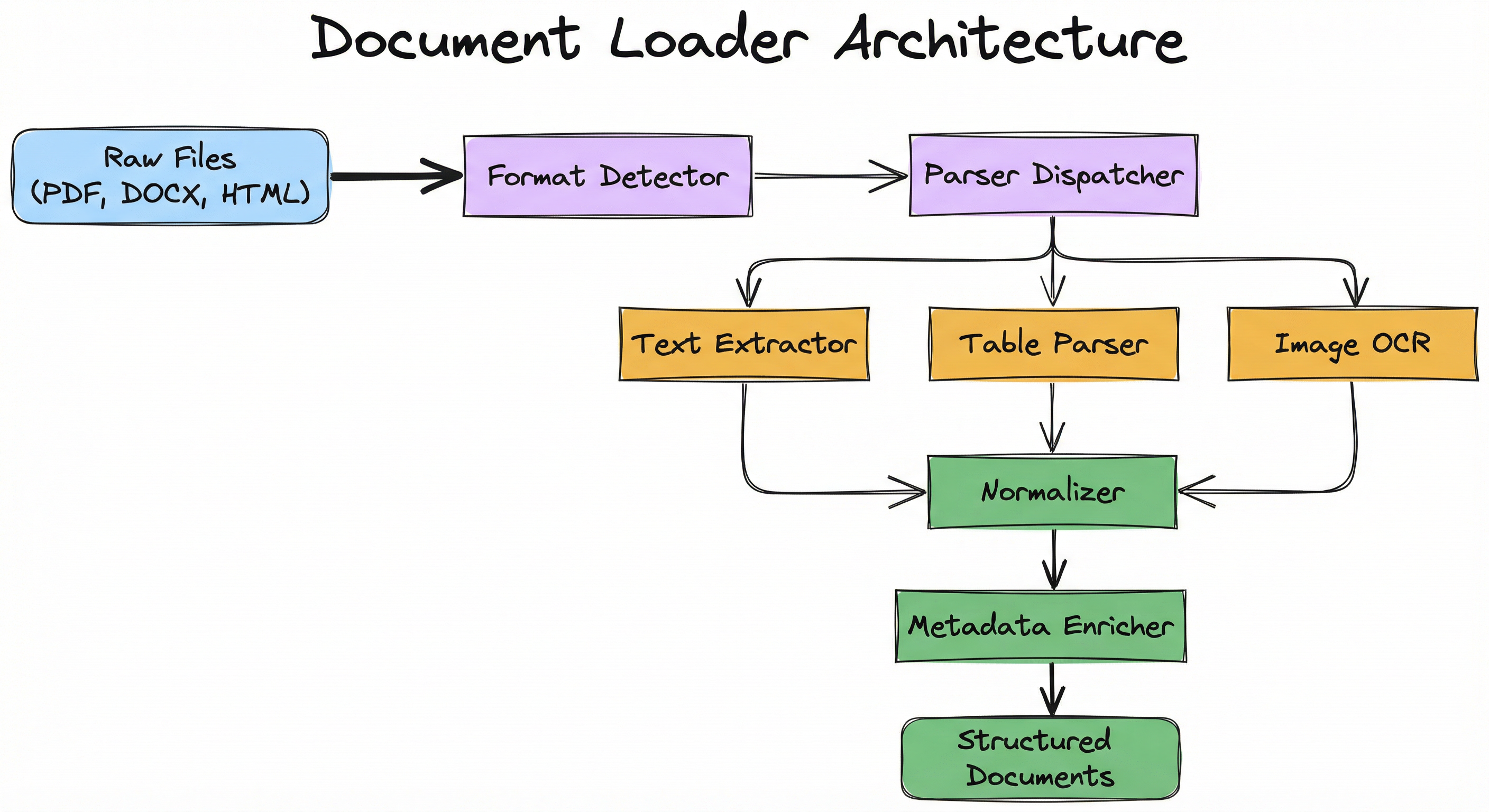
A production document loader isn't a single monolithic function -- it's a pipeline of specialized components, each handling a different concern. Let me walk you through the architecture.
At the top sits a format dispatcher -- think of it as a traffic cop that looks at the incoming file, determines its type (via MIME detection or magic bytes, not just the file extension), and routes it to the appropriate parser.
Each format-specific parser handles the gnarly details of its domain: PDF object stream decoding, HTML DOM traversal, DOCX XML parsing, or OCR for scanned images.
After parsing, a text normalization layer cleans up the output: fixing character encoding issues, collapsing excessive whitespace, normalizing Unicode (NFC form), and stripping control characters. This ensures every downstream component sees consistent, clean text regardless of the source format.
Finally, a metadata extractor pulls document properties -- author, creation date, page count, title -- from format-specific metadata fields (PDF info dictionaries, HTML <meta> tags, DOCX core properties).
Production tip: Always use MIME type detection (via
python-magicor similar) rather than file extensions. Users will upload a.docx, and your pipeline needs to handle it gracefully.
Key Components
Format Dispatcher
Determines file type via MIME detection or extension, routes to the appropriate parser. Handles unsupported formats gracefully.
PDF Parser
Extracts text from PDF object streams, reconstructs reading order from positional metadata, handles embedded fonts and character mappings. May use PyMuPDF, pdfplumber, or Donut/Nougat for layout-aware extraction.
HTML Parser
Parses HTML DOM, strips script/style tags, extracts visible text while preserving semantic structure (headings, lists, tables). Handles malformed HTML via lxml or BeautifulSoup's lenient parsing.
Markdown Parser
Converts Markdown to plain text or structured representation, preserving headers, code blocks, and links. Typically straightforward via regex or libraries like markdown-it.
DOCX/Office Parser
Unzips DOCX (which is a ZIP of XML files), parses document.xml for paragraphs and runs, extracts tables and styles. Uses python-docx or apache-tika.
OCR Engine
For scanned PDFs or images, applies optical character recognition (Tesseract, Google Vision, or end-to-end models like Donut). May include layout detection to preserve reading order.
Text Normalizer
Decodes character entities, normalizes Unicode (NFC/NFD), strips control characters, collapses excessive whitespace, optionally lowercases or removes accents.
Metadata Extractor
Pulls file-level metadata (author, title, creation date, page count) from PDF info dictionaries, HTML meta tags, or DOCX core properties.
Data Flow
Here's the flow, step by step:
Step 1: A file (raw bytes or a file path) enters the format dispatcher.
Step 2: The dispatcher inspects MIME type / magic bytes and selects the appropriate parser (PDF, HTML, Markdown, DOCX, or OCR engine).
Step 3: The selected parser extracts raw text and structural information (headings, tables, lists).
Step 4: The text normalizer cleans and standardizes the output -- fixing encoding, collapsing whitespace, stripping control characters.
Step 5: The metadata extractor attaches document properties (author, date, page count, source URL).
Step 6: The final output -- structured text + metadata -- is emitted for downstream chunking or indexing.
The entire flow is designed to be format-agnostic from the normalizer onward. Once text passes through the format-specific parser, every downstream component sees the same clean representation regardless of whether the source was a PDF, HTML page, or scanned invoice.
A branching flow: 'File Input' -> 'Format Dispatcher' -> {PDF Parser, HTML Parser, Markdown Parser, DOCX Parser, OCR Engine} -> 'Text Normalizer' -> 'Metadata Extractor' -> 'Structured Text Output'.
How to Implement
Choosing Your Implementation Strategy
Let's be practical about this. You have three main approaches, and the right one depends entirely on your documents and your constraints.
Approach 1: Library-based parsing. Use established libraries like PyMuPDF, BeautifulSoup, or Unstructured.io. These are low-latency (single-digit milliseconds per document), easy to deploy (no GPU needed), and battle-tested. BUT they struggle with scanned PDFs, complex multi-column layouts, and documents where structure is encoded visually rather than in markup.
Approach 2: Model-based parsing. Deploy vision-language models like Donut, Nougat, or LayoutLMv3. These achieve significantly higher fidelity, generalize across languages and layouts, and handle scanned documents end-to-end. However, they require GPU inference (50-500ms per page), add deployment complexity, and cost more to run -- roughly $0.50-2.00 per 1,000 pages on cloud GPUs (Rs 40-170 on Azure India regions).
Approach 3: Hybrid pipelines. This is what most production systems actually do. Use fast library parsing as the primary path, with model-based fallback for documents that fail quality checks (empty extraction, low confidence, detected scanned content). You get the speed of libraries for 80-90% of documents and the fidelity of models for the hard cases.
My recommendation: Start with library-based parsing. Monitor extraction quality metrics (text length distribution, empty extraction rate). Add model-based fallback only for document types where library parsers demonstrably fail. Premature optimization with GPU models is a common (and expensive) mistake.
import fitz  # PyMuPDF

def load_pdf(file_path: str) -> dict:
    doc = fitz.open(file_path)
    pages = []
    metadata = {
        "title": doc.metadata.get("title", ""),
        "author": doc.metadata.get("author", ""),
        "page_count": len(doc),
    }

    for page_num, page in enumerate(doc, start=1):
        text = page.get_text("text")  # extract plain text
        pages.append({
            "page_number": page_num,
            "text": text,
        })

    doc.close()
    return {"pages": pages, "metadata": metadata}
PyMuPDF (fitz) is a high-performance library backed by the MuPDF C library. It handles most PDFs reliably and extracts text faster than pure-Python alternatives. The get_text() method can return plain text, HTML, or structured dict representations. This example extracts per-page text and document metadata. Limitations: struggles with scanned PDFs (no OCR) and complex multi-column layouts.
from bs4 import BeautifulSoup
import requests

def load_html(url_or_path: str) -> dict:
    if url_or_path.startswith("http"):
        html = requests.get(url_or_path).text
    else:
        with open(url_or_path, "r", encoding="utf-8") as f:
            html = f.read()

    soup = BeautifulSoup(html, "lxml")

    # Remove scripts, styles, and non-content tags
    for tag in soup(["script", "style", "nav", "footer"]):
        tag.decompose()

    # Extract title and main content
    title = soup.title.string if soup.title else ""
    main_text = soup.get_text(separator="\n", strip=True)

    return {
        "title": title,
        "text": main_text,
        "metadata": {"source": url_or_path},
    }
BeautifulSoup with the lxml parser handles malformed HTML gracefully. This example removes non-content tags (script, style, nav, footer) to avoid polluting the extracted text with JavaScript or boilerplate. The get_text() method traverses the DOM and concatenates visible text. For production use, consider additional heuristics to extract main content (e.g., using readability algorithms like trafilatura or newspaper3k).
from unstructured.partition.auto import partition

def load_document(file_path: str) -> list[dict]:
    # Auto-detects format and returns structured elements
    elements = partition(filename=file_path)

    chunks = []
    for el in elements:
        chunks.append({
            "type": el.category,  # e.g., "Title", "NarrativeText", "Table"
            "text": el.text,
            "metadata": el.metadata.to_dict(),
        })

    return chunks
Unstructured.io provides a unified interface for loading PDFs, DOCX, HTML, Markdown, and more. It automatically detects document structure and labels elements by type (Title, NarrativeText, ListItem, Table). This simplifies downstream chunking and indexing. The library supports OCR via Tesseract for scanned PDFs. Best for rapid prototyping when you need one API for many formats.
from transformers import DonutProcessor, VisionEncoderDecoderModel
from PIL import Image
import torch

processor = DonutProcessor.from_pretrained("naver-clova-ix/donut-base-finetuned-docvqa")
model = VisionEncoderDecoderModel.from_pretrained("naver-clova-ix/donut-base-finetuned-docvqa")

def parse_document_image(image_path: str) -> str:
    image = Image.open(image_path).convert("RGB")
    pixel_values = processor(image, return_tensors="pt").pixel_values

    # Generate text from image
    decoder_input_ids = processor.tokenizer("<s_docvqa><s_question>What is written in the document?</s_question><s_answer>",
                                             add_special_tokens=False, return_tensors="pt").input_ids

    with torch.no_grad():
        outputs = model.generate(pixel_values, decoder_input_ids=decoder_input_ids, max_length=512)

    text = processor.batch_decode(outputs, skip_special_tokens=True)[0]
    return text
Donut is an OCR-free document understanding transformer that directly reads images and generates structured outputs. Unlike traditional OCR + layout detection pipelines, Donut uses a vision encoder (Swin Transformer) and text decoder (BART) to understand documents end-to-end. This example shows inference on a document image. Donut excels at scanned documents, forms, and receipts. Tradeoff: requires GPU and has higher latency than library-based parsers.
# Example configuration for a multi-format document loader
loader:
  pdf:
    engine: pymupdf  # or 'pdfplumber', 'donut'
    ocr_fallback: tesseract
    preserve_layout: true
  html:
    parser: lxml
    strip_tags: [script, style, nav, footer, aside]
    extract_main_content: true  # use readability heuristics
  markdown:
    preserve_code_blocks: true
    strip_html: false  # allow inline HTML
  docx:
    extract_images: false
    preserve_tables: true
  text_normalization:
    unicode_form: NFC
    remove_control_chars: true
    collapse_whitespace: true
    lowercase: false
  metadata:
    extract_dates: true
    extract_authors: true
    extract_page_count: true
Common Implementation Mistakes
- ●
Assuming all PDFs are text-based -- many are scanned images requiring OCR, which library parsers silently ignore, returning empty text. Always check extraction length and fall back to OCR when text is suspiciously short.
- ●
Ignoring character encoding issues: not all files are UTF-8. Failing to detect and decode properly leads to mojibake (garbled text like 'a]' instead of an apostrophe) or UnicodeDecodeErrors that crash your pipeline.
- ●
Stripping all whitespace or newlines during normalization, which destroys paragraph boundaries and sentence structure that your chunker needs to split meaningfully.
- ●
Not handling malformed files gracefully -- production systems must catch parser exceptions and log failures rather than crashing the entire ingestion pipeline. Wrap every parser call in try/except.
- ●
Over-relying on file extensions for format detection instead of MIME type or magic byte sniffing. Users will upload a file called 'report.pdf' that's actually a renamed DOCX, and your pipeline needs to handle it.
- ●
Extracting text from PDFs without preserving reading order, causing scrambled output for multi-column or tabular layouts. This is especially common with PyPDF2.
- ●
Loading entire large documents into memory instead of streaming or paginating. A 500MB PDF will OOM-kill your container. Process page-by-page.
- ●
Failing to sanitize HTML content, which can introduce XSS vulnerabilities if extracted content is later displayed in a web UI. Always sanitize before storing or rendering.
When Should You Use This?
Use When
Building a RAG system that needs to ingest documents from multiple sources (user uploads, web scraping, document repositories)
Your corpus includes heterogeneous formats (PDFs, HTML, DOCX) and you need a unified ingestion interface
You need to preserve document structure (headings, tables, metadata) for downstream chunking or indexing
Handling scanned documents or images with text, requiring OCR or layout-aware models
Your application requires reproducible, version-controlled document processing (as opposed to manual copy-paste)
Avoid When
Your corpus consists entirely of plain text files or already-structured JSON/CSV -- a document loader adds unnecessary complexity for data that's already machine-readable
You need real-time document parsing at sub-10ms latency and only have simple formats -- model-based loaders introduce too much overhead
Your documents are extremely large (multi-GB PDFs) and you lack streaming or pagination infrastructure -- in-memory loading will blow up your containers
Your use case requires pixel-perfect layout reconstruction (e.g., rendering for print) -- document loaders are optimized for text extraction, not visual fidelity
Key Tradeoffs
The Three-Way Tradeoff: Fidelity vs. Latency vs. Cost
Let's break this down clearly.
Library-based parsers (PyMuPDF, BeautifulSoup) process documents in single-digit milliseconds, need no GPU, and cost essentially nothing to run. BUT they struggle with complex layouts, scanned PDFs, and non-standard encodings. For a corpus of clean, text-based PDFs -- say, Flipkart product documentation or Zomato restaurant listings -- they're perfect.
Vision-language models (Donut, Nougat, LayoutLMv3) achieve significantly higher extraction quality and handle scanned documents end-to-end. However, they require GPU inference at 50-500ms per page, adding both latency and cost. On Azure India regions, a T4 GPU instance runs around Rs 25-50/hour (1.65-3.30).
The second axis is robustness vs. strictness. Lenient parsers (BeautifulSoup with lxml) handle malformed inputs gracefully -- they'll produce something even from broken HTML. Strict parsers fail fast, which is better for catching data quality issues early but requires cleaner input.
My rule of thumb: Start with libraries. Measure extraction quality on a representative sample. Deploy models only where library quality is demonstrably insufficient. This hybrid approach typically handles 85-90% of documents via fast library parsing, reserving expensive GPU inference for the remaining 10-15%.
Alternatives & Comparisons
For small, static corpora (fewer than 100 documents), manually extracting and curating text may genuinely be simpler than setting up a document loader. Copy-paste from a few dozen PDFs? Just do it. However, this approach doesn't scale, isn't reproducible, and can't handle ongoing document updates. Once your corpus grows beyond what one person can maintain in a day, switch to automated loading.
Cloud-based managed services handle format detection, OCR, and layout analysis as a fully managed API. They offload all operational complexity -- no models to deploy, no GPUs to manage. BUT they introduce per-document API costs (Azure Document Intelligence charges around $1.50 per 1,000 pages, roughly Rs 125) and latency (network round-trip + processing). Best when you need high-fidelity extraction without deploying your own models, and cost / vendor lock-in are acceptable tradeoffs. Particularly convenient if you're already on Azure (common for Indian enterprises using Jio-Azure partnerships) or AWS.
Tika is a Java-based content analysis toolkit that supports 1,000+ file formats via a unified API. It's more comprehensive than any Python library. However, it requires JVM deployment, has higher startup overhead (JVM cold start), and is less Pythonic. Use Tika when you need extremely broad format support -- legacy Office formats (.doc, .xls), email archives (.mbox, .eml), CAD files, or anything exotic that Python libraries don't handle.
Pros, Cons & Tradeoffs
Advantages
Enables automated, reproducible ingestion of heterogeneous document formats -- no more manual copy-paste from PDFs
Preserves document structure (headings, lists, tables, metadata) that directly improves downstream chunking and retrieval quality
Modern vision-language loaders (Donut, Nougat) generalize across languages and domains without format-specific rules -- great for multilingual corpora (English + Hindi + regional languages)
Libraries like Unstructured.io and LangChain provide high-level abstractions that get you from zero to working pipeline in under an hour
Metadata extraction (page numbers, authors, dates) enables filtering, attribution, and temporal scoping in production RAG systems
Disadvantages
Library-based parsers often fail silently on scanned PDFs, returning empty text without raising any error -- the most dangerous failure mode because you don't know it's happening
Complex layouts (multi-column, nested tables, footnotes) require heuristic or model-based inference, which is inherently error-prone and domain-specific
Vision-language models improve quality but require GPU infrastructure and add 50-500ms latency per page -- a significant cost at scale
Character encoding issues, malformed files, and password-protected documents introduce failure modes that must be handled gracefully in production
No single loader handles all edge cases perfectly -- production systems invariably require format-specific fallbacks, quality monitoring, and error handling logic
Failure Modes & Debugging
Silent failure on scanned PDFs
Cause
Library-based PDF parsers (PyPDF2, PyMuPDF) extract text from text-based PDFs but return empty strings for scanned images. They don't raise errors -- they just give you nothing.
Symptoms
Documents appear to load successfully but yield no text. Downstream chunking and embedding produce empty results. Retrieval recall drops to zero for those documents, and you might not notice for weeks.
Mitigation
Detect empty or near-empty extraction (e.g., extracted text < 50 characters for a 10-page PDF is suspicious) and route to OCR pipeline (Tesseract, Donut, AWS Textract). Monitor extraction length distributions and set up alerts on anomalies.
Scrambled text from multi-column PDFs
Cause
Simple PDF text extraction concatenates text in the order it appears in the PDF object stream, not visual reading order. For a two-column academic paper, you get sentences from column 1 interleaved with sentences from column 2.
Symptoms
Extracted text is gibberish or sentences are fragmented. Chunks are incoherent. Retrieval returns irrelevant results. Users report that the system "doesn't understand" documents that clearly contain the answer.
Mitigation
Use layout-aware parsers (pdfplumber with explicit column detection, or Donut/Nougat for end-to-end parsing). Always validate extraction on a representative sample before running full ingestion. A 5-minute manual check can save hours of debugging.
Unicode encoding errors
Cause
Files encoded in non-UTF-8 character sets (Latin-1, Windows-1252, GB2312, or ISCII for Hindi documents) opened with a UTF-8 decoder.
Symptoms
UnicodeDecodeError exceptions that crash the pipeline, or worse -- mojibake (garbled characters like 'a\u20ac\u2122' instead of apostrophes) that silently corrupts your text.
Mitigation
Use charset detection libraries (chardet, cchardet) to infer encoding before decoding. Fall back to 'replace' or 'ignore' error handling to prevent pipeline crashes. Log encoding mismatches for investigation.
Memory exhaustion on large files
Cause
Loading multi-hundred-MB or multi-GB PDFs entirely into memory. The parser allocates the full document structure at once, and your 2GB container limit is gone.
Symptoms
OOM kills, container crashes, or extreme swap thrashing. Latency spikes from milliseconds to minutes. Other requests on the same node may be affected.
Mitigation
Implement page-by-page processing. For very large PDFs, extract pages in batches (e.g., 50 pages at a time) and process incrementally. Set per-document size limits (e.g., reject files > 200MB) and monitor memory usage per worker.
Table structure loss
Cause
Text extraction flattens tables into unstructured paragraphs, losing row/column relationships. The text "Revenue Q1 2024 $500M" becomes just a string with no indication of what's a header and what's a value.
Symptoms
Tabular data becomes incoherent. Numeric data is separated from its headers. Retrieval cannot answer questions requiring table comprehension (e.g., "What was revenue in Q1?").
Mitigation
Use libraries that preserve table structure (pdfplumber, camelot-py for PDFs; pandas for HTML tables). Represent extracted tables as Markdown tables or CSV in metadata so downstream components can interpret row/column relationships.
Placement in an ML System
In a RAG pipeline, the document loader is the first stage -- the gatekeeper. It sits between file storage and the text chunker, converting raw files into clean text that the rest of the pipeline can work with.
Here's what makes this position so critical: document loader quality directly impacts every downstream component. Poor extraction leads to bad chunks, which lead to poor embeddings, which lead to degraded retrieval quality. It's a cascading failure.
The document loader is often the most fragile component in a RAG pipeline due to format diversity and edge cases. It requires robust error handling, comprehensive monitoring, and a healthy dose of defensive programming.
Pipeline Stage
Ingestion / Data Loading
Upstream
- File Storage (S3, Blob Storage)
- Web Scraping
- User Uploads
- Content Management Systems
Downstream
- Text Chunker
- Embedding Model
- Vector Store
- Metadata Index
Scaling Bottlenecks
The primary bottlenecks depend on your parser choice. For library-based parsing, it's I/O throughput -- reading from disk or S3. For OCR and model-based parsing, it's CPU/GPU compute, which is 10-100x slower than library parsing.
For large-scale ingestion (millions of documents -- think a platform like Swiggy ingesting restaurant menus or a legal-tech startup processing court filings from eCourts), parallelization is essential. Use task queues (Celery, RabbitMQ) or serverless functions (AWS Lambda, Azure Functions). A hybrid strategy -- library-first with model fallback -- optimizes both cost and latency.
Concrete numbers: PyMuPDF processes ~500 pages/second on a single CPU core. Donut processes ~2-5 pages/second on a T4 GPU. At scale, the 100x cost difference between library and model parsing really adds up.
Production Case Studies
Anthropic's internal RAG system for grounding Claude's responses in research papers and documentation uses a multi-stage document loader. PDFs are parsed with PyMuPDF for fast extraction, with a Nougat fallback for academic papers that have complex equations and LaTeX-heavy layouts. HTML documentation is ingested via trafilatura, which intelligently extracts main content while filtering out navigation bars, sidebars, and boilerplate.
The key design decision was the hybrid approach: try the fast path first, measure quality, and escalate to the expensive model only when needed.
The hybrid parsing strategy reduced ingestion latency by 80% compared to model-only approaches while maintaining >95% extraction quality on academic PDFs. This enabled real-time updates to the knowledge base -- new papers could be indexed within minutes of publication.
Glean's workplace search platform ingests documents from Slack, Google Drive, Confluence, and 20+ other enterprise sources. Their document loader handles a remarkable variety of formats using Apache Tika as the broad-coverage backend, with custom parsers for domain-specific formats like Jupyter notebooks, API documentation, and Figma files.
OCR is applied selectively -- only to scanned contracts, whiteboards, and handwritten notes -- rather than blanket-processing everything through a vision model. This selective approach keeps costs manageable at enterprise scale (millions of documents per customer).
Unified document loading across heterogeneous enterprise sources enabled semantic search over 10M+ documents per deployment. Metadata extraction (author, team, date, access permissions) supported fine-grained access control and temporal filtering -- critical for enterprise compliance.
LexisNexis's legal research platform ingests court opinions, contracts, and regulatory filings -- many of which exist as scanned PDFs from decades-old court records. Their document loader pipeline uses pdfplumber for text extraction from digital PDFs, camelot-py for table parsing (critical for financial exhibits and regulatory tables), and a fine-tuned LayoutLMv3 model for scanned legal documents.
The LayoutLMv3 model was specifically fine-tuned on legal document layouts to preserve case citations, footnotes, and the multi-column formats common in court opinions.
Layout-aware extraction improved citation extraction accuracy by 40% and reduced manual curation effort for scanned documents by 70%. This directly translated to faster legal research workflows -- attorneys could find relevant precedents in minutes instead of hours.
Tooling & Ecosystem
High-performance Python binding for the MuPDF C library. Fast PDF text extraction with support for metadata, images, and annotations. Best for text-based PDFs in production pipelines.
Unified document loader supporting 15+ formats (PDF, DOCX, HTML, Markdown, images). Auto-detects structure (titles, tables, lists) and supports OCR via Tesseract. Best for rapid prototyping and multi-format RAG pipelines.
Collection of 100+ document loaders for files, databases, and APIs. Integrates with LangChain's RAG abstractions. Good for prototyping but may require customization for production use.
Content analysis toolkit supporting 1000+ file formats via a unified API. JVM-based with REST interface. Best for extreme format diversity (legacy office files, email archives, CAD).
Python library for detailed PDF inspection with table extraction and layout analysis. Slower than PyMuPDF but preserves structure better. Best for complex PDFs with tables and multi-column layouts.
Python library for parsing HTML and XML with lenient error handling. Best for web scraping and extracting content from malformed HTML.
OCR-free document understanding transformer from Naver. Uses vision encoder + text decoder for end-to-end parsing of scanned documents, forms, and receipts. Requires GPU.
Neural optical understanding for academic documents from Meta. Parses scientific PDFs with equations, tables, and references. Best for academic paper ingestion in RAG systems.
Managed service for document parsing, OCR, and layout analysis. Supports forms, invoices, receipts, and custom document types. Pay-per-document pricing.
Managed OCR and document analysis service. Extracts text, tables, and forms from PDFs and images. Best for serverless architectures on AWS.
Research & References
Xu, Li, Cui, Huang, Wei, Zhou & Li (2019)KDD 2020
Introduced the LayoutLM architecture that jointly models text, layout, and image information for document understanding. Pre-trained on millions of scanned documents, LayoutLM achieves state-of-the-art results on form understanding, receipt parsing, and document classification by encoding 2D positional information alongside text.
Kim, Hong, Park, Yim, Park, Kim, Hwang, Yun, Lee, Park & Seo (2022)ECCV 2022
Presented Donut, an OCR-free approach that directly reads document images and generates structured outputs using a vision encoder (Swin Transformer) and text decoder (BART). Eliminates the traditional OCR -> layout analysis pipeline, reducing errors from cascaded modules and enabling end-to-end training.
Blecher, Cucurull & Scialom (2023)arXiv preprint
Introduced Nougat, a transformer-based model specifically designed for parsing scientific PDFs. Trained on arXiv papers, Nougat accurately extracts LaTeX equations, tables, references, and section structure from academic documents, outperforming generic OCR pipelines on scientific content.
Huang, Lv, Cui, Lu, Wei, Zhou & Li (2022)ACM Multimedia 2022
Extended LayoutLM with unified masked language modeling across text and image patches, eliminating the need for separate text and layout pre-training objectives. LayoutLMv3 achieves new state-of-the-art on document understanding benchmarks (FUNSD, CORD, DocVQA) with fewer parameters and faster inference.
Zhang, Cheng, Zhao, Liu, Tang, Wang, Sun & Yin (2024)arXiv preprint
Comprehensive survey of document parsing techniques covering rule-based, learning-based, and hybrid approaches. Analyzes challenges in multi-modal parsing, layout detection, and table extraction, and benchmarks state-of-the-art methods across diverse document types.
Lewis, Perez, Piktus, Petroni, Karpukhin, Goyal, Kuttler, Lewis, Yih, Rocktaschel, Riedel & Kiela (2020)NeurIPS 2020
Established the RAG paradigm that combines a dense passage retriever with a seq2seq generator. Demonstrated that retrieval over large corpora (indexed with document loaders -> chunkers -> embedders) grounds LLM responses and reduces hallucination on knowledge-intensive tasks like open-domain QA.
Clark & Divvala (2015)DocEng 2015
Introduced a pipeline for extracting figure captions and associated images from PDF documents by analyzing layout, typography, and spatial relationships. Relevant for enriching document loaders with visual metadata in RAG systems that support multimodal retrieval.
Trivedi (2019)Open-source software
Presented Camelot, an open-source library for high-quality table extraction from PDFs using stream (text-based) and lattice (ruled-line) parsing modes. Widely used in production document loaders for preserving tabular structure in financial reports, research papers, and contracts.
Interview & Evaluation Perspective
Common Interview Questions
- ●
How would you design a document loader for a RAG system that ingests user-uploaded PDFs, some of which are scanned?
- ●
What are the tradeoffs between using a library-based PDF parser like PyMuPDF vs. a model-based parser like Donut?
- ●
How do you handle malformed or password-protected files in a production ingestion pipeline?
- ●
Explain how you would preserve table structure when extracting text from PDFs for downstream retrieval.
- ●
What is the difference between OCR and layout-aware document parsing? When would you use each?
Key Points to Mention
- ●
Document loaders must handle format diversity, character encoding issues, and failure modes gracefully to avoid silent data loss -- emphasize that silent failures are worse than crashes
- ●
Library-based parsers (PyMuPDF, BeautifulSoup) are fast but struggle with scanned PDFs and complex layouts; model-based parsers (Donut, Nougat) improve quality but require GPU and add latency -- always frame as a tradeoff, not a clear winner
- ●
Preserving document structure (headings, tables, metadata) is critical for downstream chunking and retrieval quality -- flattening everything to plain text is the #1 mistake that degrades RAG performance
- ●
Hybrid strategies (library-first with model fallback) optimize for cost and latency while handling edge cases -- this is what production systems actually do
- ●
Metadata extraction (page numbers, authors, dates) enables filtering, attribution, and temporal scoping -- mention this to show you think beyond just text extraction
Pitfalls to Avoid
- ●
Assuming all PDFs are text-based and failing to handle scanned documents, which return empty text silently
- ●
Ignoring reading order in multi-column or tabular PDFs, causing scrambled extraction that makes chunks incoherent
- ●
Loading entire large documents into memory instead of streaming page-by-page, leading to OOM errors in production
- ●
Not sanitizing HTML content, introducing XSS vulnerabilities if extracted text is later displayed in a web UI
- ●
Over-engineering with complex vision models when simple library parsers handle 90% of your corpus perfectly well -- always profile your actual document distribution first
Senior-Level Expectation
A senior candidate should walk through the full ingestion lifecycle like a systems thinker: format detection (MIME-based, not extension-based), parser selection strategy (library vs. model, with clear criteria for when to use each), error handling (malformed files, encoding mismatches, password-protected documents), structure preservation (tables, headings, reading order), metadata extraction, monitoring (extraction quality metrics, failure rate dashboards), and scaling strategies (parallelization via task queues, serverless for burst loads, hybrid pipelines for cost optimization). They should be able to justify tradeoffs between latency, cost, and fidelity for different workloads -- and ideally cite concrete numbers.
Summary
Key Takeaways
-
A document loader is the ingestion component of a RAG pipeline, converting heterogeneous file formats (PDF, HTML, DOCX, images) into structured text for downstream ML processing. It's the first -- and often most fragile -- stage in the pipeline.
-
The core challenge is a three-way tradeoff between fidelity (preserving structure, handling complex layouts), latency (milliseconds vs. seconds per document), and robustness (gracefully handling malformed files, encoding issues, and scanned documents).
-
Library-based parsers (PyMuPDF, BeautifulSoup) process documents in single-digit milliseconds and need no GPU, BUT they struggle with scanned PDFs and complex layouts. Vision-language models (Donut, Nougat, LayoutLMv3) achieve higher quality but require GPU inference at 50-500ms per page, costing roughly $0.50-2.00 per 1,000 pages (Rs 40-170).
-
Production systems use hybrid strategies: library-first parsing with model-based fallbacks for scanned documents and complex layouts. This handles 85-90% of documents cheaply and reserves expensive GPU inference for the hard cases.
-
Document loader quality cascades through the entire RAG pipeline. Poor extraction leads to bad chunks, bad embeddings, and degraded retrieval. A 5% improvement in extraction fidelity can translate to 10-15% better end-to-end retrieval performance.
Bottom line: The document loader is the bridge between raw files and machine-readable text. Get it right, and your entire RAG pipeline benefits. Get it wrong, and every downstream component pays the price. Invest in monitoring, quality metrics, and graceful error handling -- because document formats will always surprise you.