Data Lake in Machine Learning
A data lake is a centralized storage repository that holds vast amounts of raw data in its native format -- structured tables, semi-structured JSON and Parquet, unstructured text, images, audio, and video -- all coexisting in a single, schema-on-read system built on cheap cloud object storage.
In ML systems, the data lake is the gravitational center around which everything else orbits. It is where raw training data lands before feature engineering, where model artifacts and experiment logs accumulate, and where production inference data flows back for monitoring and retraining. Without a well-organized data lake, ML teams spend 80% of their time wrangling data instead of building models.
The modern data lake has evolved far beyond "dump everything into S3 and pray." With the rise of open table formats like Delta Lake, Apache Iceberg, and Apache Hudi, data lakes now support ACID transactions, time travel, schema evolution, and sub-second metadata operations -- capabilities that were once exclusive to data warehouses. This convergence has given birth to the lakehouse architecture, which combines the flexibility of data lakes with the reliability of data warehouses.
From Uber's 150+ petabyte Hudi-powered data lake processing 500 billion records daily, to Flipkart's Hadoop-based analytics platform driving Big Billion Day recommendations, to Swiggy's Delta Lake-backed lakehouse powering demand forecasting -- data lakes are the foundational storage layer for ML at scale across the globe.
Concept Snapshot
- What It Is
- A centralized storage system built on cloud object storage (S3, GCS, ADLS) that holds structured, semi-structured, and unstructured data in open formats, providing a unified foundation for analytics, ML training, and serving workloads.
- Category
- Storage
- Complexity
- Advanced
- Inputs / Outputs
- Inputs: raw data from batch sources (databases, logs, files), streaming sources (Kafka, Kinesis), and external APIs. Outputs: curated datasets for ML training, feature engineering, analytics queries, and model monitoring.
- System Placement
- Sits at the storage foundation of the ML pipeline -- upstream of feature stores, training pipelines, and analytics engines; downstream of data ingestion and streaming systems.
- Also Known As
- data lakehouse, analytics data lake, enterprise data lake, ML data platform, cloud data lake
- Typical Users
- Data Engineers, ML Engineers, Data Scientists, Analytics Engineers, Platform Engineers
- Prerequisites
- Cloud object storage (S3, GCS, ADLS), Columnar file formats (Parquet, ORC), Distributed computing basics (Spark, MapReduce), SQL fundamentals, Data modeling concepts
- Key Terms
- lakehousetable formatACID transactionsschema evolutionpartition pruningtime travelmedallion architecturedata catalogmetadata layercompaction
Why This Concept Exists
The Problem with Separate Storage Silos
Before data lakes, organizations maintained a fragmented landscape of storage systems: relational databases for structured data, HDFS for batch analytics, blob storage for unstructured files, and specialized systems for each use case. An ML engineer who needed to join user clickstream logs with product catalog data and customer support tickets would have to navigate three different systems, each with its own access patterns, security models, and query interfaces.
This fragmentation created a data gravity problem: moving data between systems was expensive, slow, and error-prone. Teams ended up maintaining redundant copies, leading to inconsistency. The cost of storage was dominated not by the bytes themselves -- cloud object storage is cheap at $0.023/GB/month (~INR 1.93/GB/month) on S3 Standard -- but by the operational overhead of managing dozens of point-to-point data pipelines.
Two Trends That Made Data Lakes Essential
Trend 1: The volume and variety of ML data exploded. Modern ML systems don't just consume clean tabular data. They ingest clickstreams, sensor readings, images, audio, video, log files, and text corpora. A single recommendation model at a company like Flipkart might need to join structured purchase history with semi-structured browsing events and unstructured product reviews. No single database format can efficiently store all of these.
Trend 2: Cloud object storage became absurdly cheap and durable. Services like Amazon S3, Google Cloud Storage, and Azure Data Lake Storage Gen2 offer 99.999999999% (11 nines) durability at fractions of a penny per gigabyte. This made it economically viable to store everything -- even data whose value isn't yet clear -- and apply schema when reading rather than writing.
From Data Swamp to Lakehouse
The first generation of data lakes (circa 2010-2016) earned a reputation as data swamps -- vast, disorganized repositories where data went to die. The problem wasn't the storage layer; it was the lack of management primitives. Without ACID transactions, concurrent writes could corrupt data. Without schema enforcement, datasets drifted into incompatible formats. Without cataloging, nobody could find anything.
The answer came from three open-source projects that emerged between 2016 and 2019: Apache Hudi (Uber, 2016), Delta Lake (Databricks, 2019), and Apache Iceberg (Netflix, 2017). Each added a metadata layer on top of object storage that provides ACID transactions, schema evolution, time travel, and efficient metadata operations. This created the lakehouse architecture -- a system that combines the low-cost, flexible storage of a data lake with the reliability, performance, and governance features of a data warehouse.
Key Takeaway: Data lakes exist because ML systems need a single, cost-effective storage layer that handles all data types, supports concurrent reads and writes with transactional guarantees, and scales to petabytes without breaking the bank. The lakehouse evolution solved the governance and reliability problems that plagued first-generation data lakes.
Core Intuition & Mental Model
The Core Promise
Think of a data lake as a universal filing cabinet for your entire organization's data. Unlike a traditional database (which is more like a rigid spreadsheet with predefined columns), a data lake accepts anything -- CSVs, Parquet files, JSON blobs, images, audio recordings, model checkpoints -- and stores it all on the same infinitely expandable shelf (cloud object storage). You decide how to interpret the data when you read it, not when you write it.
The key insight is the separation of storage and compute. Your data sits in cheap, durable object storage. When you need to process it -- whether that's running a Spark job for feature engineering, a Trino query for analytics, or a PyTorch DataLoader for model training -- you spin up compute resources on demand. When the job finishes, the compute disappears but your data remains. You pay for storage 24/7 (cheap) and compute only when needed (expensive but intermittent).
What a Data Lake Does NOT Do
A common misconception: a data lake is NOT a query engine. It doesn't run SQL queries itself -- that's the job of engines like Spark SQL, Trino, Athena, or BigQuery that sit on top. The data lake provides the storage substrate, metadata management, and transactional guarantees. The query engine provides the compute.
Another trap: a data lake is NOT a substitute for a feature store. While you can compute features from data lake tables, a feature store adds point-in-time correctness, low-latency serving, and feature reuse that raw lake tables don't provide.
A Useful Mental Model: The Medallion Architecture
The most widely adopted pattern for organizing a data lake is the medallion architecture (also called multi-hop or bronze-silver-gold):
- Bronze (raw): Data lands here exactly as ingested -- no transformations, no deduplication. This is your source of truth and your insurance policy against upstream changes.
- Silver (cleaned): Deduplicated, validated, and joined. Schema is enforced. This is where most data exploration happens.
- Gold (curated): Business-level aggregates, ML-ready feature tables, and reporting datasets. This is what downstream consumers -- ML training jobs, dashboards, APIs -- actually use.
Each layer applies progressively more structure, and the open table format (Delta, Iceberg, or Hudi) ensures that every transition is atomic and auditable.
Expert Note: The single biggest determinant of data lake success is not the technology -- it's the organizational discipline to maintain clear ownership, naming conventions, and data quality standards at each medallion layer. Technology can enforce schemas; it can't enforce culture.
Technical Foundations
Formal Model of a Data Lake
A data lake can be formally described as a tuple where:
- is the storage layer -- a cloud object store providing key-value access to immutable data files (Parquet, ORC, Avro, etc.)
- is the metadata layer -- a transaction log and catalog that tracks table schemas, partition layouts, file manifests, and snapshot history
- is the table format -- the specification (Delta Lake, Iceberg, or Hudi) defining how metadata and data files are organized to provide ACID semantics
- is the catalog service -- the namespace registry (Hive Metastore, AWS Glue, Unity Catalog) that maps logical table names to physical metadata locations
ACID Guarantees
Modern data lake table formats provide full ACID transactions:
- Atomicity: Each write operation (INSERT, UPDATE, DELETE, MERGE) either fully commits or is fully rolled back. Implemented via optimistic concurrency control -- writes produce new data files, and a metadata commit atomically publishes the new snapshot.
- Consistency: Schema enforcement and check constraints prevent invalid data from being committed.
- Isolation: Concurrent readers see a consistent snapshot (snapshot isolation). Writers use conflict detection on commit.
- Durability: Both data files and transaction logs are persisted to the object store with its underlying durability guarantees.
Cost Model
The total cost of a data lake deployment can be modeled as:
Where:
- -- volume (GB) times price per GB per month times months
- -- number of API calls times price per 1000 requests
- -- cost of query engines and ETL jobs processing the data
- -- cross-region or internet data transfer costs
For example, storing 100 TB on S3 Standard costs approximately:
Partition Pruning Efficiency
Partition pruning is critical for query performance. Given a table with total data files distributed across partitions, a query with a selective partition predicate reads only:
where is the number of partitions matching the predicate. With well-chosen partition keys (e.g., date), , reducing I/O by orders of magnitude. Apache Iceberg's hidden partitioning further improves this by automatically deriving partition values from column transforms (year, month, day, hour, bucket, truncate) without requiring users to manage partition columns explicitly.
Internal Architecture
A production data lake consists of five major subsystems layered on top of cloud object storage: the ingestion layer, the table format / transaction layer, the metadata catalog, the query engine layer, and the governance layer. Let's walk through each.
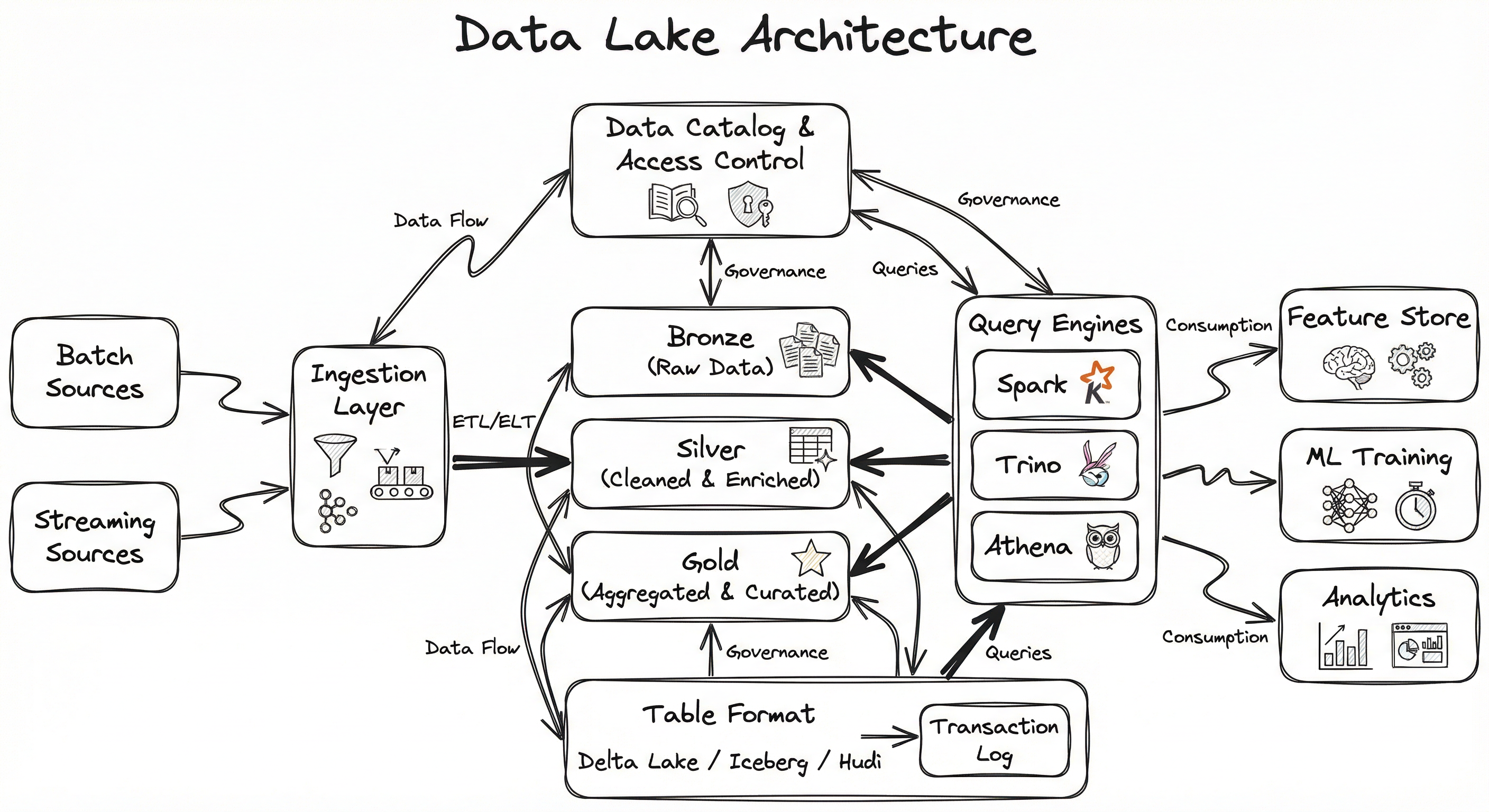
The ingestion layer handles both batch and streaming data sources, converting raw data into columnar file formats (Parquet, ORC) and writing to the bronze layer. The table format (Delta Lake, Iceberg, or Hudi) adds a transaction log that tracks every change, enabling ACID commits, schema enforcement, and time travel. The catalog provides a namespace so query engines can discover tables by name. Finally, the governance layer enforces access control, data classification, and lineage tracking.
The beauty of this architecture is that each layer is independently swappable. You can switch from Spark to Trino for queries without changing your storage. You can migrate from Delta Lake to Iceberg without rewriting your data files (both use Parquet underneath). This decoupling is what makes the lakehouse architecture so powerful.
Key Components
Cloud Object Storage (S3 / GCS / ADLS)
The foundational storage layer. Provides virtually unlimited, highly durable (11 nines), low-cost storage for data files in open formats. Supports lifecycle policies to automatically tier cold data to cheaper storage classes (S3 Glacier, GCS Nearline, ADLS Cool/Archive).
Table Format (Delta Lake / Iceberg / Hudi)
The metadata and transaction layer that sits between raw object storage and compute engines. Maintains a transaction log (Delta's _delta_log, Iceberg's metadata/ tree, Hudi's .hoodie/ timeline) that records every commit, enabling ACID transactions, schema evolution, time travel, and efficient metadata operations like partition pruning and file-level statistics.
Data Catalog (Hive Metastore / AWS Glue / Unity Catalog)
A namespace registry that maps logical table names (e.g., ml_platform.features.user_embeddings) to physical metadata locations in object storage. Enables table discovery, schema browsing, and cross-engine interoperability. Unity Catalog and AWS Glue additionally provide fine-grained access control.
Ingestion Layer (Spark / Flink / Airbyte / Fivetran)
Responsible for landing data into the lake. Batch ingestion uses Spark or distributed ETL tools; streaming ingestion uses Flink or Spark Structured Streaming to write micro-batches or continuous streams into Delta/Iceberg/Hudi tables with exactly-once semantics.
Query Engine Layer (Spark SQL / Trino / Athena / Presto)
Provides SQL and programmatic access to lake data. Leverages table format metadata for partition pruning, predicate pushdown, and column projection. Multiple engines can read the same tables concurrently thanks to the open table format specification.
Governance & Lineage (Apache Atlas / OpenMetadata / Purview)
Tracks data lineage (where data came from and how it was transformed), enforces classification policies (PII tagging, GDPR compliance), and provides audit logs. Essential for regulated industries -- a fintech like Razorpay processing payment data must demonstrate data lineage for RBI compliance.
Medallion Layers (Bronze / Silver / Gold)
An organizational pattern, not a separate technology. Bronze holds raw ingested data, Silver holds cleaned and validated data, and Gold holds curated, business-ready datasets and ML feature tables. Each transition is implemented as a Spark or Flink job writing to a table format-managed table.
Data Flow
Write Path (Ingestion): Raw data arrives from batch sources (database CDC, file uploads, API pulls) or streaming sources (Kafka topics, Kinesis streams). The ingestion layer converts data to Parquet/ORC format and writes it to the Bronze layer. The table format records the write in its transaction log, making the new data atomically visible to readers.
Transformation Path (ETL/ELT): Spark or Flink jobs read from Bronze, apply cleaning, deduplication, and joining logic, and write to Silver. Further aggregation and feature engineering jobs transform Silver data into Gold tables. Each transformation is a separate transaction with full ACID guarantees.
Read Path (Query): A query engine (Trino, Spark SQL, Athena) receives a SQL query, resolves the table name via the catalog, reads the table format's metadata to identify relevant data files (using partition pruning and column statistics), and fetches only the necessary files from object storage. The result set is returned to the user or downstream application.
ML Path: ML training jobs read Gold-layer feature tables directly using Spark DataFrames or PyArrow. Model artifacts and experiment metadata are written back to designated lake paths. Inference results and monitoring data flow back to Bronze for the next cycle.
A layered architecture diagram showing: batch and streaming sources feeding into an ingestion layer, which writes to Bronze/Silver/Gold medallion layers in cloud object storage. A table format (Delta/Iceberg/Hudi) provides transactional metadata across all layers. Query engines (Spark SQL, Trino, Athena) and governance tools (catalog, access control) connect through the table format layer. Downstream consumers include Feature Store, ML Training, and Analytics/BI.
How to Implement
Choosing Your Stack
Implementing a data lake requires decisions across four dimensions: object storage (where files live), table format (how metadata is managed), compute engine (how data is processed), and catalog (how tables are discovered).
For most teams starting fresh in 2026, the recommended stack is:
- Storage: S3 (AWS), GCS (GCP), or ADLS Gen2 (Azure) -- whichever matches your cloud provider
- Table Format: Apache Iceberg (broadest engine compatibility) or Delta Lake (best if you're on Databricks)
- Compute: Apache Spark for ETL, Trino for interactive SQL, and native engine SDKs (PyArrow, DuckDB) for local development
- Catalog: AWS Glue (if on AWS), Unity Catalog (if on Databricks), or the Iceberg REST Catalog (vendor-neutral)
For Indian startups and mid-stage companies, a cost-effective starting point is S3 + Iceberg + Spark on EMR Serverless + AWS Glue Catalog. This avoids the licensing costs of Databricks while providing full lakehouse capabilities. At Razorpay's scale (~100+ TB, 0.5 billion events/day), this stack runs at approximately INR 3-5 lakh/month (6,000/month) for storage and basic compute.
The Three Table Formats Compared
Delta Lake: Created by Databricks, tightest integration with Spark and Databricks Runtime. Uses a JSON-based transaction log (_delta_log/). Best for teams already invested in the Databricks ecosystem. Supports deletion vectors for efficient updates.
Apache Iceberg: Created at Netflix, designed for multi-engine interoperability. Uses a tree of metadata files (manifest lists and manifests) for efficient partition pruning at petabyte scale. Supports hidden partitioning and partition evolution without data rewrites. Chosen by Apple, Netflix, LinkedIn, and AWS as their standard.
Apache Hudi: Created at Uber, optimized for incremental data processing and near-real-time ingestion. Supports both Copy-on-Write (CoW) and Merge-on-Read (MoR) table types. Unique timeline-based metadata architecture. Best for CDC-heavy workloads with frequent upserts.
from pyspark.sql import SparkSession

spark = SparkSession.builder \
    .appName("DataLakeIngestion") \
    .config("spark.sql.extensions", "io.delta.sql.DeltaSparkSessionExtension") \
    .config("spark.sql.catalog.spark_catalog", "org.apache.spark.sql.delta.catalog.DeltaCatalog") \
    .getOrCreate()

# Read raw data (Bronze layer)
raw_events = spark.read.json("s3://my-lake/bronze/clickstream/2026/02/07/")

# Write to Silver layer as a Delta table with partitioning
raw_events.write \
    .format("delta") \
    .mode("overwrite") \
    .partitionBy("event_date", "region") \
    .save("s3://my-lake/silver/clickstream/")

# Upsert (MERGE) new data into an existing Delta table
from delta.tables import DeltaTable

silver_table = DeltaTable.forPath(spark, "s3://my-lake/silver/clickstream/")
new_events = spark.read.json("s3://my-lake/bronze/clickstream/2026/02/08/")

silver_table.alias("target").merge(
    new_events.alias("source"),
    "target.event_id = source.event_id"
).whenMatchedUpdateAll() \
 .whenNotMatchedInsertAll() \
 .execute()

# Time travel: read the table as it was 2 versions ago
historical = spark.read.format("delta") \
    .option("versionAsOf", 2) \
    .load("s3://my-lake/silver/clickstream/")

print(f"Current count: {silver_table.toDF().count()}")
print(f"Historical count: {historical.count()}")
This example demonstrates the core data lake workflow with Delta Lake: ingesting raw JSON data into the Bronze layer, writing cleaned data to the Silver layer as a partitioned Delta table, performing MERGE (upsert) operations for incremental updates, and using time travel to access historical snapshots. The partitionBy('event_date', 'region') ensures that queries filtering on date or region benefit from partition pruning.
from pyiceberg.catalog import load_catalog
from pyiceberg.schema import Schema
from pyiceberg.types import (
    NestedField, StringType, LongType, TimestampType, DoubleType
)
from pyiceberg.partitioning import PartitionSpec, PartitionField
from pyiceberg.transforms import DayTransform
import pyarrow as pa
import pyarrow.parquet as pq

# Connect to the Iceberg catalog (e.g., AWS Glue)
catalog = load_catalog(
    "glue",
    **{
        "type": "glue",
        "s3.region": "ap-south-1",  # Mumbai region
    }
)

# Define schema
schema = Schema(
    NestedField(1, "user_id", StringType(), required=True),
    NestedField(2, "event_type", StringType(), required=True),
    NestedField(3, "event_ts", TimestampType(), required=True),
    NestedField(4, "product_id", StringType()),
    NestedField(5, "amount_inr", DoubleType()),
)

# Partition by day derived from event_ts (hidden partitioning)
partition_spec = PartitionSpec(
    PartitionField(
        source_id=3, field_id=1000,
        transform=DayTransform(), name="event_day"
    )
)

# Create the table
table = catalog.create_table(
    identifier="ml_platform.silver.user_events",
    schema=schema,
    partition_spec=partition_spec,
    location="s3://my-lake/silver/user_events/",
)

# Append data using PyArrow
arrow_table = pa.table({
    "user_id": ["u001", "u002", "u003"],
    "event_type": ["purchase", "click", "purchase"],
    "event_ts": pa.array([
        "2026-02-07T10:30:00", "2026-02-07T11:00:00", "2026-02-07T12:15:00"
    ]).cast(pa.timestamp("us")),
    "product_id": ["p100", "p200", "p100"],
    "amount_inr": [1499.0, None, 2999.0],
})

table.append(arrow_table)

# Read with partition pruning (only reads event_day = 2026-02-07)
scan = table.scan(
    row_filter="event_type = 'purchase'",
    selected_fields=("user_id", "product_id", "amount_inr"),
)
df = scan.to_pandas()
print(df)
This example shows Apache Iceberg's key advantages: hidden partitioning (the DayTransform automatically derives partition values from the event_ts column without requiring a separate partition column), schema enforcement via typed fields, and predicate pushdown during scans. The catalog integration with AWS Glue means any engine (Spark, Trino, Athena) can discover and query this table by name. The Mumbai region (ap-south-1) configuration is typical for Indian deployments.
-- Query an Iceberg table via Trino for ML feature computation
-- Trino connects to the same Glue catalog used by Spark and PyIceberg

-- Feature: user purchase aggregates for the last 30 days
CREATE TABLE gold.user_purchase_features AS
SELECT
    user_id,
    COUNT(*) AS purchase_count_30d,
    SUM(amount_inr) AS total_spend_inr_30d,
    AVG(amount_inr) AS avg_order_value_inr,
    MAX(event_ts) AS last_purchase_ts,
    COUNT(DISTINCT product_id) AS unique_products_30d,
    -- Recency feature for ML
    DATE_DIFF('day', MAX(event_ts), CURRENT_TIMESTAMP) AS days_since_last_purchase
FROM silver.user_events
WHERE event_type = 'purchase'
  AND event_ts >= CURRENT_TIMESTAMP - INTERVAL '30' DAY
GROUP BY user_id;

-- Time travel: compare current features with last week's snapshot
SELECT
    current.user_id,
    current.total_spend_inr_30d AS current_spend,
    historical.total_spend_inr_30d AS last_week_spend,
    current.total_spend_inr_30d - historical.total_spend_inr_30d AS spend_delta
FROM gold.user_purchase_features AS current
JOIN iceberg.gold.user_purchase_features FOR VERSION AS OF 7 AS historical
    ON current.user_id = historical.user_id
WHERE ABS(current.total_spend_inr_30d - historical.total_spend_inr_30d) > 5000;
This SQL example demonstrates how Trino queries data lake tables for ML feature engineering. The first query computes user purchase aggregates (a common feature set for recommendation and churn models) directly from Silver-layer Iceberg tables and materializes them into a Gold-layer table. The second query uses Iceberg's time travel to compare current features with a historical snapshot -- useful for detecting feature drift or validating feature pipeline correctness. Partition pruning on event_ts ensures only relevant data files are scanned.
import lakefs
from lakefs.client import Client

# Connect to lakeFS (Git-like version control for data lakes)
client = Client(
    host="https://lakefs.mycompany.com",
    username="ml-engineer",
    password="***"
)

repo = lakefs.Repository("ml-data-lake", client=client)

# Create a branch for a new experiment
experiment_branch = repo.branch("experiment/user-embeddings-v3").create(
    source_reference="main"
)

# ... run feature engineering pipeline on the branch ...
# Data written to this branch is isolated from main

# Commit the experiment data with metadata
experiment_branch.commit(
    message="Add user embeddings v3 with new transformer model",
    metadata={
        "model": "all-MiniLM-L6-v2",
        "dimensions": "384",
        "training_date": "2026-02-07",
        "experiment_id": "exp-2026-0207-001"
    }
)

# If experiment results are good, merge to main
result = experiment_branch.merge_into(repo.branch("main"))
print(f"Merge commit: {result}")

# Reproduce any past experiment by checking out its commit
historical_ref = repo.ref("experiment/user-embeddings-v3@{2026-02-07}")
files = historical_ref.objects(prefix="gold/user_embeddings/")
for f in files:
    print(f"File: {f.path}, Size: {f.size_bytes}")
This example shows how lakeFS adds Git-like version control to data lakes, enabling ML reproducibility. Data engineers can create branches for experiments, commit data changes with metadata (model version, experiment ID), and merge results back to main -- exactly like code version control. This solves the critical ML problem of reproducing training data snapshots for debugging or regulatory audits.
# Example Iceberg table properties (set via Spark or catalog API)
iceberg_table_properties:
  # File management
  write.target-file-size-bytes: 536870912  # 512 MB target file size
  write.parquet.compression-codec: zstd     # Best compression ratio
  write.metadata.delete-after-commit.enabled: true
  write.metadata.previous-versions-max: 100

  # Compaction
  write.spark.fanout.enabled: true
  compaction.target-file-size-bytes: 536870912
  compaction.min-input-files: 5
  compaction.partial-progress.enabled: true

  # Snapshot management (time travel retention)
  history.expire.max-snapshot-age-ms: 604800000  # 7 days
  history.expire.min-snapshots-to-keep: 10

  # Schema evolution
  compatibility.snapshot-id-inheritance.enabled: true

# Delta Lake table properties (delta.properties)
delta_table_properties:
  delta.autoOptimize.optimizeWrite: true
  delta.autoOptimize.autoCompact: true
  delta.logRetentionDuration: "interval 30 days"
  delta.deletedFileRetentionDuration: "interval 7 days"
  delta.checkpoint.writeStatsAsJson: true
  delta.checkpoint.writeStatsAsStruct: true
Common Implementation Mistakes
- ●
Treating the data lake as a data dump: Ingesting data without any organizational structure, naming conventions, or ownership leads to the dreaded 'data swamp.' Apply the medallion architecture (Bronze/Silver/Gold) from day one, and assign data stewards to each domain.
- ●
Over-partitioning tables: Creating too many partitions (e.g., partitioning by user_id with millions of distinct values) leads to the 'small files problem' -- thousands of tiny Parquet files that are expensive to list and slow to query. Rule of thumb: each partition should contain at least 128 MB of data.
- ●
Ignoring compaction: Without regular compaction (combining small files into larger ones), query performance degrades over time as the number of files grows. Schedule compaction jobs (Delta's OPTIMIZE, Iceberg's rewrite_data_files, Hudi's compaction) as part of your maintenance pipeline.
- ●
Skipping schema evolution planning: Adding a NOT NULL column to a table with billions of existing rows requires a full rewrite unless your table format supports schema evolution natively. Use Iceberg or Delta's schema evolution features (add columns, rename, reorder) instead of dropping and recreating tables.
- ●
Using the wrong file format: Storing data as CSV or JSON in a data lake is a common beginner mistake. Columnar formats (Parquet, ORC) provide 3-10x better compression and enable predicate pushdown. Always convert to Parquet at ingestion time.
- ●
Neglecting access control: A data lake without proper access control exposes sensitive data (PII, financial records) to anyone with S3 bucket access. Use Unity Catalog, AWS Lake Formation, or Apache Ranger to enforce column-level and row-level security from the start.
When Should You Use This?
Use When
You need to store diverse data types (structured tables, semi-structured logs, unstructured images/text/audio) in a single, queryable repository for ML training and analytics
Your data volume exceeds 1 TB and is growing -- at this scale, the cost savings of object storage over a data warehouse become significant (3-10x cheaper per TB)
Multiple teams (data engineering, ML, analytics, product) need to access the same data with different tools (Spark, Trino, Python, BI dashboards) -- the lakehouse architecture enables multi-engine access
You need ACID transactions, schema evolution, and time travel for data quality and auditability in regulated industries (fintech like Razorpay, healthtech, government systems)
Your ML pipeline requires point-in-time data snapshots for reproducible training -- data lake table formats provide built-in time travel and versioning
You want to decouple storage costs from compute costs -- store data cheaply 24/7 and pay for compute only when processing (e.g., nightly training jobs, ad-hoc analytics)
Your organization needs data governance with lineage tracking, access control, and PII classification across all data assets
Avoid When
Your total data volume is under 100 GB -- a PostgreSQL database or BigQuery will be simpler and cheaper. Don't build a lakehouse for a problem that fits in a single Postgres table.
You only need low-latency, high-concurrency transactional workloads (OLTP) -- data lakes are optimized for analytical (OLAP) access patterns, not for serving individual row lookups at 10K+ QPS
Your team lacks data engineering expertise -- a data lake requires ongoing maintenance (compaction, partition management, schema governance). Consider a managed warehouse like Snowflake or BigQuery if you don't have dedicated data engineers.
All your data is structured and well-modeled -- a traditional data warehouse may be simpler. Data lakes shine when you need to handle heterogeneous data types.
You need sub-second query responses on small datasets -- data lake query engines have higher baseline latency (seconds) than in-memory databases or pre-materialized views. For real-time serving, use a feature store or cache layer instead.
Your use case is purely streaming with no need for historical data -- a streaming platform (Kafka + Flink) without persistent lake storage might be more appropriate
Key Tradeoffs
The Fundamental Tradeoff: Flexibility vs. Governance
A data lake's schema-on-read approach gives you enormous flexibility -- ingest now, figure out the schema later. But that same flexibility can become a liability if teams dump data without documentation, naming conventions, or quality checks. The governance overhead scales with organizational size: a 5-person ML team can get away with informal conventions; a 500-person data organization cannot.
Cost vs. Performance
| Aspect | Data Lake (S3 + Iceberg) | Data Warehouse (Snowflake/BigQuery) |
|---|---|---|
| Storage cost per TB/month | $23 (~INR 1,930) | 100 (~INR 3,360-8,400) |
| Query latency (1 TB scan) | 10-60 seconds | 3-15 seconds |
| Concurrent query support | Engine-dependent (10-100) | High (100-1000+) |
| Unstructured data support | Native | Limited or none |
| ML framework integration | Direct (PyArrow, Spark) | Export required |
| Vendor lock-in | Low (open formats) | High |
The sweet spot for most ML teams is a hybrid approach: use the data lake as the primary storage layer (cheap, flexible, open) and materialize high-frequency query results into a serving layer (feature store, Redis, or a lightweight warehouse) for low-latency access.
Table Format Selection
| Feature | Delta Lake | Apache Iceberg | Apache Hudi |
|---|---|---|---|
| Multi-engine support | Good (improving) | Excellent | Good |
| Partition evolution | Limited | Full support | Limited |
| Streaming ingestion | Structured Streaming | Flink integration | Native (MoR) |
| Community momentum (2026) | Strong (Databricks) | Very strong (industry standard) | Moderate |
| Best for | Databricks users | Multi-engine lakehouse | CDC-heavy workloads |
Recommendation for Indian startups: Start with Apache Iceberg on S3 with AWS Glue Catalog. It gives you the broadest engine compatibility, avoids vendor lock-in, and works well with cost-effective compute options like EMR Serverless and Athena.
Alternatives & Comparisons
Raw object storage is the underlying substrate of a data lake but lacks the metadata layer, ACID transactions, and schema management that table formats provide. Use raw object storage for truly unstructured blobs (images, model checkpoints, raw logs) that don't need tabular access. Use a data lake (with a table format) when you need to query, join, or evolve structured and semi-structured data.
Data warehouses offer superior query performance, higher concurrency, and built-in governance -- but at 3-5x the storage cost and with limited support for unstructured data and direct ML framework integration. Choose a warehouse when query performance and BI concurrency are paramount; choose a data lake when cost, flexibility, and ML integration matter more. Many organizations use both: the data lake as the primary store, with a warehouse for high-frequency BI queries.
A feature store is a downstream consumer of the data lake, not a replacement. The data lake stores raw and transformed data at rest; the feature store provides point-in-time correct feature retrieval for training (offline store, often backed by the lake itself) and low-latency feature serving for inference (online store, backed by Redis or DynamoDB). You need both for a complete ML platform.
Batch data sources (relational databases, file systems, APIs) are upstream producers that feed data into the lake. The data lake acts as the centralized aggregation point for multiple batch and streaming sources, providing a unified namespace and transactional guarantees that individual source systems don't offer.
Pros, Cons & Tradeoffs
Advantages
Massive cost savings over data warehouses: S3 Standard storage costs 40-100/TB/month for managed warehouses -- a 2-5x reduction that compounds at petabyte scale. Uber's 150+ PB lake would cost 15M+/month on a warehouse.
Schema-on-read flexibility allows storing data in its native format without upfront schema design. This is critical for ML, where the features you need often aren't known until after exploratory data analysis. Ingest first, model later.
Open formats prevent vendor lock-in: Data stored in Parquet/ORC with Iceberg/Delta metadata can be read by any compatible engine (Spark, Trino, Flink, DuckDB, Athena, BigQuery). You can switch compute engines without data migration.
Direct ML framework integration: Training jobs can read Parquet files directly via PyArrow, Spark DataFrames, or Petastorm -- no export/import step required. This eliminates the ETL tax that warehouses impose on ML workflows.
ACID transactions and time travel (via modern table formats) enable reproducible ML experiments. You can pin a training job to a specific data snapshot and reproduce it months later, even if the underlying data has been updated.
Unified storage for all data types: Structured tables, semi-structured JSON/XML, and unstructured images/audio/video coexist in the same namespace. A multimodal ML pipeline can access product images, catalog metadata, and user reviews from a single data lake.
Elastic compute scaling: Because storage and compute are decoupled, you can scale processing resources up for a nightly training job and down to zero afterward. No idle warehouse instances burning money 24/7.
Disadvantages
Higher query latency compared to data warehouses: Even with partition pruning and predicate pushdown, data lake queries typically take 5-60 seconds for moderate datasets. BI analysts accustomed to sub-second Snowflake responses will notice the difference.
Operational complexity: Maintaining a data lake requires ongoing attention to compaction, snapshot expiration, small file management, partition optimization, and catalog hygiene. Without a dedicated data engineering team, the lake degrades over time.
Data quality is your responsibility: Unlike a warehouse that enforces schemas on write, a data lake's schema-on-read approach means garbage data can silently accumulate. You must build explicit data quality checks (Great Expectations, Deequ, Soda) into your pipelines.
Metadata overhead at extreme scale: Iceberg's manifest files and Delta's transaction logs grow with the number of operations. At Uber's scale (10,000+ tables, millions of commits), metadata management itself becomes a significant engineering challenge.
Steeper learning curve: Setting up a production data lake with proper table formats, catalogs, governance, and multi-engine access requires expertise across multiple technologies. The ecosystem is rich but fragmented.
Cold start for queries: Unlike warehouses with always-hot caches, data lake query engines often need to read metadata files and plan execution before touching data. This adds 1-5 seconds of overhead even for simple queries.
Failure Modes & Debugging
Small files problem
Cause
Frequent streaming ingestion or over-partitioned tables produce thousands of tiny Parquet files (< 1 MB each). Each file requires a separate S3 GET request (costing $0.0004 per 1000 requests) and an entry in the table format's metadata, bloating both cost and query planning time.
Symptoms
Query performance degrades progressively: a query that took 10 seconds last month now takes 2 minutes. S3 LIST operations become slow. The metadata layer (Delta log, Iceberg manifests) grows disproportionately large. You may see TooManyRequestsException from S3.
Mitigation
Schedule regular compaction jobs: Delta's OPTIMIZE, Iceberg's rewrite_data_files(), Hudi's compaction. Target 256-512 MB per file. For streaming ingestion, use micro-batch intervals of 5-15 minutes rather than per-event writes. Monitor file count per partition as a key operational metric.
Data swamp (governance failure)
Cause
No enforced naming conventions, data ownership, or documentation standards. Teams dump data into arbitrary paths without metadata. Over time, nobody knows what data exists, who owns it, or whether it's still valid.
Symptoms
Data engineers spend more time finding and understanding data than processing it. Duplicate datasets proliferate. ML models train on stale or incorrect data without anyone noticing. New team members take weeks to become productive.
Mitigation
Implement a data catalog (Unity Catalog, OpenMetadata, DataHub) from day one. Enforce naming conventions ({domain}/{layer}/{table_name}). Require data owners and documentation for every table. Use automated data quality checks (Great Expectations) in the ingestion pipeline.
Schema drift corruption
Cause
Upstream source systems change their schema (add columns, rename fields, change data types) without notification. The ingestion pipeline writes the new schema into existing tables, breaking downstream consumers.
Symptoms
Spark jobs fail with AnalysisException: cannot resolve column. ML training pipelines produce NaN features due to type mismatches. Dashboard queries return null for previously populated columns.
Mitigation
Enable schema enforcement in your table format (Delta's mergeSchema option, Iceberg's schema evolution rules). Add schema validation at the ingestion layer -- compare incoming schema against the registered schema and alert on changes. Use a schema registry (Confluent Schema Registry for streaming, table format schema for batch) as the single source of truth.
Partition skew and hot partitions
Cause
Uneven data distribution across partitions. For example, partitioning by country when 80% of records are from India creates one massive partition and many tiny ones. Queries scanning the large partition are orders of magnitude slower.
Symptoms
Some queries are fast and others are inexplicably slow. Spark tasks show extreme skew (one task processes 10 GB while others process 10 MB). Write operations to the hot partition experience throttling.
Mitigation
Choose partition keys with relatively uniform cardinality. Use composite partitioning (date + hash bucket) to distribute load. Iceberg's bucket(N, column) transform is designed exactly for this. Monitor partition sizes and rebalance when skew exceeds 5x.
Stale metadata and snapshot explosion
Cause
Table format snapshots and metadata files accumulate over time without expiration. Each snapshot retains references to all data files at that point in time, preventing garbage collection of deleted files.
Symptoms
Storage costs increase even as logical data volume stays flat (orphan files). Metadata operations (table planning, snapshot listing) become slow. Catalog queries time out.
Mitigation
Configure snapshot expiration policies: retain snapshots for 7-30 days depending on your time travel requirements. Run VACUUM (Delta), expire_snapshots (Iceberg), or clean (Hudi) as a scheduled maintenance job. Monitor orphan file count and total metadata size.
Cross-region egress cost explosion
Cause
Query engines or training jobs running in a different region from the data lake bucket. S3 cross-region transfer costs 20/TB), which adds up quickly at scale.
Symptoms
Cloud bill spikes unexpectedly. A 10 TB daily training job running cross-region costs 6,000/month, ~INR 5 lakh/month) in egress alone.
Mitigation
Co-locate compute and storage in the same region. For Indian deployments, use ap-south-1 (Mumbai) for both S3 and EMR/EKS. If multi-region access is required, use S3 Replication or CloudFront caching for read-heavy workloads.
Placement in an ML System
Where Does It Sit in the ML Pipeline?
The data lake sits at the foundation layer of the ML system stack. It is the primary persistent storage for all data that flows through the pipeline -- from raw ingestion to curated feature tables.
Upstream: Data flows into the lake from batch sources (relational databases via CDC, file drops, API pulls) and streaming sources (Kafka topics, event buses). The ingestion layer writes raw data to the Bronze layer.
Within the lake: Data transformation pipelines (Spark, dbt, Flink) progressively refine data through the Bronze -> Silver -> Gold medallion layers. Feature engineering jobs compute ML features from Silver/Gold tables.
Downstream: The Gold layer feeds the feature store (which materializes features for online serving), model training pipelines (which read feature tables as training data), and data validation tools (which check data quality before training).
The data lake also serves as the historical record for the entire ML system. Model predictions are logged back to the lake for monitoring. Training data snapshots are versioned for reproducibility. Experiment metadata and model artifacts are stored alongside the data that produced them.
Key Insight: The data lake is the single source of truth for your ML platform. If the lake is poorly organized, slow, or unreliable, every downstream system suffers. Investing in lake infrastructure -- proper table formats, compaction, governance -- has a multiplicative effect on the entire ML stack.
Pipeline Stage
Data Storage / Data Management
Upstream
- batch-data-source
- streaming-data-source
- data-ingestion
Downstream
- data-transformation
- feature-store
- model-training
- data-validation
Scaling Bottlenecks
The primary bottleneck is metadata operations at extreme scale. Listing files in an S3 prefix with millions of objects takes seconds, not milliseconds. Table formats mitigate this by maintaining file manifests, but the manifests themselves grow large. Iceberg addresses this with a tree of manifest files (manifest list -> manifests -> data files), enabling O(log n) pruning even at petabyte scale.
The second bottleneck is write throughput during concurrent ingestion. Optimistic concurrency control means conflicting writes must retry. At Uber's scale (500 billion records/day across 10,000+ tables), Hudi's timeline-based architecture was specifically designed to minimize write conflicts.
The third bottleneck is query engine startup time. Serverless query engines like Athena and EMR Serverless have cold-start latencies of 5-30 seconds. For interactive workloads, keep a warm Trino cluster or use a persistent Spark session.
Some concrete numbers: a well-tuned Iceberg table with 1 billion rows partitioned by day can be scanned in 3-5 seconds on a 4-node Trino cluster. The same query without partition pruning (full table scan) takes 10-15 minutes. Partitioning is not optional at scale -- it's a 200x performance difference.
Production Case Studies
Uber built one of the world's largest transactional data lakes using Apache Hudi, processing over 500 billion records per day into a 150+ petabyte data lake. Hudi was originally created at Uber in 2016 to solve the problem of incrementally updating massive datasets (trip data, driver locations, payment records) without full table rewrites. The lake supports 10,000+ tables and thousands of data pipelines powering ML models for ETA prediction, surge pricing, fraud detection, and route optimization.
Hudi's incremental processing reduced data pipeline latency from hours to minutes, enabling near-real-time ML model retraining. The data lake supports Uber's core ML workloads including ETA prediction (which processes billions of historical trip records) and dynamic pricing models.
Netflix created Apache Iceberg in 2017 to replace Apache Hive tables that couldn't guarantee data correctness at Netflix's scale. The data lake stores petabytes of viewing history, content metadata, A/B test results, and recommendation model training data across S3. Iceberg's snapshot isolation ensures that concurrent ML training jobs and analytics queries never see partially written data. Netflix's recommendation engine, which drives 80% of content discovery, trains on feature tables stored in this Iceberg-based data lake.
Migrating from Hive to Iceberg eliminated data correctness issues caused by non-atomic writes and improved query planning time by orders of magnitude for large tables. Iceberg became an Apache Top-Level Project in 2020 and is now the industry standard for open table formats.
Razorpay, India's leading payment gateway, built a real-time data platform processing 0.5 billion events per day into a data lake on AWS S3 with 100+ TB of compressed data. The lake ingests transaction events via AWS-managed Kafka, with batch data from Aurora/RDS. The data platform supports ML models for fraud detection, payment success rate optimization, and merchant risk scoring. Data classification and governance are critical given RBI regulatory requirements for payment data.
The data lake enabled Razorpay to consolidate previously siloed data sources into a unified platform, reducing the time to build new ML features from weeks to days. Real-time ingestion supports sub-minute feature freshness for fraud detection models.
Swiggy built its data platform on a Delta Lake-based lakehouse architecture running on Databricks, serving 13 million users across 653 cities in India. The data lake stores clickstream data, order history, delivery tracking events, and restaurant catalog information. Unity Catalog provides centralized access control and data governance. The platform powers critical ML applications including demand forecasting, route optimization, personalized recommendations, and predictive delivery SLAs.
The lakehouse architecture enables Swiggy's data science team to run thousands of Spark jobs daily for feature engineering and model training. The unified platform supports both batch analytics and near-real-time ML serving, with Delta Lake's ACID transactions ensuring data quality across concurrent pipelines.
Salesforce built ML Lake, a centralized data platform for machine learning, storing customer data, public datasets (word embeddings, pre-trained models), and ML-generated data in AWS S3. ML Lake provides granular access control (per-dataset, per-user tokens), metadata management via PostgreSQL, and integration with Spark and Pandas. It abstracts away data pipeline management so ML application developers can focus on modeling rather than data engineering.
ML Lake reduced the time for ML teams to access and prepare data from weeks to hours. Centralized governance ensures compliance with Salesforce's strict data security requirements while enabling broad data access for model training.
Tooling & Ecosystem
Open-source storage framework by Databricks that provides ACID transactions, schema enforcement, time travel, and optimized writes on top of Parquet files in cloud object storage. Tightest integration with Apache Spark and Databricks Runtime. Supports deletion vectors for efficient row-level updates.
Open table format created at Netflix for huge analytic tables. Provides hidden partitioning, partition evolution, schema evolution, and snapshot isolation. Broadest engine compatibility (Spark, Trino, Flink, Athena, BigQuery, Snowflake). Becoming the industry standard for multi-engine lakehouses.
Data lake storage engine created at Uber for incremental data processing. Supports Copy-on-Write and Merge-on-Read table types, built-in indexing for fast upserts, and timeline-based metadata. Optimized for CDC-heavy workloads with frequent record-level updates.
Unified analytics engine for large-scale data processing. The primary compute engine for data lake ETL, feature engineering, and ML training (via MLlib and integration with PyTorch/TensorFlow). Supports all three major table formats natively.
Distributed SQL query engine (formerly PrestoSQL) for interactive analytics on data lakes. Connects to S3, GCS, ADLS via Iceberg, Delta, and Hive connectors. Supports federated queries across multiple data sources. Ideal for ad-hoc SQL queries over lake data.
Open-source Git-like version control for data lakes. Provides branching, committing, merging, and reverting for data stored in S3, GCS, or ADLS. Enables reproducible ML experiments and safe data pipeline testing. Compatible with Spark, Trino, and all major table formats.
Managed service for setting up, securing, and managing data lakes on AWS. Provides centralized access control, cross-account sharing, data catalog integration with AWS Glue, and row/column-level security. Simplifies governance for S3-based data lakes.
Open-source metadata platform for data discovery, lineage, governance, and data quality. Founded by creators of Apache Atlas and Uber Databook. Provides 100+ turnkey connectors for cataloging all data lake assets with a unified metadata graph.
Open-source metadata management and data governance framework. Provides data classification, lineage tracking, and discovery for Hadoop-based data lakes. Integrates with Kafka for real-time metadata events. Widely used in enterprise Hadoop deployments.
In-process analytical SQL database that can directly read Parquet files from S3 and query Iceberg/Delta tables. Excellent for local development and testing against data lake files without spinning up a full Spark cluster. Think of it as 'SQLite for analytics.'
Research & References
Armbrust, Das, Torres, Yavuz, Zhu, Xin, Ghodsi, Stoica, Zaharia (2020)VLDB 2020
Introduced Delta Lake, an ACID table storage layer over cloud object stores. Describes the transaction log design, optimistic concurrency control, and how Delta Lake achieves data warehouse-like reliability on data lake storage.
Armbrust, Ghodsi, Xin, Zaharia (2021)CIDR 2021
Proposed the lakehouse architecture that combines data lake flexibility with data warehouse reliability. Argues that lakehouses will replace the two-tier lake+warehouse pattern by offering ACID transactions, schema enforcement, and BI-level performance on open formats.
Jain, Kraft, Power, Das, Stoica, Zaharia (2023)CIDR 2023
Systematically compared Delta Lake, Apache Hudi, and Apache Iceberg across performance, features, and design axes. Released LHBench, a benchmark for evaluating lakehouse storage systems. Found that all three formats significantly outperform raw Parquet on metadata-intensive operations.
Mazumdar, Bornstein, Zaharia (2023)arXiv preprint
Comprehensive survey of the data lakehouse paradigm. Covers architectural principles, open table formats, query optimization techniques, and the convergence of data warehouse and data lake workloads into a unified platform.
Uber Engineering (2020)Apache Hudi Blog / Uber Engineering
Describes Uber's production deployment of Apache Hudi at massive scale -- 150+ PB, 500 billion records/day, 10,000+ tables. Covers the timeline metadata architecture, incremental processing model, and operational lessons learned.
Uber Engineering (2017)Uber Engineering Blog
The original blog post introducing Hudi (Hadoop Upserts Deletes and Incrementals). Describes the motivation for building an incremental processing framework that avoids full table rewrites for mutable datasets in Hadoop/S3 data lakes.
Interview & Evaluation Perspective
Common Interview Questions
- ●
How would you design a data lake for an e-commerce company like Flipkart that needs to support ML training, real-time analytics, and regulatory compliance?
- ●
Explain the differences between Delta Lake, Apache Iceberg, and Apache Hudi. When would you choose each?
- ●
What is the medallion architecture and how does it help organize a data lake for ML workloads?
- ●
How do you handle schema evolution in a data lake without breaking downstream ML pipelines?
- ●
What is the small files problem in data lakes and how do you solve it?
- ●
How would you implement data versioning and time travel for reproducible ML training?
- ●
Compare the lakehouse architecture with the traditional two-tier architecture (data lake + data warehouse). What are the tradeoffs?
Key Points to Mention
- ●
The separation of storage and compute is the fundamental architectural principle -- cheap, durable object storage for data; elastic, on-demand compute for processing. This is what makes data lakes 3-5x cheaper than warehouses at scale.
- ●
Modern data lakes are NOT just 'dump files in S3.' They use open table formats (Delta, Iceberg, Hudi) to provide ACID transactions, schema evolution, time travel, and efficient metadata operations. Always mention this evolution.
- ●
The medallion architecture (Bronze/Silver/Gold) is the standard organizational pattern. Bronze = raw ingested data, Silver = cleaned and validated, Gold = ML-ready features and aggregates. Each transition is a separate ACID transaction.
- ●
Partitioning strategy is the single most impactful performance decision. Good partitioning (e.g., by date with 256-512 MB per partition) can make queries 100-200x faster. Bad partitioning (too many small partitions) causes the small files problem.
- ●
Iceberg's hidden partitioning is a significant advantage over Delta and Hudi -- it derives partition values from column transforms without requiring separate partition columns or user-managed partition layouts.
- ●
For Indian companies, quote concrete costs: S3 Standard at $23/TB/month (~INR 1,930/TB/month), with the caveat that egress and API call costs often exceed storage costs at scale.
Pitfalls to Avoid
- ●
Don't confuse a data lake with a data warehouse -- they serve different access patterns (OLAP-optimized scans vs. high-concurrency BI queries). A good answer acknowledges both and discusses when to use each.
- ●
Don't forget governance: a data lake without a catalog, access control, and quality checks becomes a data swamp. Mentioning governance separates senior engineers from junior ones.
- ●
Don't claim that any single table format is universally best -- each has strengths. Delta for Databricks shops, Iceberg for multi-engine, Hudi for CDC-heavy workloads.
- ●
Don't overlook the cost of compute: storage is cheap ($23/TB/month) but running Spark clusters for ETL and training is where the real cost lies. Capacity planning for compute is as important as storage planning.
Senior-Level Expectation
A senior/staff-level candidate should discuss the full lifecycle: data ingestion strategy (batch vs. streaming, CDC patterns), table format selection with quantitative reasoning (not just 'I'd use Iceberg'), partitioning strategy based on query patterns, compaction and maintenance scheduling, governance and cataloging, cost modeling (storage + compute + egress), multi-engine architecture (Spark for ETL, Trino for ad-hoc, DuckDB for local dev), and data quality monitoring. They should also discuss the organizational challenges -- data ownership, SLAs between teams, schema contracts between producers and consumers -- that technology alone cannot solve. Bonus points for discussing data lake versioning (lakeFS) for ML reproducibility and the emerging trend of lakehouse-native feature stores.
Summary
A data lake is a centralized storage repository built on cloud object storage (S3, GCS, ADLS) that holds structured, semi-structured, and unstructured data in open formats. It serves as the foundational storage layer for ML systems, providing the raw data from which features are engineered, models are trained, and predictions are monitored.
The evolution from first-generation data lakes (prone to becoming 'data swamps') to the modern lakehouse architecture was driven by three open table formats: Delta Lake (Databricks), Apache Iceberg (Netflix), and Apache Hudi (Uber). These formats add ACID transactions, schema evolution, time travel, and efficient metadata operations to raw object storage, combining data lake flexibility with data warehouse reliability. The medallion architecture (Bronze/Silver/Gold) provides organizational structure, while data catalogs (Unity Catalog, OpenMetadata, AWS Glue) ensure discoverability and governance.
For ML teams, the data lake's value proposition is clear: 3-5x cheaper storage than data warehouses, direct integration with ML frameworks (PyArrow, Spark, PyTorch), data versioning for reproducible training, and schema-on-read flexibility for evolving feature sets. The key operational challenges -- small file management, compaction, partition optimization, and governance -- are well understood and solvable with disciplined engineering practices. Whether you're building a 1 TB data lake for a Bengaluru startup or a 150 PB lake like Uber, the architectural principles are the same: separate storage from compute, choose an open table format, organize with medallion layers, and invest in governance from day one.