Object Storage in Machine Learning
Object storage is the foundational persistence layer for virtually every modern ML system. It stores the raw datasets you train on, the model checkpoints you produce, the evaluation artifacts you compare, and the serialized models you deploy to production. If your ML pipeline were a house, object storage would be the foundation slab -- invisible, unglamorous, and absolutely load-bearing.
Unlike file systems or block storage, object storage organizes data as discrete objects in a flat namespace. Each object carries its binary payload, a rich set of metadata key-value pairs, and a globally unique identifier. This deceptively simple abstraction unlocks near-infinite scalability: Amazon S3 alone stores over 280 trillion objects and handles over 100 million requests per second.
For ML practitioners in India and globally, object storage is the default answer to the question "where do I put my data?" Whether you are a two-person startup in Bengaluru training a fine-tuned LLM on a rented A100, or a platform team at Flipkart managing petabytes of product image embeddings, the underlying storage primitive is the same: put an object, get an object, list objects, delete an object. The devil, as always, is in the details -- versioning, lifecycle policies, access control, cost tiers, and integration with the rest of your ML infrastructure.
Concept Snapshot
- What It Is
- A scalable, flat-namespace storage system that persists data as discrete objects (binary payload + metadata + unique key), optimized for large unstructured blobs like ML datasets, model weights, and training artifacts.
- Category
- Storage
- Complexity
- Beginner
- Inputs / Outputs
- Inputs: binary blobs (datasets, model checkpoints, logs, images, embeddings) with metadata tags. Outputs: retrieved objects via HTTP API, presigned URLs for direct client access, or event notifications on object mutations.
- System Placement
- Sits as the central persistence layer across all ML pipeline stages -- ingestion writes raw data in, training reads data out and writes checkpoints back, evaluation writes metrics and reports, and serving reads final model artifacts.
- Also Known As
- blob storage, S3-compatible storage, cloud object store, artifact store, data lake storage
- Typical Users
- ML Engineers, Data Engineers, MLOps Engineers, Platform Engineers, Data Scientists, DevOps Engineers
- Prerequisites
- HTTP/REST APIs, Basic cloud concepts (regions, availability zones), IAM and access control fundamentals, File formats (Parquet, TFRecord, ONNX, SafeTensors)
- Key Terms
- bucketobject keypresigned URLmultipart uploadstorage classlifecycle policyversioningerasure codingeventual consistencyS3 API
Why This Concept Exists
The Problem with Traditional Storage for ML
Before object storage became the default, ML teams had two options: network-attached file systems (NFS, HDFS) or block storage volumes (EBS, persistent disks). Both worked, but neither scaled gracefully for the demands of modern ML.
File systems impose a hierarchical namespace with directories, permissions, and POSIX semantics. That's great for a single machine, but distributing a file system across hundreds of nodes introduces enormous complexity. HDFS solved this for Hadoop-era batch processing, but it requires dedicated infrastructure, has a single NameNode bottleneck, and doesn't play well with the cloud-native, ephemeral-compute paradigm that modern ML training uses.
Block storage provides raw disk volumes. Fast and reliable, but each volume is attached to a single compute instance. Sharing a 10 TB training dataset across a 64-GPU distributed training job means either copying the data 64 times or introducing a shared file system -- which brings us back to the complexity problem.
Why Object Storage Won
Object storage cut through these tradeoffs with a radical simplification: no hierarchy, no POSIX semantics, just a flat key-value store accessible over HTTP. This design choice enabled three properties that made it perfect for ML workloads:
-
Limitless scale: No NameNode, no directory tree, no inode table to exhaust. Amazon S3 demonstrated that a flat namespace could scale to trillions of objects without architectural changes.
-
Decoupled compute and storage: Any machine with network access and credentials can read or write objects. This is the enabler for elastic compute -- spin up 100 GPU instances for training, point them all at the same S3 bucket, tear them down when done. No persistent mounts, no cleanup.
-
HTTP-native API: Every programming language, every framework, every cloud service speaks HTTP. Integration is trivial compared to mounting NFS shares or configuring HDFS clients.
The Evolution: From Dumb Blob Store to ML Infrastructure
Early object storage (S3 in 2006) was essentially a dumb blob store. Over the past two decades, the abstraction has grown significantly richer:
- Versioning (2010): Keep every historical version of an object, enabling model checkpoint rollback and dataset reproducibility.
- Lifecycle policies (2012): Automatically transition objects between storage tiers based on age or access patterns, slashing costs for aging training data.
- Event notifications (2014): Trigger Lambda functions or SQS messages when objects are created or deleted, enabling event-driven ML pipelines.
- S3 Select / Glacier Select (2018): Push query predicates into the storage layer, reducing data transfer for selective reads.
- S3 Express One Zone (2023): Single-digit millisecond latency for hot data, closing the gap with block storage for latency-sensitive ML inference.
- Conditional writes (2024): Atomic put-if-absent operations, enabling safe concurrent writes without external locking.
Key Takeaway: Object storage won the ML storage war not because it's the fastest or the most feature-rich, but because it's the most scalable and the most interoperable. Every ML framework, every orchestrator, and every cloud service assumes object storage as the default persistence layer.
Core Intuition & Mental Model
Think of It Like a Warehouse
Here's the mental model that makes object storage click. Imagine a gigantic warehouse with numbered shelves stretching to the horizon. You walk in with a box (your object), slap a label on it (the key), attach a packing slip (metadata), and hand it to the warehouse manager. The manager guarantees three things: your box won't be lost, your box won't be damaged, and you can get it back anytime by quoting the label. The manager does NOT guarantee that your box is next to related boxes, or that you can browse boxes efficiently -- you need to know the label.
That's object storage. The "warehouse" is a bucket. The "label" is the object key (e.g., s3://ml-data/training/v3/shard-0042.parquet). The "packing slip" is the metadata (content type, creation date, custom tags like model-version=2.1). And the manager's guarantees map to durability (99.999999999% -- eleven 9s for S3 Standard) and availability.
Why the Flat Namespace Matters for ML
In a file system, listing the contents of a deeply nested directory can be fast (the directory knows its children). In object storage, there are no real directories -- the / in your key is just a character. "Listing" objects with a prefix requires scanning a potentially massive index. This is why s3 ls on a bucket with millions of objects can be painfully slow.
But this same flatness is what enables unlimited scale. There's no directory inode to lock, no tree to rebalance. Every object is independently addressable. For ML workloads where you read known keys (a specific model checkpoint, a specific data shard) rather than browsing, this tradeoff is overwhelmingly positive.
The Core Contract
Object storage gives you exactly four operations that matter:
- PUT: Upload an object (or a version of it)
- GET: Download an object (or a specific version)
- LIST: Enumerate objects by prefix (slow at scale, use sparingly)
- DELETE: Remove an object (or a version)
Everything else -- versioning, lifecycle management, access control, event notifications -- is built on top of these four primitives. If you understand these four operations and their performance characteristics, you understand object storage.
Technical Foundations
Formal Model
An object store can be modeled as a function:
where is the set of valid object keys (strings), is the set of objects (each comprising a byte sequence , metadata , and an optional version identifier ), and denotes absence.
Object Representation
Each object is a tuple:
where:
- is the binary payload (up to 5 TB per object in S3)
- is a metadata map
- is the version identifier (monotonically increasing)
- is the timestamp of last modification
- is the content hash (MD5 or SHA-256 ETag)
Durability Guarantee
For S3 Standard, the durability guarantee is:
This is achieved through erasure coding with a coding scheme where data shards and parity shards are distributed across physically independent storage nodes in different availability zones. An object can be reconstructed from any of the shards:
Cost Model
The total cost of storing objects over time months is:
where is the storage volume in GB-months, is the number of API requests, is the egress data volume in GB, and , , are the per-unit prices for the chosen storage class and region.
For a typical ML project storing 10 TB of training data in S3 Standard (Mumbai region):
Consistency Model
As of December 2020, Amazon S3 provides strong read-after-write consistency for all operations:
This eliminates the notorious eventual consistency issues that plagued earlier S3 usage for ML checkpointing, where a training job might fail to read a checkpoint that was just written.
Internal Architecture
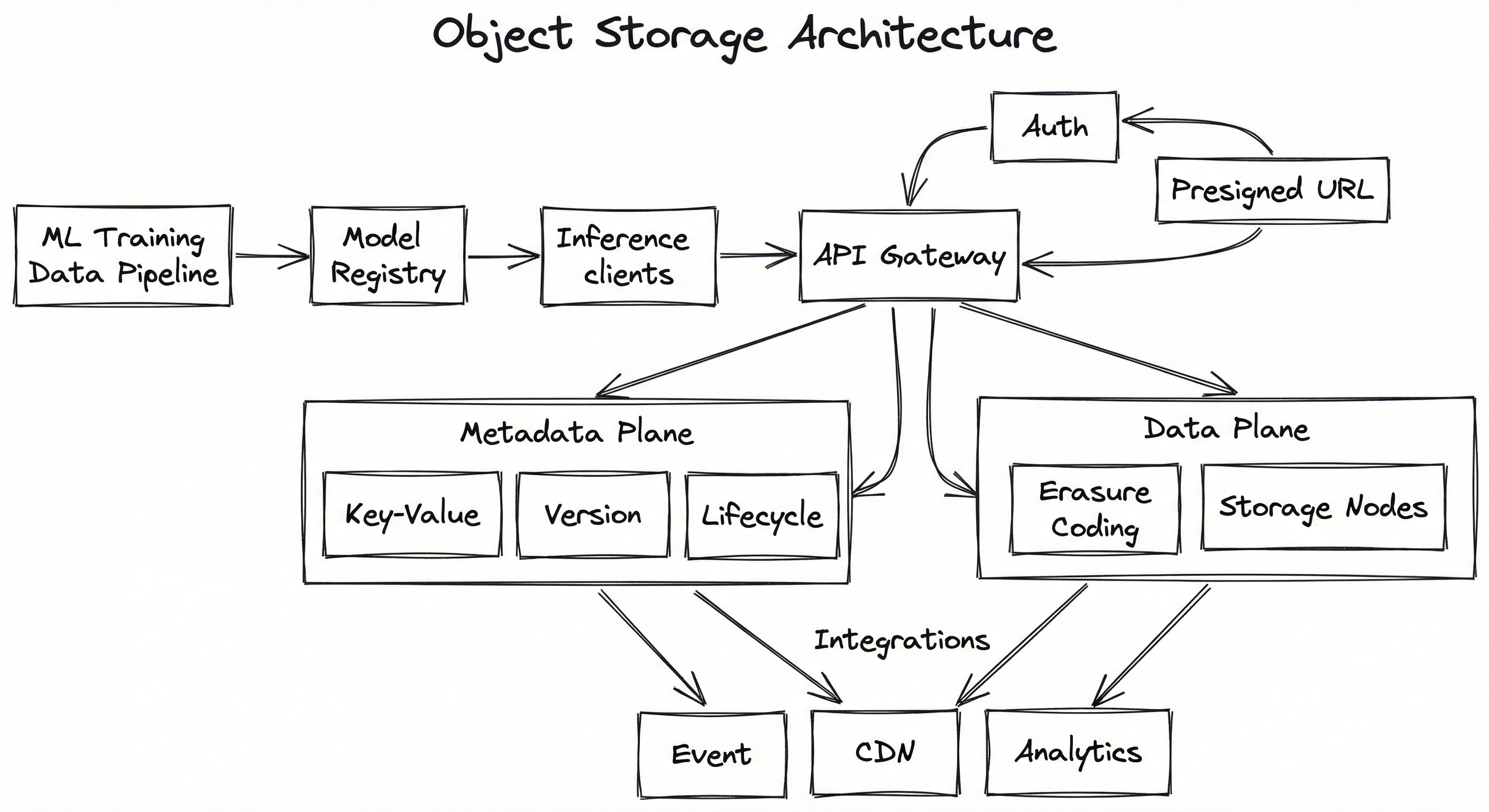
A production object storage system (whether managed like S3/GCS/Azure Blob or self-hosted like MinIO/Ceph) consists of several interacting subsystems. At its core, the system separates the metadata plane (which tracks where objects are and their properties) from the data plane (which stores the actual bytes). This separation is what enables independent scaling of indexing and storage.
The metadata plane maintains an index mapping object keys to the physical locations of data shards. In S3, this is a massively distributed key-value store optimized for prefix-based lookups. The data plane handles the actual storage, replication, and erasure coding of object bytes across physical drives and availability zones.
For ML systems, the architecture typically involves an additional gateway layer that handles authentication (IAM roles, presigned URLs), request routing, and protocol translation (S3 API compatibility). Event notification systems (S3 Event Notifications, GCS Pub/Sub) integrate with this layer to trigger downstream ML pipeline stages.
Key Components
API Gateway / S3-Compatible Interface
Accepts HTTP requests conforming to the S3 API (or provider-specific API). Handles PUT, GET, HEAD, DELETE, LIST operations. Routes requests to the appropriate metadata and data plane components. Manages multipart upload orchestration for objects larger than 5 GB.
Authentication & IAM Layer
Validates request signatures (AWS SigV4), resolves IAM roles and policies, enforces bucket policies, and generates presigned URLs for time-limited unauthenticated access. Critical for ML pipelines where training jobs run with scoped credentials.
Metadata Plane (Key-Value Index)
Stores the mapping from object keys to physical data locations, along with object metadata (size, ETag, content type, custom headers, version ID). Backed by a distributed key-value store partitioned by bucket and key prefix for scalability.
Version Manager
When versioning is enabled, maintains a linked list of object versions per key. Each PUT creates a new version rather than overwriting. Supports GET by version ID for ML checkpoint rollback and dataset reproducibility.
Lifecycle Engine
Evaluates lifecycle rules (transition, expiration, abort incomplete multipart uploads) against object metadata on a periodic schedule. Automatically moves objects between storage tiers (Standard -> Infrequent Access -> Glacier) based on age or access patterns.
Erasure Coding Engine
Splits object data into data shards and parity shards using Reed-Solomon or similar codes. Distributes shards across physically independent storage nodes in different fault domains. Enables reconstruction from any of shards, providing 11-nines durability.
Storage Nodes
Physical or virtual servers with attached drives that store erasure-coded data shards. Spread across multiple availability zones for fault isolation. Handle background tasks: integrity checks, shard repair, garbage collection of deleted versions.
Event Notification System
Emits events (object created, deleted, transitioned) to message queues (SQS, Pub/Sub, Event Grid) or serverless functions (Lambda, Cloud Functions). Enables event-driven ML pipelines: new dataset upload triggers preprocessing, new model artifact triggers deployment validation.
CDN Integration Layer
For read-heavy access patterns (model artifact distribution, dataset serving to distributed training nodes), integrates with CDN services (CloudFront, Cloud CDN) to cache objects at edge locations and reduce egress costs and latency.
Data Flow
- Client initiates a PUT request (or multipart upload for large objects) to the API gateway.
- The gateway authenticates the request, resolves IAM permissions, and forwards to the metadata plane.
- The metadata plane assigns a storage location and, if versioning is enabled, creates a new version entry.
- The data plane receives the object bytes, applies erasure coding, and distributes shards across storage nodes in multiple availability zones.
- Once all shards are durably written, the metadata plane commits the entry and returns success.
- If configured, the event notification system emits an
ObjectCreatedevent.
- Client issues a GET request with the object key (and optional version ID).
- The gateway authenticates, resolves permissions, and queries the metadata plane for the shard locations.
- The data plane retrieves the minimum required shards from storage nodes and reconstructs the original bytes.
- The object bytes are streamed back to the client, optionally through a CDN cache for subsequent reads.
- The lifecycle engine periodically scans metadata entries against configured rules.
- Objects matching transition rules are moved to lower-cost storage classes (e.g., Standard-IA, Glacier).
- Objects matching expiration rules are deleted. Incomplete multipart uploads older than the configured threshold are aborted.
- Transition events are emitted for monitoring and audit.
The architecture diagram shows four client types (ML Training Job, Data Pipeline, Model Registry, Inference Service) connecting to an API Gateway. The gateway interfaces with an Auth/IAM layer and Presigned URL Service. Below, a Metadata Plane contains a Key-Value Index, Version Manager, and Lifecycle Engine. The Data Plane contains an Erasure Coding Engine distributing data across three availability zone storage nodes. An integration layer provides Event Notifications, CDN caching, and Analytics capabilities.
How to Implement
Choosing Your Object Storage Backend
The implementation landscape for object storage in ML systems breaks down into three tiers:
Tier 1: Managed cloud services -- Amazon S3, Google Cloud Storage (GCS), and Azure Blob Storage. These are the defaults for most teams. Zero operational overhead, pay-as-you-go pricing, and deep integration with their respective cloud ML services (SageMaker, Vertex AI, Azure ML). If you are on a single cloud, just use the native service. Do not overthink this.
Tier 2: S3-compatible self-hosted -- MinIO and Ceph/RadosGW. These make sense for on-premise deployments, air-gapped environments (defense, healthcare), or when you need to avoid cloud egress costs. MinIO in particular has become the de facto standard for on-prem ML storage, with native integration into MLflow, Kubeflow, and PyTorch.
Tier 3: Abstraction layers -- Tools like fsspec, smart_open, and cloud-agnostic SDKs that let your ML code work with any backend. Essential if you want multi-cloud portability or need to switch from local development (MinIO) to cloud production (S3) without code changes.
Cost Context: For a typical Indian ML startup storing 5 TB of training data, monthly costs range from approximately $125/month (INR 10,500) on S3 Standard in Mumbai to near-zero on a self-hosted MinIO instance running on existing infrastructure. The cost inflection point where self-hosting makes sense is usually around 50-100 TB, where cloud egress fees start to dominate.
Key Implementation Patterns for ML
The most important patterns for ML-specific object storage usage are: multipart upload for large model files, presigned URLs for secure client-side uploads, versioning for reproducibility, lifecycle policies for cost management, and event-driven triggers for pipeline automation. We will cover each with working code examples.
import boto3
import os
import math
from concurrent.futures import ThreadPoolExecutor

def upload_model_checkpoint(
    file_path: str,
    bucket: str,
    key: str,
    part_size_mb: int = 100,
    max_workers: int = 8,
) -> str:
    """Upload a large model checkpoint using S3 multipart upload.

    Args:
        file_path: Local path to the model checkpoint file.
        bucket: S3 bucket name.
        key: S3 object key (e.g., 'checkpoints/v2/model.safetensors').
        part_size_mb: Size of each upload part in MB (min 5 MB).
        max_workers: Number of parallel upload threads.

    Returns:
        The ETag of the completed upload.
    """
    s3 = boto3.client("s3", region_name="ap-south-1")  # Mumbai region
    file_size = os.path.getsize(file_path)
    part_size = part_size_mb * 1024 * 1024
    num_parts = math.ceil(file_size / part_size)

    # Initiate multipart upload with metadata
    mpu = s3.create_multipart_upload(
        Bucket=bucket,
        Key=key,
        Metadata={
            "model-framework": "pytorch",
            "checkpoint-epoch": "42",
            "training-run-id": "run-2026-02-07-abc123",
        },
        StorageClass="STANDARD",  # Use INTELLIGENT_TIERING for uncertain access
    )
    upload_id = mpu["UploadId"]

    def upload_part(part_number: int) -> dict:
        offset = (part_number - 1) * part_size
        length = min(part_size, file_size - offset)
        with open(file_path, "rb") as f:
            f.seek(offset)
            data = f.read(length)
        response = s3.upload_part(
            Bucket=bucket,
            Key=key,
            PartNumber=part_number,
            UploadId=upload_id,
            Body=data,
        )
        return {"PartNumber": part_number, "ETag": response["ETag"]}

    try:
        # Upload parts in parallel
        with ThreadPoolExecutor(max_workers=max_workers) as executor:
            parts = list(executor.map(upload_part, range(1, num_parts + 1)))

        # Complete the multipart upload
        result = s3.complete_multipart_upload(
            Bucket=bucket,
            Key=key,
            UploadId=upload_id,
            MultipartUpload={"Parts": sorted(parts, key=lambda p: p["PartNumber"])},
        )
        print(f"Upload complete: {result['ETag']}")
        return result["ETag"]

    except Exception as e:
        # Abort on failure to avoid orphaned parts (and storage charges)
        s3.abort_multipart_upload(Bucket=bucket, Key=key, UploadId=upload_id)
        raise RuntimeError(f"Multipart upload failed: {e}") from e


# Usage: upload a 15 GB SafeTensors model file
upload_model_checkpoint(
    file_path="/data/checkpoints/llama-3-8b-finetuned.safetensors",
    bucket="ml-models-prod",
    key="models/llama-3-8b-ft/v2/model.safetensors",
    part_size_mb=100,
    max_workers=8,
)
This example demonstrates parallel multipart upload for large ML model files. S3 requires multipart upload for objects exceeding 5 GB, and it is recommended for anything over 100 MB. The key ML-specific details: we attach custom metadata (model framework, epoch, run ID) for lineage tracking, use the Mumbai region for Indian deployments, and handle abort-on-failure to avoid orphaned parts that silently accumulate storage costs. With 8 parallel threads and 100 MB parts, a 15 GB model file uploads in approximately 2-3 minutes on a 1 Gbps connection.
import boto3
from datetime import datetime

def generate_presigned_upload_url(
    bucket: str,
    key: str,
    expiry_seconds: int = 3600,
    max_size_bytes: int = 5 * 1024 * 1024 * 1024,  # 5 GB
) -> dict:
    """Generate a presigned URL for direct-to-S3 upload.

    Use this when clients (browsers, edge devices, labeling tools)
    need to upload data directly to S3 without routing through your backend.

    Args:
        bucket: Target S3 bucket.
        key: Object key for the upload.
        expiry_seconds: URL validity period.
        max_size_bytes: Maximum allowed upload size.

    Returns:
        Dict with presigned URL and required fields.
    """
    s3 = boto3.client("s3", region_name="ap-south-1")

    # Generate presigned POST (more secure than presigned PUT)
    conditions = [
        ["content-length-range", 1, max_size_bytes],
        {"x-amz-meta-uploaded-by": "labeling-tool"},
        {"x-amz-meta-upload-timestamp": datetime.utcnow().isoformat()},
    ]

    presigned = s3.generate_presigned_post(
        Bucket=bucket,
        Key=key,
        Fields={
            "x-amz-meta-uploaded-by": "labeling-tool",
            "x-amz-meta-upload-timestamp": datetime.utcnow().isoformat(),
        },
        Conditions=conditions,
        ExpiresIn=expiry_seconds,
    )

    return presigned


def generate_presigned_download_url(
    bucket: str,
    key: str,
    expiry_seconds: int = 3600,
    version_id: str = None,
) -> str:
    """Generate a presigned URL for downloading an object.

    Useful for serving model artifacts to inference services
    without exposing bucket credentials.
    """
    s3 = boto3.client("s3", region_name="ap-south-1")
    params = {"Bucket": bucket, "Key": key}
    if version_id:
        params["VersionId"] = version_id

    url = s3.generate_presigned_url(
        "get_object",
        Params=params,
        ExpiresIn=expiry_seconds,
    )
    return url


# Generate upload URL for a data labeling tool
upload_info = generate_presigned_upload_url(
    bucket="ml-datasets-raw",
    key=f"uploads/labeling/batch-2026-02-07/image-{42:06d}.jpg",
)
print(f"Upload URL: {upload_info['url']}")
print(f"Fields: {upload_info['fields']}")

# Generate download URL for a specific model version
download_url = generate_presigned_download_url(
    bucket="ml-models-prod",
    key="models/fraud-detector/v3/model.onnx",
    version_id="abc123def456",
)
print(f"Download URL: {download_url}")
Presigned URLs are essential for ML systems where clients need direct S3 access without your backend acting as a proxy. Common use cases: data labeling tools uploading annotated images, edge devices uploading sensor data, frontend dashboards downloading evaluation reports, and inference services pulling model artifacts. The presigned POST is more secure than presigned PUT because it lets you enforce conditions like maximum file size and required metadata. The download URL with version_id enables pinning deployments to specific model versions -- critical for rollback safety.
# Terraform configuration for ML artifact buckets with versioning
# and cost-optimized lifecycle policies

resource "aws_s3_bucket" "ml_artifacts" {
  bucket = "mycompany-ml-artifacts-prod"

  tags = {
    Environment = "production"
    Team        = "ml-platform"
    CostCenter  = "ml-infra"
  }
}

resource "aws_s3_bucket_versioning" "ml_artifacts" {
  bucket = aws_s3_bucket.ml_artifacts.id
  versioning_configuration {
    status = "Enabled"
  }
}

resource "aws_s3_bucket_lifecycle_configuration" "ml_artifacts" {
  bucket = aws_s3_bucket.ml_artifacts.id

  # Rule 1: Training datasets -- move to IA after 30 days, Glacier after 90
  rule {
    id     = "training-data-tiering"
    status = "Enabled"

    filter {
      prefix = "datasets/training/"
    }

    transition {
      days          = 30
      storage_class = "STANDARD_IA"
    }

    transition {
      days          = 90
      storage_class = "GLACIER"
    }

    expiration {
      days = 365  # Delete training data older than 1 year
    }

    noncurrent_version_transition {
      noncurrent_days = 7
      storage_class   = "STANDARD_IA"
    }

    noncurrent_version_expiration {
      noncurrent_days = 30  # Keep old versions for 30 days only
    }
  }

  # Rule 2: Model checkpoints -- keep recent, archive old
  rule {
    id     = "checkpoint-lifecycle"
    status = "Enabled"

    filter {
      prefix = "checkpoints/"
    }

    transition {
      days          = 14
      storage_class = "STANDARD_IA"
    }

    transition {
      days          = 60
      storage_class = "GLACIER"
    }

    noncurrent_version_expiration {
      noncurrent_days = 14
    }
  }

  # Rule 3: Production model artifacts -- keep hot for serving
  rule {
    id     = "production-models"
    status = "Enabled"

    filter {
      prefix = "models/production/"
    }

    # No transition -- production models stay in Standard
    # Only expire noncurrent versions after 90 days
    noncurrent_version_expiration {
      noncurrent_days = 90
    }
  }

  # Rule 4: Abort incomplete multipart uploads after 7 days
  rule {
    id     = "abort-incomplete-uploads"
    status = "Enabled"

    filter {
      prefix = ""
    }

    abort_incomplete_multipart_upload {
      days_after_initiation = 7
    }
  }
}

# Block public access (ML data should never be public)
resource "aws_s3_bucket_public_access_block" "ml_artifacts" {
  bucket = aws_s3_bucket.ml_artifacts.id

  block_public_acls       = true
  block_public_policy     = true
  ignore_public_acls      = true
  restrict_public_buckets = true
}

# Enable server-side encryption
resource "aws_s3_bucket_server_side_encryption_configuration" "ml_artifacts" {
  bucket = aws_s3_bucket.ml_artifacts.id

  rule {
    apply_server_side_encryption_by_default {
      sse_algorithm = "aws:kms"
    }
    bucket_key_enabled = true  # Reduces KMS costs by up to 99%
  }
}
This Terraform configuration demonstrates a production-grade lifecycle policy for ML artifact buckets. The key insight is that different artifact types have very different access patterns: training datasets are written once and read intensively for a few weeks, then rarely touched; checkpoints are hot during training and cold immediately after; production model artifacts must remain in the hottest storage class for low-latency serving. The lifecycle rules encode these patterns into automatic cost optimization. The abort_incomplete_multipart_upload rule is especially important -- without it, failed large-file uploads silently accumulate storage charges. At scale, this alone can save thousands of rupees per month.
import fsspec
import pyarrow.parquet as pq
import torch
from torch.utils.data import Dataset, DataLoader


class ObjectStorageMLDataset(Dataset):
    """PyTorch Dataset that reads data shards from any object store.

    Supports S3, GCS, Azure Blob, and local filesystem via fsspec.
    """

    def __init__(
        self,
        data_uri: str,  # e.g., "s3://bucket/datasets/train/"
        storage_options: dict = None,
        shard_pattern: str = "*.parquet",
    ):
        self.fs, self.base_path = fsspec.core.url_to_fs(
            data_uri, **(storage_options or {})
        )
        # List all shard files matching the pattern
        self.shard_paths = sorted(
            self.fs.glob(f"{self.base_path}/{shard_pattern}")
        )
        if not self.shard_paths:
            raise FileNotFoundError(f"No shards found at {data_uri}")

        # Read schema from first shard to get column names
        with self.fs.open(self.shard_paths[0], "rb") as f:
            schema = pq.read_schema(f)
        self.columns = schema.names

        # Build an index mapping global row index -> (shard, local_row)
        self._index_map = []
        for shard_path in self.shard_paths:
            with self.fs.open(shard_path, "rb") as f:
                metadata = pq.read_metadata(f)
                num_rows = metadata.num_rows
            self._index_map.extend(
                [(shard_path, i) for i in range(num_rows)]
            )

    def __len__(self) -> int:
        return len(self._index_map)

    def __getitem__(self, idx: int) -> dict:
        shard_path, local_row = self._index_map[idx]
        with self.fs.open(shard_path, "rb") as f:
            table = pq.read_table(f)
        row = {col: table.column(col)[local_row].as_py() for col in self.columns}
        return row


# Usage with S3 (Mumbai region)
dataset = ObjectStorageMLDataset(
    data_uri="s3://ml-datasets-prod/training/image-classification/v3/",
    storage_options={
        "anon": False,
        "client_kwargs": {"region_name": "ap-south-1"},
    },
)

loader = DataLoader(dataset, batch_size=32, num_workers=4, shuffle=True)

for batch in loader:
    # batch is a dict of tensors
    features = batch["features"]
    labels = batch["labels"]
    # ... training step ...
    break  # Demo: process one batch

# Same code works with GCS:
# dataset = ObjectStorageMLDataset("gs://my-bucket/training/v3/")

# Same code works with Azure Blob:
# dataset = ObjectStorageMLDataset("az://container/training/v3/")

# Same code works locally (for development):
# dataset = ObjectStorageMLDataset("file:///data/training/v3/")
This example shows how fsspec provides a unified interface across all major object stores. The same dataset class works with S3, GCS, Azure Blob, and local filesystems -- the only difference is the URI scheme. This is critical for ML teams that develop locally (with MinIO or local files) and deploy to cloud. The shard-based architecture (many Parquet files instead of one giant file) enables parallel reads and is the standard pattern for large ML datasets. Note: for production, you would add caching (filecache filesystem in fsspec) to avoid re-downloading shards on every epoch.
import json
import boto3
import os

# This Lambda function triggers when new data lands in S3.
# It kicks off an ML preprocessing pipeline via Step Functions.

def lambda_handler(event, context):
    """Triggered by S3 ObjectCreated event on the raw data bucket.

    Expected event structure:
    {
      "Records": [
        {
          "s3": {
            "bucket": {"name": "ml-datasets-raw"},
            "object": {"key": "uploads/batch-2026-02-07/data.csv", "size": 1073741824}
          }
        }
      ]
    }
    """
    sfn_client = boto3.client("stepfunctions", region_name="ap-south-1")
    state_machine_arn = os.environ["PREPROCESSING_STATE_MACHINE_ARN"]

    for record in event["Records"]:
        bucket = record["s3"]["bucket"]["name"]
        key = record["s3"]["object"]["key"]
        size = record["s3"]["object"]["size"]

        # Only trigger for files in the uploads/ prefix
        if not key.startswith("uploads/"):
            continue

        # Only trigger for files larger than 1 MB (skip tiny/empty uploads)
        if size < 1_000_000:
            print(f"Skipping small file: {key} ({size} bytes)")
            continue

        pipeline_input = {
            "source_bucket": bucket,
            "source_key": key,
            "file_size_bytes": size,
            "output_bucket": "ml-datasets-processed",
            "output_prefix": f"processed/{key.split('/')[-1].replace('.csv', '')}/",
            "pipeline_config": {
                "format": "parquet",
                "compression": "snappy",
                "shard_size_mb": 128,
                "validation_enabled": True,
            },
        }

        response = sfn_client.start_execution(
            stateMachineArn=state_machine_arn,
            name=f"preprocess-{key.replace('/', '-')}-{context.aws_request_id[:8]}",
            input=json.dumps(pipeline_input),
        )

        print(
            f"Started pipeline for s3://{bucket}/{key} -> "
            f"execution: {response['executionArn']}"
        )

    return {"statusCode": 200, "body": "Pipeline triggered"}
This Lambda function demonstrates event-driven ML pipeline automation. When new data files land in the raw data bucket, S3 Event Notifications trigger this function, which in turn starts a Step Functions state machine for preprocessing. This pattern eliminates polling and manual triggers -- the pipeline runs automatically when data arrives. The guards (prefix filter, minimum size check) prevent spurious triggers from metadata files or empty uploads. This is the standard pattern at scale: Flipkart, Swiggy, and other Indian tech companies use similar event-driven architectures to process incoming data.
# MinIO configuration for on-premise ML object storage (docker-compose.yml)
version: '3.8'
services:
  minio:
    image: minio/minio:latest
    command: server /data --console-address ":9001"
    ports:
      - "9000:9000"    # S3 API
      - "9001:9001"    # Web console
    environment:
      MINIO_ROOT_USER: minio-admin
      MINIO_ROOT_PASSWORD: ${MINIO_ROOT_PASSWORD}
      MINIO_REGION: ap-south-1
    volumes:
      - minio_data:/data
    healthcheck:
      test: ["CMD", "mc", "ready", "local"]
      interval: 30s
      timeout: 10s
      retries: 3

  createbuckets:
    image: minio/mc:latest
    depends_on:
      minio:
        condition: service_healthy
    entrypoint: >
      /bin/sh -c "
      mc alias set local http://minio:9000 minio-admin $${MINIO_ROOT_PASSWORD};
      mc mb --ignore-existing local/ml-datasets-raw;
      mc mb --ignore-existing local/ml-datasets-processed;
      mc mb --ignore-existing local/ml-models;
      mc mb --ignore-existing local/ml-checkpoints;
      mc version enable local/ml-models;
      mc version enable local/ml-checkpoints;
      mc ilm rule add local/ml-checkpoints --transition-days 14 --storage-class STANDARD_IA;
      mc ilm rule add local/ml-checkpoints --expire-delete-marker --noncurrent-expire-days 30;
      echo 'Buckets created and configured.';
      "

volumes:
  minio_data:
    driver: local
Common Implementation Mistakes
- ●
Not configuring lifecycle policies: Without lifecycle rules, training datasets and old checkpoints accumulate indefinitely. A team storing 100 GB/day of training data without cleanup will burn through $750/month (INR 63,000/month) in S3 Standard within a year. Set lifecycle policies on day one.
- ●
Using LIST operations at scale:
s3 lsorlist_objects_v2enumerates objects sequentially at ~5,000 objects per request. Listing a bucket with 10 million objects takes minutes and costs ~$5 in API fees. Instead, maintain an external catalog (DynamoDB, PostgreSQL) of your object inventory. - ●
Ignoring incomplete multipart upload cleanup: Failed multipart uploads leave orphaned parts that are invisible in normal listings but incur storage charges. Add an
AbortIncompleteMultipartUploadlifecycle rule to every bucket. - ●
Treating object storage like a file system: Renaming objects requires a full copy-and-delete. Moving a 10 GB model file between prefixes costs time and money. Design your key naming scheme upfront and avoid renames.
- ●
Not using S3 Transfer Acceleration or regional endpoints: Uploading model checkpoints from an Indian training cluster to a US-based S3 bucket adds 200-400ms of latency per request. Use Transfer Acceleration or same-region buckets.
- ●
Single-threaded downloads for large files: Downloading a 50 GB model file in a single stream wastes bandwidth. Use range requests (
Rangeheader) or thes3.download_fileAPI withTransferConfig(max_concurrency=10)for parallel downloads. - ●
Storing secrets in object metadata or object content without encryption: Custom metadata is visible to anyone with
s3:GetObjectpermission. Use KMS encryption and avoid storing API keys or credentials as object metadata. - ●
Not enabling versioning before it is needed: Once you realize you needed versioning (after accidentally overwriting a critical model file), it is too late. Enable versioning from the start on all ML artifact buckets.
When Should You Use This?
Use When
You need to store datasets, model artifacts, checkpoints, or evaluation results that are accessed by multiple services or compute instances -- object storage is the default choice for shared ML data.
Your data volume exceeds what fits on a single disk (typically > 1 TB) and you need elastic, pay-as-you-go scaling without provisioning capacity upfront.
You need durability guarantees (11 nines) that local disks and network file systems cannot provide -- losing a trained model or a curated dataset is catastrophic.
Your ML pipeline spans multiple stages (ingestion, preprocessing, training, evaluation, serving) that run on different compute resources and need a common persistence layer.
You want to decouple compute from storage so that training instances can be spun up and torn down without data loss.
You need versioning for reproducibility -- the ability to roll back to a specific dataset version or model checkpoint at any point.
You want event-driven pipeline automation (e.g., trigger preprocessing when new data lands, trigger deployment validation when a new model artifact is uploaded).
Your team needs to share data across regions or with external collaborators using presigned URLs without exposing infrastructure credentials.
Avoid When
You need POSIX file system semantics (random writes, file locking, append operations) -- object storage is immutable-write-only. Use EBS/EFS/Filestore instead.
Your workload requires sub-millisecond latency for small random reads -- object storage typically delivers 50-200ms first-byte latency (10-20ms for S3 Express One Zone). Block storage or local NVMe is faster.
You are storing structured, queryable data that needs SQL semantics -- use a database, not object storage. Object storage stores blobs, not rows.
Your data access pattern is append-heavy (e.g., streaming logs, time-series metrics) -- consider a log store or time-series database instead of repeatedly uploading new object versions.
You need transactional guarantees across multiple objects -- object storage has no multi-object transactions. Use a database for ACID requirements.
Your dataset is tiny (< 100 MB) and only used by a single process -- a local file is simpler, faster, and free. Do not introduce cloud storage for a CSV that fits in memory.
Key Tradeoffs
Latency vs. Cost vs. Durability
Object storage optimizes for durability and cost at the expense of latency. A GET request to S3 Standard takes 50-200ms for first byte (compared to < 1ms for local NVMe). For ML training, this latency is amortized by prefetching and large sequential reads. For model serving where cold-start latency matters, consider caching the model locally or using S3 Express One Zone (~3-5ms first byte at 3x the storage cost).
| Storage Class | Monthly Cost (per GB) | First-Byte Latency | Durability | Best For |
|---|---|---|---|---|
| S3 Standard | $0.025 (INR 2.10) | 50-200ms | 99.999999999% | Active datasets, production models |
| S3 Intelligent-Tiering | $0.025 + monitoring | Auto-optimized | 99.999999999% | Unpredictable access patterns |
| S3 Standard-IA | $0.0138 (INR 1.15) | 50-200ms | 99.999999999% | Old checkpoints, archived datasets |
| S3 Glacier Instant | $0.005 (INR 0.42) | milliseconds | 99.999999999% | Compliance, long-term model archive |
| S3 Glacier Deep Archive | $0.002 (INR 0.17) | 12-48 hours | 99.999999999% | Regulatory retention, raw data archive |
| S3 Express One Zone | $0.16 (INR 13.40) | 3-5ms | 99.95% | Hot models, real-time feature stores |
Prices shown for ap-south-1 (Mumbai) region, approximate as of early 2026.
Versioning: Storage Cost vs. Reproducibility
Enabling versioning means every overwrite creates a new version, and old versions consume storage until explicitly expired. For a model registry bucket where you push 5 GB model files weekly, versioning costs an additional ~$6/month (INR 500/month) per retained version. The tradeoff is straightforward: the cost of losing the ability to roll back to a known-good model after a bad deployment far exceeds the incremental storage cost. Enable versioning, set noncurrent version expiration to 30-90 days, and move on.
Egress Costs: The Hidden Tax
Cloud egress (data transfer out) is the most underestimated cost in ML infrastructure. Downloading 10 TB of training data from S3 to an on-premise GPU cluster costs approximately $900 (INR 75,000) per transfer. For iterative experimentation where data is downloaded repeatedly, this adds up fast. Mitigation strategies:
- Same-region compute: Run training in the same region as your data.
- VPC endpoints: Avoid public internet routing for intra-AWS traffic.
- CDN caching: Use CloudFront for read-heavy model artifact distribution.
- Data locality: Cache frequently-used datasets on local NVMe during training.
Alternatives & Comparisons
A data lake is an organizational pattern built on top of object storage, not a replacement for it. Data lakes add ACID transactions, schema evolution, and time-travel queries over Parquet/ORC files stored in S3/GCS. Choose a data lake when you need SQL-queryable, versioned tabular datasets. Use raw object storage when you are storing unstructured blobs (model weights, images, audio) that don't fit the table format.
Network file systems provide POSIX semantics (random writes, locking, append) that object storage lacks. Choose NFS/EFS when your training framework requires a mounted filesystem (some older frameworks do) or when you need shared append-only logs. Object storage wins for everything else -- it is cheaper, more durable, and scales without capacity planning.
A model registry is a metadata layer that often uses object storage as its backend. MLflow stores model artifacts in S3 by default. The registry adds versioning semantics, stage transitions (staging -> production -> archived), lineage tracking, and experiment comparison. Use a model registry for managing the ML model lifecycle; use object storage as its underlying storage backend.
Caching complements object storage for latency-sensitive access patterns. If your inference service needs to load a model in < 10ms, caching the model in memory or on local NVMe avoids the 50-200ms S3 GET latency on every cold start. Object storage is the durable source of truth; caching is the performance optimization layer in front of it.
Pros, Cons & Tradeoffs
Advantages
Near-infinite scalability with zero capacity planning -- S3 scales from 0 bytes to exabytes without provisioning. You never run out of disk space, and you never over-provision.
11-nines durability (99.999999999%) through erasure coding across multiple availability zones. Statistically, you would lose one object out of 100 billion stored for 10,000 years. Your model weights are safer in S3 than in any other storage medium.
Pay-as-you-go pricing with no upfront commitment. Store 1 GB or 1 PB, pay only for what you use. For Indian startups with tight budgets, this eliminates the need for capital expenditure on storage infrastructure.
Universal API compatibility -- the S3 API has become a de facto standard. MinIO, GCS (via interop), Cloudflare R2, and dozens of other services speak S3. Your code is portable across providers.
Rich lifecycle management enables automatic cost optimization without manual intervention. Set rules once, and storage costs decrease automatically as data ages.
Built-in versioning provides immutable audit trails for regulatory compliance and ML reproducibility. Every dataset version, every model version, every artifact is preserved and retrievable.
Event-driven integration with serverless functions and message queues enables fully automated ML pipelines triggered by data arrival, without polling or cron jobs.
Decoupled compute and storage means you can scale training compute up and down without touching your data. This is the architectural pattern that makes cloud ML economically viable.
Disadvantages
Higher latency than local storage -- 50-200ms first-byte latency for standard GET requests. For latency-sensitive model serving, you need additional caching layers.
No random write or append -- objects are immutable once written. Updating a single byte in a 10 GB file requires re-uploading the entire file. This is a fundamental design constraint, not a bug.
Egress costs can be significant -- transferring data out of the cloud provider's network is expensive (0.12/GB). Downloading 50 TB of training data costs ~$5,000 (INR 4.2 lakh) in egress alone.
LIST operations are slow and expensive at scale -- listing millions of objects is painful. You need an external catalog (database) for large-scale object inventories.
Eventual consistency for some operations -- while S3 now provides strong read-after-write consistency, other providers and older APIs may still exhibit eventual consistency for overwrites and deletes.
No native search or query -- you cannot search object contents without downloading them first (except S3 Select for CSV/JSON/Parquet). For queryable data, you need an additional query engine (Athena, Presto).
Complexity of access control -- IAM policies, bucket policies, ACLs, and presigned URLs create a layered security model that is powerful but easy to misconfigure. Overly permissive S3 bucket policies are one of the most common cloud security vulnerabilities.
Multipart upload complexity -- files over 5 GB require multipart upload, which adds code complexity and failure-handling logic. Abandoned multipart uploads silently accumulate costs.
Failure Modes & Debugging
Runaway Storage Costs from Unbounded Versioning
Cause
Versioning is enabled but no noncurrent version expiration policy is set. Every model checkpoint overwrite, every dataset re-upload creates a new version. Old versions accumulate silently. Teams often discover this months later when the AWS bill spikes unexpectedly.
Symptoms
Monthly storage bill grows linearly despite stable active data volume. aws s3api list-object-versions reveals thousands of noncurrent versions consuming more space than current objects. A 100 GB bucket may actually contain 2 TB of versioned data.
Mitigation
Always pair versioning with noncurrent version expiration lifecycle rules. For checkpoints, expire noncurrent versions after 14-30 days. For production models, keep 90 days. Monitor total bucket size (including noncurrent versions) via CloudWatch BucketSizeBytes metric with StorageType=AllStorageTypes.
Orphaned Multipart Upload Parts
Cause
Large file uploads (model checkpoints, dataset shards) fail mid-stream due to network errors, OOM kills, or spot instance preemption. The multipart upload is never completed or explicitly aborted, leaving orphaned parts that are invisible in normal S3 listings.
Symptoms
Storage costs increase without corresponding growth in visible objects. aws s3api list-multipart-uploads reveals hundreds of incomplete uploads. Each can hold gigabytes of orphaned parts.
Mitigation
Add an AbortIncompleteMultipartUpload lifecycle rule with DaysAfterInitiation: 7 to every bucket. Implement explicit abort-on-failure in your upload code (as shown in the multipart upload example above). Monitor incomplete multipart uploads via CloudWatch.
Accidental Data Deletion or Overwrite
Cause
A script with overly broad permissions runs aws s3 rm --recursive on the wrong prefix, or a training pipeline overwrites a critical model artifact with a corrupted file. Without versioning or Object Lock, the data is gone.
Symptoms
Missing objects, corrupted model serving (loading a bad checkpoint), broken data pipelines that fail to find expected input files. Often discovered only when downstream systems fail.
Mitigation
Enable versioning on all ML artifact buckets. For critical production models, enable S3 Object Lock in Governance or Compliance mode to prevent deletion even by administrators. Use MFA Delete for the bucket's version configuration. Implement least-privilege IAM policies -- training jobs should not have s3:DeleteObject permission on production model buckets.
Egress Cost Explosion from Cross-Region Training
Cause
Training data stored in a US region but training compute runs in Mumbai (or vice versa). Every epoch re-downloads the full dataset across regions, incurring egress charges. For distributed training with multiple workers, this multiplies further.
Symptoms
AWS bill shows unexpectedly high data transfer charges. Cost Explorer shows cross-region transfer as the dominant cost component, sometimes exceeding compute costs.
Mitigation
Co-locate data and compute in the same region. Use S3 Replication to maintain a replica bucket in the training region. Cache the dataset on local NVMe (instance store) during training. For multi-region setups, use CloudFront or S3 Transfer Acceleration.
S3 Throttling Under High-Concurrency Training
Cause
S3 partitions data by key prefix. When hundreds of training workers simultaneously read shards that share a common prefix (e.g., s3://bucket/dataset/shard-*.parquet), all requests hit the same partition, triggering 503 SlowDown errors at >5,500 GET/s or >3,500 PUT/s per prefix.
Symptoms
Intermittent 503 SlowDown errors in training logs. Training throughput drops. Retry storms worsen the problem.
Mitigation
Use randomized prefixes (hash-based key naming) to distribute reads across S3 partitions. Example: instead of dataset/shard-0001.parquet, use dataset/a3f2/shard-0001.parquet where a3f2 is a hash prefix. Alternatively, enable S3 Express One Zone which has much higher per-prefix throughput.
Presigned URL Leakage
Cause
Presigned URLs with long expiry times are logged in application logs, shared in Slack channels, or embedded in client-side JavaScript. Anyone with the URL can access the object until expiry, bypassing all IAM controls.
Symptoms
Unauthorized access to ML datasets or model artifacts. CloudTrail logs show access from unexpected IP addresses. Difficult to trace because presigned URLs don't carry user identity.
Mitigation
Set presigned URL expiry to the minimum necessary (minutes, not hours or days). Use presigned POST with conditions (content-length-range, required metadata) rather than presigned PUT. Rotate the IAM credentials used to sign URLs regularly. Monitor CloudTrail for access patterns inconsistent with expected usage.
Data Corruption from Concurrent Writes
Cause
Multiple pipeline stages write to the same object key simultaneously. Without conditional writes (available since 2024 on S3), the last writer wins and earlier writes are silently lost. This is especially dangerous for manifest files or metadata JSON that multiple workers update.
Symptoms
Inconsistent object contents. Training runs produce different results depending on write timing. Manifest files missing entries from concurrent writers.
Mitigation
Use S3 conditional writes (If-None-Match header) for create-only semantics. For update semantics, use a coordination service (DynamoDB, Redis) to serialize writes, or adopt an append-only pattern with unique keys per writer and a separate merge step.
Placement in an ML System
The Universal Persistence Layer
Object storage is not a single stage in the ML pipeline -- it is the cross-cutting persistence layer that every stage reads from and writes to. Unlike components that occupy a specific position (embedding model -> vector store -> re-ranker), object storage sits beneath the entire pipeline like a shared bus.
Ingestion: Raw data lands in object storage first. Whether it arrives via file upload, streaming ingestion, or API collection, the first durable copy goes into an S3 bucket. This is the starting point for all downstream processing.
Processing and Feature Engineering: Processed datasets, feature tables, and transformed data are written back to object storage, typically in a different bucket or prefix with a different lifecycle policy. Tools like Spark, Dask, and Ray all read from and write to object storage natively.
Training: Training jobs read data shards from object storage and write model checkpoints back to it. For distributed training, all workers read from the same bucket. For fault-tolerant training, checkpoints are written to object storage periodically so training can resume from the last checkpoint if a node fails.
Evaluation and Experimentation: Evaluation metrics, confusion matrices, and comparison reports are stored as artifacts in object storage, linked to specific model versions and experiment runs by the experiment tracker (MLflow, W&B).
Serving: The final model artifact is pulled from object storage (often via the model registry) into the serving infrastructure. For low-latency serving, the model is cached locally; object storage serves as the durable source of truth.
Key Insight: If you design your key naming scheme well (e.g.,
s3://bucket/{stage}/{entity}/{version}/{artifact}), object storage becomes a self-documenting artifact store that provides traceability across the entire ML lifecycle.
Pipeline Stage
Storage / Persistence (Cross-Cutting)
Upstream
- file-upload
- data-lake
Downstream
- model-registry
- cache-layer
Scaling Bottlenecks
S3 supports 5,500 GET/s and 3,500 PUT/s per prefix partition. For large-scale distributed training with hundreds of workers, this can become a bottleneck if all workers read from the same prefix. The fix is prefix randomization or using S3 Express One Zone.
A single S3 GET request can deliver up to ~100 Gbps for large objects using byte-range requests. But aggregate egress from a region is metered and charged. For a 1,000-GPU training cluster each downloading 100 GB shards, that is 100 TB of egress per epoch -- approximately $9,000 (INR 7.5 lakh) per epoch in transfer costs if cross-region.
LIST operations are the primary metadata bottleneck. Listing 100 million objects takes ~20,000 API calls and minutes of wall time. For ML pipelines that need to discover input files, maintain an external catalog or use S3 Inventory reports (daily/weekly batch listing).
With versioning enabled, every checkpoint upload creates a new version. A training job that saves checkpoints every 1,000 steps for 100,000 steps generates 100 versions per checkpoint key. Combined with noncurrent version storage costs, this can 10-100x the effective storage footprint if lifecycle policies are not configured.
Production Case Studies
Netflix uses Amazon S3 as the foundation of its data lake, storing petabytes of viewing data, content metadata, and ML model artifacts. Their ML platform leverages S3 for storing training datasets, model checkpoints, and serving artifacts. They adopted Apache Iceberg table format on top of S3 to enable ACID transactions and time-travel queries over their analytical datasets.
S3-backed data lake supports over 200 ML models in production, serving personalized recommendations to 260M+ subscribers globally. The Iceberg integration reduced data pipeline failures by enabling atomic dataset updates.
Uber's Michelangelo ML platform uses distributed object storage as its central artifact store. Model artifacts -- including weights, configurations, and evaluation reports -- are stored with full versioning and lineage metadata. The platform manages over 5,000 models in production serving 10 million predictions per second at peak.
Centralized object storage for ML artifacts enabled Uber to scale from a handful of models to 5,000+ production models with full reproducibility and rollback capability. Over 20,000 model training jobs run monthly against data stored in the object layer.
Flipkart stores millions of product images, visual search embeddings, and catalog datasets in object storage. Their visual search engine encodes product images into embeddings using fine-tuned vision transformers, storing both the raw images and computed embeddings in S3-compatible storage for training and serving. During Big Billion Days, their storage infrastructure handles massive spikes in both reads (product image serving) and writes (new seller uploads).
Object storage backed visual search infrastructure reduced duplicate product listings by ~30% and enabled real-time visual similarity search across millions of products, directly improving catalog quality and GMV.
Hugging Face Hub serves as the world's largest repository of open-source ML models and datasets, storing over 500,000 model repositories backed by object storage. They use Git-LFS (Large File Storage) on top of S3-compatible storage to version and serve model weights that can range from megabytes (distilled models) to hundreds of gigabytes (large language models).
Object storage enables Hugging Face to serve model downloads to millions of ML practitioners globally, with CDN integration reducing download times and egress costs. The Hub serves over 1 million model downloads per day.
CERN's Large Hadron Collider produces approximately 1 PB of data per second, with a filtered subset stored for physics analysis. They use a distributed object storage system (EOS) with an S3-compatible interface to store petabytes of collision data, ML training datasets for particle classification, and trained model artifacts. The storage system spans multiple data centers across Europe.
CERN's object storage infrastructure manages over 1 exabyte of physics data, supporting ML-based particle detection that contributed to discoveries including the Higgs boson. The S3 interface enables integration with standard ML training frameworks.
Tooling & Ecosystem
The original and most widely adopted cloud object storage service. Offers multiple storage classes, lifecycle policies, versioning, event notifications, and deep integration with the AWS ML ecosystem (SageMaker, Athena, EMR). The de facto standard that defines the S3 API other services implement.
Google's object storage with Autoclass (ML-based automatic tier optimization), strong consistency, and deep integration with Vertex AI and BigQuery. Offers S3-compatible interoperability API for migration. Autoclass can reduce storage costs by 30-40% for workloads with unpredictable access patterns.
Microsoft's object storage with Hot, Cool, Cold, and Archive tiers. Deep integration with Azure Machine Learning, Synapse Analytics, and Azure DevOps. Offers immutable storage policies for regulatory compliance, particularly important for Indian financial services companies under RBI guidelines.
High-performance, S3-compatible object storage designed for AI/ML workloads. Can be self-hosted on-premise or in any cloud. Achieves near-hardware-speed throughput with erasure coding, versioning, and lifecycle management. The standard choice for on-premise ML storage and local development environments.
S3-compatible object storage with zero egress fees -- a game-changer for ML workloads where data transfer costs dominate. Integrates with Cloudflare's global CDN for model artifact distribution. Ideal for serving model weights to globally distributed inference endpoints.
Git-like version control layer on top of object storage. Provides branches, commits, merges, and diffs for data stored in S3/GCS/Azure Blob. Enables atomic dataset updates and reproducible ML experiments without copying data. Recently acquired DVC (Data Version Control) to unify the data versioning ecosystem.
Git-based version control for ML data and models. Tracks large files stored in object storage using lightweight pointer files in Git. Supports S3, GCS, Azure Blob, and local storage backends. Best for individual data scientists and small teams managing datasets alongside code.
Command-line tool for syncing and managing files across 70+ cloud storage providers. Supports parallel transfers, bandwidth throttling, encryption, and server-side copy. Essential for multi-cloud ML setups and large-scale data migrations between storage providers.
Python library providing a unified filesystem interface for S3, GCS, Azure Blob, HDFS, and local filesystems. Used by PyArrow, Pandas, and Dask under the hood. Enables writing cloud-agnostic ML data loading code that works identically in local development and cloud production.
Research & References
Andy Warfield (VP/Distinguished Engineer, AWS) (2023)All Things Distributed (Werner Vogels' blog) / USENIX ATC 2023 Keynote
A rare inside look at S3's architecture: how it evolved from a monolith to hundreds of microservices, how it achieves 11-nines durability, and how it handles over 100 million requests per second across trillions of objects.
Armbrust, Das, Torres, et al. (2020)PVLDB, Vol. 13, No. 12
Introduced Delta Lake, a transactional storage layer over cloud object stores that adds ACID transactions, time travel, and schema enforcement. Foundational for building reliable ML data lakes on S3/GCS/Azure Blob.
Trisovic, Lau, et al. (2024)arXiv preprint
Comprehensive survey of reproducibility challenges in ML research, highlighting data versioning and artifact management as critical barriers. Argues that object storage with proper versioning is a necessary (but not sufficient) condition for ML reproducibility.
Armbrust, Ghodsi, Xin, Zaharia, et al. (2021)CIDR 2021
Proposed the lakehouse architecture that combines the cost advantages of object storage data lakes with the management features of data warehouses. Directly relevant to how ML teams organize training data and feature stores on object storage.
Yucheng Low (XetData) (2023)CIDR 2023
Presents techniques for applying Git-like version control semantics to large data objects using content-defined Merkle trees. Addresses the key challenge of efficiently versioning multi-gigabyte ML datasets stored in object storage without full copies.
Bae, Kim, et al. (2021)IEEE Access
Introduces Redup, a system that resolves the performance bottleneck of enabling deduplication on storage clusters for ML/DL workloads. Shows that naive deduplication can slow ML training by 2-3x, and proposes hierarchical caching to recover performance while maintaining storage savings.
Interview & Evaluation Perspective
Common Interview Questions
- ●
How would you design the storage layer for an ML platform that handles 100 TB of training data and thousands of model artifacts?
- ●
Compare S3, GCS, and Azure Blob Storage for ML workloads. When would you choose one over another?
- ●
How do you handle versioning of ML datasets and model artifacts in object storage? What are the cost implications?
- ●
Walk me through how you would implement a cost-optimized lifecycle policy for ML artifacts with different access patterns.
- ●
How would you handle the upload of a 50 GB model checkpoint to S3? What failure modes would you design for?
- ●
Explain how presigned URLs work and when you would use them in an ML system.
- ●
How do you prevent data loss in object storage? What combination of versioning, replication, and access control would you recommend?
- ●
Your team's S3 bill has doubled in the last quarter. How would you diagnose and reduce costs?
Key Points to Mention
- ●
Object storage is the default persistence layer for ML systems because it decouples compute from storage, scales infinitely, and provides 11-nines durability. Start here unless you have a specific reason not to.
- ●
The S3 API has become the universal interface -- even GCS and Azure Blob offer S3-compatible access. Designing against the S3 API gives you portability across all major providers and self-hosted solutions like MinIO.
- ●
Lifecycle policies are not optional -- they are the primary cost optimization lever. Training data, checkpoints, and production models have fundamentally different access patterns and should transition through storage tiers accordingly.
- ●
Multipart upload is mandatory for files > 5 GB and recommended for files > 100 MB. Always implement abort-on-failure and lifecycle cleanup for incomplete uploads.
- ●
Versioning + noncurrent version expiration is the standard pattern for ML artifact reproducibility. Enable versioning on day one; set expiration policies to control costs.
- ●
Egress costs are the hidden tax -- co-locate compute and storage in the same region, use VPC endpoints, and cache frequently accessed data locally.
- ●
Prefix-based S3 partitioning means key design matters for throughput. Randomized prefixes prevent hotspotting under high-concurrency distributed training workloads.
Pitfalls to Avoid
- ●
Treating object storage as a file system -- it has no directories, no rename, no append. Design your key naming scheme upfront.
- ●
Ignoring egress costs in your architecture -- downloading 10 TB from S3 costs ~$900 (INR 75,000). This can exceed compute costs for iterative experiments.
- ●
Forgetting to enable versioning before a disaster -- you cannot retroactively recover overwritten objects.
- ●
Assuming all storage classes have the same retrieval latency -- Glacier Deep Archive takes 12-48 hours. Don't put your production model in Glacier.
- ●
Over-engineering for multi-cloud from day one -- use the native object storage service of your primary cloud. Abstract later if multi-cloud becomes a real requirement.
Senior-Level Expectation
A senior/staff-level candidate should be able to design a complete ML artifact storage strategy covering: key naming conventions that encode pipeline stage, entity type, and version; lifecycle policies tailored to each artifact type (raw data, processed features, checkpoints, production models); cost projections with specific storage class pricing for their target region; security model with least-privilege IAM policies, encryption (SSE-S3 vs SSE-KMS), and presigned URL governance; disaster recovery with cross-region replication and Object Lock for critical artifacts; performance optimization including multipart upload tuning, prefix partitioning for throughput, and CDN integration for model distribution. They should be able to estimate costs in both USD and INR for a given data volume and access pattern, and articulate the tradeoffs between managed cloud services and self-hosted MinIO. Bonus points for discussing data lineage integration (how object storage metadata connects to experiment trackers like MLflow), compliance considerations (GDPR right-to-deletion with versioned objects, RBI data localization for Indian financial services), and cost anomaly detection.
Summary
Recap
Object storage is the foundational persistence layer for ML systems -- the "where do I put my data?" answer that underpins every pipeline stage from data ingestion to model serving. Its key properties -- infinite scalability, 11-nines durability, pay-as-you-go pricing, and a universally adopted HTTP API -- make it the default choice for storing ML datasets, model checkpoints, training artifacts, and serving binaries.
The practical skill set for ML engineers centers on five patterns: multipart upload for large model files, presigned URLs for secure delegated access, versioning for reproducibility and rollback, lifecycle policies for automated cost optimization, and event-driven triggers for pipeline automation. These patterns, implemented correctly, reduce storage costs by 60-80% and eliminate entire categories of operational failures (orphaned uploads, accidental deletion, unbounded version accumulation).
The strategic considerations for senior engineers go deeper: key naming conventions that encode pipeline semantics, prefix partitioning for throughput under distributed training, egress cost management across regions, CDN integration for model distribution, and data lineage integration with experiment trackers. Whether you use managed S3/GCS/Azure Blob or self-hosted MinIO, the architectural patterns are identical -- the S3 API has become the universal interface for object storage in ML.
Object storage is to ML infrastructure what the filesystem is to a single machine: so fundamental that it becomes invisible. The teams that invest in getting their storage layer right -- proper lifecycle policies, versioning, access control, and naming conventions -- build ML platforms that are cheaper to run, easier to debug, and safer to operate than those that treat storage as an afterthought.