pgvector in Machine Learning
Here is a question that comes up in nearly every ML infrastructure discussion: do you really need a separate vector database, or can your trusty PostgreSQL handle it? pgvector is the open-source PostgreSQL extension that makes that question worth asking seriously.
pgvector adds first-class vector data types and similarity search operators directly into PostgreSQL. That means you can store embeddings, build ANN indexes (both IVFFlat and HNSW), and run cosine similarity queries -- all inside the same database that already holds your users, orders, and application state. No new infrastructure, no new ops runbooks, no new vendor invoices.
Created by Andrew Kane and first released in April 2021, pgvector has rapidly grown to over 19,000 GitHub stars, becoming one of the most popular PostgreSQL extensions ever built. It is now natively supported on AWS Aurora, Google Cloud SQL, Azure Cosmos DB for PostgreSQL, Supabase, Neon, and virtually every managed Postgres provider.
For teams already running PostgreSQL -- and let's be honest, that's most teams -- pgvector is the lowest-friction path to production vector search. But it comes with tradeoffs that you need to understand before betting your retrieval pipeline on it. This guide will give you the full picture: architecture, index tuning, hybrid queries, failure modes, and when you should (or shouldn't) reach for a dedicated vector database instead.
Concept Snapshot
- What It Is
- An open-source PostgreSQL extension that adds vector data types, distance operators, and approximate nearest neighbor (ANN) indexing for similarity search directly within Postgres.
- Category
- Vector Databases
- Complexity
- Intermediate
- Inputs / Outputs
- Inputs: embedding vectors (up to 2,000 dimensions for vector type, 16,000 for halfvec) with standard SQL metadata. Outputs: ranked nearest neighbor results with similarity scores, queryable via standard SQL.
- System Placement
- Sits as the storage and retrieval layer between the embedding model (upstream) and the re-ranker or context assembler (downstream) in a RAG or search pipeline, while simultaneously serving as the relational database for application data.
- Also Known As
- pg_vector, PostgreSQL vector extension, Postgres vector search, pgvector extension
- Typical Users
- Backend engineers, ML engineers, Full-stack developers, Data engineers, DevOps/Platform engineers
- Prerequisites
- PostgreSQL fundamentals (tables, indexes, SQL), Embeddings and vector representations, Distance metrics (cosine, L2, inner product), Basic indexing concepts (B-tree analogy)
- Key Terms
- HNSWIVFFlatcosine distanceL2 distanceinner productef_constructionef_searchlistsprobeshalfvecsparseveciterative scanvector column
Why This Concept Exists
The Operational Tax of Separate Vector Databases
Let's start with the pain point. You are building a RAG-powered application. You have PostgreSQL for your users, documents, permissions, and audit logs. Now you need vector search for semantic retrieval. The conventional advice says: spin up Pinecone, or deploy Qdrant, or run Milvus on Kubernetes.
But here is what actually happens. You now have two databases to operate. Two sets of connection strings. Two backup strategies. Two failure domains. Two billing dashboards. And worst of all, you need to keep data synchronized between them -- when a document is deleted in Postgres, its embedding must also be deleted from the vector database. That synchronization layer is where bugs hide and consistency breaks down.
For a well-funded team with dedicated infrastructure engineers, this is manageable. For a 5-person startup in Bengaluru trying to ship their first AI product? That operational tax can be crippling.
PostgreSQL as the Universal Foundation
PostgreSQL has been the world's most advanced open-source relational database for over 35 years. Its extension system is arguably its greatest architectural decision -- it allows third-party code to add new data types, index methods, operators, and query planner hooks without forking the core database.
pgvector exploits this extension architecture to add vector similarity search as a native capability. When you CREATE EXTENSION vector;, PostgreSQL gains a vector data type, distance operators (<-> for L2, <=> for cosine, <#> for inner product), and two ANN index types (IVFFlat and HNSW). Your vectors live in the same tables, participate in the same transactions, and are backed up by the same pg_dump you already run.
The Timeline That Made pgvector Essential
pgvector's growth mirrors the AI application boom:
- April 2021: v0.1.0 released with basic vector type and exact (brute-force) search
- October 2022: v0.3.0 added IVFFlat indexing for approximate nearest neighbor search
- August 2023: v0.5.0 introduced HNSW indexing -- the same algorithm used by Pinecone, Qdrant, and Weaviate internally
- May 2024: v0.7.0 added
halfvec(16-bit floats),sparsevec, binary vectors, and quantized expression indexes - October 2024: v0.8.0 brought iterative index scans -- a game-changer for filtered vector search that solved the long-standing "overfiltering" problem
Each release narrowed the gap between pgvector and dedicated vector databases. Today, for datasets up to tens of millions of vectors, pgvector is a genuinely competitive choice -- not just a convenience hack.
Key Insight: pgvector exists because the operational cost of running a separate vector database often exceeds the performance benefit, especially for teams that already depend on PostgreSQL. It turns "should we add another database?" into "should we add another extension?" -- and that's a much easier question to answer.
Core Intuition & Mental Model
Think of It as a New Column Type
Here is the simplest mental model: pgvector adds a new column type to PostgreSQL, just like integer, text, or jsonb. Except this column stores arrays of floating-point numbers (embeddings), and you can create indexes on it that optimize for geometric proximity rather than alphabetical or numerical ordering.
When you write SELECT * FROM documents ORDER BY embedding <=> query_vector LIMIT 10;, PostgreSQL's query planner sees the <=> operator, recognizes that an HNSW or IVFFlat index exists on the embedding column, and uses that index to find the approximate nearest neighbors -- just like it would use a B-tree index for an ORDER BY created_at query.
That's it. No special API. No separate query language. No SDK. Just SQL.
Why This Matters More Than You Think
The power of this approach isn't just simplicity -- it's composability. Because vectors live in regular PostgreSQL tables, you can:
- JOIN vector results with user permissions tables to enforce access control
- WHERE clause filter on metadata columns (category, tenant_id, created_at) in the same query as vector search
- Use transactions to ensure that a document and its embedding are inserted or deleted atomically
- Run standard backups that include both your relational data and your vectors
- Apply row-level security policies to vector data, which is critical for multi-tenant SaaS applications
Dedicated vector databases are catching up on some of these features, but none of them have the 35-year head start that PostgreSQL's SQL engine provides.
The Tradeoff You Are Making
The flip side is real: pgvector shares resources (CPU, memory, I/O) with your application's relational workload. A heavy vector index build or a burst of similarity queries can impact your regular SELECT and INSERT performance. Dedicated vector databases don't have this problem because vector search is all they do.
Think of it like living in a studio apartment versus having a separate office. The studio is simpler and cheaper, but your work and personal life share the same space. When your vector workload is modest relative to your relational workload, the studio is perfect. When it grows large, you might need that separate office.
Rule of Thumb: If your vector workload is less than 30-40% of your total database workload, pgvector is almost certainly the right choice. Beyond that, start benchmarking against dedicated alternatives.
Technical Foundations
The Vector Type
pgvector introduces a vector(d) column type where is the dimensionality. Internally, each vector is stored as an array of float4 (32-bit IEEE 754 floating-point) values. The halfvec(d) type uses float2 (16-bit) values, halving storage at the cost of reduced precision.
Supported Distance Functions
pgvector supports three distance operators that map directly to mathematical distance functions:
L2 (Euclidean) distance via the <-> operator:
Cosine distance via the <=> operator:
Note: this returns distance (0 = identical), not similarity. Cosine similarity = .
Inner product (negative) via the <#> operator:
The negative sign converts the maximum inner product problem into a minimum distance problem, allowing PostgreSQL's index scan to work correctly (it always scans for minimum values).
IVFFlat Index
The IVFFlat (Inverted File with Flat quantization) index partitions the vector space into Voronoi cells using k-means clustering. At query time, it searches the nearest cells (controlled by the probes parameter) and performs exact distance computation within those cells.
- Build complexity: where is the number of vectors, is the number of lists, and is the number of k-means iterations
- Query complexity: where is the number of probes and is the dimensionality
- Space complexity: -- the raw vectors are stored flat within each cell
HNSW Index
The HNSW (Hierarchical Navigable Small World) index builds a multi-layer proximity graph. Each layer contains a subset of vectors connected by edges to their approximate nearest neighbors. Search starts at the top (sparsest) layer and greedily descends to the bottom (densest) layer.
- Build complexity:
- Query complexity:
- Space complexity: where is the maximum number of connections per node
The key parameters are:
m(default 16): maximum number of bi-directional links per node per layer. Higher values improve recall but increase memory and build time.ef_construction(default 64): size of the dynamic candidate list during index building. Higher values yield better graph quality at the cost of build time.
Critical: The
mandef_constructionparameters are set at index creation time and cannot be changed without rebuilding the index. The query-time parameterhnsw.ef_search(default 40) can be tuned per-session viaSET hnsw.ef_search = 100;.
Internal Architecture
pgvector's architecture is elegant in its simplicity: it hooks into PostgreSQL's extensible type system and index access method (AM) framework rather than building a standalone engine. This means it inherits PostgreSQL's battle-tested WAL (Write-Ahead Logging), MVCC (Multi-Version Concurrency Control), and query planner for free.
Here is how the pieces fit together:
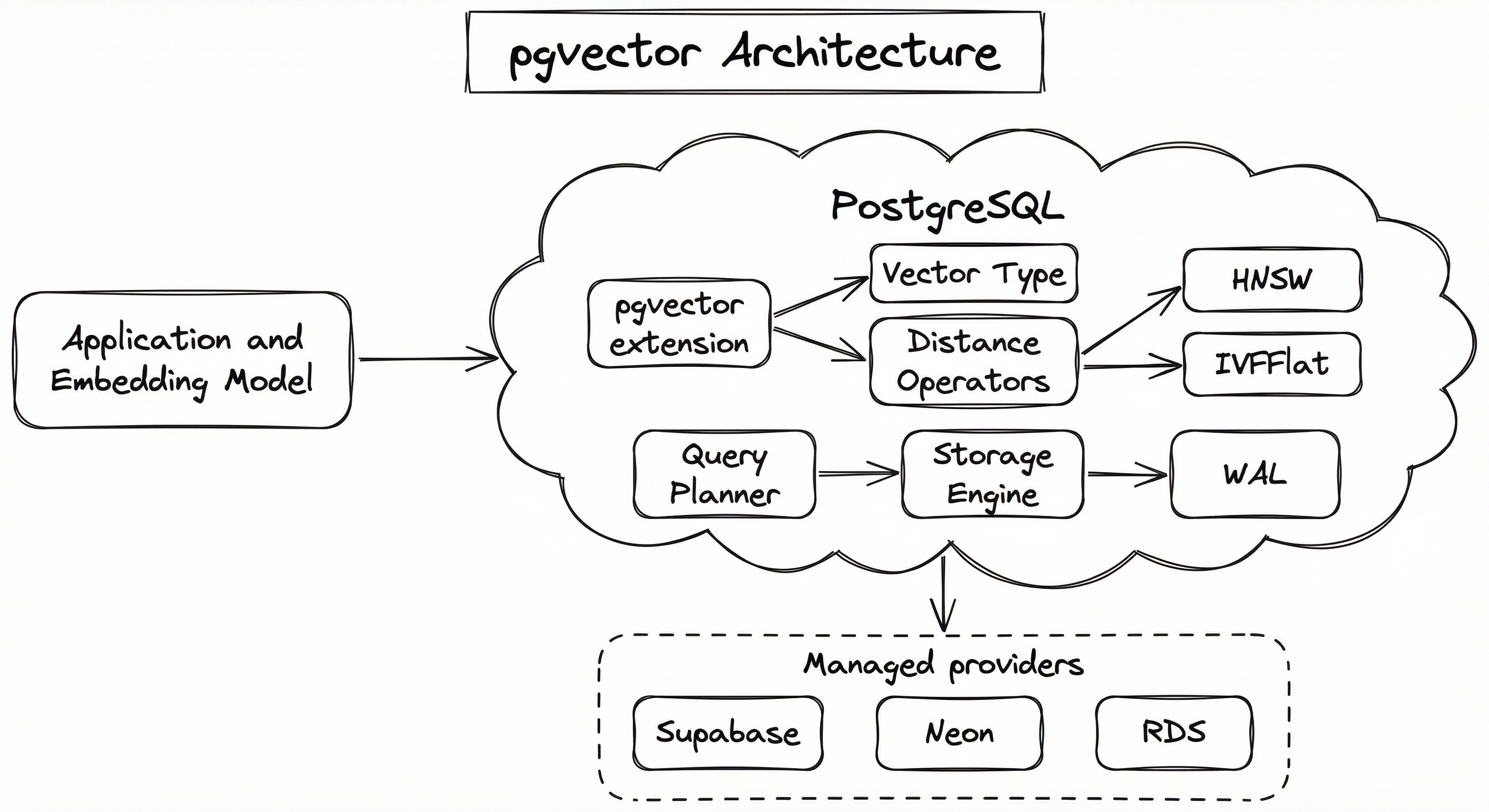
The critical architectural insight is that pgvector's HNSW and IVFFlat implementations register as PostgreSQL index access methods -- the same abstraction that B-tree, GiST, and GIN indexes use. This means the query planner can automatically choose between a sequential scan, an IVFFlat scan, or an HNSW scan based on cost estimation, just as it chooses between a sequential scan and a B-tree scan for regular queries.
Key Components
Vector Type System
Defines the vector(d), halfvec(d), sparsevec(d), and bit(d) data types. Handles input parsing, output formatting, binary I/O, and type casting. The vector type stores 32-bit floats; halfvec stores 16-bit floats (50% less storage); sparsevec stores only non-zero elements (optimal for sparse embeddings from models like SPLADE).
Distance Operators
Implements the <-> (L2), <=> (cosine), and <#> (negative inner product) operators, plus hamming_distance() and jaccard_distance() functions for binary vectors. These operators are registered with PostgreSQL's operator class system so the query planner knows which indexes can accelerate them.
HNSW Index Access Method
Implements the Hierarchical Navigable Small World graph as a PostgreSQL index AM. Supports vector, halfvec, sparsevec, and bit types. Configurable via m (connections per node, default 16) and ef_construction (build-time candidate list size, default 64). Query-time recall is tuned via SET hnsw.ef_search.
IVFFlat Index Access Method
Implements Inverted File indexing with flat (uncompressed) storage within each Voronoi cell. Requires a training step (lists parameter, default 100). Query-time recall is tuned via SET ivfflat.probes. Faster to build than HNSW but generally lower recall at equivalent latency.
Iterative Index Scan (v0.8.0+)
When a WHERE clause filters out too many candidates from the initial index scan, the iterative scan automatically continues searching the index for more candidates until the LIMIT is satisfied or a configurable threshold is reached. This solves the notorious 'overfiltering' problem where filtered vector queries returned fewer results than requested.
PostgreSQL Query Planner Integration
pgvector provides cost estimation functions so the query planner can make intelligent decisions about when to use an index scan versus a sequential scan. In v0.8.0+, improved cost estimation helps the planner choose the right index when both vector and scalar indexes are available on filtered queries.
Data Flow
Write Path: Your application generates an embedding vector (via OpenAI, Cohere, a local model, etc.) and executes an INSERT INTO documents (content, embedding) VALUES ('...', '[0.1, 0.2, ...]'). PostgreSQL writes the row to the heap, updates the HNSW or IVFFlat index (inserting the vector into the graph or the appropriate IVF list), and writes a WAL record for replication and crash recovery. The entire operation is transactional -- if the INSERT fails, neither the row nor the index entry is persisted.
Read Path: A query like SELECT id, content FROM documents ORDER BY embedding <=> $1 LIMIT 10 arrives. The query planner sees the <=> operator with an HNSW index available, so it chooses an index scan. The HNSW access method traverses the graph starting from the entry point, greedily navigating toward the query vector, and returns the top-k candidates. If a WHERE clause is present and iterative scanning is enabled, pgvector continues pulling candidates from the index until the filter conditions yield enough results.
Hybrid Path: Because vectors live in standard PostgreSQL tables, you can combine vector search with full-text search (tsvector), B-tree range filters, GIN indexes on JSONB metadata, and even PostGIS geospatial queries -- all in a single SQL statement. This composability is pgvector's killer advantage.
The architecture diagram shows a three-layer system: an Application Layer containing the app and embedding model, a PostgreSQL Instance containing the pgvector extension (with vector types, distance operators, HNSW and IVFFlat index access methods, and iterative scan), connected to PostgreSQL's WAL/replication, storage engine, and relational tables. Below, managed providers (Supabase, Neon, AWS Aurora/RDS, Google Cloud SQL) host the PostgreSQL instance.
How to Implement
Getting Started: Zero to Vector Search in 5 Minutes
Implementing pgvector is refreshingly straightforward if you already know SQL. Install the extension, create a table with a vector column, insert embeddings, build an index, and query. Three decisions matter:
- Which vector type?
vector(d)for 32-bit embeddings,halfvec(d)for 16-bit (saves 50% memory),sparsevec(d)for sparse embeddings (e.g., SPLADE) - Which index? HNSW (recommended default) or IVFFlat (faster builds, lower memory)
- Which distance metric? Must match your embedding model -- cosine (
vector_cosine_ops), L2 (vector_l2_ops), or inner product (vector_ip_ops)
Managed vs. Self-Hosted
Managed options with pgvector pre-installed: Supabase (Pro at 19/month, INR 1,600), AWS Aurora (50/month, INR 4,200), Azure Cosmos DB (70/month (~INR 5,900) -- and remember, with pgvector you are not paying for a second database.
Cost at Scale: Self-hosting pgvector+pgvectorscale on AWS EC2 costs ~3,241/month (~INR 2.72 lakh) -- a 75% cost reduction.
-- Step 1: Install the extension
CREATE EXTENSION IF NOT EXISTS vector;

-- Step 2: Create a table with a vector column
CREATE TABLE documents (
    id BIGSERIAL PRIMARY KEY,
    title TEXT NOT NULL,
    content TEXT NOT NULL,
    tenant_id UUID NOT NULL,
    category TEXT,
    created_at TIMESTAMPTZ DEFAULT NOW(),
    embedding vector(1536)  -- OpenAI ada-002 dimension
);

-- Step 3: Insert a document with its embedding
INSERT INTO documents (title, content, tenant_id, category, embedding)
VALUES (
    'Introduction to RAG',
    'Retrieval-Augmented Generation combines...',
    'a1b2c3d4-e5f6-7890-abcd-ef1234567890',
    'ml-concepts',
    '[0.0123, -0.0456, 0.0789, ...]'  -- 1536-dim vector
);

-- Step 4: Create an HNSW index for cosine similarity
CREATE INDEX ON documents
USING hnsw (embedding vector_cosine_ops)
WITH (m = 16, ef_construction = 128);

-- Step 5: Query for nearest neighbors
SELECT id, title, 1 - (embedding <=> '[0.0111, -0.0222, ...]') AS similarity
FROM documents
ORDER BY embedding <=> '[0.0111, -0.0222, ...]'
LIMIT 10;
This is the complete lifecycle: install, define schema, insert data, create index, and query. The vector_cosine_ops operator class tells pgvector to build the HNSW index optimized for cosine distance. The 1 - (embedding <=> query) expression converts cosine distance back to cosine similarity (0 to 1 scale). Note that the m and ef_construction parameters are set at index creation and cannot be changed later -- choose carefully.
-- Enable iterative scanning for HNSW
SET hnsw.iterative_scan = relaxed_order;

-- Increase ef_search for better recall with filters
SET hnsw.ef_search = 100;

-- Multi-tenant filtered vector search
-- The iterative scan ensures we get 10 results even if
-- most vectors belong to other tenants
SELECT id, title,
       1 - (embedding <=> $1::vector) AS similarity
FROM documents
WHERE tenant_id = 'a1b2c3d4-e5f6-7890-abcd-ef1234567890'
  AND category = 'ml-concepts'
  AND created_at > NOW() - INTERVAL '90 days'
ORDER BY embedding <=> $1::vector
LIMIT 10;

-- Without iterative scan (pre-v0.8.0), this query might return
-- fewer than 10 results if the tenant's documents are a small
-- fraction of the total corpus. Iterative scan fixes this by
-- continuing to search the HNSW graph until 10 matching
-- candidates are found.
This demonstrates pgvector's killer feature: combining vector similarity search with standard SQL WHERE clauses in a single query. The hnsw.iterative_scan = relaxed_order setting (new in v0.8.0) tells pgvector to keep scanning the index if the initial results don't satisfy the filter. This is essential for multi-tenant RAG systems where a small tenant's documents might be a tiny fraction of the total index. Before v0.8.0, you'd often get fewer than LIMIT results -- a major pain point that's now solved.
-- Create a GIN index for full-text search
ALTER TABLE documents ADD COLUMN search_vector tsvector
    GENERATED ALWAYS AS (to_tsvector('english', title || ' ' || content)) STORED;
CREATE INDEX ON documents USING gin(search_vector);

-- Hybrid search using Reciprocal Rank Fusion (RRF)
WITH semantic AS (
    SELECT id, title, content,
           ROW_NUMBER() OVER (ORDER BY embedding <=> $1::vector) AS rank_semantic
    FROM documents
    WHERE tenant_id = $2
    ORDER BY embedding <=> $1::vector
    LIMIT 20
),
fulltext AS (
    SELECT id, title, content,
           ROW_NUMBER() OVER (ORDER BY ts_rank_cd(search_vector, query) DESC) AS rank_fulltext
    FROM documents, plainto_tsquery('english', $3) query
    WHERE search_vector @@ query
      AND tenant_id = $2
    ORDER BY ts_rank_cd(search_vector, query) DESC
    LIMIT 20
)
SELECT COALESCE(s.id, f.id) AS id,
       COALESCE(s.title, f.title) AS title,
       COALESCE(s.content, f.content) AS content,
       COALESCE(1.0 / (60 + s.rank_semantic), 0.0) +
       COALESCE(1.0 / (60 + f.rank_fulltext), 0.0) AS rrf_score
FROM semantic s
FULL OUTER JOIN fulltext f ON s.id = f.id
ORDER BY rrf_score DESC
LIMIT 10;
This is hybrid search entirely within PostgreSQL -- no external search engine needed. The query runs two sub-queries in parallel: semantic search via pgvector's HNSW index and full-text search via PostgreSQL's built-in tsvector with a GIN index. Results are fused using Reciprocal Rank Fusion (RRF) with (the standard constant). This approach catches queries where keywords matter (specific product codes, Indian PIN codes, medical terms) alongside queries where meaning matters. For production use, consider ParadeDB's pg_search extension for BM25 scoring instead of ts_rank_cd.
import psycopg
from pgvector.psycopg import register_vector
from openai import OpenAI

conn = psycopg.connect("postgresql://user:pass@localhost:5432/mydb")
register_vector(conn)
client = OpenAI()

def get_embedding(text: str) -> list[float]:
    resp = client.embeddings.create(input=text, model="text-embedding-3-small")
    return resp.data[0].embedding

def upsert_document(doc_id, title, content, tenant_id, category):
    embedding = get_embedding(f"{title} {content}")
    with conn.cursor() as cur:
        cur.execute("""
            INSERT INTO documents (id, title, content, tenant_id, category, embedding)
            VALUES (%s, %s, %s, %s, %s, %s::vector)
            ON CONFLICT (id) DO UPDATE SET
                title = EXCLUDED.title, content = EXCLUDED.content,
                embedding = EXCLUDED.embedding
        """, (doc_id, title, content, tenant_id, category, embedding))
    conn.commit()

def search(query, tenant_id, limit=10):
    emb = get_embedding(query)
    with conn.cursor() as cur:
        cur.execute("""
            SELECT id, title, 1 - (embedding <=> %s::vector) AS similarity
            FROM documents WHERE tenant_id = %s
            ORDER BY embedding <=> %s::vector LIMIT %s
        """, (emb, tenant_id, emb, limit))
        return [dict(zip(['id','title','similarity'], r)) for r in cur.fetchall()]

results = search("How does ANN search work?", "tenant-123", 5)
for doc in results:
    print(f"[{doc['similarity']:.4f}] {doc['title']}")
Production-ready Python pattern using psycopg and the pgvector package. Key details: register_vector(conn) enables automatic Python list to PostgreSQL vector conversion; ON CONFLICT DO UPDATE handles atomic upserts; embeddings are passed as parameterized queries for SQL injection safety.
-- halfvec: 16-bit floats, 50% less storage
CREATE TABLE documents_compact (
    id BIGSERIAL PRIMARY KEY,
    title TEXT NOT NULL,
    embedding halfvec(1536)
);
CREATE INDEX ON documents_compact
USING hnsw (embedding halfvec_cosine_ops)
WITH (m = 16, ef_construction = 128);

-- Binary quantized expression index (v0.7.0+)
-- Each dimension becomes a single bit: 1536 dims -> 192 bytes
CREATE INDEX ON documents
USING hnsw ((binary_quantize(embedding)::bit(1536)) bit_hamming_ops);

-- Query: coarse search with binary, re-rank with full precision
SELECT id, title, 1 - (embedding <=> $1::vector) AS similarity
FROM documents
ORDER BY binary_quantize(embedding)::bit(1536) <~> binary_quantize($1::vector)::bit(1536)
LIMIT 20;
Two strategies to reduce memory. halfvec cuts storage in half with minimal quality loss. Binary quantization compresses each float to a single bit (32x reduction) but requires a re-ranking step. For 10M vectors at 1536 dimensions: vector uses ~60 GB, halfvec ~30 GB, binary quantization ~1.9 GB for the index.
# PostgreSQL configuration optimized for pgvector workloads
# Add to postgresql.conf or ALTER SYSTEM

# Memory: give 25% of RAM to shared buffers
shared_buffers = '8GB'            # For a 32GB instance
effective_cache_size = '24GB'     # 75% of total RAM
work_mem = '256MB'                # For sort operations in hybrid queries
maintenance_work_mem = '2GB'      # For index builds (HNSW, IVFFlat)

# pgvector-specific session settings
# Set in your application's connection initialization:
#   SET hnsw.ef_search = 100;       -- default 40, increase for better recall
#   SET ivfflat.probes = 10;        -- default 1, increase for IVFFlat recall
#   SET hnsw.iterative_scan = relaxed_order;  -- v0.8.0+, enable for filtered queries

# Parallel query support (pgvector supports parallel builds since v0.7.0)
max_parallel_workers_per_gather = 4
max_parallel_maintenance_workers = 4  # Parallel HNSW index builds

# WAL settings for bulk insert performance
max_wal_size = '4GB'
checkpoint_completion_target = 0.9
Common Implementation Mistakes
- ●
Creating an IVFFlat index on an empty or small table: IVFFlat requires representative data for k-means clustering during index creation. Building on fewer rows than
listsproduces poor cluster centers and terrible recall. Always insert your data first, then create the IVFFlat index. HNSW does not have this limitation -- it can be created on an empty table and updated incrementally. - ●
Using default
hnsw.ef_search = 40without benchmarking: The default value of 40 is conservative. For RAG applications where recall matters more than latency, bump it to 100-200. RunSET hnsw.ef_search = 100;per session or in your connection pool initialization. Forgetting this is probably the #1 reason teams report "poor pgvector quality" in blog posts. - ●
Storing embeddings from different models in the same column: Vectors from OpenAI's
text-embedding-3-smalland Cohere'sembed-v3live in completely different geometric spaces, even if they have the same dimensionality. Never mix them. Use separate columns or tables per model version, and track which model produced each embedding. - ●
Skipping
ANALYZEafter bulk inserts: PostgreSQL's query planner relies on table statistics to choose between sequential scan and index scan. After inserting a large batch of vectors, runANALYZE documents;so the planner has accurate statistics. Without this, PostgreSQL might choose a sequential scan over your carefully-tuned HNSW index. - ●
Setting
liststoo low for IVFFlat on large datasets: The rule of thumb islists = sqrt(num_rows)for tables up to 1M rows, andlists = num_rows / 1000for larger tables. Too few lists means each list is too large, and probing becomes expensive. Too many lists means each list has too few vectors for meaningful clustering. - ●
Ignoring shared_buffers and work_mem configuration: pgvector's HNSW index traversal benefits enormously from having the index in PostgreSQL's shared buffer cache. If your HNSW index is 10 GB but
shared_buffersis only 256 MB, every index scan will hit disk. Setshared_buffersto at least 25% of available RAM, and increasework_memfor sort operations in hybrid queries. - ●
Not using connection pooling with pgvector: Each PostgreSQL connection consumes memory (typically 5-10 MB). If your application opens hundreds of connections for concurrent vector searches, you'll exhaust memory before the index becomes the bottleneck. Use PgBouncer or Supabase's built-in pooler.
When Should You Use This?
Use When
Your team already runs PostgreSQL and you want vector search without adding a new database to your stack -- the operational simplicity alone justifies the choice for most startups
You need transactional consistency between your relational data and vector embeddings -- inserts, updates, and deletes must be atomic across both
Your dataset is under 50 million vectors and your QPS requirements are under 1,000 -- pgvector handles this range comfortably with proper tuning
You need hybrid SQL + vector queries -- combining similarity search with JOINs, WHERE clauses, CTEs, window functions, and other SQL features that dedicated vector databases don't support
You are building a multi-tenant SaaS application and need row-level security (RLS) policies applied to vector data, or need to scope vector queries by tenant_id with filtered search
Your team has PostgreSQL expertise but limited experience with specialized vector database operations (Kubernetes deployments, custom backup procedures, etc.)
You want to use a managed Postgres service (Supabase, Neon, Aurora) that bundles pgvector with zero additional setup
Budget is a constraint -- pgvector eliminates the cost of a separate vector database service, saving ₹5,000-20,000/month (~$60-240/month) for small-to-medium workloads
Avoid When
Your dataset exceeds 100 million vectors and you need sustained high throughput (>5,000 QPS) -- at this scale, purpose-built databases like Qdrant, Milvus, or Pinecone have architectural advantages in sharding and distributed search
Vector search is your primary workload (>50% of total database operations) and you don't want it competing with relational queries for CPU, memory, and I/O
You need GPU-accelerated vector search -- pgvector runs entirely on CPU, while Milvus and FAISS support GPU acceleration for massive batch operations
You need built-in vector replication and sharding beyond what PostgreSQL's streaming replication provides -- Milvus and Qdrant have native distributed architectures designed for this
Your use case requires real-time index updates at extreme write throughput (>50K inserts/second) -- HNSW index maintenance in pgvector adds overhead to every INSERT, and at high write rates this becomes the bottleneck
You need sub-millisecond query latency -- pgvector typically delivers 2-15ms for HNSW queries, while in-memory dedicated systems like Qdrant can achieve <1ms
Key Tradeoffs
The Core Tradeoff: Simplicity vs. Specialization
pgvector's greatest strength and greatest weakness are the same thing: it runs inside PostgreSQL. This means:
| Aspect | pgvector (Extension) | Dedicated Vector DB |
|---|---|---|
| Operational complexity | Low (one database) | High (two databases + sync) |
| SQL composability | Full SQL support | Limited or proprietary query language |
| ACID transactions | Yes (inherits from Postgres) | Partial or none |
| Max practical scale | ~50-100M vectors | Billions of vectors |
| Query latency (HNSW) | 2-15ms typical | 1-5ms typical |
| Resource isolation | Shared with relational workload | Dedicated |
| Index build speed | Slower (single-node) | Faster (distributed) |
| Managed options | Abundant (Supabase, Neon, Aurora) | Pinecone, Zilliz Cloud |
| Cost at small scale | Lower (shared infrastructure) | Higher (separate service) |
| Cost at large scale | Higher (vertical scaling) | Lower per-vector (horizontal) |
The Index Build Time Question
HNSW index builds in pgvector are single-node operations. For 10M vectors at 1536 dimensions, expect 30-60 minutes on a modern 8-core instance. For 50M vectors, that can stretch to 4-8 hours. During this time, your table is still queryable (the index is built in the background), but write performance may degrade.
Dedicated databases like Milvus can parallelize index builds across multiple nodes, completing the same work in a fraction of the time. If you rebuild indexes frequently (e.g., weekly re-embedding after model updates), this matters.
The Memory Equation
A rough formula for HNSW memory usage in pgvector:
where = number of vectors, = dimensions, = HNSW m parameter. For 10M vectors at 1536 dimensions with :
This memory is shared with your relational workload. Plan accordingly, or use halfvec to halve the vector storage component.
Indian Startup Perspective: At the early stage (seed to Series A), pgvector on Supabase or Neon is almost always the right choice. You save ₹5,000-15,000/month versus Pinecone, avoid hiring a vector DB specialist, and can always migrate later. The time to consider a dedicated vector database is when you're processing >10M vectors and your latency SLAs tighten below 5ms P99.
Alternatives & Comparisons
Pinecone is a fully managed, proprietary vector database that eliminates all operational overhead. Choose Pinecone when you need zero-ops vector search at scale (billions of vectors) and can afford the premium pricing ($70-3,000+/month). Choose pgvector when you already run PostgreSQL, need SQL composability, want to avoid vendor lock-in, or need to keep costs under ₹10,000/month. At 50M vectors, pgvectorscale benchmarks show 28x lower P95 latency than Pinecone's s1 index at 75% less cost.
Qdrant is an open-source vector database written in Rust with excellent filtering capabilities and ACID transactions. Choose Qdrant when vector search is your primary workload, you need sub-millisecond latency, or you're operating at >100M vectors with complex metadata filters. Choose pgvector when you want a single database for everything, need SQL JOINs and CTEs, or your vector workload is secondary to your relational workload.
Milvus is a cloud-native, distributed vector database designed for billion-scale deployments with GPU acceleration support. Choose Milvus when you need horizontal scaling across nodes, GPU-accelerated indexing, or support for multiple index types (IVF, HNSW, DiskANN, SCANN). Choose pgvector when you don't need distributed architecture, want simpler operations, and your dataset fits on a single node (<50M vectors).
Weaviate is an open-source vector database with built-in vectorization modules (auto-embedding via OpenAI, Cohere, etc.) and a GraphQL API. Choose Weaviate when you want the database to handle embedding generation, need a graph-style query interface, or want built-in hybrid (vector + BM25) search. Choose pgvector when you prefer SQL, already generate embeddings externally, and want to keep your database stack simple.
ChromaDB is a lightweight, developer-friendly embedding database optimized for fast prototyping and small-to-medium workloads. Choose Chroma for hackathons, local development, and datasets under 1M vectors. Choose pgvector for production deployments where you need persistence, replication, backups, and integration with your existing PostgreSQL application data.
Pros, Cons & Tradeoffs
Advantages
Zero additional infrastructure: Adds vector search to your existing PostgreSQL instance with a single
CREATE EXTENSION vector;command -- no new services to deploy, monitor, or pay forFull SQL composability: JOIN vector results with any other table, apply WHERE clauses, use CTEs, window functions, aggregations, and row-level security -- something no dedicated vector database can match
ACID transactions: Embedding inserts and deletions are transactional with your relational data. Delete a user? Their embeddings are deleted in the same transaction. No orphaned vectors, no synchronization headaches
Massive managed ecosystem: Supported out-of-the-box on Supabase, Neon, AWS Aurora/RDS, Google Cloud SQL, Azure Cosmos DB, Crunchy Data, and more. You likely don't need to self-host.
Excellent hybrid search: Combine pgvector's similarity search with PostgreSQL's built-in
tsvectorfull-text search, PostGIS geospatial queries, or ParadeDB's BM25 -- all in a single SQL queryActive development with rapid improvement: From no HNSW support (2022) to iterative scans and binary quantization (2024) in just two years. The community is large (19K+ GitHub stars) and the release cadence is strong.
Multiple vector types for cost optimization:
vector(32-bit),halfvec(16-bit),sparsevec(sparse), andbit(binary) types let you optimize the storage-accuracy tradeoff per use caseBattle-tested PostgreSQL reliability: Inherits 35+ years of PostgreSQL's crash recovery, WAL-based replication, point-in-time recovery, and proven operational tooling
Disadvantages
Shared resource contention: Vector index builds and queries compete with your relational workload for CPU, memory, and I/O. A heavy HNSW index build can spike latency on your application's regular queries.
Single-node scaling ceiling: pgvector runs on a single PostgreSQL instance. Beyond ~50-100M vectors, you hit memory and throughput limits that require vertical scaling (bigger machines) rather than horizontal scaling (more nodes).
HNSW index build time: Building an HNSW index on 10M x 1536-dim vectors takes 30-60 minutes on a modern instance. For 50M vectors, it can take 4-8 hours. During model upgrades requiring full re-indexing, this causes significant operational windows.
No GPU acceleration: All operations run on CPU. For large-scale batch indexing or search, GPU-accelerated alternatives like Milvus or FAISS can be 10-100x faster.
Less mature than purpose-built alternatives: pgvector's HNSW implementation, while correct, may lag behind Qdrant's or Milvus's in raw performance optimizations like SIMD acceleration, quantization-aware search, and parallel graph traversal.
Memory-intensive HNSW indexes: HNSW indexes for large datasets can be significantly larger than the raw vector data due to graph edge storage. A 10M x 1536-dim HNSW index requires ~63 GB of memory for optimal performance.
No native multi-node replication for vector indexes: While PostgreSQL streaming replication replicates the entire database (including vector indexes), there is no vector-aware sharding or distributed search -- read replicas simply duplicate the full index.
Failure Modes & Debugging
Overfiltering with pre-v0.8.0 indexes
Cause
When a WHERE clause filters out most candidates returned by the HNSW or IVFFlat index scan, the query returns fewer results than the LIMIT specifies. This happens because the ANN index returns the top-k nearest neighbors without considering the filter, and the filter is applied post-hoc.
Symptoms
Queries with selective filters (e.g., small tenant's documents in a multi-tenant system) return 2-3 results instead of the requested 10. No error is raised -- the result set is simply incomplete. Users see incomplete search results.
Mitigation
Upgrade to pgvector 0.8.0+ and enable iterative scanning: SET hnsw.iterative_scan = relaxed_order;. This tells pgvector to continue searching the index until enough filtered results are found. For pre-0.8.0, over-fetch by requesting 5-10x the desired LIMIT, apply filters in application code, and take the top-k.
HNSW index not fitting in shared_buffers
Cause
The HNSW index exceeds PostgreSQL's shared_buffers allocation, causing index page reads to go through the OS page cache or hit disk. Common when teams scale vector count without scaling shared_buffers.
Symptoms
Vector query latency increases from 5ms to 50-200ms. EXPLAIN (ANALYZE, BUFFERS) shows high Buffers: read counts instead of Buffers: hit. The pg_statio_user_indexes view shows a low cache hit ratio for the HNSW index.
Mitigation
Set shared_buffers to at least 25% of available RAM. Monitor index size with SELECT pg_size_pretty(pg_relation_size('your_hnsw_index_name'));. If the index exceeds shared_buffers, either increase RAM, switch to halfvec (50% reduction), or use binary quantization expression indexes. On AWS Aurora, enable Optimized Reads for up to 20x improvement on memory-exceeding workloads.
IVFFlat index built on insufficient data
Cause
Creating an IVFFlat index on an empty table or a table with fewer rows than the lists parameter. The k-means clustering step produces degenerate cluster centers.
Symptoms
Extremely poor recall -- relevant documents are consistently missed because they're assigned to incorrect clusters. The issue is invisible without a recall benchmark.
Mitigation
Always load representative data before creating an IVFFlat index. Ensure num_rows >> lists (at least 10x more rows than lists). Alternatively, use HNSW indexes which can be created on empty tables and handle incremental inserts correctly.
Silent metric mismatch
Cause
The HNSW or IVFFlat index is created with vector_l2_ops but the embedding model was trained with cosine similarity (or vice versa). pgvector does not validate this -- it's your responsibility.
Symptoms
Retrieval results are semantically poor despite vectors being correctly stored and the index being properly built. No errors. Teams often blame the embedding model or the chunking strategy before discovering the metric mismatch.
Mitigation
Always check the embedding model's documentation for the recommended distance metric. OpenAI models use cosine; some sentence-transformers use dot product. Create a validation script that computes brute-force top-k results and compares them against the index's top-k to catch mismatches. Document the metric choice in your schema migration files.
Query planner choosing sequential scan over index scan
Cause
PostgreSQL's query planner estimates that a sequential scan is cheaper than an HNSW/IVFFlat index scan. This can happen after bulk inserts if ANALYZE hasn't been run, or if the table is small enough that the planner prefers a full scan.
Symptoms
Vector queries that were fast (5ms) suddenly become slow (500ms+). EXPLAIN shows Seq Scan instead of Index Scan using hnsw_index. This often happens after deploying a data migration.
Mitigation
Run ANALYZE your_table; after bulk data loads. Check that enable_seqscan = on and enable_indexscan = on (both default). For debugging, temporarily SET enable_seqscan = off; to force index usage and compare plans. In v0.8.0+, improved cost estimation reduces this issue significantly.
Memory exhaustion during HNSW index build
Cause
Building an HNSW index on a large table requires significantly more memory than the final index size -- the build process uses temporary structures that can consume 1.5-2x the final index memory. If maintenance_work_mem is too low, the build spills to disk and slows dramatically.
Symptoms
Index build takes 10x longer than expected. PostgreSQL logs show temporary file usage. In extreme cases, the build is killed by the OOM killer or exceeds available disk space.
Mitigation
Set maintenance_work_mem to at least the expected index size (check with a small sample first). For large tables (>10M rows), build during off-peak hours. Use CREATE INDEX CONCURRENTLY to avoid locking the table during the build, and monitor memory usage throughout. Consider pgvectorscale's StreamingDiskANN index which is designed for disk-friendly builds.
Placement in an ML System
Where pgvector Fits in the ML System
In a RAG pipeline, pgvector serves as both the vector store and the metadata store. The embedding model converts chunks into vectors, which are inserted into a PostgreSQL table alongside metadata (source document ID, chunk index, tenant ID, timestamps). At query time, the user's question is embedded and used to search the same table, with optional metadata filters applied in the same SQL query. The retrieved chunks flow downstream to a re-ranker or directly to the LLM's context window.
For recommendation systems (think a Swiggy-like food recommendation or Flipkart-like product similarity), pgvector stores item embeddings in the same database as item metadata (price, rating, availability). A single query can find semantically similar items that are also in stock, within a price range, and available in the user's city -- all without leaving PostgreSQL.
For semantic search applications (think a legal document search for Indian courts, or a medical knowledge base for Apollo Hospitals), pgvector enables the entire search pipeline within one database: store documents, embeddings, user queries, search logs, and feedback -- all with full ACID guarantees.
Key Placement Insight: pgvector is unique among vector databases because it doesn't just replace the vector store block in your pipeline -- it merges the vector store with the metadata store and the application database. This simplification is its core value proposition.
Pipeline Stage
Retrieval / Storage
Upstream
- embedding-model
- vector-store
Downstream
- semantic-search
- vector-store
Scaling Bottlenecks
The single biggest factor in pgvector performance is keeping your HNSW index in PostgreSQL's shared buffer cache. When the index fits in memory, queries complete in 2-10ms. When it spills to disk, latency jumps to 50-200ms -- a 10-20x degradation.
For capacity planning, estimate HNSW index memory as:
The 1.3 multiplier accounts for HNSW graph edge storage overhead.
Each INSERT or UPDATE that modifies a vector column must also update the HNSW graph. This adds ~0.5-2ms per write operation compared to a table without a vector index. At sustained write rates above 10,000-50,000 inserts/second, this becomes the bottleneck. Batch your inserts and consider dropping/recreating the index for bulk loads.
Unlike dedicated vector databases that manage concurrency internally, pgvector relies on PostgreSQL's process-per-connection model. Each connection holds a backend process consuming 5-10 MB. At 500+ concurrent connections, memory pressure from connections alone can impact index caching. Use PgBouncer or Supavisor for connection pooling.
Production Case Studies
Supabase built their entire Vector product on pgvector, making it accessible to hundreds of thousands of developers. They provide pre-configured pgvector on every Supabase project, with edge functions for embedding generation and a Vecs Python client for vector operations. Multiple AI startups have migrated from dedicated vector databases to Supabase+pgvector, citing equivalent search performance with reduced infrastructure complexity.
Supabase reports customers storing over 1.6 million embeddings with great performance. Berri AI migrated from self-hosted vector databases on AWS RDS to Supabase+pgvector, reducing operational overhead significantly. The platform now powers vector search for thousands of AI applications globally.
Letta uses Amazon Aurora PostgreSQL with pgvector to build production-ready AI agents with persistent memory. Agent configuration, conversation history, and vector embeddings for archival memory are all stored in the same Aurora cluster. The source_passages and archival_passages tables use pgvector's vector type for efficient similarity search over the agent's memory.
Aurora PostgreSQL with pgvector delivers sub-second query latency for memory lookups across millions of embeddings. The architecture supports up to 15 read replicas for scaling memory retrieval, enabling multi-tenant deployments with unlimited agents on Letta's Pro and Enterprise plans.
Timescale benchmarked PostgreSQL with pgvector and their pgvectorscale extension against Pinecone on 50 million Cohere embeddings (768 dimensions). The benchmark demonstrated that the PostgreSQL stack could match or exceed Pinecone's performance at significantly lower cost when self-hosted on AWS EC2.
pgvector+pgvectorscale achieved 28x lower P95 latency and 16x higher query throughput compared to Pinecone's storage-optimized (s1) index at 99% recall, at 75% less cost (3,241/month on AWS). This benchmark was a turning point in industry perception of pgvector's viability at scale.
Neon, the serverless PostgreSQL platform, integrated pgvector as a core extension for their AI-focused use cases. Their architecture separates compute from storage, enabling autoscaling and scale-to-zero for vector workloads. Neon partnered with Microsoft and OpenAI (featured in OpenAI Cookbook) to provide reference implementations for vector similarity search using their platform.
Neon's serverless architecture with pgvector enables developers to start with zero cost (free tier with 0.5 GB storage) and scale automatically. The compute-storage separation means vector indexes are loaded on-demand, making it cost-effective for applications with intermittent search workloads -- a common pattern for early-stage Indian AI startups.
CORTO, an AI-powered legal technology platform, deployed Amazon Aurora PostgreSQL with pgvector for their document analysis and retrieval system. They manage one of the largest known pgvector deployments, storing 7.6 billion vectors in their primary embeddings table across 46 terabytes of data in their APAC cluster.
CORTO's deployment demonstrates that pgvector can handle billion-scale workloads on Aurora PostgreSQL. With pgvector 0.8.0's iterative scans and improved cost estimation, their filtered legal document retrieval achieved up to 9x faster query processing and 100x more relevant search results compared to earlier pgvector versions.
Tooling & Ecosystem
The core PostgreSQL extension for vector similarity search. Adds vector, halfvec, sparsevec, and bit types with HNSW and IVFFlat indexing. Written in C, MIT licensed. 19K+ GitHub stars.
Timescale's complementary extension that adds StreamingDiskANN (inspired by Microsoft's DiskANN) for disk-friendly billion-scale search, Statistical Binary Quantization for compression, and label-based filtered search. Written in Rust, PostgreSQL license.
Python client for pgvector with support for psycopg2, psycopg3, asyncpg, SQLAlchemy, Django, Peewee, and SQLModel. Handles vector type registration and conversion between Python lists/numpy arrays and PostgreSQL vector types.
Supabase's vector toolkit built on pgvector. Provides a high-level Python client (vecs), edge functions for embedding generation, and a dashboard for managing vector collections. Pre-configured on every Supabase project.
PostgreSQL extension for BM25 full-text search built on Tantivy (Rust-based Lucene alternative). Combines with pgvector for production-grade hybrid search (BM25 + vector similarity) with Reciprocal Rank Fusion, entirely within PostgreSQL.
LangChain's official pgvector integration. Provides PGVector vector store class with support for similarity search, metadata filtering, and MMR (Maximal Marginal Relevance) retrieval. Widely used for RAG prototyping.
JavaScript/TypeScript client for pgvector with support for pg, Sequelize, Knex.js, Objection.js, Prisma, Drizzle ORM, and Kysely. Essential for Next.js and Node.js applications using pgvector.
Timescale's PostgreSQL extension that brings AI workflows directly into the database. Supports embedding generation (OpenAI, Cohere, Ollama), RAG retrieval, and classification -- all via SQL functions. Complements pgvector by automating the embedding pipeline.
Research & References
Malkov, Y.A. & Yashunin, D.A. (2018)IEEE TPAMI, Vol. 42, No. 4
The foundational paper for the HNSW algorithm that pgvector implements. Introduces multi-layer proximity graphs with logarithmic search complexity -- the same algorithm now used by pgvector, Qdrant, Weaviate, and virtually every modern vector database.
Subramanya, S.J., Devvrit, F., Kadekodi, R., Simhadri, H.V. & Krishaswamy, R. (2019)NeurIPS 2019
The algorithm behind pgvectorscale's StreamingDiskANN index. Demonstrates billion-point ANN search on a single node with just 64 GB RAM by using SSD-resident graph indices, achieving 5,000+ QPS at 95%+ recall.
Gollapudi, S., et al. (2023)ACM Web Conference (WWW) 2023
Extends DiskANN with label-based filtering, enabling efficient filtered ANN search. This research directly influenced pgvectorscale's label-based filtered search feature and pgvector 0.8.0's iterative scan approach to the overfiltering problem.
Jegou, H., Douze, M. & Schmid, C. (2011)IEEE TPAMI, Vol. 33, No. 1
Foundational work on vector compression via sub-vector quantization. While pgvector uses flat storage (not PQ), the binary quantization feature in v0.7.0+ draws on these compression principles for expression indexes.
Pan, J., Wang, J. & Li, G. (2024)The VLDB Journal
Comprehensive survey of 20+ vector DBMSs including pgvector, analyzing indexing, storage, and query processing. Positions pgvector as the leading extension-based approach versus purpose-built systems, with analysis of tradeoffs at different scales.
Lewis, P., Perez, E., Piktus, A. et al. (2020)NeurIPS 2020
The paper that established the RAG paradigm -- the primary use case driving pgvector adoption. Demonstrated that combining dense passage retrieval with a seq2seq generator dramatically improves knowledge-intensive task performance.
Interview & Evaluation Perspective
Common Interview Questions
- ●
Why would you choose pgvector over a dedicated vector database like Pinecone or Qdrant? What are the tradeoffs?
- ●
How does pgvector's HNSW index work, and what parameters would you tune for a RAG application with 5 million documents?
- ●
How would you handle the 'overfiltering' problem in pgvector when running filtered vector searches on a multi-tenant system?
- ●
What is the difference between IVFFlat and HNSW indexes in pgvector? When would you choose each?
- ●
You have a PostgreSQL database with 20 million product embeddings. Queries are slow. Walk me through your debugging and optimization process.
- ●
How would you implement hybrid search (keyword + semantic) using pgvector and PostgreSQL's built-in full-text search?
- ●
Your embedding model was just upgraded from v1 to v2. How do you handle the migration in a pgvector-backed production system?
Key Points to Mention
- ●
pgvector's core advantage is operational simplicity -- one database instead of two, with ACID transactions covering both relational and vector data. Lead with this, not just 'it's free.'
- ●
The HNSW index in pgvector supports
m(graph connectivity, default 16) andef_construction(build-time quality, default 64) at creation time, plushnsw.ef_search(query-time recall, default 40) at runtime. Know the defaults and when to change them. - ●
pgvector 0.8.0's iterative scan feature is a game-changer for filtered queries. Before this, the overfiltering problem was a serious limitation. Mentioning this shows you're up-to-date.
- ●
For memory estimation:
num_vectors x dimensions x 4 bytes x 1.3for HNSW withvectortype. Halve the vector component forhalfvec. Know these numbers cold. - ●
The distance metric must match the embedding model's training objective. This is a hard constraint, not a preference.
- ●
Blue-green re-indexing works for pgvector too: create a new table with updated embeddings, build the index, validate recall, then swap via a view or table rename within a transaction.
Pitfalls to Avoid
- ●
Saying 'pgvector is just as fast as Pinecone or Qdrant at any scale' -- it's competitive up to ~50M vectors but purpose-built databases have architectural advantages at billion scale. Be honest about the ceiling.
- ●
Forgetting that IVFFlat requires data to exist before index creation -- this is a common gotcha that shows practical experience (or lack thereof).
- ●
Not mentioning
shared_buffersand memory tuning -- pgvector performance is heavily dependent on keeping the HNSW index in PostgreSQL's buffer cache. This separates practitioners from tutorial readers. - ●
Claiming pgvector can 'replace all vector databases' -- it can't handle GPU acceleration, distributed sharding, or the extreme QPS (>10K) that some workloads demand.
- ●
Ignoring the hybrid search capability -- combining vector search with SQL JOINs, WHERE clauses, and full-text search is pgvector's killer feature and a major differentiator. Always bring this up.
Senior-Level Expectation
A senior candidate should demonstrate end-to-end reasoning about pgvector in production: embedding model selection and its impact on distance metric choice, HNSW parameter tuning with quantitative justification (not just 'I'd increase ef_search'), memory capacity planning (exact GB calculations for their dataset), the iterative scan feature for filtered multi-tenant queries, PostgreSQL-level tuning (shared_buffers, maintenance_work_mem, work_mem), hybrid search implementation with RRF scoring, blue-green re-indexing strategy for model upgrades, monitoring (recall regression via golden evaluation sets, index cache hit ratios via pg_statio_user_indexes, P99 latency tracking), and honest assessment of when to migrate to a dedicated vector database. Bonus points for discussing pgvectorscale's StreamingDiskANN as a scaling path before leaving the PostgreSQL ecosystem. The ability to reason about cost-performance tradeoffs in INR terms -- especially relevant for Indian startups operating on tight budgets -- demonstrates real-world engineering judgment.
Summary
Wrapping Up
pgvector is the open-source PostgreSQL extension that brings vector similarity search directly into the world's most popular open-source relational database. By adding vector, halfvec, sparsevec, and bit data types along with HNSW and IVFFlat index access methods, it eliminates the need for a separate vector database for a wide range of ML applications -- from RAG pipelines and semantic search to recommendation engines and duplicate detection.
The core value proposition is operational simplicity through unification: your embeddings live in the same database as your users, documents, and application state. They participate in the same transactions, are protected by the same access control policies, and are backed up by the same procedures. The SQL composability this enables -- combining vector similarity with JOINs, WHERE clauses, full-text search, and even geospatial queries -- is unmatched by any dedicated vector database.
pgvector is not without limitations. It shares resources with your relational workload, scales vertically rather than horizontally, lacks GPU acceleration, and its HNSW index builds are slower than distributed alternatives. For datasets beyond 50-100 million vectors or workloads demanding sub-millisecond latency at thousands of QPS, dedicated vector databases like Qdrant, Milvus, or Pinecone have architectural advantages. But for the vast majority of applications -- including those built by early-stage startups in Bengaluru, growing SaaS companies in Hyderabad, and enterprise teams in Mumbai -- pgvector on a well-tuned managed PostgreSQL instance delivers more than enough performance at a fraction of the cost and complexity. Start here, measure, and scale when the data tells you to.