ChromaDB in Machine Learning
If you have spent any time building RAG applications or tinkering with LLM-powered tools, you have almost certainly encountered ChromaDB. It is the vector database that makes you think, "Wait, that's all it takes?" -- and that simplicity is entirely by design.
ChromaDB (commonly just called Chroma) is an open-source embedding database built specifically for AI applications. Founded in 2022 by Jeff Huber and Anton Troynikov, it launched publicly in February 2023 and quickly became one of the most popular vector databases in the open-source ecosystem -- accumulating over 25,000 GitHub stars and more than 5 million monthly PyPI downloads by 2025. It is licensed under Apache 2.0, meaning you can use it freely in commercial projects.
What sets Chroma apart from heavyweight alternatives like Milvus or Pinecone is its relentless focus on developer experience. Where other vector databases require you to set up servers, configure index parameters, and manage infrastructure, Chroma lets you go from pip install chromadb to a working semantic search in under ten lines of Python. It ships with built-in embedding functions (defaulting to Sentence Transformers all-MiniLM-L6-v2), handles persistence via SQLite, and uses HNSW under the hood -- all without asking you to configure a single parameter.
But Chroma is not just a toy for hackathons. With the 2025 Rust-core rewrite delivering up to 4x performance improvements, the launch of Chroma Cloud for serverless deployment, and first-class integrations with LangChain, LlamaIndex, and OpenAI, it has matured into a serious contender for small-to-medium production workloads. Think of it as the SQLite of vector databases: lightweight enough to embed directly in your application, yet capable enough to handle real work.
Concept Snapshot
- What It Is
- An open-source, developer-friendly embedding database that stores vectors alongside metadata and supports similarity search, metadata filtering, and built-in embedding generation for AI applications.
- Category
- Vector Databases
- Complexity
- Beginner
- Inputs / Outputs
- Inputs: raw documents or pre-computed embedding vectors with optional metadata key-value pairs. Outputs: ranked nearest-neighbor results with similarity scores, metadata payloads, and original documents.
- System Placement
- Sits between the embedding model (upstream) and the retrieval consumer -- typically a re-ranker, context assembler, or LLM prompt builder (downstream) in a RAG pipeline.
- Also Known As
- Chroma, Chroma DB, Chroma vector database, Chroma embedding database
- Typical Users
- ML Engineers, Backend Engineers, AI Application Developers, Data Scientists, Indie Hackers, Startup CTOs
- Prerequisites
- Basic understanding of embeddings, Python programming, Familiarity with similarity search concepts
- Key Terms
- collectionsembedding functionsmetadata filteringHNSWpersistent clientephemeral clientwhere filtersdocumentsChroma Cloud
Why This Concept Exists
The Problem: Vector Databases Were Too Hard
Before Chroma entered the picture, the vector database landscape looked something like this: you had industrial-strength systems like Milvus and Weaviate that required Docker, configuration files, and genuine infrastructure expertise to get running. You had managed services like Pinecone that charged monthly fees starting around $70/month (~INR 5,900/month). And you had raw libraries like FAISS and HNSWlib that gave you an index but no persistence, no metadata, and no API.
For a developer in Bengaluru building their first RAG prototype on a weekend, or a student at IIT exploring semantic search for a course project, all of these options presented unnecessary friction. The gap was clear: there was no vector database that felt as natural as using a Python dictionary.
Two Shifts That Made Chroma Necessary
Shift 1: The LLM explosion made retrieval mainstream. When ChatGPT launched in late 2022, millions of developers suddenly needed to build applications that could ground LLM responses in custom data. RAG (Retrieval-Augmented Generation) went from a niche research technique to the default architecture for any LLM application that needed domain-specific knowledge. Every single one of these applications needed a vector store.
Shift 2: The developer experience bar was set by tools like Supabase and PlanetScale. Modern developers expected to go from zero to a working database in minutes, not hours. They expected pip install, not docker-compose up with a 200-line YAML file. The vector database ecosystem had not caught up to this expectation.
Chroma's Bet: Developer Experience First
Jeff Huber and Anton Troynikov -- who had AI experience at Meta and Nuro respectively -- founded Chroma in April 2022 with a specific thesis: the winning vector database would be the one developers actually enjoy using. Their approach was to hide complexity behind sensible defaults. You do not need to choose an index type (HNSW is the default). You do not need to bring your own embedding model (Sentence Transformers all-MiniLM-L6-v2 is built in). You do not need to set up a server (an in-process ephemeral or persistent client works out of the box).
This bet paid off spectacularly. By April 2023 -- just over a year after founding -- Chroma raised 75 million valuation. The open-source project exploded, becoming the default vector store in countless LangChain and LlamaIndex tutorials.
Key Takeaway: Chroma exists because the explosion of LLM applications created millions of developers who needed a vector store but did not want to become vector database administrators. It fills the gap between raw ANN libraries (too low-level) and production vector databases (too complex for prototyping) with a developer-first experience.
Core Intuition & Mental Model
Think of It as a Smart Filing Cabinet
Here is the simplest way to think about ChromaDB. Imagine you have a filing cabinet where each folder contains a document. In a normal filing cabinet, you label each folder with a name or category and find things by flipping through labels. That is keyword search.
Now imagine a magical filing cabinet where each folder has a hidden "meaning sensor." When you walk up and describe what you are looking for -- not with exact words, but with the idea you have in mind -- the cabinet automatically slides out the folders whose contents are most similar in meaning to your description. That is what ChromaDB does. It converts your documents into numerical "meaning fingerprints" (embeddings), stores them, and retrieves the most similar ones when you ask a question.
The Three Things Chroma Manages for You
At its core, ChromaDB manages three tightly coupled pieces of data for every item in a collection:
- The embedding vector -- a dense array of floats (typically 384 dimensions with the default model) that captures the semantic meaning of the content.
- The original document -- the raw text you stored, so you can retrieve it without a separate lookup.
- Metadata -- arbitrary key-value pairs (strings, ints, floats, booleans) that enable filtering. Think of these as structured tags:
{"source": "arxiv", "year": 2024, "language": "en"}.
This triplet -- vector + document + metadata -- is the fundamental unit of storage in Chroma. Most other vector databases force you to manage the document separately and only store the vector and a reference ID. Chroma's decision to co-locate all three simplifies the developer experience enormously: one insert, one query, everything you need comes back together.
Where Chroma's Simplicity Shines (and Where It Does Not)
Chroma's design philosophy is convention over configuration. It picks HNSW as the index, SQLite as the metadata store, and all-MiniLM-L6-v2 as the default embedding model. For 80% of use cases -- prototyping, internal tools, small-to-medium production apps with fewer than a few million vectors -- these defaults are excellent.
But this simplicity has a boundary. If you need sharding across multiple nodes, advanced quantization for memory efficiency, or sub-10ms latency at 100 million vectors, you will outgrow Chroma. That is not a criticism -- it is the same reason you do not use SQLite to run Flipkart's order database. The tool is built for a specific scale range, and knowing that boundary is part of using it wisely.
Technical Foundations
The Mathematical Foundations
Let us formalize what ChromaDB does under the hood. While Chroma abstracts away the math, understanding it helps you debug retrieval quality and tune performance.
Collection as a Vector Space: A Chroma collection stores a set of records where each record consists of an embedding vector (default dimension), a document string , and a metadata dictionary .
Query Operation: Given a query (either a raw text string or a pre-computed query vector ) and an integer , Chroma returns the set with that minimizes the distance to under the configured metric.
Distance Metrics Supported
Chroma supports three distance functions, configured per-collection:
-
L2 (Euclidean) distance (default):
-
Cosine distance:
-
Inner product (IP):
Note that Chroma normalizes these into a distance framework where lower values mean higher similarity. This is why cosine and inner product are expressed as .
HNSW Index Complexity
Chroma uses the Hierarchical Navigable Small World (HNSW) algorithm for its ANN index. The key complexity properties are:
- Index construction: where is the number of vectors
- Query time: with tunable accuracy via the
efparameter - Memory: where is the embedding dimension and is the number of bidirectional links per node (default: 16)
The HNSW graph is parameterized by two key values:
- M (construction parameter): the number of bidirectional links per element. Higher improves recall but increases memory.
- ef_construction: the size of the dynamic candidate list during index building. Higher values improve index quality at the cost of build time.
- ef (query parameter): the size of the dynamic candidate list during search. This is the primary recall-vs-latency knob.
Metadata Filtering Logic
Chroma implements metadata filtering using SQL-like predicates evaluated against the SQLite metadata store. The filter is applied as a post-filter step after the HNSW search retrieves initial candidates. Formally:
where is the set of ANN candidates (retrieved with a larger internal ) and is the user-specified metadata condition. This post-filtering approach means that highly selective filters can occasionally return fewer than results -- a known tradeoff discussed in the failure modes section.
Implementation Note: Because Chroma uses post-filtering, it internally over-fetches candidates (retrieving more than from the HNSW index) and then applies the metadata filter. This is simpler to implement than pre-filtering but can impact performance with very selective filters.
Internal Architecture
ChromaDB's architecture is elegantly layered, designed to provide a simple API surface while managing the complexity of vector indexing, metadata storage, and persistence underneath. The system consists of four main layers: the client interface, the collections manager, the HNSW index engine, and the storage backend.
Since the 2025 Rust-core rewrite (version 1.0), ChromaDB has moved its performance-critical components -- the HNSW index, segment management, and query execution -- into Rust, while keeping the Python API layer for developer convenience. This eliminates Python's Global Interpreter Lock (GIL) bottleneck and enables true multi-threaded query processing.
Chroma supports three deployment modes, each adding a layer of infrastructure:
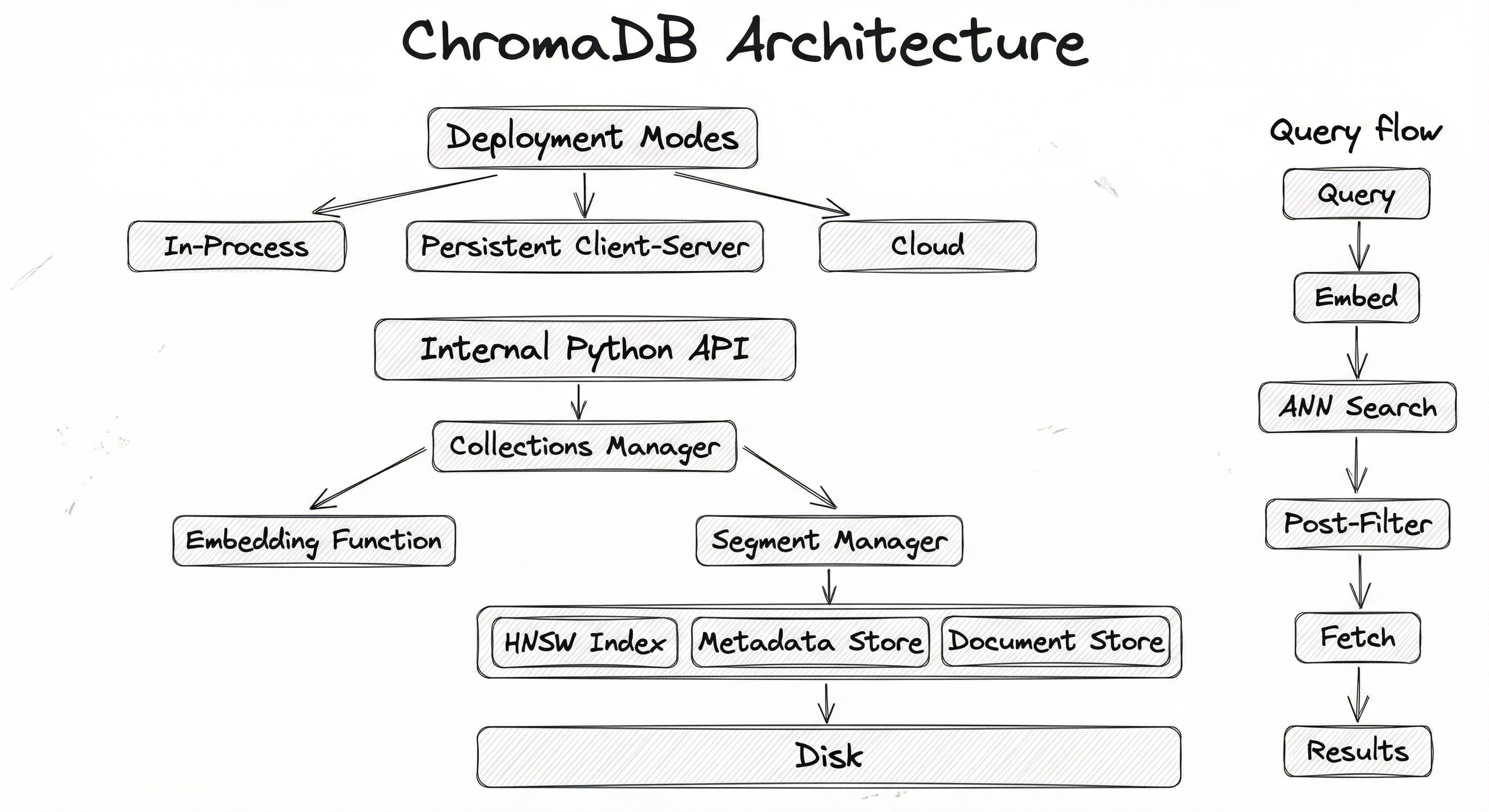
The key architectural insight is that Chroma stores metadata and documents in SQLite while storing the HNSW index graph in binary files on disk. This separation means metadata queries leverage SQLite's mature query optimizer, while vector search uses purpose-built graph traversal -- each component plays to its strengths.
Key Components
Client Layer
Provides the Python API that developers interact with. Three client types exist: EphemeralClient (in-memory, no persistence), PersistentClient (writes to disk via SQLite + HNSW binary files), and HttpClient (connects to a remote Chroma server over HTTP). The client handles serialization, validation, and routing requests to the appropriate backend.
Collections Manager
Manages the lifecycle of collections -- Chroma's equivalent of database tables. Each collection has a name, an associated embedding function, a distance metric, and optional HNSW configuration overrides. The collections manager handles creation, deletion, listing, and routing CRUD operations to the correct segments.
Embedding Function Engine
An abstraction layer that converts raw documents into embedding vectors before storage or query. Ships with built-in support for Sentence Transformers (all-MiniLM-L6-v2 default), OpenAI, Cohere, HuggingFace, Google PaLM, and custom functions. If you pass pre-computed embeddings, this layer is bypassed entirely.
HNSW Index (Rust Core)
The heart of the system -- a Rust-based HNSW implementation (migrated from the original HNSWlib binding in v1.0) that builds and maintains the proximity graph for approximate nearest neighbor search. Handles concurrent reads, incremental inserts, and index persistence to binary files (data_level0.bin, header.bin, link_lists.bin).
SQLite Metadata & Document Store
Stores metadata key-value pairs, document text, and collection-level configuration in a SQLite database (chroma.sqlite3). Metadata filtering queries are executed here using SQL predicates. SQLite was chosen for its zero-configuration nature, ACID compliance, and single-file portability.
Segment Manager
Coordinates between the HNSW index and the SQLite stores. Manages the mapping between external record IDs and internal segment positions. Handles write-ahead logging and ensures consistency between the vector index and metadata store during inserts, updates, and deletes.
Data Flow
Write Path (Adding Documents):
- User calls
collection.add(documents=[...], metadatas=[...], ids=[...])orcollection.upsert(...) - The embedding function converts raw documents into vectors (skipped if pre-computed embeddings are provided)
- The segment manager assigns internal IDs and routes data to both stores
- Vectors are inserted into the HNSW graph (Rust core)
- Metadata and documents are written to SQLite
- For
PersistentClient, changes are flushed to disk (HNSW binary files + SQLite WAL)
Read Path (Querying):
- User calls
collection.query(query_texts=[...], n_results=10, where={...}) - Query text is embedded using the collection's embedding function
- HNSW index returns the top candidates (over-fetching if metadata filters are present)
- Metadata predicates are evaluated against SQLite to post-filter results
- Documents and metadata for surviving candidates are fetched from SQLite
- Results are returned as a dict with
ids,documents,metadatas,distances, and optionallyembeddings
The write and read paths are largely independent, allowing concurrent reads during writes. However, heavy write loads can temporarily increase query latency due to HNSW graph restructuring.
The architecture diagram shows three deployment modes (in-process, persistent, client-server, and cloud) flowing into the internal architecture: Python Client API connects to Collections Manager, which branches to the Embedding Function and Segment Manager. The Segment Manager coordinates between the HNSW Index (Rust Core), Metadata Store (SQLite), and Document Store (SQLite), all persisting to disk storage. A separate query flow shows: Query Text/Vector goes through embedding, HNSW ANN search, metadata post-filtering, document fetching, and returns results.
How to Implement
Getting Started Is Absurdly Easy
One of Chroma's biggest selling points is that you can go from zero to a working semantic search in about five lines of Python. No Docker, no configuration files, no API keys (unless you want a non-default embedding model). This section walks through progressively more complex implementations.
Three Implementation Patterns
Pattern 1: In-Memory (Prototyping). Use chromadb.EphemeralClient() for throwaway experiments. Data lives only in memory and is lost when the process exits. Perfect for Jupyter notebooks and quick tests.
Pattern 2: Persistent Local (Development / Small Production). Use chromadb.PersistentClient(path="./chroma_data") to persist data to disk. Data survives process restarts. Ideal for development servers, internal tools, and applications with fewer than ~1 million vectors.
Pattern 3: Client-Server (Production). Run chroma run --host 0.0.0.0 --port 8000 (or use the Docker image chromadb/chroma) and connect via chromadb.HttpClient(host="server-ip", port=8000). This decouples the database from your application and enables horizontal scaling.
Pattern 4: Chroma Cloud (Managed Production). For teams that want zero infrastructure management, Chroma Cloud provides a serverless deployment with $5 of free credits to start. Available on AWS, GCP, and Azure.
Cost Context: Running a self-hosted Chroma server on an AWS
t3.mediuminstance costs about 70/month (~INR 5,900/month) for small workloads. For a bootstrapped startup in India, these savings matter.
import chromadb

# Create a persistent client (data saved to disk)
client = chromadb.PersistentClient(path="./chroma_data")

# Create a collection (uses default all-MiniLM-L6-v2 embeddings)
collection = client.get_or_create_collection(name="my_documents")

# Add documents -- Chroma embeds them automatically
collection.add(
    documents=[
        "The Taj Mahal was built by Mughal emperor Shah Jahan in 1632.",
        "ISRO successfully launched Chandrayaan-3 to the Moon in 2023.",
        "Mumbai's dabbawalas deliver 200,000 lunches daily with Six Sigma accuracy.",
        "The Indian Premier League is the world's richest cricket tournament.",
        "Bangalore is often called the Silicon Valley of India.",
    ],
    ids=["doc1", "doc2", "doc3", "doc4", "doc5"],
    metadatas=[
        {"topic": "history", "year": 1632},
        {"topic": "space", "year": 2023},
        {"topic": "logistics", "year": 2024},
        {"topic": "sports", "year": 2024},
        {"topic": "technology", "year": 2024},
    ],
)

# Query by meaning -- not keywords!
results = collection.query(
    query_texts=["Indian space exploration achievements"],
    n_results=2,
)

print(results["documents"])
# [['ISRO successfully launched Chandrayaan-3 to the Moon in 2023.',
#   'Bangalore is often called the Silicon Valley of India.']]
This is the simplest possible Chroma workflow. Notice what you did NOT have to do: choose an embedding model, configure an index, set up a server, or manage any infrastructure. Chroma handled all of it with sensible defaults. The all-MiniLM-L6-v2 model was downloaded automatically on first use, embeddings were generated transparently, and HNSW was configured with default parameters. The query found the most semantically relevant documents despite sharing zero keywords with the query ("ISRO" and "Chandrayaan" were retrieved for "Indian space exploration").
import chromadb

client = chromadb.PersistentClient(path="./chroma_data")
collection = client.get_or_create_collection(
    name="product_reviews",
    metadata={"hnsw:space": "cosine"},  # Use cosine distance
)

# Add product reviews with rich metadata
collection.add(
    documents=[
        "Excellent phone, great camera quality and battery life.",
        "Budget phone with decent performance for the price.",
        "Premium build quality but overpriced for Indian market.",
        "Best laptop for coding, fast SSD and 16GB RAM.",
        "Affordable laptop, good for students and light usage.",
    ],
    ids=["rev1", "rev2", "rev3", "rev4", "rev5"],
    metadatas=[
        {"category": "phone", "rating": 5, "price_inr": 45000},
        {"category": "phone", "rating": 4, "price_inr": 12000},
        {"category": "phone", "rating": 3, "price_inr": 85000},
        {"category": "laptop", "rating": 5, "price_inr": 75000},
        {"category": "laptop", "rating": 4, "price_inr": 35000},
    ],
)

# Query: Find similar phone reviews under INR 50,000
results = collection.query(
    query_texts=["good camera phone"],
    n_results=3,
    where={
        "$and": [
            {"category": {"$eq": "phone"}},
            {"price_inr": {"$lt": 50000}},
        ]
    },
)

print(results["documents"])
# [['Excellent phone, great camera quality and battery life.',
#   'Budget phone with decent performance for the price.']]

# Query with document content filter
results = collection.query(
    query_texts=["affordable computing device"],
    n_results=5,
    where_document={"$contains": "student"},
)

print(results["documents"])
# [['Affordable laptop, good for students and light usage.']]
This example demonstrates two powerful filtering features. The where parameter filters on structured metadata using operators like $eq, $lt, $gt, $ne, $lte, $gte, and logical combinators $and / $or. The where_document parameter filters on the raw document text using $contains and $not_contains. Both filters are applied as post-filters after the HNSW ANN search, meaning Chroma internally over-fetches candidates and then narrows down. The cosine distance metric is set via collection metadata -- this is important if your embedding model was trained with cosine similarity objectives.
import chromadb
from chromadb.utils import embedding_functions

client = chromadb.PersistentClient(path="./chroma_data")

# Option 1: OpenAI embeddings (requires OPENAI_API_KEY env var)
openai_ef = embedding_functions.OpenAIEmbeddingFunction(
    api_key="your-api-key",
    model_name="text-embedding-3-small",  # 1536 dimensions
)

collection_openai = client.get_or_create_collection(
    name="docs_openai",
    embedding_function=openai_ef,
    metadata={"hnsw:space": "cosine"},
)

# Option 2: HuggingFace Sentence Transformers (local, free)
hf_ef = embedding_functions.SentenceTransformerEmbeddingFunction(
    model_name="BAAI/bge-small-en-v1.5",  # 384 dimensions, great quality
)

collection_hf = client.get_or_create_collection(
    name="docs_hf",
    embedding_function=hf_ef,
    metadata={"hnsw:space": "cosine"},
)

# Option 3: Pre-computed embeddings (bring your own)
import numpy as np

collection_custom = client.get_or_create_collection(
    name="docs_custom",
    metadata={"hnsw:space": "cosine"},
)

# Add with pre-computed embeddings (skip the embedding function entirely)
collection_custom.add(
    ids=["doc1"],
    embeddings=[[0.1, 0.2, 0.3, 0.4]],  # Your pre-computed vector
    documents=["Sample document"],
    metadatas=[{"source": "custom_pipeline"}],
)

# Query with a pre-computed vector
results = collection_custom.query(
    query_embeddings=[[0.15, 0.25, 0.35, 0.45]],
    n_results=1,
)
Chroma's embedding function abstraction is one of its best design decisions. You can swap between local models (Sentence Transformers -- free, runs on CPU), cloud APIs (OpenAI at ~$0.02 per 1M tokens or ~INR 1.7 per 1M tokens), or pre-computed embeddings from your own pipeline -- all without changing your query code. The embedding function is bound to a collection at creation time, ensuring consistency between stored and query embeddings. For cost-sensitive Indian startups, the default Sentence Transformers model is often sufficient and completely free.
from langchain_community.vectorstores import Chroma
from langchain_community.embeddings import HuggingFaceEmbeddings
from langchain.text_splitter import RecursiveCharacterTextSplitter
from langchain_community.document_loaders import TextLoader
from langchain.chains import RetrievalQA
from langchain_openai import ChatOpenAI

# 1. Load and chunk documents
loader = TextLoader("company_docs.txt")
documents = loader.load()

text_splitter = RecursiveCharacterTextSplitter(
    chunk_size=500,
    chunk_overlap=50,
)
chunks = text_splitter.split_documents(documents)

# 2. Create Chroma vector store with HuggingFace embeddings (free)
embeddings = HuggingFaceEmbeddings(model_name="BAAI/bge-small-en-v1.5")

vectorstore = Chroma.from_documents(
    documents=chunks,
    embedding=embeddings,
    persist_directory="./chroma_langchain",
    collection_name="company_knowledge",
)

# 3. Build a RAG chain
retriever = vectorstore.as_retriever(
    search_type="similarity",
    search_kwargs={"k": 5},
)

qa_chain = RetrievalQA.from_chain_type(
    llm=ChatOpenAI(model="gpt-4o-mini", temperature=0),
    chain_type="stuff",
    retriever=retriever,
    return_source_documents=True,
)

# 4. Query the RAG pipeline
result = qa_chain.invoke({"query": "What is our company's refund policy?"})
print(result["result"])
print(f"Sources: {[doc.metadata for doc in result['source_documents']]}")
This is the canonical RAG pipeline using LangChain and Chroma. The integration is seamless -- LangChain's Chroma class wraps ChromaDB's native API and provides a as_retriever() method that plugs directly into LangChain's chain abstractions. For a startup building an internal knowledge base or customer support bot, this entire pipeline can be running in production within a day. The BAAI/bge-small-en-v1.5 model is a popular open-source alternative that runs locally, avoiding per-query API costs entirely.
# Start ChromaDB server with persistent storage
docker run -d \
  --name chromadb \
  -p 8000:8000 \
  -v ./chroma-data:/chroma/chroma \
  -e IS_PERSISTENT=TRUE \
  -e ANONYMIZED_TELEMETRY=FALSE \
  chromadb/chroma:latest

# Verify the server is running
curl http://localhost:8000/api/v1/heartbeat
# {"nanosecond heartbeat": 1707307200000000000}
Running Chroma in client-server mode decouples the database from your application process. The Docker image handles everything -- the Rust-based HNSW engine, SQLite metadata store, and HTTP API server. The -v flag maps a host directory for persistent storage, so your data survives container restarts. This is the recommended deployment pattern for production workloads where you want multiple application instances querying the same Chroma server.
import chromadb

# Connect to the Docker-hosted Chroma server
client = chromadb.HttpClient(host="localhost", port=8000)

# Everything works exactly the same as the local client
collection = client.get_or_create_collection(
    name="production_docs",
    metadata={"hnsw:space": "cosine"},
)

# Add, query, update, delete -- identical API
collection.add(
    documents=["IRCTC handles 25 million bookings per month during peak season."],
    ids=["irctc_fact"],
    metadatas=[{"domain": "railways", "country": "india"}],
)

results = collection.query(
    query_texts=["Indian railway ticket booking volume"],
    n_results=1,
)

print(results["documents"][0][0])
# 'IRCTC handles 25 million bookings per month during peak season.'
The beauty of Chroma's API design is that switching from local to client-server mode requires changing exactly one line: PersistentClient(path=...) becomes HttpClient(host=..., port=...). The rest of your code -- collection creation, document insertion, querying, metadata filtering -- remains identical. This means you can prototype locally and deploy to a server without refactoring anything.
# Docker Compose for production ChromaDB deployment
# Save as docker-compose.yml
version: '3.8'

services:
  chromadb:
    image: chromadb/chroma:latest
    ports:
      - "8000:8000"
    volumes:
      - chroma_data:/chroma/chroma
    environment:
      - IS_PERSISTENT=TRUE
      - PERSIST_DIRECTORY=/chroma/chroma
      - ANONYMIZED_TELEMETRY=FALSE
      - CHROMA_SERVER_AUTH_CREDENTIALS_PROVIDER=chromadb.auth.token_authn.TokenAuthenticationServerProvider
      - CHROMA_SERVER_AUTH_CREDENTIALS=your-secret-token
      - CHROMA_SERVER_AUTH_TOKEN_TRANSPORT_HEADER=Authorization
    restart: unless-stopped
    deploy:
      resources:
        limits:
          memory: 4G
        reservations:
          memory: 2G

volumes:
  chroma_data:
    driver: local
Common Implementation Mistakes
- ●
Not specifying the embedding function on retrieval: If you create a collection with a custom embedding function and later call
get_collection()without passing the same function, Chroma falls back to the defaultall-MiniLM-L6-v2. Your queries will then use a different embedding space than your stored vectors, causing silently terrible results. Always pass the embedding function when getting an existing collection. - ●
Storing millions of vectors in EphemeralClient: The ephemeral client keeps everything in memory with no persistence. Developers sometimes use it in long-running server processes, only to lose all data on a crash or restart. Use
PersistentClientfor anything beyond throwaway experiments. - ●
Ignoring the distance metric mismatch: Chroma defaults to L2 distance, but many popular embedding models (including OpenAI's and BGE) are trained with cosine similarity objectives. Always set
metadata={"hnsw:space": "cosine"}when creating collections for these models. L2 on normalized vectors gives the same ranking as cosine, but if your vectors are not normalized, the results will differ. - ●
Using ChromaDB for multi-tenant isolation at scale: Chroma's collection-per-tenant approach works for a few hundred tenants, but creating thousands of collections (each with its own HNSW index) consumes significant memory and file handles. For large multi-tenant applications (like a SaaS serving 10,000+ customers), use metadata filtering within a shared collection or consider a purpose-built multi-tenant database like Qdrant.
- ●
Forgetting that metadata filters are post-filters: Because Chroma applies metadata filters after the ANN search, a highly selective filter (e.g., matching only 0.1% of the corpus) may return fewer than
n_resultsitems. Chroma does internal over-fetching to mitigate this, but extremely selective filters can still under-return. If this is a frequent issue, consider partitioning data into separate collections by the most selective dimension. - ●
Not handling ID collisions on upsert vs add:
collection.add()raises an error if an ID already exists, whilecollection.upsert()silently overwrites. Mixing these up can either cause crashes in production or silently overwrite data you wanted to keep. Be deliberate about which operation you use.
When Should You Use This?
Use When
You are prototyping a RAG application and want to go from zero to a working vector search in under 5 minutes with minimal boilerplate
Your vector corpus is small to medium (fewer than ~5 million vectors) and does not require distributed sharding
You want built-in embedding generation without managing a separate embedding service -- Chroma's embedding function abstraction handles this transparently
You are building with LangChain or LlamaIndex and want a vector store that integrates natively with these frameworks out of the box
Your team values developer experience and low operational overhead over maximum raw performance -- you would rather write 5 lines of Python than 50 lines of configuration
You need a portable, file-based vector store that can be committed to version control, shipped as part of an application, or deployed without a separate database server (similar to SQLite for relational data)
You are building an internal tool, hackathon project, or MVP where time-to-first-result matters more than scaling to billions of vectors
You want to run vector search entirely locally without cloud dependencies or API costs -- particularly relevant for privacy-sensitive use cases or cost-constrained projects in India
Avoid When
Your corpus exceeds 10 million vectors -- Chroma's single-node architecture will hit memory and latency limits. Benchmarks show QPS drops to ~112 at 10M vectors compared to thousands for Milvus or Qdrant at the same scale
You need distributed horizontal scaling with sharding across multiple nodes -- Chroma does not support this natively (unlike Milvus, Qdrant, or Weaviate)
You require sub-10ms P99 query latency at high QPS for user-facing production systems -- Chroma is optimized for developer experience, not raw performance
You need advanced index types like IVF, PQ, scalar quantization, or GPU-accelerated search -- Chroma only supports HNSW
Your application requires enterprise features like role-based access control (RBAC), audit logging, or SOC 2 compliance out of the box
You are building a large-scale multi-tenant SaaS where thousands of tenants each need isolated vector spaces with per-tenant resource limits
You need hybrid search (dense vector + sparse BM25 in a single query) -- Weaviate and Qdrant provide this natively, while Chroma requires a separate BM25 implementation
Key Tradeoffs
The Core Tradeoff: Simplicity vs. Scale
Chroma's fundamental design decision is to prioritize developer experience over maximum performance. This manifests in several concrete tradeoffs:
| Dimension | ChromaDB | Production Vector DBs (Qdrant, Milvus) |
|---|---|---|
| Setup time | 30 seconds (pip install) | 10-30 minutes (Docker, config) |
| Lines of code for basic search | 5-10 | 20-40 |
| Max practical corpus size | ~5M vectors | 100M-1B+ vectors |
| Query latency at 1M vectors | ~15-30ms | ~5-10ms |
| Distributed sharding | Not supported | Native support |
| Index types | HNSW only | HNSW, IVF, PQ, flat, and more |
| Built-in embedding functions | Yes (10+ providers) | Varies (Weaviate yes, Qdrant no) |
| Metadata filtering | Post-filter | Pre-filter + post-filter |
| Cost (self-hosted) | Free | Free (but higher ops cost) |
| Cost (managed cloud) | Usage-based from $0 | $70-500+/month |
Memory vs. Convenience
Chroma co-locates documents with embeddings in the same database. This means you do not need a separate document store, which simplifies architecture. But it also means your SQLite file grows significantly -- a collection with 1 million documents averaging 500 characters each adds ~500 MB just for document storage, on top of the vector index. For comparison, a vector-only store like Qdrant would only store the embeddings and a lightweight ID, keeping the index lean.
The Migration Question
Many teams start with Chroma for prototyping and plan to migrate to a production database later. This is a valid strategy, but be aware of the migration cost. Chroma's API is different from Qdrant's, Pinecone's, and Milvus's APIs. If you anticipate needing to migrate, consider using LangChain's or LlamaIndex's vector store abstraction from the start -- it provides a uniform interface that makes switching backends easier.
Rule of Thumb for Indian Startups: If your total corpus is under 1 million documents and you have fewer than 100 concurrent users, Chroma is probably all you need for production. That covers a surprisingly large number of real applications -- internal knowledge bases, customer support bots, document search for legal/medical firms, and most B2B SaaS products in their early stages.
Alternatives & Comparisons
Pinecone is a fully managed vector database that handles sharding, replication, and infrastructure automatically. Choose Pinecone over Chroma when you need zero-ops production deployment at scale (10M+ vectors), enterprise SLAs, and are willing to pay $70-500+/month (~INR 5,900-42,000/month). Choose Chroma when you want open-source flexibility, local development without cloud dependencies, or need to minimize costs during the prototyping phase.
Qdrant is a high-performance vector database written in Rust with native support for pre-filtering, distributed deployment, and advanced quantization. Choose Qdrant over Chroma when you need sub-10ms latency at millions of vectors, sophisticated metadata filtering with pre-filter support, or horizontal scaling across nodes. Choose Chroma when you prioritize setup simplicity, built-in embedding functions, and do not need distributed architecture.
Weaviate offers native hybrid search (vector + BM25), a GraphQL API, and built-in vectorization modules -- similar to Chroma's embedding functions but more mature. Choose Weaviate over Chroma when you need hybrid search, graph-like data relationships, or a more feature-complete production system. Choose Chroma when you want a simpler Python-native API and do not need hybrid search capabilities.
Milvus is a cloud-native distributed vector database designed for billion-scale workloads with multiple index types (HNSW, IVF, PQ, GPU). Choose Milvus over Chroma when you need to handle 100M+ vectors, require GPU acceleration, or need fine-grained index type selection. Choose Chroma when your scale is modest and you prefer simplicity over the operational complexity of a distributed system.
pgvector adds vector search capabilities to PostgreSQL. Choose pgvector over Chroma when you are already running PostgreSQL and want to add vector search without introducing a new system -- this keeps your stack simpler. Choose Chroma when you want a purpose-built embedding database with built-in embedding functions, richer metadata filtering, and do not want to manage a PostgreSQL instance.
Pros, Cons & Tradeoffs
Advantages
Unmatched developer experience -- go from
pip install chromadbto a working semantic search in under 10 lines of Python. No server setup, no configuration files, no API keys required for the default model. This is the fastest way to get a vector store running.Built-in embedding functions for 10+ providers (Sentence Transformers, OpenAI, Cohere, HuggingFace, Google) with a clean abstraction for custom functions. You do not need a separate embedding service or pipeline -- Chroma handles it transparently.
First-class LangChain and LlamaIndex integration -- Chroma is the default vector store in most tutorials and examples for these frameworks, meaning extensive community documentation and battle-tested integration code.
SQLite-based portability -- the entire database is a directory of files that can be copied, backed up, or version-controlled. No server process needed for the persistent client. This makes it ideal for edge deployments, air-gapped environments, and shipping databases as application artifacts.
Completely open-source (Apache 2.0) with no vendor lock-in. You can run it forever on your own infrastructure without paying a license fee. The $18M seed funding means active development is sustainable.
The Rust-core rewrite (v1.0, 2025) delivers up to 4x performance improvements for both reads and writes, eliminates Python GIL bottlenecks, and positions Chroma for handling larger workloads than its pure-Python predecessor.
Zero-cost local operation with the default Sentence Transformers model. For Indian startups and students, this means you can build and run a complete RAG system without spending a single rupee on cloud services or API calls.
Disadvantages
Single-node architecture limits scalability -- no native support for distributed sharding or replication. Practical limit is ~5M vectors on a single node before performance degrades significantly (QPS drops to ~112 at 10M vectors).
HNSW-only indexing -- no IVF, PQ, scalar quantization, or GPU-accelerated indices. If you need memory-efficient indexing for large corpora (where HNSW's ~1.3x memory overhead is too expensive), you cannot use Chroma.
Post-filter only for metadata -- metadata predicates are applied after the ANN search, which can result in fewer than
n_resultsitems being returned for highly selective filters. Production databases like Qdrant and Weaviate support pre-filtering, which is more reliable.No native hybrid search -- combining dense vector search with sparse BM25 retrieval requires a separate system and manual score fusion. Weaviate and Qdrant offer this natively.
Limited enterprise features -- no built-in RBAC (beyond token auth), no audit logging, no SOC 2 compliance documentation. For enterprise deployments in regulated industries (banking, healthcare), this can be a blocker.
Document co-location increases storage size -- storing full documents alongside vectors in SQLite can balloon the database size. A corpus of 1M documents at 500 chars each adds ~500 MB just for text, on top of the vector index.
Migration friction -- Chroma's API is non-standard. Moving to Pinecone, Qdrant, or Milvus later requires rewriting data ingestion and query code (unless you use LangChain/LlamaIndex as an abstraction layer from the start).
Failure Modes & Debugging
Embedding function mismatch on collection retrieval
Cause
A collection is created with a custom embedding function (e.g., OpenAI text-embedding-3-small) but later retrieved with get_collection() without specifying the same function. Chroma silently falls back to the default all-MiniLM-L6-v2, producing 384-dimensional query vectors that are compared against 1536-dimensional stored vectors -- or worse, producing vectors in a completely different semantic space.
Symptoms
Query results are nonsensical or seemingly random. No error is raised because Chroma does not validate embedding function consistency across sessions. If the dimensions match by coincidence (both 384), the results will be wrong but not obviously broken. Developers often waste hours debugging the retrieval pipeline when the issue is a single missing parameter.
Mitigation
Always pass the embedding function explicitly when calling get_collection() or get_or_create_collection(). Create a wrapper function or factory pattern that ensures the correct function is always attached. Consider storing the embedding function name in collection metadata as a safety check.
Post-filter starvation returning fewer results than requested
Cause
A metadata filter with high selectivity (e.g., matching only 0.5% of the corpus) is applied. Chroma's post-filter approach first retrieves HNSW candidates and then filters. If the over-fetch factor is insufficient, fewer than n_results items survive the filter.
Symptoms
Queries return fewer results than n_results specifies, or return results with poor relevance because the most similar vectors were filtered out. This is particularly common in multi-tenant setups where a small tenant's documents are a tiny fraction of the total collection -- for example, a small law firm with 100 documents in a shared collection of 500,000.
Mitigation
For highly selective dimensions, create separate collections per group rather than relying on metadata filtering in a shared collection. Alternatively, increase the internal over-fetch factor (though Chroma does not expose this directly). Monitor result counts and alert when queries consistently return fewer than requested.
SQLite file corruption or locking under concurrent writes
Cause
Multiple processes attempt to write to the same PersistentClient path simultaneously. SQLite supports concurrent readers but only one writer at a time. Heavy concurrent writes from multiple application instances can trigger database is locked errors or, in rare cases, file corruption.
Symptoms
sqlite3.OperationalError: database is locked exceptions. In severe cases, the SQLite file becomes corrupted and Chroma fails to start. Data loss may occur if writes were in progress during the corruption event.
Mitigation
Use the client-server mode (HttpClient + Docker) instead of PersistentClient when multiple processes need to access the same database. The server serializes writes properly. For single-process applications, PersistentClient is fine. Consider enabling SQLite WAL mode (Write-Ahead Logging) for better concurrent read performance.
Memory exhaustion with large collections on the default client
Cause
The HNSW index is loaded entirely into memory. For large collections (1M+ vectors at 768 dimensions), this requires ~3-4 GB of RAM just for the index. Combined with SQLite's memory usage for metadata, the process can exceed available memory on constrained machines.
Symptoms
Out-of-memory (OOM) errors, process crashes, or extreme slowdowns due to OS swap usage. On Kubernetes, pods enter OOMKilled or CrashLoopBackOff states. Latency increases by 10-100x as the OS pages index data to disk.
Mitigation
Monitor memory usage with the formula: vectors * dimensions * 4 bytes * 1.3 (HNSW overhead). For 1M vectors at 768 dimensions, expect ~4 GB. Provision machines accordingly. If budget is limited, consider using a smaller embedding model (384 dimensions instead of 768) or splitting data across multiple collections that are loaded on demand.
Distance metric mismatch causing poor retrieval quality
Cause
Chroma defaults to L2 (Euclidean) distance, but many popular embedding models (OpenAI, BGE, E5) are trained with cosine similarity. Using L2 on non-normalized vectors produces different rankings than cosine similarity, leading to suboptimal retrieval.
Symptoms
Retrieval results are not as semantically relevant as expected, despite the embedding model being high quality. Switching the metric to cosine improves results immediately. This is a silent failure -- no errors, just degraded quality.
Mitigation
Always check the embedding model's training objective and set the distance metric accordingly: metadata={"hnsw:space": "cosine"} for cosine-trained models. Most modern text embedding models use cosine similarity, so cosine is almost always the right choice. Make this a default in your codebase.
Data loss from EphemeralClient in long-running services
Cause
Developers use chromadb.EphemeralClient() (which stores everything in memory) in a server process, not realizing that data is lost on process restart, crash, or deployment. This often happens when following quick-start tutorials that use the ephemeral client and then deploying the same code to production.
Symptoms
All vector data disappears after a server restart or deployment. Users report that the system "forgets" everything periodically. There is no error or warning -- the ephemeral client works perfectly until the process ends.
Mitigation
Never use EphemeralClient() in production. Always use PersistentClient(path=...) or HttpClient(host=..., port=...) for any application where data must survive restarts. Add a startup check that verifies the collection contains expected data.
Placement in an ML System
Where ChromaDB Fits in the ML Pipeline
In a RAG pipeline, ChromaDB sits between the embedding model and the LLM context assembly stage. Documents are chunked, embedded (either by Chroma's built-in functions or an external model), and stored in a collection. At query time, the user's question is embedded and used to retrieve the most relevant chunks, which are then formatted into a prompt for the LLM.
For recommendation systems at the scale of a small-to-medium Indian e-commerce startup (think Meesho, early-stage Nykaa, or a D2C brand), ChromaDB can store product embeddings and serve similarity-based recommendations. A catalog of 100K-500K products is well within Chroma's comfortable operating range.
For semantic search in internal tools -- like a legal document search system for an Indian law firm, or an HR policy search for a company with 10,000 employees -- Chroma is often the ideal choice because the corpus is small, updates are infrequent, and the simplicity of deployment outweighs the need for industrial-grade performance.
Practical Advice: If your ML system receives fewer than 50 queries per second and your corpus has fewer than 1 million documents, ChromaDB is likely sufficient for production. That covers a remarkably wide range of real-world applications. When you outgrow it, you will know -- latency will creep up, memory will become a concern, and that is the signal to evaluate Qdrant, Milvus, or Pinecone.
Pipeline Stage
Retrieval / Serving
Upstream
- embedding-model
- vector-store
- semantic-search
Downstream
- semantic-search
- vector-store
Scaling Bottlenecks
The primary bottleneck is single-node memory. Since Chroma runs the entire HNSW index in one process without sharding, your maximum corpus size is bounded by available RAM. At 768 dimensions, 1 million vectors consume ~4 GB. At 5 million vectors, you need ~20 GB -- achievable on a modern cloud instance but getting expensive.
Query throughput is the second bottleneck. Benchmarks show Chroma achieving ~2,000-5,000 QPS at 100K vectors but dropping to ~112 QPS at 10 million vectors. For comparison, Qdrant and Milvus maintain thousands of QPS at 10M vectors. The Rust-core rewrite in v1.0 improved this significantly (4x faster than the pure-Python predecessor), but Chroma is still not designed to compete with production databases on raw throughput.
Write throughput during bulk ingestion can also bottleneck. Inserting 1 million vectors with metadata takes minutes rather than seconds due to the sequential SQLite writes and HNSW graph construction. For initial bulk loads, batch your inserts (Chroma supports batch add()) and consider disabling the embedding function if you are providing pre-computed vectors.
Production Case Studies
OpenAI features ChromaDB prominently in their official Cookbook as the recommended lightweight vector store for building embeddings-based search applications. The tutorial demonstrates using OpenAI's text-embedding-ada-002 model with Chroma for semantic search over the Wikipedia Simple English dataset, showcasing the integration between OpenAI's embedding API and Chroma's storage layer.
The cookbook example has become one of the most-referenced tutorials for building RAG applications, contributing to ChromaDB becoming the de facto starter vector database in the OpenAI developer ecosystem. It demonstrates sub-100ms query times over tens of thousands of Wikipedia articles.
DataRobot provides official documentation for building and hosting ChromaDB vector databases as part of their enterprise AI platform. Their integration allows data scientists to create Chroma-backed vector stores for RAG applications directly within the DataRobot workflow, embedding document collections and deploying them alongside ML models.
Enterprise teams using DataRobot can leverage ChromaDB for prototyping and deploying RAG-powered applications without introducing additional vector database infrastructure, reducing time-to-deployment for generative AI features from weeks to days.
ChromaDB is one of the most widely used vector stores in the LangChain ecosystem, with first-class integration in both LangChain Python and LangChain.js. The langchain-chroma package provides seamless wrappers for Chroma collections, enabling developers to plug Chroma into RAG chains, conversational agents, and document Q&A systems with minimal code. Thousands of open-source projects and tutorials use this integration.
ChromaDB's LangChain integration is used in over 90,000 open-source projects on GitHub. The combination of LangChain + Chroma has become the standard starter stack for RAG application development, particularly popular among developers in India's growing AI startup ecosystem building with limited budgets.
Airbyte, the open-source data integration platform, built a dedicated ChromaDB destination connector that enables automated data pipelines from 300+ sources (databases, APIs, SaaS tools) into Chroma vector collections. This allows teams to keep their vector stores continuously updated with fresh data from production systems without writing custom ETL code.
The Airbyte-Chroma integration reduces the data pipeline setup time for RAG applications from days to hours, enabling automatic syncing of product catalogs, support tickets, and documentation into Chroma for real-time semantic search.
Tooling & Ecosystem
The core ChromaDB open-source project. Provides the Python client library, embedded database engine (Rust core + SQLite), HTTP server, built-in embedding functions, and the chromadb PyPI package. Over 25,000 GitHub stars and 5M+ monthly downloads.
The managed serverless deployment of ChromaDB. Provides hosted Chroma instances on AWS, GCP, and Azure with usage-based pricing. Includes $5 of free credits to start. Ideal for production deployments where you want zero infrastructure management.
Official LangChain integration for ChromaDB (langchain-chroma package). Provides Chroma class that wraps ChromaDB collections with LangChain's VectorStore interface, enabling plug-and-play usage in RAG chains, agents, and retrieval pipelines.
LlamaIndex's ChromaDB integration providing ChromaVectorStore class for indexing and querying documents. Supports metadata filtering, persistent storage, and both local and client-server Chroma instances.
Official community cookbook with practical recipes for common ChromaDB patterns: running Chroma, embedding functions, filtering, performance tips, and integrations. An excellent resource for learning beyond the basic documentation.
Official Docker image for running ChromaDB in client-server mode. Includes the Rust-based server with persistent storage support. Recommended for production deployments where multiple clients need to connect to a shared Chroma instance.
Open-source benchmarking tool from Zilliz that includes ChromaDB among its supported backends. Tests insertion speed, query throughput (QPS), recall, and latency across multiple vector databases for standardized comparison.
Research & References
Malkov, Y. A. & Yashunin, D. A. (2018)IEEE TPAMI, Vol. 42, No. 4
The foundational paper for the HNSW algorithm that ChromaDB uses as its core indexing engine. Introduces the multi-layer navigable small world graph with logarithmic search complexity, which became the dominant ANN index type across the vector database industry.
Lewis, P., Perez, E., Piktus, A., et al. (2020)NeurIPS 2020
Established the RAG paradigm that drives the majority of ChromaDB's use cases. Demonstrated that combining a dense retriever with a seq2seq generator significantly outperforms pure parametric models on knowledge-intensive tasks -- the core insight that made vector databases essential for LLM applications.
Pan, J., Wang, J. & Li, G. (2024)The VLDB Journal
Comprehensive survey covering 20+ vector database management systems including ChromaDB. Analyzes storage architectures, indexing techniques, query processing, and filtering strategies across commercial and open-source systems, providing context for ChromaDB's design choices.
Reimers, N. & Gurevych, I. (2019)EMNLP 2019
Introduced the Sentence Transformers framework that powers ChromaDB's default embedding function (all-MiniLM-L6-v2). The paper showed how to adapt BERT for producing fixed-size sentence embeddings suitable for similarity search -- the exact use case ChromaDB is built for.
Multiple authors (2025)arXiv preprint
Addresses unique testing challenges in vector databases including approximate search correctness, high-dimensional data handling, and dynamic scaling -- challenges directly relevant to ChromaDB's development as it matures from prototyping tool to production system.
Multiple authors (2024)arXiv preprint
Evaluates embedding models in RAG contexts using various similarity metrics and benchmarks. Directly relevant to ChromaDB users who must choose between the default all-MiniLM-L6-v2 model and alternatives like BGE, E5, or OpenAI embeddings.
Interview & Evaluation Perspective
Common Interview Questions
- ●
When would you choose ChromaDB over Pinecone or Qdrant for a production system?
- ●
How does ChromaDB handle metadata filtering, and what are its limitations compared to pre-filtering in Qdrant?
- ●
You are building a RAG system for a startup with 500K documents and 10 concurrent users. Would you use ChromaDB? Justify your answer.
- ●
What happens to your ChromaDB-based system when you upgrade the embedding model? Walk me through the migration process.
- ●
Explain the HNSW algorithm that ChromaDB uses under the hood. What are its time and space complexity trade-offs?
- ●
How would you architect a multi-tenant document search system using ChromaDB? What are the scaling limits?
- ●
Compare ChromaDB's approach of co-locating documents with vectors versus storing only vector IDs. What are the trade-offs?
Key Points to Mention
- ●
ChromaDB's core value proposition is developer experience -- it reduces the barrier to entry for vector search from hours to minutes. This is a deliberate engineering trade-off, not a limitation.
- ●
The post-filtering approach for metadata is simpler to implement but can under-return results for selective queries. Production systems like Qdrant use pre-filtering which is more reliable but requires tighter integration between the index and metadata store.
- ●
ChromaDB's built-in embedding functions are a genuine architectural feature, not just a convenience. They ensure consistency between storage and query embeddings, which eliminates an entire class of bugs (embedding function mismatch).
- ●
The Rust-core rewrite (v1.0) is significant because it eliminates the Python GIL bottleneck for the performance-critical path while keeping the Python API for developer convenience -- a pattern similar to NumPy wrapping C/Fortran.
- ●
For scale estimation: 1M vectors at 384 dimensions = ~2 GB RAM for the HNSW index. At 768 dimensions, double that. Include SQLite overhead for metadata and documents.
- ●
The migration path from Chroma to a production database should be planned from day one. Using LangChain or LlamaIndex as an abstraction layer makes this significantly easier.
Pitfalls to Avoid
- ●
Dismissing ChromaDB as 'just a toy' -- for the right workload (sub-5M vectors, moderate QPS), it is a legitimate production choice. Many real applications operate within this range.
- ●
Claiming ChromaDB supports distributed sharding or horizontal scaling -- it does not. Be precise about its single-node architecture.
- ●
Forgetting to mention the embedding function consistency requirement -- this is the most common production bug with ChromaDB and shows practical experience.
- ●
Conflating ChromaDB's simplicity with lack of sophistication -- the Rust core, HNSW index, and SQLite metadata store are well-engineered; the simplicity is in the API, not the internals.
- ●
Not discussing the cost angle -- in interviews at Indian companies especially, demonstrating awareness that ChromaDB's zero-cost local operation is valuable for budget-constrained projects shows practical maturity.
Senior-Level Expectation
A senior candidate should articulate ChromaDB's position in the vector database spectrum with precision: it occupies the 'SQLite of vector databases' niche -- lightweight, embeddable, zero-configuration, sufficient for a wide range of workloads but not designed for web-scale. They should discuss concrete scaling limits (5M vectors, ~100-200 QPS at 1M+ vectors), the Rust-core migration story, and the trade-offs of post-filtering vs pre-filtering. Most importantly, they should demonstrate judgment about when to use Chroma versus when to invest in a production database, grounding this judgment in real metrics (corpus size, QPS requirements, memory budget, team ops capacity). The ability to design a migration path -- starting with Chroma for rapid prototyping, validating the use case, then migrating to Qdrant or Milvus when scale demands it -- signals architectural maturity.
Summary
Wrapping Up: ChromaDB in Perspective
ChromaDB is the SQLite of vector databases -- and that comparison is both its greatest strength and its clearest limitation. Just as SQLite made relational databases accessible to every developer by eliminating the need for a separate server, ChromaDB makes vector search accessible by eliminating the need for infrastructure, configuration, and embedding pipelines. You pip install, write five lines of Python, and you have semantic search. That is genuinely powerful.
Under the hood, Chroma packages a Rust-based HNSW index (since the v1.0 rewrite in 2025, delivering 4x performance gains), a SQLite metadata store, built-in embedding functions for 10+ providers, and a clean Python API into a single package. It supports ephemeral (in-memory), persistent (on-disk), and client-server deployment modes, scaling from Jupyter notebook experiments to small production services without code changes. Its first-class integration with LangChain and LlamaIndex has made it the default starting point for RAG application development, with over 25,000 GitHub stars and usage in 90,000+ open-source projects.
But know the boundaries. ChromaDB is a single-node database without distributed sharding, supports only HNSW indexing (no IVF, PQ, or GPU acceleration), uses post-filtering for metadata queries, and shows significant QPS degradation above 5-10 million vectors. For large-scale production workloads -- the kind that power Flipkart's product search or Swiggy's recommendations -- you need Qdrant, Milvus, or Pinecone. The smart approach, and one that many successful Indian AI startups follow, is to prototype with Chroma, validate the use case, then migrate to a production database when scale demands it. ChromaDB makes that first step so easy that there is no reason not to start building today.