LangGraph Node in Machine Learning
LangGraph is an open-source framework built on top of LangChain for constructing stateful, multi-agent applications as directed graphs. Instead of treating agent behavior as a single chain of prompts, LangGraph lets you decompose complex workflows into discrete nodes (functions, agents, or decision points) connected by edges (fixed transitions or conditional branches), with a shared state object flowing through the entire graph.
Why does this matter? Because real-world agent systems are not linear. They loop, branch, wait for human approval, retry on failure, and coordinate multiple specialized sub-agents -- all while maintaining context across potentially long-running sessions. Traditional chain-based orchestration breaks down quickly in these scenarios.
LangGraph addresses this by borrowing concepts from finite state machines and dataflow programming. It gives you first-class support for cycles (agents that think in loops), conditional routing (different paths based on runtime decisions), checkpointing (pause, persist, and resume execution), and human-in-the-loop patterns (interrupt execution for human review). Combined with LangSmith for observability, it forms one of the most production-ready agentic frameworks available today.
From LinkedIn's SQL Bot to Uber's code migration agents, from Klarna's customer service assistant to Elastic's security threat detection -- LangGraph powers multi-agent systems at some of the world's largest companies. In India, the agentic AI ecosystem is booming with 109+ startups building on frameworks like LangGraph, and companies from Sarvam AI to enterprise consultancies are deploying graph-based agent architectures in production.
Concept Snapshot
- What It Is
- A graph-based orchestration framework that models multi-agent workflows as state machines with nodes (agents/functions), edges (transitions), and a shared mutable state, enabling cycles, branching, persistence, and human-in-the-loop control.
- Category
- Multi-Agent Orchestration
- Complexity
- Advanced
- Inputs / Outputs
- Inputs: user query or task description, tool definitions, agent configurations, initial state. Outputs: final state containing agent responses, tool call results, intermediate reasoning traces, and any accumulated artifacts.
- System Placement
- Sits at the orchestration layer of an agentic system -- above individual LLM calls and tool integrations, but below the application interface. It coordinates how multiple agents collaborate, when to invoke tools, and how state flows between steps.
- Also Known As
- LangGraph agent graph, StateGraph, agent state machine, graph-based agent orchestrator, LangChain graph runtime
- Typical Users
- ML Engineers, AI/LLM Application Developers, Backend Engineers building agentic systems, Platform Engineers, AI Solutions Architects
- Prerequisites
- LangChain fundamentals (LLMs, tools, chains), Python async programming, Basic graph theory (nodes, edges, cycles), Finite state machines, Understanding of LLM function calling / tool use
- Key Terms
- StateGraphconditional edgecheckpointhuman-in-the-loopsubgraphreducerSend APIinterruptpersistencestreamingLangSmith
Why This Concept Exists
The Limitations of Linear Chains
When LangChain popularized LLM application development, the dominant pattern was the chain -- a linear sequence of prompt-model-output steps. This worked for simple tasks but broke down for ambitious applications like autonomous research agents or customer support bots that escalate to humans.
The problem is fundamental: chains are acyclic by design. An agent that reflects on its output and retries requires a cycle. A workflow that pauses for human approval needs interruptibility. Chains support neither.
The State Management Crisis
Multi-agent systems also face a state management problem. Multiple agents need shared context -- Agent A's output becomes Agent B's input, a supervisor needs to see all worker outputs, and a human reviewer needs the accumulated state. With chains, developers resorted to ad-hoc global variables and database writes between steps. It was fragile, hard to debug, and impossible to replay after failures.
Enter the Graph Abstraction
LangGraph was introduced in early 2024 to solve both problems by modeling agent workflows as directed graphs with cycles, naturally supporting iterative reasoning, conditional branching, parallel execution, persistence, and human-in-the-loop. The graph abstraction is not new (Apache Airflow, XState), but LangGraph is purpose-built for LLM agents with first-class streaming, tool calling, and message history management.
Key Insight: LangGraph exists because real agent systems are not pipelines -- they are state machines with cycles, branches, and human checkpoints.
Core Intuition & Mental Model
Think of It as a Board Game
Imagine a board game where: the board is your graph (positions connected by paths), the game piece is your state object (moving node to node, accumulating information), some positions have forks (conditional edges), some have loops (cycles), some pause for a human move (human-in-the-loop), and if the power goes out, the game is saved (checkpointing).
This is LangGraph. StateGraph defines the board, add_node() places positions, add_edge() and add_conditional_edges() draw paths, the TypedDict defines what the game piece carries, and the checkpointer saves state.
Why Graphs Beat Chains
Graphs are to chains what roads are to railways. Railways are efficient for fixed routes, but when you need dynamic routing, detours, and intersections, you need the flexibility of a road network. Runtime decisions become conditional edges, self-correction becomes cycles, and parallel specialist agents become fan-out/fan-in nodes.
The State Is Everything
In LangGraph, the state is the central data structure, not the agents. Agents are stateless functions that read from and write to state. You can inspect state at any point, serialize it for debugging, replay from a checkpoint, or present it to a human. The agents are stateless; the graph is stateful.
Technical Foundations
Formal Graph Model
A LangGraph workflow is defined as a tuple where:
- is the state space -- the set of all possible values of the typed state dictionary
- is the set of nodes, each a function that transforms the state
- is the set of edges defining allowed transitions
- is the initial state
- is the set of terminal nodes (mapping to the special
ENDnode)
State Reducers
State updates in LangGraph use reducer functions to merge node outputs with existing state. For a state key with reducer :
where is the current value and is the update from a node. The default reducer is overwrite (), but the most common custom reducer is append for message lists:
where denotes list concatenation. This is why Annotated[list, add_messages] is the canonical pattern for message history in LangGraph state definitions.
Conditional Edges as Routing Functions
A conditional edge from node is a function that maps the current state to the next node:
This is precisely a transition function in the finite state machine formalism, making LangGraph workflows a generalization of Mealy machines where outputs (state mutations) depend on both the current state and the transition.
Execution Complexity
For a graph with nodes and maximum cycle length , the worst-case execution involves node invocations. In practice, is bounded by a configurable recursion limit (default 25) to prevent infinite loops:
Each node invocation may involve one or more LLM calls, so the actual latency depends on the model and whether calls are parallelized. For a typical ReAct-style agent loop with tool calling, expect iterations where is the number of tool calls needed, with each iteration costing one LLM inference.
Internal Architecture
LangGraph's architecture centers on four pillars: the StateGraph definition layer, the execution runtime, the persistence layer (checkpointers), and the deployment layer (LangGraph Platform). Here is how they connect:
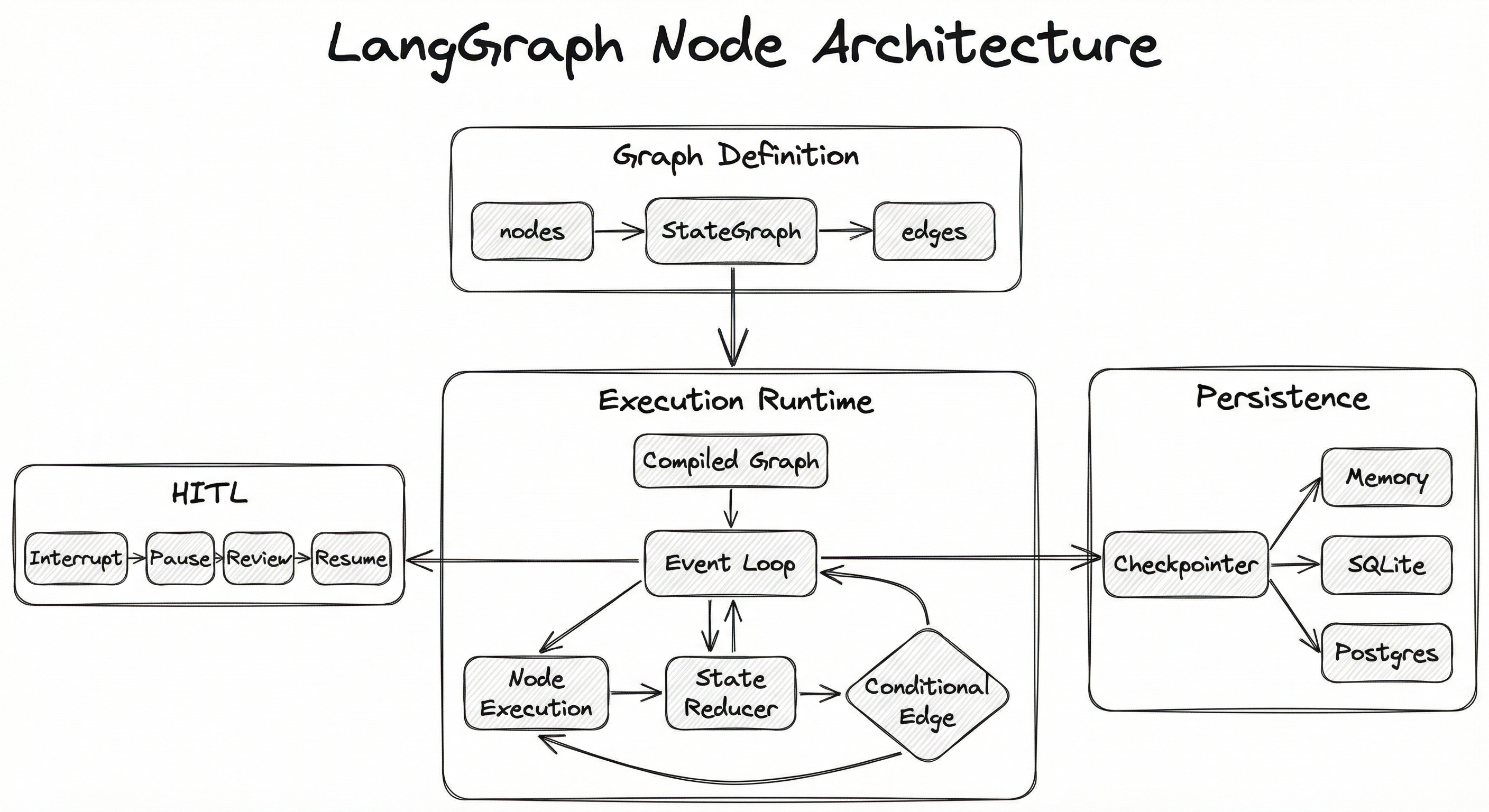
At definition time, you declare nodes (Python functions or sub-graphs), wire them with edges and conditional edges, and specify a state schema. Calling .compile() transforms this definition into an executable graph backed by an event loop.
At runtime, the event loop processes one node at a time (or fans out to multiple nodes via the Send API), applies the node's output through state reducers to update the shared state, evaluates conditional edges to determine the next node, and optionally checkpoints the state after each step. If an interrupt is encountered, execution pauses, the state is persisted, and the system waits for external input before resuming.
Key Components
StateGraph
The top-level container that holds the graph definition. You instantiate it with a state schema (TypedDict), then register nodes and edges. Think of it as the blueprint before compilation.
Nodes
Python functions (sync or async) that receive the current state, perform computation (LLM calls, tool execution, data transformation), and return a partial state update. Each node has a unique string name. Nodes can also be entire sub-graphs, enabling hierarchical composition.
Edges (Fixed and Conditional)
Fixed edges define unconditional transitions between nodes. Conditional edges use a routing function that inspects the current state and returns the name of the next node. This is the primary mechanism for dynamic control flow -- branching, looping, and early termination.
State Schema and Reducers
A TypedDict defines the shape of the shared state. Each key can optionally have a reducer (via Annotated types) that specifies how node outputs merge with existing values -- overwrite, append, or custom logic. The add_messages reducer from langgraph.graph is the most commonly used, enabling message history accumulation.
Checkpointer
A persistence backend that saves the complete graph state after each node execution. Supports MemorySaver (in-memory, for testing), SqliteSaver, and PostgresSaver for production. Enables pause/resume, time-travel debugging, and fault recovery.
Interrupt / Human-in-the-Loop
The interrupt() function pauses graph execution at a designated point and persists the state. External code (a UI, an API endpoint, a Slack bot) can inspect the state, optionally modify it, and invoke graph.invoke(None, config) to resume. This is LangGraph's mechanism for human oversight of autonomous agent actions.
Send API (Fan-out)
The Send class enables dynamic parallelism. An orchestrator node can emit multiple Send objects, each targeting a worker node with a distinct input. All worker outputs are collected via a reducer. This powers orchestrator-worker and map-reduce patterns.
Subgraphs
Any compiled graph can be used as a node within a parent graph, enabling hierarchical composition. The parent graph's checkpointer automatically propagates to subgraphs. Subgraphs maintain their own internal state but can communicate with the parent through shared state keys.
Data Flow
Write Path (Graph Invocation):
- User invokes
graph.invoke(initial_input, config)orgraph.stream(...) - The runtime sets the initial state from the input and the state schema defaults
- Starting from the
STARTnode, edges are followed to the first active node - The node function executes, returning a partial state update
- The reducer merges the update into the current state
- The checkpointer persists the new state (if configured)
- Conditional edges are evaluated to determine the next node
- Steps 4-7 repeat until an
ENDnode is reached orinterrupt()is called
Read Path (State Inspection):
- Given a
thread_idin the config, callgraph.get_state(config)to retrieve the latest checkpoint - The checkpointer loads the serialized state from storage
- The returned
StateSnapshotincludes the current values, the next node to execute, and the full config - For time-travel debugging,
graph.get_state_history(config)returns all checkpoints for the thread
Human-in-the-Loop Path:
- A node calls
interrupt(value)with context for the reviewer - The runtime pauses, checkpoints the state, and returns control to the caller
- The caller presents the state to a human (via UI, API, etc.)
- The human approves, rejects, or modifies the state
- The caller invokes
graph.invoke(Command(resume=value), config)to continue execution
The architecture diagram shows four layers: (1) Graph Definition with StateGraph containing nodes, edges, conditional edges, and a state schema; (2) Execution Runtime with a compiled graph driving an event loop that cycles through node execution, state reduction, and conditional edge evaluation; (3) Persistence Layer with a checkpointer supporting memory, SQLite, and PostgreSQL backends; (4) Human-in-the-Loop with interrupt, pause, review, and resume stages. Arrows flow from definition to runtime via compilation, from runtime to persistence via checkpointing after each node, and from runtime to HITL via interrupt signals.
How to Implement
Two Levels of Abstraction
LangGraph offers two levels of abstraction for building multi-agent systems:
Level 1: Low-level graph construction -- You manually define nodes, edges, and state schema using StateGraph. This gives you full control over every transition, every state mutation, and every conditional branch. It is verbose but maximally flexible.
Level 2: Prebuilt components -- LangGraph ships prebuilt patterns like create_react_agent() that wire up a standard ReAct loop (LLM -> tool call -> LLM) with a single function call. These are great for common patterns but can be composed as nodes in larger custom graphs.
For production multi-agent systems, you typically use Level 2 for individual agents and Level 1 to orchestrate them. For example, each specialist agent might be a create_react_agent() compiled graph, and the supervisor that routes between them is a custom StateGraph.
Deployment Options
LangGraph can run anywhere Python runs -- in a FastAPI server, a Celery worker, an AWS Lambda, or a long-running process. For teams that want managed infrastructure, LangGraph Platform provides hosted deployment with built-in persistence, streaming, and the LangGraph Studio visual debugger.
Cost Note: LangGraph itself is free and open-source (MIT license). LangGraph Platform pricing starts with a free Developer tier (100K node executions/month), with the Plus tier at 0.001 per node execution (~INR 0.084). For a system running 1M node executions/month, that's roughly $1,000/month (~INR 84,000/month) on the platform, versus free if self-hosted.
from typing import Annotated, Literal, TypedDict
from langchain_openai import ChatOpenAI
from langgraph.graph import StateGraph, START, END
from langgraph.graph.message import add_messages


# 1. Define the shared state schema
class AgentState(TypedDict):
    messages: Annotated[list, add_messages]
    task_type: str
    final_answer: str


# 2. Define node functions
def classifier_node(state: AgentState) -> dict:
    """Classify the user query into a task type."""
    llm = ChatOpenAI(model="gpt-4o-mini", temperature=0)
    response = llm.invoke([
        {"role": "system", "content": "Classify the query as 'code', 'research', or 'general'. Reply with just the category."},
        state["messages"][-1]
    ])
    return {"task_type": response.content.strip().lower()}


def code_agent(state: AgentState) -> dict:
    """Handle code-related queries."""
    llm = ChatOpenAI(model="gpt-4o", temperature=0)
    response = llm.invoke([
        {"role": "system", "content": "You are an expert programmer. Provide clean, production-ready code."},
        *state["messages"]
    ])
    return {"final_answer": response.content, "messages": [response]}


def research_agent(state: AgentState) -> dict:
    """Handle research queries with citations."""
    llm = ChatOpenAI(model="gpt-4o", temperature=0.3)
    response = llm.invoke([
        {"role": "system", "content": "You are a research analyst. Provide thorough analysis with sources."},
        *state["messages"]
    ])
    return {"final_answer": response.content, "messages": [response]}


def general_agent(state: AgentState) -> dict:
    """Handle general conversational queries."""
    llm = ChatOpenAI(model="gpt-4o-mini", temperature=0.7)
    response = llm.invoke(state["messages"])
    return {"final_answer": response.content, "messages": [response]}


# 3. Define the routing function for conditional edges
def route_by_task(state: AgentState) -> Literal["code_agent", "research_agent", "general_agent"]:
    task = state.get("task_type", "general")
    if task == "code":
        return "code_agent"
    elif task == "research":
        return "research_agent"
    return "general_agent"


# 4. Build the graph
graph = StateGraph(AgentState)

graph.add_node("classifier", classifier_node)
graph.add_node("code_agent", code_agent)
graph.add_node("research_agent", research_agent)
graph.add_node("general_agent", general_agent)

graph.add_edge(START, "classifier")
graph.add_conditional_edges("classifier", route_by_task)
graph.add_edge("code_agent", END)
graph.add_edge("research_agent", END)
graph.add_edge("general_agent", END)

# 5. Compile and run
app = graph.compile()

result = app.invoke({
    "messages": [{"role": "user", "content": "Write a Python function to calculate compound interest in INR"}]
})
print(result["final_answer"])
This example demonstrates the core LangGraph pattern: a classifier node determines the task type, and a conditional edge routes execution to the appropriate specialist agent. The state schema uses Annotated[list, add_messages] so that each agent's response is appended to the message history rather than overwriting it. This is the foundation for more complex patterns like supervisor-worker architectures.
from typing import Annotated, TypedDict
from langchain_openai import ChatOpenAI
from langchain_core.tools import tool
from langgraph.graph import StateGraph, START, END
from langgraph.graph.message import add_messages
from langgraph.checkpoint.memory import MemorySaver
from langgraph.prebuilt import ToolNode
from langgraph.types import interrupt, Command


# Define tools
@tool
def search_database(query: str) -> str:
    """Search the internal product database."""
    # Simulated database search
    return f"Found 3 products matching '{query}': Widget A (INR 499), Widget B (INR 999), Widget C (INR 1,499)"


@tool
def place_order(product_name: str, quantity: int) -> str:
    """Place an order for a product. Requires human approval."""
    # This tool has side effects -- we want human approval
    return f"Order placed: {quantity}x {product_name}"


# State schema
class State(TypedDict):
    messages: Annotated[list, add_messages]


# Node functions
def agent(state: State) -> dict:
    llm = ChatOpenAI(model="gpt-4o").bind_tools([search_database, place_order])
    response = llm.invoke(state["messages"])
    return {"messages": [response]}


def human_review(state: State) -> dict:
    """Pause for human approval before executing side-effect tools."""
    last_message = state["messages"][-1]
    tool_calls = getattr(last_message, "tool_calls", [])

    # Check if any tool call requires approval
    needs_approval = any(tc["name"] == "place_order" for tc in tool_calls)

    if needs_approval:
        # Interrupt execution and wait for human input
        decision = interrupt(
            {"question": "Approve this order?", "tool_calls": tool_calls}
        )
        if decision != "approved":
            return {"messages": [{"role": "tool", "content": "Order cancelled by human reviewer.", "tool_call_id": tool_calls[0]["id"]}]}

    return {}  # No changes, proceed to tool execution


def should_continue(state: State) -> str:
    last_message = state["messages"][-1]
    if hasattr(last_message, "tool_calls") and last_message.tool_calls:
        return "human_review"
    return END


# Build graph
graph = StateGraph(State)
graph.add_node("agent", agent)
graph.add_node("human_review", human_review)
graph.add_node("tools", ToolNode([search_database, place_order]))

graph.add_edge(START, "agent")
graph.add_conditional_edges("agent", should_continue, {"human_review": "human_review", END: END})
graph.add_edge("human_review", "tools")
graph.add_edge("tools", "agent")

# Compile with persistence for human-in-the-loop
checkpointer = MemorySaver()
app = graph.compile(checkpointer=checkpointer)

# Run with a thread ID for persistence
config = {"configurable": {"thread_id": "order-session-1"}}

# First invocation -- will pause at human_review if order is requested
result = app.invoke(
    {"messages": [{"role": "user", "content": "Find me a widget under INR 1000 and place an order for 2"}]},
    config=config
)

# Resume after human approval
result = app.invoke(Command(resume="approved"), config=config)
print(result["messages"][-1].content)
This example shows three critical LangGraph patterns working together: (1) Tool calling via ToolNode that automatically executes tools the LLM requests, (2) Human-in-the-loop via interrupt() that pauses execution when a destructive tool like place_order is invoked, and (3) Checkpointing via MemorySaver that persists state across the pause/resume boundary. The thread_id in the config ensures state is associated with a specific conversation session. In production, you would replace MemorySaver with PostgresSaver for durability.
from typing import Annotated, Literal, TypedDict
from langchain_openai import ChatOpenAI
from langchain_core.tools import tool
from langgraph.graph import StateGraph, START, END
from langgraph.graph.message import add_messages
from langgraph.prebuilt import create_react_agent
from langgraph.checkpoint.postgres import PostgresSaver
import psycopg


# Shared state for the supervisor graph
class SupervisorState(TypedDict):
    messages: Annotated[list, add_messages]
    next_agent: str
    iteration_count: int


# --- Define specialist agents as subgraphs ---

@tool
def query_sql(sql: str) -> str:
    """Execute a read-only SQL query against the analytics database."""
    return f"Query result for: {sql} -> 42 rows returned"

@tool
def generate_chart(data: str, chart_type: str) -> str:
    """Generate a visualization from data."""
    return f"Chart generated: {chart_type} visualization saved to /tmp/chart.png"

@tool
def write_report(content: str, title: str) -> str:
    """Write a formatted report."""
    return f"Report '{title}' written successfully ({len(content)} chars)"


llm = ChatOpenAI(model="gpt-4o")

# Each specialist is a prebuilt ReAct agent compiled as a subgraph
data_analyst = create_react_agent(llm, [query_sql], prompt="You are a data analyst. Query databases and analyze results.")
visualizer = create_react_agent(llm, [generate_chart], prompt="You are a data visualizer. Create clear, insightful charts.")
report_writer = create_react_agent(llm, [write_report], prompt="You are a report writer. Create executive summaries.")


# --- Supervisor logic ---

def supervisor(state: SupervisorState) -> dict:
    """Decide which agent to invoke next or finish."""
    llm_with_routing = ChatOpenAI(model="gpt-4o", temperature=0)
    response = llm_with_routing.invoke([
        {"role": "system", "content": (
            "You are a supervisor coordinating a data analysis team. "
            "Based on the conversation, decide the next step: "
            "'data_analyst' to query data, 'visualizer' to make charts, "
            "'report_writer' to write the report, or 'FINISH' if done. "
            "Reply with just the agent name or FINISH."
        )},
        *state["messages"]
    ])
    next_agent = response.content.strip().lower()
    return {
        "next_agent": next_agent,
        "iteration_count": state.get("iteration_count", 0) + 1
    }


def route_supervisor(state: SupervisorState) -> Literal["data_analyst", "visualizer", "report_writer", "__end__"]:
    if state["next_agent"] == "finish" or state.get("iteration_count", 0) > 10:
        return "__end__"
    return state["next_agent"]


# --- Build the supervisor graph ---

supervisor_graph = StateGraph(SupervisorState)

supervisor_graph.add_node("supervisor", supervisor)
supervisor_graph.add_node("data_analyst", data_analyst)  # Subgraph as node
supervisor_graph.add_node("visualizer", visualizer)        # Subgraph as node
supervisor_graph.add_node("report_writer", report_writer)  # Subgraph as node

supervisor_graph.add_edge(START, "supervisor")
supervisor_graph.add_conditional_edges("supervisor", route_supervisor)
supervisor_graph.add_edge("data_analyst", "supervisor")
supervisor_graph.add_edge("visualizer", "supervisor")
supervisor_graph.add_edge("report_writer", "supervisor")

# Compile with PostgreSQL persistence for production
DB_URI = "postgresql://user:pass@localhost:5432/langgraph_checkpoints"
with psycopg.Connection.connect(DB_URI) as conn:
    checkpointer = PostgresSaver(conn)
    checkpointer.setup()  # Create tables if they don't exist
    app = supervisor_graph.compile(checkpointer=checkpointer)

    # Run the full workflow
    result = app.invoke(
        {"messages": [{"role": "user", "content": "Analyze Q4 2025 sales for the India market and prepare an executive report with charts"}]},
        config={"configurable": {"thread_id": "q4-india-report-001"}}
    )
    print(result["messages"][-1].content)
This example demonstrates the supervisor-worker pattern -- the most common production architecture for multi-agent systems. The supervisor node decides which specialist to invoke next, and each specialist is itself a complete ReAct agent compiled as a subgraph. The supervisor loops back after each specialist completes, deciding whether to delegate to another agent or finish. A PostgresSaver checkpointer ensures the entire multi-agent workflow survives process restarts. The iteration_count guard prevents infinite delegation loops.
import asyncio
from typing import Annotated, TypedDict
from langchain_openai import ChatOpenAI
from langgraph.graph import StateGraph, START, END
from langgraph.graph.message import add_messages


class State(TypedDict):
    messages: Annotated[list, add_messages]


def chatbot(state: State) -> dict:
    llm = ChatOpenAI(model="gpt-4o", streaming=True)
    response = llm.invoke(state["messages"])
    return {"messages": [response]}


graph = StateGraph(State)
graph.add_node("chatbot", chatbot)
graph.add_edge(START, "chatbot")
graph.add_edge("chatbot", END)
app = graph.compile()


async def stream_response():
    """Stream tokens as they are generated."""
    input_msg = {"messages": [{"role": "user", "content": "Explain how UPI works in India"}]}

    # Stream mode 'messages' yields individual tokens
    async for event, metadata in app.astream(input_msg, stream_mode="messages"):
        if hasattr(event, "content") and event.content:
            print(event.content, end="", flush=True)
    print()  # newline after streaming completes

    # Stream mode 'updates' yields full node outputs
    async for update in app.astream(input_msg, stream_mode="updates"):
        for node_name, node_output in update.items():
            print(f"\n--- Node '{node_name}' completed ---")
            print(f"Output keys: {list(node_output.keys())}")


asyncio.run(stream_response())
Streaming is essential for production LLM applications -- users expect to see tokens appear in real-time, not wait for a complete response. LangGraph supports two streaming modes: messages (token-level streaming, ideal for chat UIs) and updates (node-level streaming, ideal for progress tracking in multi-step workflows). The astream method is async-native, making it compatible with FastAPI, Starlette, and other async web frameworks commonly used in production deployments.
# langgraph.yaml -- LangGraph Platform deployment config
# Used when deploying to LangGraph Cloud or self-hosted LangGraph Platform

graphs:
  my_agent:
    path: ./src/agent.py:graph
    # The compiled graph object to serve

env:
  OPENAI_API_KEY: ${OPENAI_API_KEY}
  DATABASE_URL: ${DATABASE_URL}

# Persistence configuration
checkpointer:
  backend: postgres
  connection_string: ${DATABASE_URL}

# Resource limits
recursion_limit: 50
timeout_seconds: 300

# Authentication (LangGraph Platform)
auth:
  type: api_key
  header: x-api-key
Common Implementation Mistakes
- ●
Forgetting to compile the graph: Calling methods like
invoke()orstream()on aStateGraphinstead of calling.compile()first. TheStateGraphis just the definition; the compiled graph is the executable runtime. Always doapp = graph.compile()before invoking. - ●
Mutating state directly in node functions: Node functions should return a partial state update dictionary, not modify the state object in place. LangGraph uses reducers to merge updates, so direct mutation bypasses the reducer logic and can cause subtle bugs, especially with checkpointing.
- ●
Not using reducers for list-type state keys: If a state key is a list (like
messages) and multiple nodes write to it, the default overwrite reducer means each node replaces the list instead of appending. Always useAnnotated[list, add_messages]or a custom append reducer for accumulative state keys. - ●
Ignoring the recursion limit: The default recursion limit is 25 steps. For complex workflows with many cycles, this may be too low, causing premature termination. For simple workflows, it may be too high, allowing runaway agents to burn through API credits. Always set an explicit
recursion_limitin your config based on your workflow's expected complexity. - ●
Using MemorySaver in production:
MemorySaveris an in-memory checkpointer that loses all state when the process restarts. It is intended for development and testing only. Production systems must useSqliteSaver(single-node) orPostgresSaver(distributed) for durable persistence. - ●
Not propagating checkpointers to subgraphs correctly: When using subgraphs, you should only pass the checkpointer when compiling the parent graph. LangGraph automatically propagates it to child subgraphs. Passing a checkpointer to both parent and child causes conflicts.
- ●
Building overly complex single graphs instead of composing subgraphs: A graph with 20+ nodes and complex conditional edges becomes hard to test, debug, and maintain. Break it into focused subgraphs (each handling one concern) and compose them in a parent graph. This mirrors how you would decompose a monolith into microservices.
When Should You Use This?
Use When
Your agent system requires cycles -- agents that iterate, self-correct, or engage in multi-turn reasoning loops before producing a final answer
You need conditional routing at runtime -- different agents or tools should handle different types of queries, and the routing decision depends on the query content or intermediate results
Human-in-the-loop oversight is required -- a human must review, approve, or modify agent actions before they execute (e.g., approving financial transactions, reviewing generated code before deployment)
The workflow is long-running (minutes to hours) and must survive process restarts -- checkpointing and durable persistence are essential, not optional
You are building a multi-agent system where specialized agents collaborate -- a supervisor delegates to workers, agents critique each other's output, or multiple agents contribute to a shared artifact
You need streaming support for real-time UIs -- users should see tokens appear as they are generated, and see progress updates as the workflow moves through nodes
You want full observability into agent execution -- LangSmith integration provides traces, latency breakdowns, token usage, and state snapshots at every step
Your team already uses LangChain and wants to leverage existing chains, tools, and integrations within a more structured orchestration framework
Avoid When
Your agent workflow is a simple linear chain with no branching or cycles -- LangChain's LCEL (LangChain Expression Language) or even raw API calls are simpler and have less overhead
You need a no-code or low-code agent builder -- LangGraph requires writing Python code; consider CrewAI's YAML-driven approach or visual tools like Flowise instead
Your team has no Python expertise -- LangGraph is Python-first (with a JS/TS port available). For TypeScript-native teams, consider Vercel AI SDK or direct API orchestration
You want maximum abstraction over agent internals and prefer to configure rather than code -- CrewAI's role-based model or AutoGen's conversational agents may be more appropriate
Your use case is a single LLM call with tools -- the overhead of defining a graph, compiling it, and managing state is unnecessary when a single
llm.invoke()with tool binding sufficesYou need hard real-time guarantees (sub-10ms orchestration overhead) -- LangGraph's Python runtime adds overhead per node; for latency-critical paths, consider a compiled language or direct API calls
Key Tradeoffs
Flexibility vs. Complexity
LangGraph's greatest strength is its flexibility -- you can express virtually any agent topology. But that flexibility comes at a cost: you must explicitly define every node, edge, and routing function. For a simple ReAct agent, that might mean 30-50 lines of boilerplate versus a single create_react_agent() call. The prebuilt helpers mitigate this for common patterns, but custom workflows require custom graph definitions.
| Aspect | LangGraph | CrewAI | AutoGen |
|---|---|---|---|
| Control granularity | Node-level | Role-level | Conversation-level |
| Learning curve | Steep | Gentle | Moderate |
| Cycle support | Native | Limited | Via conversation |
| Human-in-the-loop | First-class | Basic | Via conversation |
| Persistence | Built-in checkpointers | External | External |
| Observability | LangSmith native | Third-party | Third-party |
Vendor Coupling
While LangGraph itself is open-source (MIT license), the full production stack -- LangGraph Platform for deployment, LangSmith for observability -- ties you to the LangChain ecosystem. You can absolutely use LangGraph without LangSmith (plug in Langfuse or custom logging), but you lose the integrated debugging experience. Evaluate whether the ecosystem lock-in is acceptable for your organization.
Cost Considerations
The dominant cost in any LangGraph application is LLM inference, not the framework itself. A supervisor-worker graph with 3 specialist agents might make 5-10 LLM calls per user query. At GPT-4o pricing (10/1M output tokens), a complex query consuming ~5,000 tokens across calls costs roughly 500/day (~INR 42,000/day) in LLM costs alone. LangGraph Platform adds ~$0.001 per node execution on top.
Rule of Thumb: If your workflow has fewer than 3 nodes and no cycles, you probably don't need LangGraph. If it has conditional branches, cycles, or human checkpoints, LangGraph will save you weeks of building custom orchestration.
Alternatives & Comparisons
CrewAI uses a role-based abstraction where agents are defined by their role, goal, and backstory, and organized into crews with defined processes (sequential or hierarchical). Choose CrewAI when you want rapid prototyping with minimal boilerplate, especially for clearly defined team-based workflows. Choose LangGraph when you need fine-grained control over state transitions, cycles, human-in-the-loop, or complex conditional routing that doesn't map cleanly to a crew metaphor.
An agent router is a simpler pattern that classifies incoming requests and dispatches them to the appropriate handler -- essentially a single conditional edge without cycles or state persistence. Use an agent router when your workflow is purely dispatch-based (no iterative refinement, no multi-step collaboration). Use LangGraph when agents need to interact with each other, loop, or maintain state across multiple steps.
The ReAct (Reasoning + Acting) loop is a specific agent pattern where an LLM alternates between reasoning and tool execution. LangGraph's create_react_agent() implements this pattern as a prebuilt graph. Use a standalone ReAct loop when you have a single agent with tools. Use the full LangGraph StateGraph when you need multiple agents, custom control flow beyond the ReAct cycle, or human-in-the-loop checkpoints.
Generic agent orchestrators (custom-built or framework-agnostic) give you total control but require building state management, persistence, and error handling from scratch. Choose a generic orchestrator when you have very specific requirements that no framework satisfies, or when you want zero dependencies. Choose LangGraph when you want battle-tested state management, checkpointing, and streaming out of the box without reinventing the wheel.
Pros, Cons & Tradeoffs
Advantages
First-class cycle support enables iterative agent patterns (self-reflection, critique-and-revise, multi-turn tool use) that are impossible or hacky in chain-based frameworks. Cycles are the killer feature.
Built-in persistence and checkpointing means long-running workflows survive process restarts, and you get time-travel debugging for free. No need to build custom state serialization.
Human-in-the-loop as a primitive -- the
interrupt()function andCommand(resume=...)pattern make human oversight a first-class citizen, not an afterthought bolted on.Subgraph composition enables clean separation of concerns. Each agent team or workflow stage can be developed, tested, and deployed independently, then composed into larger systems.
Native streaming at both token and node levels integrates cleanly with modern async web frameworks (FastAPI, Starlette), enabling responsive UIs even for complex multi-agent workflows.
LangSmith integration provides production-grade observability -- traces, token counts, latency per node, state snapshots -- that dramatically reduces debugging time for complex agent systems.
Open-source and extensible (MIT license) with no runtime cost for the core framework. You only pay for LLM API calls and optional managed platform services.
Disadvantages
Steep learning curve -- thinking in graphs (nodes, edges, state reducers) is a paradigm shift from sequential programming. Teams unfamiliar with state machines will need ramp-up time.
Verbose for simple use cases -- a basic chatbot requires defining a state schema, node functions, edges, and compilation. For trivial workflows, this is over-engineering.
Python-centric ecosystem -- while a JavaScript/TypeScript port (
@langchain/langgraph) exists, the Python version is more mature, better documented, and has more community support. JS teams may find it less polished.Debugging complex graphs is hard -- when a 10-node graph with conditional edges produces unexpected behavior, tracing the execution path requires LangSmith or careful logging. Without observability tooling, debugging is painful.
LangChain coupling -- LangGraph builds on LangChain's abstractions (messages, tools, LLMs). If you are not already in the LangChain ecosystem, adopting LangGraph means adopting LangChain too, which is a significant dependency.
Overhead per node execution -- each node transition involves state serialization, reducer application, and optional checkpointing. For latency-critical applications, this overhead (typically 1-5ms per node) can accumulate in deep graphs.
Failure Modes & Debugging
Infinite loop in cyclic graphs
Cause
A conditional edge routing function always returns the same node, or the LLM never produces a termination signal, causing the graph to cycle indefinitely. This is especially common with ReAct agents that keep calling tools without converging on an answer.
Symptoms
Execution hangs, token usage spikes, the recursion limit is eventually hit and a GraphRecursionError is raised. In production without monitoring, this manifests as a slow API response followed by a timeout error, and a surprisingly large LLM API bill.
Mitigation
Always set an explicit recursion_limit in the config (default is 25). Add an iteration_count to your state and include a hard exit condition in your routing function. Monitor LLM token usage per graph execution and set cost alerts. Consider adding a dedicated 'max_iterations_exceeded' terminal node that returns a graceful failure message.
State schema mismatch between nodes
Cause
Node A writes a state key that Node B expects in a different format (e.g., Node A returns {"result": "text"} but Node B expects {"result": [{"content": "text"}]}). This often happens when subgraphs have different state schemas than the parent graph.
Symptoms
Runtime KeyError or TypeError in node functions. The graph may crash mid-execution, leaving a partially-written checkpoint. In worst cases, the wrong data type silently propagates and causes incorrect downstream behavior.
Mitigation
Define strict TypedDict state schemas with explicit types for every key. Use input/output schemas on subgraphs to enforce contracts at the composition boundary. Write unit tests that invoke each node in isolation with mock state to verify schema compliance.
Checkpoint corruption or bloat
Cause
Very large state objects (e.g., storing entire documents or image bytes in the state) cause checkpoints to grow to megabytes per step. Over many steps and threads, the checkpoint store (PostgreSQL, SQLite) becomes a storage bottleneck. Additionally, schema changes to the state TypedDict between deployments can make old checkpoints unreadable.
Symptoms
Slow checkpoint writes causing increased per-node latency. Database storage growing unexpectedly. DeserializationError when resuming old threads after a code deployment that changed the state schema.
Mitigation
Keep state lean -- store references (URLs, IDs) instead of large payloads. Implement checkpoint TTLs to garbage-collect old threads. Version your state schema and implement migration logic for breaking changes. Monitor checkpoint storage size and set alerts.
Human-in-the-loop timeout
Cause
Execution interrupts for human review, but no human responds within the expected timeframe. The graph state sits in the checkpoint store indefinitely, consuming resources and potentially blocking dependent workflows.
Symptoms
Threads stuck in 'interrupted' state. Growing backlog of unresolved review requests. Users experience workflows that start but never complete. In async systems, this can exhaust thread pools or connection pools if many sessions are waiting simultaneously.
Mitigation
Implement timeout logic that auto-resumes with a default action (approve, reject, or escalate) after a configurable period. Track interrupted threads in a dashboard with age-based alerts. Design the graph so that human review is on the critical path only for truly high-risk actions.
Subgraph state isolation failure
Cause
Parent and child subgraphs inadvertently share state keys with different semantics. For example, both define a messages key but expect different message formats. When the subgraph writes to messages, it corrupts the parent's state.
Symptoms
Unexpected state values after subgraph execution. Parent graph nodes receiving data that doesn't match their expected schema. Difficult to reproduce because it depends on the order of subgraph execution.
Mitigation
Use explicit state mapping between parent and child subgraphs via input and output schemas. Namespace subgraph state keys (e.g., analyst_messages vs supervisor_messages). Test subgraphs independently with mock parent state before composing.
Streaming token loss in nested subgraphs
Cause
A known limitation: streaming LLM tokens from a deeply nested subgraph may not propagate to the outer graph's stream. This is a documented issue in LangGraph where inner graph streaming works independently but not when nested.
Symptoms
Users see no streaming output during subgraph execution, then receive the complete response all at once when the subgraph completes. The UX feels 'frozen' during subgraph processing.
Mitigation
Use stream_mode='updates' with subgraphs=True in the config to capture subgraph events. For critical streaming paths, consider flattening the graph hierarchy rather than nesting subgraphs deeply. Monitor the LangGraph GitHub issues for fixes -- this is an actively tracked limitation.
Placement in an ML System
Where LangGraph Sits in the ML System
LangGraph operates at the orchestration layer of an agentic AI system. It sits above the individual components (LLMs, tools, vector stores, APIs) and below the application interface (web app, Slack bot, API gateway).
In a typical multi-agent ML system, the flow is:
- Application layer receives a user request
- Task decomposer or agent router determines the complexity and routes to the appropriate workflow
- LangGraph orchestrates the multi-agent workflow -- invoking LLMs, calling tools, routing between specialist agents, checkpointing state, and pausing for human review
- Individual agents within the graph may access vector stores (for RAG), shared memory (for cross-agent context), external APIs (for tool use), and model endpoints (for inference)
- The final state from the graph is returned to the application layer
LangGraph can also be used recursively: a node in a parent LangGraph can itself be a complete LangGraph subgraph, enabling hierarchical agent architectures. For example, a high-level planning agent might delegate to a research subgraph (with its own internal search-summarize-validate cycle) and a coding subgraph (with its own write-test-debug cycle).
Key Insight: LangGraph is the glue layer. It doesn't do the thinking (that's the LLM) or the acting (that's the tools) -- it manages when things happen, in what order, and what state flows between them.
Pipeline Stage
Orchestration / Agent Runtime
Upstream
- task-decomposer
- agent-router
- shared-memory
Downstream
- agent-supervisor
- react-loop
- shared-memory
Scaling Bottlenecks
The primary bottleneck is LLM inference latency, not the framework itself. Each node that calls an LLM adds 200ms-5s depending on model and prompt length. A 5-node graph with sequential LLM calls will have 1-25s total latency -- dominated entirely by the LLM.
The secondary bottleneck is checkpoint persistence. With PostgresSaver, each checkpoint write adds 5-20ms of overhead. For a 10-node graph, that's 50-200ms of pure persistence overhead. At high concurrency (1000+ simultaneous graph executions), the database connection pool can become a limiter.
For fan-out patterns using the Send API, the bottleneck shifts to concurrent LLM API rate limits. If your supervisor sends work to 10 workers simultaneously, you need 10 concurrent LLM API slots. At scale, this requires careful API key management and rate limiting.
Some concrete numbers: a single-threaded LangGraph process can handle ~50-200 graph executions per second for non-LLM nodes. With LLM calls, throughput drops to 1-5 executions per second per thread. Horizontal scaling requires running multiple processes behind a load balancer, with shared PostgreSQL for checkpoint persistence.
Production Case Studies
LinkedIn built SQL Bot, an AI-powered internal assistant that transforms natural language questions into SQL queries against their analytics databases. SQL Bot is a multi-agent system built on LangGraph where one agent handles query understanding, another generates and validates SQL, and a third formats results for the user. Additionally, LinkedIn's AI Recruiter uses a hierarchical agent system powered by LangGraph for conversational candidate search, matching, and messaging.
SQL Bot reduced the time for non-technical employees to get data insights from hours (filing a ticket to the data team) to seconds. The AI Recruiter freed human recruiters to focus on high-level strategy by automating sourcing and initial outreach.
Uber integrated LangGraph to streamline large-scale code migrations within their developer platform. They built a network of specialized agents: one agent analyzes the existing codebase, another generates migration code, a third writes unit tests, and a supervisor orchestrates the entire process. Each step of the unit test generation pipeline was handled by a dedicated agent with precision, using LangGraph's conditional edges to handle different code patterns.
Automated code migration reduced developer time on repetitive refactoring tasks by an estimated 60-70%, allowing engineering teams to focus on feature development rather than migration overhead.
Klarna's AI Assistant, powered by LangGraph and LangSmith, handles customer support tasks for 85 million active users. The agent workflow includes intent classification, account lookup, transaction resolution, and escalation to human agents -- all orchestrated as a LangGraph with conditional routing based on issue complexity and customer tier. LangSmith provides observability into every customer interaction.
Reduced average customer resolution time by 80%, handling the equivalent workload of 700 full-time customer service agents. The human-in-the-loop pattern ensures complex disputes are escalated to human agents with full context.
Elastic uses LangGraph to orchestrate a network of AI agents for real-time security threat detection in their Security AI assistant. The system includes agents for log analysis, threat pattern matching, incident classification, and response recommendation. LangGraph's conditional edges route alerts through different analysis pipelines based on threat severity and type.
Significantly faster threat response times compared to manual SOC (Security Operations Center) workflows. The multi-agent architecture enables parallel analysis of multiple threat indicators simultaneously, reducing mean time to detection.
AppFolio's copilot Realm-X helps property managers make faster decisions about maintenance requests, lease renewals, and tenant communications. After switching from a chain-based architecture to LangGraph, they could implement multi-step reasoning with tool calling -- the agent can look up lease terms, check maintenance history, and draft a response in a single workflow with conditional branching based on the request type.
Response accuracy increased 2x after migration to LangGraph. Property managers reported saving 10+ hours per week on routine decision-making tasks.
Exa's engineering team built a production-ready multi-agent web research system using LangGraph. The system decomposes complex research queries into sub-questions, dispatches parallel search agents to gather information from different sources, synthesizes findings, and validates citations -- all orchestrated as a LangGraph with fan-out/fan-in patterns via the Send API.
Processes hundreds of research queries daily, delivering structured results in 15 seconds to 3 minutes depending on complexity. The graph-based architecture made it straightforward to add new specialist agents (e.g., for academic papers vs. news articles) without restructuring the entire system.
Tooling & Ecosystem
The core open-source framework for building stateful, multi-agent applications as graphs. Provides StateGraph, conditional edges, checkpointing, streaming, and subgraph composition. MIT licensed with active development.
The JavaScript/TypeScript port of LangGraph for Node.js and edge runtime environments. Supports the same graph abstractions with TypeScript type safety. Less mature than the Python version but actively maintained.
The observability platform for LangGraph (and LangChain). Provides execution traces, latency breakdowns, token usage tracking, state snapshots, and regression testing for agent workflows. Free tier includes 5K traces/month; Plus plan at $39/seat/month (~INR 3,300/seat/month).
Managed deployment platform for LangGraph applications. Provides hosted graph execution with built-in persistence, streaming, authentication, and the visual LangGraph Studio debugger. Free tier includes 100K node executions/month.
Open-source alternative to LangSmith for LLM observability. Integrates with LangGraph via callbacks for tracing, evaluation, and cost tracking. A good choice if you want observability without LangChain ecosystem lock-in.
Role-based multi-agent framework that offers a higher-level abstraction than LangGraph. Complementary rather than competitive -- some teams use CrewAI for simple crew workflows and LangGraph for complex graph-based orchestration.
Microsoft's multi-agent conversation framework. Focuses on conversational agent patterns rather than graph-based orchestration. Useful comparison point when evaluating LangGraph for dialogue-heavy use cases.
Research & References
Jainil Patel, Aishwarya Naresh Reganti (2024)arXiv preprint
Explores how LangGraph's graph-based agent orchestration improves machine translation quality through modular multi-agent workflows with dynamic state management and automated agent collaboration.
Taicheng Guo, Xiuying Chen, Yaqi Wang, et al. (2024)arXiv preprint
Comprehensive survey covering the architecture, communication protocols, and coordination mechanisms of LLM-based multi-agent systems. Discusses frameworks including LangGraph, AutoGen, and CAMEL.
Mingchen Zhuge, Wenyi Wang, Louis Kirsch, et al. (2024)arXiv preprint
Proposes treating language agent pipelines as optimizable computational graphs -- a concept closely related to LangGraph's approach. Demonstrates that graph-structured agent systems can be automatically optimized for task performance.
Ke Xu, Zhiwei Kang, Yubo Chen, et al. (2025)arXiv preprint
Surveys collaboration mechanisms across multi-agent LLM systems, categorizing by actors, structures, strategies, and coordination protocols. Provides a taxonomy relevant to LangGraph's supervisor-worker and peer-to-peer patterns.
Various authors (2025)arXiv preprint
Proposes using finite state machines as the formal backbone for multi-agent system design, with an optimization algorithm to merge redundant states -- directly validating LangGraph's state machine approach to agent orchestration.
Interview & Evaluation Perspective
Common Interview Questions
- ●
How would you design a multi-agent customer support system using LangGraph? Walk through the graph structure, state schema, and routing logic.
- ●
Explain the difference between fixed edges and conditional edges in LangGraph. When would you use each?
- ●
How does LangGraph handle human-in-the-loop? Describe the interrupt/resume mechanism and when you would use it.
- ●
What are the tradeoffs between using LangGraph's StateGraph versus CrewAI's role-based agents for a multi-agent system?
- ●
How would you ensure a LangGraph agent doesn't enter an infinite loop? What safeguards would you implement?
- ●
Describe how checkpointing works in LangGraph. Why is it important for production systems?
- ●
How would you decompose a complex 20-node graph into manageable subgraphs? What principles guide the decomposition?
Key Points to Mention
- ●
LangGraph models agent workflows as state machines with nodes (functions), edges (transitions), and a shared typed state. The state is the central abstraction, not the agents.
- ●
Conditional edges are routing functions that inspect state and return the next node name -- this is the mechanism for all dynamic control flow (branching, looping, termination).
- ●
Reducers (especially
add_messages) control how node outputs merge with existing state -- overwrite vs. append semantics are critical for message history management. - ●
Checkpointing enables three capabilities: fault recovery (resume after crash), human-in-the-loop (pause for review), and time-travel debugging (inspect any historical state).
- ●
The supervisor-worker pattern is the most common production architecture: a supervisor node delegates to specialist agent subgraphs and loops until the task is complete.
- ●
Subgraph composition is LangGraph's answer to complexity management -- it is the graph equivalent of function decomposition in regular programming.
- ●
LLM inference cost dominates total cost -- framework overhead is negligible. Budget based on expected LLM calls per graph execution, not framework pricing.
Pitfalls to Avoid
- ●
Describing LangGraph as 'just LangChain with graphs' -- it is a separate framework with fundamentally different execution semantics (stateful, cyclic, persistent).
- ●
Forgetting about the recursion limit when discussing cyclic graphs -- always mention the safeguard against infinite loops.
- ●
Conflating the graph definition (StateGraph) with the executable runtime (compiled graph) -- compilation is a required step.
- ●
Ignoring state schema design in your answer -- the state TypedDict is arguably the most important design decision in a LangGraph application.
- ●
Claiming LangGraph is the best choice for all agent use cases -- it is over-engineered for simple linear chains and under-opinionated compared to CrewAI for standard team-based workflows.
Senior-Level Expectation
A senior candidate should discuss the end-to-end architecture: state schema design with appropriate reducers, graph decomposition into focused subgraphs, conditional routing strategies (classifier-based vs. LLM-based), persistence backend selection (SQLite for single-node, PostgreSQL for distributed), human-in-the-loop design (which actions require approval, timeout handling for unresponsive reviewers), streaming strategy (token-level for chat UIs, node-level for progress tracking), observability (LangSmith traces, custom metrics, cost tracking per thread), and failure handling (recursion limits, checkpoint corruption recovery, graceful degradation when subgraphs fail). They should also discuss cost modeling: estimating LLM calls per graph execution, projecting monthly costs at target QPS, and identifying optimization levers (caching, model selection per node, early termination). For Indian startup contexts, they should discuss trade-offs between self-hosting LangGraph (free, more ops burden) vs. LangGraph Platform (~INR 84,000/month for 1M executions, less ops).
Summary
What We Covered
LangGraph is an open-source framework for building stateful, multi-agent AI applications as directed graphs. It models agent workflows as state machines where nodes are functions (agents, tools, or decision logic), edges define transitions (fixed or conditional), and a shared typed state flows through the entire execution.
The framework's core capabilities -- cycles for iterative reasoning, conditional edges for dynamic routing, checkpointing for persistence and fault recovery, human-in-the-loop for oversight, subgraphs for hierarchical composition, and streaming for responsive UIs -- make it the most production-ready framework for complex agent orchestration available today.
In production, LangGraph powers multi-agent systems at LinkedIn (SQL Bot, AI Recruiter), Uber (code migration), Klarna (customer support for 85M users), Elastic (security threat detection), AppFolio (property management), and many others. The framework is free and open-source, with optional managed services (LangGraph Platform, LangSmith) for teams that want hosted infrastructure and observability. For Indian teams, self-hosted LangGraph on cloud infrastructure costs as little as INR 5,000-10,000/month for the orchestration layer, with LLM API costs being the dominant expense.
The bottom line: If your agent system has cycles, branches, or human checkpoints, LangGraph is almost certainly the right orchestration framework. If it is a simple linear chain, you probably don't need it. The graph abstraction is powerful precisely because real-world agent systems are not pipelines -- they are state machines.