ReAct Loop in Machine Learning
The ReAct loop is the beating heart of modern AI agents. Short for Reasoning + Acting, it is an iterative control pattern where a language model alternates between thinking (generating reasoning traces) and doing (executing actions via external tools), then observing the results before deciding its next move.
Why does this matter so much? Because LLMs on their own are stateless text generators. They can reason impressively -- but they cannot look things up, run calculations, call APIs, or verify their own claims. The ReAct loop gives them hands and eyes: the ability to act on the world and learn from what comes back.
The pattern was formalized by Yao et al. in their 2023 ICLR paper, but the intuition is ancient. Humans solve problems the same way: think about what to do, do it, observe the result, adjust, and repeat. The ReAct loop is simply that cognitive cycle implemented as a prompt-driven control flow around an LLM.
Today, ReAct loops power everything from customer support bots at Razorpay to code generation assistants, research agents, and autonomous data analysis pipelines. If you have used an AI agent that can search the web, query a database, or execute code -- you have interacted with a ReAct loop, whether the system called it that or not.
Concept Snapshot
- What It Is
- An iterative control pattern where an LLM agent interleaves reasoning (chain-of-thought traces) with tool actions, observes feedback, and repeats until the task is complete or a termination condition is met.
- Category
- Agentic Systems
- Complexity
- Intermediate
- Inputs / Outputs
- Input: user query/task + set of available tools. Output: final answer/action after N iterations of thought-action-observation cycles.
- System Placement
- Core orchestration loop within an AI agent, sitting between the planning/prompt layer (upstream) and the tool execution layer (downstream).
- Also Known As
- Reasoning and Acting loop, Thought-Action-Observation cycle, Agent loop, ReAct prompting, Tool-augmented reasoning loop
- Typical Users
- ML Engineers, AI/LLM Application Developers, Backend Engineers, Product Engineers building AI agents
- Prerequisites
- Large Language Models (LLMs), Prompt engineering basics, Chain-of-thought reasoning, Function/tool calling, API integration
- Key Terms
- thought traceactionobservationtool callingchain of thoughtgroundingloop terminationmax iterationsaction spaceself-correction
Why This Concept Exists
The Problem: LLMs Are Brilliant but Blind
Large language models can reason, summarize, translate, and generate code with remarkable fluency. But they have a fundamental limitation: they cannot interact with the world. An LLM cannot check today's stock price, query your database, verify a fact against a live source, or run a computation it is unsure about. Everything it says is generated from its training data and the current context window.
This creates two well-known failure modes:
- Hallucination: The model confidently fabricates information -- quoting non-existent papers, inventing API endpoints, or producing plausible-sounding but wrong calculations.
- Knowledge staleness: The model's training data has a cutoff date. Ask it about yesterday's cricket score or this quarter's revenue, and it simply cannot know.
Two Separate Lineages That Converged
The ReAct loop sits at the intersection of two research threads that developed independently:
Thread 1: Chain-of-Thought (CoT) Reasoning. Wei et al. (2022) showed that prompting LLMs to "think step by step" dramatically improves performance on reasoning tasks. But CoT happens entirely inside the model's head -- it never touches the outside world. The model can reason beautifully about a math problem and still get the arithmetic wrong because it never actually runs the calculation.
Thread 2: Tool-Augmented LLMs. Systems like MRKL (Karpas et al., 2022) and Toolformer (Schick et al., 2023) demonstrated that LLMs can learn to invoke external tools -- calculators, search engines, databases -- to compensate for their weaknesses. But these early systems lacked explicit reasoning traces: the model would jump straight from question to tool call without explaining why.
The ReAct Synthesis
Yao et al.'s key insight was deceptively simple: combine both. Let the model think out loud (like CoT) and take actions (like tool-augmented systems) in an interleaved fashion. The reasoning informs the action, and the observation from the action informs the next round of reasoning.
This interleaving is what makes ReAct more than the sum of its parts. The reasoning trace helps the model plan which tool to use and why. The observation from the tool grounds the next reasoning step in reality. And the cycle continues until the model has enough information to produce a final answer.
Key Insight: ReAct exists because reasoning without acting leads to hallucination, and acting without reasoning leads to aimless tool use. The loop is the mechanism that keeps both in check.
Core Intuition & Mental Model
The Coffee Shop Analogy
Imagine you are a barista who has never made a cortado before, but you have a recipe book, a coffee machine, and a customer waiting. Here is what you would do:
- Think: "A cortado is espresso with an equal amount of steamed milk. I should pull a double shot first."
- Act: Pull the double espresso shot.
- Observe: The shot looks thin and watery -- probably under-extracted.
- Think: "The grind was too coarse. I need to adjust finer and pull again."
- Act: Adjust the grinder, pull another shot.
- Observe: Rich, syrupy shot. Perfect.
- Think: "Now I need equal parts steamed milk. About 60ml."
- Act: Steam the milk, pour it over the espresso.
- Observe: The drink looks right. Done.
That is a ReAct loop. You did not memorize the entire procedure and execute it blindly (that would be pure acting). You did not sit and reason about coffee theory for ten minutes without touching the machine (that would be pure reasoning). You interleaved thought and action, adjusting your plan based on real-world feedback at each step.
Why Interleaving Matters
The power of interleaving is that it makes the agent self-correcting. If an action fails or returns unexpected results, the reasoning step can diagnose the problem and try a different approach. Without the reasoning step, the agent would blindly retry or give up. Without the action step, the agent would spin its wheels theorizing without ever verifying.
This is fundamentally different from a static plan-then-execute approach. In ReAct, the plan is emergent -- it unfolds one step at a time based on what the agent learns from the environment. This makes ReAct loops naturally robust to ambiguous tasks, incomplete information, and surprising intermediate results.
Mental Model: Think of a ReAct loop as a conversation between the LLM and the world. The LLM says what it is thinking and what it wants to do. The world replies with what actually happened. And the LLM adjusts. This back-and-forth is what separates an agent from a chatbot.
Technical Foundations
Formal Structure of a ReAct Iteration
Let us formalize the loop. A ReAct agent operates over discrete time steps where is bounded by a maximum iteration limit. At each step , the agent produces a thought-action pair and receives an observation.
State at step : where is the original user query and is the history of previous thought-action-observation triples.
Thought: The LLM generates a reasoning trace conditioned on the current state:
Action: Based on the thought, the LLM selects an action from the action space : where .
Observation: The environment returns feedback:
Termination Conditions
The loop terminates when any of the following hold:
- Success: The agent selects , indicating it has sufficient information to respond.
- Max iterations: , a hard safety bound to prevent infinite loops.
- Error budget exceeded: Cumulative errors or cost exceed a threshold.
- Timeout: Wall-clock time exceeds a deadline.
Cost Model
Each iteration incurs LLM inference cost proportional to the growing context length:
This quadratic growth in context tokens is why max iterations and observation truncation are critical production concerns. A 10-step ReAct loop with verbose tool outputs can easily consume 20,000-50,000 tokens per query.
Practical Note: At GPT-4o pricing (10.00 per million output tokens), a 10-step ReAct loop averaging 30K input tokens and 5K output tokens costs roughly 1,250/day (~INR 1.05 lakh/day). Token cost management is not optional -- it is survival.
Internal Architecture
A ReAct loop is an orchestration pattern, not a single component. It coordinates several subsystems: the LLM (the "brain"), the prompt template (the "instructions"), the tool registry (the "hands"), the observation parser (the "eyes"), and the loop controller (the "clock"). Here is the standard architecture:
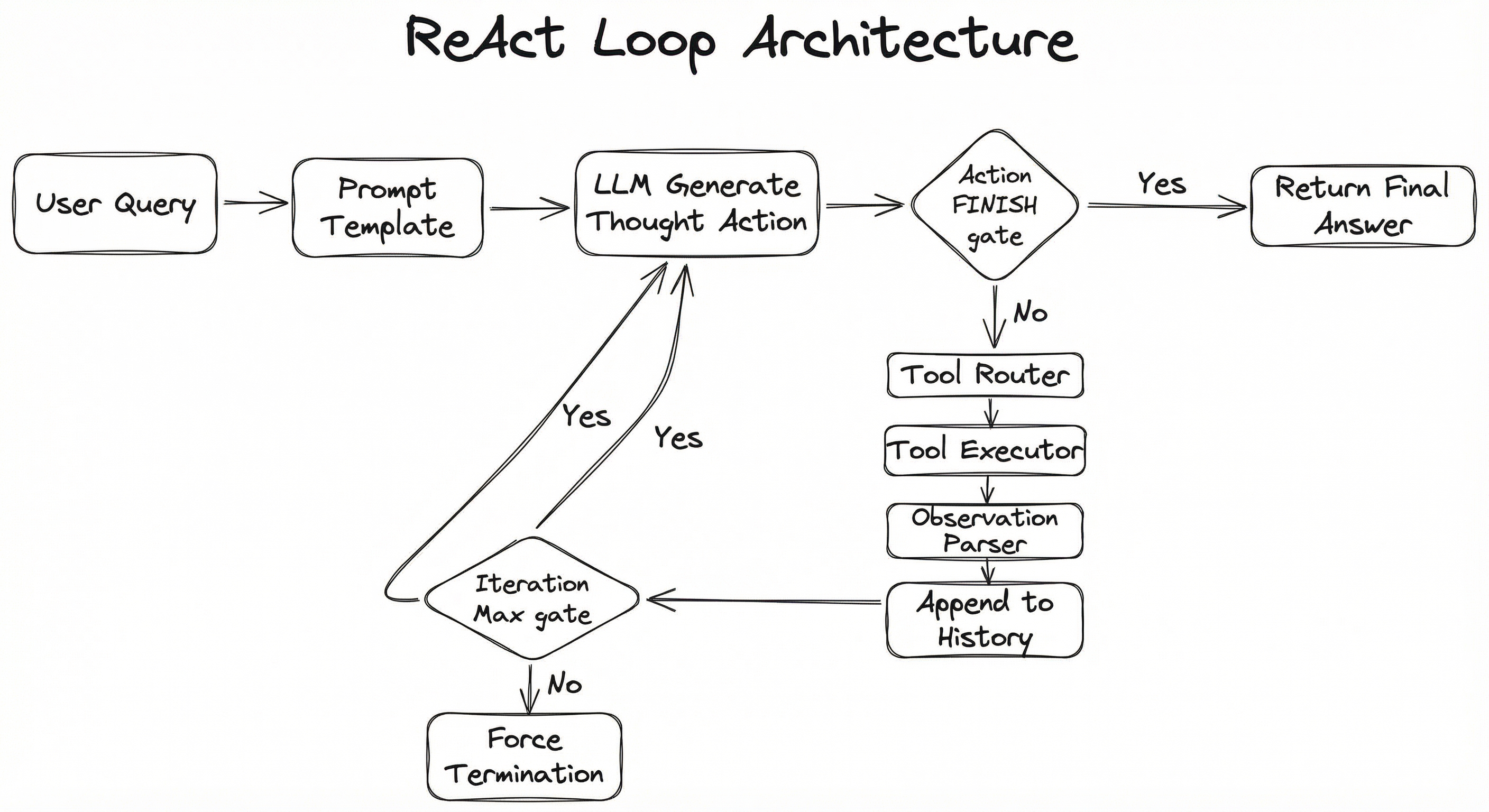
The loop is fundamentally a while loop with an LLM as the conditional. Each iteration asks the LLM: "Given everything you know so far, what should we think and do next?" The LLM either chooses to invoke a tool (continuing the loop) or signals completion (breaking the loop).
What makes this architecture elegant is its simplicity. The LLM does not need special training or fine-tuning to participate in a ReAct loop -- the behavior is induced entirely through the prompt template and the structured output format. This is why ReAct became the default pattern for agent frameworks like LangChain, LangGraph, and CrewAI: it works with any sufficiently capable LLM right out of the box.
Key Components
Prompt Template
Provides the system prompt that instructs the LLM to follow the Thought/Action/Observation format. Includes the tool descriptions (names, parameters, usage guidelines) and optionally few-shot examples of successful ReAct trajectories. This is the single most important component -- a bad prompt template will produce a broken agent regardless of the LLM quality.
LLM (Reasoning Engine)
The core language model that generates reasoning traces (thoughts) and selects actions. Must support structured output or reliable text parsing. Models with native function/tool-calling support (GPT-4o, Claude, Gemini) are strongly preferred because they produce structured action outputs rather than free-form text that needs regex parsing.
Tool Registry
A catalog of available tools with their names, descriptions, input schemas, and execution functions. The registry is injected into the prompt so the LLM knows what actions are available. Well-designed tool descriptions are critical -- the LLM selects tools based on their natural language descriptions, not their code.
Tool Router & Executor
Parses the LLM's action output, resolves it to a registered tool, validates the input parameters, executes the tool, and captures the result. Handles errors gracefully -- if a tool call fails, the error message becomes the observation so the LLM can reason about what went wrong and try a different approach.
Observation Parser
Formats and truncates tool output before feeding it back to the LLM. This is critical for cost control: a database query might return 10,000 rows, but the LLM only needs a summary or the first 20. Without truncation, observations can blow up the context window and the token budget.
Loop Controller
Manages the iteration count, enforces max iteration limits, tracks token consumption, handles timeouts, and decides when to force-terminate a loop that is not converging. Also responsible for logging each iteration for debugging and observability.
Memory / History Buffer
Accumulates the sequence of (thought, action, observation) triples from previous iterations. This growing context is what allows the LLM to reason about its past actions and avoid repeating mistakes. In long-running agents, a sliding window or summarization strategy may be needed to keep the history within context limits.
Data Flow
Step 1 -- Prompt Assembly: The user query is combined with the system prompt, tool descriptions, and any conversation history to form the initial LLM input.
Step 2 -- LLM Generation: The LLM produces a thought (its internal reasoning) followed by an action (a tool name and input parameters) or a FINISH signal with the final answer.
Step 3 -- Action Routing: If the action is not FINISH, the tool router parses the action, validates parameters, and dispatches to the appropriate tool executor.
Step 4 -- Tool Execution: The tool runs (API call, database query, code execution, web search, etc.) and returns a result or error.
Step 5 -- Observation Formatting: The raw tool output is truncated, formatted, and wrapped as an observation string.
Step 6 -- History Update: The (thought, action, observation) triple is appended to the history buffer.
Step 7 -- Loop Check: If iteration count < max and no FINISH signal, go back to Step 2 with the updated history. Otherwise, return the answer.
The key insight is that the context window grows with each iteration. By step 5, the LLM sees the original query plus all previous thought-action-observation triples. This accumulated context is both the agent's strength (it can learn from past steps) and its primary cost driver.
A flowchart showing the user query entering a prompt template, flowing to the LLM which generates a thought and action. A decision diamond checks if the action is FINISH. If yes, the final answer is returned. If no, the action flows to a tool router, then tool executor, then observation parser, which appends to history and loops back to the LLM, with an iteration limit check that can force termination.
How to Implement
Implementation Approaches
There are three main ways to implement a ReAct loop, ranging from framework-managed to fully custom:
Approach 1: Framework-managed agents (LangGraph create_react_agent, CrewAI, AutoGen). These provide pre-built ReAct loops with tool registration, output parsing, and loop management out of the box. Best for getting started quickly and for standard use cases.
Approach 2: Native function calling (OpenAI Responses API, Anthropic tool use, Google Gemini function calling). The model natively outputs structured tool calls, and the API can even loop internally. This eliminates parsing errors but couples you to a specific provider.
Approach 3: Custom implementation from scratch. You write the loop, the prompt, the parser, and the tool executor yourself. More work, but maximum control over every aspect. This is what production teams at scale typically end up doing because they need custom termination logic, cost controls, and observability that frameworks do not provide.
For most teams starting out, Approach 1 (LangGraph) is the right call. As you hit production scale and need fine-grained control, you will likely migrate to Approach 3. Approach 2 is great for prototypes where you are already locked into a single LLM provider.
Cost Context: Running a ReAct agent with GPT-4o at 10 iterations averaging 3K tokens per iteration costs about 0.15 per query (~INR 6.7-12.6). With Claude 3.5 Sonnet at 15 per million tokens, the same loop costs roughly 0.18 (~INR 8.4-15.1). For budget-conscious Indian startups, using GPT-4o-mini (0.60 per million tokens) can cut this to 0.01 per query (~INR 0.4-0.8) -- a 15-20x savings.
import openai
import json
from typing import Any

client = openai.OpenAI()

# Define tools
tools = [
    {
        "type": "function",
        "function": {
            "name": "search_web",
            "description": "Search the web for current information on a topic",
            "parameters": {
                "type": "object",
                "properties": {
                    "query": {"type": "string", "description": "Search query"}
                },
                "required": ["query"]
            }
        }
    },
    {
        "type": "function",
        "function": {
            "name": "calculate",
            "description": "Evaluate a mathematical expression",
            "parameters": {
                "type": "object",
                "properties": {
                    "expression": {"type": "string", "description": "Math expression to evaluate"}
                },
                "required": ["expression"]
            }
        }
    }
]

def execute_tool(name: str, arguments: dict) -> str:
    """Route and execute tool calls."""
    if name == "search_web":
        # Replace with real search API (SerpAPI, Tavily, etc.)
        return f"Search results for '{arguments['query']}': [simulated results]"
    elif name == "calculate":
        try:
            result = eval(arguments["expression"])  # Use safe eval in production!
            return str(result)
        except Exception as e:
            return f"Calculation error: {e}"
    return f"Unknown tool: {name}"

def react_loop(
    query: str,
    max_iterations: int = 10,
    model: str = "gpt-4o"
) -> str:
    """Execute a ReAct loop with thought-action-observation cycles."""

    system_prompt = """You are a helpful assistant that solves tasks step by step.
For each step, think about what you need to do, then use the available tools.
When you have enough information to answer the user's question, respond directly."""

    messages = [
        {"role": "system", "content": system_prompt},
        {"role": "user", "content": query}
    ]

    for iteration in range(max_iterations):
        # Step 1: LLM generates thought + action (or final answer)
        response = client.chat.completions.create(
            model=model,
            messages=messages,
            tools=tools,
            tool_choice="auto"  # Let the model decide
        )

        assistant_message = response.choices[0].message
        messages.append(assistant_message)

        # Step 2: Check if the model wants to use a tool
        if not assistant_message.tool_calls:
            # No tool call = model is done reasoning, return answer
            print(f"[ReAct] Completed in {iteration + 1} iterations")
            return assistant_message.content

        # Step 3: Execute each tool call and collect observations
        for tool_call in assistant_message.tool_calls:
            func_name = tool_call.function.name
            func_args = json.loads(tool_call.function.arguments)

            print(f"[ReAct] Step {iteration + 1}: {func_name}({func_args})")

            # Execute the tool
            observation = execute_tool(func_name, func_args)

            # Truncate long observations to control context growth
            if len(observation) > 2000:
                observation = observation[:2000] + "\n[truncated]"

            # Append observation as tool response
            messages.append({
                "role": "tool",
                "tool_call_id": tool_call.id,
                "content": observation
            })

    # Max iterations reached -- force a final answer
    messages.append({
        "role": "user",
        "content": "You have reached the maximum number of steps. Please provide your best answer now based on what you have learned so far."
    })
    response = client.chat.completions.create(
        model=model,
        messages=messages
    )
    print(f"[ReAct] Force-terminated after {max_iterations} iterations")
    return response.choices[0].message.content

# Usage
answer = react_loop("What is the population of Bengaluru and what is 15% of it?")
print(answer)
This is a production-style ReAct loop built directly on OpenAI's function calling API. The key design decisions are: (1) the model decides when to use tools vs. respond directly via tool_choice='auto', (2) observations are truncated to prevent context window blowup, (3) a max iteration limit prevents infinite loops, and (4) when max iterations are hit, we force the model to produce a best-effort answer rather than failing silently. In production, you would add logging, cost tracking, error handling for API failures, and timeout management.
from langgraph.prebuilt import create_react_agent
from langchain_openai import ChatOpenAI
from langchain_core.tools import tool
from langchain_core.messages import HumanMessage
import asyncio

# Define tools with proper docstrings (these become tool descriptions)
@tool
def search_database(query: str) -> str:
    """Search the product database for items matching the query.
    Use this when you need to find specific products, prices, or inventory."""
    # Replace with real DB query
    return f"Found 3 products matching '{query}': Widget A (INR 599), Widget B (INR 899), Widget C (INR 1299)"

@tool
def check_inventory(product_id: str) -> str:
    """Check real-time inventory for a specific product.
    Use this to verify stock availability before confirming orders."""
    # Replace with real inventory API
    return f"Product {product_id}: 42 units in stock at Bengaluru warehouse, 18 units at Mumbai warehouse"

@tool
def calculate_discount(price: float, discount_percent: float) -> str:
    """Calculate the discounted price given original price and discount percentage."""
    discounted = price * (1 - discount_percent / 100)
    savings = price - discounted
    return f"Original: INR {price:.2f}, Discount: {discount_percent}%, Final: INR {discounted:.2f}, Savings: INR {savings:.2f}"

# Initialize the LLM
llm = ChatOpenAI(
    model="gpt-4o",
    temperature=0,       # Deterministic for agents
    max_tokens=1024,     # Cap output per step
)

# Create the ReAct agent with LangGraph
agent = create_react_agent(
    model=llm,
    tools=[search_database, check_inventory, calculate_discount],
    # Optional: customize the system prompt
    prompt="You are a helpful shopping assistant for an Indian e-commerce platform. "
           "Always check inventory before confirming availability. "
           "Quote all prices in INR.",
)

# Run the agent
async def main():
    result = await agent.ainvoke({
        "messages": [
            HumanMessage(
                content="Find me the cheapest widget and check if it's in stock. "
                        "Also tell me the price after a 20% Diwali discount."
            )
        ]
    })

    # Print the full trajectory
    for msg in result["messages"]:
        print(f"[{msg.type}] {msg.content[:200] if msg.content else '(tool call)'}")
        if hasattr(msg, 'tool_calls') and msg.tool_calls:
            for tc in msg.tool_calls:
                print(f"  -> Tool: {tc['name']}({tc['args']})")

asyncio.run(main())
LangGraph's create_react_agent provides a production-ready ReAct loop with built-in features: automatic tool routing, message history management, streaming support, and integration with LangSmith for observability. The @tool decorator converts Python functions into LangChain tools with schema auto-generation from type hints. Note temperature=0 -- for agent loops, you want deterministic behavior to ensure reproducible tool selection. This example shows a realistic Indian e-commerce scenario with INR pricing.
import time
import logging
from dataclasses import dataclass, field
from typing import Optional

logger = logging.getLogger(__name__)

@dataclass
class ReActStep:
    """One iteration of the ReAct loop."""
    iteration: int
    thought: str
    action: str
    action_input: dict
    observation: str
    error: Optional[str] = None
    latency_ms: float = 0.0
    tokens_used: int = 0

@dataclass
class ReActResult:
    """Final result of a ReAct loop execution."""
    answer: str
    steps: list[ReActStep] = field(default_factory=list)
    total_iterations: int = 0
    total_tokens: int = 0
    total_latency_ms: float = 0.0
    terminated_by: str = "completion"  # completion | max_iterations | timeout | error

class ReActAgent:
    """Production ReAct agent with self-correction, cost tracking, and observability."""

    def __init__(
        self,
        llm_client,
        tools: dict,
        system_prompt: str,
        max_iterations: int = 10,
        max_retries_per_tool: int = 2,
        timeout_seconds: float = 120.0,
        max_observation_chars: int = 3000,
        token_budget: int = 50000,
    ):
        self.llm = llm_client
        self.tools = tools  # {name: callable}
        self.system_prompt = system_prompt
        self.max_iterations = max_iterations
        self.max_retries = max_retries_per_tool
        self.timeout = timeout_seconds
        self.max_obs_chars = max_observation_chars
        self.token_budget = token_budget

    def _truncate_observation(self, obs: str) -> str:
        if len(obs) <= self.max_obs_chars:
            return obs
        half = self.max_obs_chars // 2
        return obs[:half] + f"\n\n[... truncated {len(obs) - self.max_obs_chars} chars ...]\n\n" + obs[-half:]

    def _execute_tool_with_retry(self, name: str, args: dict) -> tuple[str, Optional[str]]:
        """Execute a tool with retry logic. Returns (observation, error)."""
        for attempt in range(self.max_retries + 1):
            try:
                result = self.tools[name](**args)
                return self._truncate_observation(str(result)), None
            except Exception as e:
                error_msg = f"Tool '{name}' failed (attempt {attempt + 1}): {type(e).__name__}: {e}"
                logger.warning(error_msg)
                if attempt == self.max_retries:
                    return error_msg, str(e)
                time.sleep(0.5 * (attempt + 1))  # Backoff
        return "Tool execution failed after all retries", "max_retries_exceeded"

    def run(self, query: str) -> ReActResult:
        """Execute the ReAct loop."""
        result = ReActResult(answer="")
        start_time = time.time()
        history = []
        total_tokens = 0

        for iteration in range(self.max_iterations):
            # Check timeout
            elapsed = (time.time() - start_time) * 1000
            if elapsed > self.timeout * 1000:
                result.terminated_by = "timeout"
                result.answer = self._force_answer(query, history)
                break

            # Check token budget
            if total_tokens > self.token_budget:
                result.terminated_by = "token_budget"
                result.answer = self._force_answer(query, history)
                break

            # Generate thought + action
            step_start = time.time()
            llm_response = self._call_llm(query, history)
            step_latency = (time.time() - step_start) * 1000
            total_tokens += llm_response.get("tokens", 0)

            thought = llm_response["thought"]
            action = llm_response["action"]
            action_input = llm_response["action_input"]

            # Check for completion
            if action == "FINISH":
                step = ReActStep(
                    iteration=iteration + 1,
                    thought=thought,
                    action="FINISH",
                    action_input=action_input,
                    observation="",
                    latency_ms=step_latency,
                    tokens_used=llm_response.get("tokens", 0)
                )
                result.steps.append(step)
                result.answer = action_input.get("answer", thought)
                result.terminated_by = "completion"
                break

            # Execute tool
            if action not in self.tools:
                observation = f"Error: Tool '{action}' not found. Available tools: {list(self.tools.keys())}"
                error = "tool_not_found"
            else:
                observation, error = self._execute_tool_with_retry(action, action_input)

            step = ReActStep(
                iteration=iteration + 1,
                thought=thought,
                action=action,
                action_input=action_input,
                observation=observation,
                error=error,
                latency_ms=step_latency,
                tokens_used=llm_response.get("tokens", 0)
            )
            result.steps.append(step)
            history.append(step)

            logger.info(f"Step {iteration + 1}: {action}({action_input}) -> {observation[:100]}...")

        else:
            # Max iterations reached
            result.terminated_by = "max_iterations"
            result.answer = self._force_answer(query, history)

        result.total_iterations = len(result.steps)
        result.total_tokens = total_tokens
        result.total_latency_ms = (time.time() - start_time) * 1000
        return result

    def _call_llm(self, query, history):
        """Call LLM with structured output parsing. Implementation depends on provider."""
        # Placeholder -- implement with your LLM provider
        raise NotImplementedError("Implement with OpenAI, Anthropic, etc.")

    def _force_answer(self, query, history):
        """Force a best-effort answer when termination is triggered."""
        # Call LLM one final time without tools
        return "Based on the information gathered so far..."
This is a production-grade ReAct agent class with the guardrails you need in real deployments: retry logic with exponential backoff for flaky tool calls, observation truncation to prevent context window blowup, token budget enforcement to cap costs, timeout management for SLA compliance, and structured step logging for debugging. The ReActResult dataclass captures the full execution trace including termination reason, making it easy to diagnose why an agent behaved a certain way. In production at scale (say, powering a customer support agent for a Flipkart-like platform), this level of observability is not optional -- it is table stakes.
# ReAct Agent Configuration (YAML)
agent:
  name: customer-support-agent
  model: gpt-4o
  temperature: 0
  max_tokens_per_step: 1024

loop:
  max_iterations: 10
  timeout_seconds: 120
  token_budget: 50000
  observation_max_chars: 3000
  force_answer_on_termination: true

tools:
  - name: search_knowledge_base
    description: "Search internal knowledge base for support articles"
    timeout_ms: 5000
    retry_count: 2
  - name: lookup_order
    description: "Look up order details by order ID or customer email"
    timeout_ms: 3000
    retry_count: 1
  - name: check_refund_policy
    description: "Check refund eligibility for a given order"
    timeout_ms: 2000
    retry_count: 1
  - name: escalate_to_human
    description: "Escalate the conversation to a human agent when the issue is too complex"
    timeout_ms: 1000
    retry_count: 0

observability:
  log_full_trajectory: true
  track_token_usage: true
  alert_on_max_iterations: true
  export_to: langsmith
Common Implementation Mistakes
- ●
No max iteration limit: The most dangerous mistake. Without a hard cap on iterations, a confused agent can loop forever, burning tokens and money. Always set
max_iterations(typically 5-15 for most tasks). At GPT-4o pricing, an infinite loop can cost hundreds of dollars before someone notices. - ●
Bloated observations: Feeding raw, untruncated tool outputs back to the LLM. A database query returning 10,000 rows or a web search returning full page HTML will overwhelm the context window and degrade reasoning quality. Always truncate observations to 1-3K characters and summarize when needed.
- ●
Vague tool descriptions: The LLM selects tools based on their natural language descriptions. If descriptions are ambiguous (e.g., "search stuff" instead of "Search the product catalog by name, category, or price range"), the model will misroute actions. Invest time in writing precise, example-rich tool descriptions.
- ●
Not handling tool errors as observations: When a tool call fails, teams often crash the entire loop. Instead, pass the error message as the observation -- this lets the LLM reason about the failure and try a different approach. Self-correction is one of ReAct's greatest strengths; do not short-circuit it.
- ●
Using high temperature for agent loops: Temperature > 0 introduces randomness in tool selection, which can cause non-deterministic and unreproducible behavior. Set temperature to 0 or near-0 for production agents. Save creativity for content generation, not tool routing.
- ●
Ignoring the growing context cost: Each ReAct iteration adds the previous thought, action, and observation to the context. By iteration 10, you might be sending 30K+ tokens per LLM call. Track token usage per iteration and implement early termination if the cost exceeds your budget.
- ●
Overly large action spaces: Giving the agent 50+ tools creates a needle-in-a-haystack selection problem. The LLM's ability to pick the right tool degrades as the action space grows. Keep the tool set focused (5-15 tools) or use a hierarchical tool selection strategy.
When Should You Use This?
Use When
The task requires multi-step reasoning with external information -- e.g., answering a question that requires looking up data, computing something, and synthesizing the results
You need the agent to self-correct based on intermediate feedback -- e.g., if a search returns irrelevant results, the agent should reformulate and try again
The task involves dynamic tool selection -- the agent must decide which tool to use at each step rather than following a fixed sequence
Explainability matters -- the thought traces provide a natural audit trail of the agent's decision-making process, critical for regulated industries (finance, healthcare)
The problem is open-ended or ambiguous -- you do not know in advance how many steps are needed or which tools will be required
You are building a general-purpose assistant that needs to handle diverse query types with a single architecture
Avoid When
The task is a simple, single-step operation -- e.g., "translate this sentence" or "summarize this paragraph." A ReAct loop adds unnecessary latency and cost for tasks that do not need tool use or multi-step reasoning
You have a fixed, known workflow -- e.g., always search, then rank, then summarize. Use a deterministic pipeline instead; the LLM does not need to decide the steps if you already know them
Latency is critical (sub-500ms response required) -- each ReAct iteration adds 500-2000ms of LLM inference time. A 5-step loop takes 3-10 seconds minimum. For real-time applications, consider pre-computed results or simpler architectures
Cost is extremely constrained -- ReAct loops are expensive because they make multiple LLM calls per query. If you are serving millions of queries per day at razor-thin margins, the token costs may be prohibitive without aggressive optimization
The LLM does not have access to meaningful tools -- a ReAct loop without useful tools is just expensive chain-of-thought reasoning. If all the information the model needs is already in the context, skip the loop
You need guaranteed determinism -- ReAct loops are inherently non-deterministic (even at temperature 0, tool outputs vary). If you need bit-for-bit reproducible outputs, use a deterministic pipeline
Key Tradeoffs
The Fundamental Tradeoff: Quality vs. Cost vs. Latency
The ReAct loop sits at the center of a three-way tension:
| Dimension | More Iterations | Fewer Iterations |
|---|---|---|
| Quality | Better -- more chances to gather info and self-correct | Worse -- may miss key information |
| Cost | Higher -- more LLM calls and growing context | Lower -- fewer tokens consumed |
| Latency | Slower -- each step adds 0.5-2s | Faster -- fewer round trips |
Most production systems land on 5-10 max iterations as the sweet spot. Below 3, the agent barely has room to think-act-observe-adjust. Above 15, you are usually dealing with a poorly scoped task or bad tool descriptions.
Reasoning Quality vs. Action Space Size
There is a less obvious tradeoff between how many tools you give the agent and how well it reasons about tool selection. Research (and practical experience) suggests that 5-15 tools is the sweet spot for most LLMs. Beyond that, the model starts confusing tools or selecting suboptimal ones.
If you need more tools, consider a hierarchical approach: a top-level agent selects a category ("database queries", "web search", "calculations"), and a sub-agent handles the specific tool within that category.
Explainability vs. Efficiency
The thought traces in a ReAct loop provide excellent explainability -- you can see exactly why the agent chose each action. But those traces consume tokens. Some teams strip the thought traces in production and only keep actions/observations, saving 20-40% on token costs at the expense of debuggability. This is a valid optimization once your agent is mature and well-tested, but keep the full traces during development.
Alternatives & Comparisons
In plan-then-execute, the LLM generates a complete multi-step plan upfront, then a separate executor runs each step sequentially. This is faster (one planning call vs. multiple reasoning calls) and more predictable, but less adaptive -- if step 3 fails or returns unexpected results, the plan cannot adjust. Use plan-then-execute for well-structured tasks with predictable steps; use ReAct when the path is uncertain and intermediate feedback matters.
CoT prompting asks the LLM to reason step-by-step but does not include any action or tool use -- all reasoning happens within the model's internal knowledge. CoT is simpler, faster, and cheaper (single LLM call), but cannot access external information or verify its claims. Use CoT for reasoning tasks where the model has sufficient knowledge; use ReAct when the task requires external data or computation.
Multi-agent systems use multiple specialized agents (each potentially running their own ReAct loops) coordinated by an orchestrator. This is more powerful for complex, decomposable tasks but adds significant complexity in communication, state management, and debugging. Use a single ReAct agent for tasks that a single expert could handle; use multi-agent orchestration when the task genuinely requires different expertise domains.
Some systems skip the reasoning step entirely and use the LLM purely for function-calling: parse intent, call tool, return result. This is faster and cheaper but fragile -- without reasoning, the model cannot plan multi-step solutions, recover from errors, or explain its decisions. Use direct execution for simple, single-tool tasks; use ReAct when the task requires judgment about what to do next.
Pros, Cons & Tradeoffs
Advantages
Self-correcting behavior: The observe-then-think cycle lets the agent detect and recover from errors mid-execution. If a search returns irrelevant results, the agent can reformulate the query -- something a static pipeline cannot do.
Explainable decision-making: Every thought trace is a natural language explanation of the agent's reasoning. This audit trail is invaluable for debugging, compliance, and user trust. You can literally read why the agent did what it did.
Dynamic tool selection: The agent chooses which tool to use at each step based on the current context, rather than following a hardcoded sequence. This makes ReAct agents naturally flexible across diverse query types.
Grounded reasoning: By interleaving reasoning with real-world observations, ReAct significantly reduces hallucination compared to pure chain-of-thought approaches. The Yao et al. paper showed a 15-20% improvement on fact-checking tasks.
Minimal training required: ReAct works through prompting alone -- no model fine-tuning needed. You can build a working agent with any capable LLM (GPT-4o, Claude 3.5, Gemini 2.0) in an afternoon.
Framework ecosystem: Mature implementations in LangChain, LangGraph, CrewAI, and AutoGen mean you do not have to build from scratch. The pattern is well-documented and battle-tested.
Disadvantages
High latency: Each iteration requires an LLM inference call (500-2000ms) plus tool execution time. A 5-step loop typically takes 5-15 seconds end-to-end, which may be unacceptable for real-time applications.
Compounding token costs: The context window grows with every iteration as previous thoughts, actions, and observations accumulate. By iteration 8-10, you may be sending 30K+ tokens per call. At scale, this makes ReAct one of the most expensive architectural patterns.
Risk of infinite or unproductive loops: Without proper guardrails, the agent can get stuck in repetitive cycles -- asking the same question in slightly different ways, or oscillating between two tools. Max iteration limits are essential but crude.
Non-deterministic behavior: Even at temperature 0, tool outputs vary (search results change, APIs return different data). This makes ReAct loops hard to test deterministically and difficult to guarantee consistent behavior.
Sensitive to prompt engineering: The quality of the ReAct loop is heavily dependent on the system prompt, tool descriptions, and few-shot examples. Small changes in wording can dramatically affect tool selection and reasoning quality.
Context window limitations: Long ReAct trajectories can exceed the model's context window, especially with verbose tool outputs. Once the context is full, the model loses access to earlier steps, degrading coherence.
Failure Modes & Debugging
Infinite loop / repetitive cycling
Cause
The agent keeps calling the same tool with the same or slightly varied inputs, never reaching a FINISH condition. This typically happens when the tool returns unhelpful results and the agent lacks the reasoning ability to try a fundamentally different approach.
Symptoms
Token consumption spikes. The same tool appears in consecutive iterations with near-identical inputs. The agent's thought traces show circular reasoning ("Let me try searching again with a slightly different query..."). Costs escalate without producing a useful answer.
Mitigation
Implement hard max iteration limits (5-15 for most tasks). Add repetition detection: if the same tool is called with similar inputs twice in a row, inject a hint ("You already tried this approach. Consider a different tool or formulate your answer from what you have."). Use exponential backoff on repeated tool calls.
Premature termination
Cause
The agent signals FINISH too early, before gathering sufficient information. Common when the LLM is overly confident or when the system prompt does not explicitly instruct thoroughness.
Symptoms
Answers are shallow, incomplete, or based on assumptions rather than observed data. The agent completes in 1-2 iterations for tasks that clearly require more investigation. Users report that the agent "did not try hard enough."
Mitigation
Tune the system prompt to encourage thoroughness: "Verify your answer using at least one tool before responding." Add minimum iteration requirements for complex tasks. Implement a self-check step where the agent evaluates its own answer's completeness before finishing.
Context window overflow
Cause
Verbose tool observations (large API responses, full web pages, long database results) accumulate across iterations, exceeding the model's context window limit.
Symptoms
API errors (context length exceeded). Truncated or incoherent reasoning in later iterations. The model "forgets" information from earlier steps. Sudden quality degradation at iteration 7-10.
Mitigation
Truncate observations aggressively (1-3K chars per observation). Implement a sliding window that summarizes older iterations. Use observation summarization: instead of raw tool output, have a smaller model extract only the relevant information. Monitor context token count per iteration and alert when approaching 80% of the limit.
Tool misrouting
Cause
The LLM selects the wrong tool for a given step due to ambiguous tool descriptions, too many tools in the action space, or insufficient few-shot examples.
Symptoms
The agent calls a search tool when it should call a calculator, or queries the wrong database. Tool calls return irrelevant observations, leading to wasted iterations and degraded answer quality. Often visible as a chain of failed tool calls followed by the correct one.
Mitigation
Write precise, unambiguous tool descriptions with usage examples. Keep the action space small (5-15 tools). Add negative examples in tool descriptions ("Do NOT use this tool for X; use Y instead."). Implement tool call validation that checks parameter types before execution.
Hallucinated tool calls
Cause
The LLM generates a tool name or parameter that does not exist in the registry. More common with text-based (non-function-calling) implementations where the model must format tool calls as free text.
Symptoms
Tool routing fails with "unknown tool" errors. The agent invents plausible-sounding but non-existent tools (e.g., "check_weather" when only "search_web" is available). Parameters have wrong types or missing required fields.
Mitigation
Use native function calling (OpenAI, Anthropic, Google) rather than text-based parsing -- the model's output is constrained to the tool schema. If using text-based parsing, implement strict validation and feed the error back as an observation so the agent can self-correct. Include the complete tool list in every prompt.
Cost runaway
Cause
Long-running loops with growing context windows consume far more tokens than budgeted. A single adversarial or ambiguous query can trigger 10+ iterations at 30K+ tokens each.
Symptoms
Monthly LLM API bills exceed projections by 3-10x. Individual queries cost 2.00+ instead of the expected 0.15. Cost spikes correlate with specific query patterns or user behaviors.
Mitigation
Implement per-query token budgets (e.g., 50K tokens max per query). Track cumulative cost within the loop controller and force termination when the budget is exceeded. Use tiered models: start with a cheaper model (GPT-4o-mini) and escalate to a more capable model only if the cheaper one fails. Set up cost alerts at the API provider level.
Placement in an ML System
Where Does the ReAct Loop Sit?
The ReAct loop is the central orchestration mechanism within an AI agent. It sits at the heart of the agent architecture, coordinating between the planning layer (which determines high-level goals), the tool execution layer (which interfaces with external systems), and the memory layer (which provides context from past interactions).
Upstream, the prompt template defines the agent's behavior, tool descriptions, and few-shot examples. The planning module (if present) may decompose a complex task into sub-goals, each handled by its own ReAct loop. The memory store provides conversation history and long-term knowledge that contextualizes the agent's actions.
Downstream, the tool executor actually runs the tools that the ReAct loop selects. The human-in-the-loop component may interrupt the loop to provide guidance, approve sensitive actions, or correct course when the agent is confused.
In a typical production system -- say, a customer support agent for an Indian fintech company -- the ReAct loop receives a customer query, reasons about what information it needs, calls tools (knowledge base search, order lookup, policy check), and synthesizes a response. The entire cycle typically completes in 5-15 seconds with 3-7 iterations.
Architectural Insight: The ReAct loop is to AI agents what the event loop is to Node.js -- the core execution mechanism that everything else hangs off of. Understanding it deeply is essential for anyone building or debugging agent systems.
Pipeline Stage
Orchestration / Serving
Upstream
- prompt-template
- planning-module
- memory-store
Downstream
- tool-executor
- human-in-loop
Scaling Bottlenecks
The primary bottleneck is LLM inference latency and cost. Each iteration requires a full forward pass through the language model, and the input grows with every step. At 10 iterations, you are making 10 sequential LLM calls with increasing context sizes -- this is inherently serial and cannot be parallelized.
Throughput scaling is limited by LLM API rate limits and concurrency. If you are running 1,000 concurrent ReAct agents, each making 5-10 LLM calls, that is 5,000-10,000 concurrent API requests -- well above most API tier limits.
Tool execution latency compounds the problem. If a tool call takes 2 seconds (e.g., a slow database query) and the loop runs 5 iterations, tool latency alone adds 10 seconds.
Some concrete numbers: at 1,000 queries/hour with an average of 7 iterations per query, you are making ~7,000 LLM calls/hour. At GPT-4o pricing with an average of 10K tokens per call, that costs about 250/hour (~INR 21,000/hour).
Production Case Studies
Razorpay built Ray, an AI assistant that uses a ReAct-style agentic loop to handle customer queries. Ray reasons about the customer's issue, looks up order details and payment status via internal APIs, checks refund policies, and synthesizes a response. The agent follows a think-act-observe pattern, dynamically deciding whether to query the order database, check documentation, or escalate to a human agent based on the complexity of the issue.
Ray now handles nearly 70% of customer queries autonomously, significantly reducing the load on human support agents and improving response times. Razorpay also partnered with NPCI and OpenAI to prototype agentic payments -- AI agents that can reason about and execute payment flows.
Zomato deployed Zia, an AI customer support agent built on Together AI's optimized Llama models. Zia uses an iterative reasoning loop to handle customer complaints: it reasons about the issue, queries order history, checks restaurant and delivery partner data, and determines the appropriate resolution (refund, re-delivery, credit) -- all through a function-based response and action pipeline that mirrors the ReAct pattern.
Zia doubled customer satisfaction (CSAT) scores, reduced average response time by 75% to under 10 seconds, and scales past 1,000 messages per minute at lower cost than the previous system.
Swiggy partnered with Databricks to build an enterprise-scale AI support agent. The agent uses a multi-step reasoning approach: for each customer query, it reasons about the complaint type, retrieves relevant order and delivery data, checks policy rules, and generates a resolution. Swiggy was also one of the first Indian consumer brands to adopt MCP (Model Context Protocol), integrating its platform with AI agents that can reason about and execute food orders, grocery deliveries, and restaurant bookings through conversational interfaces.
The AI agent delivers instant, empathetic, and scalable customer support across Swiggy Food, Instamart, and Dineout. Swiggy also launched AI ordering through ChatGPT, Claude, and Gemini, enabling users to order food via natural language conversation with reasoning agents.
The original ReAct paper by Yao et al. (from Google Brain and Princeton) evaluated the pattern on four benchmarks: HotpotQA (multi-hop question answering), FEVER (fact verification), ALFWorld (interactive text game), and WebShop (web navigation). The ReAct agent used a Wikipedia search API for knowledge tasks and structured action spaces for interactive tasks.
On HotpotQA, ReAct outperformed chain-of-thought by reducing hallucination through grounded search. On ALFWorld and WebShop, ReAct achieved 34% and 10% absolute improvement over imitation and reinforcement learning baselines, using only 1-2 in-context examples.
Tooling & Ecosystem
LangChain's graph-based agent framework with a prebuilt create_react_agent function. Provides stateful execution, human-in-the-loop interrupts, time-travel debugging, and streaming. The recommended way to build ReAct agents in the LangChain ecosystem as of 2025-2026.
The foundational LLM application framework that popularized the ReAct agent pattern through its AgentExecutor class. While LangGraph is now recommended for new agents, LangChain's tool abstractions, prompt templates, and output parsers remain the standard building blocks.
Multi-agent orchestration framework where each agent can run its own ReAct loop. Provides role-based agent definitions, task delegation, and collaborative workflows. Strong adoption in enterprise settings with 60% of Fortune 500 companies using it by 2025.
Microsoft's multi-agent framework with built-in ReAct-style conversation patterns. Provides AgentChat abstraction for agent-to-agent communication, strong human-in-the-loop patterns, and deep Azure integration. Being merged with Semantic Kernel into Microsoft Agent Framework.
OpenAI's native function calling API that supports ReAct-style loops at the API level. The Responses API is an agentic loop itself, allowing the model to call multiple tools within a single API request. Eliminates parsing errors since tool calls are structured JSON.
Observability and debugging platform for LLM applications. Traces every step of a ReAct loop (thoughts, actions, observations, latency, tokens), making it essential for debugging agent behavior in production. Provides cost tracking, regression testing, and dataset management.
LlamaIndex provides ReAct agents optimized for data retrieval and RAG workflows. Its ReActAgent class supports tool use over custom data sources with built-in context management and query planning.
Research & References
Yao, Zhao, Yu, Du, Shafran, Narasimhan & Cao (2023)ICLR 2023
The foundational paper that introduced the ReAct framework. Demonstrated that interleaving reasoning traces with actions on HotpotQA, FEVER, ALFWorld, and WebShop significantly outperforms both reasoning-only and acting-only baselines.
Wei, Wang, Schuurmans, Bosma, Ichter, Xia, Chi, Le & Zhou (2022)NeurIPS 2022
Introduced chain-of-thought prompting -- the reasoning foundation that ReAct builds upon. Showed that prompting LLMs to generate intermediate reasoning steps dramatically improves performance on arithmetic, commonsense, and symbolic reasoning tasks.
Shinn, Cassano, Gopinath, Narasimhan & Yao (2023)NeurIPS 2023
Extended the ReAct pattern with self-reflection: agents verbally reflect on failures and maintain reflective text in episodic memory to improve performance across trials. Achieved 91% pass@1 on HumanEval, surpassing GPT-4's 80%.
Yao, Yu, Zhao, Shafran, Griffiths, Cao & Narasimhan (2023)NeurIPS 2023
Generalized chain-of-thought into a tree structure where the model explores multiple reasoning paths and backtracks. Complements ReAct by providing richer search over the reasoning space -- a ReAct loop can use Tree-of-Thoughts for its thinking step.
Schick, Dwivedi-Yu, Dessi, Raileanu, Lomeli, Zettlemoyer, Cancedda & Scialom (2023)NeurIPS 2023
Showed that LLMs can learn to use external tools (calculator, search, translation) in a self-supervised manner. Provides the tool-augmented reasoning foundation that ReAct loops operationalize in production.
Karpas, Abend, Belinkov, Lenz, Lieber, Ratner, Shoham et al. (2022)arXiv preprint
Proposed the Modular Reasoning, Knowledge and Language (MRKL) architecture that routes LLM queries to specialized expert modules. An early precursor to ReAct's tool-augmented reasoning approach.
Wang, Xie, Jiang, Mandlekar, Xiao, Zhu, Fan & Anandkumar (2023)NeurIPS 2023 (Spotlight)
Built an LLM-powered Minecraft agent that uses iterative prompting with environment feedback (a ReAct-style loop) to continuously explore, learn skills, and compose them. Demonstrates ReAct principles in embodied, open-ended settings.
Huang, Xia, Xiao, Chan, Liang, Florence, Zeng et al. (2022)CoRL 2023
Demonstrated closed-loop language feedback for robotic planning -- a physical-world ReAct loop where the robot thinks, acts, observes scene descriptions and success detections, and replans. Foundational work on grounding reasoning in physical observations.
Interview & Evaluation Perspective
Common Interview Questions
- ●
What is a ReAct loop and how does it differ from chain-of-thought prompting?
- ●
Walk me through the thought-action-observation cycle with a concrete example.
- ●
How would you prevent a ReAct agent from looping infinitely?
- ●
What are the cost implications of a ReAct loop at scale, and how would you optimize them?
- ●
How would you design the action space (tool set) for a customer support ReAct agent?
- ●
When would you choose a ReAct loop over a plan-then-execute architecture?
- ●
How do you handle tool failures within a ReAct loop?
- ●
Explain the relationship between ReAct and Reflexion. How does self-reflection improve agent performance?
Key Points to Mention
- ●
ReAct synergizes reasoning (chain-of-thought traces) with acting (tool use), where reasoning informs action selection and observations ground the next reasoning step. This bidirectional synergy is the key innovation.
- ●
The loop has a formal structure: at each step , the agent generates (thought , action ) and receives observation , with the full history feeding into the next step.
- ●
Termination conditions are critical for production: max iterations, token budget, timeout, and FINISH signal. Never deploy a ReAct agent without all four.
- ●
The action space design (which tools, how described, how many) has a direct and significant impact on agent quality. 5-15 well-described tools is the sweet spot.
- ●
Cost grows quadratically with iterations because the context includes all previous steps. This means a 10-step loop is not 2x the cost of a 5-step loop -- it is closer to 3-4x.
- ●
Self-correction from error observations is one of ReAct's superpowers. Always pass tool errors as observations rather than crashing the loop.
Pitfalls to Avoid
- ●
Confusing ReAct with simple function calling -- ReAct specifically requires the reasoning trace (thought) before each action, which is what makes it more than just a tool-calling loop.
- ●
Claiming ReAct agents are deterministic -- they are not, even at temperature 0, because tool outputs are dynamic. Always discuss testing and evaluation strategies.
- ●
Ignoring the cost dimension -- interviewers at Indian startups especially want to hear about token cost management, not just architectural elegance.
- ●
Treating the ReAct loop as a black box -- you should be able to trace through a 5-step example, explaining what the agent thinks and does at each step, and what the termination conditions are.
Senior-Level Expectation
A senior/staff candidate should be able to design a complete ReAct agent system: prompt engineering (system prompt, tool descriptions, few-shot examples), loop controller implementation (max iterations, token budget, timeout, repetition detection), tool registry design (naming, descriptions, error handling, retries), observation management (truncation, summarization, context window optimization), cost modeling (tokens per iteration, cost per query, monthly projections at target QPS), and observability (step-level logging, cost tracking, quality evaluation, regression testing). They should also discuss when ReAct is not the right pattern and propose alternatives. The ability to reason about the cost-quality-latency tradeoff at Indian startup scale (say, 50K queries/day budget of INR 5-10 lakh/month) is what separates senior from mid-level.
Summary
The ReAct loop (Reasoning + Acting) is the foundational execution pattern for modern AI agents. It works by interleaving three steps in a cycle: the LLM thinks (generates a chain-of-thought reasoning trace), acts (invokes an external tool like search, database, or calculator), and observes (processes the tool's response). This cycle repeats until the agent has enough information to produce a final answer, or until a safety condition (max iterations, token budget, timeout) forces termination.
What makes ReAct powerful is the bidirectional synergy between reasoning and acting. The reasoning traces guide tool selection and error diagnosis. The observations from tools ground the reasoning in reality, dramatically reducing hallucination compared to pure chain-of-thought approaches. This self-correcting behavior -- where the agent can detect a bad search result and reformulate its query, or notice a failed API call and try a different approach -- is what makes ReAct agents genuinely useful in production.
In practice, ReAct loops are used by companies like Razorpay (Ray handles 70% of customer queries), Zomato (Zia doubled CSAT), and Swiggy (enterprise-scale AI support) to power intelligent customer service, while frameworks like LangGraph, CrewAI, and AutoGen provide production-ready implementations. The key engineering challenges are cost management (context grows with each iteration, making token costs the primary concern at scale), loop termination (preventing infinite cycling while allowing sufficient exploration), and action space design (curating 5-15 well-described tools that cover the task domain without overwhelming the model). For teams building AI agents in 2026, understanding the ReAct loop is not optional -- it is the default pattern that everything else builds upon.