File Upload in Machine Learning
Every machine learning system starts with data, and the vast majority of that data arrives as files -- CSV exports from business databases, JSON dumps from APIs, Parquet snapshots from data warehouses, and image archives from annotation platforms. The file upload block is the front door of your ML pipeline: it governs how raw data physically enters your system from the outside world.
File upload sounds deceptively simple -- accept a file, write it to storage, done. But at production scale, it becomes a rich engineering problem. A 50 GB training dataset cannot travel over a single HTTP connection without corruption risk. A user uploading 100,000 labeled images needs resumability so that a network blip at image 87,432 doesn't force a restart. A CSV with inconsistent column types needs schema inference before downstream transforms can trust it. And every uploaded file is a potential attack vector that must be scanned before it touches your processing pipeline.
This guide covers the complete lifecycle of file upload in ML systems: from the browser or CLI initiating the transfer, through multipart chunking and cloud storage integration, to format detection, schema inference, virus scanning, and handoff to downstream processing blocks. Whether you are building a data labeling platform in Bengaluru or a training data pipeline at a hyperscaler, the patterns here apply universally.
Concept Snapshot
- What It Is
- A system component that accepts data files from external sources, transfers them reliably into cloud or local storage, validates their integrity and format, and makes them available for downstream ML pipeline processing.
- Category
- Data Ingestion
- Complexity
- Intermediate
- Inputs / Outputs
- Inputs: raw files (CSV, JSON, Parquet, images, audio, video) from browsers, CLIs, or automated systems. Outputs: validated files in object storage with metadata records (file size, format, schema, checksum, upload status).
- System Placement
- Sits at the very beginning of the ML pipeline, upstream of data validation, document loaders, and feature engineering. It is the first point of contact between external data and your system.
- Also Known As
- data upload, file ingestion, bulk data import, dataset upload, data drop zone
- Typical Users
- ML Engineers, Data Scientists, Data Annotators, Platform Engineers, Backend Engineers
- Prerequisites
- HTTP protocol basics, Cloud object storage (S3, GCS, Azure Blob), File formats (CSV, JSON, Parquet), Basic security concepts
- Key Terms
- multipart uploadchunked transferresumable uploadpresigned URLschema inferencecontent-type detectionchecksum verificationvirus scanningSAS token
Why This Concept Exists
The Problem: Data Doesn't Magically Appear in Your Pipeline
ML practitioners spend an enormous amount of time acquiring and preparing data. According to a widely cited survey, data scientists spend 60-80% of their time on data preparation, and a significant chunk of that begins with simply getting data into the system. Without a robust file upload mechanism, teams resort to ad-hoc solutions -- SCP-ing files to servers, emailing CSVs, sharing Google Drive links -- none of which provide the auditability, validation, or reliability that production ML systems demand.
The core problem is deceptively layered. First, there is the transport problem: files range from kilobytes to terabytes, and HTTP was not designed for multi-gigabyte transfers over unreliable networks. A single dropped connection on a 20 GB upload means starting over unless you have chunking and resumability. Second, there is the trust problem: every uploaded file could contain malware, corrupted data, or schema violations that will silently poison your training pipeline. Third, there is the metadata problem: an uploaded file is useless without context -- who uploaded it, when, what format, what schema, which project it belongs to.
Historical Context: From FTP to Cloud-Native Upload
In the early days, data ingestion meant FTP servers and batch file transfers scheduled via cron jobs. Data engineers would drop files into designated directories and downstream scripts would pick them up. This worked for small-scale analytics but broke down as ML systems demanded higher throughput, real-time processing, and multi-tenant isolation.
The shift to cloud object storage (AWS S3 in 2006, Google Cloud Storage in 2010, Azure Blob Storage in 2010) changed the game fundamentally. Instead of managing disk space on physical servers, teams could upload directly to virtually unlimited storage. But this introduced new challenges: managing credentials, handling multipart uploads for large files, and ensuring consistency in distributed storage.
The Modern Pattern: Presigned URLs and Direct Upload
Today's best practice is the presigned URL pattern (or SAS token in Azure). The client requests a time-limited, pre-authorized URL from the backend, then uploads directly to cloud storage without the file ever touching your application server. This eliminates the application server as a bottleneck, reduces bandwidth costs, and scales horizontally by default because the cloud provider handles the heavy lifting.
Key Insight: A well-designed file upload system is not just a file transfer mechanism -- it is the trust boundary between the outside world and your ML pipeline. Everything downstream assumes the upload block has done its job: the file is intact, the format is valid, the content is safe, and the metadata is recorded.
Core Intuition & Mental Model
The Mental Model: A Secure Mailroom
Think of the file upload block as the mailroom of a large organization. Packages (files) arrive from the outside world. The mailroom's job is to: (1) accept the delivery reliably, even if the courier needs multiple trips for a large shipment, (2) scan for hazards before letting anything into the building, (3) log what arrived, from whom, and when, (4) route the package to the correct department. A mailroom that just dumps packages in a pile is technically accepting deliveries but is failing at its actual job.
Similarly, a file upload endpoint that simply writes bytes to disk without validation, scanning, or metadata tracking is technically functional but operationally useless. The real value is in the guarantees it provides to everything downstream.
Why Chunking Changes Everything
Here is the single most important architectural insight: never upload large files as a single HTTP request. Instead, split the file into chunks (typically 5-100 MB each) and upload them independently. This gives you three superpowers:
- Resumability -- if chunk 47 of 200 fails, retry only chunk 47, not the entire file
- Parallelism -- upload multiple chunks simultaneously, saturating your bandwidth
- Progress tracking -- show the user a meaningful progress bar, not a spinning wheel
AWS S3 multipart upload, for example, splits files into parts of 5 MB to 5 GB each, supports up to 10,000 parts, and allows parallel upload of parts. A 50 GB file that takes 45 minutes as a single upload can complete in under 10 minutes with parallel multipart upload -- roughly a 4x speedup.
The Trust Boundary Principle
Every file upload creates a trust boundary crossing. Data produced by external users, third-party systems, or even internal teams in different departments must be treated as untrusted until validated. This means: verify checksums to ensure integrity, detect the actual file format (not just the extension), scan for malware, validate the schema against expectations, and only then mark the file as ready for processing. Skipping any of these steps is how data poisoning attacks and silent pipeline failures happen.
Technical Foundations
Transfer Throughput Model
The effective throughput of a file upload can be modeled as:
where is the total file size in bytes, is the available bandwidth per connection in bytes/sec, is the number of parallel upload connections (capped by the client's upload bandwidth and server-side concurrency limits), is the initial handshake latency (presigned URL generation, multipart upload initiation), is the number of chunks for chunk size , and is the per-chunk overhead (HTTP headers, checksum verification).
Optimal Chunk Size
The optimal chunk size balances two competing forces:
The first term is the parallel transfer time, the second is the total per-chunk overhead, and the third is the expected retry cost where is the per-chunk failure probability. Smaller chunks reduce retry cost but increase overhead; larger chunks reduce overhead but increase retry cost.
In practice, chunk sizes of 16-64 MB are optimal for most network conditions. AWS recommends a minimum of 5 MB per part, and empirical benchmarks show that 16 MB chunks with 4-8 parallel connections maximize throughput on typical cloud networks.
Checksum Verification
Data integrity is verified using checksums at multiple levels:
- Per-chunk checksum: Each chunk is hashed (typically MD5 or SHA-256) before upload. The server verifies the hash upon receipt: .
- Whole-file checksum: After all chunks are assembled, the complete file hash is verified: .
- ETag verification: S3 multipart uploads produce a composite ETag:
MD5(MD5(part1) || MD5(part2) || ... || MD5(partN))-N.
Schema Inference Complexity
For tabular files (CSV, JSON, Parquet), schema inference involves sampling rows and inferring the type of each column :
The type lattice follows: null < bool < int < float < string, where each type subsumes all types above it. If row 1 has an integer in column and row 500 has a float, the inferred type is float. Parquet files embed their schema in the file footer, so inference is -- just read the metadata. CSV files require scanning, making inference where is the number of columns.
Internal Architecture
A production file upload system consists of five layers: a client-side upload manager that handles chunking, retry logic, and progress tracking; an API gateway that authenticates requests and generates presigned URLs; a cloud storage backend that receives and persists file chunks; a post-upload processor that validates, scans, and extracts metadata; and a metadata store that records upload state, schema information, and lineage.
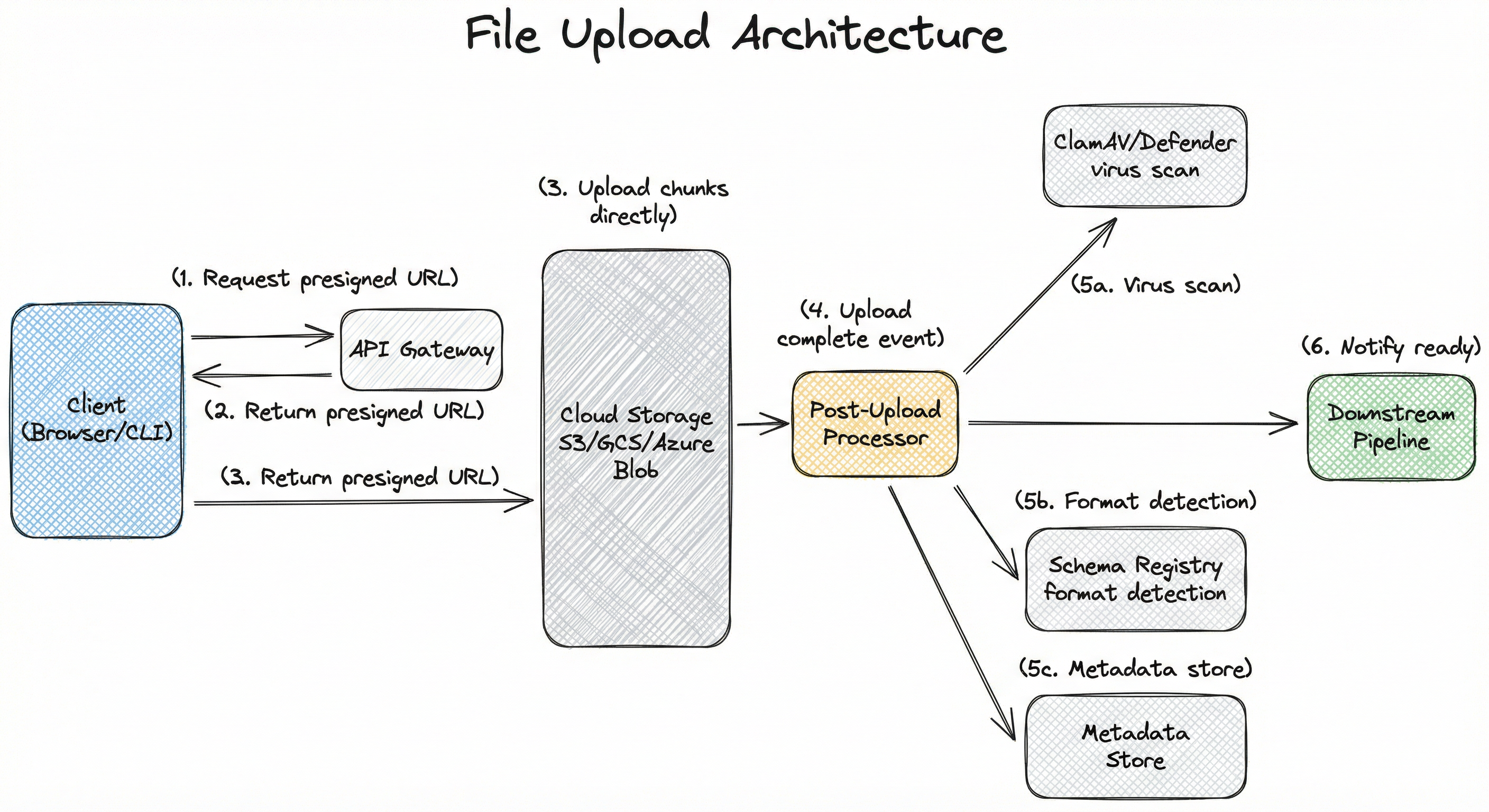
The key architectural decision is the direct-to-storage upload pattern. The client never sends file bytes through the application server. Instead, the API server acts as an authorization and coordination layer that issues presigned URLs, tracks upload progress, and triggers post-upload processing. This means your API server can be a tiny instance -- it handles only lightweight JSON requests, never gigabytes of file data.
The post-upload processor is triggered by cloud storage events (S3 event notifications, GCS Pub/Sub triggers, or Azure Event Grid). It runs as a serverless function or background worker that performs virus scanning, format validation, schema inference, and metadata extraction. Only after all checks pass is the file marked as "ready" and made available to downstream pipeline stages.
Key Components
Client Upload Manager
Runs in the browser or CLI. Splits files into chunks, manages parallel uploads, tracks progress, handles retries on failure, and computes per-chunk checksums. Libraries like Uppy (browser), tus-js-client, or boto3 (Python CLI) implement this logic.
API Gateway / Upload Coordinator
Authenticates the upload request, validates file metadata (name, expected size, format), generates presigned URLs or SAS tokens for direct cloud storage upload, tracks multipart upload state (initiated, in-progress, completed, failed), and triggers post-upload processing upon completion.
Cloud Object Storage
The actual storage backend (AWS S3, Google Cloud Storage, or Azure Blob Storage). Receives file chunks via presigned URLs, assembles them into complete objects, and emits upload completion events. Provides durability (11 nines for S3), versioning, and lifecycle policies.
Post-Upload Processor
Triggered by storage events. Performs: (1) virus/malware scanning using ClamAV or cloud-native scanners, (2) file format detection using magic bytes, (3) schema inference for tabular files, (4) checksum verification against client-provided hashes, (5) thumbnail generation for images. Quarantines files that fail any check.
Metadata Store
Records upload metadata: file ID, original filename, size, format, schema, uploader identity, upload timestamp, checksum, scan status, and processing status. Typically backed by a relational database (PostgreSQL) or document store. This is the source of truth for what data exists in the system.
Virus Scanner
Scans uploaded files for known malware signatures before they enter the processing pipeline. ClamAV is the standard open-source option. Cloud providers offer managed alternatives: AWS uses Amazon Macie and GuardDuty, Azure provides Microsoft Defender for Storage. Files are quarantined in a separate bucket until cleared.
Schema Registry
Stores and versions the inferred or declared schemas for uploaded datasets. When a new CSV is uploaded, its inferred schema is compared against the expected schema for that dataset. Schema drift (new columns, type changes) triggers alerts or automatic migration. Often implemented using Apache Avro schema registry or a custom metadata table.
Data Flow
Here is the complete data flow for a file upload:
Step 1 - Initiation: The client sends an upload request to the API gateway with file metadata (name, size, content type, target dataset). The gateway authenticates the user, validates quotas, and creates an upload record in the metadata store.
Step 2 - Presigned URL Generation: The gateway generates presigned URLs (one per chunk for multipart upload) with a configurable expiry (typically 1-4 hours). For S3, this uses create_multipart_upload + generate_presigned_url for each part. For Azure, a SAS token with write-only permissions is generated.
Step 3 - Direct Upload: The client uploads chunks directly to cloud storage using the presigned URLs. Chunks can be uploaded in parallel (4-8 concurrent connections is typical). Each chunk includes a Content-MD5 header for integrity verification.
Step 4 - Completion: After all chunks are uploaded, the client notifies the API gateway, which calls complete_multipart_upload on S3 (or commits the block list on Azure). The storage backend assembles the final object.
Step 5 - Post-Processing: The storage completion event triggers the post-upload processor. It downloads the file to a temporary workspace, runs virus scanning, detects the format, infers the schema (for tabular data), and updates the metadata store.
Step 6 - Handoff: If all checks pass, the file status is updated to "ready" and a notification is sent to downstream pipeline stages (data validation, document loader, or feature engineering). If any check fails, the file is quarantined and the uploader is notified.
A directed flow starting from 'Client (Browser/CLI)' which requests a presigned URL from 'API Gateway', receives the URL, then uploads chunks directly to 'Cloud Storage (S3/GCS/Azure Blob)'. Cloud Storage emits an event to 'Post-Upload Processor' which fans out to 'Virus Scanner', 'Schema Registry', and 'Metadata Store'. After processing, a ready notification flows to 'Downstream Pipeline'.
How to Implement
Two Core Implementation Patterns
File upload implementations split into two camps based on where the file bytes flow:
Pattern A: Proxy Upload -- the file passes through your application server, which then writes it to storage. Simple to implement, works for small files (<100 MB), but creates a bottleneck because every byte of every upload consumes your server's CPU, memory, and bandwidth. A single 10 GB upload can saturate a small EC2 instance. This pattern is appropriate only for prototypes or low-volume internal tools.
Pattern B: Direct-to-Storage Upload -- the client uploads directly to cloud storage using presigned URLs or SAS tokens. Your application server only handles lightweight API calls for authorization and coordination. This scales horizontally by default because the cloud provider absorbs the transfer bandwidth. This is the production-grade pattern used by virtually every serious data platform.
For ML-specific workloads, there is an additional consideration: bulk upload. When a data scientist needs to upload 500,000 labeled images or a 200 GB Parquet dataset, neither the browser nor a single HTTP connection is practical. The implementation must support CLI-based bulk upload with parallel multipart transfers, progress checkpointing, and the ability to resume from where it left off after interruption.
Cost Note: Direct-to-S3 upload is essentially free -- you pay only for storage (0.17/hour (~INR 14.3/hour), and handling just 10 concurrent 10 GB uploads would require a much larger instance. At scale, the cost difference is dramatic.
import boto3
import hashlib
import requests
from concurrent.futures import ThreadPoolExecutor, as_completed

# === Backend: Generate presigned URLs for multipart upload ===

def initiate_multipart_upload(bucket: str, key: str) -> dict:
    """Initiate a multipart upload and return upload_id + presigned URLs."""
    s3 = boto3.client('s3')

    # Start the multipart upload
    response = s3.create_multipart_upload(
        Bucket=bucket,
        Key=key,
        ContentType='application/octet-stream',
        Metadata={'uploaded-by': 'ml-pipeline', 'status': 'uploading'}
    )
    upload_id = response['UploadId']
    return {'upload_id': upload_id, 'bucket': bucket, 'key': key}


def generate_part_urls(bucket: str, key: str, upload_id: str, num_parts: int,
                       expiry: int = 3600) -> list[dict]:
    """Generate presigned URLs for each part."""
    s3 = boto3.client('s3')
    part_urls = []
    for part_number in range(1, num_parts + 1):
        url = s3.generate_presigned_url(
            'upload_part',
            Params={
                'Bucket': bucket,
                'Key': key,
                'UploadId': upload_id,
                'PartNumber': part_number,
            },
            ExpiresIn=expiry,
        )
        part_urls.append({'part_number': part_number, 'url': url})
    return part_urls


def complete_multipart_upload(bucket: str, key: str, upload_id: str,
                              parts: list[dict]) -> dict:
    """Complete the multipart upload after all parts are uploaded."""
    s3 = boto3.client('s3')
    response = s3.complete_multipart_upload(
        Bucket=bucket,
        Key=key,
        UploadId=upload_id,
        MultipartUpload={'Parts': parts},  # [{'PartNumber': 1, 'ETag': '...'}]
    )
    return {'location': response['Location'], 'etag': response['ETag']}


# === Client: Upload file chunks in parallel ===

def upload_file_multipart(file_path: str, part_urls: list[dict],
                          chunk_size: int = 16 * 1024 * 1024,
                          max_workers: int = 4) -> list[dict]:
    """Upload a file in parallel chunks using presigned URLs."""
    parts = []

    def upload_part(part_info: dict, data: bytes) -> dict:
        md5 = hashlib.md5(data).digest()
        response = requests.put(
            part_info['url'],
            data=data,
            headers={'Content-MD5': __import__('base64').b64encode(md5).decode()},
        )
        response.raise_for_status()
        return {
            'PartNumber': part_info['part_number'],
            'ETag': response.headers['ETag'],
        }

    with open(file_path, 'rb') as f:
        chunks = []
        for part_info in part_urls:
            chunk = f.read(chunk_size)
            if not chunk:
                break
            chunks.append((part_info, chunk))

    with ThreadPoolExecutor(max_workers=max_workers) as executor:
        futures = {
            executor.submit(upload_part, part_info, data): part_info
            for part_info, data in chunks
        }
        for future in as_completed(futures):
            parts.append(future.result())

    return sorted(parts, key=lambda p: p['PartNumber'])
This example shows the complete server-client interaction for S3 multipart upload. The backend initiates the upload and generates presigned URLs -- one per chunk. The client reads the file in chunks (16 MB default), computes an MD5 checksum for each chunk, and uploads them in parallel using a thread pool. Each chunk is independently retryable. After all parts are uploaded, the backend calls complete_multipart_upload to assemble the final object. This pattern keeps file bytes off your application server entirely.
import os
import hashlib
from tusclient import client as tus_client

def resumable_upload(file_path: str, upload_url: str,
                     chunk_size: int = 32 * 1024 * 1024) -> str:
    """Upload a file using the tus resumable upload protocol.

    If interrupted, calling this again with the same file will
    resume from where it left off.
    """
    file_size = os.path.getsize(file_path)
    file_hash = hashlib.sha256(open(file_path, 'rb').read(8192)).hexdigest()

    # Create tus client
    my_client = tus_client.TusClient(upload_url)

    # Create uploader with fingerprint for resume capability
    uploader = my_client.uploader(
        file_path,
        chunk_size=chunk_size,
        metadata={
            'filename': os.path.basename(file_path),
            'filetype': _detect_mime_type(file_path),
            'sha256_prefix': file_hash,
        },
        # Store upload URL locally for resumption
        store_url=True,
        url_storage=tus_client.fingerprint.Fingerprint(),
    )

    # Upload with automatic resume
    uploader.upload()
    return uploader.url


def _detect_mime_type(file_path: str) -> str:
    """Detect MIME type from file magic bytes."""
    import magic
    mime = magic.Magic(mime=True)
    return mime.from_file(file_path)


# Usage
upload_location = resumable_upload(
    file_path='/data/training_images.tar.gz',
    upload_url='https://upload.example.com/files/',
    chunk_size=64 * 1024 * 1024,  # 64 MB chunks
)
The tus protocol is an open standard for resumable file uploads over HTTP. Unlike S3 multipart upload which is cloud-specific, tus is cloud-agnostic and works with any backend that implements the protocol. The key feature is automatic resume: if the upload is interrupted (network drop, process crash, laptop closing), calling the upload function again with the same file automatically detects the previously uploaded offset and continues from there. The tusd server can be configured to store files on S3, GCS, or Azure Blob behind the scenes.
import pyarrow as pa
import pyarrow.parquet as pq
import pyarrow.csv as csv
import json
from pathlib import Path


def infer_schema(file_path: str, sample_rows: int = 10000) -> dict:
    """Infer schema from uploaded file (CSV, Parquet, or JSON).

    Returns a schema dict with column names, types, nullability,
    and basic statistics.
    """
    path = Path(file_path)
    ext = path.suffix.lower()

    if ext == '.parquet':
        return _infer_parquet_schema(file_path)
    elif ext == '.csv':
        return _infer_csv_schema(file_path, sample_rows)
    elif ext in ('.json', '.jsonl'):
        return _infer_json_schema(file_path, sample_rows)
    else:
        return {'format': ext, 'schema': None, 'error': 'Unsupported format'}


def _infer_parquet_schema(file_path: str) -> dict:
    """Parquet stores schema in footer -- O(1) inference."""
    pf = pq.ParquetFile(file_path)
    schema = pf.schema_arrow
    metadata = pf.metadata

    columns = []
    for i in range(len(schema)):
        field = schema.field(i)
        columns.append({
            'name': field.name,
            'type': str(field.type),
            'nullable': field.nullable,
        })

    return {
        'format': 'parquet',
        'num_rows': metadata.num_rows,
        'num_columns': len(schema),
        'num_row_groups': metadata.num_row_groups,
        'serialized_size_bytes': metadata.serialized_size,
        'columns': columns,
        'created_by': metadata.created_by,
    }


def _infer_csv_schema(file_path: str, sample_rows: int) -> dict:
    """CSV requires sampling rows for type inference."""
    read_options = csv.ReadOptions(block_size=1024 * 1024)  # 1 MB blocks
    convert_options = csv.ConvertOptions(
        auto_dict_encode=True,
        auto_dict_max_cardinality=50,
    )

    # Read a sample for inference
    table = csv.read_csv(
        file_path,
        read_options=read_options,
        convert_options=convert_options,
    )

    # Sample if the file is large
    if table.num_rows > sample_rows:
        table = table.slice(0, sample_rows)

    columns = []
    for i, name in enumerate(table.column_names):
        col = table.column(i)
        columns.append({
            'name': name,
            'type': str(col.type),
            'nullable': col.null_count > 0,
            'null_count': col.null_count,
            'null_fraction': round(col.null_count / len(col), 4),
        })

    return {
        'format': 'csv',
        'num_rows_sampled': table.num_rows,
        'num_columns': len(table.column_names),
        'columns': columns,
    }


def _infer_json_schema(file_path: str, sample_rows: int) -> dict:
    """Infer schema from JSON/JSONL by sampling records."""
    table = pa.json_.read_json(file_path)

    if table.num_rows > sample_rows:
        table = table.slice(0, sample_rows)

    columns = []
    for i, name in enumerate(table.column_names):
        col = table.column(i)
        columns.append({
            'name': name,
            'type': str(col.type),
            'nullable': col.null_count > 0,
        })

    return {
        'format': 'json',
        'num_rows_sampled': table.num_rows,
        'num_columns': len(table.column_names),
        'columns': columns,
    }


# Usage
schema_info = infer_schema('/uploads/training_data.parquet')
print(json.dumps(schema_info, indent=2))
This example demonstrates format-aware schema inference. Parquet files embed their schema in the file footer, so inference is instant -- just read the metadata without scanning any data rows. CSV files require sampling rows and inferring types using PyArrow's built-in type inference (which follows the type lattice: null < bool < int < float < string). JSON/JSONL files are parsed and the schema is inferred from the structure of sampled records. The output includes column names, data types, nullability, and basic statistics -- exactly what downstream data validation and feature engineering blocks need.
import clamd
import logging
from enum import Enum
from dataclasses import dataclass

logger = logging.getLogger(__name__)


class ScanResult(Enum):
    CLEAN = 'clean'
    INFECTED = 'infected'
    ERROR = 'error'


@dataclass
class FileScanReport:
    file_path: str
    result: ScanResult
    threat_name: str | None = None
    error_message: str | None = None


class FileScanner:
    """Scan uploaded files for malware using ClamAV daemon."""

    def __init__(self, host: str = 'localhost', port: int = 3310):
        self.scanner = clamd.ClamdNetworkSocket(host=host, port=port)
        # Verify ClamAV daemon is running
        try:
            self.scanner.ping()
        except clamd.ConnectionError:
            raise RuntimeError(
                'ClamAV daemon is not reachable. '
                'Ensure clamd is running on {host}:{port}'
            )

    def scan_file(self, file_path: str) -> FileScanReport:
        """Scan a single file and return the result."""
        try:
            result = self.scanner.scan(file_path)
            if result is None:
                return FileScanReport(
                    file_path=file_path,
                    result=ScanResult.CLEAN
                )

            # ClamAV returns: {'/path/to/file': ('FOUND', 'Malware.Name')}
            status, threat = result[file_path]
            if status == 'FOUND':
                logger.warning(f'Malware detected in {file_path}: {threat}')
                return FileScanReport(
                    file_path=file_path,
                    result=ScanResult.INFECTED,
                    threat_name=threat,
                )
            return FileScanReport(
                file_path=file_path,
                result=ScanResult.CLEAN
            )
        except Exception as e:
            logger.error(f'Scan error for {file_path}: {e}')
            return FileScanReport(
                file_path=file_path,
                result=ScanResult.ERROR,
                error_message=str(e),
            )

    def scan_stream(self, file_stream) -> FileScanReport:
        """Scan a file stream without writing to disk."""
        try:
            result = self.scanner.instream(file_stream)
            status, threat = result['stream']
            if status == 'FOUND':
                return FileScanReport(
                    file_path='<stream>',
                    result=ScanResult.INFECTED,
                    threat_name=threat,
                )
            return FileScanReport(
                file_path='<stream>',
                result=ScanResult.CLEAN
            )
        except Exception as e:
            return FileScanReport(
                file_path='<stream>',
                result=ScanResult.ERROR,
                error_message=str(e),
            )


# Usage
scanner = FileScanner(host='clamav-service', port=3310)
report = scanner.scan_file('/tmp/uploads/user_dataset.csv')
if report.result == ScanResult.INFECTED:
    # Quarantine the file
    move_to_quarantine(report.file_path)
    notify_security_team(report)
This example wraps the ClamAV daemon client (pyclamd) in a clean interface for scanning uploaded files. ClamAV runs as a separate daemon (clamd) -- typically in a Docker container alongside your post-upload processor. Files can be scanned either from disk or as a stream (useful when you want to scan before writing to permanent storage). The scan result is one of CLEAN, INFECTED, or ERROR. Infected files must be quarantined immediately -- moved to a separate storage bucket that is not accessible to the processing pipeline. The ClamAV virus database should be updated daily via freshclam.
# File Upload Service Configuration (YAML)
upload:
  max_file_size_gb: 100
  max_files_per_upload: 1000
  allowed_formats:
    - csv
    - json
    - jsonl
    - parquet
    - avro
    - png
    - jpg
    - jpeg
    - tiff
    - wav
    - mp3
  chunk_size_mb: 16
  max_parallel_chunks: 8
  presigned_url_expiry_seconds: 3600
  checksum_algorithm: sha256

storage:
  provider: s3  # s3 | gcs | azure_blob
  bucket: ml-data-uploads
  region: ap-south-1  # Mumbai for India-based deployments
  quarantine_bucket: ml-data-quarantine
  lifecycle:
    incomplete_upload_cleanup_days: 7
    quarantine_retention_days: 30

scanning:
  enabled: true
  engine: clamav
  clamav_host: clamav-service
  clamav_port: 3310
  max_scan_size_gb: 10
  timeout_seconds: 300

schema_inference:
  enabled: true
  sample_rows: 10000
  max_columns: 5000
  type_coercion: true
  register_schema: true

quotas:
  per_user_daily_gb: 500
  per_upload_max_gb: 100
  concurrent_uploads_per_user: 5
Common Implementation Mistakes
- ●
Proxy upload at scale: Routing file bytes through the application server instead of using presigned URLs. This creates a bandwidth bottleneck, increases server costs, and adds a single point of failure. A single m5.xlarge handling proxy uploads can only sustain ~125 MB/s -- that's 8 concurrent 1 Gbps uploads. Use direct-to-storage upload with presigned URLs.
- ●
No checksum verification: Accepting uploaded files without verifying checksums. Network corruption, truncated transfers, and even man-in-the-middle attacks can silently alter file content. Always compute and verify Content-MD5 or SHA-256 at both the chunk and whole-file level.
- ●
Trusting file extensions: Using the file extension (.csv, .json) to determine format instead of inspecting magic bytes. A file named
training_data.csvcould actually be a ZIP archive, an executable, or a malformed binary. Always use content-type detection libraries likepython-magicor Apache Tika. - ●
Single-connection upload for large files: Uploading a 50 GB dataset as a single HTTP request. Any network interruption forces a complete restart. Use multipart/chunked upload with a minimum chunk size of 5 MB and parallel connections. The retry cost of restarting a 50 GB upload is enormous -- potentially hours of wasted time and bandwidth.
- ●
Skipping virus scanning: Assuming uploaded files from trusted users are safe. Even files from internal teams can be unintentionally infected. A malicious CSV with embedded macros or a poisoned pickle file can compromise your entire processing pipeline. Always scan before processing.
- ●
No upload size limits: Allowing unlimited file sizes without quotas. A single user uploading a 5 TB file can exhaust storage budgets or overwhelm post-processing workers. Implement per-user and per-upload size limits, and enforce them at the presigned URL level (S3 supports upload conditions).
- ●
Ignoring schema drift: Not comparing the inferred schema of a new upload against the expected schema for that dataset. If a training CSV suddenly has a new column or a changed data type, downstream feature engineering will break silently. Always validate schemas against a registry.
When Should You Use This?
Use When
Your ML pipeline accepts data from external users, data annotators, or partner organizations who provide files in standard formats (CSV, JSON, Parquet, images)
Training datasets are prepared offline and need to be uploaded in bulk -- for example, a data science team exporting 100 GB of labeled data from a labeling platform
You are building a data labeling or annotation platform where annotators upload images, audio, or text files for ML training
The data source is a one-time or periodic batch export from a business system (ERP, CRM, analytics platform) rather than a continuous stream
You need a human-in-the-loop step where data scientists review, upload, and approve training data before it enters the pipeline
Your system must support multiple file formats with automatic detection and schema inference, rather than requiring a single fixed format
Regulatory requirements mandate that data ingestion has an audit trail showing who uploaded what, when, with full provenance tracking
Avoid When
Data arrives as a continuous stream (event logs, sensor data, clickstream) -- use a streaming ingestion block (Kafka, Kinesis) instead
The data source is a database or API that can be queried directly -- use a batch data source connector or API ingestion block instead of exporting and re-uploading files
Files are already in cloud storage and don't need to cross a trust boundary -- use a direct cloud-to-cloud copy (S3 cross-region replication,
gsutil cp) instead of re-uploadingThe upload volume is extremely low (a few small files per week) and doesn't justify the infrastructure complexity -- a simple form upload to your application server may suffice
You need sub-second data freshness -- file upload is inherently batch-oriented and adds latency from post-processing (scanning, validation, schema inference)
The data is already in a structured, queryable format in a data warehouse -- extracting it as files and re-uploading is wasteful
Key Tradeoffs
Direct Upload vs. Proxy Upload
| Factor | Direct-to-Storage (Presigned URL) | Proxy Upload (Through App Server) |
|---|---|---|
| Scalability | Virtually unlimited (cloud provider handles bandwidth) | Limited by app server capacity |
| Cost | Storage cost only (~$0.023/GB/month) | Storage + compute + bandwidth |
| Latency | Lower (one fewer hop) | Higher (extra hop through app server) |
| Complexity | Higher (presigned URL management, CORS, event-driven post-processing) | Lower (simple file handling in app code) |
| Observability | Harder (upload happens outside your stack) | Easier (you see every byte) |
| Virus Scanning | Post-upload (asynchronous) | Can scan inline (synchronous) |
For any deployment handling more than a few uploads per day or files larger than 100 MB, direct-to-storage is the clear winner. The added architectural complexity pays for itself immediately in reduced server costs and improved reliability.
Resumable vs. Non-Resumable Upload
Resumable upload (via tus protocol or S3 multipart) adds approximately 15-20% implementation complexity but is essential for files larger than 100 MB or for users on unreliable networks. In India, where mobile network connectivity can be inconsistent, resumability is not optional -- it is a hard requirement for any user-facing upload feature. A data annotator in a tier-2 city uploading labeled images over a 4G connection will abandon your platform if their upload fails at 90% and they have to restart.
Schema Inference: Eager vs. Lazy
Eager inference (at upload time) adds latency to the upload flow but catches schema issues immediately. Lazy inference (deferred to processing time) is faster for the uploader but pushes errors downstream where they are more expensive to debug. The right choice depends on your pipeline's tolerance for late failure. For ML training pipelines, eager inference is almost always better -- catching a malformed CSV at upload time saves hours of wasted training compute.
Alternatives & Comparisons
A batch data source connector pulls data directly from databases, APIs, or data warehouses on a schedule. Use it when the data already lives in a queryable system and exporting to files would be wasteful. File upload is better when data originates outside your infrastructure -- from annotators, partners, or manual exports -- and needs to cross a trust boundary.
A document loader parses and extracts content from files that are already in storage (PDFs, Word docs, HTML). It operates downstream of file upload -- first the file is uploaded and validated, then the document loader extracts its content. They are complementary, not alternatives. However, for unstructured documents, you might combine them into a single 'upload-and-parse' pipeline step.
Streaming ingestion handles continuous, real-time data flows -- event logs, sensor data, clickstream. File upload handles discrete, batch-oriented data drops. If your data arrives as a continuous stream, file upload is the wrong abstraction. But many production systems use both: streaming for live data and file upload for historical backfills and one-time dataset imports.
API ingestion pulls data from REST or GraphQL APIs, typically record-by-record or in paginated batches. File upload is better for bulk data (thousands to millions of records at once) and for data that doesn't have a queryable API. API ingestion is better for real-time or near-real-time data from third-party services.
Pros, Cons & Tradeoffs
Advantages
Universal compatibility: Every data source can export files. CSV, JSON, Parquet, and images are the lingua franca of ML data -- no special connectors or API integrations needed. A data scientist in any organization can produce a file.
Human-in-the-loop friendly: File upload naturally supports manual review workflows. Data scientists can inspect, clean, and approve datasets before uploading, providing a critical quality gate that automated ingestion methods lack.
Bulk efficiency: Multipart upload with parallelism can transfer terabytes of data at near-wire-speed. A 100 GB dataset uploads to S3 in under 15 minutes on a 1 Gbps connection with 8 parallel streams.
Audit trail: Every upload creates a discrete, traceable event with metadata (who, when, what, size, checksum). This makes regulatory compliance (GDPR, India's DPDP Act) straightforward because you have a clear record of every data ingestion event.
Format flexibility: A single upload endpoint can accept CSV, JSON, Parquet, images, audio, and video. Downstream format-specific processing is triggered based on the detected file type, not hardcoded in the upload path.
Resumability: With multipart or tus-based upload, large transfers survive network interruptions. This is critical for ML workloads where training datasets can be hundreds of gigabytes.
Cost-effective: Direct-to-storage upload via presigned URLs has essentially zero compute cost. Storage in S3 Standard in Mumbai (ap-south-1) costs just INR 1.9/GB/month ($0.023/GB/month).
Disadvantages
Inherently batch-oriented: File upload introduces latency -- the entire file must be uploaded, scanned, validated, and processed before data is available. For use cases requiring sub-minute data freshness, this is too slow.
Schema rigidity risk: Without careful schema inference and validation, subtle format changes (a new column, a type change, a different date format) can silently break downstream processing. The file was uploaded successfully, but the data is wrong.
Storage cost at scale: Raw file storage accumulates quickly. A team uploading 10 GB of training data daily accumulates 3.6 TB per year -- roughly INR 6,600/year ($80/year) in S3 Standard. With multiple teams and no lifecycle policies, costs grow linearly and indefinitely.
Security surface area: Every file upload is a potential attack vector. Malware in uploaded files, path traversal attacks in filenames, zip bombs, and data exfiltration via upload endpoints all require active mitigation.
Duplication risk: Without deduplication, the same dataset can be uploaded multiple times by different users, wasting storage and creating confusion about which version is canonical. Content-addressed storage (hashing file content) helps but adds complexity.
Post-processing bottleneck: Virus scanning, schema inference, and validation happen after upload, creating a queue. During bulk upload periods (e.g., end-of-sprint data drops), the post-processing queue can back up, delaying data availability.
Failure Modes & Debugging
Incomplete multipart upload accumulation
Cause
Multipart uploads initiated but never completed (client crash, network failure, abandoned session). Each incomplete upload retains uploaded parts in storage, consuming space and incurring costs.
Symptoms
Storage costs grow unexpectedly. Running aws s3api list-multipart-uploads reveals hundreds or thousands of incomplete uploads, each holding orphaned parts. On S3, these parts are billed at the standard storage rate.
Mitigation
Configure a lifecycle rule to automatically abort incomplete multipart uploads after a threshold (e.g., 7 days): AbortIncompleteMultipartUpload: DaysAfterInitiation: 7. Monitor the count of incomplete uploads as a metric. AWS estimates that incomplete multipart uploads are one of the most common sources of unexpected S3 bills.
Silent data corruption during transfer
Cause
Network bit flips, proxy interference, or incomplete chunk writes that alter file content without causing an HTTP error. More common than you might think, especially on unreliable networks.
Symptoms
Files appear to upload successfully but downstream processing produces unexpected results -- wrong row counts, parse errors deep in the pipeline, or subtly incorrect training data. The upload endpoint returned 200, so nobody suspects the transfer.
Mitigation
Compute and verify checksums at every level: (1) client computes per-chunk MD5/SHA-256 before upload, (2) server verifies on receipt, (3) whole-file checksum verified after assembly. Use Content-MD5 headers for S3 -- the service will reject chunks that don't match. Implement end-to-end integrity checks: hash the file on the client before upload and verify the hash of the stored object after upload.
File format spoofing / malicious uploads
Cause
An attacker renames a malicious executable or script to .csv or .parquet and uploads it. Without magic-byte detection and virus scanning, the file passes format checks based on extension alone.
Symptoms
Malware executes when a downstream processor opens the file. In the worst case, a Python pickle file uploaded as a dataset can execute arbitrary code when deserialized. Archive files (ZIP, tar.gz) can contain path traversal attacks that overwrite system files.
Mitigation
Never trust file extensions. Use python-magic (libmagic) to detect actual file format from magic bytes. Scan all uploads with ClamAV or a cloud-native scanner before processing. For Python ML pipelines, never use pickle.load() on untrusted uploads -- use safe serialization formats (Parquet, Arrow, JSON) exclusively. Reject files whose detected format doesn't match the declared format.
Presigned URL abuse
Cause
Presigned URLs leaked or shared beyond the intended recipient. Since the URL contains the authorization signature, anyone with the URL can upload data to your storage bucket within the expiry window.
Symptoms
Unexpected files appear in the upload bucket. Storage costs increase. Potentially malicious or oversized files are uploaded by unauthorized parties.
Mitigation
Set short expiry times (15-60 minutes, not hours). Include upload conditions in the presigned URL: maximum file size, required content type, required metadata. Use per-upload unique paths (e.g., uploads/{user_id}/{uuid}/{filename}) so even a leaked URL can only write to a scoped location. Monitor for uploads that don't have corresponding initiation records in your metadata store.
Schema drift causing silent pipeline failure
Cause
A recurring upload (e.g., weekly data export from a partner) changes its schema -- new columns added, column order changed, data types altered -- without notification. The upload succeeds, but downstream processing fails or produces incorrect results.
Symptoms
Feature engineering pipelines crash with column-not-found errors, or worse, silently map data to wrong columns. Model training produces degraded metrics without an obvious cause. This is especially insidious because the symptoms may not appear until the model is evaluated.
Mitigation
Implement schema validation at upload time: compare the inferred schema against the registered expected schema. Allow explicit schema evolution (additive changes) but require manual approval for breaking changes (column removal, type narrowing). Use Great Expectations or similar frameworks to define and enforce data contracts on every upload.
Zip bomb / decompression bomb
Cause
An uploaded compressed file (ZIP, gzip, bzip2) contains nested compression that expands to an enormous size when decompressed -- a 1 MB ZIP file expanding to 1 TB. This can exhaust disk space, memory, and CPU on the post-processing worker.
Symptoms
Post-upload processor runs out of disk space or memory. Worker containers are OOM-killed. Processing queue backs up as workers crash and restart in a loop.
Mitigation
Set decompression limits: maximum decompressed size (e.g., 10x the compressed size), maximum nesting depth (e.g., 2 levels), and maximum number of files in an archive. ClamAV's MaxFileSize and MaxScanSize options provide protection. Monitor decompression ratios and reject files that exceed safe thresholds.
Placement in an ML System
The Gateway to Your ML Pipeline
File upload sits at the very beginning of the ML data pipeline -- it is literally the first block that data touches when entering your system from the outside world. Every downstream block depends on file upload having done its job correctly: the file is intact, the format is valid, the content is safe, and the metadata is recorded.
In a typical ML system architecture, the flow is: File Upload -> Data Validation -> Feature Engineering -> Model Training. For unstructured data (documents, images), the flow includes a document loader: File Upload -> Document Loader -> Chunking -> Embedding. For data labeling platforms, the flow loops: File Upload -> Annotation UI -> Export -> File Upload (labeled data).
The file upload block interacts with object storage as its primary persistence layer. Raw uploaded files are stored in object storage (S3, GCS, Azure Blob) and referenced by downstream blocks via storage paths. The upload block also writes metadata to a metadata store (typically PostgreSQL or a document database) that tracks upload lineage, schemas, and processing status.
Design Principle: The file upload block should be the only entry point for external file data into your ML system. If data can enter through other paths (direct S3 writes, shared drives, email attachments), you lose the validation, scanning, and audit guarantees that the upload block provides. Enforce this architecturally, not just by convention.
Pipeline Stage
Data Ingestion
Upstream
- External data sources (human annotators, partner systems, data exports)
- Data labeling platforms
Downstream
- data-validation
- document-loader
- object-storage
- feature-engineering
Scaling Bottlenecks
The primary bottleneck is post-upload processing throughput. Virus scanning with ClamAV processes files at roughly 25-50 MB/s on a single core. Schema inference for large CSV files (100M+ rows) can take minutes. When multiple large uploads arrive simultaneously, the post-processing queue becomes the chokepoint.
Concrete numbers: a single ClamAV worker can scan approximately 2 TB/day. If your platform ingests 10 TB/day, you need at least 5 scanner workers running in parallel. Schema inference for a 10 GB CSV with 500 columns takes approximately 30-60 seconds with PyArrow.
The second bottleneck is cloud storage API rate limits. S3 supports 3,500 PUT requests per second per prefix. If many users upload small files (images) concurrently to the same prefix, you will hit throttling. The solution is to distribute uploads across multiple prefixes using hash-based or date-based partitioning.
Network bandwidth is rarely the bottleneck in cloud environments (inter-region transfers within AWS run at 5-25 Gbps) but can be significant for client-side uploads, especially in India where average upload speeds range from 10-50 Mbps on broadband and 5-20 Mbps on mobile networks.
Production Case Studies
Databricks Auto Loader automatically ingests files as they arrive in cloud storage, with built-in schema inference and evolution. When new CSV, JSON, or Parquet files are uploaded to a cloud storage path, Auto Loader detects them, infers the schema from the first batch, and evolves it as new columns appear in subsequent uploads. This eliminates the manual schema management that traditionally accompanies file-based data ingestion.
Auto Loader processes millions of files per hour across customer deployments, with schema inference adding less than 5% overhead compared to fixed-schema ingestion. Schema evolution handles additive changes (new columns) automatically, reducing pipeline maintenance by an estimated 40% for teams with frequently changing data sources.
Uber's Michelangelo ML platform includes a data management layer that ingests training data from multiple sources, including file uploads from data science teams. The platform's Palette feature store accepts bulk data imports from files (CSV, Parquet) and registers their schemas for reuse across ML projects. The ingestion pipeline validates uploaded datasets against expected schemas before making them available for feature engineering and model training.
Michelangelo's data ingestion layer supports hundreds of ML models in production. The schema validation at upload time catches approximately 15% of data quality issues before they reach the training pipeline, saving significant compute costs that would otherwise be wasted on training with malformed data.
Razorpay's internal data pipeline, codenamed Lumberjack, ingests data from multiple producers into their data lake. While primarily event-driven, the system also handles bulk file uploads for merchant onboarding data, KYC documents, and transaction reconciliation files. Files uploaded by merchants are scanned, validated against expected schemas, and routed to appropriate processing pipelines. The system handles sensitive financial data under RBI regulatory requirements, making audit trails and data integrity non-negotiable.
The data pipeline processes over 500 million events daily with zero data loss guarantees. File-based bulk imports for merchant reconciliation reduced manual processing time by 70% compared to the previous email-based submission workflow.
Google Cloud Architecture Center's official guide for deploying automated malware scanning on file uploads using ClamAV engine in Cloud Run, with Eventarc triggers and quarantine workflows for infected files in Cloud Storage.
Production-ready architecture that scans files on upload, moves clean files to clean bucket and infected files to quarantine bucket; includes automated ClamAV database mirroring via Cloud Scheduler with comprehensive logging and monitoring through Cloud Operations.
Tooling & Ecosystem
Open-source modular file uploader for the browser. Supports drag-and-drop, webcam, screen capture, and remote sources (Google Drive, Dropbox, Instagram). Integrates with tus protocol for resumable uploads and can upload directly to S3, GCS, or any tus-compatible server. The golden standard for building file upload UIs.
Open protocol and reference server implementation for resumable file uploads. The tusd server (written in Go) can store files on local disk, S3, GCS, or Azure Blob. Clients include JavaScript (tus-js-client), Python (tusclient), Java, and more. Used by Cloudflare, Supabase, and Vimeo in production.
Native S3 API for uploading large objects in parts. Supports files up to 5 TB, parts from 5 MB to 5 GB, and up to 10,000 parts per upload. Available through all AWS SDKs (boto3, @aws-sdk/client-s3, etc.). The TransferManager utility in boto3 automatically handles multipart upload with configurable concurrency.
Open-source antivirus engine for detecting malware in uploaded files. Runs as a daemon (clamd) with client libraries in Python (pyclamd), Node.js, and more. Signature database updated daily via freshclam. The standard choice for file upload security in open-source and self-hosted environments.
In-memory columnar data format with Python bindings. PyArrow provides fast schema inference for CSV, JSON, and Parquet files, cross-format conversion, and efficient reading of large files. The pyarrow.csv.read_csv() and pyarrow.parquet.read_schema() functions are the foundation of most schema inference implementations.
Data validation framework that lets you define expectations (tests) for your data and validate uploaded files against them. Supports CSV, Parquet, and database sources. Integrates with Airflow, Prefect, and Dagster for pipeline-level validation. Use it to enforce data contracts on every upload.
Python wrapper around libmagic for detecting file types from magic bytes (content-based detection, not extension-based). Essential for the post-upload processor to verify that uploaded files actually match their declared format. Prevents format spoofing attacks.
JavaScript file upload library with a smooth, accessible UI. Supports chunked uploads, image preview, file validation, and server-side processing. Lighter-weight than Uppy for simpler upload scenarios. Available as React, Vue, Angular, and Svelte components.
Research & References
Zhao, Xie, Pan, Wu, et al. (2022)ISCA 2022
Meta's analysis of their end-to-end Data Storage and Ingestion (DSI) pipeline for deep learning recommendation models. Shows that data loading and preprocessing can account for up to 32% of total training time when not optimized, and presents the architecture for their warehouse-scale data ingestion system.
Pereira, Araujo, Braga (2024)arXiv preprint
Comprehensive survey of data pipeline tools covering ETL/ELT, data integration, ingestion, transformation, orchestration, and ML pipelines. Compares file-based ingestion patterns across major frameworks including Apache Airflow, Prefect, and Dagster.
Quaranta, Calefato, Lanubile (2023)arXiv preprint
Identifies root causes of data quality issues in ML pipelines, with file ingestion being a primary source of schema drift, format inconsistency, and data corruption. Proposes antipatterns to avoid during data ingestion design.
Whang, Roh, Song, Lee (2023)The VLDB Journal
Surveys data collection and quality challenges from a data-centric AI perspective. Covers data acquisition (including file upload and crowdsourcing), labeling, integration, cleaning, and their impact on model performance. Argues that data quality at ingestion time is more impactful than model architecture improvements.
Polyzotis, Roy, Whang, Zinkevich (2018)ACM SIGMOD 2018
Google's seminal paper on data management in production ML. Identifies data ingestion validation as a critical challenge and introduces patterns for schema validation, data slicing analysis, and anomaly detection at the ingestion boundary.
Zhao, Harik, et al. (2024)arXiv preprint
Presents cedar, a composable framework for ML input data pipelines that unifies offline feature engineering with online data loading. Shows that data ingestion pipeline design significantly affects training throughput, with optimized pipelines achieving up to 2.3x improvement.
Interview & Evaluation Perspective
Common Interview Questions
- ●
How would you design a file upload system for an ML platform that handles datasets up to 100 GB?
- ●
What are the security considerations when accepting file uploads from external users for ML training data?
- ●
How do you handle schema inference and validation for uploaded CSV files in a production pipeline?
- ●
Explain the tradeoffs between proxy upload and direct-to-storage upload with presigned URLs.
- ●
How would you design resumable uploads for a data annotation platform used by annotators across India?
- ●
What happens if a user uploads a large file and the connection drops at 80%? Walk me through the recovery flow.
- ●
How do you prevent data poisoning through malicious file uploads in an ML pipeline?
Key Points to Mention
- ●
Always use direct-to-storage upload with presigned URLs for production systems. Your application server should never handle file bytes -- only authorization and metadata. This is the single most important architectural decision.
- ●
Multipart upload with parallel chunks is essential for files over 100 MB. Optimal chunk size is 16-64 MB with 4-8 parallel connections. Always compute and verify checksums at the chunk and whole-file level.
- ●
Virus scanning is not optional, even for internal uploads. ClamAV is the standard open-source choice. Files must be quarantined until cleared -- never allow unscanned files into the processing pipeline.
- ●
Schema inference at upload time catches data quality issues early. Parquet gives you schema for free (it is embedded in the file footer). CSV requires sampling. Always compare inferred schemas against expected schemas from a registry.
- ●
Resumable uploads (via tus protocol or S3 multipart) are essential for user-facing platforms, especially in markets like India where network reliability varies significantly across regions.
- ●
Consider the trust boundary: every uploaded file is untrusted until validated. Check magic bytes (not just extensions), scan for malware, validate schemas, and enforce size limits.
Pitfalls to Avoid
- ●
Saying you would proxy file uploads through the application server for a high-scale system. This immediately signals that you haven't built upload systems at scale.
- ●
Forgetting virus scanning and treating it as a 'nice to have'. In any system that accepts external files, malware scanning is a hard security requirement.
- ●
Not mentioning checksums or data integrity verification. A file upload system that can't detect corruption is fundamentally broken.
- ●
Ignoring the operational aspects: incomplete upload cleanup, storage lifecycle policies, upload quotas, and monitoring. These are what separate a prototype from a production system.
- ●
Assuming all files are small. ML datasets range from megabytes to terabytes. Your design must handle the full range without requiring different code paths for different sizes.
Senior-Level Expectation
A senior or staff-level candidate should discuss the complete upload lifecycle: client-side chunking and progress tracking, presigned URL generation with appropriate conditions (expiry, size limits, content type), direct-to-storage upload with parallel multipart transfers, event-driven post-processing (virus scanning, format detection, schema inference, metadata recording), and integration with downstream pipeline stages. They should address security in depth: magic-byte format detection, ClamAV integration, zip bomb protection, presigned URL abuse prevention, and the principle of quarantine-before-process. Cost analysis is expected: compare proxy vs. direct upload costs at scale, storage pricing across regions (especially ap-south-1 for India deployments), and the cost of post-processing compute. For Indian market context, discuss how network variability affects upload design -- resumability is not optional when your annotators are on 4G connections in tier-2 cities. The ability to reason about schema inference strategies (eager vs. lazy, type lattice, handling missing values) and their downstream impact on training data quality separates senior engineers from mid-level ones.
Summary
File upload is the front door of every ML data pipeline -- the mechanism by which raw data crosses the trust boundary from the outside world into your processing infrastructure. While it sounds simple, production-grade file upload involves a stack of engineering challenges: multipart chunking for reliability and parallelism, presigned URLs for scalable direct-to-storage transfer, virus scanning for security, magic-byte format detection for safety, schema inference for data quality, and metadata tracking for audit and lineage.
The key architectural pattern is direct-to-storage upload with presigned URLs (or SAS tokens on Azure). Your application server should never handle file bytes -- it acts solely as an authorization and coordination layer. File data flows directly from the client to cloud storage (S3, GCS, Azure Blob), and an event-driven post-upload processor handles validation, scanning, and schema inference asynchronously. This pattern scales horizontally by default, costs almost nothing in compute, and keeps your API server lightweight.
For ML-specific workloads, the most critical downstream consideration is schema management. A training CSV that silently changes its column types will produce a model trained on corrupted features -- and you won't know until the model underperforms in production. Eager schema inference at upload time, combined with schema registry validation and drift detection, is the strongest defense against this class of failure. Combined with mandatory virus scanning (ClamAV for self-hosted, cloud-native scanners for managed deployments), size quotas, and content-type verification, the file upload block provides the trust guarantees that every downstream pipeline stage depends on.