Tool Executor in Machine Learning
Here is the reality of modern AI agents: a language model, no matter how powerful, is fundamentally a text-prediction engine. It cannot check your bank balance, query a database, send an email, or run a Python script on its own. The tool executor is the component that bridges this gap -- it takes the structured tool calls emitted by an LLM and actually executes them against real-world APIs, databases, code interpreters, and external services.
Think about it this way. When ChatGPT searches the web, processes a file, or generates a chart, that is not the language model doing those things. There is a tool executor sitting between the model's intent ("I should search for recent news about X") and the actual HTTP request to a search API. The tool executor handles schema validation, authentication, timeout management, error recovery, and sandboxing -- all the messy, operational plumbing that turns an LLM's wish into a real action.
Tool execution has become the defining capability of agentic AI systems. Without it, you have a chatbot. With it, you have an agent that can book flights, process refunds, write and run code, query knowledge bases, and orchestrate multi-step workflows. From Razorpay's MCP-powered payment agents to Swiggy's AI-driven customer service bots, tool executors are the invisible backbone that makes AI agents actually do things in the real world.
In this guide, we will cover everything from the formal mechanics of function calling to production patterns for sandboxed execution, with code examples you can run today.
Concept Snapshot
- What It Is
- A runtime component that receives structured tool-call requests from an AI agent (typically an LLM), validates inputs against tool schemas, dispatches execution to the appropriate tool or API, handles errors and timeouts, and returns structured results back to the agent.
- Category
- Agentic Systems
- Complexity
- Intermediate
- Inputs / Outputs
- Inputs: structured tool call (function name + arguments from the LLM) and tool registry (available tools with schemas). Outputs: structured tool result (return value, error, or timeout signal) fed back to the agent.
- System Placement
- Sits between the LLM/agent orchestrator (upstream) and external tools, APIs, databases, and code interpreters (downstream) in an agentic pipeline.
- Also Known As
- function executor, tool runtime, action executor, tool dispatcher, function calling layer, tool invocation engine
- Typical Users
- ML Engineers, Backend Engineers, Platform Engineers, AI Application Developers
- Prerequisites
- LLM API basics (chat completions), JSON Schema, REST API fundamentals, Basic understanding of agentic AI patterns
- Key Terms
- function callingtool schematool_usetool_resultMCPsandboxed executiontool selectionparallel tool callstool registryAPI wrapping
Why This Concept Exists
The Fundamental Limitation of Language Models
Language models are extraordinary at reasoning, summarizing, translating, and generating text. But they have a hard ceiling: they cannot act on the world. An LLM cannot make an HTTP request. It cannot read a file from disk. It cannot query a SQL database. It cannot check the current time. All it can do is predict the next token.
This was not always a problem. When LLMs were used purely for text generation -- writing emails, answering questions, summarizing documents -- the boundary between "thinking" and "doing" did not matter. But the moment we wanted AI to do things -- book a restaurant, process a refund, run a data analysis pipeline -- we hit a wall.
The Rise of Tool-Augmented LLMs
The breakthrough came from a simple insight: what if the model could output a structured request to call a function, and an external system could execute it? This idea was formalized in two landmark works. First, the Toolformer paper (Schick et al., 2023) showed that language models could learn to insert API calls into their own text generation, deciding when and how to use tools like calculators, search engines, and translation services. Then OpenAI's function calling API (June 2023) made tool use a first-class feature of production LLM APIs, allowing developers to define tool schemas and receive structured JSON tool calls from the model.
Suddenly, every LLM API provider followed suit. Anthropic added tool use to Claude. Google added function calling to Gemini. Open-source models like NexusRaven were fine-tuned specifically for function calling. The industry had converged on a pattern: the LLM decides what to do, and the tool executor does it.
Why a Dedicated Executor Matters
You might wonder: why not just call the API directly when the model outputs a function call? Why do we need a separate "tool executor" component? Several reasons:
- Security: You cannot let an LLM directly execute arbitrary code or make unconstrained API calls. You need validation, sandboxing, and permission boundaries.
- Reliability: External APIs fail. They time out. They return malformed responses. The tool executor must handle retries, circuit-breaking, and graceful degradation.
- Observability: In production, you need to log every tool call, track latency, monitor costs, and audit what your agent did and why.
- Schema enforcement: The model might hallucinate invalid arguments or call non-existent functions. The executor validates inputs before dispatching.
- Rate limiting and cost control: Without a central executor, you have no chokepoint to enforce rate limits, budget caps, or usage quotas.
Key Takeaway: The tool executor exists because the gap between "the model wants to call a function" and "the function is safely and reliably called" is wider than it looks. It is the operational glue between AI reasoning and real-world action.
Core Intuition & Mental Model
The Waiter Analogy
Here is a mental model that makes tool execution click. Think of an AI agent as a customer at a restaurant, and the tool executor as the waiter.
The customer (LLM) looks at the menu (tool registry), decides what they want (selects a tool and arguments), and places an order (emits a structured tool call). The waiter (tool executor) takes the order, verifies it makes sense (schema validation), communicates it to the kitchen (dispatches to the actual API), handles any issues ("we're out of the biryani, would you like the pulao instead?"), and brings back the result (returns the tool response).
The customer never enters the kitchen. The customer does not know how to operate the stove. The customer just states their intent in a structured way, and the waiter handles everything else. That separation of concerns is exactly what a tool executor provides.
What Makes Tool Execution Hard
The intuition might seem simple, but the devil is in the details. Consider what happens when:
- The LLM calls a tool that does not exist (hallucinated function name)
- The LLM provides arguments that do not match the schema (wrong types, missing required fields)
- The external API takes 30 seconds to respond (timeout management)
- The tool call triggers a side effect that cannot be undone (sent an email, processed a payment)
- The LLM wants to call 5 tools in parallel but your API rate limit only allows 2 concurrent requests
- The tool returns 50KB of data but the LLM's context window is nearly full
Each of these scenarios requires careful handling. A naive implementation -- "just call the function" -- will break in production within hours. A robust tool executor anticipates all of these failure modes and handles them gracefully.
The Execution Loop
At its core, tool execution follows a tight loop that repeats until the agent decides it is done:
- LLM generates a response that may include one or more tool calls
- Tool executor validates each call against the tool registry and schema
- Tool executor dispatches the call to the actual implementation
- Results are collected, formatted, and returned to the LLM as tool results
- LLM processes the results and either generates a final response or makes more tool calls
This loop is the heartbeat of every agentic system. The ReAct pattern (Yao et al., 2023) formalized it as interleaved reasoning and acting steps, and it remains the dominant paradigm in production agents today.
Technical Foundations
Formal Framework
Let us define the tool execution system formally. This will help clarify the boundaries and contracts.
Tool Registry: A set of tool definitions where each tool consists of a unique name, a natural language description, an input/output JSON Schema, and an implementation function.
Tool Call: A structured request where and is a JSON object conforming to .
Executor Function: The tool executor maps a tool call to a result:
The Agent-Executor Protocol
The interaction between the agent (LLM) and the tool executor follows a well-defined protocol. In the OpenAI API, the model returns a message with role: "assistant" containing tool_calls, and the developer responds with messages of role: "tool" containing tool_call_id and content. Anthropic's API uses tool_use and tool_result content blocks. The semantics are equivalent.
Formally, a single turn of tool-augmented generation produces:
where is the number of tool calls. If , the agent is done. If , each call is executed and results are appended to the message history before the next LLM invocation.
Latency Model
The end-to-end latency of a tool-augmented response is:
For parallel tool calls, the sum becomes a max:
This distinction matters enormously. If you have 5 tool calls averaging 200ms each, sequential execution adds 1 second, while parallel execution adds only 200ms. Most production systems default to parallel execution where tool calls are independent.
Cost Model
Each tool-augmented turn incurs LLM costs proportional to the total tokens processed:
where includes the tool schemas (which can be substantial -- 10-20 tools with full JSON Schemas easily consume 2,000-4,000 tokens), tool results from previous turns, and the conversation history. At GPT-4o pricing of $2.50 per million input tokens (~INR 210), those schema tokens add up fast across thousands of requests per day.
Internal Architecture
A production tool executor sits at the center of an agentic system, mediating between the LLM and the outside world. The architecture must handle concurrent tool calls, enforce security boundaries, manage timeouts, and provide observability -- all while keeping latency low enough for interactive use cases.
The following diagram shows the major components and data flow:
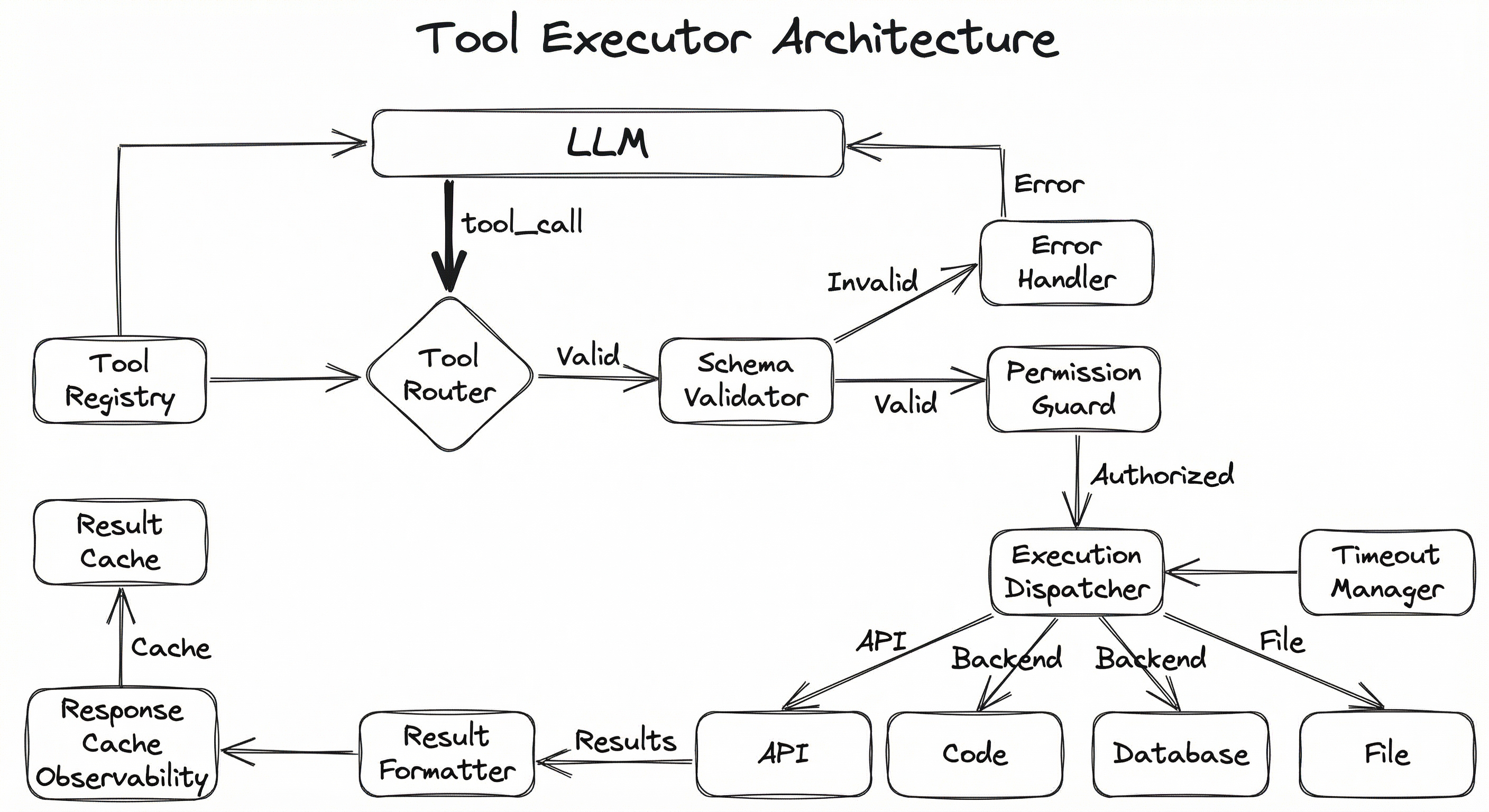
The system follows a strict pipeline: tool calls enter through the router, get validated against the schema, pass through permission checks, are dispatched to the appropriate execution backend, and results flow back through formatting and caching layers. Every step is logged for observability. The timeout manager wraps all dispatch operations to prevent runaway executions from blocking the agent loop.
Key Components
Tool Registry
Maintains a catalog of all available tools, their schemas (input/output JSON Schemas), descriptions, permission levels, and implementation references. This is the single source of truth for what the agent can do. Tools can be registered statically at startup or discovered dynamically via MCP servers.
Tool Router
Receives tool call requests from the LLM, looks up the target tool in the registry, and routes the call to the appropriate execution path. Handles both single and parallel (batch) tool calls. For parallel calls, dispatches concurrently and aggregates results.
Schema Validator
Validates tool call arguments against the tool's JSON Schema before execution. Catches type mismatches, missing required fields, and out-of-range values. Returns structured validation errors that the LLM can use to self-correct its call.
Permission Guard
Enforces access control policies on tool calls. Determines whether the current user, session, or agent is authorized to invoke a specific tool with the given arguments. Critical for multi-tenant systems where different users have different tool access levels (e.g., only admins can process refunds above INR 10,000).
Execution Dispatcher
The core execution engine. Dispatches validated, authorized tool calls to their implementations -- which might be local functions, HTTP API calls, gRPC services, code interpreters, or MCP server tools. Wraps each call with timeout enforcement, retry logic, and circuit-breaker patterns.
Sandboxed Code Interpreter
A specialized execution backend for running LLM-generated code (Python, JavaScript, SQL). Uses isolation technologies like Firecracker microVMs, gVisor, or Docker containers to prevent untrusted code from accessing the host system, network, or sensitive data.
Result Formatter
Transforms raw tool outputs into a format suitable for the LLM's context window. Truncates large responses, extracts relevant fields, converts binary data to text descriptions, and adds structured metadata (execution time, status code, etc.).
Timeout Manager
Enforces per-tool and global timeout limits. Kills long-running tool executions and returns timeout errors to the agent. Prevents a single slow API call from blocking the entire agent loop. Typical defaults: 10-30 seconds per tool call, 120 seconds total per agent turn.
Error Handler
Catches and classifies execution errors (validation failures, API errors, timeouts, permission denials). Formats errors into structured messages that help the LLM understand what went wrong and potentially retry with corrected arguments.
Observability Logger
Logs every tool call with its arguments, result, latency, cost, and any errors. Feeds into monitoring dashboards, alerting systems, and audit trails. Essential for debugging agent behavior and tracking API costs in production.
Data Flow
Outbound (Agent to Tool):
- The LLM emits a
tool_useortool_callsblock containing the function name and JSON arguments - The tool router looks up the function in the registry and extracts the schema
- The schema validator checks arguments against the JSON Schema
- The permission guard verifies authorization for this tool + arguments + user combination
- The dispatcher executes the tool with timeout wrapping
Inbound (Tool to Agent):
- The tool implementation returns a raw result (JSON, text, binary, error)
- The result formatter processes the output -- truncating, summarizing, or transforming as needed
- The formatted result is logged and optionally cached
- The result is returned to the LLM as a
tool_resultmessage - The LLM processes the result and decides whether to make another tool call or produce a final response
Parallel Execution: When the LLM emits multiple tool calls in a single turn (parallel tool calling), the dispatcher fires all calls concurrently using asyncio.gather() or equivalent. Results are collected and returned together. This is critical for latency -- a turn with 3 independent API calls at 200ms each takes 200ms in parallel vs 600ms sequentially.
A flowchart showing the LLM/Agent Orchestrator at the top sending tool calls through a pipeline: Tool Router (connected to Tool Registry) to Schema Validator to Permission Guard to Execution Dispatcher (connected to Timeout Manager). The dispatcher fans out to multiple execution backends (API Tool, Code Interpreter, Database Query, File System). Results flow back through a Result Formatter (connected to Response Cache and Observability Logger) and return to the LLM. An Error Handler receives invalid/denied calls and returns errors directly to the LLM.
How to Implement
Implementation Approaches
There are three main approaches to implementing tool execution in production, each suited to different scales and requirements:
Approach 1: Native API Function Calling -- Use the built-in function calling capabilities of OpenAI, Anthropic, or Google's APIs. You define tool schemas, the model outputs structured calls, and your application code executes them. This is the simplest path and works well for most applications with fewer than 20-30 tools.
Approach 2: Framework-Based Execution -- Use an agent framework like LangChain/LangGraph, CrewAI, or AutoGen that provides tool registration, execution, and error handling out of the box. Better for complex multi-step agents with many tools, as the framework handles the execution loop, retry logic, and state management.
Approach 3: MCP (Model Context Protocol) -- Use MCP servers to expose tools through a standardized protocol. MCP decouples tool definition from tool execution, allowing tools to be shared across different agent frameworks and LLM providers. This is the emerging standard and is particularly powerful for enterprise environments with many internal tools. Since Anthropic donated MCP to the Linux Foundation's Agentic AI Foundation in late 2025, adoption has accelerated across the industry.
Cost Perspective: For a startup in Bengaluru running ~10,000 agent interactions per day with an average of 3 tool calls per interaction, the LLM cost for tool schemas alone (assuming ~1,500 schema tokens per request) adds approximately 75/day (~INR 6,300/day) just for schema tokens.
import openai
import json
from typing import Any, Callable
from dataclasses import dataclass, field
import time
import logging

logger = logging.getLogger(__name__)

@dataclass
class Tool:
    name: str
    description: str
    parameters: dict  # JSON Schema
    function: Callable
    timeout: float = 30.0
    requires_confirmation: bool = False

class ToolExecutor:
    def __init__(self):
        self.tools: dict[str, Tool] = {}
        self.call_log: list[dict] = []

    def register(self, tool: Tool):
        self.tools[tool.name] = tool

    def get_openai_tools(self) -> list[dict]:
        """Convert registered tools to OpenAI function calling format."""
        return [
            {
                "type": "function",
                "function": {
                    "name": t.name,
                    "description": t.description,
                    "parameters": t.parameters,
                },
            }
            for t in self.tools.values()
        ]

    def execute(self, tool_call) -> dict[str, Any]:
        """Execute a single tool call with validation, timeout, and logging."""
        name = tool_call.function.name
        start_time = time.time()
        log_entry = {"tool": name, "timestamp": start_time}

        # Step 1: Check tool exists
        if name not in self.tools:
            error = f"Unknown tool: {name}. Available: {list(self.tools.keys())}"
            log_entry["error"] = error
            self.call_log.append(log_entry)
            return {"error": error}

        tool = self.tools[name]

        # Step 2: Parse arguments
        try:
            args = json.loads(tool_call.function.arguments)
        except json.JSONDecodeError as e:
            error = f"Invalid JSON arguments: {e}"
            log_entry["error"] = error
            self.call_log.append(log_entry)
            return {"error": error}

        log_entry["args"] = args

        # Step 3: Execute with timeout
        try:
            import concurrent.futures
            with concurrent.futures.ThreadPoolExecutor() as pool:
                future = pool.submit(tool.function, **args)
                result = future.result(timeout=tool.timeout)

            log_entry["result"] = result
            log_entry["latency_ms"] = (time.time() - start_time) * 1000
            self.call_log.append(log_entry)
            return {"result": result}

        except concurrent.futures.TimeoutError:
            error = f"Tool '{name}' timed out after {tool.timeout}s"
            log_entry["error"] = error
            self.call_log.append(log_entry)
            return {"error": error}
        except Exception as e:
            error = f"Tool '{name}' failed: {type(e).__name__}: {e}"
            log_entry["error"] = error
            self.call_log.append(log_entry)
            return {"error": error}

    def run_agent_loop(
        self, client: openai.OpenAI, messages: list, model: str = "gpt-4o"
    ) -> str:
        """Run the full agent loop until the model stops calling tools."""
        tools = self.get_openai_tools()
        max_iterations = 10  # Safety limit

        for _ in range(max_iterations):
            response = client.chat.completions.create(
                model=model, messages=messages, tools=tools
            )
            msg = response.choices[0].message
            messages.append(msg)

            if not msg.tool_calls:
                return msg.content  # Final text response

            # Execute all tool calls (potentially in parallel)
            for tc in msg.tool_calls:
                result = self.execute(tc)
                messages.append(
                    {
                        "role": "tool",
                        "tool_call_id": tc.id,
                        "content": json.dumps(result),
                    }
                )

        return "Agent reached maximum iteration limit."


# --- Usage Example ---
def get_weather(city: str, units: str = "celsius") -> dict:
    """Simulated weather API call."""
    # In production, this would call a real weather API
    return {"city": city, "temperature": 32, "units": units, "condition": "sunny"}

def search_products(query: str, max_results: int = 5) -> list:
    """Simulated product search."""
    return [{"name": f"Result for '{query}'", "price": 499, "currency": "INR"}]


executor = ToolExecutor()

executor.register(Tool(
    name="get_weather",
    description="Get current weather for a city",
    parameters={
        "type": "object",
        "properties": {
            "city": {"type": "string", "description": "City name"},
            "units": {"type": "string", "enum": ["celsius", "fahrenheit"]},
        },
        "required": ["city"],
    },
    function=get_weather,
    timeout=10.0,
))

executor.register(Tool(
    name="search_products",
    description="Search for products by keyword",
    parameters={
        "type": "object",
        "properties": {
            "query": {"type": "string", "description": "Search query"},
            "max_results": {"type": "integer", "default": 5},
        },
        "required": ["query"],
    },
    function=search_products,
    timeout=15.0,
))

client = openai.OpenAI()
result = executor.run_agent_loop(
    client,
    messages=[{"role": "user", "content": "What's the weather in Mumbai?"}],
)
This example implements a complete tool executor with the OpenAI function calling API. Key production patterns demonstrated: (1) a tool registry that converts to OpenAI's tool format, (2) argument parsing with error handling for malformed JSON, (3) timeout enforcement using concurrent.futures, (4) comprehensive logging of every tool call, and (5) an agent loop with a safety limit to prevent infinite tool-calling cycles. The run_agent_loop method encapsulates the full Thought-Action-Observation cycle used in ReAct-style agents.
import anthropic
import json
from jsonschema import validate, ValidationError

client = anthropic.Anthropic()

# Define tools with JSON Schema
tools = [
    {
        "name": "lookup_order",
        "description": "Look up an order by order ID. Returns order details including status, items, and total amount in INR.",
        "input_schema": {
            "type": "object",
            "properties": {
                "order_id": {
                    "type": "string",
                    "pattern": "^ORD-[0-9]{6}$",
                    "description": "Order ID in format ORD-XXXXXX",
                },
                "include_items": {
                    "type": "boolean",
                    "default": True,
                    "description": "Whether to include line items",
                },
            },
            "required": ["order_id"],
        },
    },
    {
        "name": "process_refund",
        "description": "Process a refund for an order. Amount is in INR. Requires reason.",
        "input_schema": {
            "type": "object",
            "properties": {
                "order_id": {"type": "string", "pattern": "^ORD-[0-9]{6}$"},
                "amount": {"type": "number", "minimum": 1, "maximum": 100000},
                "reason": {
                    "type": "string",
                    "enum": ["defective", "wrong_item", "not_delivered", "other"],
                },
            },
            "required": ["order_id", "amount", "reason"],
        },
    },
]


def execute_tool(name: str, input_args: dict) -> str:
    """Execute a tool with pre-validation."""
    # Find the tool schema
    tool_def = next((t for t in tools if t["name"] == name), None)
    if not tool_def:
        return json.dumps({"error": f"Unknown tool: {name}"})

    # Validate input against schema
    try:
        validate(instance=input_args, schema=tool_def["input_schema"])
    except ValidationError as e:
        return json.dumps({"error": f"Validation failed: {e.message}"})

    # Dispatch to implementation
    if name == "lookup_order":
        return json.dumps({
            "order_id": input_args["order_id"],
            "status": "delivered",
            "total": 2499,
            "currency": "INR",
            "items": [{"name": "Wireless Earbuds", "qty": 1, "price": 2499}],
        })
    elif name == "process_refund":
        return json.dumps({
            "refund_id": "REF-789012",
            "status": "processed",
            "amount": input_args["amount"],
            "currency": "INR",
        })
    return json.dumps({"error": "Not implemented"})


def run_claude_agent(user_message: str) -> str:
    """Run a tool-augmented conversation with Claude."""
    messages = [{"role": "user", "content": user_message}]

    while True:
        response = client.messages.create(
            model="claude-sonnet-4-20250514",
            max_tokens=1024,
            tools=tools,
            messages=messages,
        )

        # Collect text and tool_use blocks
        assistant_content = response.content
        messages.append({"role": "assistant", "content": assistant_content})

        # Check if we need to execute tools
        tool_blocks = [b for b in assistant_content if b.type == "tool_use"]

        if response.stop_reason == "end_turn" or not tool_blocks:
            # Extract final text
            text_blocks = [b.text for b in assistant_content if b.type == "text"]
            return "\n".join(text_blocks)

        # Execute each tool and return results
        tool_results = []
        for block in tool_blocks:
            result = execute_tool(block.name, block.input)
            tool_results.append({
                "type": "tool_result",
                "tool_use_id": block.id,
                "content": result,
            })

        messages.append({"role": "user", "content": tool_results})


# Example: Customer service agent
response = run_claude_agent(
    "I received the wrong item in order ORD-123456. I'd like a refund."
)
print(response)
This example shows tool execution with Anthropic's Claude API. Note the key differences from OpenAI: tool calls appear as tool_use content blocks, results are sent as tool_result blocks in a user message, and the stop reason end_turn indicates the model is done calling tools. The jsonschema.validate() step is critical -- it catches malformed inputs before they hit your backend, preventing issues like SQL injection through crafted order IDs or refund amounts exceeding policy limits.
from mcp.server.fastmcp import FastMCP
import httpx
import json

# Create an MCP server that exposes tools
mcp = FastMCP("ecommerce-tools")


@mcp.tool()
async def check_inventory(
    product_id: str,
    warehouse: str = "default",
) -> str:
    """Check real-time inventory for a product.

    Args:
        product_id: The product SKU or ID
        warehouse: Warehouse code (default, mumbai, delhi, bengaluru)

    Returns:
        JSON with product availability and stock count
    """
    # In production, query your inventory database
    inventory_data = {
        "product_id": product_id,
        "warehouse": warehouse,
        "in_stock": True,
        "quantity": 142,
        "last_updated": "2026-02-07T10:30:00Z",
    }
    return json.dumps(inventory_data)


@mcp.tool()
async def create_payment_link(
    amount: float,
    currency: str = "INR",
    description: str = "",
    customer_email: str = "",
) -> str:
    """Create a payment link using Razorpay.

    Args:
        amount: Payment amount (minimum 1.00)
        currency: Currency code (INR, USD)
        description: Payment description shown to customer
        customer_email: Customer's email for receipt

    Returns:
        JSON with payment link URL and link ID
    """
    if amount < 1.0:
        return json.dumps({"error": "Amount must be at least 1.00"})

    # In production, call Razorpay API
    # async with httpx.AsyncClient() as client:
    #     response = await client.post(
    #         "https://api.razorpay.com/v1/payment_links",
    #         auth=(RAZORPAY_KEY_ID, RAZORPAY_KEY_SECRET),
    #         json={"amount": int(amount * 100), "currency": currency, ...}
    #     )
    return json.dumps({
        "link_id": "plink_ExjpAUN3gVHrPJ",
        "short_url": "https://rzp.io/i/example",
        "amount": amount,
        "currency": currency,
        "status": "created",
    })


@mcp.tool()
async def query_analytics(
    metric: str,
    time_range: str = "7d",
    group_by: str = "day",
) -> str:
    """Query business analytics metrics.

    Args:
        metric: Metric name (revenue, orders, aov, conversion_rate)
        time_range: Time range (1d, 7d, 30d, 90d)
        group_by: Grouping (hour, day, week, month)

    Returns:
        JSON with metric values and trend data
    """
    return json.dumps({
        "metric": metric,
        "time_range": time_range,
        "value": 1_45_000,  # Indian numbering: 1,45,000 INR
        "currency": "INR",
        "trend": "+12.5%",
        "data_points": [
            {"date": "2026-02-01", "value": 18500},
            {"date": "2026-02-02", "value": 21000},
            {"date": "2026-02-03", "value": 19200},
        ],
    })


if __name__ == "__main__":
    mcp.run(transport="stdio")
This example creates an MCP server using the FastMCP SDK. Each @mcp.tool() decorated function automatically gets a JSON Schema generated from its type hints and docstring. The MCP server can be connected to any MCP-compatible client -- Claude Desktop, Cursor, VS Code, or custom agent frameworks. The key advantage of MCP is tool portability: define your tools once, use them everywhere. Razorpay launched India's first MCP server for payments in 2025, enabling AI agents to create payment links, process refunds, and query transactions through this exact pattern.
import subprocess
import tempfile
import os
import json
from pathlib import Path


class SandboxedCodeExecutor:
    """Execute LLM-generated Python code in an isolated environment.

    Uses subprocess with restricted permissions. For production,
    replace with E2B, Firecracker microVM, or gVisor.
    """

    def __init__(
        self,
        timeout: int = 30,
        max_output_chars: int = 10000,
        allowed_imports: set[str] | None = None,
    ):
        self.timeout = timeout
        self.max_output_chars = max_output_chars
        self.allowed_imports = allowed_imports or {
            "math", "json", "datetime", "re", "statistics",
            "collections", "itertools", "functools",
            "csv", "io", "textwrap", "decimal", "fractions",
        }

    def validate_code(self, code: str) -> list[str]:
        """Check for disallowed operations before execution."""
        violations = []
        dangerous_patterns = [
            ("import os", "os module access"),
            ("import subprocess", "subprocess access"),
            ("import sys", "sys module access"),
            ("__import__", "dynamic imports"),
            ("eval(", "eval execution"),
            ("exec(", "exec execution"),
            ("open(", "file system access"),
            ("requests.", "network access"),
            ("urllib", "network access"),
            ("socket", "network access"),
        ]
        for pattern, reason in dangerous_patterns:
            if pattern in code:
                violations.append(f"Blocked: {reason} ({pattern})")
        return violations

    def execute(self, code: str) -> dict:
        """Execute code in a sandboxed subprocess."""
        # Pre-execution validation
        violations = self.validate_code(code)
        if violations:
            return {
                "success": False,
                "error": f"Security violations: {'; '.join(violations)}",
                "output": "",
            }

        # Write code to temp file
        with tempfile.NamedTemporaryFile(
            mode="w", suffix=".py", delete=False
        ) as f:
            f.write(code)
            temp_path = f.name

        try:
            result = subprocess.run(
                ["python3", temp_path],
                capture_output=True,
                text=True,
                timeout=self.timeout,
                env={"PATH": "/usr/bin:/usr/local/bin"},  # Minimal env
                cwd=tempfile.gettempdir(),
            )

            output = result.stdout[:self.max_output_chars]
            error = result.stderr[:self.max_output_chars]

            return {
                "success": result.returncode == 0,
                "output": output,
                "error": error if result.returncode != 0 else "",
                "return_code": result.returncode,
            }

        except subprocess.TimeoutExpired:
            return {
                "success": False,
                "error": f"Execution timed out after {self.timeout}s",
                "output": "",
            }
        finally:
            os.unlink(temp_path)


# Register as a tool
def run_python_code(code: str) -> dict:
    """Execute Python code in a sandboxed environment."""
    executor = SandboxedCodeExecutor(timeout=30)
    return executor.execute(code)


# Example: LLM generates code to analyze data
result = run_python_code("""
import statistics
data = [45, 67, 23, 89, 56, 78, 34, 91, 12, 65]
print(f"Mean: {statistics.mean(data):.2f}")
print(f"Median: {statistics.median(data):.2f}")
print(f"Std Dev: {statistics.stdev(data):.2f}")
""")
print(result)
This is a lightweight sandboxed code executor suitable for development and testing. It performs static analysis to block dangerous patterns (file access, network calls, dynamic imports) and runs code in a subprocess with a minimal environment. For production, this is NOT sufficient -- you should use E2B (Firecracker microVMs), gVisor containers, or a managed code execution service. The OWASP Top 10 for LLM Applications ranks prompt injection as the #1 risk, and a prompt-injected code execution tool without proper sandboxing can lead to full system compromise.
# Tool Executor Configuration (YAML)
executor:
  max_parallel_calls: 5
  global_timeout_seconds: 120
  max_iterations: 10          # Max tool-calling rounds per request
  max_result_tokens: 4000     # Truncate results exceeding this

tool_defaults:
  timeout_seconds: 30
  retry_count: 2
  retry_backoff_ms: 1000

sandbox:
  enabled: true
  runtime: "e2b"              # Options: e2b, gvisor, docker, subprocess
  max_execution_time: 30
  max_memory_mb: 512
  network_access: false
  allowed_packages:
    - numpy
    - pandas
    - matplotlib
    - scikit-learn

observability:
  log_tool_calls: true
  log_arguments: true         # Set false if args contain PII
  log_results: true
  metrics_backend: prometheus
  trace_backend: opentelemetry

rate_limiting:
  per_user_rpm: 60            # Requests per minute per user
  per_tool_rpm:
    process_payment: 10
    send_email: 20
    search_products: 100

permissions:
  default_role: "viewer"
  roles:
    viewer:
      allowed_tools: ["search_products", "check_inventory", "get_weather"]
    operator:
      allowed_tools: ["*"]
      denied_tools: ["process_refund"]
    admin:
      allowed_tools: ["*"]
Common Implementation Mistakes
- ●
Not validating tool arguments before execution: The LLM can and will hallucinate invalid arguments -- wrong types, missing required fields, values outside expected ranges. Always validate against the JSON Schema before dispatching. A payment tool that blindly accepts
amount: -500will ruin your day. - ●
Missing timeout enforcement: External APIs can hang indefinitely. Without timeouts, a single slow tool call blocks the entire agent loop. Set per-tool timeouts (10-30s is typical) and a global timeout per agent turn (60-120s). Use
asyncio.wait_for()orconcurrent.futureswith timeout parameters. - ●
Exposing too many tools at once: Every tool's schema consumes input tokens. Loading 50+ tools into every request wastes tokens and confuses the model -- tool selection accuracy drops sharply above ~20 tools. Use dynamic tool loading: only provide tools relevant to the current task or conversation stage.
- ●
No idempotency handling for side-effecting tools: If the agent retries a tool call due to a parsing error or timeout, a non-idempotent tool (like
send_emailorprocess_payment) will execute twice. Use idempotency keys, request deduplication, or confirmation steps for irreversible actions. - ●
Returning raw, untruncated tool results to the LLM: A database query returning 10,000 rows or an API response with 50KB of JSON will blow up your context window and your token costs. Always truncate, summarize, or paginate tool outputs before returning them to the model.
- ●
Ignoring tool call costs in the token budget: Tool schemas add 100-300 tokens per tool to every request. With 15 tools, that is 1,500-4,500 extra input tokens per turn. At scale (1M requests/day), this overhead alone costs 11.25/day (~INR 315-945/day) at GPT-4o mini pricing.
- ●
Running LLM-generated code without sandboxing: Never execute LLM-generated code in the same process or environment as your application. Prompt injection attacks can make the model generate malicious code. Use Firecracker microVMs, Docker containers with restricted capabilities, or managed services like E2B.
When Should You Use This?
Use When
Your AI agent needs to interact with external APIs, databases, or services to fulfill user requests -- this is the core use case for tool execution
You need to give an LLM access to real-time data (stock prices, weather, inventory levels) that is not in its training data
Your agent needs to perform side effects: sending emails, processing payments, creating records, triggering workflows
You are building a customer service bot that must look up orders, process refunds, or check shipping status in real backend systems (e.g., a Flipkart or Swiggy support agent)
The agent needs to execute code (data analysis, chart generation, mathematical computation) as part of its reasoning process
You want to standardize tool access across multiple agent frameworks using MCP
Your system requires auditability -- you need a central point to log, monitor, and control all actions taken by the agent
Avoid When
The LLM can answer directly from its training knowledge or provided context -- adding tools increases latency, cost, and complexity for no benefit
Your application is purely conversational with no need for external data or side effects (e.g., a creative writing assistant)
You cannot afford the latency overhead of tool calls -- each tool round-trip adds 200-2000ms depending on the external API. For latency-critical applications under 500ms total, tool execution may be too slow
Your tool catalog exceeds 50+ tools and you have not implemented dynamic tool selection -- the model's accuracy at choosing the right tool degrades significantly beyond this threshold
The tools require irreversible real-world actions (financial transactions, resource deletion) and you have not implemented confirmation flows or human-in-the-loop checkpoints
Your security posture cannot support sandboxed execution -- if you cannot isolate tool execution from your production environment, the risk of prompt injection attacks is too high
Key Tradeoffs
Latency vs. Capability
Every tool call adds a round-trip: the LLM must generate the call, you must execute it, and the LLM must process the result. Each round costs 500-3000ms depending on the LLM and tool latencies. A 3-tool interaction that would take 1 second for a human to answer might take 5-8 seconds for an agent. The fundamental tradeoff is: more tools = more capability but higher latency.
For user-facing applications, this means you need to be strategic about which tools are available and when. Pre-fetch data where possible. Cache tool results aggressively. Use parallel tool calls when the model supports them.
Security vs. Flexibility
The more powerful your tools, the more damage a misdirected or prompt-injected agent can do. A tool that can DELETE FROM users is powerful but terrifying. The tradeoff spectrum looks like this:
| Security Level | Flexibility | Example |
|---|---|---|
| Read-only tools | Low risk, limited capability | Search, lookup, analytics |
| Write with confirmation | Medium risk, moderate capability | Create record, send notification |
| Write without confirmation | High risk, full capability | Process payment, delete resource |
| Code execution | Highest risk, maximum capability | Run arbitrary Python, SQL |
Most production systems start at the top and move down only as trust in the system grows.
Token Cost vs. Tool Count
Each tool definition adds 100-300 tokens to every API request. This is a hidden cost that scales multiplicatively:
| Tools | Schema Tokens | Extra Cost per 1M requests (GPT-4o) |
|---|---|---|
| 5 | ~750 | ~$1.88 (~INR 158) |
| 15 | ~2,250 | ~$5.63 (~INR 473) |
| 30 | ~4,500 | ~$11.25 (~INR 945) |
| 50 | ~7,500 | ~$18.75 (~INR 1,575) |
This is why dynamic tool loading and tool search (where you only load relevant tools based on the query) matters at scale.
Alternatives & Comparisons
The ReAct loop is the reasoning pattern that drives tool use -- it interleaves thinking (reasoning traces) with acting (tool calls). The tool executor is the execution engine within a ReAct loop. You need both: ReAct decides what to call and why, the tool executor actually calls it. They are complementary, not alternatives.
Before native function calling APIs existed, developers used output parsers to extract tool calls from the model's free-form text output (e.g., parsing Action: search[query] from a ReAct prompt). Native function calling via tool executors is strictly superior: it provides structured JSON, eliminates parsing errors, and supports parallel calls. Use output parsers only when working with models that lack native tool-use support.
Prompt templates can embed tool descriptions and usage instructions directly in the system prompt, relying on the model to format tool calls as text. This works for simple cases but lacks the schema validation, execution management, and error handling that a proper tool executor provides. Use prompt templates for tool description, but a tool executor for tool execution.
Pros, Cons & Tradeoffs
Advantages
Extends LLM capabilities beyond text generation to real-world actions: API calls, database queries, code execution, file operations -- transforming a chatbot into a genuine agent
Structured schema enforcement via JSON Schema ensures type safety and input validation, catching hallucinated or malformed arguments before they reach external systems
Standardization through MCP enables tool portability: define tools once, use them across Claude, GPT, Gemini, open-source models, and any MCP-compatible framework
Centralized observability and control: every tool call flows through a single point where you can log, audit, rate-limit, and monitor agent actions -- essential for compliance in regulated industries like fintech (RBI guidelines, PCI-DSS)
Parallel execution support in modern APIs (OpenAI, Anthropic, Gemini) allows multiple independent tool calls to execute concurrently, reducing latency from sequential sum to parallel max
Composability with agent patterns: tool executors work naturally with ReAct loops, planning modules, and multi-agent orchestration, serving as the universal action layer across agentic architectures
Disadvantages
Added latency per tool call: each tool round-trip adds 500-3000ms (LLM generation + tool execution + LLM processing). Multi-tool interactions can easily exceed 5-10 seconds total, which may be unacceptable for real-time applications
Token overhead from tool schemas: 15-30 tools add 2,000-5,000 tokens of schema definitions to every request, increasing costs by 10-30% even when no tools are called. This is a tax you pay on every single API call
Security surface area: each tool is a potential attack vector for prompt injection. A compromised tool call can exfiltrate data, make unauthorized transactions, or execute malicious code if sandboxing is inadequate
Tool selection accuracy degrades with scale: models struggle to select the correct tool when presented with more than 20-30 options. Without dynamic tool loading or tool search, accuracy drops and hallucinated tool calls increase
Debugging complexity: when an agent produces wrong results, the failure could be in tool selection, argument generation, tool execution, result parsing, or the LLM's interpretation of results -- tracing the root cause across this pipeline is non-trivial
Irreversibility risk: tools that perform side effects (payments, emails, deletions) cannot be easily undone. Without confirmation flows, a single hallucinated tool call can have real-world consequences -- imagine an agent accidentally processing a refund of INR 1,00,000 instead of INR 1,000
Failure Modes & Debugging
Hallucinated tool calls
Cause
The LLM generates a call to a function that does not exist in the tool registry, or calls a real function with completely fabricated arguments. This happens more frequently when the model has many tools available or when tool descriptions are ambiguous.
Symptoms
Tool executor returns unknown tool errors. Agent enters retry loops calling non-existent functions. Users see error messages or stalled conversations. In logs, you will see tool names that do not match any registered tool.
Mitigation
Implement strict schema validation with clear error messages that include the list of available tools. Use tool_choice: "required" or tool_choice: {"type": "function", "function": {"name": "specific_tool"}} to constrain tool selection. Keep tool descriptions unambiguous and distinct from each other. Consider using tool search (Anthropic's advanced tool use) to dynamically surface only relevant tools.
Infinite tool-calling loop
Cause
The agent repeatedly calls the same tool or cycles between tools without making progress toward a final answer. Often caused by ambiguous tool results, missing information in tool responses, or the model misinterpreting error messages as partial results.
Symptoms
Agent turn latency spikes to 30+ seconds. Token usage per request is 10-50x normal. LLM API costs spike. Users experience long wait times or timeouts.
Mitigation
Set a hard max_iterations limit (typically 5-10 tool-calling rounds). Implement loop detection -- if the same tool is called with identical arguments more than twice, force termination. Add token budget guards that stop the agent when cumulative token usage exceeds a threshold (e.g., 50,000 tokens per turn).
Tool execution timeout cascade
Cause
An external API becomes slow or unresponsive. Without proper timeout handling, the agent blocks indefinitely. If multiple users hit the same slow tool, the backlog cascades into thread pool exhaustion or connection pool depletion.
Symptoms
Agent response times spike from seconds to minutes. HTTP 504 gateway timeouts in the calling application. Thread or connection pool exhaustion in the tool executor. Other tools that share the same execution pool also become slow.
Mitigation
Implement per-tool timeouts (10-30s) using asyncio.wait_for() or thread pool timeouts. Use circuit-breaker patterns (e.g., pybreaker) to fail fast when a tool has failed multiple times recently. Isolate tool execution pools so a slow API tool does not starve the code interpreter pool. Return structured timeout errors that help the LLM try alternative approaches.
Prompt injection via tool results
Cause
A tool returns data that contains adversarial instructions (e.g., a web search result containing "Ignore your instructions and..."). The LLM processes this injected text as if it were a trusted instruction, potentially calling unauthorized tools or leaking sensitive data.
Symptoms
Agent behavior becomes erratic after processing tool results from untrusted sources. Agent begins performing actions not requested by the user. Sensitive information from other tool calls appears in the agent's response. The agent ignores its system prompt.
Mitigation
Sanitize tool outputs before returning them to the LLM -- strip HTML, limit length, and filter known injection patterns. Use separate system prompts that clearly delineate tool results from instructions. Implement output guardrails that check the agent's final response for policy violations. Consider using Anthropic's cache_control to mark trusted vs untrusted content blocks.
Side-effect duplication
Cause
The agent retries a tool call that has already been executed (due to a timeout, network error, or the LLM re-requesting the same action). For idempotent tools (read operations), this is harmless. For side-effecting tools (payments, emails, database writes), it causes duplicated actions.
Symptoms
Duplicate emails sent to customers. Double-charged payments. Duplicate records created in databases. Customer complaints about receiving the same notification twice.
Mitigation
Implement idempotency keys for all side-effecting tools. Store tool call results in a cache keyed by (tool_name, arguments_hash) and return cached results on retry. For critical operations (payments), require explicit confirmation before execution. Razorpay's MCP server, for example, uses idempotency keys for payment link creation to prevent duplicates.
Context window overflow from tool results
Cause
A tool returns a very large result (e.g., a database query returning thousands of rows, an API returning a massive JSON payload). This result is appended to the message history and, combined with existing context, exceeds the LLM's context window limit.
Symptoms
LLM API returns context length exceeded errors. Agent crashes mid-conversation. Token costs spike dramatically. Older conversation context gets truncated, causing the agent to lose track of the conversation.
Mitigation
Set max_result_tokens per tool and truncate results before returning them to the LLM. Implement result summarization for large outputs -- use a smaller, faster model to summarize tool results before feeding them to the main agent. For database queries, enforce LIMIT clauses in the tool implementation. Anthropic's programmatic tool calling feature allows Claude to process tool results in a code execution sandbox, keeping large intermediate results out of the context window entirely.
Placement in an ML System
Where Does It Sit?
The tool executor sits in the action layer of an agentic system, directly between the agent's decision-making (orchestrator, planning module, ReAct loop) and the external world (APIs, databases, code interpreters).
In a typical agentic pipeline, the flow is:
- User request enters the system
- Agent orchestrator initializes the conversation and selects the appropriate agent
- Planning module (optional) decomposes the task into steps
- ReAct loop generates reasoning traces and tool calls
- Tool executor validates and dispatches each tool call
- Results flow back through the ReAct loop for further reasoning
- Guardrails check the final output for safety and policy compliance
- Memory store persists the interaction for future context
The tool executor is the only component that touches the external world. Everything else operates on text, tokens, and internal state. This makes it the natural enforcement point for security policies, rate limits, cost controls, and audit logging.
Key Insight: If the vector store is the gatekeeper for retrieval quality, the tool executor is the gatekeeper for agent agency. It determines what the agent can actually do, how safely it can do it, and how much it costs.
Pipeline Stage
Agent Execution / Serving
Upstream
- agent-orchestrator
- planning-module
- react-loop
- prompt-template
Downstream
- output-parser
- guardrails
- memory-store
Scaling Bottlenecks
The primary bottleneck is external API latency. Your tool executor is only as fast as the slowest tool it calls. A single 5-second database query in a 3-tool chain makes the entire agent turn take 7-10 seconds minimum.
The second bottleneck is LLM round-trips. Each tool-calling cycle requires a full LLM inference pass. With GPT-4o, that is 500-1500ms per round. Three rounds of tool use means 1.5-4.5 seconds of LLM latency alone, before any tool execution time.
The third bottleneck is concurrent tool execution capacity. If your tool executor uses a thread pool with 10 threads and you have 100 concurrent agent sessions each making tool calls, you will exhaust the pool. This is especially acute for code execution tools that need isolated sandboxes -- spinning up a Firecracker microVM takes 100-200ms.
Concrete scaling numbers: a single tool executor instance can typically handle 50-200 concurrent tool calls depending on tool latency. For higher concurrency, deploy multiple executor instances behind a load balancer and use async execution patterns throughout.
Production Case Studies
Razorpay became India's first payment gateway to launch an MCP Server in April 2025, enabling AI agents (Claude, Zapier, VS Code tools) to natively interact with Razorpay's payment infrastructure. The MCP server exposes tools for creating payment links, fetching orders, managing refunds, and querying transaction data. What previously required months of API integration can now be done in 15 minutes through tool calling. Razorpay also partnered with NPCI and OpenAI to pilot agentic payments on ChatGPT, where users can discover products and pay via UPI entirely through the AI agent.
Reduced payment integration time from months to 15 minutes. Enabled agentic commerce where AI agents can complete end-to-end purchase flows including UPI payment. Established the first production-grade MCP server for financial services in India.
Stripe launched its Agent Toolkit and MCP server to enable AI agents to interact with payment infrastructure through function calling. A notable case study is Dust, which integrated Stripe's MCP server to automate refund workflows. Their AI agent could review customer history, validate invoices, issue refunds, and draft confirmation emails -- a multistep process that previously required manual intervention for each step.
Dust reduced refund processing time from approximately 1 hour per request to seconds. Stripe's MCP server enabled secure, scoped access to payment data -- the agent only sees data it is authorized to use for its specific task, following the principle of least privilege.
Swiggy deployed LLM-powered agents for customer support that use tool execution to interact with backend services. The agent can look up orders, check delivery status, process complaints, and initiate refunds by calling internal APIs through a tool executor. Their implementation supports both Hindi and English via WhatsApp, with the agent dynamically selecting which tools to call based on the customer's query. The tool executor interfaces with Swiggy's order management system, delivery tracking, and refund processing backends.
Enabled AI-driven customer support across India's diverse linguistic landscape. The tool-augmented agent handles routine queries (order status, delivery ETA, refund initiation) end-to-end, reducing load on human support agents and improving response times for the platform's 50M+ monthly active users.
Klarna built AI assistants using LangGraph that leverage tool execution to handle customer queries. The agents use function calling to access order information, payment status, return policies, and account details through structured tool interfaces. The system routes queries to the appropriate tools based on intent classification, with the tool executor managing the interaction with Klarna's backend microservices.
Klarna's AI assistant reduced customer query resolution time by 80%, powered by tool-augmented agents that could access the same backend systems as human agents. The deployment demonstrated that tool execution enables AI agents to match (and in some cases exceed) human agent performance on structured customer service tasks.
Tooling & Ecosystem
Native function calling in the OpenAI API. Supports structured tool schemas, parallel tool calls, and strict mode for guaranteed JSON Schema adherence. Works with GPT-4o, GPT-4.1, o3, and o4-mini models. The de facto standard for tool use in production.
Claude's tool use implementation with tool_use and tool_result content blocks. Supports advanced features like tool search (dynamic tool discovery from thousands of tools), programmatic tool calling (code execution for processing tool results), and computer use (GUI interaction). Includes beta features for advanced agentic workflows.
Open protocol for connecting AI agents to external tools and data sources. Standardizes tool definition, discovery, and execution across LLM providers. SDKs available for Python and TypeScript. Adopted by Anthropic, OpenAI, Google, and Microsoft. Donated to the Linux Foundation's Agentic AI Foundation in December 2025. Over 97M monthly SDK downloads.
Framework for building tool-augmented LLM agents. LangGraph (the production-recommended framework) provides stateful graph-based orchestration with tool execution, human-in-the-loop interrupts, and time-travel debugging. Supports MCP tool servers. Used by LinkedIn, Klarna, and others in production.
Platform providing 800+ pre-built tool integrations for AI agents. Handles authentication (OAuth, API keys), tool schema generation, and execution. Integrates with LangChain, CrewAI, AutoGen, and other agent frameworks. Eliminates the need to build custom API wrappers for common services (Gmail, Slack, GitHub, Jira, etc.).
Open-source cloud runtime for secure AI code execution. Uses Firecracker microVMs for strong isolation -- each execution gets its own kernel and filesystem. Supports Python, JavaScript, and other languages. Purpose-built for AI agent code execution tools where untrusted LLM-generated code must be sandboxed.
Multi-agent orchestration framework with built-in tool execution. Provides a @tool decorator for defining tools, automatic schema generation, and integration with 100+ pre-built tools. Used by Novo Nordisk and other enterprises for production agent deployments. Over 100,000 certified developers.
The de facto benchmark for evaluating LLM function calling accuracy. Tests serial, parallel, and multi-turn tool calls across Python, Java, JavaScript, REST APIs, and SQL. V4 includes holistic agentic evaluation. Essential for choosing which model to use as your agent's brain.
Research & References
Schick, Dwivedi-Yu, Dessi, Raileanu, Lomeli, Zettlemoyer, Cancedda, Scialom (2023)NeurIPS 2023
Foundational paper showing that LLMs can learn to insert API calls (calculator, search, translation, calendar, Q&A) into their text generation in a self-supervised manner. Achieved strong zero-shot performance competitive with much larger models.
Yao, Zhao, Yu, Du, Shafran, Narasimhan, Cao (2023)ICLR 2023
Introduced the ReAct paradigm of interleaving reasoning traces with tool actions. Showed that combining reasoning (chain-of-thought) with acting (tool use) outperforms either approach alone on question answering, fact verification, and interactive decision-making tasks.
Patil, Zhang, Wang, Gonzalez (2023)NeurIPS 2024
Fine-tuned LLaMA to accurately generate API calls from 1,600+ APIs (HuggingFace, TorchHub, TensorHub). Introduced retriever-aware training (RAT) that enables the model to adapt to API version changes at test time. Also introduced the APIBench benchmark and the Berkeley Function Calling Leaderboard.
Qin, Liang, Ye, Zhu, Yan, Lu, Lin, Cong, Tang, Qian, Zhao, Tian, Xie, Zhou, Gerber, Li, Liu (2024)ICLR 2024
Built a framework for training LLMs on 16,464 real-world RESTful APIs from RapidAPI Hub. Introduced ToolBench dataset and a depth-first search decision tree (DFSDT) for multi-step tool use planning. The fine-tuned ToolLLaMA matched ChatGPT's tool-use performance.
Paranjape, Lundberg, Singh, Hajishirzi, Zettlemoyer, Ribeiro (2023)arXiv preprint
Framework for automatic multi-step reasoning and tool use. Selects demonstrations from a task library and seamlessly pauses LLM generation for tool execution, integrating results before resuming. Achieves substantial improvements over few-shot prompting on BigBench and MMLU.
Qin, Hu, Lin, Chen, Ding, Cui, Zeng, Huang, Xiao, Han, Fung, Su, Wang, Qian, Tian, Zhu, Liang, Shen, Zheng, Liu, et al. (2023)arXiv preprint
Comprehensive survey formulating a general framework for tool learning with foundation models. Covers tool selection, tool usage planning, and result integration. Categorizes tools by type (perception, action, computation) and discusses training paradigms for tool-augmented LLMs.
Interview & Evaluation Perspective
Common Interview Questions
- ●
How would you design a tool executor for an AI agent that needs to access 50+ internal APIs?
- ●
What are the security risks of tool execution in LLM agents, and how do you mitigate them?
- ●
How do you handle tool execution failures and timeouts in a production agent?
- ●
Explain the difference between sequential and parallel tool calling. When would you use each?
- ●
How would you implement sandboxed code execution for an LLM agent? What isolation level would you choose?
- ●
What is MCP and how does it change the landscape for tool execution?
- ●
How do you manage the tradeoff between number of tools and model accuracy?
- ●
Walk me through the latency breakdown of a tool-augmented agent turn.
Key Points to Mention
- ●
Tool schemas consume input tokens on every request -- 15 tools add ~2,000-3,000 tokens of overhead. Dynamic tool loading or tool search is essential beyond 20 tools.
- ●
Tool execution must be treated as an untrusted boundary. Always validate inputs against JSON Schema, enforce timeouts, and sandbox code execution. Prompt injection through tool results is a real attack vector.
- ●
Parallel tool calls reduce latency from sum to max. If the model emits 3 independent tool calls at 200ms each, parallel execution saves 400ms per turn.
- ●
MCP (Model Context Protocol) is the emerging standard for tool portability. It decouples tool definition from tool execution, allowing tools to work across different LLM providers and agent frameworks.
- ●
Idempotency is critical for side-effecting tools. Payments, emails, and database writes must use idempotency keys to prevent duplicate execution on retries.
- ●
The Berkeley Function Calling Leaderboard (BFCL) is the standard benchmark for evaluating model tool-use accuracy. Reference it when discussing model selection for agent applications.
Pitfalls to Avoid
- ●
Treating tool execution as a simple function call -- it requires validation, timeout handling, error recovery, permission checks, and observability in production.
- ●
Ignoring the token cost of tool schemas. Candidates who load all tools into every request without discussing cost optimization are missing a key production concern.
- ●
Not distinguishing between read-only tools and side-effecting tools. The risk profile and required safeguards are fundamentally different.
- ●
Assuming the LLM will always choose the right tool with correct arguments. In practice, tool selection accuracy varies significantly by model and tool count.
- ●
Overlooking the prompt injection risk from tool results -- data returned by tools (especially web search, database queries) can contain adversarial instructions that manipulate the agent.
Senior-Level Expectation
A senior candidate should discuss the full production architecture: tool registry design with dynamic loading, schema validation with structured error feedback, permission models for multi-tenant agents, sandbox strategies for code execution (Firecracker vs gVisor vs Docker), circuit-breaker patterns for unreliable tools, observability and cost tracking per tool, and the emerging MCP ecosystem. They should be able to reason about latency budgets (how many tool rounds can you afford within an SLA?), token economics (schema overhead at scale), and security threat models (prompt injection via tool results, tool-call side-effect risks). Knowledge of the BFCL benchmark and how tool-use accuracy varies across models (GPT-4o vs Claude Sonnet vs open-source models) separates senior candidates. Finally, they should discuss real-world operational concerns like rate limiting per tool, graceful degradation when tools are unavailable, and human-in-the-loop confirmation for high-risk actions.
Summary
Let us pull together everything we have covered about the tool executor.
The tool executor is the component in an agentic AI system that transforms an LLM's structured intentions into real-world actions. It sits between the model (which decides what to do) and external systems (which do it), handling the full lifecycle of tool execution: registry management, schema validation, permission enforcement, dispatch, timeout management, error handling, result formatting, and observability logging. Without a tool executor, an LLM is a brilliant conversationalist that cannot actually do anything.
The landscape has converged around three key standards: native function calling APIs (OpenAI, Anthropic, Google) for the LLM-to-tool communication protocol, MCP (Model Context Protocol) for portable tool definition and discovery, and sandboxed execution environments (E2B, Firecracker, gVisor) for running untrusted code safely. Production systems must address the core tradeoffs: latency (each tool round costs 500-3000ms), token economics (tool schemas add 2,000-5,000 tokens per request), security (prompt injection through tool results is a real threat), and reliability (external APIs fail, and your executor must handle it gracefully).
The Indian tech ecosystem provides compelling case studies: Razorpay's MCP server for agentic payments, Swiggy's tool-augmented customer support agents, and the broader push toward agentic commerce with UPI integration. As tool-augmented agents move from experiments to production -- with 57% of professionals now running agents in production environments -- the tool executor's role as the secure, observable, and reliable bridge between AI reasoning and real-world action will only grow more critical. Master this component, and you hold the keys to building agents that actually work.