Response Cache in Machine Learning
Here is the uncomfortable truth about LLM-powered applications: you are probably paying to generate the same answers over and over again. Every time a user asks "What is your return policy?" or "How do I reset my password?" -- and trust me, they will ask these questions hundreds of times a day -- your system dutifully sends the prompt to GPT-4 or Claude, waits 2-5 seconds, burns through tokens, and gets back essentially the same response it generated an hour ago.
A response cache fixes this by storing previously generated LLM responses and returning them for identical or semantically similar queries without invoking the model again. It sits between your application and the LLM API, intercepting requests and short-circuiting the expensive inference step whenever a suitable cached response exists.
The impact is not marginal -- it is transformative. Production deployments report 60-73% cost reductions and latency improvements from seconds to single-digit milliseconds on cache hits. For an Indian startup spending INR 5-10 lakh per month on OpenAI or Anthropic APIs, that is the difference between burning runway and building sustainably.
Response caching comes in two flavors: exact match caching (hash the prompt, look up the hash) and semantic caching (embed the prompt, find similar cached prompts via vector similarity). The choice between them -- and how you combine them -- determines your cache hit rate, which is the single most important metric in this entire system.
Concept Snapshot
- What It Is
- A caching layer that stores LLM-generated responses and returns them for identical or semantically similar future queries, eliminating redundant API calls.
- Category
- LLM Operations
- Complexity
- Intermediate
- Inputs / Outputs
- Input: user prompt (+ model parameters) -> Output: cached LLM response (on hit) or pass-through to LLM (on miss)
- System Placement
- Sits between the application layer and the LLM API gateway, after prompt construction and before model inference.
- Also Known As
- LLM cache, inference cache, prompt-response cache, semantic cache, LLM result cache, completion cache
- Typical Users
- ML Engineers, Backend Engineers, Platform Engineers, DevOps/SRE teams
- Prerequisites
- Basic caching concepts (TTL, eviction), LLM API usage, Embeddings (for semantic caching), Redis or similar cache stores
- Key Terms
- cache hit ratesemantic similarityTTLexact matchembedding distancecache invalidationprompt normalizationcache warmingLRU eviction
Why This Concept Exists
The Repetition Problem in LLM Applications
Let us start with a number that will make you pause. Research shows that 31% of LLM queries in production systems are semantically similar to previous requests. That means nearly a third of your LLM spend is going toward regenerating responses that already exist somewhere in your system's recent history.
Consider a customer support chatbot for a company like Flipkart or Swiggy. Thousands of users ask variations of the same questions every day: "Where is my order?", "How do I return a product?", "What are the delivery charges?" Each of these queries costs tokens -- at INR 1.25-4.20 per 1K input tokens for GPT-4o (approximately 0.05 USD) and more for output tokens. Multiply that by thousands of daily requests, and you are looking at INR 3-10 lakh/month (12,000 USD) in API costs, a significant portion of which is pure waste.
Why Traditional Web Caching Falls Short
You might be thinking: "We already have Redis and CDN caching -- can we just use those?" Sort of, but not really. Traditional caching works on exact key matches. The prompts "What is your refund policy?" and "Can you tell me about your refund policy?" produce different cache keys despite expecting identical responses. Web caching was designed for deterministic endpoints where the same URL always returns the same content. LLM prompts are natural language -- messy, variable, and paraphrased endlessly by users.
This is where semantic caching enters the picture. Instead of hashing the exact prompt text, semantic caching converts prompts into embedding vectors and looks for cached entries within a configurable similarity threshold. Two prompts that mean the same thing but use different words will map to nearby points in embedding space, enabling cache hits that exact-match caching would miss.
The Evolution: From Exact Match to Semantic
The first generation of LLM caches (2022-2023) used straightforward exact-match strategies: hash the prompt, store the response, return it on an exact hash match. This worked for template-driven applications but achieved low hit rates (10-20%) for conversational interfaces.
The second generation, pioneered by tools like GPTCache (open-sourced by Zilliz in early 2023), introduced semantic caching using embedding similarity. This boosted hit rates to 60-70% in production systems. The GPT Semantic Cache paper (2024) demonstrated 68.8% reduction in API calls across various query categories.
The third generation (2025-2026) adds domain-specific embeddings, adaptive similarity thresholds, and generative caching (synthesizing new responses from multiple cached entries). We are also seeing provider-level caching -- Anthropic's prompt caching offers 90% cost reduction on cached prefixes, and OpenAI's automatic caching provides 50% savings -- complementing application-level response caches.
Key Insight: Response caching is not just an optimization -- it is a fundamental architectural pattern for any cost-conscious LLM deployment. The question is not whether to cache, but how aggressively and at what granularity.
Core Intuition & Mental Model
The Library Analogy
Imagine you run a reference desk at a busy library. Every day, hundreds of people walk in and ask questions. You could look up the answer from scratch every single time -- pulling books off shelves, reading through chapters, synthesizing an answer. Or you could keep a notebook of recent questions and answers. When someone asks "What are the library hours?" for the fiftieth time today, you just flip to the page in your notebook instead of walking to the information board again.
That notebook is your response cache. Exact match caching is looking up the question verbatim in your notebook. Semantic caching is recognizing that "When does the library close?" is essentially the same question as "What are the library hours?" and returning the same answer.
The Two Mental Models
Mental Model 1: Hash Table vs. Proximity Search. Exact match caching is a hash table -- O(1) lookup, perfect precision, but zero tolerance for variation. Semantic caching is a proximity search in embedding space -- slightly more expensive to look up, but it catches paraphrases, typos, and rewordings that exact match would miss. Most production systems run both in sequence: check the exact match first (cheap, precise), then fall back to semantic similarity (slightly more expensive, much higher recall).
Mental Model 2: The Cost-Latency Spectrum. Think of your caching strategy as a dial between "never cache" (maximum freshness, maximum cost) and "cache everything forever" (minimum cost, maximum staleness risk). Every LLM application needs to find its sweet spot on this dial. A chatbot answering questions about static product documentation can cache aggressively with long TTLs. A financial advisor bot pulling live market data should cache cautiously with short TTLs or skip caching entirely for time-sensitive queries.
What Response Caching Does NOT Do
Let me be clear about the boundaries. A response cache does not improve the quality of LLM responses -- it only avoids re-generating responses that were already good enough. If the original response was wrong, the cache will faithfully serve that wrong response faster and cheaper. This is why cache invalidation is not just a computer science joke -- it is a genuine production concern. The cache stores answers, not truth. The quality of cached responses is exactly as good as the quality of the original LLM generation.
Technical Foundations
Formal Model
Let us define the response cache formally. We have a set of cached entries where is a prompt, is the corresponding LLM response, and is the timestamp of entry creation.
Exact Match Cache Lookup:
Given a new prompt , the cache returns a hit if:
where is a hash function (e.g., SHA-256) and applies prompt normalization (lowercasing, whitespace trimming, punctuation removal).
Semantic Cache Lookup:
Given a new prompt , the cache returns a hit if:
where is an embedding function, is a similarity metric (typically cosine similarity), and is the similarity threshold.
Cache Hit Rate
The cache hit rate is the primary performance metric:
Cost Savings Model
The expected cost savings from caching can be modeled as:
where is the average cost per LLM call and is the amortized cost of cache infrastructure (storage, embedding computation, vector search). For semantic caching, each cache miss incurs an additional embedding cost :
Simplified: you always pay for embedding (both hits and misses), but you only pay for LLM inference on misses.
Similarity Threshold Tradeoff
The similarity threshold controls the precision-recall tradeoff of the cache:
- High (e.g., 0.98): High precision (few false positives), low recall (many cache misses). Safe but limited savings.
- Low (e.g., 0.85): High recall (many cache hits), lower precision (risk of returning responses for semantically different queries). Aggressive savings but quality risk.
Production Guideline: Most systems start with and tune based on observed false positive rates. Domain-specific embedding models can push this lower (to ) while maintaining precision, as shown by recent research on fine-tuned cache embeddings.
Internal Architecture
A production response cache sits in the request path between the application and the LLM provider. The architecture is layered: an exact-match cache provides the fastest path (sub-millisecond lookups via hash), and a semantic cache provides broader coverage (5-20ms lookups via embedding + vector search). Both layers share a common cache store and invalidation mechanism.
Here is the typical flow:
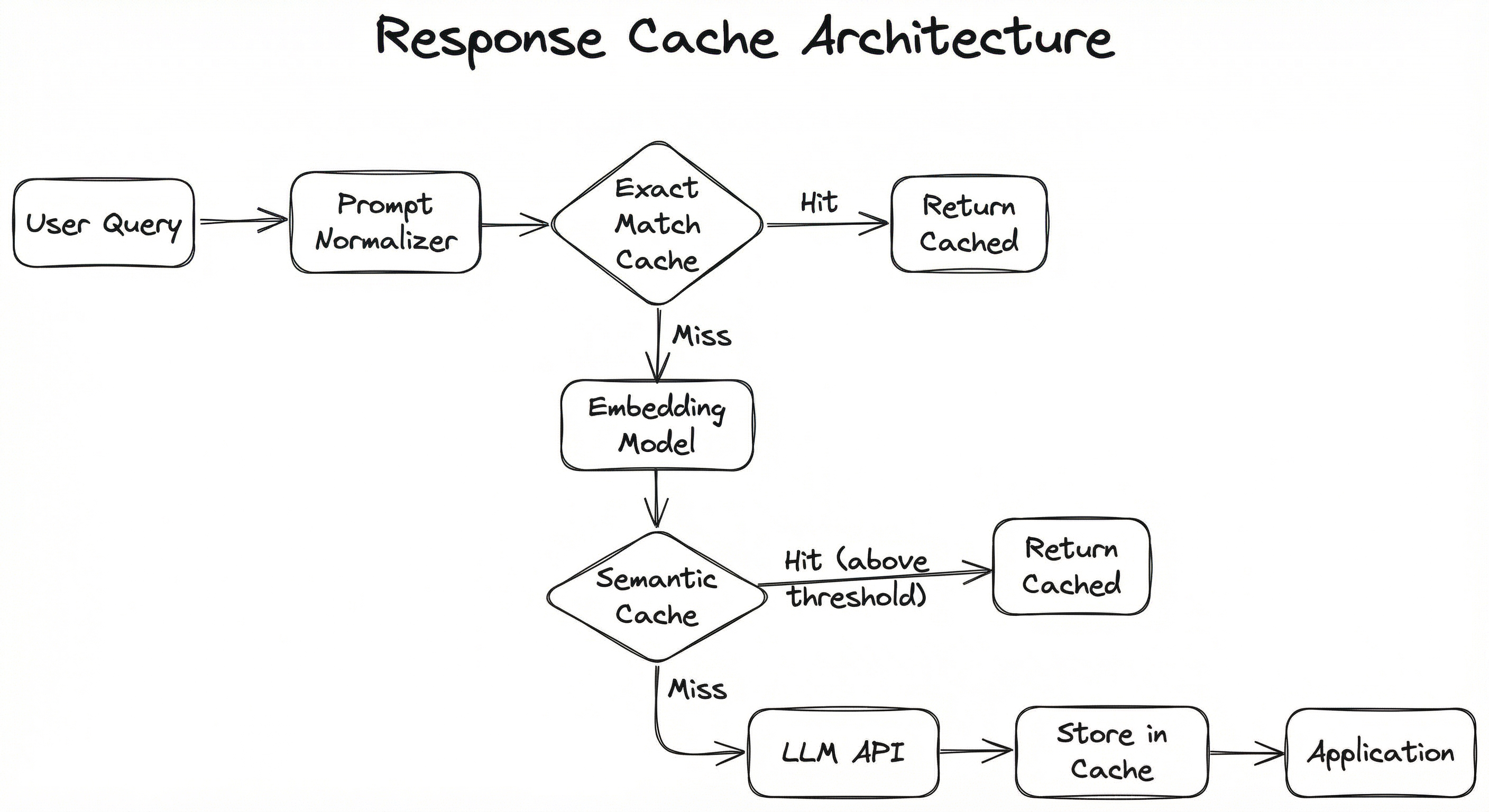
The dual-layer design is intentional. Exact match is essentially free (a hash lookup in Redis takes microseconds), so you always check it first. Semantic matching adds 5-20ms of overhead for embedding computation and vector search, but this is negligible compared to the 500-5000ms LLM inference it replaces on a hit. The layered approach means you get the speed of exact match for repeated verbatim queries AND the coverage of semantic matching for paraphrased queries.
For distributed deployments, the cache store (typically Redis or a managed equivalent like Amazon ElastiCache) is shared across all application instances, ensuring that a cache entry written by one instance benefits all others. The embedding model can run locally (a lightweight model like all-MiniLM-L6-v2 adds only 5-10ms per query) or as a shared microservice.
Key Components
Prompt Normalizer
Preprocesses incoming prompts before cache lookup. Applies transformations like lowercasing, whitespace normalization, punctuation stripping, and optionally removing filler words. This increases exact-match hit rates by canonicalizing surface-level variations. For instance, "What is your return policy?" and "what is your return policy" become the same cache key after normalization.
Exact Match Cache (Hash Layer)
Stores prompt-response pairs keyed by a cryptographic hash (SHA-256 or xxHash) of the normalized prompt plus model parameters (model name, temperature, system prompt hash). Provides O(1) lookup with zero ambiguity -- either the exact prompt has been seen before or it has not. Backed by Redis, Memcached, or an in-process LRU cache.
Embedding Engine
Converts prompts into dense vector embeddings for semantic similarity comparison. Typically uses a lightweight sentence-transformer model (e.g., all-MiniLM-L6-v2 at 384 dimensions or text-embedding-3-small at 1536 dimensions). Must be fast -- production targets are under 10ms per embedding to avoid adding meaningful latency.
Semantic Cache (Vector Layer)
Stores prompt embeddings alongside their response entries in a vector-capable store (Redis with vector search, Qdrant, Milvus, or FAISS). On a cache miss from the exact-match layer, performs a nearest-neighbor search to find the most similar cached prompt. Returns a hit if similarity exceeds the configured threshold .
Cache Store (Persistence)
The underlying storage backend that holds cached responses, metadata, and TTL information. Redis is the most common choice due to its sub-millisecond latency, built-in TTL support, and vector search capabilities (via RediSearch). Alternatives include PostgreSQL with pgvector, Amazon ElastiCache, or DynamoDB for serverless deployments.
Cache Invalidation Manager
Handles TTL-based expiration, event-driven invalidation (e.g., when underlying knowledge base changes), and manual purge operations. Implements eviction policies (LRU, LFU) when cache capacity is reached. Critical for preventing stale responses from being served to users.
Cache Analytics & Monitoring
Tracks cache hit rate, miss rate, latency distributions, cost savings, similarity score distributions, and false positive rates. Feeds into dashboards and alerts. Without this component, you are flying blind -- you would not know if your cache is actually saving money or silently serving stale responses.
Data Flow
Cache Hit Path (Fast Path):
- User prompt arrives at the application layer
- Prompt Normalizer canonicalizes the text
- Hash is computed and checked against the exact-match cache -> HIT -> response returned in <1ms
- If exact miss, prompt is embedded via the Embedding Engine (5-10ms)
- Embedding is searched against the Semantic Cache vector index -> HIT (similarity >= threshold) -> cached response returned in 10-25ms total
Cache Miss Path (Slow Path):
- Steps 1-5 above result in no cache hit
- Original prompt is forwarded to the LLM API (500-5000ms)
- LLM response is received
- Response is stored in both the exact-match cache (keyed by hash) and the semantic cache (keyed by embedding vector)
- Response is returned to the user
The key insight: every cache miss becomes a future cache hit. The cache is self-populating -- it learns your traffic patterns organically. Cache warming (pre-populating with expected queries) can accelerate this for new deployments.
A left-to-right flow diagram showing: User Query -> Prompt Normalizer -> Exact Match Cache (diamond decision) -> on hit, return cached response; on miss -> Embedding Model -> Semantic Cache Lookup (diamond decision) -> on hit above threshold, return cached response; on miss -> LLM API Call -> Store in Cache -> Return response to Application.
How to Implement
Implementation Approaches
There are three main implementation strategies, each suited to different stages of product maturity:
Strategy 1: Exact Match Only. Start here. Hash the normalized prompt + model parameters, store in Redis with a TTL. This takes an afternoon to implement and immediately saves money on verbatim repeat queries. For template-driven applications (where prompts are constructed programmatically), this alone can achieve 30-50% hit rates.
Strategy 2: Semantic Cache with GPTCache or LangChain. When exact match hits plateau, add semantic caching. GPTCache (by Zilliz) and LangChain's RedisSemanticCache provide drop-in implementations. You get 50-70% hit rates but need to tune the similarity threshold carefully to avoid false positives.
Strategy 3: Custom Multi-Layer Cache. For high-scale production systems, build a custom solution that combines exact match, semantic search, and provider-level prompt caching (Anthropic/OpenAI). Add per-tenant isolation, tiered TTLs based on query category, and real-time monitoring. This is what you want at scale.
Cost Context: Running a Redis instance for caching on AWS costs approximately 100/month) or API-based (OpenAI's
text-embedding-3-smallat 500-5,000/month (~INR 42,000-4,20,000/month) in LLM API costs you are saving.
import hashlib
import json
import time
import redis
from typing import Optional


class ExactMatchLLMCache:
    """Exact match response cache with prompt normalization."""

    def __init__(
        self,
        redis_url: str = "redis://localhost:6379",
        default_ttl: int = 3600,  # 1 hour
        namespace: str = "llm_cache",
    ):
        self.redis_client = redis.from_url(redis_url)
        self.default_ttl = default_ttl
        self.namespace = namespace

    def _normalize_prompt(self, prompt: str) -> str:
        """Canonicalize prompt for better cache hit rates."""
        normalized = prompt.strip().lower()
        # Collapse multiple whitespace into single space
        normalized = " ".join(normalized.split())
        # Remove trailing punctuation variations
        normalized = normalized.rstrip("?!.")
        return normalized

    def _generate_cache_key(
        self,
        prompt: str,
        model: str,
        temperature: float,
        system_prompt: str = "",
    ) -> str:
        """Generate deterministic cache key from prompt + params."""
        normalized = self._normalize_prompt(prompt)
        key_data = json.dumps({
            "prompt": normalized,
            "model": model,
            "temperature": temperature,
            "system_prompt_hash": hashlib.sha256(
                system_prompt.encode()
            ).hexdigest()[:16],
        }, sort_keys=True)
        hash_key = hashlib.sha256(key_data.encode()).hexdigest()
        return f"{self.namespace}:{hash_key}"

    def get(
        self,
        prompt: str,
        model: str = "gpt-4o",
        temperature: float = 0.0,
        system_prompt: str = "",
    ) -> Optional[dict]:
        """Look up cached response. Returns None on miss."""
        key = self._generate_cache_key(
            prompt, model, temperature, system_prompt
        )
        cached = self.redis_client.get(key)
        if cached:
            entry = json.loads(cached)
            # Track hit for analytics
            self.redis_client.hincrby(
                f"{self.namespace}:stats", "hits", 1
            )
            return entry
        self.redis_client.hincrby(
            f"{self.namespace}:stats", "misses", 1
        )
        return None

    def set(
        self,
        prompt: str,
        response: str,
        model: str = "gpt-4o",
        temperature: float = 0.0,
        system_prompt: str = "",
        ttl: Optional[int] = None,
        metadata: Optional[dict] = None,
    ) -> None:
        """Store LLM response in cache."""
        key = self._generate_cache_key(
            prompt, model, temperature, system_prompt
        )
        entry = {
            "response": response,
            "model": model,
            "cached_at": time.time(),
            "original_prompt": prompt,
            "metadata": metadata or {},
        }
        self.redis_client.setex(
            key, ttl or self.default_ttl, json.dumps(entry)
        )

    def get_hit_rate(self) -> float:
        """Return current cache hit rate."""
        stats = self.redis_client.hgetall(f"{self.namespace}:stats")
        hits = int(stats.get(b"hits", 0))
        misses = int(stats.get(b"misses", 0))
        total = hits + misses
        return hits / total if total > 0 else 0.0


# Usage
cache = ExactMatchLLMCache(redis_url="redis://localhost:6379")

# Check cache before calling LLM
cached = cache.get("What is your return policy?", model="gpt-4o")
if cached:
    print(f"Cache hit: {cached['response'][:100]}...")
else:
    # Call LLM (your existing code)
    response = call_llm("What is your return policy?")
    cache.set("What is your return policy?", response, model="gpt-4o")
    print(f"Cache miss, stored response")
This is the foundation layer -- a straightforward exact-match cache backed by Redis. The key design decisions here are: (1) prompt normalization to catch trivial variations (casing, whitespace, trailing punctuation), (2) compound cache keys that include model name, temperature, and system prompt hash so that identical prompts with different model configs get separate cache entries, and (3) built-in analytics tracking for hit/miss rates. Note that we only cache when temperature=0.0 by default -- caching non-deterministic responses (temperature > 0) is a design choice that depends on your application's tolerance for response variation.
from langchain_openai import OpenAIEmbeddings, ChatOpenAI
from langchain_redis import RedisSemanticCache
from langchain_core.globals import set_llm_cache
import langchain_core
import time

# Initialize embedding model for semantic similarity
embeddings = OpenAIEmbeddings(
    model="text-embedding-3-small",  # 1536 dims, fast + cheap
)

# Configure semantic cache with Redis
semantic_cache = RedisSemanticCache(
    redis_url="redis://localhost:6379",
    embeddings=embeddings,
    distance_threshold=0.15,  # L2 distance; lower = stricter match
    ttl=3600,  # 1 hour TTL
)

# Set as global LangChain cache
set_llm_cache(semantic_cache)

# Initialize LLM
llm = ChatOpenAI(model="gpt-4o", temperature=0)

# First call: cache miss, calls OpenAI API
start = time.time()
response1 = llm.invoke("What is your refund policy?")
print(f"First call: {time.time() - start:.2f}s")

# Second call with semantically similar prompt: cache HIT
start = time.time()
response2 = llm.invoke("Tell me about your refund policy")
print(f"Second call (semantic hit): {time.time() - start:.2f}s")

# Third call with different intent: cache MISS
start = time.time()
response3 = llm.invoke("How do I track my order?")
print(f"Third call (different topic, miss): {time.time() - start:.2f}s")

# Expected output:
# First call: 2.34s
# Second call (semantic hit): 0.08s   <-- ~30x faster
# Third call (different topic, miss): 1.89s
LangChain's RedisSemanticCache is the fastest path to production-grade semantic caching. Under the hood, it embeds each prompt using the specified embedding model, stores the embedding in Redis (using RediSearch's vector indexing), and on each new query, embeds the prompt and searches for the nearest cached entry. The distance_threshold parameter is the L2 distance threshold (not cosine similarity) -- lower values mean stricter matching. A threshold of 0.15 is a good starting point; tune it based on your false positive rate. The beauty of this approach is that it is transparent to the rest of your LangChain chain -- just set the cache and forget it.
from gptcache import cache, Config
from gptcache.adapter import openai as gptcache_openai
from gptcache.embedding import Onnx
from gptcache.manager import CacheBase, VectorBase, get_data_manager
from gptcache.similarity_evaluation.distance import SearchDistanceEvaluation
import openai

# Step 1: Configure embedding model (ONNX for fast local inference)
onnx_embedder = Onnx()

# Step 2: Configure storage backends
cache_base = CacheBase("sqlite")  # Metadata + responses in SQLite
vector_base = VectorBase(
    "faiss",
    dimension=onnx_embedder.dimension,  # 768 for default ONNX model
)

# Step 3: Create data manager with eviction policy
data_manager = get_data_manager(
    cache_base,
    vector_base,
    max_size=10000,       # Max cached entries
    eviction="LRU",       # Least Recently Used eviction
)

# Step 4: Initialize GPTCache
cache.init(
    embedding_func=onnx_embedder.to_embeddings,
    data_manager=data_manager,
    similarity_evaluation=SearchDistanceEvaluation(),
    config=Config(
        similarity_threshold=0.8,  # Cosine similarity threshold
    ),
)

# Step 5: Use the cached OpenAI client
# First call: cache miss -> calls OpenAI, stores response
response1 = gptcache_openai.ChatCompletion.create(
    model="gpt-4o",
    messages=[{"role": "user", "content": "What is machine learning?"}],
)
print(response1["choices"][0]["message"]["content"][:100])

# Second call with similar prompt: cache HIT
response2 = gptcache_openai.ChatCompletion.create(
    model="gpt-4o",
    messages=[{"role": "user", "content": "Explain machine learning to me"}],
)
print(response2["choices"][0]["message"]["content"][:100])
# Returns cached response from first call -- no API call made
GPTCache (by Zilliz) is the most mature open-source semantic caching library for LLMs. This example shows the full setup: an ONNX embedding model for fast local inference (no API calls for embeddings), FAISS for vector similarity search, SQLite for response storage, and LRU eviction when the cache exceeds 10,000 entries. The similarity_threshold of 0.8 means any query whose embedding has >= 0.8 cosine similarity to a cached query will return the cached response. GPTCache wraps the OpenAI client transparently, so existing code requires minimal changes.
import hashlib
import json
import numpy as np
import redis
from redis.commands.search.field import VectorField, TextField, NumericField
from redis.commands.search.indexDefinition import IndexDefinition, IndexType
from redis.commands.search.query import Query
from sentence_transformers import SentenceTransformer
from typing import Optional, Tuple
import time


class MultiLayerLLMCache:
    """Production multi-layer cache: exact match -> semantic -> LLM."""

    def __init__(
        self,
        redis_url: str = "redis://localhost:6379",
        embedding_model: str = "all-MiniLM-L6-v2",
        similarity_threshold: float = 0.92,
        default_ttl: int = 3600,
    ):
        self.redis = redis.from_url(redis_url)
        self.encoder = SentenceTransformer(embedding_model)
        self.dim = self.encoder.get_sentence_embedding_dimension()
        self.similarity_threshold = similarity_threshold
        self.default_ttl = default_ttl
        self._ensure_index()

    def _ensure_index(self):
        """Create RediSearch vector index if not exists."""
        try:
            self.redis.ft("llm_cache_idx").info()
        except redis.exceptions.ResponseError:
            schema = (
                TextField("prompt"),
                TextField("response"),
                NumericField("timestamp"),
                VectorField(
                    "embedding",
                    "HNSW",
                    {
                        "TYPE": "FLOAT32",
                        "DIM": self.dim,
                        "DISTANCE_METRIC": "COSINE",
                    },
                ),
            )
            self.redis.ft("llm_cache_idx").create_index(
                schema,
                definition=IndexDefinition(
                    prefix=["sem_cache:"], index_type=IndexType.HASH
                ),
            )

    def _hash_key(self, prompt: str, model: str) -> str:
        normalized = " ".join(prompt.strip().lower().split())
        data = f"{normalized}|{model}"
        return f"exact:{hashlib.sha256(data.encode()).hexdigest()}"

    def lookup(
        self, prompt: str, model: str = "gpt-4o"
    ) -> Tuple[Optional[str], str]:
        """
        Multi-layer lookup.
        Returns (response, cache_type) where cache_type is
        'exact_hit', 'semantic_hit', or 'miss'.
        """
        # Layer 1: Exact match
        exact_key = self._hash_key(prompt, model)
        cached = self.redis.get(exact_key)
        if cached:
            entry = json.loads(cached)
            return entry["response"], "exact_hit"

        # Layer 2: Semantic similarity
        embedding = self.encoder.encode(prompt).astype(np.float32)
        query_vector = embedding.tobytes()

        q = (
            Query("*=>[KNN 1 @embedding $vec AS score]")
            .return_fields("prompt", "response", "score")
            .sort_by("score")
            .dialect(2)
        )
        results = self.redis.ft("llm_cache_idx").search(
            q, query_params={"vec": query_vector}
        )

        if results.docs:
            doc = results.docs[0]
            # RediSearch COSINE returns distance (0=identical)
            similarity = 1 - float(doc.score)
            if similarity >= self.similarity_threshold:
                return doc.response, "semantic_hit"

        return None, "miss"

    def store(
        self,
        prompt: str,
        response: str,
        model: str = "gpt-4o",
        ttl: Optional[int] = None,
    ) -> None:
        """Store response in both exact and semantic caches."""
        ttl = ttl or self.default_ttl

        # Store in exact match cache
        exact_key = self._hash_key(prompt, model)
        self.redis.setex(
            exact_key,
            ttl,
            json.dumps({"response": response, "ts": time.time()}),
        )

        # Store in semantic cache
        embedding = self.encoder.encode(prompt).astype(np.float32)
        sem_key = f"sem_cache:{hashlib.md5(prompt.encode()).hexdigest()}"
        self.redis.hset(
            sem_key,
            mapping={
                "prompt": prompt,
                "response": response,
                "timestamp": int(time.time()),
                "embedding": embedding.tobytes(),
            },
        )
        self.redis.expire(sem_key, ttl)


# Usage example
cache = MultiLayerLLMCache(
    redis_url="redis://localhost:6379",
    similarity_threshold=0.92,
    default_ttl=7200,  # 2 hours
)

# Store a response
cache.store(
    prompt="What are the delivery charges for Mumbai?",
    response="Delivery charges for Mumbai are free for orders above...",
    model="gpt-4o",
)

# Exact match hit
resp, hit_type = cache.lookup("What are the delivery charges for Mumbai?")
print(f"{hit_type}: {resp[:60]}...")  # exact_hit

# Semantic match hit
resp, hit_type = cache.lookup("How much does delivery cost in Mumbai?")
print(f"{hit_type}: {resp[:60]}...")  # semantic_hit

# Cache miss
resp, hit_type = cache.lookup("What is the weather in Delhi?")
print(f"{hit_type}: {resp}")  # miss: None
This is the production pattern: a dual-layer cache that checks exact match first (sub-millisecond Redis GET), then falls back to semantic similarity (embedding + vector search in 5-20ms). The implementation uses Redis with RediSearch for both layers -- the exact match uses simple key-value storage, while the semantic layer uses Redis vector search with HNSW indexing and cosine distance. The similarity_threshold of 0.92 is a solid default for general-purpose applications -- aggressive enough to catch paraphrases but conservative enough to avoid returning responses for genuinely different queries. In production, you would add metrics emission, circuit breakers for Redis failures, and graceful degradation (if the cache is down, just call the LLM directly).
# Response Cache Configuration (YAML)
cache:
  # Layer 1: Exact match
  exact_match:
    enabled: true
    backend: redis
    redis_url: redis://cache.internal:6379/0
    key_prefix: "llm_exact:"
    default_ttl_seconds: 3600
    normalization:
      lowercase: true
      strip_whitespace: true
      remove_trailing_punctuation: true

  # Layer 2: Semantic cache
  semantic:
    enabled: true
    backend: redis  # Uses RediSearch vector index
    redis_url: redis://cache.internal:6379/1
    embedding_model: "all-MiniLM-L6-v2"
    embedding_dimension: 384
    similarity_threshold: 0.92
    similarity_metric: cosine
    max_entries: 100000
    default_ttl_seconds: 7200
    eviction_policy: LRU

  # Invalidation
  invalidation:
    ttl_based: true
    event_driven: true
    event_topics:
      - "knowledge_base.updated"
      - "product_catalog.changed"
    staleness_check:
      enabled: true
      sample_rate: 0.01  # Check 1% of cache reads
      max_age_hours: 48

  # Monitoring
  monitoring:
    metrics_prefix: "llm_cache"
    emit_hit_rate: true
    emit_latency_histogram: true
    emit_similarity_scores: true
    alert_on_hit_rate_below: 0.3
    alert_on_false_positive_rate_above: 0.05
Common Implementation Mistakes
- ●
Caching non-deterministic responses without accounting for temperature: When
temperature > 0, the same prompt produces different responses each time. Caching one response and returning it for all future identical prompts eliminates response diversity. Either only cache fortemperature=0calls, or cache multiple responses per prompt and return randomly. - ●
Setting the similarity threshold too low: A threshold of 0.80 sounds conservative, but it can match genuinely different queries. "How do I cancel my order?" and "How do I place an order?" might have 0.85 cosine similarity despite requiring completely different responses. Always measure false positive rates on your actual query distribution before lowering the threshold.
- ●
Ignoring model parameters in the cache key: Two queries with the same prompt but different
temperature,max_tokens, orsystem_promptvalues should not share a cache entry. Include all generation parameters in the cache key -- otherwise, you serve a response generated with one configuration to a request that expects another. - ●
No TTL or excessively long TTLs: Cached responses go stale as the underlying data changes. A chatbot answering questions about a product catalog with a 30-day TTL will serve outdated pricing and availability information. Match your TTL to how frequently the underlying knowledge changes -- 1 hour for dynamic data, 24 hours for semi-static content, 7 days for truly stable reference material.
- ●
Caching error responses: If the LLM returns an error, a rate-limit response, or a malformed output, do not cache it. Otherwise, every subsequent matching query will instantly return the error. Always validate the LLM response before writing to cache.
- ●
Forgetting to scope cache keys by tenant or user context: In multi-tenant applications, different users may receive different responses based on their permissions, subscription tier, or data access. A response generated for user A should not be served to user B if their contexts differ. Include tenant/user identifiers in the cache key where relevant.
When Should You Use This?
Use When
Your LLM application handles repetitive queries -- customer support bots, FAQ systems, documentation assistants, or any interface where users commonly ask similar questions
LLM API costs exceed INR 50,000/month (~$600 USD) and you need to reduce spend without degrading user experience
Latency requirements are strict (sub-500ms) and LLM inference times of 1-5 seconds are unacceptable for your UX
Your prompt templates are relatively stable and the same system prompt or context is reused across many queries
You are building a multi-tenant SaaS product where many tenants ask similar questions about their own data (with proper cache key scoping)
Your application has predictable query patterns that can benefit from cache warming -- for example, an e-commerce site where product-related queries cluster around bestsellers
You need to handle traffic spikes gracefully without proportionally increasing LLM API costs -- the cache absorbs the burst
Avoid When
Every query is unique with no repetition -- for instance, a code generation tool where each prompt contains unique code snippets is unlikely to benefit from caching
Response freshness is critical and stale data is unacceptable -- real-time trading bots, live score updates, or systems pulling from rapidly changing data sources
The LLM is being used for creative generation where users expect novel, diverse outputs every time (e.g., story writing, brainstorming) -- caching would eliminate the variety users want
Your query volume is too low to justify the infrastructure overhead -- if you are making fewer than 100 LLM calls per day, the engineering investment in caching will not pay off for months
Personalization is deep and per-user context makes responses unique -- a therapy chatbot or personal journal assistant where every response is highly contextual will have near-zero cache hit rates
You are already using provider-level prompt caching (Anthropic, OpenAI) and your prompts share long common prefixes -- you may be double-caching with diminishing returns
Key Tradeoffs
The Fundamental Tradeoff: Savings vs. Staleness
Every response cache operates on a tension between cost savings and response freshness. Higher cache hit rates mean more money saved, but they also mean a higher probability of serving stale or contextually inappropriate responses. This tradeoff is governed by two knobs: TTL and similarity threshold.
| Strategy | Hit Rate | Staleness Risk | Implementation Complexity |
|---|---|---|---|
| Exact match only | 10-30% | Low (verbatim match) | Low |
| Semantic (conservative, >= 0.95) | 30-50% | Low-Medium | Medium |
| Semantic (aggressive, >= 0.85) | 50-70% | Medium-High | Medium |
| Multi-layer (exact + semantic) | 40-70% | Configurable | High |
The Second Tradeoff: Latency Budget
Semantic caching adds 5-20ms of overhead for embedding computation and vector search on every request -- including cache misses. For cache misses, you have added latency without saving anything. If your cache hit rate is below 20%, the overhead may not be worth it, and you should stick with exact-match caching or focus on improving hit rates before enabling semantic matching.
The Third Tradeoff: Memory vs. Coverage
More cached entries mean broader coverage but higher memory costs. A semantic cache with 100K entries using 384-dimensional embeddings consumes approximately:
for embeddings alone, plus storage for the actual responses. At scale (1M+ entries), you need to think about eviction policies, tiered storage, and whether all entries are worth caching equally.
Rule of Thumb: Start with exact match caching, measure your hit rate for two weeks, and only add semantic caching if your hit rate is below 40% and your LLM spend justifies the added complexity.
Alternatives & Comparisons
A general cache layer (Redis, Memcached) handles any key-value caching need -- API responses, database queries, session data. A response cache is a specialized application of caching specifically designed for LLM prompts and responses, with features like prompt normalization, semantic similarity matching, and LLM-aware cache keying. Use a general cache layer when your caching needs are broader; use a response cache when the primary goal is reducing LLM inference costs.
Provider-level prompt caching (Anthropic, OpenAI) caches the computation of shared prompt prefixes at the inference engine level, reducing cost by 50-90% for prompts that share long common prefixes (system prompts, few-shot examples). A response cache caches the final output, avoiding inference entirely on a hit. These are complementary: use prompt templates with prefix caching for prompts that share structure, and a response cache for queries that repeat entirely.
A rate limiter controls the volume of LLM API calls to prevent overspending or hitting provider rate limits. A response cache reduces the volume of calls by eliminating redundant ones. They solve related but different problems: the rate limiter is a safety valve (preventing overuse), while the cache is an optimizer (reducing unnecessary use). In practice, you deploy both.
Pros, Cons & Tradeoffs
Advantages
Dramatic cost reduction: Production deployments consistently report 40-73% reduction in LLM API costs. For a company spending INR 5 lakh/month on GPT-4o, that is INR 2-3.65 lakh saved per month -- enough to fund an additional engineering hire.
Latency improvement by orders of magnitude: Cache hits return in 1-25ms versus 500-5000ms for LLM inference. This transforms the user experience from "waiting for AI" to "instant response" on cache hits.
Throughput scaling without proportional cost: During traffic spikes (like a sale event on an e-commerce platform), the cache absorbs the burst. Your LLM API costs do not scale linearly with traffic -- only cache misses incur inference costs.
Consistency for identical queries: Users asking the same question get the same answer, avoiding the confusion that arises when an LLM generates slightly different responses each time (especially relevant for customer support and compliance-sensitive applications).
Reduced dependency on LLM provider availability: If the LLM API experiences an outage, cached responses can continue serving known queries, providing graceful degradation instead of complete failure.
Self-populating and self-improving: The cache learns your traffic patterns organically. As more queries are served, the cache coverage grows, and hit rates improve over time without manual intervention.
Disadvantages
Stale responses are a real risk: Cached responses do not update when the underlying data changes. A product price update, policy change, or knowledge base refresh will not be reflected in cached responses until TTL expiration or explicit invalidation.
Semantic cache false positives: Queries that are embedding-similar but semantically different can return incorrect cached responses. "How do I cancel my subscription?" and "How do I start a subscription?" may be close in embedding space but require opposite answers.
Added infrastructure complexity: A semantic cache requires an embedding model, a vector store, a cache backend, monitoring, and invalidation logic. This is meaningful operational overhead, especially for small teams.
Cold start problem: A fresh cache has zero entries and zero hit rate. Until enough queries populate the cache, you get full LLM latency plus the overhead of cache miss processing (embedding computation, store operations). Cache warming helps but requires predicting query patterns.
Embedding model dependency: The semantic cache is only as good as the embedding model powering it. If the embedding model conflates dissimilar queries, the cache will serve wrong responses. Changing the embedding model requires flushing the entire semantic cache.
Cache poisoning vulnerability: Recent research (arXiv:2601.23088) has shown that semantic caches are vulnerable to key collision attacks, where adversarial prompts are crafted to be embedding-similar to target queries, poisoning the cache with attacker-controlled responses. This is an emerging security concern.
Failure Modes & Debugging
Semantic False Positives (Wrong Answer Served)
Cause
The similarity threshold is set too low, or the embedding model maps semantically different queries to nearby points in vector space. Example: "How to upgrade my plan" and "How to downgrade my plan" may have high embedding similarity but require opposite responses.
Symptoms
Users receive incorrect or contradictory responses. Customer support tickets increase about "wrong answers." Quality metrics (user satisfaction, response accuracy) degrade despite the system appearing to function normally.
Mitigation
Start with a conservative similarity threshold ( >= 0.95) and lower it gradually while monitoring false positive rates. Implement a feedback loop where users can flag incorrect responses, triggering cache invalidation for those entries. Use domain-specific fine-tuned embedding models that better discriminate within your query space.
Stale Response Syndrome
Cause
Underlying data changes (product prices, policies, inventory status) but cached responses reflect outdated information. TTLs are either not set or set too long relative to data volatility.
Symptoms
Users see outdated information -- wrong prices, discontinued products, expired promotions. Particularly dangerous in financial services (stale exchange rates) or healthcare (outdated medical guidance). Trust erosion is gradual and hard to attribute to caching specifically.
Mitigation
Implement event-driven cache invalidation tied to data source updates (e.g., when the product catalog is updated, invalidate all cache entries tagged with product-related queries). Use tiered TTLs: short (5-15 minutes) for volatile data, long (24-72 hours) for stable reference content. Run periodic staleness checks on a sample of cached entries.
Cache Stampede on Cold Start
Cause
When the cache is empty (fresh deployment, cache flush, or Redis restart), all queries result in cache misses simultaneously. This creates a thundering herd of LLM API calls that can exceed rate limits or cause provider throttling.
Symptoms
Spike in LLM API latency and error rates immediately after a deployment or cache flush. 429 (rate limit) errors from the LLM provider. Application response times degrade for all users simultaneously.
Mitigation
Implement cache warming by pre-populating the cache with responses to the most common queries before directing traffic. Use request coalescing (also called single-flight or deduplication): when multiple identical requests arrive during a cache miss, only one triggers the LLM call, and all waiters receive the same response. Add a mutex or semaphore per cache key to prevent thundering herd.
Cache Poisoning via Adversarial Prompts
Cause
An attacker crafts prompts that are embedding-similar to common queries but generate harmful or misleading LLM responses. Once cached, these malicious responses are served to legitimate users whose queries are semantically similar.
Symptoms
Legitimate users receive responses that contain misinformation, offensive content, or phishing links. Difficult to detect because the cached response appears to come from the LLM provider.
Mitigation
Validate and sanitize LLM responses before caching -- apply content safety filters, check for known attack patterns. Implement input validation and anomaly detection on incoming prompts. Scope caches per tenant to limit blast radius. Monitor for sudden changes in response patterns for popular cache entries.
Embedding Model Drift or Mismatch
Cause
The embedding model is updated or replaced without flushing the semantic cache. Embeddings generated by the old model and the new model exist in incompatible vector spaces, causing similarity comparisons to produce meaningless results.
Symptoms
Cache hit rates drop dramatically or, worse, increase with many false positives because the distance metric no longer reflects actual semantic similarity. Retrieval quality becomes erratic and unpredictable.
Mitigation
Version your embedding model and include the model version in cache key namespaces. When upgrading the embedding model, create a new cache namespace and let the old namespace expire via TTL. Never mix embeddings from different models in the same vector index.
Memory Exhaustion from Unbounded Cache Growth
Cause
No maximum size limit or eviction policy is configured. The cache grows indefinitely as new unique queries are processed, eventually consuming all available memory on the Redis instance.
Symptoms
Redis OOM errors, application timeouts on cache operations, increased latency across all Redis-backed services (not just the cache). In extreme cases, Redis crashes and takes dependent services down.
Mitigation
Always configure maxmemory on Redis with an appropriate eviction policy (e.g., allkeys-lru). Set a maximum entry count on the semantic cache with LRU or LFU eviction. Monitor Redis memory usage and set alerts at 70% and 90% capacity. Budget approximately 1-2 KB per exact-match entry and 2-5 KB per semantic cache entry (embedding + response).
Placement in an ML System
Where Does the Response Cache Sit?
In a typical LLM-powered application, the response cache sits in the serving layer, specifically between the prompt construction pipeline and the LLM API gateway. Think of it as a short-circuit: before the expensive LLM call happens, the cache intercepts the request and tries to serve a pre-computed response.
The upstream components include the prompt template engine (which constructs the final prompt from user input, system context, and retrieved documents) and the rate limiter (which controls API call volume). The token counter may sit upstream to estimate cost before deciding whether to cache.
Downstream, the response flows back to the application layer. If the application uses a RAG pipeline, the response cache can be placed either before or after the retrieval step -- caching the final response (post-retrieval) gives higher hit rates because it captures the entire answer, while caching the retrieval step (pre-retrieval) gives more granular control.
Architecture Tip: For RAG systems, consider caching at two levels: (1) cache the retrieval results (embedding search results), and (2) cache the final LLM response. The retrieval cache addresses the case where the same documents are retrieved for similar queries, while the response cache addresses the case where the same final answer is generated.
Pipeline Stage
Serving / LLM Operations
Upstream
- prompt-template
- rate-limiter
- token-counter
Downstream
- semantic-search
- embedding-model
Scaling Bottlenecks
The primary bottleneck shifts depending on your caching strategy:
Exact match caching: Bottleneck is Redis throughput, which is rarely an issue (a single Redis instance handles 100K+ operations/second). At extreme scale, network latency between your application and Redis becomes the constraint.
Semantic caching: The embedding computation is the bottleneck. A local all-MiniLM-L6-v2 model processes approximately 1,000 queries/second on a single CPU core. At 10,000 QPS, you need either GPU-accelerated embedding inference or a fleet of embedding workers. The vector search step (Redis vector search or FAISS) is fast (sub-millisecond at 100K entries) but degrades with very large indexes (10M+ entries).
Distributed caching: When running multiple application instances behind a load balancer, all instances share the same Redis cache. This is the main advantage of Redis over in-process caches. However, cache writes from high-traffic instances can create hot spots, and network partitions can cause cache inconsistency between data centers.
Production Case Studies
Thomson Reuters Labs implemented prompt caching across their LLM-powered legal research and document analysis tools. They leveraged provider-level prompt caching (Anthropic's cache control breakpoints) to avoid reprocessing long legal documents and system prompts that are reused across many user queries. The implementation required careful structuring of prompts to maximize prefix reuse.
Achieved 60% cost reduction in LLM API spend and a 20% improvement in response times, transforming the economics of their AI-powered legal tools.
AWS published a reference architecture for semantic caching using Amazon ElastiCache for Valkey with Amazon Bedrock. The system embeds user prompts using Amazon Titan Text Embeddings, performs vector similarity search in ElastiCache, and returns cached responses from Amazon Bedrock when similarity exceeds the threshold. The architecture handles both exact match (hash-based) and semantic (embedding-based) cache lookups.
Demonstrated up to 86% reduction in LLM inference costs and 88% improvement in end-to-end latency for cached queries in benchmark tests, with cache hit latency in the low milliseconds versus seconds for Bedrock inference.
An in-depth case study of a production SaaS application that implemented semantic caching to address exploding LLM API costs. The team used embedding-based similarity lookup (replacing text-based keys), achieving a 67% cache hit rate. They addressed challenges including similarity threshold tuning, latency overhead of 20ms for embedding and vector search (versus 850ms LLM calls avoided), and cache staleness management.
Achieved 73% reduction in LLM API costs, making it their highest-ROI optimization for production LLM systems. The p99 overhead of 47ms for cache lookup was deemed acceptable given the seconds-level latency avoided on cache hits.
Zilliz developed and open-sourced GPTCache, the first dedicated semantic cache library for LLM applications. Published at the NLP-OSS workshop at EMNLP 2023, the paper describes the modular architecture: pluggable embedding models, vector stores (FAISS, Milvus), cache storage backends (SQLite, MySQL), and similarity evaluation strategies. GPTCache wraps the OpenAI API transparently, requiring minimal code changes.
Demonstrated 2-10x response speed improvement on cache hits. The library gained 7,000+ GitHub stars and was integrated into LangChain and LlamaIndex, becoming the de facto standard for open-source LLM semantic caching.
Tooling & Ecosystem
The most mature open-source semantic cache for LLMs. Modular architecture with pluggable embedding models (ONNX, OpenAI, Hugging Face), vector stores (FAISS, Milvus, ChromaDB), and cache backends (SQLite, MySQL, PostgreSQL). Supports LRU/FIFO eviction, configurable similarity thresholds, and transparent wrapping of OpenAI and other LLM APIs. Fully integrated with LangChain and LlamaIndex.
LangChain's built-in semantic caching integration with Redis. Uses RedisVL for vector storage and retrieval, supporting configurable distance thresholds, TTL-based expiration, and multiple embedding model backends. Drop-in replacement for LangChain's default in-memory cache. Part of the langchain-redis partner package.
Redis with the RediSearch module supports both exact-match caching (standard key-value) and semantic caching (vector similarity search with HNSW indexing). Sub-millisecond latency for exact match, single-digit milliseconds for vector search. Supports TTL, eviction policies, and persistence. The foundation for most production LLM caching architectures.
AWS-managed Redis-compatible cache service with built-in vector search for semantic caching. Integrates with Amazon Bedrock for LLM inference. Provides microsecond-latency searches across billions of vectors, real-time index updates, and automatic scaling. Ideal for AWS-native LLM deployments.
Serverless, distributed, low-latency cache service with built-in LangChain integration. Zero infrastructure management -- true scale-to-zero with pay-per-request pricing. Supports both exact-match and vector-based caching for LLM applications. Good for teams that want caching without managing Redis infrastructure.
An open-source KV-cache layer optimized for LLM inference serving. Focuses on KV-cache reuse at the inference engine level (complementary to application-level response caching). Supports prefix caching, multi-turn conversation caching, and distributed cache sharing across vLLM instances.
Research & References
Bang, Fu, et al. (2023)NLP-OSS Workshop, EMNLP 2023
Introduced GPTCache, the first modular semantic caching framework for LLMs. Demonstrated 2-10x speedup on cache hits with pluggable embedding models, vector stores, and similarity evaluation strategies.
Rao, Chowdhury, et al. (2024)arXiv preprint
Demonstrated a semantic caching system using Redis for in-memory embedding storage that reduced LLM API calls by up to 68.8% across various query categories. Provided detailed analysis of cache hit rates and cost savings across different query types.
Bulatov, et al. (2025)arXiv preprint
Showed that compact embedding models fine-tuned for just one epoch on domain-specific synthetic datasets significantly outperform general-purpose models (including proprietary ones) in semantic cache precision and recall. A key insight for production deployments.
Chen, et al. (2026)arXiv preprint
Identified cache poisoning vulnerabilities in semantic caching systems, demonstrating that adversarial prompts can be crafted to collide with legitimate cache keys. An important security consideration for production deployments.
Various authors (2025)arXiv preprint
Proposed combining multiple embedding models through a meta-encoder to improve semantic similarity detection, achieving 92% cache hit ratio for equivalent queries while maintaining 85% accuracy in rejecting non-equivalent queries.
Interview & Evaluation Perspective
Common Interview Questions
- ●
How would you design a caching layer for an LLM-powered chatbot that handles 10,000 queries per day?
- ●
What is the difference between exact match caching and semantic caching for LLM responses? When would you use each?
- ●
How would you handle cache invalidation when the underlying knowledge base is updated?
- ●
A user reports that the chatbot sometimes gives wrong answers instantly instead of thinking. What might be happening and how would you debug it?
- ●
How would you calculate the cost savings from implementing a response cache, and what cache hit rate would you need to break even?
- ●
How would you design a semantic cache that works across multiple data centers with eventual consistency?
Key Points to Mention
- ●
Layered architecture: Always describe the dual-layer approach (exact match first, then semantic fallback). This shows you understand that exact match is cheap and precise while semantic matching adds coverage at a cost.
- ●
Similarity threshold as the key tuning parameter: Explain the precision-recall tradeoff. Too low a threshold causes false positives (wrong answers served); too high a threshold reduces hit rate (money wasted). Quote a reasonable default ( = 0.92-0.95).
- ●
Cache key composition: Include model name, temperature, system prompt hash, and normalized user prompt in the cache key. This prevents cross-contamination between different model configurations.
- ●
Cost savings math: Be ready to calculate: if the LLM costs INR 4/1K tokens and average response is 500 tokens, that is INR 2 per call. At 10K calls/day with 60% hit rate, you save 6,000 calls/day = INR 12,000/day = INR 3.6 lakh/month.
- ●
Cache warming and cold start: Discuss pre-populating the cache with common queries before launch, and request coalescing to prevent thundering herd on cold start.
- ●
Invalidation strategy: TTL-based (simple, passive) + event-driven (active, tied to data source changes). Mention that cache invalidation is genuinely hard and quote Phil Karlton's famous observation.
Pitfalls to Avoid
- ●
Describing only exact-match caching without mentioning semantic similarity -- this misses the key innovation that makes LLM caching effective for natural language queries.
- ●
Ignoring the false positive problem in semantic caching -- if you do not discuss how embedding similarity can match semantically different queries, the interviewer will assume you have not built this in production.
- ●
Claiming 100% cache hit rates are achievable or desirable -- even the best systems top out at 60-70%, and attempting higher rates dramatically increases false positive risk.
- ●
Forgetting about cache invalidation and TTL -- a cache that never invalidates will eventually serve stale responses to every user.
- ●
Not considering multi-tenant isolation -- in SaaS applications, cache entries from one tenant must not leak to another. This is both a correctness issue and a security/privacy concern.
Senior-Level Expectation
A senior candidate should design the full system end-to-end: cache key composition with prompt normalization, dual-layer architecture (exact + semantic), embedding model selection and latency budget, similarity threshold tuning methodology (not just a magic number), cache invalidation tied to data source events, eviction policy with capacity planning, monitoring and alerting (hit rate, false positive rate, latency percentiles, cost savings). They should also discuss cache warming strategies for new deployments, request coalescing for thundering herd protection, per-tenant cache isolation in multi-tenant systems, and security considerations including cache poisoning attacks. The ability to reason about the break-even analysis -- at what query volume and hit rate does the cache infrastructure cost justify itself -- separates senior engineers from mid-level ones. For an Indian startup context, demonstrating awareness of INR-denominated cost optimization and infrastructure choices (AWS Mumbai region pricing, Azure India Central) shows practical production experience.
Summary
Let us recap what we have covered about response caching for LLM applications:
A response cache is a caching layer that stores LLM-generated responses and returns them for identical or semantically similar future queries, eliminating redundant API calls. It operates in two layers: exact match caching (hash lookup, sub-millisecond, zero false positives, 10-30% hit rate) and semantic caching (embedding similarity search, 5-25ms, higher recall at 50-70% hit rate but with false positive risk). The combined multi-layer approach is the production standard, providing both precision and coverage.
The economic case is overwhelming: production deployments consistently achieve 40-73% reduction in LLM API costs, with cache infrastructure costing a fraction of the savings. For an Indian startup spending INR 5 lakh/month on LLM APIs, a response cache with 50% hit rate saves approximately INR 2.3 lakh/month after infrastructure costs -- a payback period measured in days, not months. The latency improvement (from seconds to milliseconds on cache hits) is equally transformative for user experience.
The hard part is not building the cache -- it is operating it correctly. Cache invalidation (TTL + event-driven + staleness checks), similarity threshold tuning (start at 0.95, lower carefully while monitoring false positives), embedding model selection (lightweight, domain-aware), and security considerations (cache poisoning, tenant isolation) separate a toy implementation from a production-grade system. Tools like GPTCache, LangChain's RedisSemanticCache, and cloud-native solutions (AWS ElastiCache, Azure Cache for Redis) provide solid foundations, but the tuning and operational discipline are where the real engineering work lives.
The bottom line: If you are running an LLM-powered application with any meaningful query volume and repetition, a response cache is not optional -- it is table stakes. The only question is whether you implement it this week or next week, and how much money you waste in between.